
Game rental software for member queues and monthly plans
Members keep a queue of board games, consoles and kits, and the next one ships when they send one back. Monthly plans with item slots, copies counted per title, and returns scanned back in. Built for WooCommerce.
Members keep a queue, and the next item ships when they send one back.
- Member queues
- Plans with item slots
- Copies counted per title

Demand outruns stock, and members want a plan, not a checkout
A game and media library runs on small, fast-moving items, several copies of the popular titles and members who pay monthly. A plain booking calendar handles none of that.
Many copies of one title
A popular release is one catalogue entry and several physical copies, counted as they go out, while a console or a rare boxed set is tracked on its own.
Copies counted, hardware tracked.
A queue, not a date
Members don’t pick dates: they keep a list of what they want next, and it ships when a slot frees up.
Members queue what’s next.
Monthly plans
Most libraries sell a plan, so many items out at a time, billed each month, rather than one rental at a time.
Plans with item slots.
Fast turnaround
Titles move quickly and margins are thin, so a returned copy should be back on the shelf the same afternoon.
Buffers in hours, not days.
Late returns
A copy sitting unreturned is the whole problem, so reminders and a card on file matter more than any fee.
Reminders and a card on file.
Pieces and age ratings
Board games come back missing pieces, and an 18-rated title shouldn’t go out on an assumption.
Checks at booking and on return.
A queue per member, and the next item ships on return
Each member adds games, consoles and kits to their own queue and drags to reorder it in My Account Pro. The plugin checks their plan’s limit and ships the top items; marking one returned in the admin frees the slot and reserves the next item in the queue, ready to post.
Queue items need no dates at all. The day’s queue dispatches and returns come off the Send & Return desk as a pick list, and each item is scanned out and back in, so the counter and the post room work from one list.
Monthly plans with item slots, billed automatically
| Plan | Price | Out at a time |
|---|---|---|
| Starter | $29 / month | 1 item |
| Family | $59 / month | 3 items |
A plan sets how many items a member can have out at once, such as one on Starter and three on Family, and recurring billing charges it each month through your own payment gateway Pro. Members see their allowance, what they have out and their queue when they sign in, and can swap cards, pause or upgrade from My Account.
Store-credit tiers work too: a monthly allowance toward any rental, or premium stock kept for paid members. About subscriptions, memberships and the rental queue.
Every copy counted, and back on the shelf the same day
A title is one catalogue entry with a real quantity behind it, and each copy is drawn down as it goes out. Anything you need to identify on its own, such as a console or a VR headset, gets a serial number with its own rental history, and barcode labels let staff scan it out and back in.
Turnaround buffers can be set in hours, so a game checked in at midday can be counted, cleaned and borrowable that afternoon. Return and overdue reminders go out by email, SMS or WhatsApp, and a card on file through the Security Deposits plugin Pro covers a copy that comes back damaged or not at all.
Age checks, hardware ID and deposits where they matter
Ask the small but necessary questions at booking. Fields belong to the cart line, so a console, a headset and three titles on one order each carry their own details.
- Platform and region
- Controllers
- Age confirmation
- Player count
- Membership number
- Postal insurance
- Collect or post
Age and platform details
Ask for the platform, region, number of controllers and player count, and record an age confirmation with a date of birth on restricted titles, per product or per category. About custom fields and ID checks.
ID checks on hardware
For a current console bundle, a VR headset or a projector, collect an ID at checkout and approve it from a queue before the item is picked. Switch it on for hardware and leave it off for discs and cardboard.
A card on file
Charge a refundable deposit, or store the card as a secure token and charge it only if a copy comes back damaged or never comes back.
Plans, queues and store credit
Membership tiers with item slots or a monthly store credit, recurring billing, and each member’s queue in My Account.
Queue pick lists
The day’s dispatches and returns come off the Send & Return desk as a pick list, and each item is scanned out and back in.
Return reminders
Return and overdue reminders go out by email, SMS or WhatsApp against the due date on dated rentals.
Pro included in Rentals & Bookings Pro, or sold on its own. Everything else here comes with Regular.
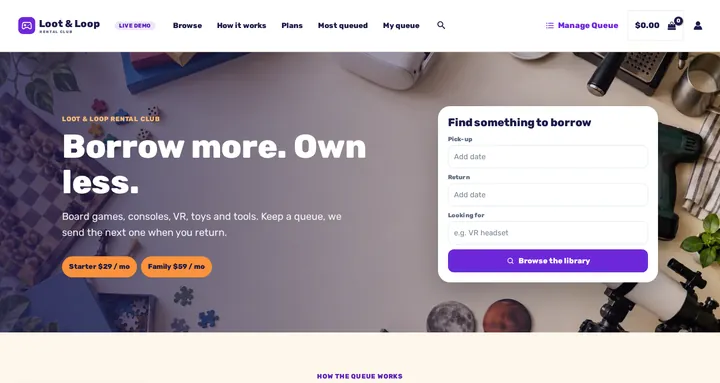
Start from a ready-made rental club
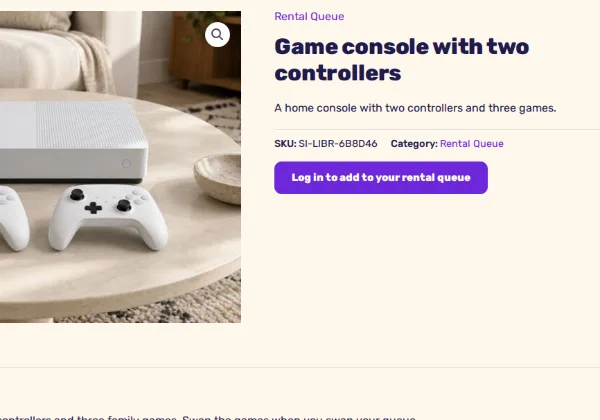
Seven sample items to borrow (a party board game bundle, a games console, a VR headset, a building-brick castle, a science kit, a cordless drill and a telescope), a Find something to borrow search with a Looking for keyword field, a homepage built from WordPress blocks, and colours and fonts for Astra or a block theme. On the live demo it runs as Loot & Loop.
Free with the Rentals & Bookings Lite plugin 1.0.11 or newer, which imports everything except the date search on the homepage. Regular and Pro 1.0.74 or newer add the search widget. The queue and memberships need Rentals & Bookings Pro (Subscriptions & Memberships).
Free with the Lite plugin 1.0.11 or newer. Regular and Pro add the homepage date search. The queue and memberships need Pro.
Run it on WooCommerce or Magento 2
The rental engine runs on both. The member queue and monthly plans run on WooCommerce with Pro.
WooCommerce game and library rental plugin
Built for this: game stores, specialist libraries and postal clubs that want member queues and monthly plans on their own WordPress site.
- Member queues with automatic next-item dispatch Pro
- Plans with item slots and store-credit tiers, billed monthly Pro
- Copies counted per title, hardware on serial numbers
- Queue send and return with a pick list and barcode scans
- Turnaround buffers in hours
- Sell pre-owned stock and accessories from the same catalogue
Magento 2 game rental extension
For large catalogues renting single titles by date across several branches, on Adobe Commerce or Magento Open Source.
- Rentals by date, with copies counted per title
- Serial and barcode check-out and check-in
- Multi-source inventory per branch
- Multi-store and multi-language storefronts
The member queue, monthly plans and store-credit tiers are WooCommerce-only. For a subscription library, choose the WooCommerce plugin with Pro.
Not sure which platform fits? Our Magento versus WooCommerce comparison sets out the trade-offs, and games are one of the trades in our rental software by industry overview.
From shelves to first dispatch in six steps
Step 1: Plans as membership products
Starter, Family or your own tiers, each with its item limit and monthly price.
Step 2: Items for the queue
Games, consoles, kits and tools, with copies as quantity and hardware on serials.
Step 3: Members build their queue
They add items and drag to reorder in My Account. No dates to pick.
Step 4: Dispatch from the pick list
The top items ship within each member’s limit, scanned out on the Send & Return desk.
Step 5: Scan returns back in
A return frees a slot and reserves the next item in the queue.
Step 6: Turnaround and checks
A short buffer to count pieces and clean, and a card on file for what doesn’t come back.
Who this suits
- Board game cafés and game libraries
- Video game and console rental stores
- Movie and media rental by post
- Toy libraries and toy subscriptions
- Libraries of things lending tools and gadgets
- Schools, clubs and makerspaces with shared kit
Game and media rental software questions
Can I hold several copies of the same title?
Yes. A title is one catalogue entry with a real quantity behind it, and each copy is drawn down as it goes out. Anything you need to identify on its own, such as a console, can be tracked by serial number instead.
What happens when a member returns an item?
Marking it returned frees a slot on their plan and reserves the next item in their queue, ready to ship. Members reorder their own queue in My Account.
Do members have to pick dates?
No. Queue items don’t need dates: members keep them within their plan’s limit, and the next one goes out when they send one back.
Can I sell monthly memberships rather than single rentals?
Yes, with the Subscriptions plugin in Pro. A plan sets how many items a member can have out at once, and recurring billing charges it each month through your own payment gateway.
Can I chase late returns?
Yes. Return and overdue reminders go out by email, SMS or WhatsApp, and the Security Deposits plugin can keep a card on file to charge for a copy that comes back damaged or not at all.
Can a title go back out the same day it’s returned?
Yes. Turnaround buffers are set in hours as well as days, so a game checked in at midday can be back on the shelf that afternoon.
Does the queue work on Magento 2?
No. The queue and memberships are part of Rentals & Bookings Pro for WooCommerce. On Magento 2 you can rent single titles by date, with copies counted and serials scanned.
Is there free game rental software?
Rentals & Bookings Lite is free, with a booking calendar and quantity stock for single rentals by date. The queue and memberships need Pro, on a one-time licence with no commission on your bookings. See our self-hosted, open-source rental software overview.
See it running before you buy
Browse the shelves on the live demo and see how the plans and the queue are shown, or try the free live rental software demo to follow an order through the admin. We can also set up your plans, queue and catalogue with a custom build.