
Credit Cards (2)
SSL may seem difficult to setup, but it’s really quite easy. Don’t fall for companies that charges lots of money to setup SSL. You will need a few things to setup SSL:
- An SSL certificate. SSL certificates do not need to be that expensive. The cheap $10/year ones are just fine, and offer the same level of encryption as even the $699/year ones do. If you pay lots of money, you are just paying for the name brand appeal of having say a “Verisign” branded SSL certificate.
- A CSR or Certificate Signing Request generated from your web host. If you are hosting with us, you can go to your cpanel > ssl/tls manager to generate your CSR. Then you can copy and paste it to the place where you buy your SSL. if the SSL place asks for server type, choose cpanel from the drop down choices, or Apache if cpanel is not available as an option.
Where can you get SSL certificates? Our personal favorite is http://www.namecheap.com/ssl-certificates.aspx the Comodo and Geotrust $9 – $10 a year ones are fine.
To accept credit cards online you will need a Merchant Account and a Internet Payment Gateway.
A Merchant Account is basically the same thing as a bank account, except usually it is a temporary storage of your funds until it is deposited into your normal bank account.
An Internet Payment Gateway is the place that does the online transaction. They will verify the credit card of your client, make sure it has funds, and usually do a quick fraud check.
We recommend using Stripe which doesn’t charge any monthly fees or hidden charges and their service combines both the Merchant Account and Internet Payment Gateway. Their rates are very competitive and clearly listed on their website. If you want to use Authorize.net We offer merchant accounts and internet payment gateway accounts via our partner Merchant Focus.
Features (13)
For Magento 1 please see: Security deposits
For Magento 2 or WooCommerce please see: Security Deposits for Rental Businesses – Tokenized vs Authorization
Yes — and for a true multi-store setup we recommend the Magento 2 version.
A multi-store means you run several storefronts, each with its own domain name, design template, default language and currency, all sharing one installation of our rental software and one inventory pool. For example:
Store 1 | mystore.com | Catalog of cameras
Store 2 | mystore2.com | Catalog of sporting equipment
Why Magento 2 for this
Magento 2 was built with multi-store as a first-class feature, and our rental extension takes advantage of it. If you are running multiple storefronts and multiple inventory locations — separate warehouses, depots, branches or cities that each need to hold and show their own real stock — Magento 2 is the right platform. Its Multi-Source Inventory keeps genuine stock levels per location on one shared booking calendar, so a camera in your London depot is not offered to a booking being collected in Manchester. You also get multi-language and multi-currency storefronts running off a single catalogue.
See our Magento 2 rental booking extension for the full detail, or read about Multi-Source Inventory and multi-store in Magento 2 vs WooCommerce.
What about WordPress / WooCommerce?
WooCommerce does not have multi-store built in the way Magento 2 does. If you want a multi-store or multi-location setup on WooCommerce, we can build it for you as a customization project — this is work we do regularly, and for many businesses it still works out cheaper and quicker than moving to Magento 2. Tell us how many storefronts and inventory locations you need and we will quote it: fill in our custom development request form.
If you are weighing up the two platforms generally, our Magento 2 vs WordPress / WooCommerce comparison covers cost, scale and customization time.
No. WooCommerce sells products that ship and do not come back. It has no concept of a rental period, of an item being unavailable while it is out with a customer, or of that item returning to stock on a given date. Sales Igniter Bookings & Tours adds exactly that: a date-range availability calendar, real rental inventory, turnaround time, deposits and hire agreements, on top of the WooCommerce catalogue and checkout you already know.
Yes. Pricing can be set by the hour, day, week, month or year. On Magento 2 rates can also be set by the minute, and charged pro rata or as the cheapest mix of rates. You can run hourly hire and multi-week hire from the same catalogue, and set fixed-length options (for example 2h, 4h, full day) where that suits the product better than an open date range.
The two terms get used interchangeably, but they solve different problems, and the difference is what decides whether the software still works for you in month three.
A booking plugin books time. It sells a slot in a calendar — an appointment, a table, a class. Once the slot has passed, nothing else has to happen.
A rental plugin sends a physical item out and needs it back. That item is unavailable for the whole hire, not just for an hour. It needs turnaround time before it can go out again. It may need a deposit and a signed agreement. And you need to know which specific unit went where, and whether it came back.
If what you rent comes back, an appointment scheduler runs out of road quickly. Filling that gap is what Sales Igniter Bookings & Tours is for.
Yes. Items can be assigned to locations, and pickup and drop-off are chosen at the time of booking. A one-way hire shows the unit as unavailable at the origin depot and expected at the destination, so both sites see the same accurate picture of what they have.
Yes — this is turnaround (buffer) time, and it is set per product.
Padding applies before and after each booking, so an item returned on Sunday evening is not offered to somebody for Monday morning if it first needs to be cleaned, dried, inspected or serviced. The customer is billed only for the days they actually have the item; the blocked turnaround is invisible to them and simply removes the item from the availability calendar.
Yes, with the rental contract signing add-on. The agreement is generated straight from the booking, with the customer, the item, the dates and your own terms already merged in. The customer signs it on screen, and it is stored as a PDF against that order with a timestamp.
The template is editable, so the excess, mileage limits, damage terms and liability wording that appear are your own — not ours. No printing, scanning or chasing paperwork on the day of collection.
Yes. Delivery and collection can be priced by zone or by distance, and a time window is captured on the order, so the drop and pickup schedule sits on the same calendar as the bookings themselves. Fixed rates, distance-based rates and table rates are all supported, so you can charge a flat fee locally and scale it up for longer runs.
Yes. Bundles and composite products let you sell something like a “Wedding for 150” that contains tables, chairs, linens and glassware as a single purchase, while every component still draws down its own real stock behind the scenes.
You can let customers swap or add components where that makes sense, so the package stays flexible without you losing track of what is actually committed on the date.
Yes, with the Subscriptions & Memberships add-on for WooCommerce. A product can be billed on a repeating cycle — every X hours, days, weeks, months or years — so long-term hire becomes recurring revenue instead of a booking you have to win again every month.
The booking calendar is driven by that billing cycle, so the rental period extends as each renewal is taken and inventory is never released before the customer has paid for the next term. The same add-on also sells membership tiers and runs a rental queue, where returning one item automatically dispatches the next one the customer has lined up.
Yes, if you want them to. You decide which billing intervals you are willing to accept on each product.
Offer more than one and the product page shows a Billing every chooser, so the customer picks weekly, monthly or yearly themselves. Offer exactly one and it is simply fixed, with nothing extra for them to think about.
You can also let the same product be taken either as a one-off hire or as a subscription, and leave that choice to the customer at the point of booking.
The renewal is retried automatically the following day. After three failed attempts the subscription is put on hold rather than quietly lapsing, so it surfaces for you to follow up instead of disappearing.
The customer is emailed each time a payment fails, and can change the card that future renewals will charge from their My Account area. Renewals are charged off-session against the card already on file, through Stripe, Braintree, Authorize.net or PayPal.
General (5)
Not hard at all — for most people it is a five to ten minute job, and it is the same process as installing any other WordPress plugin.
What you need first
- A working WordPress site
- WooCommerce installed and activated
- Standard WordPress hosting — nothing high-powered required
How to install it
- Download the plugin .zip file from your account area after purchase.
- In your WordPress admin, go to Plugins → Add New → Upload Plugin.
- Choose the .zip file and click Install Now, then Activate.
- Enter your licence key so the site receives updates.
- Open the rental settings and set your calendar type, pricing units and turnaround (buffer) time.
- Edit a product, switch it to a rental product, and set its rental pricing.
That’s it — the booking calendar appears on the product page and your store can take rental bookings. Because the plugin installs into the site you already own, you keep your existing theme, pages, blog and search rankings; there is nothing to migrate and no separate storefront to set up.
Free installation with the Pro version
If you would rather not touch any of it, the Pro package includes free installation and a training session. We install and configure the plugin on your site for you, and then walk you and your team through how to set up rental products, pricing and the booking calendar.
Full setup documentation is in our WooCommerce / WordPress Bookings & Tours knowledge base. If you get stuck, support is included for the first year — just get in touch.
Magento 1.9 requires intermediate web experience, you will need to unzip a file in your web hosting control panel, and flush the Magento cache. The Magento 2.1 version is a bit more advanced as it requires running some shell/ssh commands. We offer professional installation though as an add-on if you are not comfortable doing the installation yourself for $99. If you subscribe to the monthly leased version installation is already included.
Both are 100% open source and both run the same rental booking engine, so the decision is about your business rather than about features. For most clients we recommend the WordPress / WooCommerce version.
WordPress / WooCommerce — the right choice for most businesses
- Much cheaper and faster to customize. Magento customizations typically take three to five times longer than the equivalent WooCommerce work, and WooCommerce developers are more plentiful and less expensive.
- Runs on ordinary hosting. No high-powered server required, so your hosting bill stays modest.
- Installs into the WordPress site you already own. You keep your theme, your pages, your blog and your search rankings — there is nothing to migrate.
- Quicker to launch. Most stores are taking real bookings within days.
- Drawback: WooCommerce has no built-in multi-store, and a few advanced capabilities (serial number tracking, product maintenance records, per-day inventory availability reporting) are customization work rather than settings.
Magento 2 / Adobe Commerce — the right choice when you scale
- True multi-store and Multi-Source Inventory. Real stock levels per warehouse, depot, branch or city on one shared calendar — the main reason to choose Magento.
- Multi-language and multi-currency storefronts running off a single catalogue and inventory pool.
- Built for very large catalogues and heavy seasonal booking traffic, with B2B account pricing and request-a-quote.
- Serial number tracking, product maintenance and POS are supported natively rather than as customizations.
- Drawbacks: it needs high-powered hosting, it is slower and more expensive to customize, and it takes longer to launch.
The short version
If you run one location and want to be trading quickly at a sensible cost, choose WordPress / WooCommerce. If you are running several depots, countries or storefronts and need each to hold its own real inventory, choose Magento 2.
There is no automatic migration path between the two platforms, so it is worth choosing deliberately. For a full side-by-side breakdown see our Magento vs WordPress / WooCommerce booking solutions comparison, or talk to us and describe your setup — we will tell you honestly which one fits.
Every line of the source code sits on your own server and can be read and modified. There is no vendor tie-in — you are not renting access to somebody else’s hosted platform, and nobody can switch your store off or change the terms underneath you.
In practice that means three things: you can adapt the system to how your business actually works rather than the other way round, you can keep running it on your own hosting for as long as you like, and you can hand it to your own developers if you want changes we have not built.
Not usually — and be wary of anything that claims otherwise. “Open source” describes the licence on the code, not the price.
WordPress, WooCommerce and Magento are themselves free and open source, and the Sales Igniter rental engine is a one-time purchase rather than a monthly subscription, so there is no recurring software fee after you buy it. But it is not a zero invoice. What open source buys you is the source code, the freedom to modify it, and the absence of lock-in.
Current pricing is on the WooCommerce rental plugin page and the Magento 2 rental booking extension page.
General Usage Guide (1)
Setup of your rental booking software is very quick. We can have your rental system installed the same day after purchase.
After purchase you will receive a download link and license generator link to download your rental booking software Magento extension.
If you want us to set it up for you and host it, we can do so on our fast web hosting server.
Inventory (3)
Yes our rental booking software works with barcodes and rfid tags.
Both barcodes and rfid tags do similar things. They track a unit of inventory by a serial number. So say you have 5 of the same camera but you want to track each separately rather than use quantity based tracking. You could assign each a serial number in our rental system like camera_001, camera_002, camera_003, camera_004, and camera_005 where “camera” is the unique identifier or SKU of your product.
Now when you go to check-out and check-in products you can input in our rental system the serial number. To input it you either start typing the first few numbers, or use your barcode or rfid tag scanner and it will output it to the screen.
We have a screencast showing more information about how rental inventory tracking works and using our system with barcodes or rfid tags.
Yes. The availability calendar on the product page reflects real inventory in real time, including any turnaround buffer you have configured. If the last unit for a Saturday is gone, the calendar stops offering it — rather than taking a booking you have to apologise for on the Friday.
Both — and you choose per product, because rental businesses genuinely need both.
Quantity tracking suits stock you hold in bulk: 500 chairs, 40 trestle tables, 200 place settings. The calendar simply draws down what is left on each date.
Serial tracking suits items you have to identify individually. Each unit gets its own record and its own barcode, registration or VIN, so you always know which specific vehicle, camera body or machine went out, when it is due back, and what condition it returned in.
License (5)
Most of our Rental Booking extensions and plugins come with one year of support and updates. After that it can be renewed at $299/year.
But don’t worry, even if you don’t renew support and updates you can continue to use the rental booking extension and plugins on your Magento or WooCommerce website. You just won’t get access to support or the latest versions with new features.
A license entitles you to use our rental system, or other Magento module for one Magento installation. We can license a domain name or ip address. Some Magento stores run multiple stores from the same admin panel using the multi-store feature – this is fine and not against our license. You can also have licensed your dev server. You may not however purchase our extension and use it in multiple installations of Magento that are all live stores.
Yes we do. You can receive a 10% discount on your 2nd license purchase, and 20% discount on 3+ licenses.
No you are not limited you can have UNLIMITED numbers of products, categories, or admins no catches or strings attached.
Both our regular and pro license does not limit adding rental products, categories, or administrator logins. This is a big advantage to using our rental booking software when you compare us to the other systems available. Most other rental systems limit how many products, categories, or admins you can have, and usually charge you more for having them.
Every line of the source code sits on your own server and can be read and modified. There is no vendor tie-in — you are not renting access to somebody else’s hosted platform, and nobody can switch your store off or change the terms underneath you.
In practice that means three things: you can adapt the system to how your business actually works rather than the other way round, you can keep running it on your own hosting for as long as you like, and you can hand it to your own developers if you want changes we have not built.
Magento (5)
Magento Community Edition is a free open source shopping cart, it does not cost anything. Our Rental Booking System is a extension for Magento shopping cart that adds on all the features that are needed for rentals. This gives you many advantages. First you can not only rent products, but also sell them if you want to. Second, Magento has a huge user base so there are lots of other extensions, templates, and developers that can enhance your store.
Our rental booking software runs as a module / extension for Magento. This means that we have extended the core functionality of the Magento E-commerce shopping cart so that it can handle rentals.
There are many other Magento modules / extensions available besides our rental booking software extension. These Magento extensions do things like integrate social networks, payment systems, shipping systems, customer relationship management systems, and many other features that would take too long to list here.
No. Magento 2 and Adobe Commerce sell products that ship and do not come back. There is no concept of a rental period, of stock being unavailable while it is out with a customer, or of that stock returning to availability on a given date.
Sales Igniter adds exactly that on top of the standard Magento catalogue: a date and time-of-day availability calendar, real rental inventory, turnaround (buffer) times, serial number and barcode tracking, and rental contracts.
The extension supports Magento 2.3.x and 2.4.x, on both Magento Open Source and Adobe Commerce, and every tier is Hyvä ready — so a Hyvä storefront gets the rental calendar and checkout without a separate port.
Because the extension builds on the standard Magento product and checkout flow rather than replacing it, most themes carry through unchanged.
The Multi Source Inventory Pro tier adds support for Magento’s own MSI, so you can run a rental store with stock held in several locations and have availability worked out per source rather than only across the business as a whole.
The rental inventory reports can then be filtered by source, so you can see what is out and what is due back at each branch.
Pricing (4)
We list out all of our pricing on our pricing page. The pricing listed there is the real final price. You can choose either our fixed price, or monthly leased plan.
Our rental system is a plug-in to the free and open source Magento Community Edition or WordPress / WooCommerce. There is no licensing cost or extra fee to use it. So to know your monthly or yearly cost, you have:
- License fee for Sales Igniter Rental System (starts at $199 for WordPress / WooCommerce and $399 for Magento 2 / Adobe Commerce)
- Your web hosting cost. You may host with us ($35/month or $350/year) or with your preferred Magento or WordPress / WooCommerce compatible web host. Your web host is what holds your files and runs our rental system. If you use our monthly leased this is already included in the monthly price.
- Decide if you want to subscribe to updates/support after the included free support/update time (1 year). This cost is $299/year if you decide to continue. This is completely optional and not required. If you use our monthly leased this is already included in the monthly price.
- If you accept credit cards online directly (and not via Paypal) then you will want to get a merchant account. Many clients choose Stripe for their merchant account as they have no monthly fees or hidden fees that other merchant accounts do.
No. It is a one-time purchase. Support and updates are included for the first year and can be renewed at $299/year if you want them, but the plugin keeps working on your site whether or not you renew. There is no licence check, no kill switch and no commission on your bookings. More on that in what it means to own your rental software.
Not usually — and be wary of anything that claims otherwise. “Open source” describes the licence on the code, not the price.
WordPress, WooCommerce and Magento are themselves free and open source, and the Sales Igniter rental engine is a one-time purchase rather than a monthly subscription, so there is no recurring software fee after you buy it. But it is not a zero invoice. What open source buys you is the source code, the freedom to modify it, and the absence of lock-in.
Current pricing is on the WooCommerce rental plugin page and the Magento 2 rental booking extension page.
No — never, at any volume. There is no commission on order value and no per-booking fee.
You choose your own payment gateway (Stripe, PayPal, Braintree and Authorize.net are all supported) and connect your own merchant account, so the gateway’s normal card processing rate is the only per-transaction cost anywhere in the system. Whether you take $1,000 a month or $100,000, what you pay us does not change.
Programming Customization (4)
This depends on how your current website was built. We offer our Magento / Adobe Commerce version of Sales Igniter Rental System as well as the WordPress / WooCommerce version. If you already have a WordPress website then we suggest you try our WooCommerce Bookings version.
For Magento 2 / Adobe Commerce the recommended way is to add a link on your website that says something like “online bookings” and it links to the Sales Igniter rental booking website. It is also possible to iframe the Sales Igniter rental booking site to your existing site, but this is a bit more difficult and requires the help of a web developer.
We do custom programming for both WordPress / WooCommerce and Magento 2. If you want features added, an integration built, or a professional to set up your e-commerce website, we offer custom development services on either platform. To get a quote and check on our availability, please fill in our custom development request form.
WordPress / WooCommerce customization
This is the platform most of our custom work happens on now, and it is the cheaper of the two to customize — WooCommerce changes typically take a fraction of the time the equivalent Magento work would. Common requests include custom pricing rules, bespoke booking flows, delivery and routing logic, integrations with accounting or ERP systems, custom reports, and multi-store or multi-location setups. If you are bringing in your own developer, any competent WordPress/PHP developer can work with the plugin — the code is 100% open source and there are far more WooCommerce developers available (at lower rates) than Magento specialists.
Magento 2 customization
We have developed on Magento for many years and offer the same service there. A good Magento developer is worth having if you want to go beyond the included functionality of the module, enhance your site, change the design, apply security patches or handle upgrades.
If you use your own developer
That is absolutely fine — here are some tips:
Developers usually charge by the hour or by project. If by the hour, they can use a time tracking tool like upwork.com or Time Doctor. To price your project, first write a detailed description — a request for proposal — of what you need, and add screenshots marked up if possible using a tool like Awesome Screenshot or similar. After the initial project is done, further work can usually just be paid by the hour.
Important note: make sure your developer does customizations without changing the core files, so that your rental system can still be upgraded easily. For more information please see our programming guidelines.
Yes. Our rental system is 100% open source and you are free to modify it as you wish. If you hire a developer look for a Magento developer. Magento is PHP / MySQL based. We have a small programming guide available, and it should be made very clear to your developer not to modify directly the rental system source code, rather to use a local module so that if you want to upgrade your rental system later your custom changes will not be overwritten. Magento is very developer friendly in this regard and it’s possible to do modifications and keep them seperate.
Yes. It is plain PHP, JavaScript and MySQL running on your own server, with developer documentation and an API. Many customers make small changes themselves; larger operations hand it to their own development team. Nothing in the licence prevents it.
If you would rather not do it yourself, we take on customisation work directly — get in touch with what you need.
Service & Support (1)
Support and updates includes:
- Access to the latest version of the module you purchased
- Support tickets for any bugs or issues
- Help with questions you have on how the system works
What support & updates does not include:
- Updating your Magento or WordPress site or updating our rental module, if you want us to do that for you please contact us for pricing
- We do not provide support for localhost environments
- Customizations
- Fixing issues or conflicts with other Magento or WordPress extensions, plugins or modules. If another extension conflicts, we will analyze it for a few minutes, and if there is a quick fix we will do it, but if not you will need pay for additional developer time at our hourly rates if you wish us to code an integration
- Fixing theme or template conflicts – we do provide best effort help though, but if it’s because of a special module the theme uses (like one page checkout or ajax add to cart) extra billed time may be necessary
- Phone support & live training
We can help you with the issues above like fixing a conflict with some other extension, design themes, and phone support but it is billed hourly.
Theme & Design (2)
Yes. Most templates/themes (95%) work out of the box just fine. Included with support/updates is up to 1/2 hour of time to help you get your theme working if it doesn’t out of the box. Theme issues that may need extra time are:
1) ajax add to cart modules (usually these can be turned off if not compatible, but many already work with no changes)
2) Some themes add homepage featured products and these are hardcoded to use a simple product price rather than a call to the magento getPrice(). If changes are needed for this beyond the included 1/2 hour it would need to be billed
3) Some themes remove default Magento functionality from the product page (bad programming techniques). Most themes do not, but if yours does it may need customization time to fix.
Our rental module has been installed into a variety of themes including Plaza Themes, Ultimo, and many from Theme Forest without issue. If we find any themes that are not compatible because they are very poorly coded we will list them here:
Venus Themes – these usually cause issues and we like to avoid them
Yes. The large majority of WordPress themes work with our rental booking plugin out of the box. Included with support/updates is up to 1/2 hour of time to help you get your theme working if it doesn’t work straight away.
The reason compatibility is good is that our plugin extends the standard WooCommerce product, cart and checkout templates rather than replacing them. Any theme that follows WooCommerce’s own template standards — which is nearly all of them — will render the rental calendar, pricing and booking fields correctly.
Popular WooCommerce-compatible themes that work well with the rental booking plugin include:
- Astra — lightweight and fast, and what this website runs on
- Kadence
- GeneratePress
- Blocksy
- OceanWP
- Neve
- Storefront — WooCommerce’s own reference theme
- Commercial ThemeForest themes such as Flatsome, WoodMart and Divi
Theme issues that may occasionally need extra time:
1) AJAX add-to-cart that bypasses the standard WooCommerce add-to-cart flow. This can usually be switched off in the theme settings, and many implementations already work with no changes.
2) Page-builder product templates (Elementor, Divi, WPBakery) that output a hardcoded product price instead of calling WooCommerce’s own price functions. Rental prices are calculated, so a hardcoded price field will show the wrong figure until the template is pointed at the correct function.
3) Themes that replace the default WooCommerce single-product template rather than extending it. This is poor practice and most themes do not do it, but if yours does it may need some customization time.
If your theme needs work beyond the included 1/2 hour we can quote for it — see our custom development request form. If we find any themes that are genuinely incompatible because of how they are coded, we will list them here.
Web Hosting (6)
The server currently has PHP 8.1+ available. You can switch the version used by going to your cpanel > multi version php manager and editing the php used for your website.
For command line / SSH
It will use the version of PHP that you choose in multi php manager
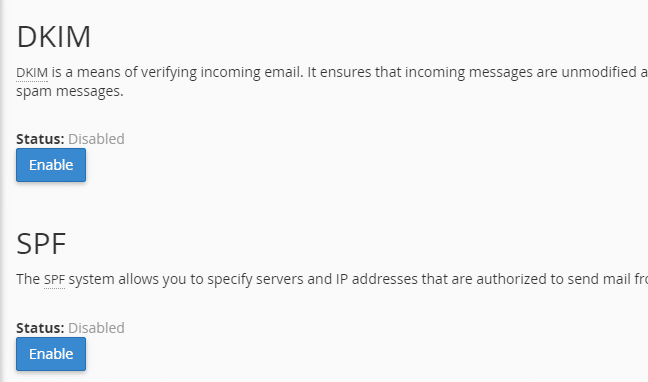
SPF and DKIM are ways to make sure that email sent from your email address really comes from you and not some spam server. We recommend enabling this in your cpanel and it will also improve your chances of not getting marked as spam. To do so go to cpanel > authentication and from there click the enable buttons next to SPF and DKIM
Magento 2 has different web hosting requirements than Magento 1.9. Usually value priced web host will not provide the performance needed to host a Magento 2 website. We recommend a Magento specialized web host. We offer this service, or you can try Nexcess or Mage Mojo. Higher priced Host Gator or Siteground plans will also work as long as you get SSH access.
Please do not use Amazon AWS or similar unless you have a lot of experience setting up servers – we do not include install to Amazon AWS in our install package.
Hosting Requirements for Magento 2.4:
- PHP 7.4
- MySQL 8.0
- Elasticsearch
- SSH Access
More info: https://devdocs.magento.com/guides/v2.4/install-gde/system-requirements-tech.html
DNS is the domain name server for your domain name. This points your domain name to use a certain server to host your website. To update your DNS you go to where you registered your domain name (for example GoDaddy, Network Solutions, Namecheap, etc.) and login. After logging in there should be a place to manage your domain name. From there edit the nameservers for your domain. Our nameservers are:
ns1.itwebexperts.com
ns2.itwebexperts.com
After that please let us know what domain name you set to use our web hosting so we can make sure it’s setup. You can add it yourself if you want in cpanel > parked domains. If you want your Magento site to use your domain name set it in system > configuration > web > unsecure url and secure url section. Here are a couple youtube videos for popular registrars:
How To update GoDaddy DNS
How To update Network Solutions DNS
To run our rental software the requirements are basically the same as they are to run Magento 2. Here are what they are:
- PHP 7.4+
- MySQL
- Elastic Search
- Full details: https://devdocs.magento.com/guides/v2.4/install-gde/system-requirements.html
- PHP Extensions needed: PDO_MySQL, simplexml, mcrypt, hash, GD, DOM, iconv, curl
Please note that low cost hosting providers may not provide good speed – try our hosting, Nexcess, MageMojo, or a Cloudways Magento plan.
SSL may seem difficult to setup, but it’s really quite easy. Don’t fall for companies that charges lots of money to setup SSL. You will need a few things to setup SSL:
- An SSL certificate. SSL certificates do not need to be that expensive. The cheap $10/year ones are just fine, and offer the same level of encryption as even the $699/year ones do. If you pay lots of money, you are just paying for the name brand appeal of having say a “Verisign” branded SSL certificate.
- A CSR or Certificate Signing Request generated from your web host. If you are hosting with us, you can go to your cpanel > ssl/tls manager to generate your CSR. Then you can copy and paste it to the place where you buy your SSL. if the SSL place asks for server type, choose cpanel from the drop down choices, or Apache if cpanel is not available as an option.
Where can you get SSL certificates? Our personal favorite is http://www.namecheap.com/ssl-certificates.aspx the Comodo and Geotrust $9 – $10 a year ones are fine.
WordPress / WooCommerce (8)
Not hard at all — for most people it is a five to ten minute job, and it is the same process as installing any other WordPress plugin.
What you need first
- A working WordPress site
- WooCommerce installed and activated
- Standard WordPress hosting — nothing high-powered required
How to install it
- Download the plugin .zip file from your account area after purchase.
- In your WordPress admin, go to Plugins → Add New → Upload Plugin.
- Choose the .zip file and click Install Now, then Activate.
- Enter your licence key so the site receives updates.
- Open the rental settings and set your calendar type, pricing units and turnaround (buffer) time.
- Edit a product, switch it to a rental product, and set its rental pricing.
That’s it — the booking calendar appears on the product page and your store can take rental bookings. Because the plugin installs into the site you already own, you keep your existing theme, pages, blog and search rankings; there is nothing to migrate and no separate storefront to set up.
Free installation with the Pro version
If you would rather not touch any of it, the Pro package includes free installation and a training session. We install and configure the plugin on your site for you, and then walk you and your team through how to set up rental products, pricing and the booking calendar.
Full setup documentation is in our WooCommerce / WordPress Bookings & Tours knowledge base. If you get stuck, support is included for the first year — just get in touch.
Both are 100% open source and both run the same rental booking engine, so the decision is about your business rather than about features. For most clients we recommend the WordPress / WooCommerce version.
WordPress / WooCommerce — the right choice for most businesses
- Much cheaper and faster to customize. Magento customizations typically take three to five times longer than the equivalent WooCommerce work, and WooCommerce developers are more plentiful and less expensive.
- Runs on ordinary hosting. No high-powered server required, so your hosting bill stays modest.
- Installs into the WordPress site you already own. You keep your theme, your pages, your blog and your search rankings — there is nothing to migrate.
- Quicker to launch. Most stores are taking real bookings within days.
- Drawback: WooCommerce has no built-in multi-store, and a few advanced capabilities (serial number tracking, product maintenance records, per-day inventory availability reporting) are customization work rather than settings.
Magento 2 / Adobe Commerce — the right choice when you scale
- True multi-store and Multi-Source Inventory. Real stock levels per warehouse, depot, branch or city on one shared calendar — the main reason to choose Magento.
- Multi-language and multi-currency storefronts running off a single catalogue and inventory pool.
- Built for very large catalogues and heavy seasonal booking traffic, with B2B account pricing and request-a-quote.
- Serial number tracking, product maintenance and POS are supported natively rather than as customizations.
- Drawbacks: it needs high-powered hosting, it is slower and more expensive to customize, and it takes longer to launch.
The short version
If you run one location and want to be trading quickly at a sensible cost, choose WordPress / WooCommerce. If you are running several depots, countries or storefronts and need each to hold its own real inventory, choose Magento 2.
There is no automatic migration path between the two platforms, so it is worth choosing deliberately. For a full side-by-side breakdown see our Magento vs WordPress / WooCommerce booking solutions comparison, or talk to us and describe your setup — we will tell you honestly which one fits.
Yes. The large majority of WordPress themes work with our rental booking plugin out of the box. Included with support/updates is up to 1/2 hour of time to help you get your theme working if it doesn’t work straight away.
The reason compatibility is good is that our plugin extends the standard WooCommerce product, cart and checkout templates rather than replacing them. Any theme that follows WooCommerce’s own template standards — which is nearly all of them — will render the rental calendar, pricing and booking fields correctly.
Popular WooCommerce-compatible themes that work well with the rental booking plugin include:
- Astra — lightweight and fast, and what this website runs on
- Kadence
- GeneratePress
- Blocksy
- OceanWP
- Neve
- Storefront — WooCommerce’s own reference theme
- Commercial ThemeForest themes such as Flatsome, WoodMart and Divi
Theme issues that may occasionally need extra time:
1) AJAX add-to-cart that bypasses the standard WooCommerce add-to-cart flow. This can usually be switched off in the theme settings, and many implementations already work with no changes.
2) Page-builder product templates (Elementor, Divi, WPBakery) that output a hardcoded product price instead of calling WooCommerce’s own price functions. Rental prices are calculated, so a hardcoded price field will show the wrong figure until the template is pointed at the correct function.
3) Themes that replace the default WooCommerce single-product template rather than extending it. This is poor practice and most themes do not do it, but if yours does it may need some customization time.
If your theme needs work beyond the included 1/2 hour we can quote for it — see our custom development request form. If we find any themes that are genuinely incompatible because of how they are coded, we will list them here.
No. WooCommerce sells products that ship and do not come back. It has no concept of a rental period, of an item being unavailable while it is out with a customer, or of that item returning to stock on a given date. Sales Igniter Bookings & Tours adds exactly that: a date-range availability calendar, real rental inventory, turnaround time, deposits and hire agreements, on top of the WooCommerce catalogue and checkout you already know.
The two terms get used interchangeably, but they solve different problems, and the difference is what decides whether the software still works for you in month three.
A booking plugin books time. It sells a slot in a calendar — an appointment, a table, a class. Once the slot has passed, nothing else has to happen.
A rental plugin sends a physical item out and needs it back. That item is unavailable for the whole hire, not just for an hour. It needs turnaround time before it can go out again. It may need a deposit and a signed agreement. And you need to know which specific unit went where, and whether it came back.
If what you rent comes back, an appointment scheduler runs out of road quickly. Filling that gap is what Sales Igniter Bookings & Tours is for.
Yes, with the Subscriptions & Memberships add-on for WooCommerce. A product can be billed on a repeating cycle — every X hours, days, weeks, months or years — so long-term hire becomes recurring revenue instead of a booking you have to win again every month.
The booking calendar is driven by that billing cycle, so the rental period extends as each renewal is taken and inventory is never released before the customer has paid for the next term. The same add-on also sells membership tiers and runs a rental queue, where returning one item automatically dispatches the next one the customer has lined up.
Yes, if you want them to. You decide which billing intervals you are willing to accept on each product.
Offer more than one and the product page shows a Billing every chooser, so the customer picks weekly, monthly or yearly themselves. Offer exactly one and it is simply fixed, with nothing extra for them to think about.
You can also let the same product be taken either as a one-off hire or as a subscription, and leave that choice to the customer at the point of booking.
The renewal is retried automatically the following day. After three failed attempts the subscription is put on hold rather than quietly lapsing, so it surfaces for you to follow up instead of disappearing.
The customer is emailed each time a payment fails, and can change the card that future renewals will charge from their My Account area. Renewals are charged off-session against the card already on file, through Stripe, Braintree, Authorize.net or PayPal.