
Car and motorcycle rental software that knows every vehicle
Pick-up and return times with daily, weekend and weekly rates. One record per car by plate or VIN, a turnaround for the valet, and the licence, agreement and deposit done before the keys change hands.
Pick-up and return times, daily and weekly rates, and every car tracked by its plate.
- Pick-up and return times
- One record per vehicle
- Licence and deposit online

A spreadsheet works until two people want the same car on a Saturday
Most operators start with a phone, a spreadsheet and a wall planner. These are the failures that push them to a proper reservation system.
The same car promised twice
A phone booking never reaches the spreadsheet, or two staff sell the same vehicle for overlapping days, and nobody finds out until the handover.
One calendar, so a car can’t be sold twice.
Which car, not how many
You can see that three SUVs are booked, but not which one is on the forecourt, which is out until Friday and which is waiting on a service.
Every vehicle has its own record.
Re-let before it’s ready
Valeting, refuelling and a damage check take real hours. If that time isn’t in the calendar, a car still dirty on the ramp gets booked.
A turnaround holds each car back.
Deposits kept off the system
A card number written down, a deposit by bank transfer, and an argument three weeks later about a scratch nobody photographed.
The deposit sits on the order.
Paperwork away from the booking
The hire agreement lives in a folder, not on the order, so proving what the customer agreed to means going looking for it.
The signed agreement is filed with the order.
Rates that don’t fit one daily price
Weekend rates, weekly rates, a different price in August, a young-driver surcharge: generic booking tools flatten all of it into one daily figure.
Daily, weekend, weekly and seasonal rates.
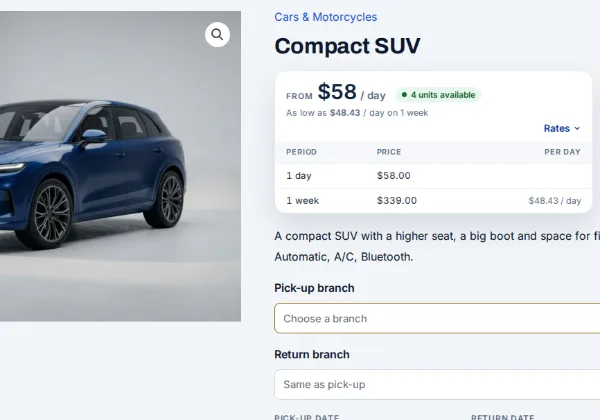
Pick-up and return times, with daily, weekend and weekly rates
| Period | Price | Works out |
|---|---|---|
| 1 day | $58.00 | $58.00 / day |
| 1 week | $339.00 | $48.43 / day |
Customers choose a pick-up date and time and a return date and time, and the engine prices the hire from the rates on that vehicle: by the hour for city or airport hire, by the day for leisure, by the week or month for longer hires, so a week costs less per day than a weekend. A vehicle can also be locked to a fixed length, such as a three-hour track slot or a seven-day minimum in peak season.
Weekend, holiday and seasonal pricing sit on top of the base rate, minimum and maximum hire lengths are set per vehicle, and closed days can’t be picked. Customers can extend a hire from My Account before the return time, priced from your rates. See the full rental feature list.
Every car tracked by plate or VIN, and held back until it’s ready
Register each car, van or motorcycle as its own serial, by registration, VIN or asset number, with its acquisition date and cost and its own hire history. Staff check it out and back in on the Send & Return desk with a keyboard-compatible barcode scanner or by typing the number, and can record the odometer, fuel, condition and photos each time. Take one car off the road for a service and the rest keep renting. More on serial numbers.
Turnover time is set per vehicle, before and after each hire, so a car returned at 5 pm on Sunday isn’t offered for a Monday-morning pick-up if it needs to be back on the ramp first. The rental inventory report shows what is out, what is due back and what is free, vehicle by vehicle.
Pick up at one branch, drop off at another
Each branch keeps its own vehicles and opening hours, the search asks for the pick-up and return branch, and a car based at one branch can’t be booked out of another Multi Location Inventory plugin. Returning to a different branch is a one-way hire, and its drop-off fee shows beside the return branch before the customer books.
On the live demo, Kestrel runs three branches, downtown, the airport and the harbour, with a $25 fee for a one-way return. You add your own locations under Locations → Locations, and without the plugin the same store runs as a single branch.
Licence, agreement, deposit and extras before the keys change hands
A child seat, GPS or an additional driver goes on the same order as a priced option against that vehicle, and the fields sit on the cart line, so a two-car booking carries two drivers, two licence numbers and two collection times.
- Child seat
- GPS
- Additional driver
- Excess reduction
- Roof box
- Helmet hire
Refundable security deposits
Hold a separate deposit at checkout and release it, or part of it, once the vehicle is back and checked. Amounts are set per vehicle, so a supercar and a city runabout carry different excesses, or keep the card as a secure token and charge it only if needed.
Hire agreement signed online
Generated from the booking with the customer, vehicle, dates and your terms merged in, signed on screen and stored as a PDF against the order. Your excess, mileage limits, fuel policy and territory rules are the ones that appear. Start from our free car and motorcycle rental contract template.
Driving licence checked before arrival
Licence number, country or state of issue, expiry and date of birth, and a photo of the licence, passport or ID uploaded at checkout and approved from a queue. Documents are kept out of the media library and purged on a schedule. About custom fields and licence checks.
Excess reduction and damage waiver
A fixed amount or a percentage, per vehicle or per order, with per-product overrides so a van and a city car don’t carry the same excess. Offer it as a decline-able option and the customer’s decision is recorded.
Extras priced on the booking
Child seat, GPS, an additional driver with their licence number, or a young-driver surcharge, each as a priced option against that vehicle, with pick-up and return times per vehicle rather than one for the whole order.
Extensions and reminders
Customers extend a hire from My Account, priced from your rates, and pick-up, return and overdue reminders go out by email, SMS or WhatsApp.
Pro included in Rentals & Bookings Pro, or sold on its own. Everything else here comes with Regular.
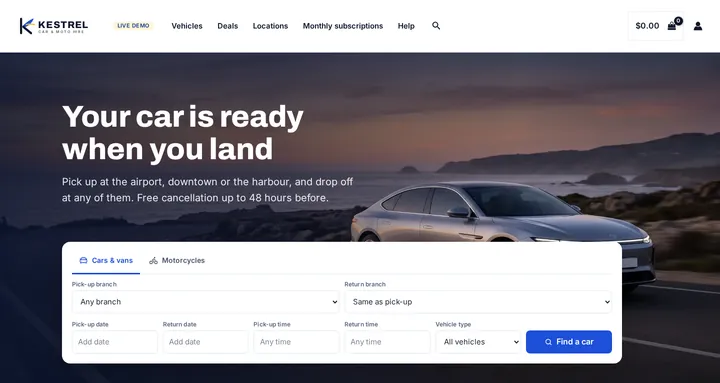
Start from a store that looks like a car hire desk
Seven sample vehicles, from an economy hatchback to a 7-seat SUV and an adventure motorcycle, with real daily and weekly rates; a search in your words (Pick-up date, Pick-up time, Return date, Return time, Vehicle type); a homepage built from WordPress blocks; and colours and fonts for Astra or a block theme. On the live demo it runs as Kestrel Car & Moto Hire, with three branches and a $25 one-way drop-off fee through the Multi Location Inventory plugin.
Free with the Rentals & Bookings Lite plugin 1.0.11 or newer, which imports everything except the date search on the homepage. Regular and Pro 1.0.74 or newer add the search widget.
Free with the Lite plugin 1.0.11 or newer. Regular and Pro add the homepage date search.
Run it on WooCommerce or Magento 2
The same rental engine on both. We sell both, so the choice is yours.
WooCommerce car rental plugin
Right for independents and single-branch operators who want to stop taking bookings by phone and start taking them online, on the WordPress site they already run.
- Pick-up and return times with hourly, daily, weekly and seasonal rates
- One record per vehicle by plate or VIN, checked out and back in with a barcode scan
- Turnaround time per vehicle, and extensions from My Account
- Licence upload, damage waiver, signed agreement and deposit at checkout Pro
- Several branches with their own stock, and one-way fees Multi Location Inventory plugin
- Sell cars new or used, and accessories, from the same catalogue
Magento 2 car rental extension
For multi-depot and cross-border operators and corporate account customers, on Adobe Commerce or Magento Open Source.
- Stock per depot, branch or city with Multi Source Inventory Pro
- Customer-group pricing for corporate accounts
- Request for Quote for corporate and long-term hire (sold separately)
- The same serials, buffers, hourly and daily rates, deposits, damage waiver and signed agreements (Pro)
- Multi-store and multi-language storefronts from one catalogue
Not sure which platform fits? Our Magento versus WooCommerce comparison sets out the trade-offs, and cars are one of the trades in our rental software by industry overview.
From catalogue to first hire in six steps
Everything here is configuration, not development. For a start-to-finish walkthrough, read how to set up a car rental booking system on WooCommerce.
Step 1: A calendar on the vehicle page
Customers pick pick-up and return dates and times on the page, or search by date first and see only what’s free.
Step 2: Rent by the hour, day, week or fixed term
Hourly airport hire, daily leisure hire, weekly corporate hire, or a fixed length such as a 24-hour hire.
Step 3: Block the turnaround
Valeting, refuelling and the damage check sit in the calendar, before and after each hire.
Step 4: Price the way you sell
Weekend, holiday and seasonal pricing, and longer-hire rates so a week costs less per day than a weekend.
Step 5: Deposit and signed agreement
Held and signed at checkout, both attached to the same order.
Step 6: Check the vehicle back in
Record its condition, release the deposit, and it goes back on sale once its turnaround has passed.
Who this suits
- Independent and single-branch car hire
- Airport, city and harbour rental desks
- Motorcycle, scooter and moped rental
- Quad, buggy and powersports hire
- Van and minibus hire for families and teams
- Executive and wedding car hire
Car rental software FAQs
Can customers book by the hour as well as by the day?
Yes. Hourly, daily, weekly, monthly and fixed-length hires are all supported, and you can mix them across your vehicles: hourly for scooters or track slots, daily for the cars, weekly for long-term hire.
Does it track each vehicle separately, or just how many of each type I have?
Each vehicle is its own serial, by registration, VIN or barcode, so you know which car went out, when it’s due back and what condition it came back in, with odometer and fuel readings recorded at check-out and check-in.
Can I take a refundable security deposit for damage?
Yes, with the Security Deposits plugin in Pro. The deposit is held as a separate amount at checkout and released, or partly kept, when the vehicle is back and checked. Amounts are set per vehicle.
Can I get the hire agreement signed online before handover?
Yes, with the Contract Signing plugin in Pro. The agreement is generated from the booking with your terms merged in, signed online and stored as a PDF against the order, and the template is yours to edit.
Can I block time between hires for valeting and refuelling?
Yes. Turnaround time is set per vehicle, before and after each hire, so a car returned on Sunday evening isn’t offered for a Monday-morning pick-up if you need it back on the ramp first.
Can customers pick up at one branch and drop off at another?
Yes, with the Multi Location Inventory plugin: each branch keeps its own vehicles, the customer picks the pick-up and return branch, and a one-way return can carry a drop-off fee, $25 on the demo.
Does it handle motorcycle, scooter and powersports rentals too?
Yes. Bikes, scooters, quads and buggies run on the same engine as cars, often by the hour, with helmets and jackets booked as stock of their own on the same order. See how to rent motorcycles and scooters online with WooCommerce.
Is there a monthly fee or a commission on each booking?
No. It’s a one-time licence you host yourself, with the full source code, and no commission on your bookings. See our open-source rental software overview, or how we compare with Point of Rental and Rentman.
See it running before you buy
Pick a car, a branch and your times on the live demo and watch the calendar count down what’s free, or try the free live rental software demo to follow an order through the admin. We also build complete car rental websites: the storefront, your rates and branches, deposits, your hire agreement, your vehicles loaded in, and training for your team.