
- 1.0.84 Released October 25, 2026
- 1.0.83 Released October 23, 2026
- 1.0.82 Released October 20, 2026
- 1.0.81 Released October 16, 2026
- 1.0.79 Released October 12, 2026
- 1.0.78 Released October 5, 2026
- 1.0.75 Released September 29, 2026
- 1.0.74 Released September 28, 2026
- 1.0.72 Released September 25, 2026
- 1.0.71 Released September 23, 2026
- 1.0.66 Released September 22, 2026
- 1.0.65 Released September 20, 2026
- 1.0.63 Released September 18, 2026
- 1.0.62 Released September 13, 2026
- 1.0.61 Released September 8, 2026
- 1.0.60 Released September 6, 2026
- 1.0.59 Released August 7, 2026
- 1.0.50 Released August 8, 2025
- 1.0.42 Released October 21, 2024
- 1.0.3 Released June 30, 2023
- 1.0.2 Released June 15, 2023
- 1.0.1 Released March 15, 2023
- 1.0.0 Initial Release January 15, 2023
Changes to the free Lite plugin are listed in the Lite changelog.
Looking for what is next? Vote on the WooCommerce rental plugin roadmap, or send us a feature request.
1.0.84 Released October 25, 2026 #
- New featureChoose itinerary days for each staff or resource requirement, such as a driver on days 2–3. Upcoming departures follow product changes, and the daily assignments that remain are kept as they are.
- New featureFixed pickup times for one departure, keeping booked pickup choices and clock times when a run is delayed. A product can also offer a Meet at the start choice.
- New featureTour pickup reminder emails with the booked point, address and current pickup time. The default is 18:00 the day before pickup; change or turn it off under Rentals > Settings > Emails. Checked-in, cancelled and Meet at the start bookings are left out.
- FixWhole-day rentals schedule staff during each day’s opening hours, including separate shifts. Repeated saves keep each day’s assignments; removed days cancel them. Timed overnight bookings keep their full window, and stock reservation dates stay unchanged.
- New featureMessage guests on Rentals > Departures. Dispatchers review the lead bookers, then send a plain-text email to each address separately. Cancelled or moved bookings are checked again before sending, new recipients need a new preview, and refreshing a sent form never sends it again.
- New featureA resource can be several counted units, such as 12 kayaks. A tour takes one per guest (or as its requirement says) and the rest stay free for other tours and for customers renting them on their own. Linked to a rental product, the pool is that product’s stock; otherwise it counts its own units. The Staff board, manifests and My schedule show “Kayak × 8”, and a departure’s seats follow the units left.
- New featureDelivery & pickup labels. Each way’s section of Rentals > Settings > Delivery & pickup has one Labels block. Its Start date label and End date label (saved before, but never shown) now name the dates on the booking form while that way is chosen, in every picker (In Line, Separate fields, the popup, the Modern booking bar), and switch back when the customer picks another way. New beside them: the time slot and return time slot labels, the way back’s name, the names of the cart, order and email rows, and a note under the way’s name in place of the automatic one (Pick up and Delivery). A new Product page wording row changes “How do you want it?”, “How will it come back?” and the postcode box’s label and button. Empty keeps the standard wording; WPML and Polylang translate what you write, and developers can change any label with the sibooking_delivery_label filter.
- ImprovementThe time slots’ standard captions name the hand-over: “Pick-up time slot” and “Return time slot” for Pick up (a return in store read “Collection time slot”), “Delivery time slot” and “Collection time slot” for Delivery. A shop that translated “Time slot” or “Collection time slot” keeps its own words.
- ImprovementA way’s “Name customers see” also names it on the shipping option, the order screen and the emails, not only on the product page.
- New featureFor add-ons: questions for each guest on the guest details page, validated together before anything is saved, with each guest’s answers on the staff phone manifests; the staff directory, so a maintenance add-on can bring in its technicians and their existing assignments without duplicate job emails; and staff hours by location and date (Api 15, and the hooks sibooking_participant_details_* and sibooking_staff_job_windows).
- ImprovementThe calendar, the pricing card, the booking emails and Rentals > Bookings (the parts that come from the included Lite plugin) are now translated as fully as the rest, in the same 17 languages, with new Czech, Danish, Finnish, Greek and Swedish translations.
- ChangePricing engine 1.10.0 (with Lite 1.0.20). No price changes; it adds the delivery and pickup labels.
1.0.83 Released October 23, 2026 #
- New featureStaff emails for new, changed and cancelled jobs, tomorrow’s schedule, jobs without staff, declined jobs and expiring certificates. Each has its own WooCommerce email settings. Staff can also receive job texts through the store’s text-message service.
- New featureA private calendar subscription for each staff member, on their profile and in My schedule’s week view. Managers can replace a calendar address to stop the old one working.
- New featureDownload hours (CSV) on Staff & resources, respecting location access, with overlapping assignments counted once and overnight jobs split by day.
- ImprovementCustomers moving a tour booking see the next six available departures and can choose Later dates to find departures on another day. Moves still require the same tour and price, enough seats, and an open booking window.
- ImprovementA private tour’s classic cart and mini-cart show the party price, and its order editor shows that price beside the number of seats. Stored quantities, prices and totals stay unchanged.
- ImprovementQuantities priced per person read “3 seats” in the classic cart, checkout and mini-cart; stock and prices count the same seats as before.
- ImprovementStaff at several locations, with Multi Location Inventory 1.0.7: staff limits are checked at each cart line’s location, staff follow their location’s working hours, and the calendar works out staff limits per location.
- ImprovementComplete translations in 17 languages, reviewed language by language: Arabic, Czech, Danish, Dutch, Finnish, French, German, Greek, Italian, Japanese, Korean, Polish, Portuguese (Brazil and Portugal), Romanian, Spanish, Swedish and Turkish. Czech, Danish, Finnish, Greek and Swedish are new, and German uses the formal “Sie” throughout.
- FixTours: a departure with its own seat limit can no longer be overbooked by adding a second group for the same departure to the cart.
- FixDelivery: the time slots on the product page count the places of your delivery area, as the checkout does, and the last free place of a slot can be booked.
- FixDelivery: a checkout that does not go through no longer holds its delivery time slots for 30 minutes.
- FixTransport: when the destination changes, a start date the shop can no longer ship in time for is refused on the product page, in the cart and at checkout, and the message gives the first date it can ship for.
- FixA tour’s Product structured data uses the same departure offers as its Event markup, rather than the product’s placeholder price.
- FixA tour calendar’s day badge shows the most seats left in one departure that day, respecting departure capacity and booked stock.
- FixStaff & resources requirement controls keep their labels readable in a narrow product editor, with scrolling confined to the requirements table.
- FixMy schedule highlights Tomorrow only for the following day. Departure check-in buttons keep a readable background when there is no staff color on the page.
- FixThe cart shows the right duration for preset booking times, so a two-hour booking reads “2 hours”.
1.0.82 Released October 20, 2026 #
- New featureDelivery areas priced by distance. The product page’s postcode step gives the price for that address, for example “We deliver to 90210 (North side), from $25.00 (about 13 km). Exact price at checkout.”, or says why not: “We deliver up to 40 km from North depot. Choose pick up.” This needs Delivery by Distance 1.0.2; with 1.0.1 the step says the delivery is priced by distance at checkout.
- New featureThe order’s Delivery line keeps the distance quote of each stop, so Delivery by Distance 1.0.2 can show it on the order screen.
- ImprovementClassic checkout: when delivery isn’t possible for the address, the shipping section says why as soon as the address is entered (for example “We deliver up to 40 km from North depot. Choose pick up.”), instead of WooCommerce’s general “There are no shipping options available” text. The block checkout’s Delivery plan shows the same reason.
- ImprovementThe product page’s Delivery card no longer shows the Delivery way’s flat fee once delivery areas set the fee: it reads “Delivered to your door, priced by distance” when the areas are priced by distance, or “Delivered to your door” when they have their own fees. The postcode step gives the amount.
- ImprovementDelivery area editor: only the fee of the chosen pricing shows: “Fee per stop” for “Flat fee per stop”, the price table for “By distance”.
- New featureThe delivery code shared with Sales Igniter Smart Routing 1.1.0, so Smart Routing can run delivery on its own for shops that only sell. Nothing changes here: with Regular active, Regular’s delivery runs as before. Smart Routing’s own vehicles move into Staff & resources when it meets Regular.
- ImprovementDeleting the plugin with “Delete all rental data” also removes the delivery settings for sold products and the proof-of-delivery photos; the shared delivery data (areas, stops, routes, settings) stays while Smart Routing is installed.
- ImprovementDelivery & pickup settings say “vehicles”, not “vans”.
- FixRental kits count toward a delivery area’s minimum order and its free delivery over.
- FixA location with no delivery areas of its own keeps the Delivery way’s flat fee.
- FixA quote’s delivery stays a delivery when the quote becomes an order.
- FixThe cart page loads the Delivery plan’s stylesheet.
- FixThe date search marks kits whose parts are booked out.
- FixCheckout: the order summary no longer runs past its box in a narrow column (some theme looks at 1440 px): the Delivery plan’s time slot list now shrinks with it.
1.0.81 Released October 16, 2026 #
- New featureNew admin menu: Every Rentals page has a top bar: Dashboard, Day to day (Bookings, Calendar, Send & Return, Departures, Staff & resources), Reports (every report one by one), Stock & money (Stock, Money) and Setup (Settings, Tools). The open page’s tabs sit right under it: Send, Pick list, Return and History on Send & Return; Balances and Late fees on Money; Reminders on Bookings. The WordPress menu under Rentals lists one item per page. Locations, Quotes, Subscriptions and Maintenance keep menus of their own with the same kind of top bar, and Ctrl+K jumps to any of these pages
- New featureDashboard: Needs you: Rentals > Dashboard opens on Needs you, right under the top bar: overdue units, bookings not sent yet, late fees to review and overdue balances, plus what the add-ons add (ID checks, repairs, quote requests), each with a link. The date heading and the big search box are gone: find a booking under Bookings or with Ctrl+K
- ImprovementMoney: Balances is always listed under Money; with booking deposits off it says what it is for and has a button to the switch
- New featureOne Licenses screen: Rentals > Settings > Licenses shows your package key in one row (Regular, Pro or Ultimate, its state and renewal date), the add-ons it covers as Included with no key of their own, and only the add-ons bought on their own with a key of their own. An expired key keeps everything working: the screen offers Renew, and only updates are paused. Each add-on’s old License page opens this screen
- New featureNew admin menu: Every Rentals page has a top bar: Day to day (Bookings, Calendar), Reports (each report listed one by one) and Setup (Settings, Tools), each item with a one-line description, and the open page’s tabs right under it. The WordPress menu under Rentals is shorter: one item per page
- New featureCtrl+K: Press Ctrl+K (Cmd+K on a Mac) anywhere in the admin to jump to any Rentals page or tab, or to start a new booking
- ImprovementTidier pages: The Rentals pages have no Help tab or Screen Options, and Rentals > Settings has its search box at the top of the page
- ChangeClassic or modern look: The switch moved from the admin bar to Ctrl+K (“Rentals: use the classic look” or “Rentals: use the modern look”). Your choice is kept
- ImprovementCalendar feed: The Calendar’s ICS feed button opens a dialog with the link, Copy, Reset link and short steps for Google Calendar, Outlook and Apple Calendar
- New featureFor add-ons: Plugins add their own menus, headings, pages and tabs to the top bar and to Ctrl+K (filters sibooking_nav_menus, sibooking_nav_groups, sibooking_nav_entries and sibooking_nav_tabs)
- New featureDelivery & pickup: Off until you switch it on under Rentals > Settings > Delivery & pickup. Customers choose how they get a rental (pick up in store, delivery to their door, or transport) and how it comes back (return in store, we collect, transport it back). Each way has its own notice, order cut-off, days, time slots, labels, late time and blackout dates; a delivery can go out the day before and be collected the day after, a transported rental spends days in transport, and the calendar holds those days. The product page asks “How do you want it?” before the dates; the cart and checkout show the delivery plan with a time slot per stop, and the shipping options follow the way (your local pickup, a delivery fee per stop plus the slot’s surcharge, or your own shipping rates for transport). It needs no WooCommerce shipping zones: on a store without any, its own shipping method “Rental delivery & pickup” brings the fee and the pickup to checkout and the order. Orders, emails and My Account say when it goes out and comes back; Send, Return, reminders and late fees count from those days; the order screen has a Delivery & collection box with the transported return’s tracking number. A product can offer fewer ways or its own days on the road (also in bulk edit). REST: /handover/windows, /handover/ways, /settings/delivery and PATCH /bookings/{id}/handover
- New featureDelivery areas: Rentals > Settings > Delivery & pickup > Delivery areas: each area has its postcodes or a radius, its own days and time slots, a fee per stop, a minimum order and “Max stops per day”. The product page asks for the postcode before the dates, the checkout’s delivery address decides the area (an address outside every area is refused), and each area is its own shipping rate. Slots and days hold their places while a customer checks out, and a full slot or day is greyed in the calendar (“2 left” on the slot). Every delivery and collection becomes a stop on its day, and a transported rental can come back to another location. REST: /delivery-zones and /delivery/check
- New featureTransport days by destination: Under Transport, “Days in transport” can be the same everywhere, by WooCommerce shipping zone or by distance (with Delivery by Distance). The product page asks “Where is it going?”, the calendar offers the dates that place can make, and the checkout plans again with the shipping address (“Shipping to Western Australia takes 4 days, so 15 Oct is too soon. The first date we can ship for is 17 Oct.”). With Multi Location Inventory’s “ship from any”, the location with the fewest days to the address sends it. A rental by the hour offers only the start times inside that day’s delivery or pick-up slots
- New featureTransport days by shipping option: “By shipping option” sets the days in transport for each of your shipping options (Express 1 day, Ground 4 days). The rental is held for the chosen option’s days, and at checkout an option that can’t arrive in time, or would keep the item out when it is booked again, is not offered, with the reason in the Delivery plan
- New featureNon-rental orders: Off until you tick “Deliver non-rental orders too” under Delivery & pickup. An order of sold products shipped by one of the methods you choose becomes one delivery stop with a Sale tag, with nothing to collect; products and categories can be left out (“Ships by transport only”). An order that also has rentals keeps Send and Return and lists its sold items on the rental’s delivery stop. At the classic and the block checkout, a cart of sold products shipped by the Delivery option gets a Delivery day (and a time slot when the Delivery way has slots): days start after “Lead time for sales”, follow the delivery and closed days, and share the slot and day limits and the fees with rental deliveries. With Smart Routing, a paid sale-only order is marked Completed when the driver taps Delivered (a setting, on by default)
- New featureReady for Smart Routing: Regular gives the separate Sales Igniter Smart Routing plugin the day’s stops, your vans (resources of type Vehicle) and saving the routes it plans. Rentals > Schedule (run sheets, load lists, the CSV export and the morning day sheet) and the driver app come with Smart Routing. Each stop and route keeps what a driver recorded: the route’s driver, the actual time, the reason a stop failed, who received it, the driver’s note, the signature and the photos
- New featureStaff and resources: Rentals > Staff & resources holds your staff (skills, with an expiry date for a certificate; their own hours or your opening hours; time off), your resources (a boat, a vehicle, a room: type, seats, hours, blocked time) and the skill list. A product’s Staff & resources tab says who or what each booking needs (“1 Captain for each booking”, “1 Guide for every 12 guests”), and every paid booking becomes a job; the REST API assigns staff and resources, warns about clashes (double booked, time off, outside their hours, an expired certificate) and suggests who is free. Nothing changes for a store without staff: the product tab appears once the first staff member or resource is added
- New featureStaff schedule: Rentals > Staff schedule (shown once you add the first staff member or resource) is a board of the day or week with a row per staff member and resource. Drag a job onto someone to assign them or between people to hand it over, or let Auto-fill propose who takes the jobs still missing someone. A clash is refused unless a dispatcher gives a reason
- New featureMy schedule: Under My Account on their phone, staff with the new “Rental staff” role (or any user linked to a staff profile) see today’s, tomorrow’s or the next 7 days’ jobs, each with its time, place (with a map link), party and the customer’s first name and phone. They check in, add a note and, when “Staff confirm their jobs” is on, accept or decline new jobs (declining asks why). They see only their own jobs
- New featureDepartures for tours: For products sold by “Fixed Rental Date and Rental Length”. Rentals > Departures lists the upcoming departures with their seats (12 / 20), status and staff; each has its own capacity, Close sales, notes, a note on the tickets and Change time (every booking moves with it and the guests are emailed), and you can add a one-off departure. The manifest prints, downloads as CSV and is emailed to its staff. Cancel a departure, or every departure of a day (weather): refund in full through the payment method, or offer the guests the next departures with seats (a part paid by a gift card goes back on the card with PW Gift Cards, the order note says so; otherwise the note says what to re-issue by hand). “Stop online sales N hours before” per product and per departure (“Call us to book” after it). Tickets with a QR code in the order emails and My Account; staff scan them on My schedule or check guests in from the manifest; a checked-in tour is never shown as Out or Overdue nor listed on the Return screen, gets no return reminder or late fee, and has no Extend or Swap item. A tour that needs staff has one staff job per departure. schema.org Event markup on tour pages
- New featureTour pricing: Seniors, Students and your own guest types are each priced the same as an adult, a percentage off or at their own price, next to the child price. A group price: one price for the whole party up to N guests, with optional party sizes (up to 4 guests, up to 8), for every booking or for private bookings, where the product page offers “Join the group” or “Book it privately” (its total follows the choice; the order, the emails and My Account say “Booking: Private”). The group price is charged once for the whole party, in the cart, the order and the emails. A private booking takes the whole departure and is refused once others have booked it (also when it is added through the Store API)
- New featureMinimum participants: Per product and per departure: “Runs with at least 6 guests. We will confirm by Thu 9:00.” on the departure, a “Guaranteed to run” email to the guests once it is reached, and at the deadline (24 hours before by default) the shop is asked to Run anyway, Cancel and refund all, or Offer another date. Departures are cancelled automatically only when the product says so
- New featureLimit sales: A product’s Staff & resources row can say “Limit sales” instead of “Track” (the sentence under the rows says which): a booking is then taken online only when someone qualified (or a resource) is free for it (“No guide is free for this time any more.”), the calendar greys the times staff cannot cover, a departure sells only the seats its boat or bus has (Rentals > Departures shows “7 / 8, Limited by boat”), and the booking takes its people at once so the next customer cannot book the same guide. The store can still book from the admin. A resource can be “Also rented as” a product (the boat you also hire bare): it is busy while that product is booked, and a tour it is given books that product’s stock
- New featureTour guests: A tour asks for each guest’s name on the product page (optional by default, required, or not asked), and the confirmation email and My Account offer “Add your group’s names” while any is missing; staff can type names on the manifest. Pickup points with their minutes before the departure (“Hotel Plaza, 45 min before”), also chosen when a tour is added through the Store API (with the guests’ names), show on the ticket, the emails and the manifest (sorted by pickup time). An Itinerary tab for tours of several days. Customers can move their booking to another departure with seats at the same price in My Account until online sales stop. A review request email after the booking ends (off until you add a timing), sent only to guests who were checked in
- New featureRental bundles of Sales Igniter Bundles & Composites: A customer extends a rental bundle as one rental from My Account: the extra days are checked against the stock of every item in it and charged as the cart charges the bundle, and once paid every item moves to the new return date. The booking deposit line (“Reserve with 25% now”) and the checkout’s booking deposit cover the bundle’s own price and its items priced on their own. Bundles of the Product Bundles and Composite Products plugins work as before
- ChangeSettings need an active license: Without an active license, Rentals > Settings opens on the Licenses tab and settings can’t be saved (on the server too, not only on the screen) until a key is entered and activated; Shop Managers see a short notice. An expired license locks nothing: the settings stay open and save, only updates stop, and the Licenses tab says “Expired: renew for updates”
- FixLate fee of a rental bundle: A rental bundle of Sales Igniter Bundles & Composites is one rental for its late fee too: back late, it costs what extending it costs for the same time (the bundle’s own rental price, or its items’ prices less the bundle’s discount), with the bundle’s own late-fee setting. It used to cost the rental price of the items that hold its bookings
- FixBooking deposit of 100%: A product’s own booking deposit of 100% means paid in full. It used to fall back to the store’s percentage
- FixBooking deposits: the balance: A customer can no longer cancel (or order again) the balance they owe from My Account; “Send payment link” sends “Your balance is due” with the rental, dates, amount and due date instead of an empty invoice
- FixBooking deposits: payment: Recording a deposit keeps the customer’s payment method; the order screen lists the security deposit and the balance apart (no “Fees: -$0.25” line); with the deposit chosen, checkout offers only the payment methods that take one
- FixSearch totals: No total for a length a product is not sold for (a four-hour tour in a search without times read “$534 for 1 day”); the card keeps the product’s own headline
- FixLesser Rental Length Rule: Picks the rule for the lesser length again under unified pricing
- FixDepartures: The quantity box stops at the seats left on the chosen departure (“Only 1 left on this departure”); a departure-priced product shows a “Priced by departure” chip and its price in the admin, not “Rental price Not set”; the departure table’s Date column and the Rental Length choice have room
- FixBold style: The party dialog in the booking bar is readable; product questions marked to go before Reserve sit above the booking bar
- FixEarly return: With “with turnover”, a unit back early is free once its turnover after the return is done; the early send and early return help says what the turnover buffers do. The Return desk shows “Returned at” with late fees off too
- FixSerial numbers: The serials list shows the order a unit is out on (“Order assigned”), and a return in the same second as its send counts as the unit’s last movement
- FixCalendar sync: On a variable product, the feed and its advice follow the variations’ stock
- FixSend Pick List: The PDF prints the screen’s time, without seconds
- FixActivation: Activating without Secure Custom Fields shows the plugin’s notice instead of a bare error page; “Need a key?” points to Licenses. Reminder log statuses and the overdue legend match the admin’s colours
- New featureDevelopers: Filters sibooking_geocode_pre (another plugin answers address lookups first; Delivery by Distance uses it), sibooking_extend_kit_as_one, sibooking_late_fee_kit_window_price, sibooking_deposit_package_lines, sibooking_my_schedule_cards, sibooking_staff_scan, sibooking_driver_app, sibooking_route_drivers and sibooking_day_sheet_on; actions sibooking_delivery_settings_sections and sibooking_delivery_settings_save (an add-on’s own section of Settings > Delivery & pickup); REST for staff, jobs, the board and departures; for add-ons, the day’s stops, routes and proof of delivery that a driver app reads and writes
- ChangePricing engine 1.9.0: Bundles rental-pricing 1.9.0. No price changes. Needs Lite 1.0.17 (bundled)
- New featureGuest types: Seniors, Students and up to three guest types of your own (Rentals > Settings > Guests: a name and an age note each), next to adults and children: on the product page, in the cart, the order and the price breakdown
- ChangeExpress pay buttons: No WooPay button on a rental’s product page, and no express pay buttons (Apple Pay, Google Pay, Link, PayPal, Venmo, WooPay) on any product page while the cart holds a rental: those buttons empty the cart before they buy the page’s product, so the rental would drop out of the cart. Braintree’s PayPal and Venmo buttons no longer leave an empty box on a rental’s page. The filters sibooking_express_pay_on_rentals and sibooking_express_pay_in_rental_cart bring them back
- FixParty prices: A party is charged exactly what its guests cost: two adults at $45 and a child at $25 are $115.00, not 3 × $38.33 = $114.99 (the price per guest was rounded to the cent before it was multiplied back). A price for the whole party (an add-on’s group price) is charged once, not once per guest: 6 guests booked privately for $320 pay $320.00, not 6 × $320
- FixSearched dates without times: Dates searched without times pick up and return at the opening time, so the product prices the day the search card showed, and a clock change no longer adds a day to a rental
- FixSearched dates that do not fit: Searched dates are carried to a product page whole or not at all, never half applied
- Fix“From” prices: A product sold by blocks of hours is headlined at its shortest block (“From $29 / 4 hours”), a per-person product at what one person pays (“From $89 / person”), and an hourly rates column is headed Per hour. The headline choice “From the rates” shows the product’s own headline
- FixBooking fee on the product page: The booking fee (and the line’s other fees) has a line of its own above “Total for your dates”, for the whole quantity
- FixPrice lines: One block of a longer period reads “4 hours × $29.00”, never “1 × 4 hours × $29.00”
- FixCalendar: A return day reads “Fully booked”, not “Preparation day”, and a closed day keeps its reason, which opens inward in a week’s first and last columns
- FixGuests dialog: The guests dialog sets its own text colour, so it stays readable on every style
- FixStays: Check-in and check-out times follow the store’s time format
- FixCalendar Styler: A save writes only what was changed on the screen
- ImprovementBookings Calendar legend: Colour keys without sample counts
- ImprovementTheme Import / Export: The cards show “Imported” in green and the buttons that fit each card’s state
- FixProduct box: The summary chips follow the form as it is edited, and a typed Regular or Sale price becomes the active price, as WooCommerce works it out on save
- FixSwap item: The product search matches names and SKUs only
- FixAdding items to an order: After “Add item(s)” on the order screen, the items are saved once WooCommerce has added them, not at the same time. An item added with its parts (a bundle) could lose its own price before
- FixNotices on a phone: A notice with a long unbroken URL wraps inside a phone’s width, so the Rentals screens stay as wide as the phone
- New featureFor add-ons: Extension points for rentals that travel to the customer and back (the stock check, add to cart, the date picker and the reminders count the days away), and calendar rules that limit a side’s times to windows. A plugin’s own bundle products get the kit calendar, the order screen’s date editor and Swap item, as composites and bundles do, and order lines that are not lent out (a seat on a tour) have no rental status and no Swap item. New calls: a product’s bookings in a window, moving an order line’s dates as the order screen does, and when a unit back early is free again. The availability check sees what a Store API add to cart chose for the line (context cart_item_data), as it sees the product form’s
- ChangePricing engine 1.9.0: The shared pricing engine is now 1.9.0. No price changes
1.0.79 Released October 12, 2026 #
- New featureLate fees: Off until you switch them on under Rentals > Settings > Late fees. A rental checked in late becomes a late fee “To review”, priced by default at the product’s own rental price for each started hour or day after a 60-minute grace period. A fixed amount, a percentage, a fixed late return fee, a cap and a 30-day stop are settings, each product can follow the store, set its own or have none, and closed days are never charged. “Returned at” on the Return screen records when items really came back
- New featureCollect late fees: Accept collects a late fee from the security deposit, the card saved at checkout (Stripe, WooPayments, Braintree, Authorize.net) or a pay link, in the order you choose, or “Charge automatically” collects it at check-in. Staff can edit the lines, record a counter payment, waive or refund it, on the Return screen, the order and the new Rentals > Late fees list (bulk Accept and Waive, CSV). Declined cards are retried after 1 and 3 days and the customer gets the pay link; nothing is ever charged twice
- New featureLate-fee consent at checkout: When late fees may be charged to the card, the checkout saves it and shows the policy above Place order (classic and block checkout); an order without that consent is never charged automatically
- New featureLate-fee policy for customers: The product page and the cart (classic and block) show the policy before booking (“Rentals returned more than 1 hour after they are due are charged a late fee: $10.00 per day late.”); {late_fee_policy} puts it in emails and contracts
- New featureLate-fee emails and My Account: Receipts for every way a fee is paid, a 3-D Secure confirm, “still unpaid” reminders after 3 and 7 days, and a problem email for the store. Overdue rentals show the fee so far in the Overdue pill and the overdue reminder. My Account shows a booking’s late fees with Pay now
- New featureLate-fees report: Rentals > Late fees > Report: billed, collected, waived and outstanding by month, product, customer and location, with CSV. The dashboard’s Money card shows fees to review and collected this month, and an order and a customer profile show “Late returns in the last 12 months”
- New featureLate fees in the REST API: /wc-sibooking/v1/late-fees (list, edit, accept, waive, pay link, counter payment, refund, recalculate), with hooks for every late-fee event
- New featureWooPayments charges the balance automatically: WooPayments joins the gateways under Rentals > Settings > Booking Deposit > “Automatic charges with”: when the booking deposit’s balance will be charged, the checkout saves the card and the balance is charged on its due date. A declined card, a bank that asks the customer to confirm, or a removed card sends the pay link at once. Late fees and rental extensions charge WooPayments the same way
- FixAuthorize.net in the Checkout block: The card is now saved when the booking deposit’s balance, or a late fee, may be charged to it automatically; the charge used to fall back to the pay link
- New featureSwap item with Send & Return: When the item is out with the customer, “Mark <item> returned now and swap” records its return first (serials included) and the new item then waits to be sent. A re-priced swap moves a booking deposit’s balance, never a refund
- ChangeReturn screen: Opens on “Overdue and today”, and its title counts every booking out with the overdue ones; an empty tab links to all bookings out. The REST send and return lists take when=due
- FixDashboard: “Due back” and the Return screen now agree, “Going out” leaves cancelled orders out, and a deleted product is named by its order line on the dashboard, Send, Return and Serials
- FixBulk Send and Return: An order whose product was deleted no longer stops a bulk Send or Return with an error; one email that fails is reported and never stops the others
- FixUsage Report: “Last out” is never a date still to come (a product only booked ahead says “next out”, also a new CSV column), and utilisation under 1% keeps a decimal
- ImprovementSend and Return desks: Enter in the search box searches instead of sending; “Send selected” and “Return selected” are the orange buttons; on a phone each row shows its product, quantity and date; order lines say Out, Overdue or Returned
- ChangeRental emails: Subjects follow one pattern (“[Shop]: Your rental has been sent – order #…”); “Sent” replaces “Shipped”. The sent and returned emails greet the customer by name, list each item with its dates and say when everything is due back, and every rental email previews with sample data in WooCommerce > Settings > Emails
- ChangeWording: The add-on’s settings are in sentence case with one spelling, the pickers and layouts have one name each (“Inline range picker”, “Separate date pickers”, “Pricing card and booking bar”), and the Pricing settings’ typos are fixed
- FixText message opt-in: “Only text customers who opted in” shows on for stores in the EEA, the UK and Switzerland, as it behaves, so saving the page no longer turns it off
- ImprovementBooking bar: Dates in the store’s format; with Separate date pickers the end calendar opens by itself; the bar no longer covers the calendar before a date is picked; the total shows once, beside Reserve
- ImprovementSubscriptions summary: With Subscriptions 1.0.7 a subscription’s booking summary says what each billing period costs (“Subscription, $60.00 / month”)
- New featureFor add-ons: SibookingRegular\Api version 6 (the booking deposit schedule, the late-fee policy, charges billed like late fees, rental usage, serials, photos and movements), hooks on every send and return path, buttons on a serial’s page and cards on the dashboard. Contract Signing 1.1.4 and Maintenance & Inspections 1.0.0 are built on them. Every send, also one made through processSend(), asks sibooking_send_refusal, and the date search counts units an add-on holds without a booking
- ChangeBooking Deposit tab: The “Payments” settings tab is now called “Booking Deposit”; old links to it still open it
- ImprovementLicense panel: The license panel has the Rentals look: one panel with the key’s state, the key and its two buttons. On the Send and Return screens the serial picker is as tall as the other controls
- ChangePricing engine 1.3.0: No price changes; it adds the late-fee and maintenance rules. Bundles Rentals & Bookings Lite 1.0.16
- ChangeRentals menu: The Rentals menu is shorter and in a fixed order: Dashboard, Calendar, Bookings, Send, Return, Late fees, Serials, Balances, Reminders, Reports and Settings. The Usage Report is the Usage tab of Rentals > Reports (its old address still opens it, with its view and filters). Theme Import / Export opens from Rentals > Settings > Advanced
- New featureLicenses: Rentals > Settings > Advanced > Licenses lists every installed add-on under the main key: whether your main license covers it (the store is asked for each add-on, not assumed), its own key if it has one, and a field for a separate key for an add-on bought on its own. Each add-on’s own License link on the Plugins screen still works
- FixAdd-on updates: An add-on whose key does not include it no longer shows an update that then fails with “Unauthorized”
- ChangeSettings in groups: Regular’s settings tabs sit in the grouped Rentals > Settings column: Inventory rules, Serials and Extend under Bookings; Payments and Late fees under Pricing & payments; Text messages under Messages & documents; Search, Search Builder and Maps under Storefront; License under Advanced
- ImprovementAI connections: The AI connections tell an assistant how a fixed rental type is booked: a set length from a start (fixed length) or set departures (fixed date)
- New featureOverbook from the order screen: The order screen’s rental editor shows the days and times other orders have sold out, but no longer blocks staff: one “Overbook” confirm saves the booking, a private order note says who overbooked what, and the order is listed with the double bookings
- New featureWho can overbook: New setting under Rentals > Settings > Calendar: Administrators only, Administrators and Shop Managers (the default) or Nobody. Everyone else still books, changes dates and swaps items when the stock covers it, but on a sold-out pick sees “Only an administrator can overbook.”
- New featureSwap item: On an order’s rental line, or on one item of a composite or bundle, “Swap item” moves it to another product for the same dates. Free items are listed first, a fully booked one swaps with one “Overbook” confirm, the booking and its history are kept, the price stays unless you re-price it, and the customer can be told
- ImprovementAdmin date pickers: Fully booked days and times show in red and partly booked days with an amber dot, with a legend; they stay clickable. A line saved over the stock is marked “Overbooked”
- FixLast unit at checkout: When two customers check out the last unit at the same moment, the second is stopped before paying (“… is no longer available … Choose other dates.”) and that order is cancelled, instead of being charged and put on hold
- FixPay links: The pay link of a failed or unpaid order checks its rentals first. When another order booked them meanwhile, the customer sees “… is no longer available … Please contact us.” instead of the payment form, nothing is charged, and the shop gets an alert and an order note
- FixOrders that come back: A cancelled, failed, refunded or trashed order that comes back over the stock is flagged as a double booking, and a paid one is put on hold
- Fix“Pay now” orders: An order that a payment button with no review step creates straight from the product or cart page now books its rentals before it is paid. One that lost its last unit meanwhile is flagged and put on hold when it is paid
- ChangeDates for items you add: The order screen’s “Booking Calendar” box is now “Dates for items you add”. It opens on the order’s own rental dates, shows its whole calendar, and Add item(s) uses exactly what it shows
- New featureSettings search: A search box finds a setting by its name, its help text or its option name across every settings tab; “Show in tab” (or Enter) opens the tab at the setting, and Esc puts the page back as it was
- FixKeyboard: Rental dates can be picked with the keyboard: Enter on “Select dates” opens the calendar, the arrow keys move between days and months, Enter picks, and the focus goes on to the return date and then Reserve, with a visible focus ring
- ImprovementThe total for your dates: On the product page “Total for your dates” sits right above the quantity and Reserve, says how long the rental is (“3 days”) and shows once; the pricing card keeps its “From” price
- ImprovementWeekly, monthly and yearly rentals: A product sold only by lengths longer than a day headlines its shortest length at its own price, for example “$16,800 / year”, instead of that price spread over the days
- ImprovementCart and checkout: Rental dates use the store’s date format, as the product page does, and add the length (“Length: 2 days”). Each detail stays on one line on block themes, and “Start over” keeps its size on any theme
- ImprovementCalendar words: Days a turnover buffer blocks say “Preparation day” instead of “Fully booked”, and free days that cannot start a rental because its turnover would reach the next booking say “Too close to the next booking to start”
- ChangeExpress pay buttons: No express pay buttons (Apple Pay, Google Pay, Link, PayPal, Venmo) on a rental product page, and none in a cart that holds a rental (the cart, the mini-cart, the Cart and Checkout blocks and the top of the checkout): they pay without the checkout’s rental steps such as the contract and the deposit. A cart without a rental keeps them (filters sibooking_express_pay_on_rentals and sibooking_express_pay_in_rental_cart). Storefront’s sticky add-to-cart bar is hidden on a rental product page too
- FixProducts made outside the editor: A product made by an import, the REST API or Theme Import / Export shows its price under the Original layout and follows the store’s calendar limits unless its own switch is saved off
- ImprovementAdmin lists: The search box has its own Search button: Enter searches instead of running the bulk action on the ticked rows. A product deleted since it was booked is named by its order line (“Harbour kayak (deleted)”). On a phone each Bookings row shows its state, product, quantity and end date, and the tabs wrap
- ImprovementRental status on each line: Each rental line of an order shows its state (Upcoming, In progress, Past) beside its dates on the order screen, and as “Rental status” in My Account
- ChangeFewer alerts: The alerts about rentals booked over the stock show on the Rentals screens and the dashboard instead of on every admin page
- ImprovementBookings Calendar: Its browser tab says “Bookings Calendar”, and its ICS feed has a “Reset link” button (the old link stops working) and a line saying who can read the feed
- ImprovementReminder emails: The pickup and return reminders follow one pattern (“Your rental is due back soon – order #…”) and are named “Pickup reminder” and “Return reminder”; WooCommerce’s email preview shows them with a sample rental. Rentals > Settings > Emails reads as one column, lists the merge tags once, and warns when a reminder is on but could never send
- ImprovementSettings: Rentals > Settings asks before unsaved edits are dropped, and each tab counts only what it shows. Labels are in sentence case with one spelling. “Date-only rentals are booked by” has a worked example. The Calendar Styler names its choices “Popup range picker” and “Pricing card”
- ImprovementProduct screen: The Rentals & Bookings box comes first and opens with a summary of the product (rentals on or off, the rental price, whether it is also for sale); “Allow Purchase” is now “Also for sale”. Admin screens keep one primary button and a “Back” link beside the title; screens with a Help tab use the full width, and Theme Import / Export lays out evenly
- FixUpgrade page: The sign-up field starts empty, and on a phone only the comparison table scrolls, inside its box
- ChangePricing engine 1.3.0: No price changes
- ChangeRentals menu: The Rentals menu is shorter and in a fixed order: Calendar, Bookings, Reports and Settings (and Upgrade). Plugins place their entries with the filter sibooking_menu_positions and add report tabs with sibooking_report_tabs
- ChangeSettings in groups: Rentals > Settings lists its tabs in a column, by group (Bookings, Pricing & payments, Messages & documents, Storefront, Checkout fields, Advanced), with the search box at the top; on a narrow screen a “Section:” drop-down takes its place
- New featureAI connections: Rentals > Settings > AI connections (off until you switch it on): AI assistants such as Claude and ChatGPT can search your rentals, check free dates, give the exact price and hand over a link that opens the product with the dates filled in, over MCP at /wp-json/sibooking/mcp-public. They see only what any visitor sees, and each address is rate limited. The same tools are WordPress abilities (“Rentals” category). A product link with ?sib_from=YYYY-MM-DD&sib_to=YYYY-MM-DD (and sib_qty) opens with those dates and that quantity picked
1.0.78 Released October 5, 2026 #
- New featureBooked by: date-only rentals (no pick-up time) are booked by “Days: returned on the last day, entire return day is booked”, “Days: can go out again on the return day” or “Nights: same-day check-out and check-in”, for the whole store (Settings > Calendar) and for each product (its Calendar Rules tab). It replaces “Stay type” and the “Allow rentals to start on the same day as they are returned” setting; a store that had that setting on moves to the middle choice automatically
- New featureAlso charge the return day (Settings > Pricing, and on each product’s Pricing tab): a rental from the 1st to the 3rd can be charged as 3 days instead of 2. Rentals booked by Nights are always charged per night
- ChangePer day or per night: “per day” or “per night” follows “Booked by”. The “Daily rates are priced per” setting is gone: a store that saved Night keeps it and sees a one-time notice. A product’s “Price shown per” no longer offers Day or Night; a product saved with one keeps it. The extra-guest and pet fees say “Per day” or “Per night” by the product’s “Booked by”, and the Products bulk action sets “Booked by”, the new middle choice included
- ChangeOne Pricing tab: this edition’s store pricing settings sit on the Pricing tab of Rentals > Settings, with “Also charge the return day”, instead of a second Pricing tab
- New featureUnified pricing (pricing engine 1.0.0): every rental is priced by the same engine as our Magento and Shopify apps, so some prices change: hours and days are combined at the cheapest mix, a part period is rounded up, a one-day rental is one whole day, a fixed fee keeps its cents, a season’s percentage weighs by the part of the rental it covers, the most specific length rule wins, a length rule measures the rental itself, and a month price point is 30 days. Orders already placed keep their price, and a rental extension is priced at the rates its order was placed at.
wp sibooking-pricing diff --changedlists the products whose prices change - New featureUse legacy pricing (deprecated): a store setting (Settings → Advanced, off by default) that prices every rental with the pricing code from before unified pricing, exactly as before. It is kept for checking a price a customer asks about, and a notice shows while it is on
- New featureBooking deposits: customers pay part of the rental when they book and the balance before the rental starts, from a payment link, by an automatic charge of the card used at checkout, or at pick-up. Classic and block checkout, admin-created orders, fixed-length and fixed-date rentals (subscription rentals are paid in full). Switch it on under Rentals → Settings → Payments; each product can turn it off or set its own amount
- New featureThe deposit on the product page: under the price, the product page says what a booking deposit means for the dates picked (“Reserve with 25% now · the rest by Tue 29 Sep”), in every picker and layout, for simple, variable, grouped, bundle and composite rentals. It follows the same rules as checkout and updates with the dates and the quantity
- New featureBalances: Rentals → Balances, the Payment column and the “Balance due” view in the orders list, and the balance on the dashboard and the send & return desk, with Record payment, Send payment link, Charge now, Change due date and Waive. Balance emails (reminder, received, failed, card expiring and a store alert), and the payment schedule in order emails, My Account and PDF invoices
- New featureRefund booking: refunds a booking across its deposit and balance orders with the tax in proportion, and edits to a paid booking move the difference to the balance. With Security Deposits 1.0.2, a security deposit’s automatic refund waits until the booking’s balance is paid
- New featureGrouped products of rentals: a grouped product whose products are rentals has one date picker, in the store’s picker and layout. Each rental in the list says whether it is free on the dates and what it costs, one that is booked out cannot be added, the booking bar shows the total, and the chosen rentals go in the cart with those dates
- New featureREST API: balances (
/wc-sibooking/v1/balances), and bookings and orders carry apaymentobject - ChangeNew products open on advanced pricing: a new product’s Pricing Type starts at “Advanced – Customizable Rental Periods”, ready for your rental periods and their prices; choose “Simple – Day Hour Only” for daily and hourly rates. Products you already have keep their pricing
- ImprovementVariable, composite and bundle rentals: the calendar (in-line, separate or popup) shows once the options or required choices are made (“First choose product options to load the booking calendar” until then), with that choice’s booked days and prices. Changing a choice reloads it, dates that no longer fit are cleared with a note, a choice that is out of stock says so, and an optional component left empty holds nothing up
- ImprovementComposite and bundle dates in the order editor: “Edit dates” is on the composite’s or bundle’s line and its parts follow it. The new dates are checked for every part together, each for its quantity and its own turnover; every line and booking moves or nothing does (send and return progress is kept), and the price is what the cart would charge, with one order note
- ImprovementShop Managers can run rentals: Bookings, the Bookings Calendar, the Inventory Report, the Rentals dashboard, the Usage Report and the Search Builder, including adding, editing and deleting bookings. Data removal, Theme Import / Export, the licence, map keys, messaging credentials and the developer tools stay with administrators, and the licence key is shown masked. Developers can change it with the
sibooking_capabilityfilter - OptimizationFaster product pages: the calendar scripts load at the end of the page without holding it up, and minified copies of the storefront scripts and styles ship (the readable files load when SCRIPT_DEBUG is on)
- ChangeTurnover before applies from today: with a 1-day turnover before, the first start is tomorrow (as in the Magento extension)
- ImprovementRental rules checked everywhere: the minimum and maximum rental length are checked when a rental is added to the cart, not only by the date picker. Rental extensions check the whole extended rental (closed days, minimum and maximum length), and a booking created through the REST API is checked the same way and written under the product’s lock, so it cannot take the last unit a checkout is taking. REST availability answers say which rule refused the dates
- ImprovementDate search: “Hide unavailable” also hides a rental the cart would refuse for the chosen dates (a closed day, too early, too short or too long), not only one that is booked out, and the dated search reads only rental products’ stock, which is faster on large catalogues. Every search layout (bar, stacked, card) has a “Clear dates” link once dates are searched; it clears the dates from the address and the session and keeps the location
- ChangeTheme Import / Export: Rentals → Setup is now Rentals → Theme Import / Export, with an Import Theme and an Export Theme tab, and the screen no longer links to our website. Rental themes come from the free Lite plugin (one copy); this edition adds its Search Builder presets and its own fields to them
- ChangeUpgrade page sign-up: the sign-up box on the free Lite plugin’s Upgrade page now offers the free rental theme templates (the link is in the confirmation email) along with the tips and offers
- ImprovementCalendar messages: “Please first select your booking dates” and the calendar’s other messages show in the calendar instead of a browser pop-up, and on a product rented by the hour the pop-up date picker asks for the date first and then the time
- ImprovementPayment logs: every off-session charge (rental extensions, subscription renewals, balances) is written to WooCommerce → Status → Logs
- FixFull-page caches: with WP Super Cache, Cache Enabler and the like, a shop page or a search form showing one visitor’s searched dates was stored and shown to the next visitor; pages with a visitor’s dates are no longer cached, pages without dates still are. On a cached page a composite or bundle rental’s calendar keeps the chosen parts’ availability, and the calls that remember the shopper’s dates get a fresh security token instead of failing
- FixPrices that cannot be worked out: a rental whose price cannot be worked out is refused with a message, and a cart line that can no longer be priced is taken out with a notice, instead of an error on every page; each case is logged and counted in Diagnostics. A price point without a price no longer makes every rental of the product fail to price, and the product screen refuses to save one
- FixRental extensions: extending a variation’s rental charges the product’s rates for the extra days (it was free). An extension that cannot be priced is refused instead of being added free, and the extension order’s line is stored excluding tax on a store that enters prices with tax
- FixQuantities of sets: the quantity of a composite or bundle rental is limited to the whole sets that can be rented (for the chosen dates once they are picked), and a grouped page’s rows to what each item has free; a larger number is corrected with a note
- FixA monthly date rule or closed-day rule that runs over a month end (“25th to the 3rd”) now runs into the next month
- FixA variable product’s calendar uses its product’s settings and shows its day prices instead of $0
- FixOn a store that enters prices with tax, items added or re-priced in the admin order editor are no longer taxed twice, and on a phone the order editor’s date picker stays on the screen
- FixA cart line whose rental dates cannot be read is refused at checkout
- FixThe calendar (ICS) feed reads bookings in pages, and a booking of a deleted product no longer breaks it
- FixA bundle, composite, variable or grouped product that is not a rental no longer loads the booking calendar’s scripts (on a bundle they caused a JavaScript error)
- FixA serial readings REST request filtered by fields that match nothing answers no readings
- FixThe REST order list (
/orders) filtered by order status no longer answers short or empty pages, and its total counts only the orders in that status - ChangeThe Inventory Report’s “Rebuild inventory cache” button is gone; availability is read from the bookings
- ChangeDevelopers: add-ons use the new
SibookingRegular\Apiclass, andSibookingRegular\Api::offSession()is the one off-session charge service. The send and return queues are narrowed withsibooking_send_return_ids(booking ids);sibooking_send_return_whereis deprecated. The product page’s price answer carriesnotes(sibooking_price_quote_notes), and a date picker extension can send its own fields with the price request (quoteFields());Sibooking\Api::rentalWindow()andquoteMaxDays()are new, and so aresibooking_calendar_fresh_answer,sibooking_grouped_child_begin/_end,sibooking_booking_refunded,sibooking_balance_paid,sibooking_hand_over_refusalandsibooking_deposit_product_line - ChangeBundles Lite 1.0.15; a separately installed Lite must be 1.0.15 or later
1.0.75 Released September 29, 2026 #
- New featureTurnover in exact minutes: the time before and after a rental can be set in minutes (choose Minutes as the unit), or in hours with a decimal (1.5 hours is 90 minutes); until now a part of an hour or a day was dropped. Hours and days already set mean what they did, and existing bookings are not changed
- ChangeThe calendars grey exactly the days and times the cart would refuse, in every date picker and for fixed-length rentals too. Some pick-up times are newly greyed, because they now allow for the new rental’s own turnover, and a return exactly when the next booking starts is now offered
- FixA rental with a part hour on an hourly price (1.5 hours, say) no longer fails at checkout, whether the hourly price is the product’s own or a date or length pricing rule’s. The part hour is priced pro rata
- FixInternal fields (a line’s stay flag, an extension line’s link to the line it extends) no longer show on the admin order screen
- FixThe product editor’s Update button no longer silently does nothing when it is clicked before the page has finished loading
- ChangeBundles Lite 1.0.12; a separately installed Lite must be 1.0.12 or later
1.0.74 Released September 28, 2026 #
- New featureProduct locations with maps: an address per rental product, a map on the product page, a [sibooking_map] shortcode with price pins and a split list-and-map layout, a “Where” field in the date search, and approximate locations that keep an exact address private until the booking is confirmed
- New featureGuest fees and child prices (extra guests above those included, pets, a child’s price), and a party size in the date search, on maps and in the REST API. The guest types themselves (adults, children, infants and pets, Rentals → Settings → Guests) come with the free Lite plugin
- New featureThe date search can ask for one day and a length, show results as a list or beside a map, and use a pill layout and category chips
- New featureIndustry kits (Rentals → Setup): import a kit’s products, patterns, homepage, colours and fonts, remove it again, or export your own
- New featureStays by the night get this add-on’s extras: the split-cell look for partly booked days (a Calendar Styler switch), a Stay type bulk action on Products, check-in and check-out on Send and Return, in text reminders, the REST API, the iCal feed and the Usage Report in room-nights
- ChangeThe fixed-length and fixed-date rental types, the In Line and Separate date pickers, the Original and Modern Pricing & Layout product page layouts, the advanced pricing type, the overdue reminder and its email, and the early send and return settings now come entirely from this add-on. Saved settings are kept
- ChangeThe Inventory Report’s 14 and 30 day views are this add-on’s own (the free Lite plugin’s report is a 7-day report); the report opens on 14 days
- ChangeThe Overdue and Returned booking states (their filters on the Bookings list, the pills and the Bookings Calendar’s overdue marks) and the serial status pill come from this add-on; the Bookings list and calendar look and work as before
- Change“Use Serial Tracking?” starts unticked on a new product. Products that already have serials stay tracked, and the product’s Inventory tab is now part of this add-on; saved settings and serials are unchanged
- ChangeThe Previous Date Picker is retired: stores that used it now get the popup date picker, in the Original layout it showed, automatically
- FixSend and return history shows the store’s time; older entries, saved in UTC, are converted once in the background after the update
- FixEarly send and early return no longer move a rental’s dates later on stores east of UTC
- FixOn a phone, the booking bar gives Reserve a row of its own under How many
- FixSecurity: every REST route requires authentication, the storefront map uses a nonce-protected call, and rental extensions are charged once however often they are confirmed
- ImprovementThe table definitions follow WordPress’s own format, so an update no longer rewrites columns that have not changed
- Upgrade noteStores with variable rental products: check those products’ WooCommerce stock after updating. 1.0.73 wrongly reduced it when a rental was ordered; 1.0.74 stops that, but does not put back stock that was already taken
- CompatibilityRequires PHP 8.1 or newer
- ChangeBundles Lite 1.0.10 (stays by the night, a whole-cart availability check at checkout, dates on the store’s timezone, no purchase at 0 for a rental without a price, and no repeated step line above the calendar’s month); a separately installed Lite must be 1.0.10 or later
1.0.72 Released September 25, 2026 #
- New featureSerial custom fields (Rentals → Settings → Serials): record odometers, hour meters, fuel, condition and more on each serial at Send, at Return or at any time, with required fields, sensible limits and 14 ready-made templates
- New featureSerial photos at Send, at Return and on the serial page, kept private on your site or in Amazon S3 (or a compatible service), with an optional retention period
- New featureA page for every serial with its full send and return history, custom field values and photos; the product’s serial list links to it and to that serial’s usage
- New featureA Serial custom fields view in the Usage Report, a scan box on Return, and a “Rental usage and photos” box on the order screen
- New featureSerial custom fields and photos in the REST API
- FixThe Send and Return lists go past the first 20 bookings, and their search finds customers and serials; cancelled orders no longer wait on Send
- FixTyping or scanning a serial code in the Send and Return pickers selects that serial, not the first one listed
- FixSecurity: the bulk Send and Return actions check the staff member’s permission and a security token, and check each serial against the booking
- ChangeA serial stays with the product it was created for, so its history cannot be rewritten; add the unit to another product as a new serial
- ImprovementThe Usage Report tile is now simply “Utilisation”, and the Text messages tab folds the shipped translations away until you open them
- ChangeBundles Lite 1.0.7; a separately installed Lite must be 1.0.6 or later
1.0.71 Released September 23, 2026 #
- New featureSearch Builder: design the date search with a live preview — layout, fields, labels, colours and the categories it covers. See Search rentals by date
- New featureOne guided panel for pick-up and return in the search, like the product page, with time slots grouped into Morning, Afternoon and Evening
- FixTurnover time was counted twice: a 2-hour gap held a unit for 4 hours on the calendar, in composites and in the iCal feed
- FixNo critical error on a site without Secure Custom Fields: rentals pause with a notice and an install button, and start again once it is active
- FixThe search form’s dates no longer show garbled, its calendars follow the Calendar Styler, and its button keeps its colour
- FixThe Type and Keyword fields now narrow the results in every mode
- Fix“Hide products that are not available” no longer runs out of memory or replaces the products a list asked for
- FixThe “Showing availability” bar and “Not available” badge are styled on every shop page
- FixWP-CLI and early page loads no longer hang once settings are saved (Elementor and similar plugins)
- FixGuests keep their searched dates, and a search link with dates the shop does not take is ignored
- Fix“Include product name on labels” reaches the QR and barcode label sheets again
- FixSecurity: serial lookups on Send and Return need a staff login; list sorting and serial deletion are protected
- FixA personal-data erasure cancels and scrubs queued text reminders, and the block-checkout text opt-in is recorded again
- FixStock goes down again for ordinary products sold beside your rentals; rental lines still leave stock alone
- ImprovementChosen dates carry over to the next product and the search results, and survive PayPal buttons and the Pay once / Subscription switch
- ImprovementThe License tab shows the product’s name and links to your account page
- ChangeBundles Lite 1.0.7; a separately installed Lite must be 1.0.6 or later
1.0.66 Released September 22, 2026 #
Visitors can search your catalogue by date, and reminders can go out by text. A date picker on any page sends the visitor to a listing of what is free on those dates, product listings can mark or hide what is not, and the pickup, return and overdue reminders can be sent by SMS or WhatsApp as well as email. Availability can be subscribed to from other calendars, the add-on speaks nineteen languages, and the pricing engine now lives here rather than in the free base plugin.
- New featureCatalogue date search: the
[sibooking_search]shortcode renders a date picker (optional times, quantity and category) that sends the visitor to the shop page — or to a page of your own with a WooCommerce product listing — listing what is actually available for those dates. Rentals → Settings → Search chooses the results page and whether product listings mark or hide products that are not available for the visitor’s dates. It replaces the old[sicalendar_widget]wherever that shortcode is used - New featureText reminders by SMS and WhatsApp: the pickup, return and overdue reminders can be sent by text through Twilio, or by WhatsApp direct from Meta, with one provider per channel. The wording is editable, STOP and consent are handled in every shipped language, and every message has a delivery record. Rentals → Settings → Text messages
- New featurePer-product iCal feeds: a subscribable availability feed for other calendars, an operational feed for your own, and iCal import so dates blocked elsewhere block here too
- New featureUsage Report by serial: the same window and figures per individual unit, next to the per-product view
- ImprovementNineteen languages for the add-on’s own screens: French, German, Spanish, Italian, Dutch, Portuguese (Brazil and Portugal), Simplified Chinese, Japanese, Korean, Hindi, Arabic, Russian, Polish, Turkish, Romanian and the three Swiss variants, with a right-to-left layout for Arabic
- ChangeThe pricing engine lives in the add-on now: seasonal and booking-length pricing rules and advanced pricing moved here from the free Lite plugin, which WordPress.org does not allow to carry paid features. Your products, rules and price points are untouched and price exactly as before
- ChangeBundles Lite 1.0.4: the base plugin’s security hardening from the WordPress.org review, admin styles and scripts loaded only on its own screens, DataTables 3, a fixed 14 / 30 day switch in the Inventory Report, and the Google Calendar adapter removed from the bundled FullCalendar. A separately installed Lite must be 1.0.4 or later
1.0.65 Released September 20, 2026 #
- New featureSeven languages: French, German, Spanish, Italian, Dutch and Portuguese (Brazil and Portugal) across the calendar, emails, My Account and admin
- New featureThe availability badge has its own in-stock and low-stock colours in the Calendar Styler; the defaults are unchanged
- ImprovementThe calendar’s own texts (“Select your dates”, “2 left”, time-slot hints) and the settings and product fields can now be translated
- ImprovementThe low-stock point is a Calendar Styler setting, still 2 by default
- CompatibilityTranslation files you made for earlier versions keep working, and your wording wins over the bundled packs
- FixAn empty entry in your own translation file no longer blanks out a text; the bundled translation is used instead
- FixThe Serials screen’s texts can now be translated
- ChangeBundles Lite 1.0.3; Lite downloaded from rentalbookingsoftware.com now gets update notices in WordPress
1.0.63 Released September 18, 2026 #
The booking engine now ships inside the plugin, so a Regular licence is a single install rather than a paid plugin plus a free one. Alongside that, fixed rental dates can each carry their own price, and a run of admin fixes.
- ChangeOne plugin instead of two: the booking engine — the free Rentals & Bookings Lite plugin — is now included inside this one. An existing Lite install is detected, its products, settings and bookings are used exactly as they are, and the separate copy is switched off for you; you can delete it afterwards. The bundled copy of ACF Pro is gone, replaced by the free Secure Custom Fields plugin, which WordPress offers to install for you
- New featureA price per fixed rental date: each period you define on a fixed-date product can carry its own price, so periods of different lengths — a four-day slot and a nine-day slot — are priced individually instead of sharing one daily rate. Leave the price empty to keep pricing that period the usual way
- FixThe Rentals menu stays open, with the right entry highlighted, on Add and Edit Booking, Edit Serial, Send and Return History and the License page
- FixThe Add Booking and serial forms no longer print PHP warnings inside their own fields — the Notes box could open containing one
- FixThe serials editor stays on the Inventory tab and only appears when Use Serial Tracking is switched on, instead of showing on every tab of the product screen
- FixThe ID Verification screen now uses the Rentals admin styling like every other screen
- FixPHP 8 deprecation notices removed from the Returns list and from every screen reached by URL rather than from the menu
1.0.62 Released September 13, 2026 #
A REST API for the whole rental lifecycle — quote, reserve, send, return — including barcode scan endpoints for the warehouse, plus a new Usage Report, a redesigned product page layout, and customer self-service rental extensions. Full API documentation: the WooCommerce rental REST API.
- New featureREST API for rentals:
/wc-sibooking/v1/covers bookings, availability, serials, pricing and orders-by-date, authenticated with an ordinary WooCommerce API key. Reserve, re-date and release stock from a point of sale, a dashboard or your own back office - New featureSend and return over the API: work queues for what is due out today and what is still with customers (with overdue and next-7-days filters), single or batched movements carrying serial codes, and the full movement history. Customer emails are opt-in per call, so an integration that syncs warehouse state stays quiet
- New featureBarcode scanning endpoints: scan a serial code to book it back in and the code alone finds the rental it belongs to. Scanning out resolves the booking when only one is waiting for that product, and offers the choices when there is more than one
- New featureAdd a rental to the cart over the Store API, and orders created through
/wc/v3/orderswith rental dates on the line item are booked in the calendar like any checkout - New featureAPI tester under Rentals › Tools: a single page that runs every endpoint against your own store, with the request bodies filled in. Documentation is at rentalbookingsoftware.com/docs/rest-api/
- New featureUsage Report (Rentals › Usage Report): utilisation, turns and revenue for every rentable product over a 30, 90 or 365 day window, filtered the same way as the Inventory Report. It answers which kit earns its keep and which is sitting on the shelf
- New featureProduct page layout: a pricing card that lists every rate with its per-day equivalent, a sticky booking bar carrying the quantity and Reserve button, and a calendar that folds down to a one-line confirmation once the dates are chosen. Choose it in the Calendar Styler; the previous layout is still available
- New featureExtend a rental from My Account: the customer picks a new return date on your own calendar, availability is checked without their existing hire blocking it, and the difference is priced from your rate grid and charged to the saved card. Off by default — switch it on under Settings › Extend
- New featureRental dates on the admin order screen: every rental line shows “Tue 8 Sep → Sun 13 Sep · 5 days” with an Edit dates button that opens two calendars, greys out days other orders have sold out, re-checks availability, optionally re-prices the line and notes the change on the order
- ImprovementFixed Rental Date and Time products work in the guided pickers: only days with a departure are selectable, each is marked, and picking one shows the departures as cards with their start time, return and units left
- ImprovementThe calendar follows the WordPress site language and start of week, including right-to-left locales
- ImprovementThe Rentals dashboard’s Send and Return links open those screens on the day you were looking at, instead of always on today
- OptimizationProduct pages served from a full-page cache (WP Rocket, LiteSpeed, Cloudflare and friends) refresh their availability, earliest bookable day and security token in the background, so a page stored days ago can no longer offer a day that has since sold out
- CompatibilityThe bundled copy of ACF is skipped when Secure Custom Fields or your own ACF is already active, so the two no longer fight over the same admin menu
- FixFixed: closed days set as start-only or end-only were not enforced on the server; buying a bookable product outright was refused at add-to-cart; weekly fixed-date repeats skipped their first date; typing a quantity then clicking a day swallowed the click; the Price column of the admin Products list printed the whole storefront pricing card, rates table and all, instead of a single line; and the running total on the Reserve button could print over its right edge on themes that set a width on the add-to-cart button
1.0.61 Released September 8, 2026 #
A new front-end date picker, and a Calendar Styler so it matches your store without touching CSS. The customer is walked through start date → start time → end date → end time in one panel, sees the hours that are already booked, and gets the rental total the moment the last step is done. Read the full write-up: A guided rental date picker and Calendar Styler for WooCommerce.
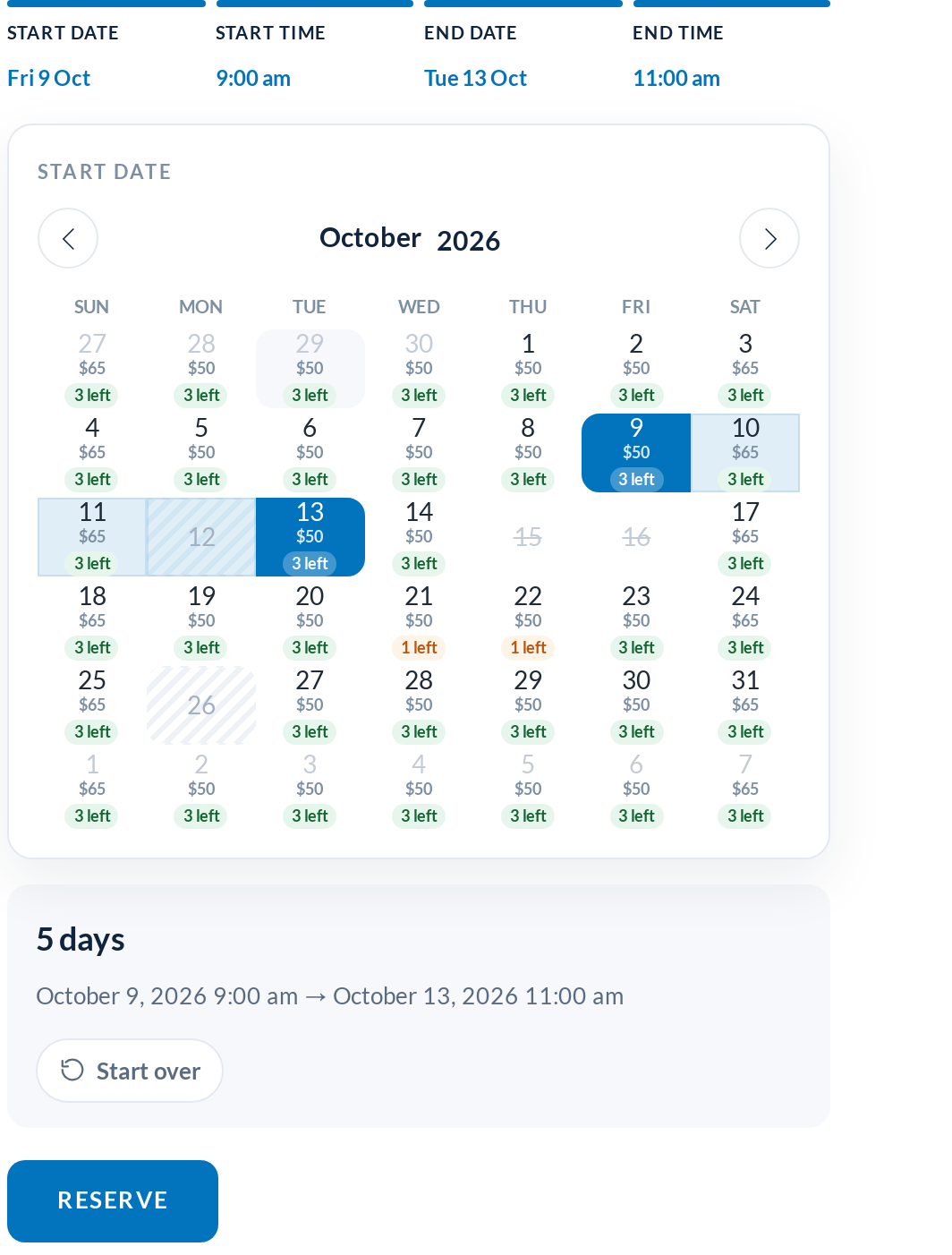
- New featureIn Line Range Picker (the new default): one guided panel with a progress legend across the top. Each finished step shows its value and can be clicked to change it; changing the start date resets the end date. A Start over button sits in the summary bar
- New featurePopup Range Picker: the same flow opened from a “Select your dates” field, as a floating card on desktop and a bottom sheet on phones. It closes itself when the last step is done
- New featureSeparate Date Pickers: start and end fields with popup calendars, and a time slot grid that opens automatically after each date
- ChangePrevious Date Picker: the calendar that shipped before 1.0.61, untouched, selectable at any time if you need to rule out the new picker
- ImprovementTime of day is a slot grid grouped by morning, afternoon and evening. Hours inside an existing booking or its turnover buffer are greyed out; on a same-day return, slots up to the pick-up time are too
- New featureCalendar Styler tab in Rentals › Settings: choose the picker and one of four styles (Airy, Card, Bold, Classic), set the main colour, corner radius and time slot interval, and switch on price per day or units left in each day. The preview beside the controls is the real calendar with sample bookings and updates as you change things
- New featureEditable labels: Start Date, Start Time, End Date and End Time can be renamed, and are registered with WPML String Translation and Polylang
- New featureBlock-out reason: closed days and holidays have an optional Reason column; customers see it when they hover a blocked day (otherwise “Disabled”)
- New featureThe rental total for the chosen dates fades in under the price as soon as the dates and times are complete
- ImprovementRentals still run through a closed day without starting or ending on it, and sold-out days cap the return calendar. Closed-day ranges are now computed once, so a weekly closure no longer slows the calendar down on busy products
- ChangeThe Contracts settings (rental agreement signing) moved into Rentals › Settings as their own tab; the separate menu item is gone
- FixThe global calendar widget is always an open start / end picker, and no longer picks up a subscription product’s options from the category page
- FixFixed: the composite and bundle product scripts could run before the calendar was ready
1.0.60 Released September 6, 2026 #
A redesign of every admin screen. The plugin menu is now called Rentals, and everything under it shares one clean, modern layout with a summary strip, filters with counts and a bulk-action bar. Prefer the classic WordPress look? Switch back any time from the UI: Modern / Classic item in the admin bar.
- New featureNew Rentals Dashboard: what is going out today, what is due back, what is overdue and what is currently out, the next seven days of movements, and a money section with revenue this month, the last 30 days against the previous 30, average rental order, orders awaiting payment and your top products by revenue
- New featureInventory Report: 7 / 14 / 30 day window, available capacity in every cell, closed days shaded, totals row, summary strip and a CSV export
- ImprovementBookings Calendar: each day now shows units going Out, coming In and Overdue; click a day to list its orders. The classic one-bar-per-order view is still there as “By order”
- New featureBookings list with Upcoming / Out / Overdue / Returned filters
- ImprovementSend and Return: Due today / Overdue / Next 7 days tabs, sent-of-booked progress, quantity steppers, and an overdue rail. The pick list and the send / return history are now buttons on these pages instead of separate menu items
- ImprovementSerials: cost and last-movement columns, proper paging, and a serials editor directly under “Use Serial Tracking?” on the product edit page with code, status, acquired date, cost and notes — rows save as you type
- ImprovementSettings are organised as tabs across the top with a sticky save bar. The licence is the first tab, green when active.
- ImprovementField help is shown as tooltips (including inside repeaters) instead of long descriptions under every field
- New featureSend and return history now record who sent or returned each item
- FixFixed: the inventory report skipped the first product; the “update start date on early send” setting was reading the early-return option; the send and return pages could error on a deleted product; the serials list ignored paging
1.0.59 Released August 7, 2026 #
- New featureNew picklist feature for generating a PDF or CSV for rentals that are sent that day
- ChangeNew code to get ready for our subscriptions, memberships, and rental queue plugin (pro)
- ImprovementReturn rentals now supports a list of serials to speed up the return process
- New featureScan a barcode to return a rental: point a scanner at each item on the return screen and it checks itself in
- New featureSecurity deposits can now be released automatically a set number of days after return, instead of only on order completion
- New featureRecurring hire schedules: weekly or monthly repeating bookings for the same customer and item, generated in advance (subscriptions add-on)
1.0.50 Released August 8, 2025 #
- New featureGenerate PDF labels of QR codes and Barcodes
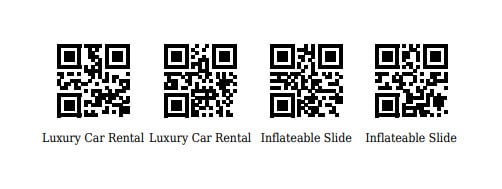
- CompatibilitySupport added for WooCommerce Product Bundles plugin. Composite products were already supported
- New featureAbility to disable dates separately for start and end dates instead of both the start and end date together
- ImprovementSearch improved for bookings, serials, and send / return pages
1.0.42 Released October 21, 2024 #
- New featureAdvanced pricing grids now available. Add as many price points as you like, the price is automatically calculated according to the rental length.
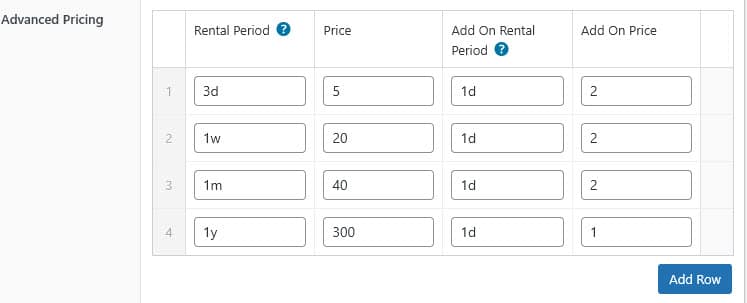
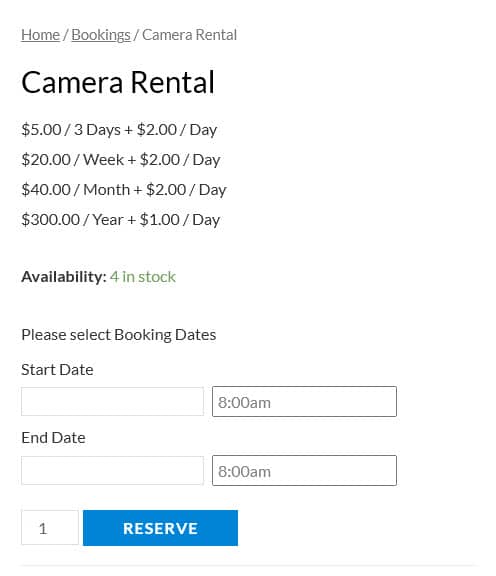
1.0.3 Released June 30, 2023 #
- New featureGreat new feature available allowing you to only have rental bookings available on special dates and times, and you can set the rental length as well. Very handy for tour operators or rentals where you only have special availability.
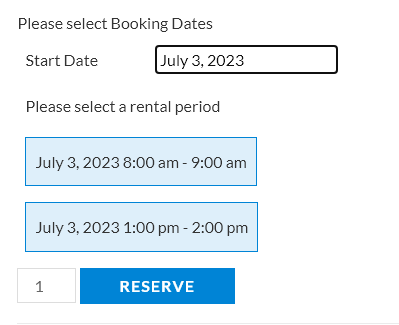
1.0.2 Released June 15, 2023 #
- New featureShortcode calendar widget feature allowing placement of a global calendar anywhere on your website including the homepage and sidebar
- New featureExclusive feature not found on other rental booking plugins: Admin order creator now has support for adding rental dates via a calendar
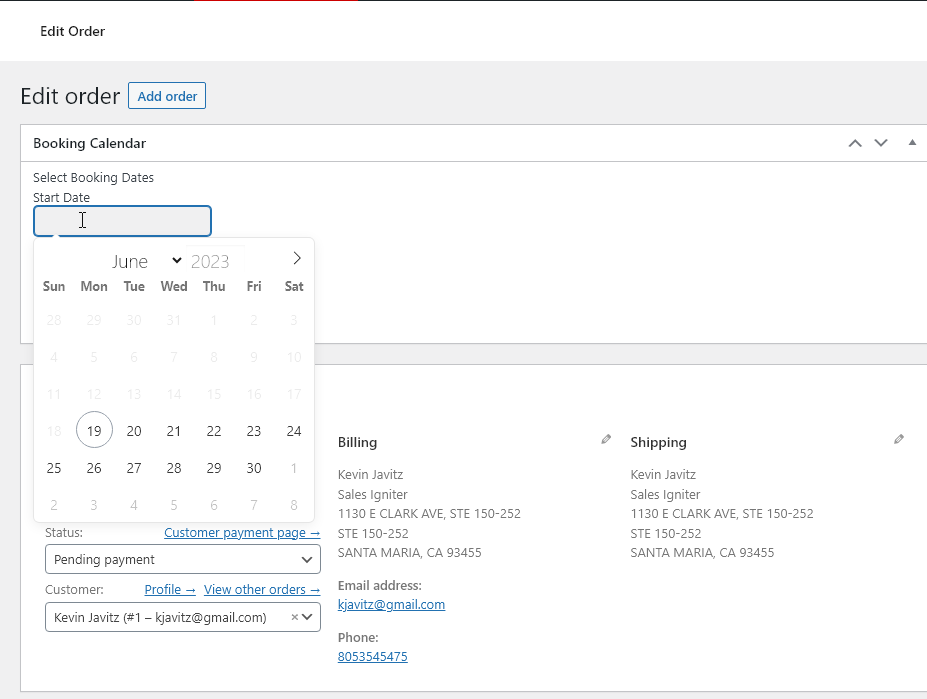
- New featureAnother exclusive feature not found on other WooCommerce bookings plugins: Updating an admin order will re-book correctly all changed rental dates on that order in the rental bookings tables and cached inventory arrays
- OptimizationSpeed of inventory lookups increased using a cached inventory array
1.0.1 Released March 15, 2023 #
- New featureCustom integration for Dokan multi vendor plugin if you are interested please contact us as it is not included in the default plugin but is available at additional cost
- New featureRental send and return history pages are completed
- New featureSerial / Barcode / RFID support is completed
1.0.0 Initial Release January 15, 2023 #
Release history for the Sales Igniter WooCommerce rental plugin.


