
Live chat and a 24/7 AI agent that turn visitors into bookings
Live Chat & AI Chatbot puts a chat on your WordPress site. Your team answers it from WordPress. Around the clock, an AI agent answers from your own help docs, pages and products, shows where its answer came from, and hands the chat to a person when it should. Your conversations stay in your own database. The AI runs on your own key, so a chat costs a fraction of a cent, and there are no per-seat fees. The plugin also has its own site, Sales Igniter Chat, with live demos and product news.
A question nobody answers is a booking you lose
Visitors with a quick question about a date, a price or a deposit don’t wait for an email. They book somewhere that answers.
Without live chat, or with a hosted one
- Questions at night and at weekends wait until somebody is back, and the visitor is gone
- Your team answers the same five questions every day
- A hosted chat keeps your conversations on its servers, and charges for its AI per conversation or in credits
- The chat doesn’t know what the customer bought, so your team looks it up in another tab
With Live Chat & AI Chatbot
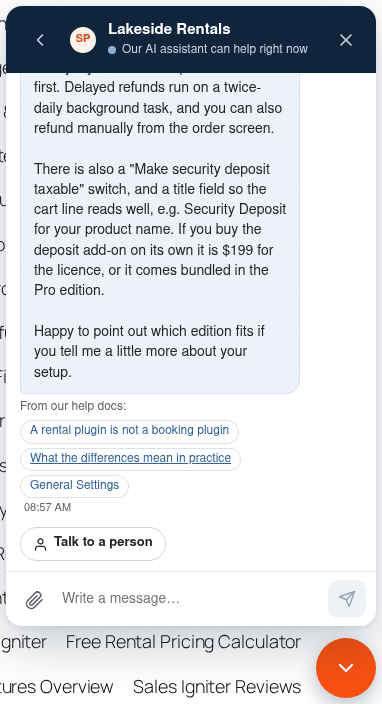
- The AI agent answers at any hour, from your own docs, pages and products, and shows its sources
- It hands the chat to a person for refunds, billing, account changes or an upset visitor, and when asked
- Everything stays in your WordPress database; the AI runs on your key at the provider’s price, with a monthly budget
- WooCommerce or Easy Digital Downloads orders and licences right next to the chat
Human + AI chat, from the first question to the booking
By default a person answers when one is online, the AI when nobody is, and email after that. You choose.
The visitor asks
The chat bubble is on every page. It loads only when it is opened, so your pages stay fast.
The AI answers in seconds
From your help docs, pages and products, with links to the docs it used. Prices come live from your store.
A person when it matters
Refunds, billing, an account change, a bug or a request for a person: the AI hands over and says why.
Your team is told
A sound, a browser notification, a push to their phone, or an email when a chat waits too long.
Gone? Email carries on
A reply they have not read goes by email. When they answer the email, it lands back in the same chat.
Booked
The visitor can rate the chat and gets a transcript by email. You see it all in one conversation.
When someone is online but busy, the AI steps in after a minute and says a person can still join. The operator’s first reply takes over.
An AI agent that knows your business, and knows when to stop
It reads what you already wrote: help docs, pages, blog posts and products. It quotes only what is there, and hands over when it should. See how the Sales Igniter Chat AI agent answers and hands over.
Answers from your own content
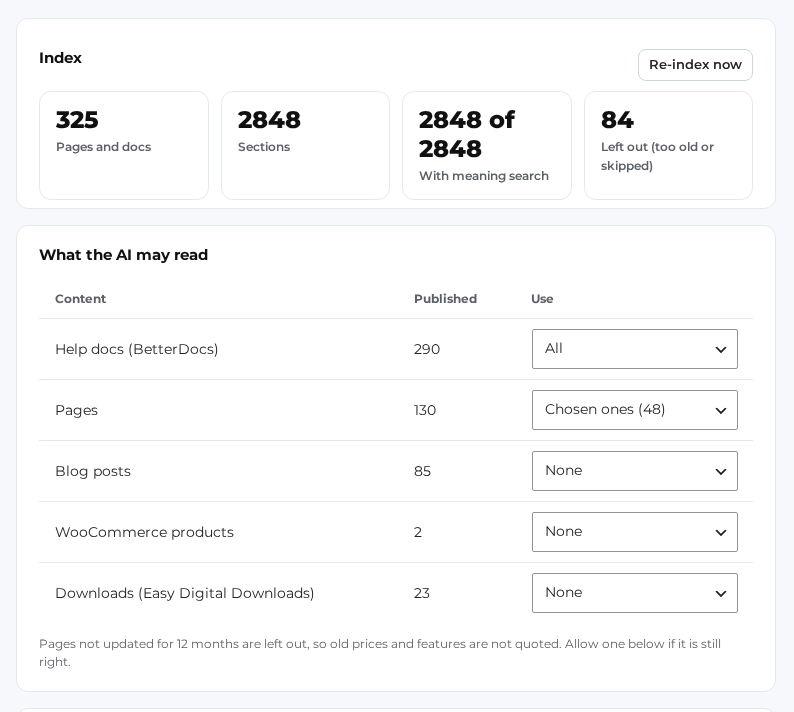
BetterDocs help docs, pages, blog posts, WooCommerce products and Easy Digital Downloads downloads. Choose all, some or none of each.
Shows its sources
Each answer links to the docs it used, so the visitor can read more and you can check it.
Quotes only your prices
Prices come live from your store. The AI never states a price, discount, date or promise that is not in your docs or your store.
Hands over to a person
For refunds, billing, licence or account changes, discounts, a bug, an upset visitor, or anything your content does not answer.
Steps in when nobody replies
Someone online but busy? After a minute the AI helps the visitor, and the operator’s first reply takes over.
Private by default
Only model hosts that keep no data, and email addresses and phone numbers are hidden before a chat leaves your site.
It knows your customers
For a visitor who is logged in or proved their email, the AI sees their licences, renewal dates and recent orders, for that visitor only.
Suggested replies
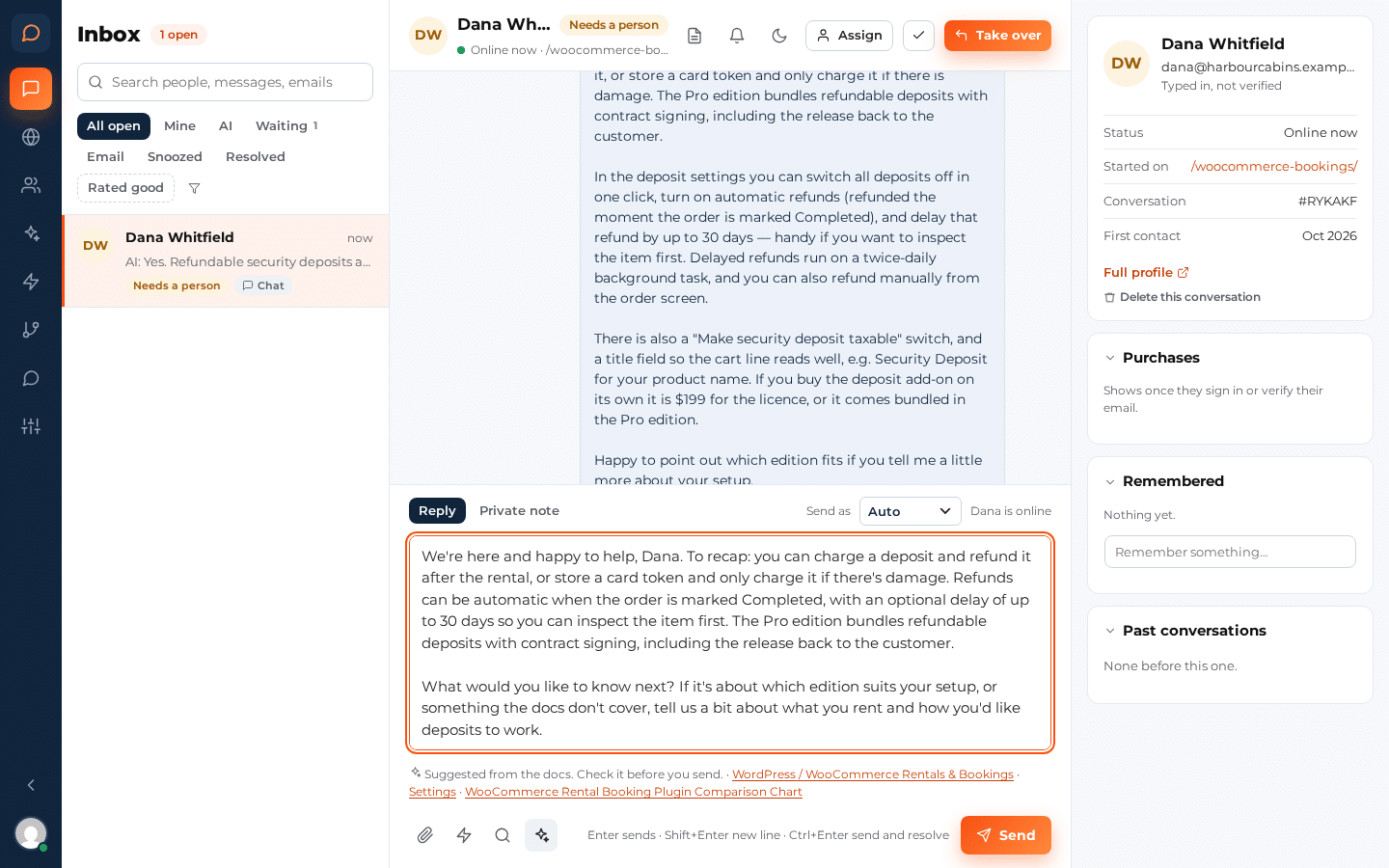
One click drafts an answer from your docs for your operator to check and send. Long chats get a summary for the team.
Your tone, your rules
Friendly, neutral or formal; the visitor’s language or the site’s; and up to 4,000 characters of your own instructions.
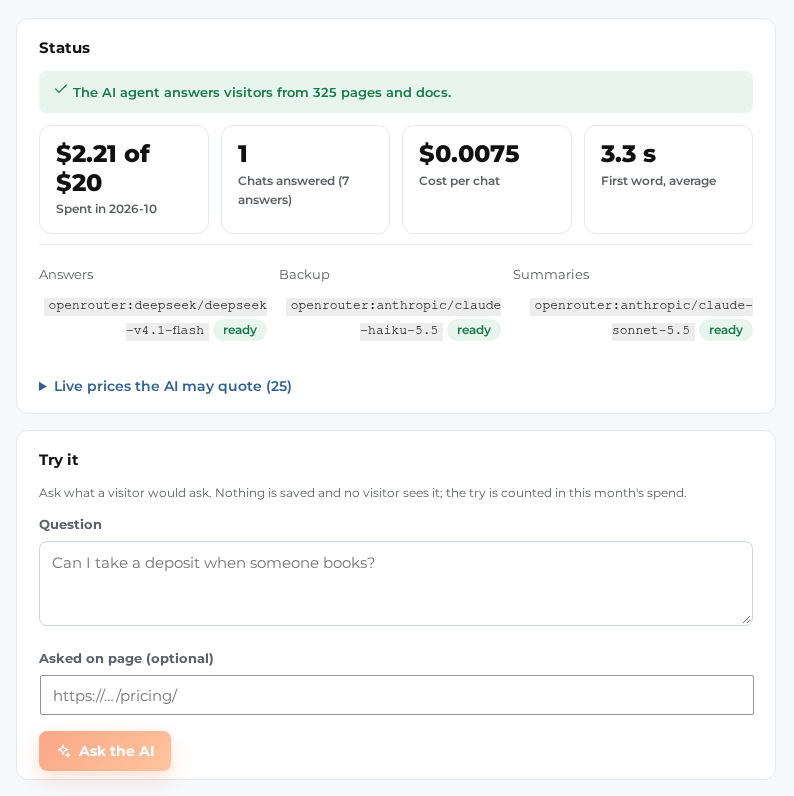
A typical AI chat costs about half a cent
You bring your own AI key and pay the provider directly, at their price per token. No per-seat fees, no per-conversation fee from us, and a monthly budget you set.
| Model (on OpenRouter) | Price per million tokens (in / out) | A typical chat | 1,000 chats |
|---|---|---|---|
| DeepSeek V4.1 Flash The default answer model | $0.30 / $1.20 | $0.0055 | $5.54 |
| Claude Haiku 5.5 The default fallback model | $0.10 / $0.50 | $0.0020 | $1.95 |
| Gemini 3.8 Flash | $0.75 / $3.75 | $0.015 | $14.63 |
| GPT-5.4 mini | $0.75 / $4.50 | $0.015 | $15.39 |
| Claude Sonnet 5.5 Premium; the default for summaries | $2.00 / $10.00 | $0.039 | $39.00 |
How we worked it out
- A typical chat here has 3 AI replies. Each reply sends the AI about 4,800 tokens (the question, the chat so far and the doc sections it found) and gets about 340 back. That is what we measured in real test chats on our own site.
- Prices are OpenRouter’s list prices on October 12, 2026, with no discount for cached prompts. Each model counts tokens a little differently, so the other models’ figures are estimates.
- Measured, not guessed: on our own live site, 19 AI answers averaged about 3,400 tokens in and 270 out, billed about $0.0008 each on the default model; 204 answers on our test site came out the same. A real 3-reply chat was billed $0.0034, less than the table, because repeated parts of the prompt are cached.
- Even on the premium model, Claude Sonnet 5.5, a typical chat is about $0.039.
Your own key
One OpenRouter key reaches all of these models. Anthropic, OpenAI, Google or any OpenAI-compatible address work too.
A monthly budget
You set how much the AI may spend each month. When it is used up, new chats go to your team or to email, and administrators get an email.
No per-seat fees
Add every person on your team as a chat operator. The plugin price stays the same.
Compared with hosted AI chat
| Service | What they list (October 12, 2026) | Per AI conversation |
|---|---|---|
| Intercom Fin | “$0.99 per outcome”, with “50 outcomes per month minimum”. Charged on top of the helpdesk it runs in. Source | $0.99 per outcome, such as a resolved chat or a hand-off |
| Tidio Lyro | Lyro AI Agent “Starts at $32.50 /mo.” “From 50 Lyro AI conversations”. Source | About $0.65 a conversation at that tier |
| Crisp | Mini plan $45 a month with “$ 5 included AI credits”, “Around 90 automated conversations”. Source | About $0.06 a conversation from the included credits |
| Live Chat & AI Chatbot | $99 the first year, then $59/year, for one site ($299, then $149/year, for 10 sites). Any number of operators, plus your AI provider at its token price. | About $0.0055 a typical chat on the default model |
Prices as listed on each vendor’s pricing page on October 12, 2026. The per-conversation figures for Tidio and Crisp are the listed price divided by the listed number of conversations. Their plans include other features and can change, so check their pages for current prices.
Weighing up a switch? Read how Live Chat & AI Chatbot compares with an Intercom alternative or a Tidio alternative on Sales Igniter Chat.
The AI checks real availability and sends a booking link
For stores that run our Sales Igniter Rentals & Bookings plugin for WooCommerce on the same site.
A visitor asks whether something is free on their dates. The AI checks your real rental calendar, gives the price the cart will charge and sends a booking link with the dates already filled in. While it looks, the visitor sees “Checking the calendar…”, and each check is in the AI usage log.
- Real availability and prices from your calendar, not a guess from a help page
- A booking link that opens the product with the dates filled in
- The customer books and pays on your site as usual. The AI never takes a payment
- Still hands over to a person whenever it should
On by default: Settings › AI agent › “Let the AI check availability and prices”. It runs the rental plugin’s own storefront tools, the same ones a shopper’s own AI assistant gets over MCP, with a shopper’s rights: it sees what a shopper sees, never your bookings or customers. WooCommerce only, with Rentals & Bookings Lite 1.0.16 or Regular 1.0.79, or later, on the same site.
One inbox for chat, email and the AI
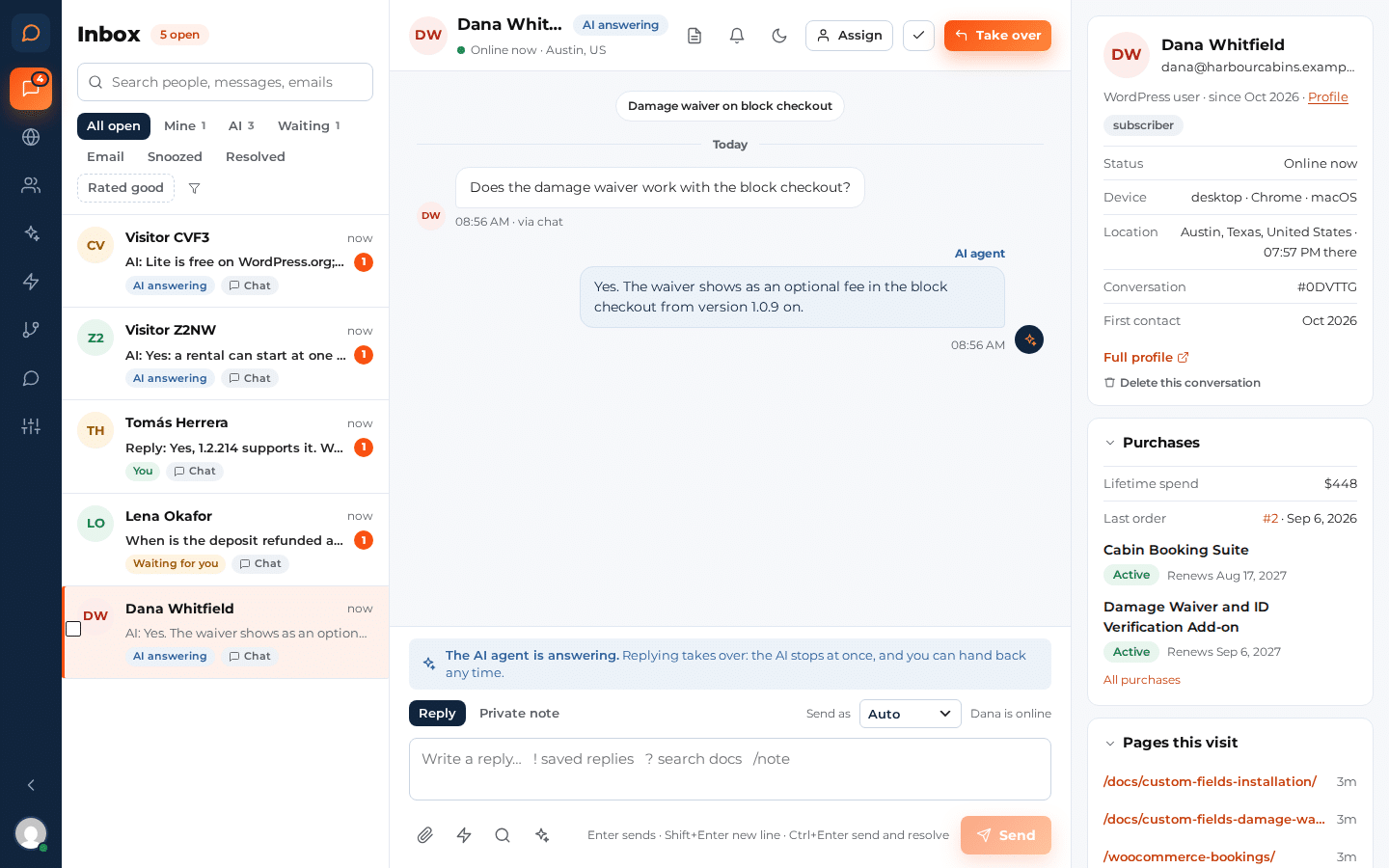
A full-screen app inside WordPress, in its own browser tab. The chats on the left, the conversation in the middle, the person on the right.
Views that match your day
All open, Mine, AI, Waiting, Email, Snoozed, Resolved and Rated good, plus your own saved views and a search across people, messages and emails.
Take over at once
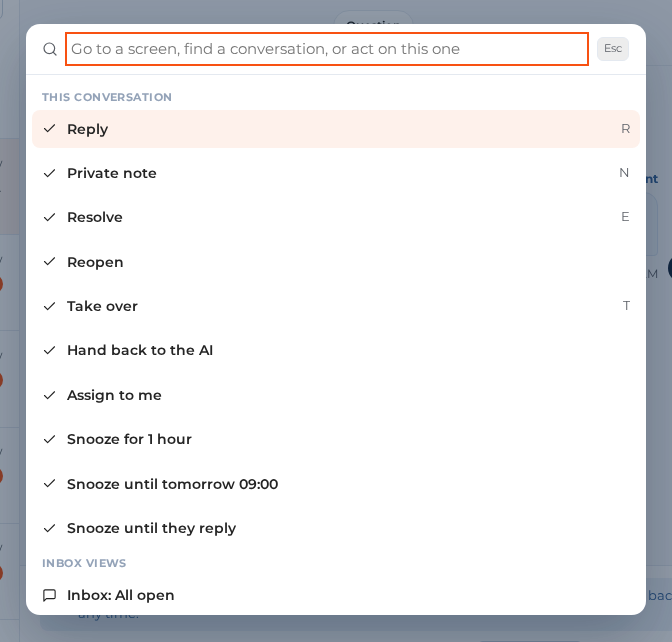
Replying to a chat the AI is answering stops the AI immediately. Hand it back to the AI at any time.
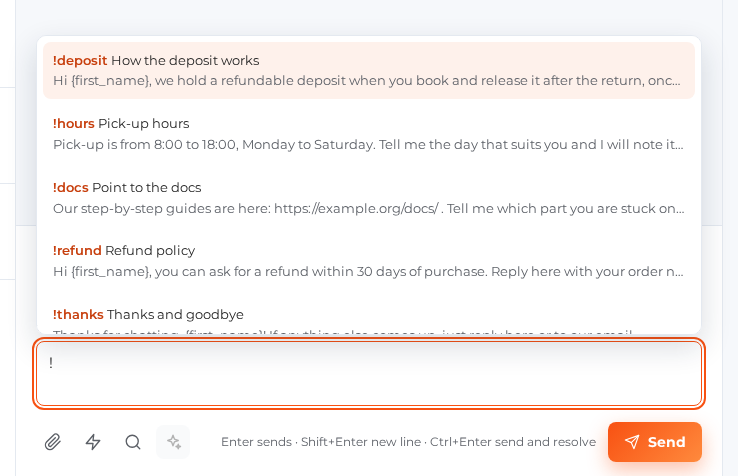
Saved replies and shortcuts
Type ! for your saved replies, ? to search your docs, and Ctrl+K for every action without the mouse.
Notes, files, snooze and assign
Private notes for the team, attachments, snooze until a time or until the visitor replies, and bulk actions.
Visitors who leave still get your answer
One conversation, chat and email, with no ticket system on the side.
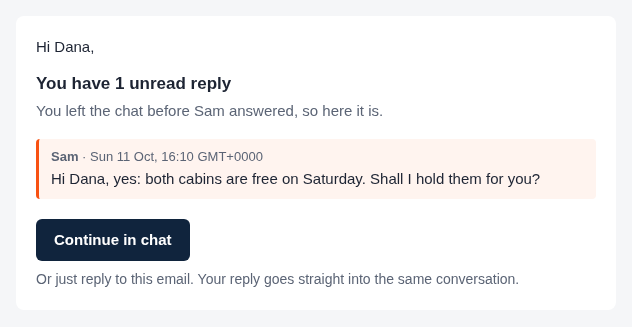
Unread replies go by email
After 10 minutes, the replies a visitor has not read go to them in one email, with Continue in chat.
Their email reply comes back into the chat
A reply to that email lands in the same conversation in your inbox, and in the widget when they come back.
Continue on any device
Continue in chat opens the conversation in their browser, on their phone or their laptop.
Transcripts and limits
A copy of the chat by email afterwards, and limits so nobody gets too many emails. Sent through WordPress mail, so your SMTP plugin works.
See who is browsing, and start the conversation
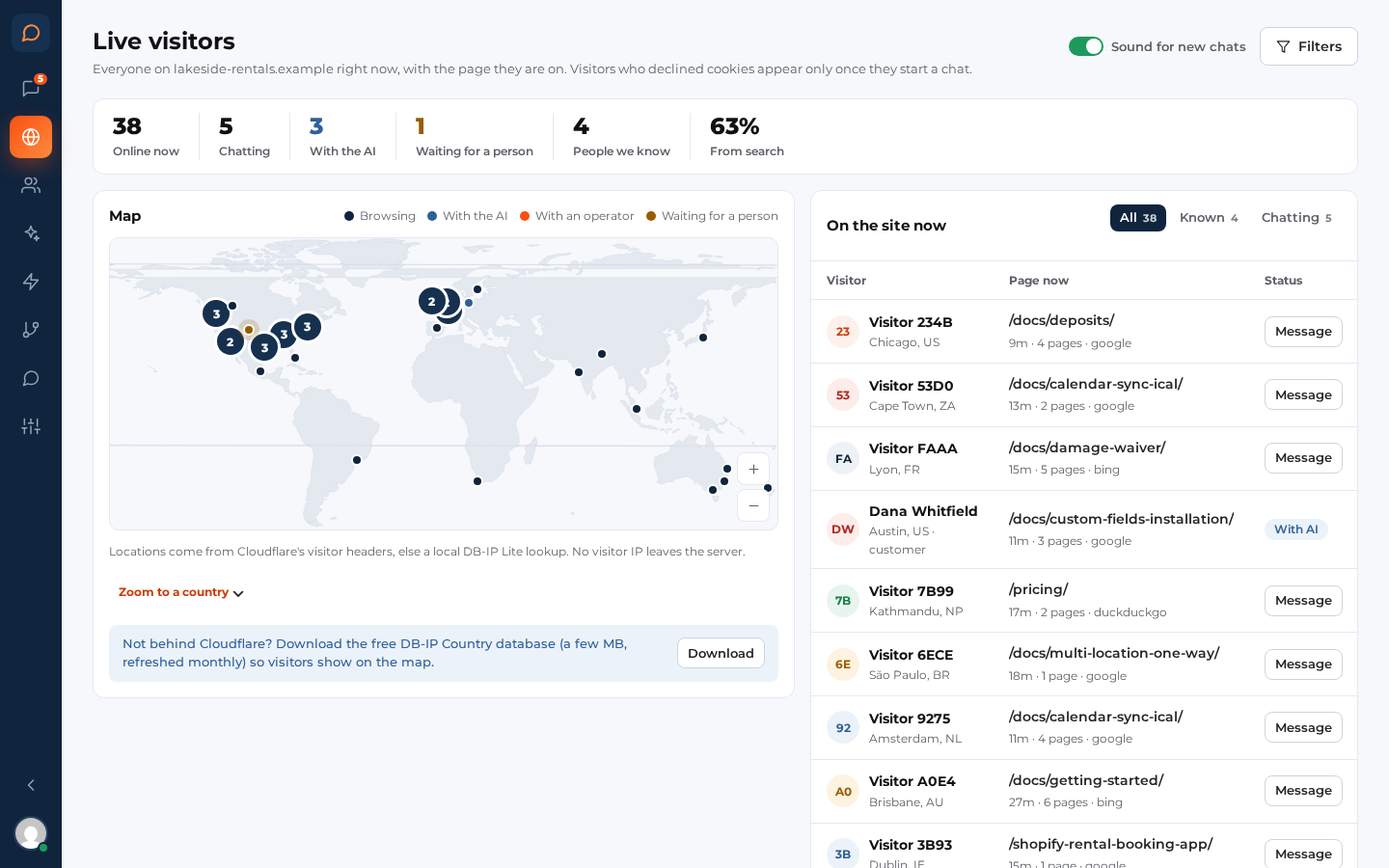
Live visitors on a list and a world map, and messages that open the chat by themselves on the pages and moments you choose.
Who is on your site now
Online, chatting, with the AI or waiting for a person, where they came from, and the page they are on. Only with their consent.
Start the chat yourself
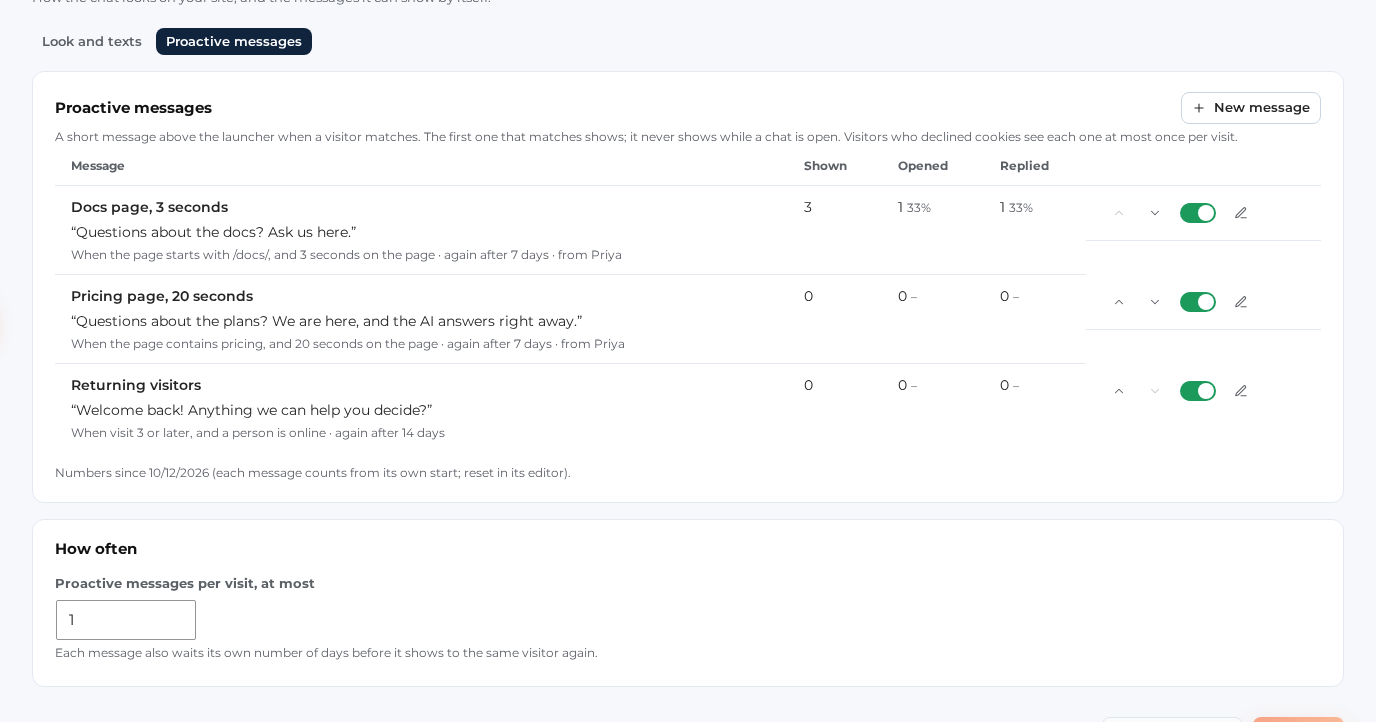
Message a visitor from the list, or let a proactive message open the chat after 30 seconds on your pricing page.
From a person or from the AI
A proactive message can come from someone on your team, from the team, or from the AI assistant.
Know what the customer bought before you answer
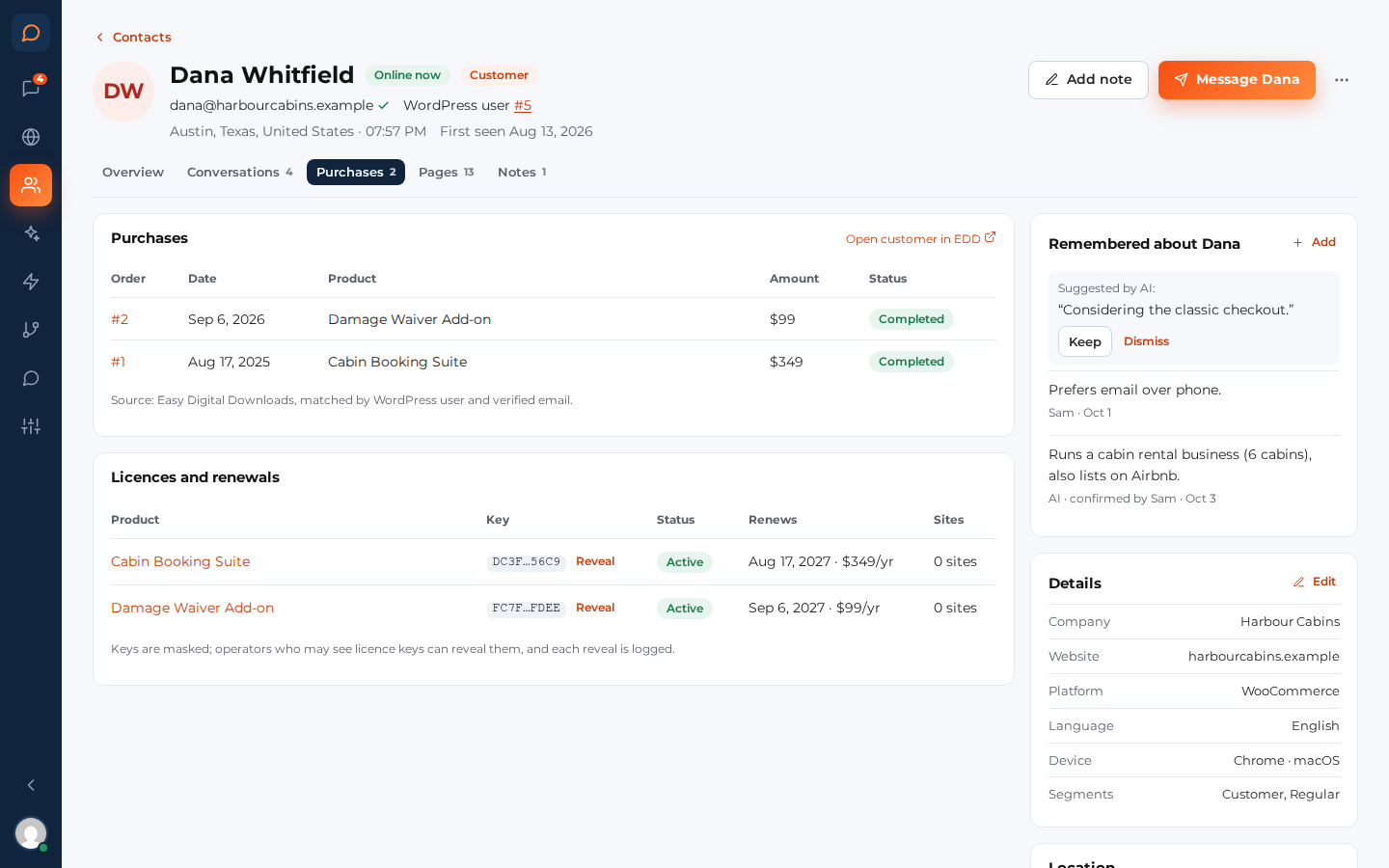
With WooCommerce or Easy Digital Downloads on the site, every conversation shows what that person bought, read live from your store.
Orders and lifetime spend
The last order and the lifetime spend in the side pane, and every order on the person’s profile, with a link to the customer in your store.
Licences and renewals
With EDD Software Licensing: each licence with its status, renewal date and sites, the key masked. Subscriptions too.
Only for a person you know
Purchases show only for someone logged in or with a proved email address, never for an address somebody just typed.
The AI can answer it too
“When does my licence renew?” For a logged-in customer, the AI answers without a person.
The right chat to the right person, at the right time
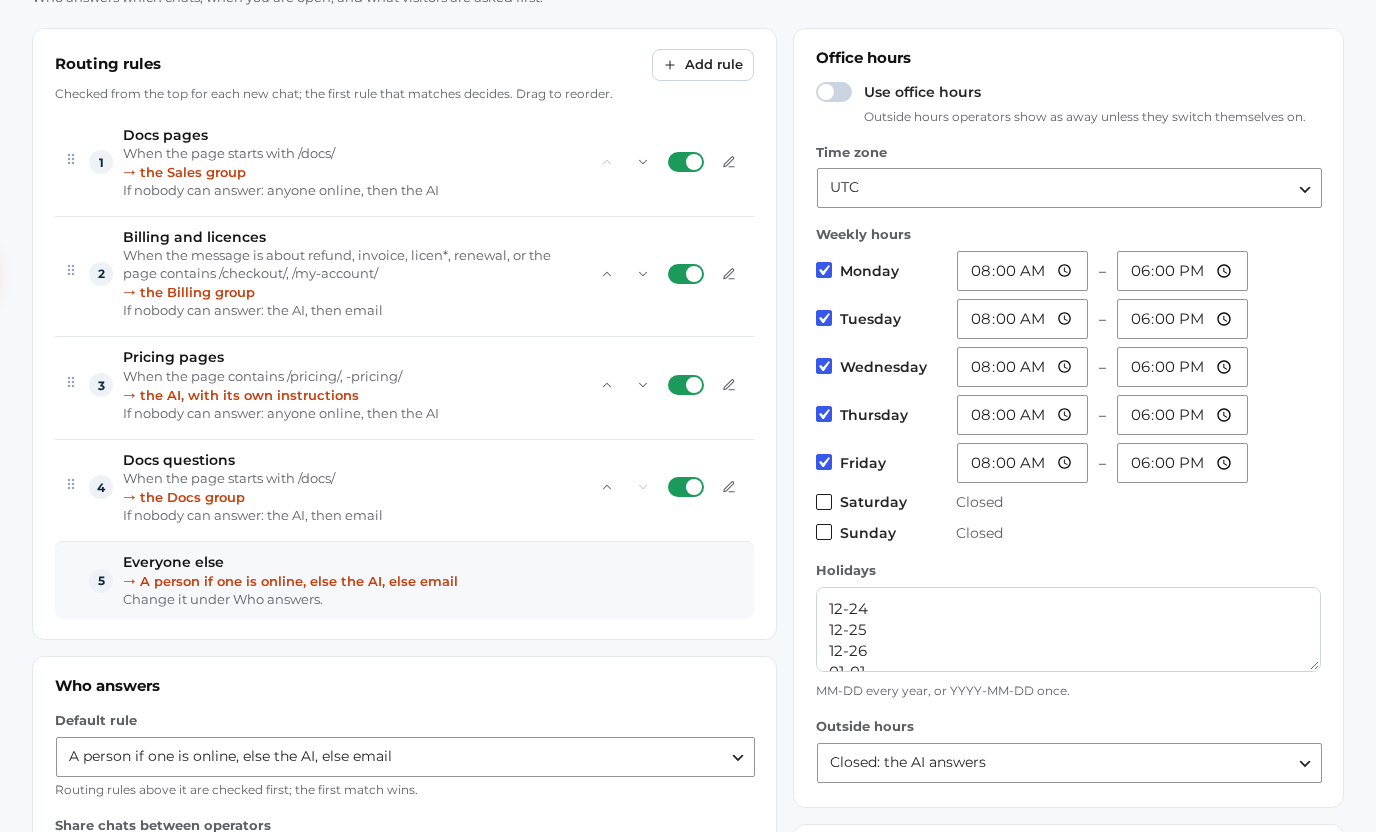
Decide who answers which chats, when you are open, and what happens when nobody is: a person, the AI or email.
Routing rules
By page, by words in the message, by product, by customer (has a licence, has bought), by login or by country. Each rule picks a person, a group, the AI or email.
Office hours and holidays
Weekly hours in your time zone and your holidays. Outside hours, the AI answers or the visitor leaves an email.
Fair sharing
Round robin or least busy, and a chat moves on when its operator goes away.
Notifications that reach you
A sound, browser notifications, Web Push to phones (no app store, no third-party service) and an email when a chat waits too long.
Chat ratings
At the end of a chat, visitors can rate it Good or Bad. Rated good is a view in the inbox.
Polling or WebSocket
Works on any host out of the box. For messages that arrive at once, connect Soketi, Laravel Reverb or Pusher.
Your conversations stay in your database
Chats, people, email replies and the AI’s index are stored in your WordPress database, not on someone else’s servers.
Your data, your server
Nothing is stored with us. The AI provider gets only what it needs to answer, through hosts that keep no data.
Consent before tracking
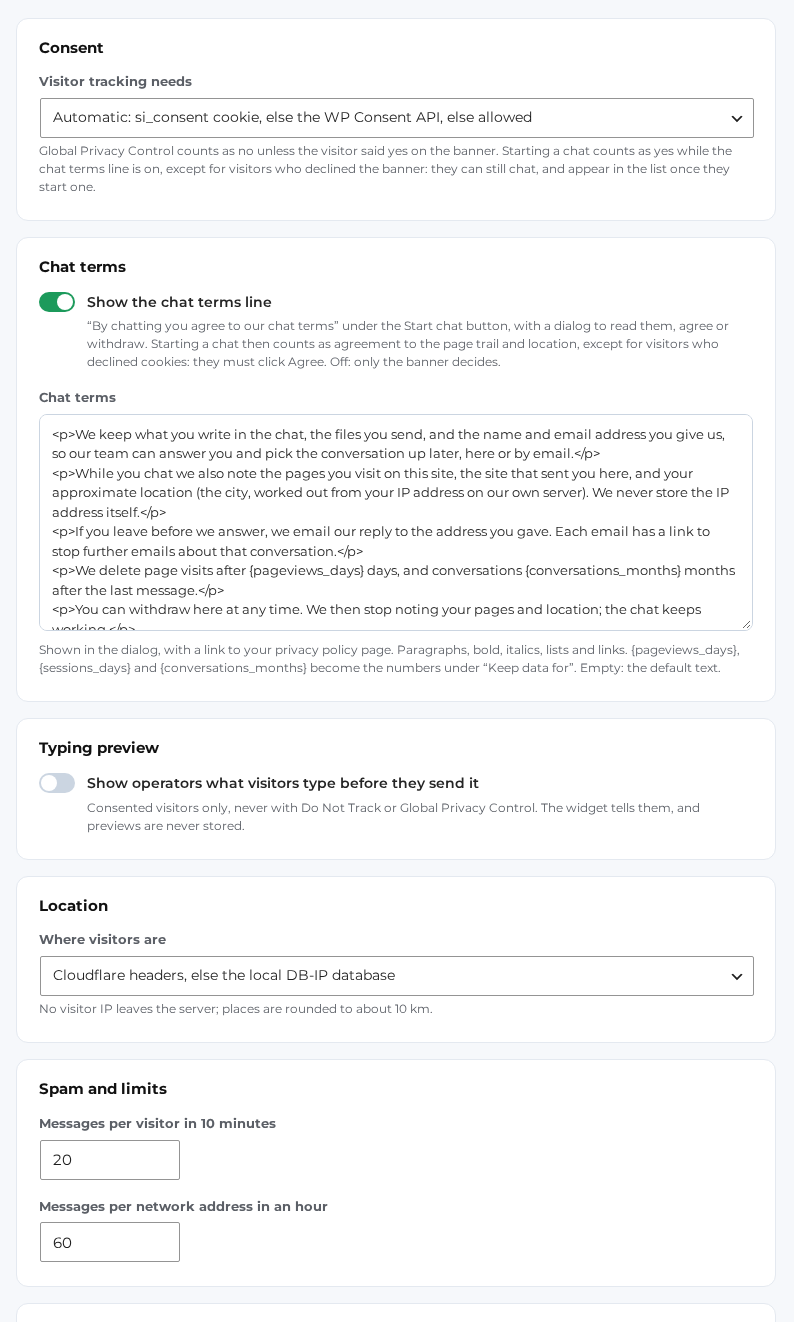
Live visitors and page views only with consent: your cookie banner, the WP Consent API, or the chat terms. Chatting never needs it.
Retention you set
Page views, sessions, conversations and logs are deleted after the periods you choose. IP addresses are never stored.
Export and erase
WordPress’s own export and erase tools cover the chat data, and you can export or delete a person from their profile.
Tickets, teams and SLA timers in the same inbox
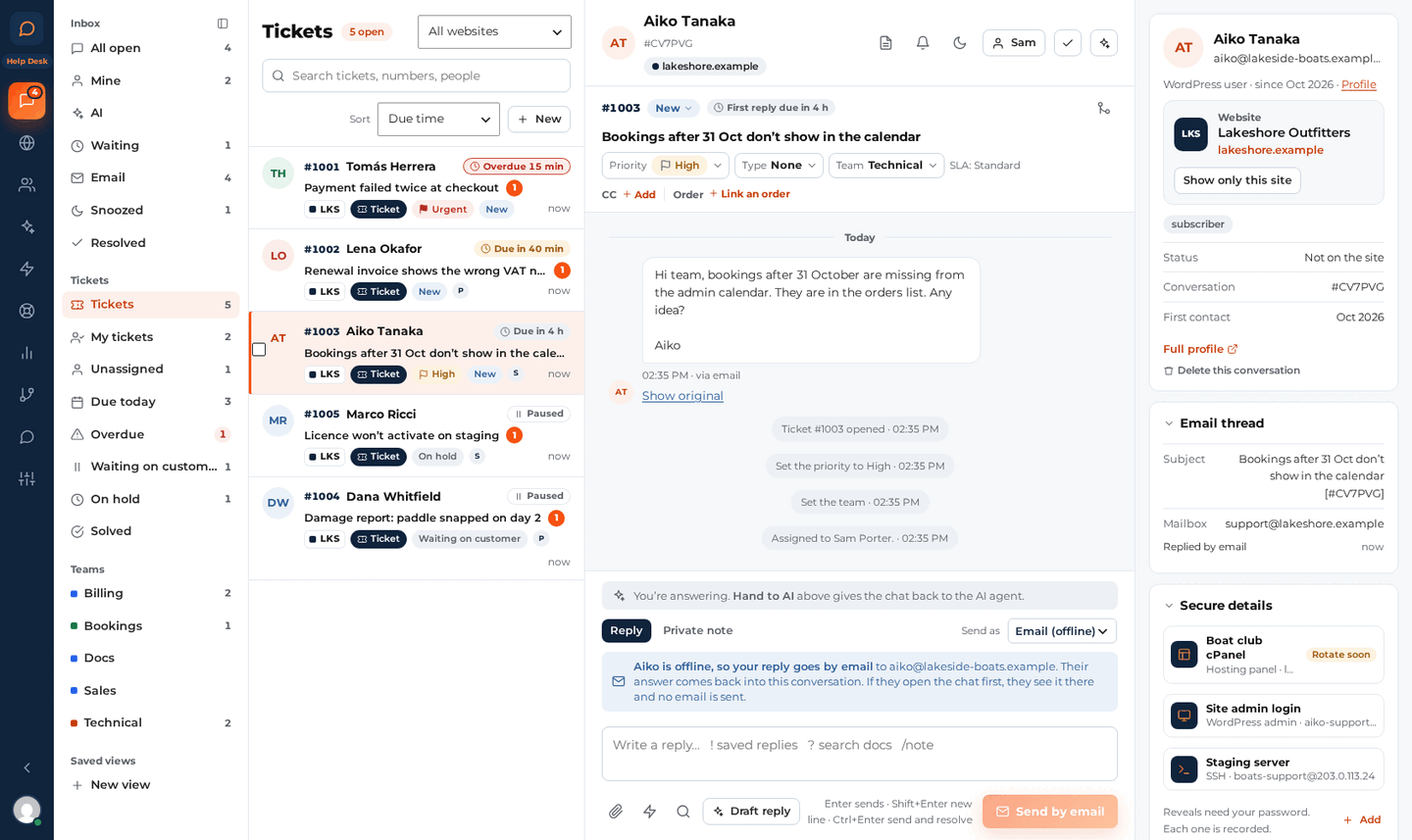
Live Chat + Help Desk gives a chat or an email a ticket number, a status, a priority, a team and timers that show when the next reply is due. Customers send requests from a form, by email or from the chat, and follow them under My support tickets.
Tickets in the inbox you know
Make it a ticket from any chat or email. Each ticket has a number (from 1001), a status, a priority, a type, a team and an assignee, with views for My tickets, Due today, Overdue and Waiting on customer.
Teams and SLA policies
Teams own tickets and either keep new ones in their queue or hand them out in turn to members who are online. SLA timers for the first reply, the next reply and the resolution count your office hours.
Ticket form and My support tickets
A Support ticket form block with up to 8 extra fields, and a My support tickets page (a Support tickets tab in My Account on WooCommerce) where customers follow and answer their requests.
Tickets by email, closed on time
New emails to your support address become tickets. Macros reply and set the status, priority, type, team and assignee at once. Waiting on the customer: a reminder after 3 days, solved after 7 days, closed 4 days after that.
AI drafts, orders and rentals
One click drafts a reply for your team to check, or sums up a long ticket. Next to each ticket you see what the customer bought, their licences and their rentals.
Secure details
Customers keep logins for hosting, SSH or WordPress admin encrypted on your site. A reveal asks for your password again every 5 minutes, allows 30 reveals an hour per person, and every reveal is recorded.
Reports show how many tickets came in, how fast they were answered and solved, the SLA results and the ratings, by channel, team, agent, type or website. Moving from SupportCandy 3.x? Import your tickets with their replies, notes and files.
Questions about Help Desk
Is Help Desk a separate plugin?
No. One plugin does both editions, and the edition comes from your licence key. With a Live Chat + Help Desk key, or a package that includes it such as Ultimate, Help Desk switches on by itself.
Can I start with Live Chat and upgrade later?
Yes. Upgrade from your account and pay the difference. You keep your licence key and your renewal date, and Help Desk switches on by itself.
What happens to Help Desk if my licence expires?
An expired licence never switches Help Desk off. You keep your tickets, settings and Secure details; you only stop getting updates until you renew.
Can I bring my tickets over from SupportCandy?
Yes, from SupportCandy 3.x (version 2.x isn’t supported). Help Desk › Tools › Import tickets copies every ticket with its replies, private notes, history and files, and never changes anything in SupportCandy.
When does a ticket close by itself?
When a ticket waits on the customer, they get a reminder after 3 days and the ticket is marked solved after 7 days. A solved ticket closes after 4 days. You can change these times in the ticket settings.
Everything the plugin does
| Area | What you get |
|---|---|
| Chat widget | A launcher under 30 KB gzipped, the chat loads only when clicked, works on cached pages; your colours, texts and position; questions before the chat; files; earlier conversations; phones |
| AI agent | Answers from BetterDocs docs, pages, posts, WooCommerce products and EDD downloads; sources shown; live store prices; hand-over rules; steps in when nobody replies; tone, language and your own instructions |
| AI models | OpenRouter, Anthropic, OpenAI, Google or any OpenAI-compatible address; a fallback model; meaning search with embeddings; monthly budget; zero-data-retention hosts |
| Inbox | Views, saved views, search, assign, resolve, snooze, bulk actions, private notes, saved replies, docs search in the reply box, suggested replies, summaries, keyboard shortcuts |
| Unread replies by email, email replies back into the chat, mailboxes, transcripts, limits per person and per day | |
| Visitors | Live visitors on a list and a world map shipped with the plugin, filters, Message a visitor, location from Cloudflare or a local database |
| Proactive messages | By page, time on page, visits, cart value and more; from a person, the team or the AI; shown, opened and replied counts |
| Routing and hours | Rules by page, message, product, customer, login and country; groups; round robin or least busy; office hours, holidays and time zone |
| Notifications | Sound, browser notifications, Web Push to phones and installed apps, emails when a chat waits |
| Purchases | WooCommerce and Easy Digital Downloads orders, EDD licences and renewals, subscriptions, masked keys, an audit log for reveals |
| Contacts | Everyone you know, merge and block people, facts the team keeps (and the AI suggests), export and delete |
| Privacy | Consent modes, Global Privacy Control, chat terms, retention periods, WordPress export and erase, no IP addresses stored |
| Team | The Chat operator role and six capabilities, any number of operators, no per-seat fees |
| Help Desk | In the Live Chat + Help Desk edition: tickets, teams, SLA policies, macros, the ticket form and My support tickets, ticket emails, Secure details, AI drafts for tickets, reports and the SupportCandy import |
| Developers | WP-CLI commands for the knowledge index, AI usage and the minute job; filters; a Pusher-protocol WebSocket option |
Want the full picture? Take the feature tour on Sales Igniter Chat.
Questions about Live Chat & AI Chatbot
Do I need an AI key?
No. Without a key the chat works as a live chat: chats go to the people who are online, and to email when nobody is. Add a key when you want the AI agent to answer.
Which AI providers can I use?
OpenRouter (one key reaches many models, and the defaults are set for it), Anthropic, OpenAI, Google, or any OpenAI-compatible address. You pay the provider directly, at their price.
How much will the AI cost me?
About $0.0055 for a typical chat with three AI replies on the default model, at OpenRouter’s prices on October 12, 2026. A monthly budget that you set caps it: when it is used up, new chats go to your team or to email. The AI agent tab shows the spend and the real cost per chat. See the cost table.
Do I need WooCommerce?
No. It runs on any WordPress site. WooCommerce, Easy Digital Downloads and BetterDocs are optional: with them, the chat shows what a customer bought and the AI reads your docs and products.
Will it slow my site down?
The launcher is a small script, under 30 KB gzipped. The chat itself loads only when a visitor opens it, and it works on cached pages.
How many people can answer chats?
As many as you like. Give them the Chat operator role. There are no per-seat fees.
Do messages arrive instantly?
Out of the box the chat checks for news every few seconds, which works on any host. For messages that arrive at once, connect a Pusher-protocol WebSocket server (Soketi, Laravel Reverb or Pusher). If it goes away, the chat falls back by itself.
Where are the conversations stored?
In your own WordPress database, in the plugin’s own tables. The AI provider gets only what it needs to answer, through hosts that keep no data, with email addresses and phone numbers hidden.
Is it included in Ultimate?
Yes. Live Chat & AI Chatbot is included in the Ultimate package for WooCommerce, in the Live Chat + Help Desk edition, or you can buy it on its own for any WordPress site. With Ultimate and Rentals & Bookings Regular on the same site, the main licence covers it.
Will the AI check availability for my rentals?
Yes, on stores that run Sales Igniter Rentals & Bookings for WooCommerce (Lite 1.0.16 or Regular 1.0.79, or later) on the same site. The AI checks your real calendar, gives the price the cart will charge and sends a booking link with the dates filled in. It sees what a shopper sees, never your bookings or customers, and it never takes a payment: the customer books and pays on your site as usual. It is on by default under Settings › AI agent, “Let the AI check availability and prices”.
Live Chat & AI Chatbot for WordPress
One plugin in two editions, any number of operators. The AI is billed by your provider at its token price.
Live Chat
1 site
Everything on this page, for one WordPress site.
- Live chat widget, the inbox and email continuity
- The 24/7 AI agent on your own key, with a monthly budget
- Live visitors, proactive messages, routing and office hours
- WooCommerce and EDD purchases and licences next to the chat
- Push notifications, ratings, privacy tools, no per-seat fees
10 sites
The same plugin on up to 10 WordPress sites, with one licence key.
- Everything in the 1 site licence
- Up to 10 sites on one licence key
- One renewal date for all your sites
- Each site keeps its own chats, AI key and monthly budget
- Any number of operators on every site
Before you buy
What it needs.
- WordPress 6.6 and PHP 8.1 or newer
- For the AI agent: a key from OpenRouter, Anthropic, OpenAI, Google or an OpenAI-compatible service
- Optional: WooCommerce or Easy Digital Downloads, to see purchases next to the chat
- Optional: BetterDocs, so the AI reads your help docs
- Installs like any plugin: Plugins › Add Plugin › Upload Plugin
Live Chat + Help Desk
1 site
Live Chat plus tickets, teams and SLA timers, for one WordPress site.
- Everything in Live Chat
- Tickets, teams, SLA policies and macros
- The ticket form and My support tickets
- Tickets by email, Secure details and reports
- AI drafts for tickets and the SupportCandy 3.x import
10 sites
Live Chat + Help Desk on up to 10 WordPress sites, with one licence key.
- Everything in Help Desk for 1 site
- Up to 10 sites on one licence key
- One renewal date for all your sites
- Each site keeps its own tickets, teams and AI budget
- Any number of operators on every site
Upgrade any time
Already on Live Chat?
- Upgrade from your account and pay the difference
- Keep your licence key and your renewal date
- One plugin: Help Desk switches on by itself, from the licence key
- An expired licence never switches Help Desk off
The Ultimate package for WooCommerce includes Live Chat + Help Desk. See WooCommerce pricing
Read the guide before you buy
Ten pages walk through setup and every feature, with screenshots from a working site, and nine more cover Help Desk. The Sales Igniter Chat documentation has the same guides on the product’s own site.
Answer every visitor, day and night
Install it on your WordPress site, add your AI key, and the next visitor with a question gets an answer in seconds.