
Subscriptions, recurring billing and memberships for Magento 2
Subscriptions & Memberships is a Magento 2 subscription extension with recurring billing: customers subscribe to a product on the billing plans you choose. Every renewal is charged to the saved card and placed as an ordinary Magento order. Sell memberships that give store credit or member prices, and on rental stores run a “send me the next title” rental queue.
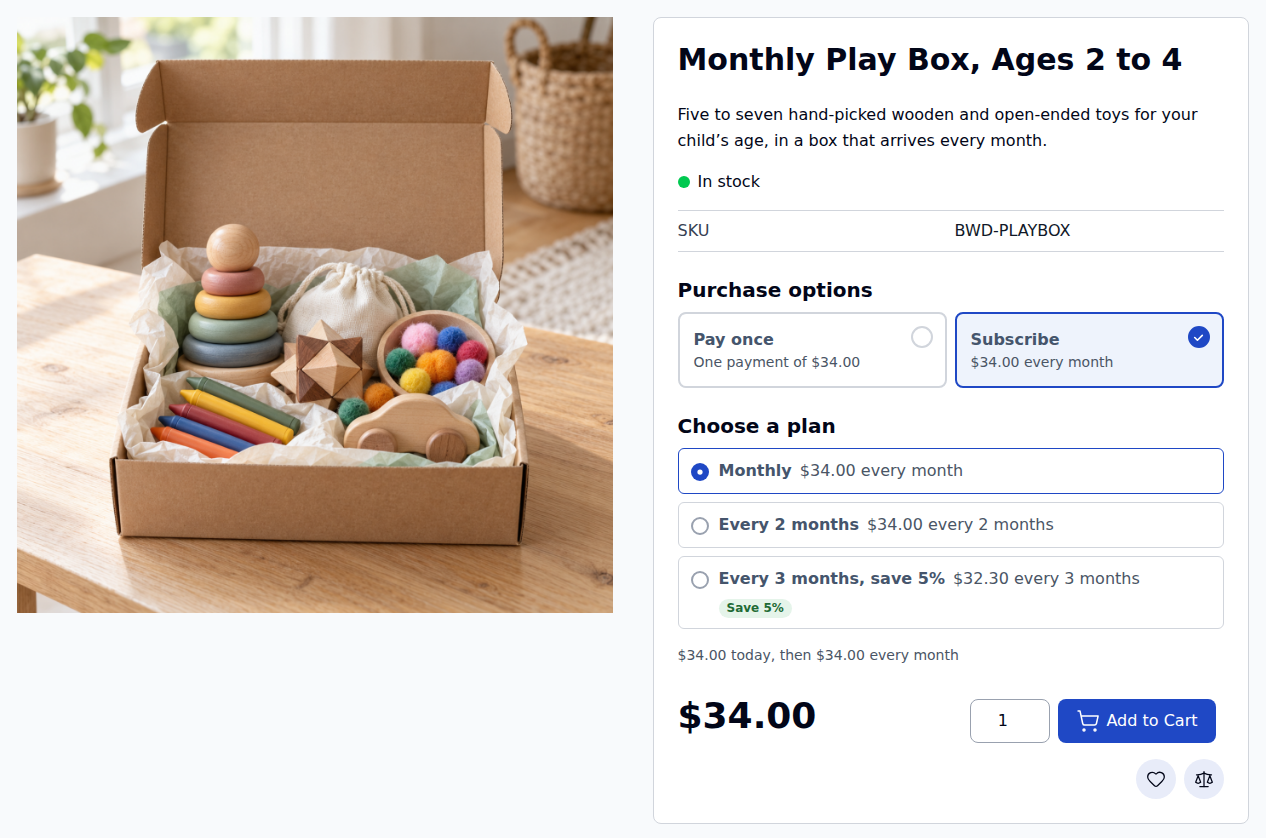
Repeat customers shouldn’t have to reorder by hand
Coffee, pet food, toy boxes, clubs and rentals sell month after month. Magento has no recurring billing of its own, so without a subscription extension every repeat order starts from scratch.
Without subscriptions
- Customers come back to reorder every month, or forget to
- Member perks live in a spreadsheet, and customer groups are changed by hand
- A declined card turns into an email thread instead of a retry
- Cancelling means writing to you, with no chance to offer a pause instead
With Subscriptions & Memberships
- Plans per product: every week, month or year, with free trials, sign-up fees and savings
- Every renewal is an ordinary Magento order, charged to the saved card
- Declined renewals are retried on your schedule, and the customer is asked to update the card
- Customers skip, pause, change plan or cancel in My Account, with offers before they go
From Subscribe to the next renewal in six steps
The same steps for a play box, a coffee club or a membership.
Choose a plan
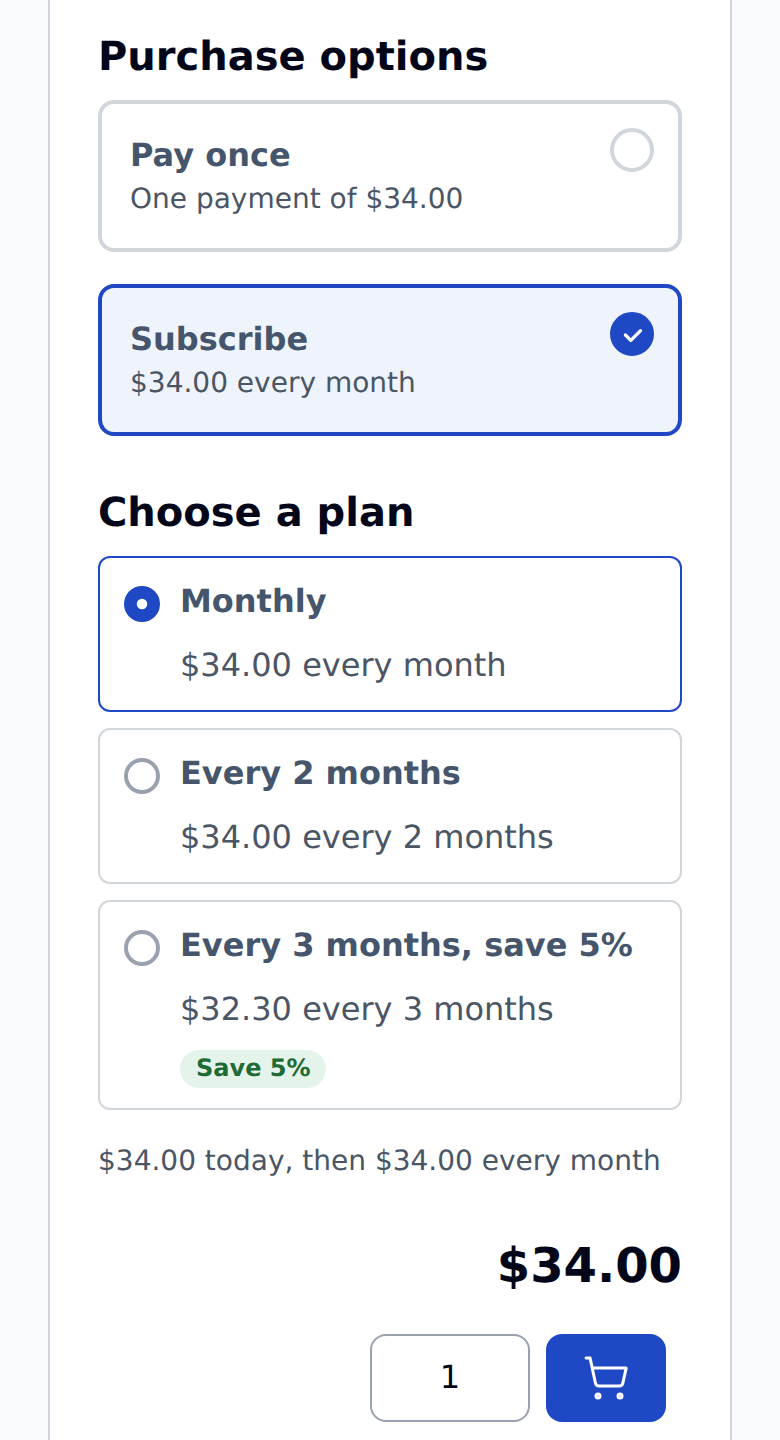
Pay once or Subscribe on the product page, then a plan with its price, any free trial and any saving.
Check out
Magento’s own checkout. The cart shows what each later renewal will cost.
The subscription starts
It links to the first order, and the card the customer paid with is kept for the renewals.
Renewals run on time
Every five minutes, cron picks up what is due and places the renewal order.
Failed payments retry
A decline is retried on the days you set, and the customer is emailed to fix the card.
Customers stay in control
Skip, pause, renew now, change the plan or the card, or cancel, from My Account.
It works on any Magento 2 store. Our rental extension is not needed; on a rental store, add the rental bridge for subscription rentals and the rental queue.
Plans on the product page, totals in the cart
Customers see what they pay today and on every renewal after it, before they check out.
Pay once or subscribe
Offer both, or sell a product as a subscription only. Plan cards show the price for each billing period.
Plans you define
Every so many days, weeks, months or years. The catalog price, a fixed price or a percentage off, with an optional free trial, sign-up fee and number of billing cycles.
No surprises at checkout
“$34.00 today, then $34.00 every month” on the product page, and a Recurring totals line in the cart and checkout.
Several subscriptions in one cart
Items are grouped by billing period and start date, and each group becomes its own subscription. Or allow one plan per order.
The products you sell
Simple, virtual, downloadable, configurable and bundle products, and rental products with the rental bridge.
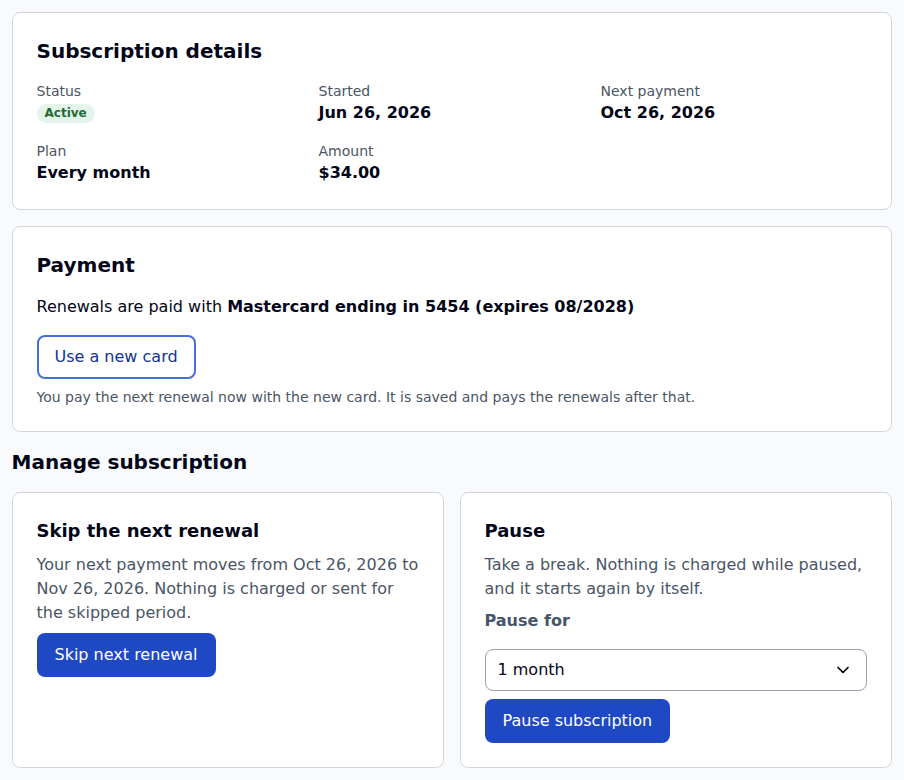
Customers manage their own subscriptions
My Subscriptions in My Account, on Luma and Hyvä. You decide which of these actions customers may use.
Skip or pause
Skip the next renewal, or pause for a number of billing periods. It starts again by itself.
Change the plan or the card
Move to another plan of the product from the next renewal, pick another saved card, or pay now with a new one.
Add to the next renewal
Add extra products to the next renewal only, or swap a product for another option when you allow it.
Renew now
Pay for the next period today, for customers who want the next box early.
Offers before cancelling
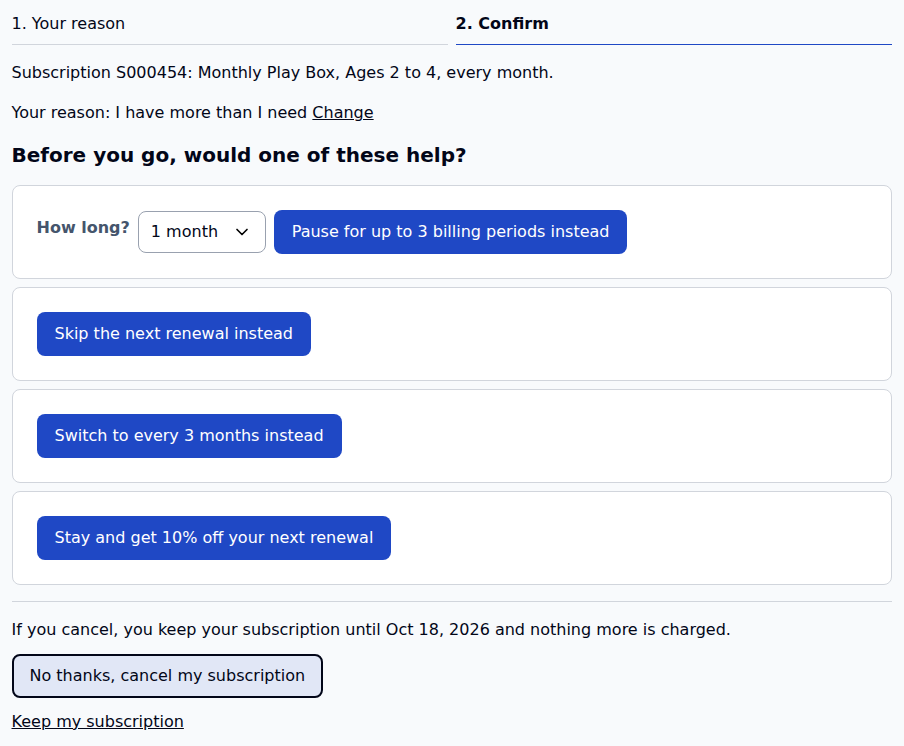
Pause instead, skip, a longer and cheaper plan, or a one-time discount. Cancellations can end at the paid-through date.
Payment due
After a failed renewal the subscription says Payment due, and the customer can change the card or pay from My Account.
Recurring billing that runs itself, and recovers when a card fails
Every renewal is an ordinary Magento order, so fulfilment and reports work as they do today. You set the rules once, in the store configuration.
| You want | Set | What happens |
|---|---|---|
| Keep the price a customer signed up at | Renewal price: locked at signup | Renewals charge the agreed price even when the catalog price changes. Or use the current price for the customer’s group. |
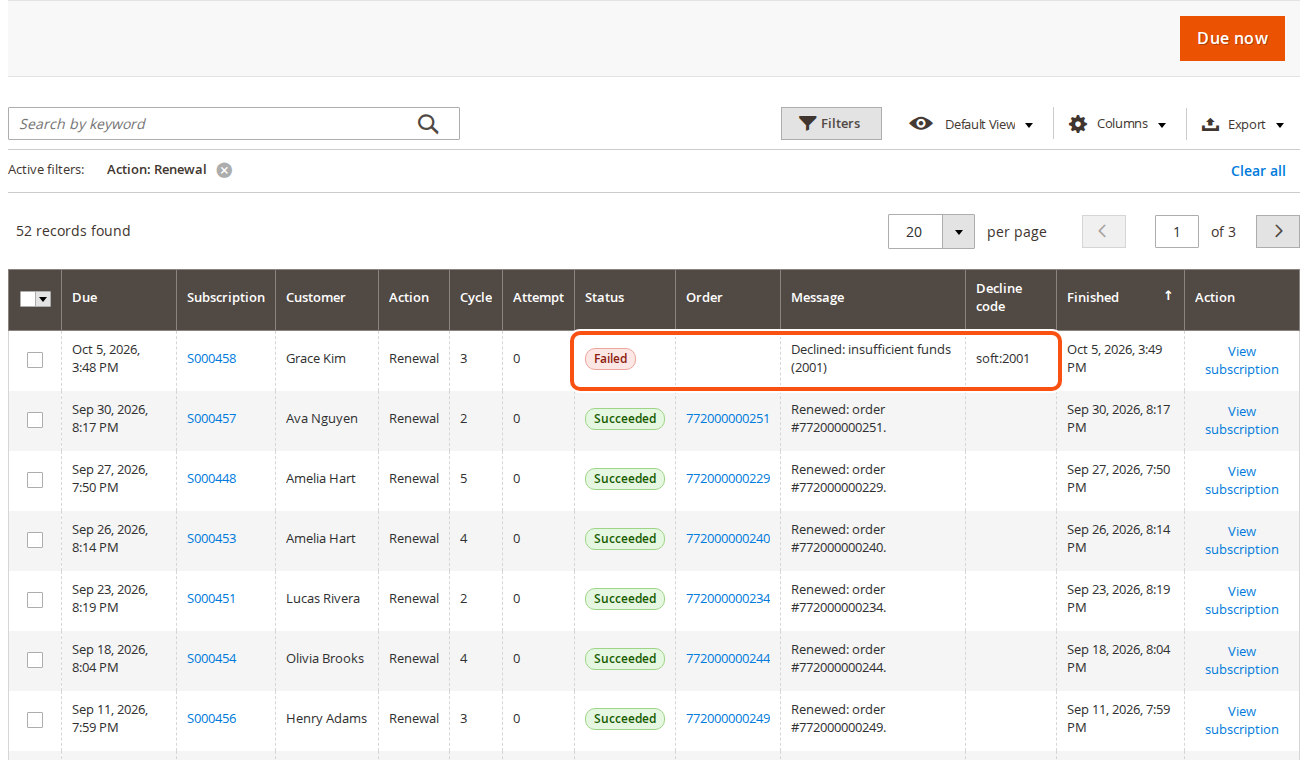
| Retry a declined card | Retry after (days), for example 1, 3, 5, 7 | The payment is retried on those days. A hard decline (stolen, closed or invalid card) stops the retries and asks for a new card. |
| Decide what happens when retries run out | When every retry has failed | Put the subscription on hold, cancel it, or put it on hold and cancel it after a number of days. |
| Remind customers before a renewal | Renewal reminders, for every plan or yearly plans only | An email the days you choose before the charge. Trial-ending and card-expiring emails too. |
| Charge shipping on renewals | Shipping on renewals | Not charged, or the same carrier and method, with the cheapest available one when it is gone. |
| Carry a coupon into renewals | Coupons from the first order | First order only, the first few renewals, or every renewal. |
Everything under one Subscriptions menu
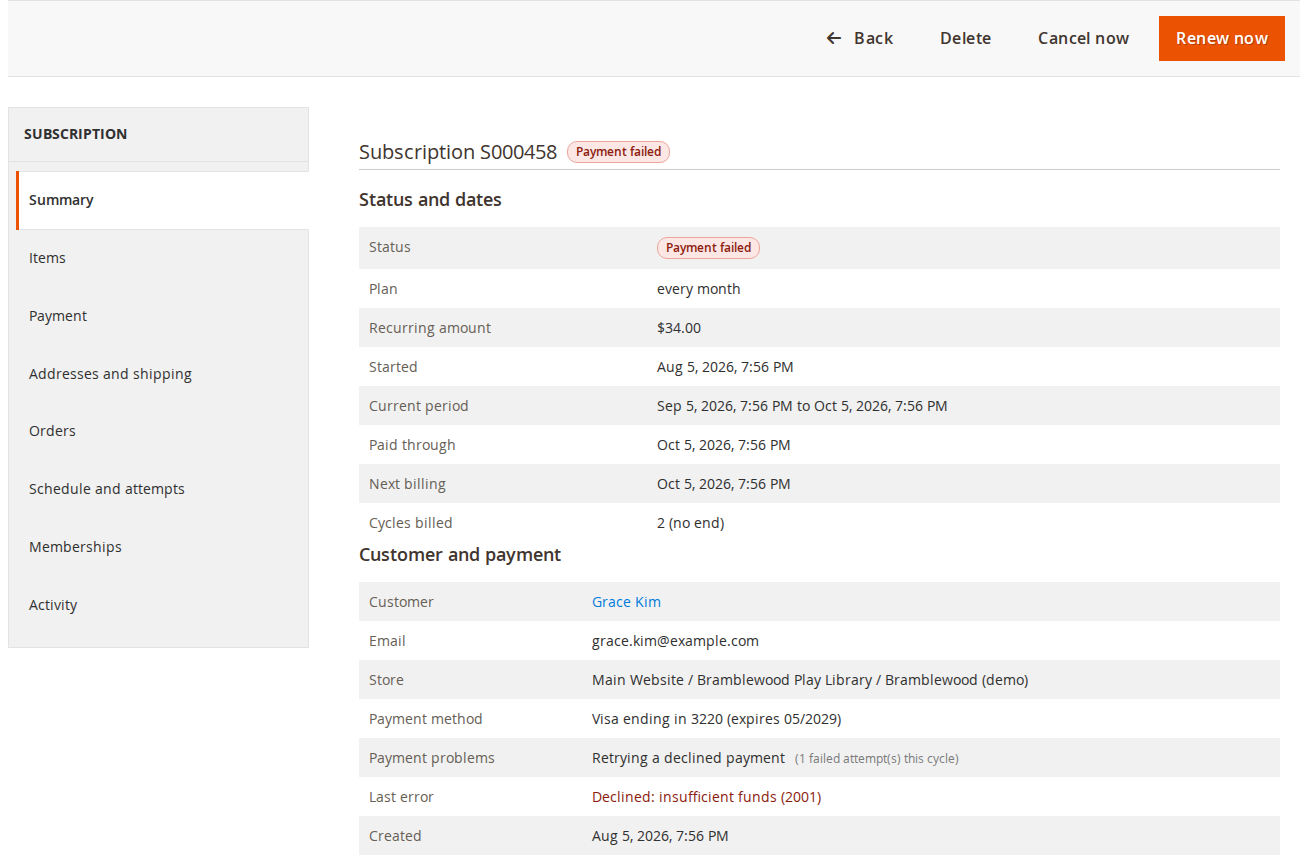
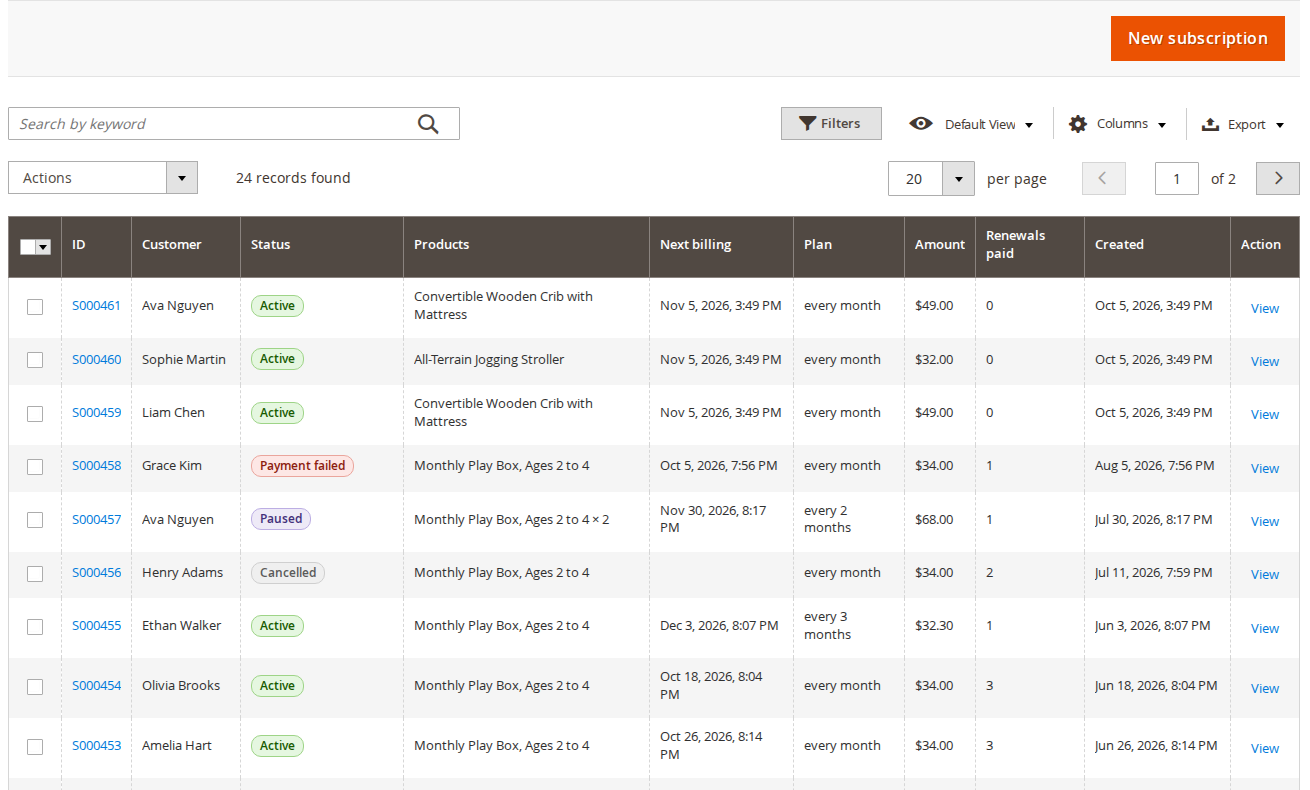
A grid of every subscription, a page for each one, the renewals log and a report of why customers leave.
A page per subscription
Summary, items, payment, addresses, orders, schedule and attempts, memberships and an activity log.
Change what you need
Pause, renew now, cancel now or at the period end, move the next billing date, change a product, the card or an address.
Create one by hand
Start a subscription for an existing customer without an order. The first charge is on the date you choose.
Plans on every product
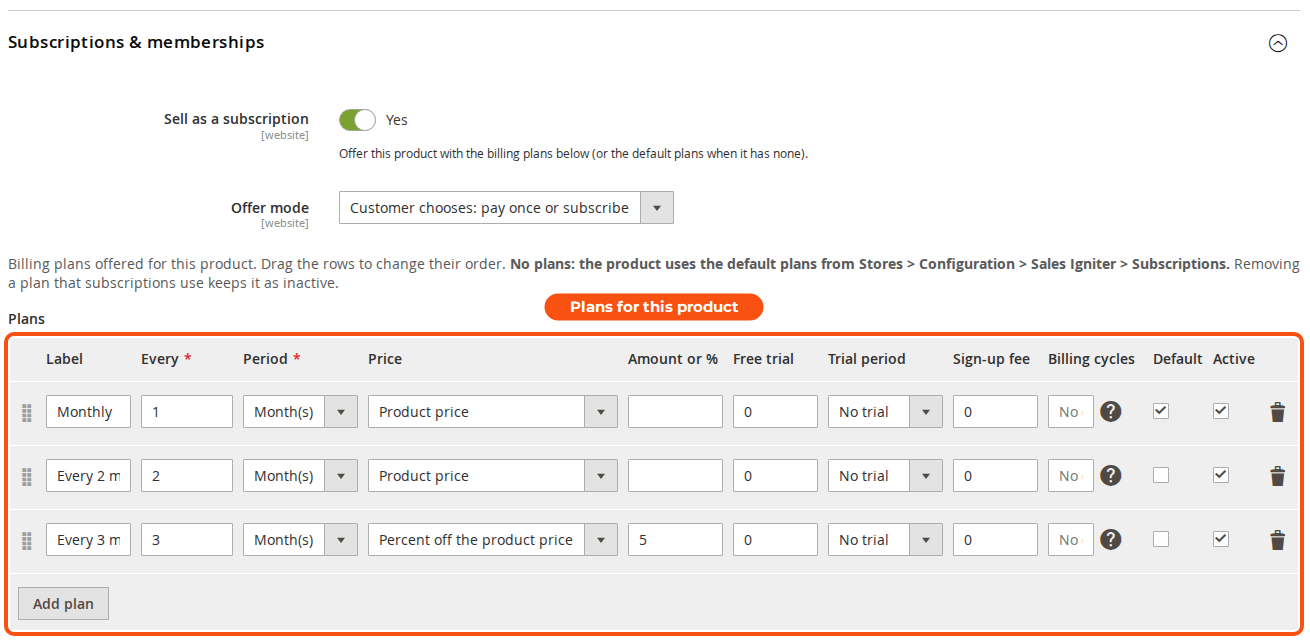
A Subscriptions & memberships section on each product, and default plans for products without their own.
Why customers leave
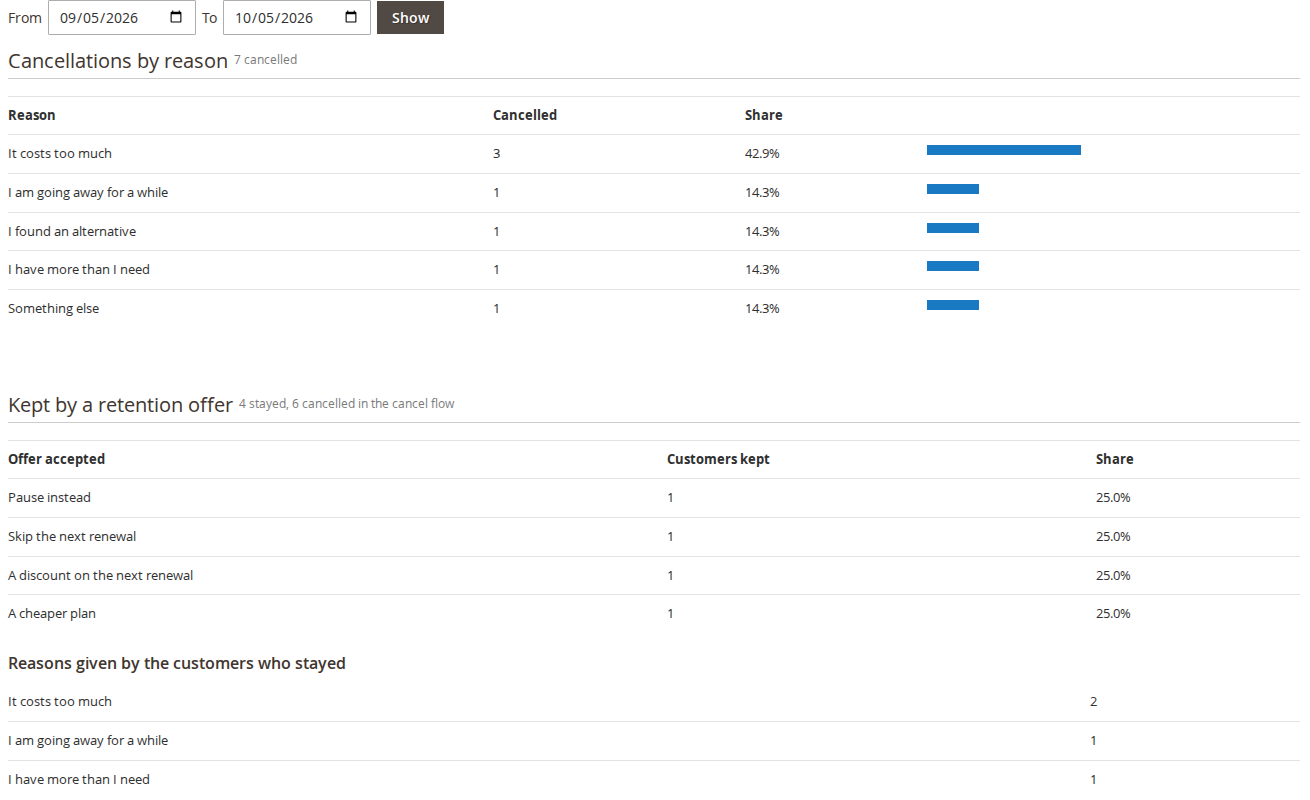
The Cancellation reasons report counts the reasons given, and the customers each retention offer kept.
A stopped cron is noticed
An admin notice appears when renewals have not run for the hours you set.
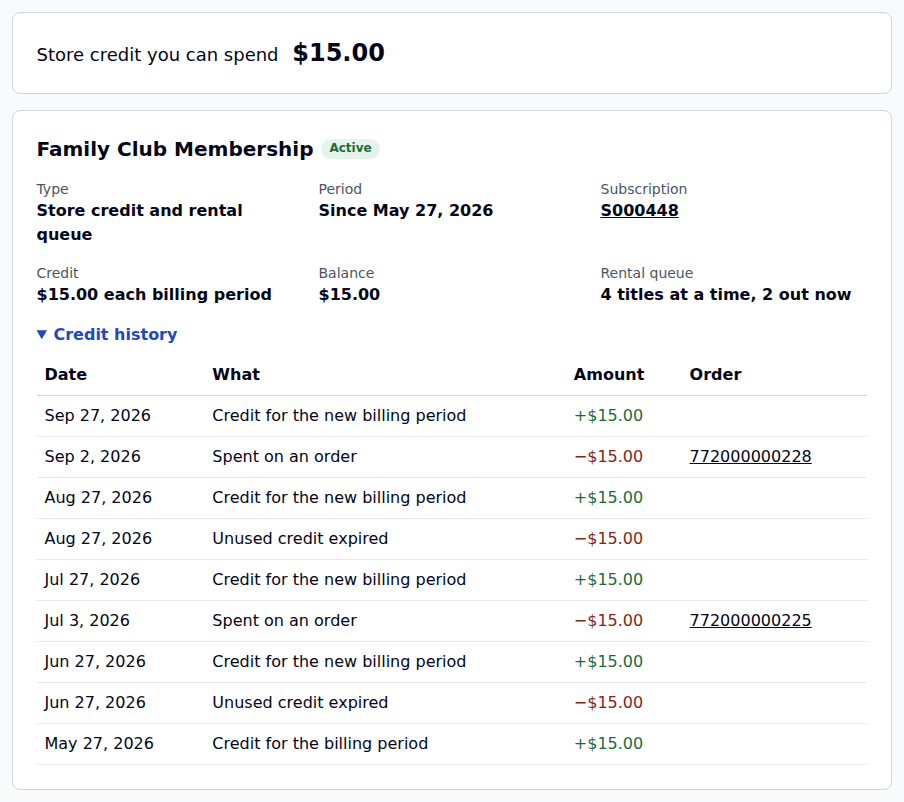
Memberships with store credit and member prices
Mark a product as a membership. Buying it gives the customer store credit every billing period, a customer group for member prices, rental queue slots (on rental stores), or a mix, for as long as the subscription runs.
Store credit each period
Granted at signup and at every renewal, and spent at checkout. Unused credit rolls over up to a cap, or expires.
A customer group while a member
Member prices and free shipping come from your ordinary catalog and cart price rules.
Benefits follow the subscription
Suspended while it is paused or on hold if you choose, kept for a grace period after a failed payment, and ended with it.
A ledger for every credit
Every grant, spend, expiry and adjustment, with the order and the reason. A credit memo gives spent credit back.
One-time memberships
Sell a membership without a subscription, for a number of days or with no end date.
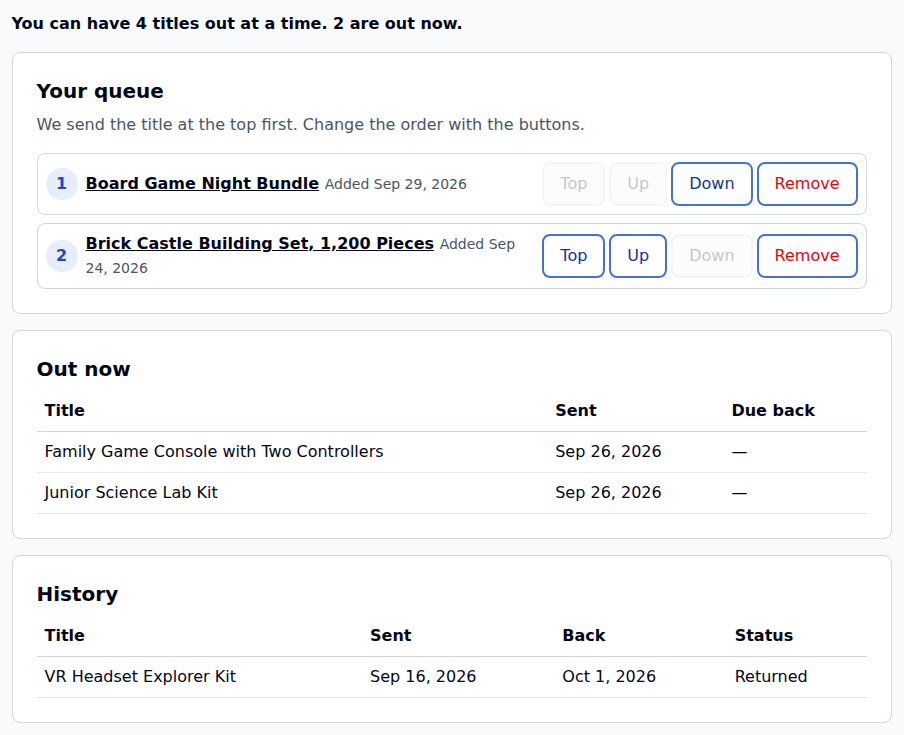
A “send me the next title” rental queue
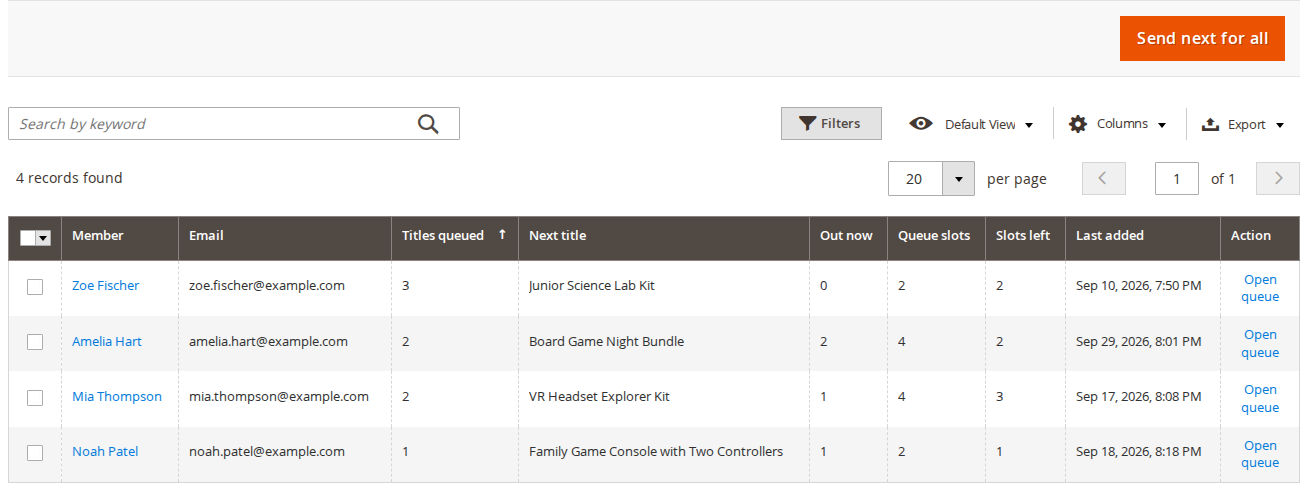
For game, toy and book libraries, lens clubs and film by post. Members line up the titles they want; when a slot is free and a title is in stock, you send it, and every send reserves a real unit in your rental stock.
Needs our Rental Booking extension 1.2.213 or later and the rental bridge
Slots and sends per period
Each membership sets how many titles a member may have out at once, and how many can be sent in a billing period.
Pick list, loans and scanning
A pick list to pack from, the loans out with their serials, and returns scanned or pasted in bulk.
Automatic sending
When a title comes back, send the next one automatically, or put the member at the top of the Send screen.
Lost titles
Mark a title lost, and its replacement can be charged on the member’s next renewal.
Emails along the way
When a title is sent and returned, a nudge to return it after the days you set, and one when a queue runs low.
Queue-only products
A product can be queued only: Add to Cart is hidden, and the server refuses it too.
Rent by the month, on a subscription
With our Rental Booking extension (1.2.213 or later) and the rental bridge, a rental product can be subscribed to. The customer picks a start date, the rental runs one billing period at a time, and the unit stays reserved while the subscription is paid.
The calendar follows the plan
Choosing a plan sets the length of the rental, and the plan cards show the rental price for one period. A month is 30 days, as your monthly rental price counts it.
The unit stays reserved
The reservation is held while the subscription runs, and released at the paid-through date when it ends.
Renewals carry the next dates
Each renewal order has the next period’s dates, without booking the unit a second time.
The rental bridge also keeps deposits off renewal orders, and lets you choose whether the damage waiver renews.
Built for the store you already run
Saved cards are charged without the customer present, on the payment gateway you already use.
Payment gateways for recurring payments
Saved cards renew through Stripe, Braintree, Adyen, Mollie and ParadoxLabs (Authorize.Net and CyberSource). Offline methods such as check / money order create renewal orders that wait for payment.
Hyvä and Luma
The product page, the My Account pages and the cart totals on both. Hyvä stores add the Hyvä package.
GraphQL API
54 queries and mutations: plans on products, subscribing in the cart, My Account, memberships, the queue and the admin actions. There is no REST API.
Twelve emails
Welcome, payment failed, payment needs confirming, renewal reminder, trial ending, status changed, card expiring, credit granted, and four for the queue.
With or without rentals
Subscriptions and memberships work on any Magento 2 store. The rental bridge is only for stores that run our Rental Booking extension.
Per website
Most settings can be set per website, plans per product, and the default plans for every product without its own.
# A customer’s active subscriptions, for a headless storefront
query {
  sisubMySubscriptions(status: [ACTIVE, PAST_DUE]) {
    items { reference status plan_label next_billing_at available_actions }
  }
}
Read: the GraphQL API for subscriptions, memberships and the queue →
Questions about Magento 2 recurring billing and subscriptions
Does Magento 2 have recurring billing built in?
No. Magento has no recurring billing of its own. Subscriptions & Memberships adds it: you set billing plans on a product, and every renewal is charged to the customer’s saved card and placed as an ordinary Magento order, so fulfilment and reports work as they do today. Read: Setting up subscriptions
How does the recurring billing run?
Renewals are scheduled work. Every five minutes Magento’s cron picks up the subscriptions that are due and places the renewal order. The cron has to be running, and an admin notice appears when renewals have not run for the hours you set.
Which payment gateways can charge a saved card for renewals?
Saved cards renew through Stripe, Braintree, Adyen, Mollie and ParadoxLabs (Authorize.Net and CyberSource). Renewals have been tested with Stripe and Braintree. Offline methods such as check / money order create renewal orders that wait for payment.
What happens when a renewal payment fails?
The payment is retried on the days you set, for example 1, 3, 5 and 7. A hard decline (stolen, closed or invalid card) stops the retries and asks the customer for a new card. When every retry has failed, you choose whether the subscription goes on hold, is cancelled, or goes on hold and is cancelled after a number of days. Read: Managing subscriptions
Can customers manage their own subscriptions?
Yes. My Subscriptions in My Account, on Luma and Hyvä, lets customers skip or pause, change the plan or the card, add to the next renewal, renew now or cancel. You decide which actions they may use, and before they cancel you can offer to pause, skip, move to a longer and cheaper plan, or give a one-time discount.
Can I sell memberships with it?
Yes. Mark a product as a membership and buying it gives the customer store credit every billing period, a customer group for member prices, rental queue slots on rental stores, or a mix, for as long as the subscription runs. Read: Setting up memberships and store credit
Does it work on Adobe Commerce and Magento Open Source?
Yes. It needs Magento Open Source or Adobe Commerce 2.4 with PHP 8.2 to 8.4, and has been tested on 2.4.9. It installs with Composer from its own repository. Read the install guide
Do I need your rental extension?
No. Subscriptions and memberships work on any Magento 2 store. The rental bridge is only for stores that run our Rental Booking extension, for subscription rentals and the rental queue.
Is there an API for a headless storefront?
There are 54 GraphQL queries and mutations covering plans on products, subscribing in the cart, My Account, memberships, the queue and the admin actions. There is no REST API. Read the GraphQL API guide
One price, for stores with or without rentals
A one-time purchase with its own licence and its own Composer repository. Magento Pro and Multi Source Inventory Pro licences do not include it.
Magento 2 Subscriptions & Memberships
Everything on this page, for Luma and Hyvä.
- Subscription plans, automatic renewals and failed-payment retries
- Customer self-service, with offers before cancelling
- Memberships with store credit and member prices
- The rental bridge and the Hyvä package included
- 1 year of support and updates for 2 sites, then $149/year if you want them
Before you buy
What it needs, and what we have tested.
- Magento Open Source or Adobe Commerce 2.4 with PHP 8.2 to 8.4, tested on 2.4.9
- Magento cron running: renewals are scheduled work
- Rental subscriptions and the rental queue: our Rental Booking extension 1.2.213 or later
- Card renewals tested with Stripe and Braintree; the Adyen, Mollie and ParadoxLabs modules are included
- Installs with Composer from its own repository, shown on the install page
The extension keeps working whether or not you renew; renewing brings new versions and support. Release notes
Read the guide before you buy
Seven pages walk through setup and every feature, with screenshots from a working store.
Ready to sell subscriptions?
Install it next to your store as it is: nothing changes for customers until you turn on subscriptions on a product.