
Damaged rentals stay off the calendar until they are fixed
Maintenance & Inspections adds repair and service tickets to Sales Igniter Rentals & Bookings for WooCommerce. Tick Needs service when a unit comes back and it goes straight into maintenance, out of stock until it is ready to rent. Plan services by days, rentals or hours, check units at check-out and check-in, track parts, labour and vendor costs, and charge customers for the damage they caused.
A damaged unit should never be rented out again by mistake
When repairs live on paper or in a spreadsheet, the rental calendar does not know a unit is broken, and the next customer finds out first.
Without maintenance tickets
- A unit comes back damaged and is on the calendar again before anyone looks at it
- Repairs are tracked on paper, in a spreadsheet or in someone’s head
- Services are missed because nobody counts the rentals or the hours
- Damage is written off because charging the customer means chasing them
With Maintenance & Inspections
- Needs service at check-in keeps the unit out of stock until it is Ready to rent
- Every repair and service is a ticket on one board, with a technician, photos and a timeline
- Schedules open service tickets by days, rentals or meter hours, and warn before a unit goes out
- Charge the deposit, the saved card or a pay link, always after you review the damage
From a damaged return to Ready to rent in six steps
The same steps for units with serial numbers and for products you count by quantity.
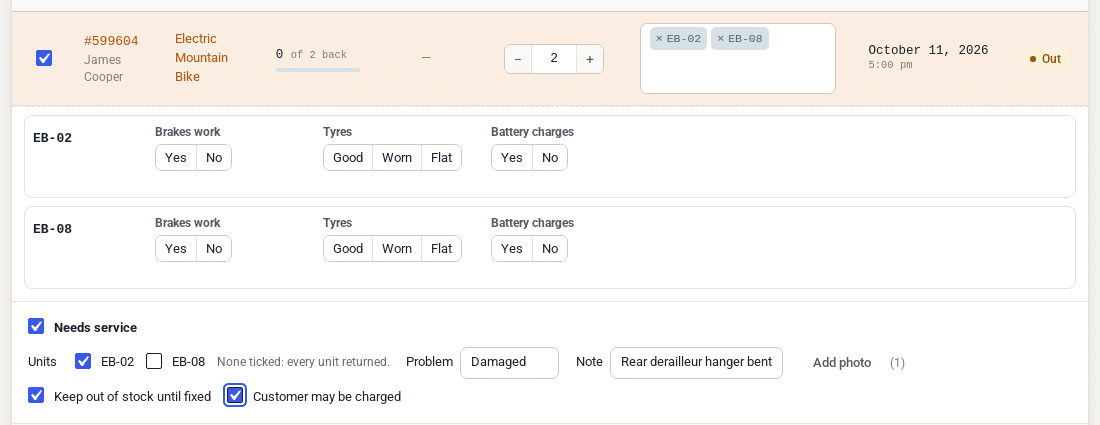
Needs service
Tick it on the Return screen, pick the problem, add a note and photos.
Out of stock at once
The unit comes back In maintenance, never Available first. Bookings it leaves short are listed.
On the board
A High priority ticket, linked to the booking and emailed to the managers.
The work
A technician, comments and photos, parts, labour and the vendor’s invoice.
The customer
If they caused it, charge the deposit, the saved card or a pay link. Or decide No charge.
Ready to rent
One click puts the unit back on the calendar. The repair stays in its history and the reports.
Tickets can also come from a serial’s page, a rental order, a service schedule, a failed checklist or the customer’s own report.
Send it to maintenance in the same step as the return
No second screen and no second save. The unit is checked in straight into maintenance, so nobody can rent it out in between.
One switch on the Return screen
Needs service works for one booking or a bulk return, with a scan and through the REST return.
Only the units that need it
Tick the serial numbers that need service, or enter a quantity. The rest are returned as usual.
Problem, note and photos
Pick the problem from your list, add a note for the technician and photos of the damage.
Already on a ticket?
Then the check-in is added to that ticket’s timeline. No duplicate tickets.
Every repair and service on one board
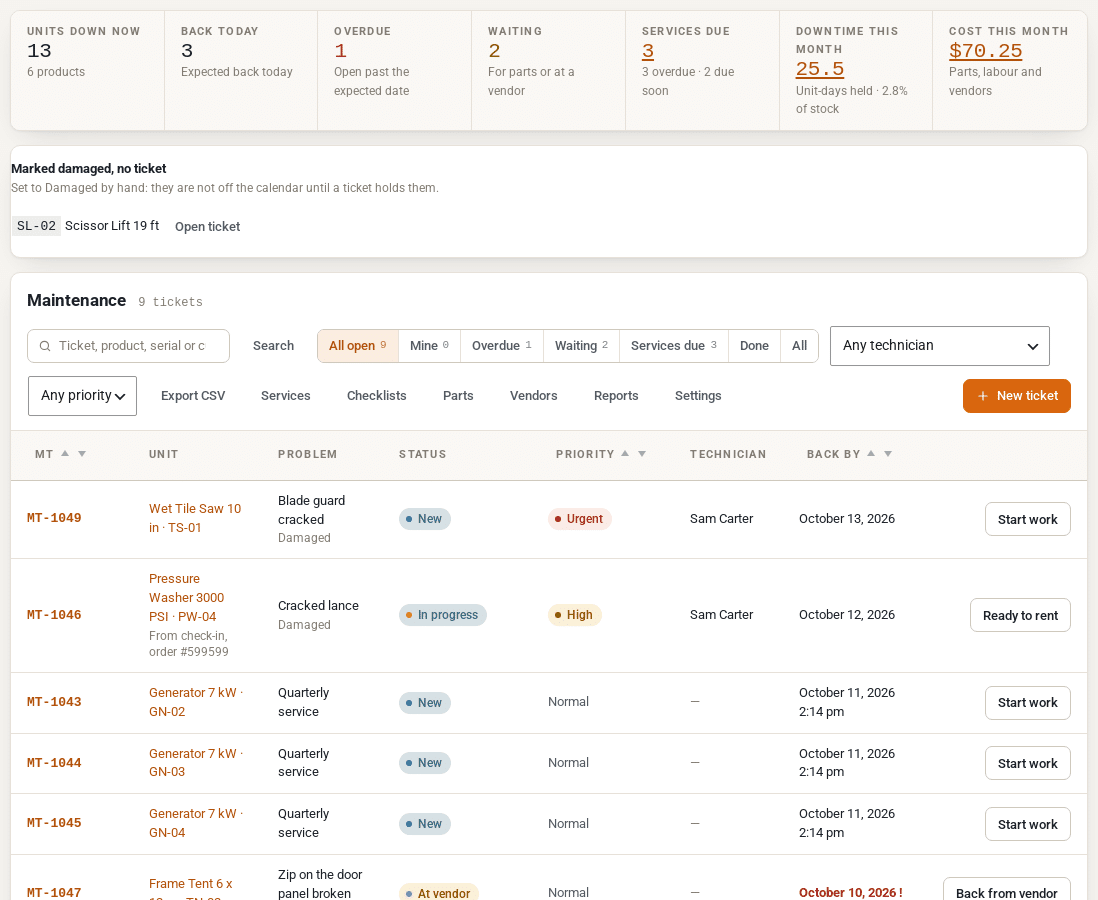
All open, Mine, Overdue, Waiting, Services due and Done, with a search, filters and one button that names the next step for each ticket.
Technicians
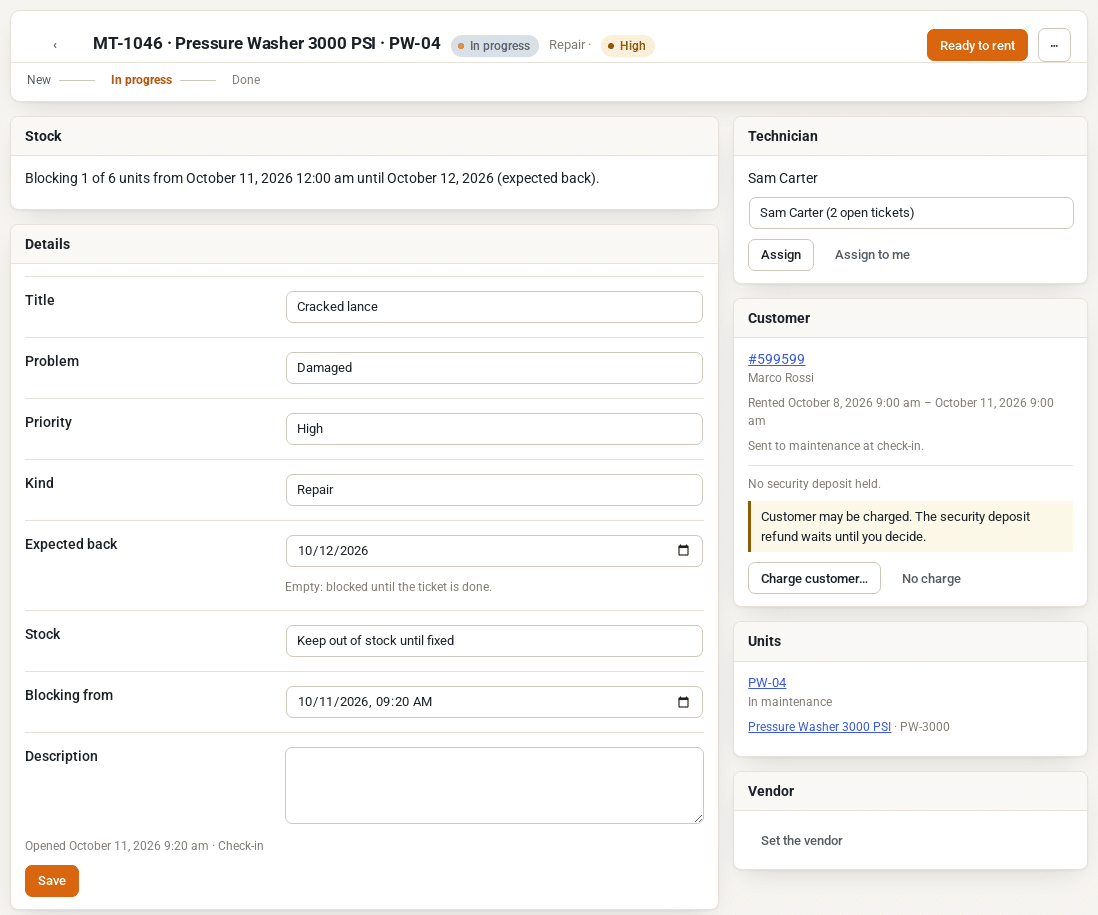
Assign a ticket or click Assign to me. The technician is emailed, and sees their jobs under Mine.
Statuses you can rename
New, In progress, Waiting for parts, At vendor, Ready to rent, Written off and Cancelled. Rename them, recolour them or add your own.
Expected back and Overdue
An expected date ends the block. A ticket still open after it keeps blocking a day at a time and shows Overdue.
Write off
Retire a unit that cannot be repaired, and lower the stock by one if you like. It stays in the history and reports.
Marked damaged, no ticket
Serials set to Damaged by hand are listed on the board, so none of them is forgotten.
Export CSV
Download the tickets in view, one row per unit, for your own records.
Out of stock until fixed, and no booking is ever cancelled
A ticket keeps its units off the calendar, the product page and the cart. It is not a booking and it never changes your stock settings.
| When | What happens to the unit |
|---|---|
| Needs service at check-in | Blocked from the return until Ready to rent |
| A ticket with an expected date | Blocked until that date. Still open after it? A day at a time, shown as Overdue |
| A service planned for next Monday | Blocked from the planned start (“Blocking from”) |
| A service falls due while the unit is out | Blocked from the end of that rental, never in the middle of it |
| A customer reports a problem | Not blocked until a member of staff confirms the report |
| Don’t block (log only) | Stays rentable while you track the work |
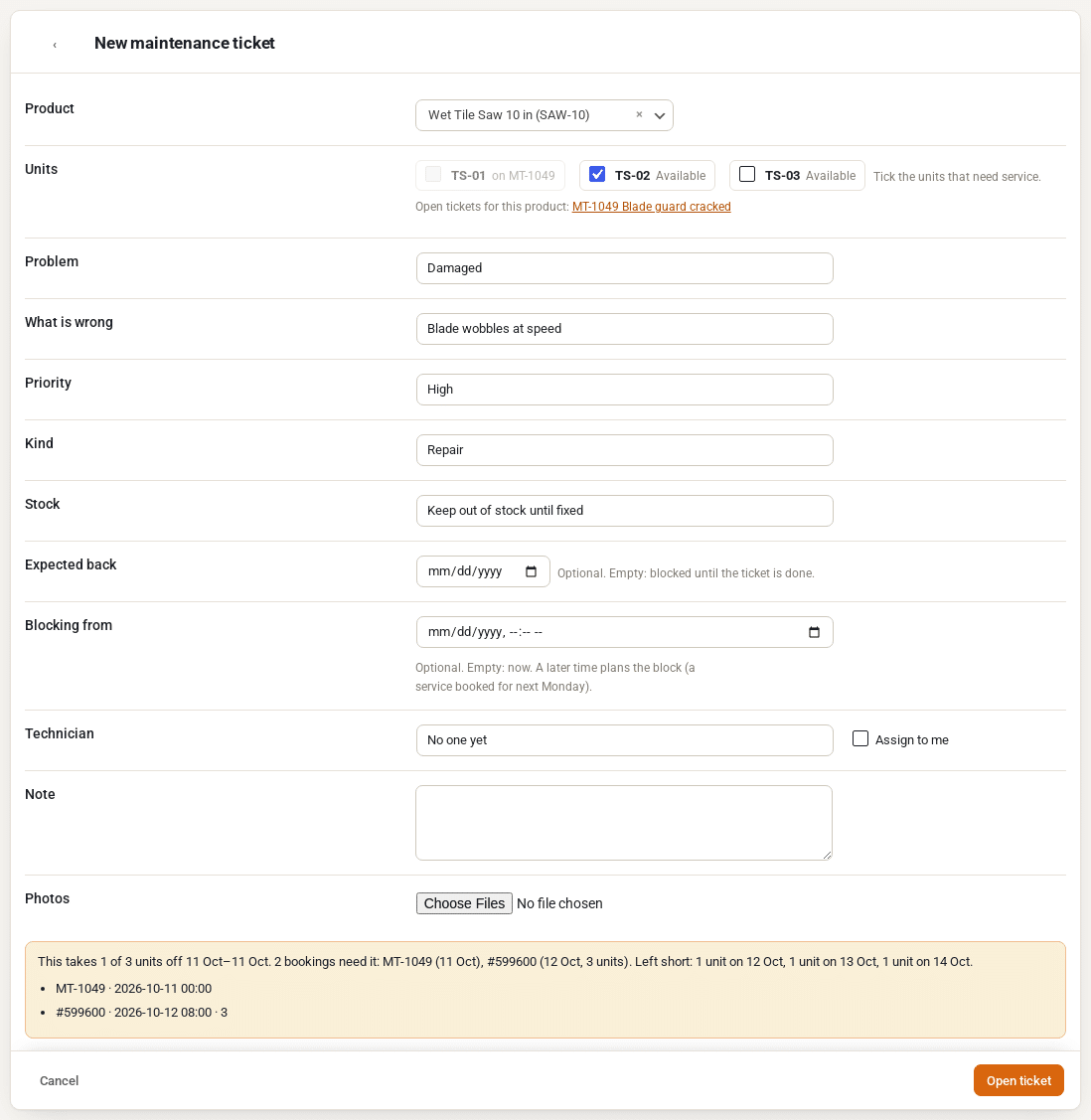
When a block leaves future bookings short, the ticket lists them before you save: swap the unit, change the expected date, or keep the block and contact the customer.
Service by days, rentals or hours, whichever comes first
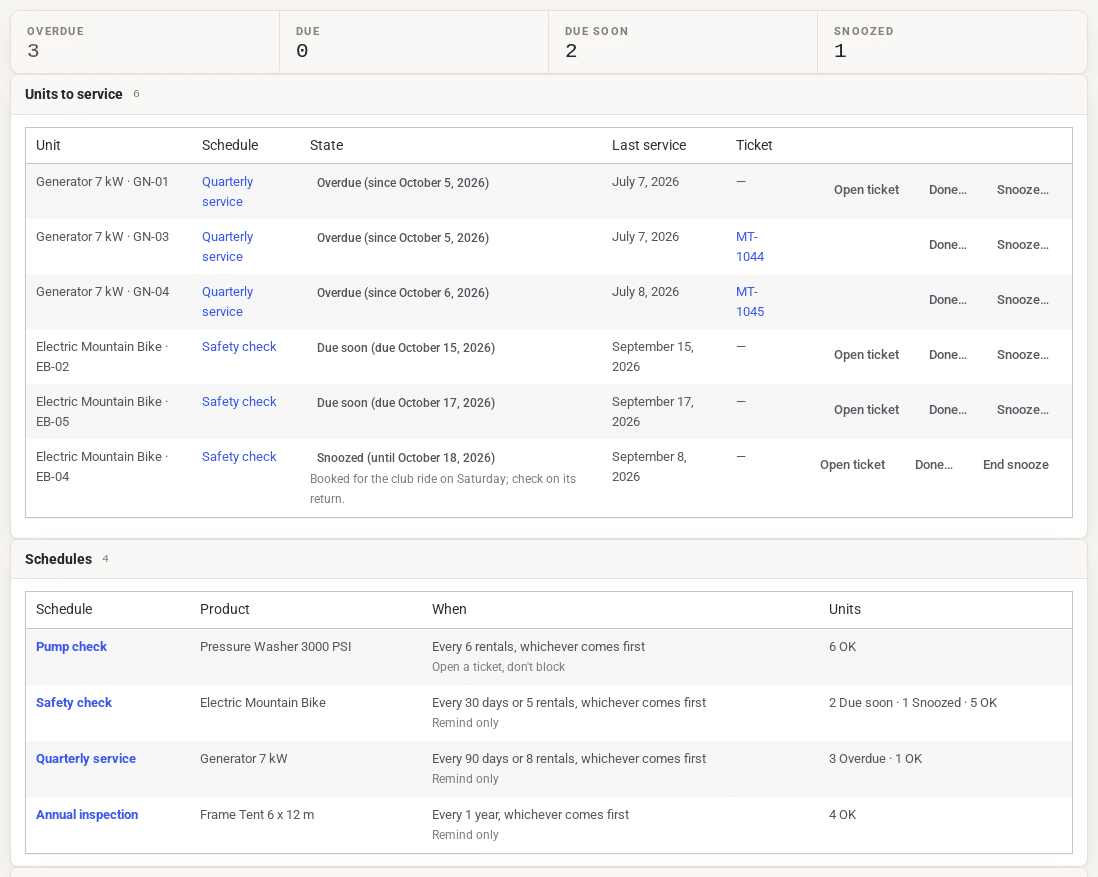
A schedule watches every unit of a product, or one unit of its own, and opens a service ticket when it is due.
Every so many days, rentals or hours
Days, weeks, months or years, rentals, days on rent, or hours from a meter reading. Whichever comes first.
Due soon, due, overdue
The Services screen and the daily digest warn ahead of time. Snooze a unit with a reason, or record a service done by hand.
A service ticket when it is due
It blocks the unit, opens without blocking, or only lists it. A unit out on a rental is blocked from the end of that rental.
The check-out guard
A unit with a service due shows a note on the Send screen. With Block when overdue, it cannot go out until it is serviced or snoozed.
Import your schedules
Bring existing service plans in from a CSV file. Check it first, then import.

Checklists at check-out and check-in, and photos side by side
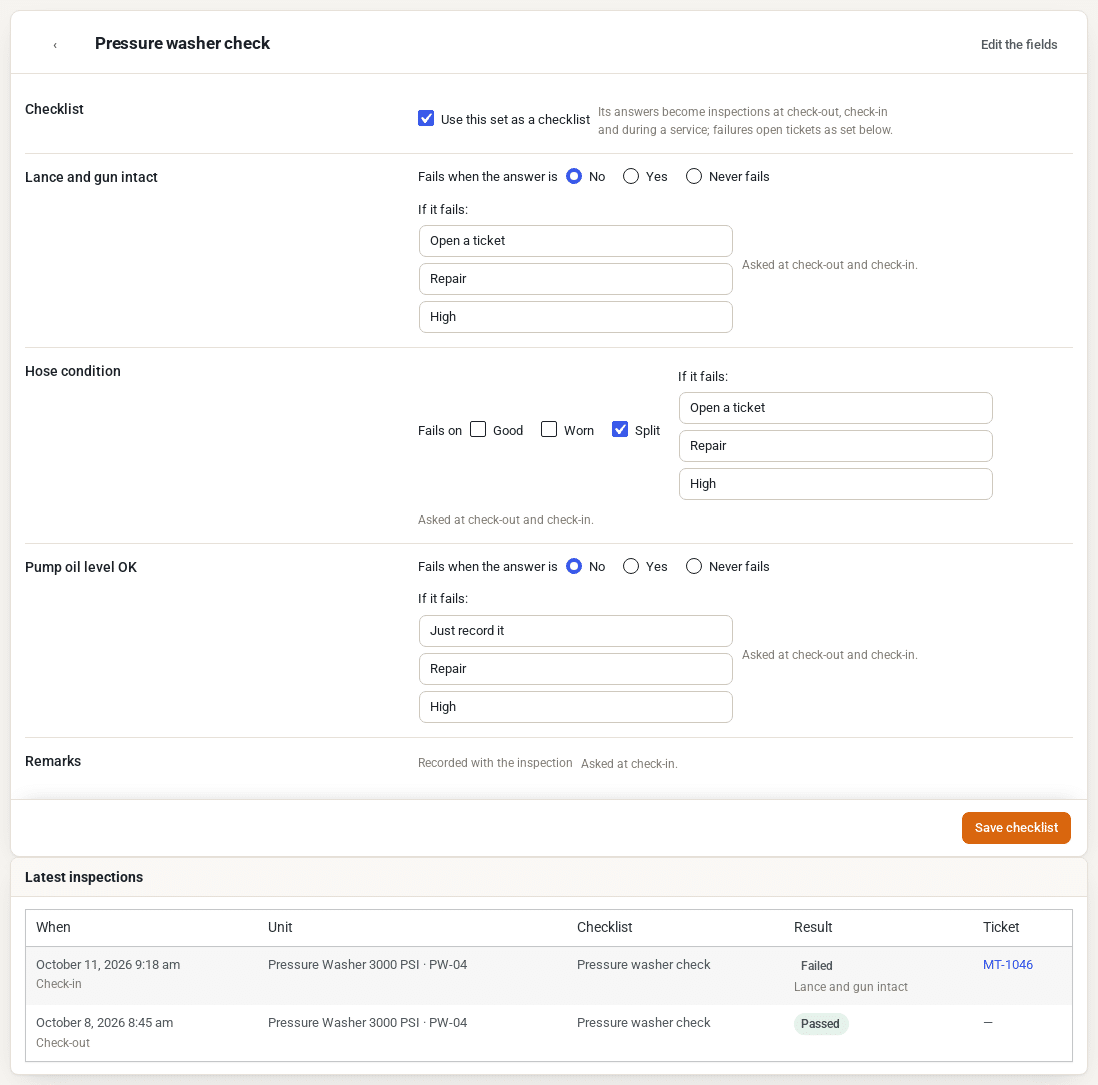
Any set of serial custom fields can be a checklist. Its answers are asked on the Send and Return screens, and a failed answer can open a ticket on its own.
Pass or fail per answer
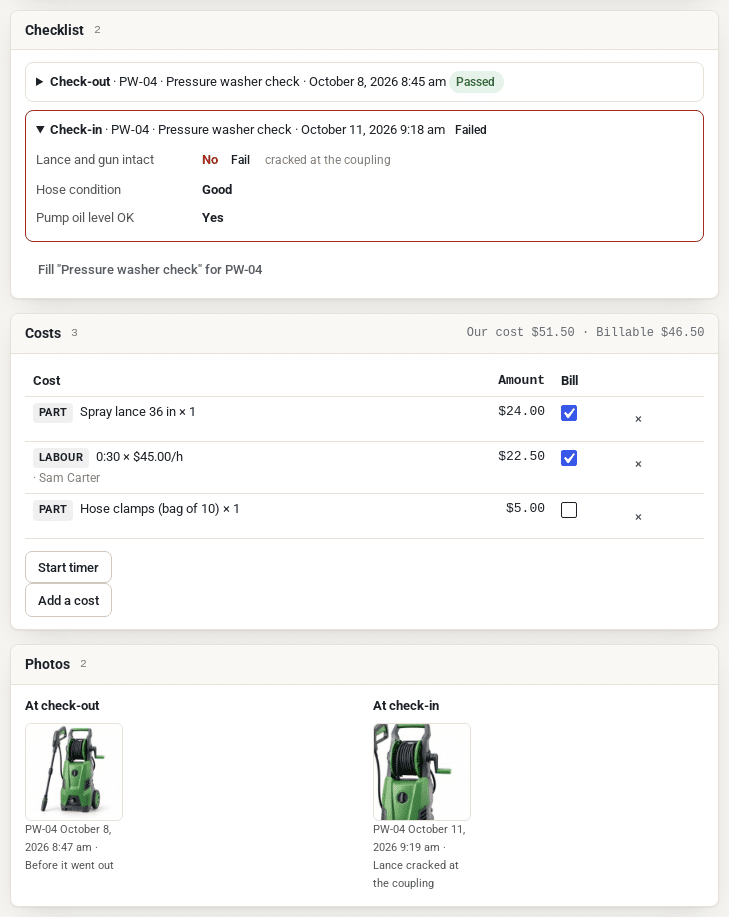
A Yes/No fails on No (or Yes), a choice on the options you tick. Other fields are recorded with the inspection.
A ticket when it fails
At check-in it blocks the unit from the return. At check-out the unit still goes out and the ticket holds it from the end of the rental.
Was it already damaged?
Photos from the Send and Return dialogs, side by side on the ticket, settle the question in seconds.
What every repair cost you, and what you may bill
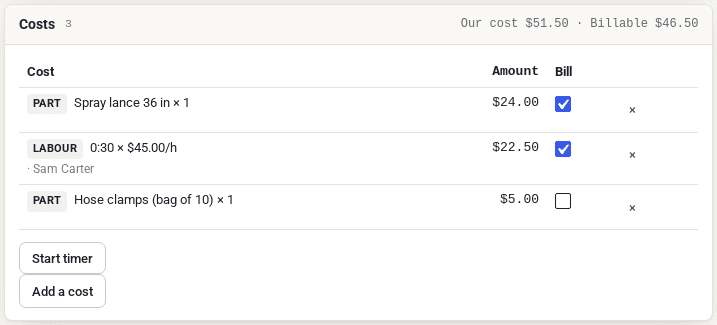
Parts, labour and vendor invoices on every ticket, with two totals: your cost, and the part the customer may pay for.
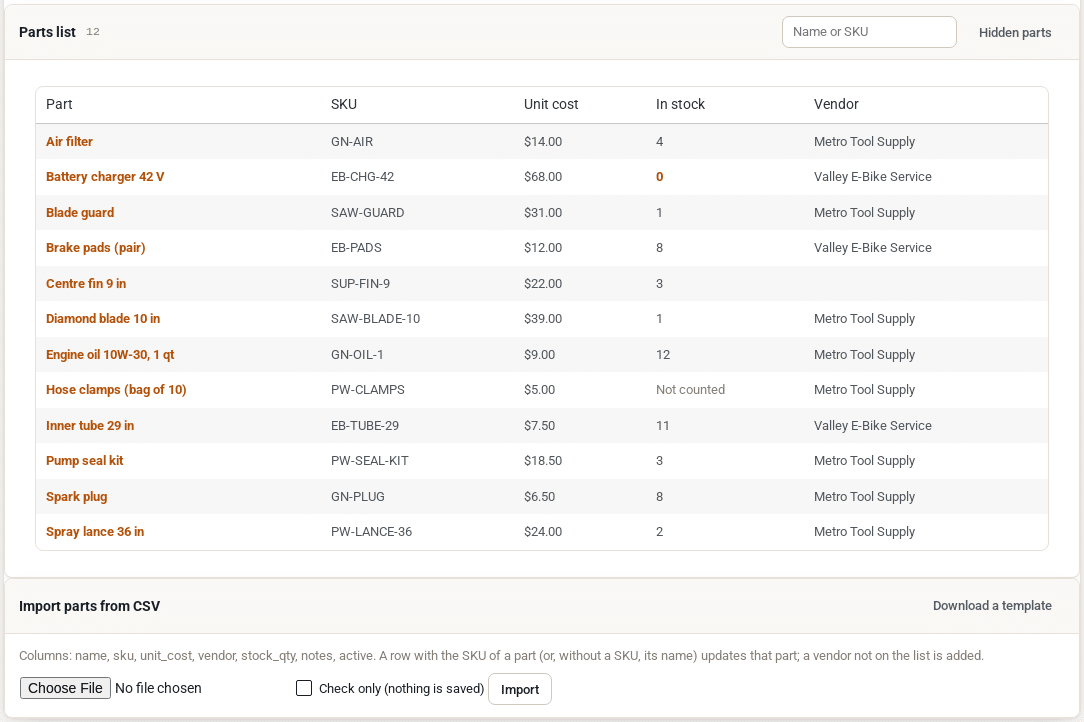
A parts list with stock
Name, SKU, unit cost and preferred vendor. Count the parts you keep, and the count goes down as tickets use them.
Labour by the minute or by timer
Start the timer when you start the job. The time lands on the ticket at your labour rate.
Vendors and their invoices
Who has the unit, their reference, when it is due back and their quote. Keep the invoice as a PDF or photo.
Bill to customer
Tick the lines the customer may pay for. A damage charge starts from that total.
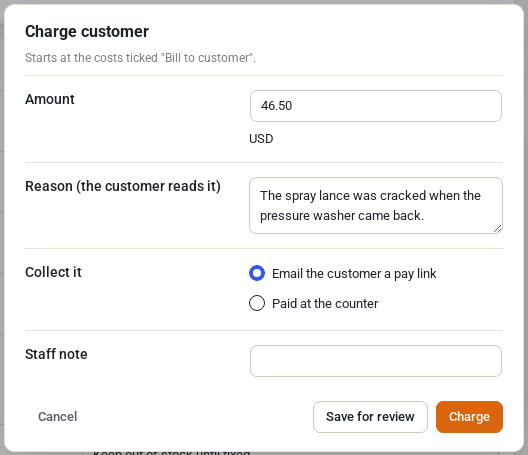
Charge for damage without chasing the customer
For damage a customer caused: the amount starts from the costs you ticked, you review it, and the plugin collects it the way you choose.
Security deposit
Kept from the deposit you hold, when what is left covers it. The rest is refunded as usual.
The saved card
The card the customer saved at checkout, where they agreed to it. Declines are retried after 1 and 3 days.
A pay link
An email with a link to pay. Also used when the bank asks for 3-D Secure.
At the counter
Record a payment you took yourself, with its reference.
- Nothing is charged until a member of staff reviews it
- Each charge is its own order (DC-1234-1), with its own pay and receipt emails
- A held security deposit is not refunded while a charge is being decided
- A damage waiver bought through Custom Fields lowers the charge, or sets it to 0
- Waive a charge, or refund it to the deposit, the card or by hand
- Charges show in the reports as billable costs
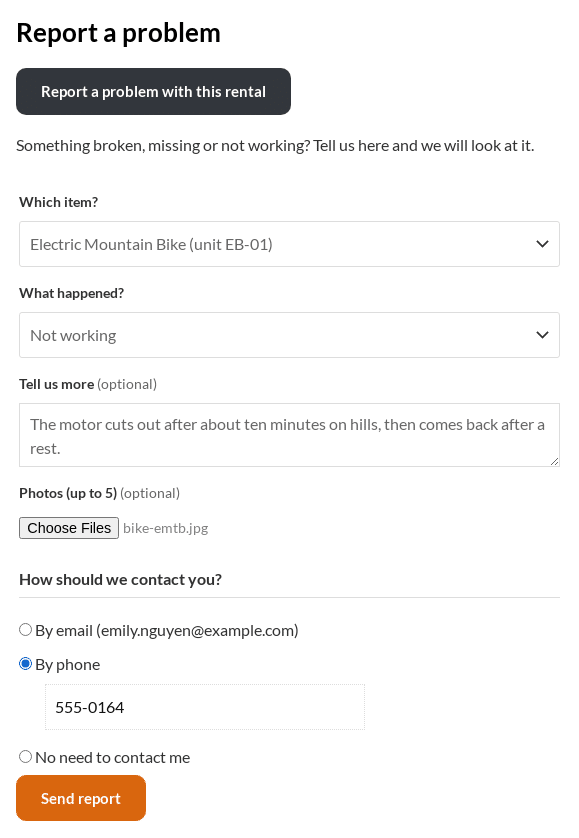
Customers report problems from their account
A flat tyre, a missing part, a machine that stopped: the customer tells you from their rental order, and gets a reference to quote.
Report a problem in My Account
On the rental order’s page, in classic and block themes. The item, down to the unit, what happened, photos and how to be contacted.
No stock change until you confirm
A report opens a ticket in Reported. It keeps no stock out until a member of staff confirms it.
Emails both ways
“We received your report” to the customer, “New customer report” to your managers.
Privacy tools
WordPress’s export and erase tools cover reports and their photos. The ticket stays as your record, without the customer’s details.
Know which items cost more than they earn
Five reports with dates, product, location and kind filters, each with Export CSV.
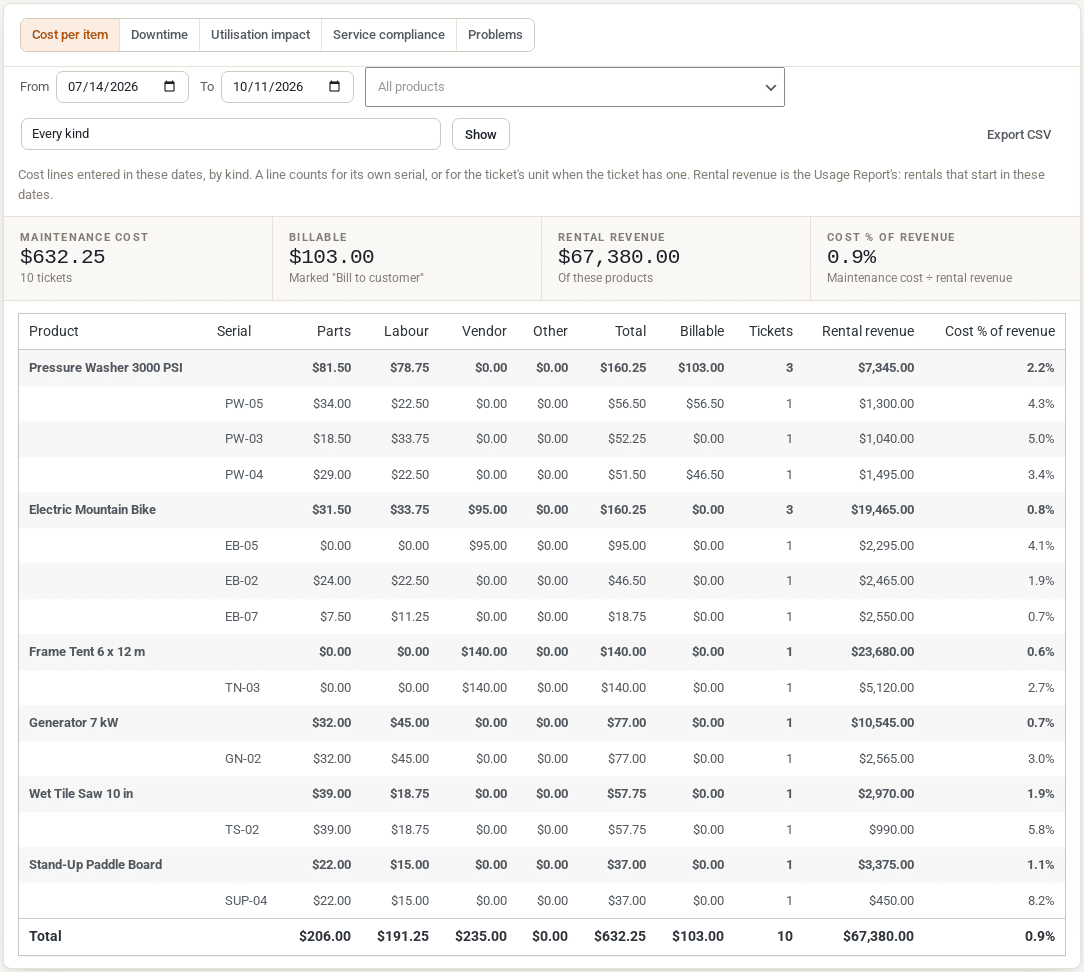
Cost per item
Parts, labour, vendor and other costs per product and unit, against rental revenue.
Downtime
Days each unit was held, failures, average repair time and rentals per failure.
Utilisation impact
The share of your stock held for maintenance, and the shortage days it caused.
Service compliance
Services done on time, late, and units overdue now.
Problems
The problems reported most, across every product and per product.
REST API
Every report as JSON, plus tickets, schedules, checklists, costs, parts, vendors and charges.
Everything the plugin does
| Area | What you get |
|---|---|
| Check-in | Needs service on the Return screen, bulk returns, scans and the REST return; problem, note, photos; Customer may be charged |
| Tickets | Numbers (MT-1042), statuses you can rename and add to, priorities, kinds (repair, service, inspection), expected back, a timeline with comments and photos, write off |
| Stock | Out of stock from check-in or a planned start until Ready to rent; overdue tickets keep blocking a day at a time; bookings left short are listed, never cancelled; log-only tickets |
| The board | All open, Mine, Overdue, Waiting, Services due and Done; search, filters, next-step buttons, summary cards, Export CSV |
| Technicians | Assign or Assign to me, the “Maintenance job assigned” email, a technician’s own view |
| Services | Schedules by days, weeks, months, years, rentals, days on rent or meter hours; due soon, due, overdue, snoozed; service tickets; CSV import |
| Check-out guard | A note on the Send screen for units with a service due; Block when overdue |
| Checklists | Serial custom field sets as checklists at check-out, check-in and during a service; failures open tickets |
| Photos | Check-out and check-in photos side by side on the ticket |
| Costs | Parts with stock, labour and a timer, vendor invoices, other costs, Bill to customer, our cost and the billable total |
| Vendors | A vendors list and a Vendor card: reference, sent, due back, quote, late flag |
| Damage charges | Security deposit, saved card, pay link or counter; own order per charge; retries; waive and refund; deposit held while undecided; damage waiver aware |
| Customer reports | Report a problem in My Account with photos and a contact choice; Reported tickets that block only once confirmed; privacy export and erase |
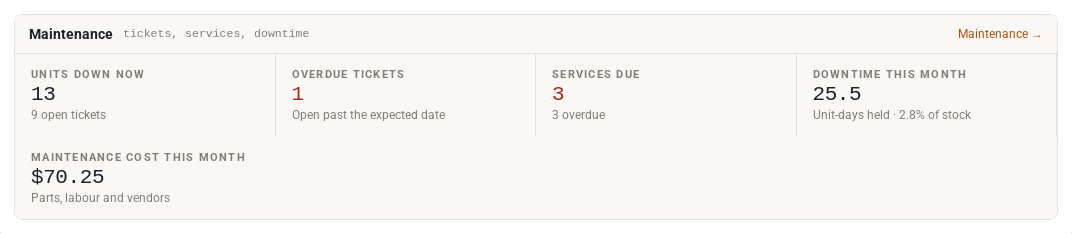
| Reports | Cost per item, downtime, utilisation impact, service compliance, problems; CSV; a Maintenance card on the Rentals dashboard |
| Emails | Nine WooCommerce emails with previews: check-in tickets, assigned, overdue, the daily digest, failed inspection, customer reports, damage charge pay and receipt |
| Developers | REST API under wc-sibooking/v1/maintenance, CSV export and import, capabilities for each role |
Questions about Maintenance & Inspections
What do I need to run it?
Sales Igniter Rentals & Bookings for WooCommerce Regular 1.0.79 or later, which includes the Lite base plugin, on WordPress 6.6 and PHP 8.1 or newer. It does not run with Lite alone.
Refundable Security Deposits is only needed to take a damage charge from a deposit; Custom Fields, Damage Waiver & ID Verification only if you sell a damage waiver.
Does a ticket ever cancel a booking?
No. A ticket only takes units out of what is left to rent. If that leaves a future booking short, the ticket lists the booking so you can swap the unit, change the expected date or contact the customer.
Does it work for products without serial numbers?
Yes. You enter how many units need service instead of ticking serials, and the block takes that many out of stock. Service schedules for those products count days, weeks, months or years.
Can technicians work on tickets without seeing everything?
Yes. A technician needs only the work capability: they see their own jobs under Mine, comment, add photos and add costs to their own tickets. Costs, charges and settings have capabilities of their own.
How does a damage charge reach the customer’s card?
Only through the card the customer saved at checkout, where the consent text says damage found when the rental comes back may be charged after review. Staff always review the charge first. A declined card is retried after 1 and 3 days, and the customer gets a pay link straight away.
Is it included in Ultimate?
Yes. Maintenance & Inspections is included in the Ultimate package for WooCommerce, or you can buy it on its own. It has its own licence key field; left empty, it uses the Regular edition’s key.
Can I bring in my existing parts and service plans?
Yes. Parts and service schedules import from CSV files, with a template and a Check only pass that lists any bad rows by line before anything is saved.
Maintenance & Inspections for WooCommerce
An add-on to Sales Igniter Rentals & Bookings Regular.
Maintenance & Inspections
Everything on this page.
- Needs service at check-in, tickets, the board and technicians
- Service schedules, checklists and the check-out guard
- Parts, labour, vendors and damage charges
- Customer reports, five reports and the dashboard card
- REST API, CSV import and export, nine WooCommerce emails
Before you buy
What it needs.
- Sales Igniter Rentals & Bookings for WooCommerce Regular 1.0.79 or later
- WordPress 6.6 and PHP 8.1 or newer, with WooCommerce
- Optional: Refundable Security Deposits, to charge damage from a deposit
- Optional: Multi Location Inventory, for the location filter in the reports
- Installs like any plugin: Plugins › Add Plugin › Upload Plugin
Also included in the Ultimate package. See WooCommerce pricing
Read the guide before you buy
Ten pages walk through setup and every feature, with screenshots from a working store.
Keep damaged stock off the calendar
Install it next to Rentals & Bookings Regular, and the next return that needs a repair goes straight to maintenance.