
Tour booking software for departures, guests and check-in
Sell kayak tours, bike tours, walking tours and multi-day trips by the departure, with seats that run out, adult and child prices, group prices and a minimum to run. On the day, a manifest and QR tickets handle check-in. Built for WooCommerce, with our Shopify app coming soon.
Sell departures by the seat, price adults, children and groups, and check guests in with a QR ticket.
- Departures sold by the seat
- Guest types and group prices
- Manifest and QR check-in

Watch a tour company set up and run its departures
Paddle & Pine Adventures, a sample kayak and bike shop on the coast, sets up a sunset kayak tour, a private food tour by bike and a three-day coastal trip. Then it takes the bookings and runs the day from a phone at the dock.

8 minutes 36 seconds. The player loads from YouTube only when you click. Watch it on YouTube (opens in a new tab)
A tour sells seats on a departure, not days of rental
A rental hands out an item for some hours or days. A tour leaves at a set time with a set number of seats, prices each guest by type, may need enough people to run, and has to know who turned up.
Fixed departures
A kayak tour at 6 pm every day, a walking tour every Saturday, a three-day trek once a month, and every departure with seats of its own.
Guests, not quantities
Adults, children, infants, seniors and students pay different prices, and a private group may pay one price for the whole party.
Minimum numbers
Some trips only run with enough guests, so you decide in time and tell everyone either way.
Weather and changes
A storm cancels the evening departure, and every guest needs a refund or another date without an evening of phone calls.
Pickups and meeting points
Guests are collected from hotels at different times before the start, and the driver needs the list in pickup order.
Check-in on the day
The guide needs to know who is coming, who has signed and who turned up, on a phone at the dock or the trailhead.
Every departure, its seats and its staff in one list
A tour is a product sold by departure: add a row for each start time with its length, an optional price and how it repeats (daily, weekly on the days you choose, or monthly). The stock is the seats a departure has, and one departure can have fewer seats of its own.
Rentals › Departures lists every coming departure with the seats sold, its state, its staff and its manifest. Add a one-off departure, close online sales while staff can still book, or stop online sales some hours before the start, after which customers see Call us to book with your phone number. The cart never sells more seats than are left.
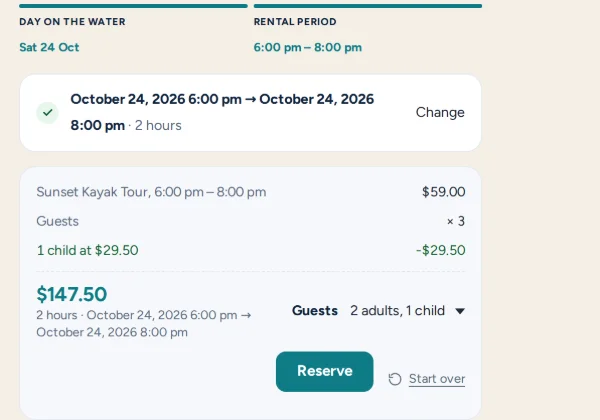
Adults, children, seniors and private groups, each at their own price
| Guests | Price | Each |
|---|---|---|
| 2 adults | $118.00 | $59.00 each |
| 1 child (50% off) | $29.50 | $29.50 |
| Total | $147.50 | 3 seats |
Turn on the guest types you sell: adults, children and infants, plus seniors, students and up to three types of your own, such as Youth 13-17. Each one costs the same as an adult, a percentage off, or a price of its own, and the product page shows a line per type, so the total is clear before checkout.
A group price charges the whole party one price, with bigger parties priced by size: up to 4 guests $200, up to 8 guests $320. Use it for every booking, or as a Book it privately choice: a private booking takes the whole departure, and nobody else can join it.
When a departure can’t run, guests are refunded or moved
Set the guests a departure needs and when you decide. Until then customers read “Runs with at least 6 guests. We will confirm by Thu 9:00.”, and then “Guaranteed to run”. If it’s still short, an email asks you to run it anyway, cancel and refund everyone, or offer another date, or it cancels itself at the deadline if you prefer.
Cancel one departure or a whole day with a reason guests read. Refunds go back through the payment method, or guests get a link to choose another departure and are refunded if they haven’t moved within 7 days. Change a departure’s time and every booking moves with it, and customers can move their own booking until online sales stop.
A manifest and QR tickets for check-in at the dock
Every departure has a manifest: who is coming, their party, phone, pickup point and check-in, sorted by pickup time when you collect guests. Print it, download a CSV or email it to the staff on the departure. Each booking gets a ticket with a QR code in the order emails and My Account, and staff scan it on their phone to check guests in.
Guides see their own departures under My schedule, and the staff schedule board assigns guides, captains and boats by drag and drop. With Limit sales, a departure only sells the seats its free guides and boats can take. After the tour, only the guests who were checked in get a review request.
Waivers, guest names and extras, collected when they book
Lunch, a photo pack or a wetsuit go on the same order as the tour, priced per guest Pro, so nobody sorts it out at the dock.
- Lunch
- Photo pack
- Wetsuit
- Dry bag
- Snorkel set
- Rain jacket
Each guest signs the waiver
Turn on Each guest signs and every guest signs your waiver, with a guardian signing for a minor. The manifest shows who has signed, and a guide can hand over a phone with Sign on this phone to anyone who hasn’t.
Extras priced per guest
Charge an extra per guest, so lunch at $12 adds $48 to a booking for 4. Per-guest questions, such as a size or a dietary need, go on the same booking.
Guest names, pickups and itineraries
Ask for each guest’s name, optional or required, with a link in the emails to add them later. Pickup points with their minutes before the start, and a day-by-day itinerary for multi-day trips, show on the product page, the ticket and the manifest.
Pro included in Rentals & Bookings Pro, or sold on its own. Everything else here comes with Regular.
No tours theme yet, so start from the boat rental one
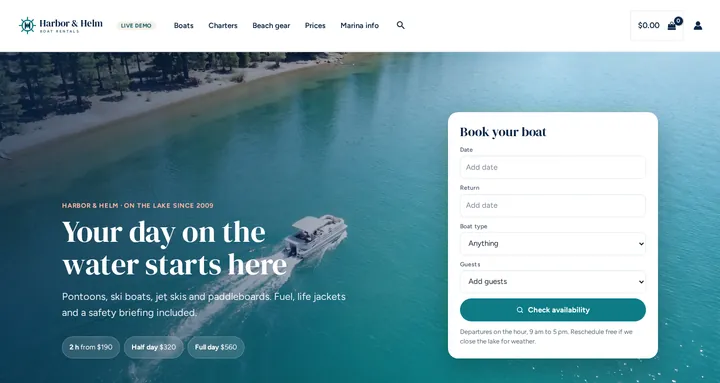
There is no theme made for tours yet. The closest is the free boat rental theme, which suits water tours best: sample boats and boards, a captained sunset cruise sold by the seat, a homepage built from WordPress blocks, and colours and fonts for Astra or a block theme. On the live demo it runs as Harbor & Helm.
Free with the Rentals & Bookings Lite plugin 1.0.11 or newer, which imports everything except the date search on the homepage. Regular and Pro 1.0.74 or newer add the search widget. Departures, guest types and the manifest come with Rentals & Bookings Regular, not with the theme.
Free with the Lite plugin 1.0.11 or newer. Regular and Pro add the homepage date search. Tour features need Regular.
Run it on WooCommerce, with Shopify coming soon
Tours are built into our WooCommerce plugin today, and the same tour features are coming to our Shopify app.
WooCommerce tour booking plugin
The right fit for most tour and activity operators. If your site already runs WordPress, it becomes a tour booking system with your own checkout, payment gateway and theme, and the bookings stay in your database.
- Departures sold by the seat, from daily, weekly or monthly rows
- Guest types, group prices and private bookings
- A minimum to run, with a decide-by time
- Cancel, change the time, or let customers move
- Manifest, QR tickets and check-in on a phone
- Each guest signs the waiver Pro
Shopify app (coming soon)
The same tour features are built for our Shopify rental and booking app, which is coming soon to the Shopify App Store.
- Departures sold by the seat
- Guest types and group prices
- The manifest and check-in
Tours are not part of the Magento 2 extension, which tracks staff and resources on bookings. Weighing a hosted booking system? See how we compare as a FareHarbor alternative, a Peek Pro alternative and a Xola alternative. Tours are one of the trades in our rental software by industry overview.
From first tour to first booking in six steps
The tours documentation walks through each one.
Step 1: A product per tour
Create it like any rental and set its rental type to Fixed Rental Date and Rental Length.
Step 2: A row per departure time
Its start, its length (90m, 2h or 3d), an optional price and how it repeats.
Step 3: Seats as the stock
A boat with 12 seats has a stock of 12, and each guest takes one seat.
Step 4: Guest types and prices
Adults, children and your own types, with a group price or a private option if you want one.
Step 5: The departure settings
Stop online sales, a minimum, guest names, pickup points and an itinerary, as each tour needs.
Step 6: Staff and check-in
Add your guides and boats, assign them on the schedule, and check guests in from the manifest.
Who this suits
- Kayak, canoe and paddleboard tours
- Bike and e-bike tours
- Walking, food and city tours
- Boat trips, sunset cruises and fishing charters
- Multi-day trips, treks and safaris
- Classes, lessons and workshops
Tour booking software FAQs
Can I sell a tour that leaves at the same times every day?
Yes. Add a row per start time, for example 10:00 and 14:00, and set it to repeat daily, or weekly on the days you choose. Each departure sells its own seats, and the cart never sells more than are left.
Can adults, children and seniors pay different prices?
Yes. Turn on the guest types you sell, including seniors, students and up to three of your own, and give each the adult price, a percentage off or a price of its own. A group price can charge the whole party one price, and customers can choose to book a departure privately.
Can a tour run only with a minimum number of guests?
Yes. Set Runs with at least and a decide-by time. Customers see that the departure isn’t confirmed yet, then Guaranteed to run. If it’s still short, you choose: run it anyway, cancel and refund everyone, or offer another date.
How do guests check in on the day?
Each booking gets a ticket with a QR code in the order emails and My Account. Staff scan it on their phone or check guests in from the manifest, which you can also print, download as a CSV or email to the staff on the departure.
Can every guest sign a waiver, children included?
Yes, with the Contract Signing plugin in Pro. Turn on Each guest signs: every guest signs, a guardian signs for a minor, and the manifest shows who has signed.
Is this a FareHarbor, Peek Pro or Xola alternative?
It’s tour booking on your own WooCommerce site, with your checkout, your payment gateway and no booking fee or commission from us. It doesn’t connect to resellers such as Viator or GetYourGuide. Compare it with FareHarbor, Peek Pro and Xola.
Is there a monthly fee or a commission on bookings?
No. It installs on your own WooCommerce site on a one-time licence, and your bookings and customer data stay in your own database. Tours come with Rentals & Bookings Regular, Pro and Ultimate.
Does it work on Shopify or Magento 2?
The same tour features are built for our Shopify app, which is coming soon. Tours are not part of the Magento 2 extension, which tracks staff and resources on bookings.
See it running before you buy
Book a guided city tour, a sunset cruise or a vineyard e-bike ride on the demo’s tours and activities, or try the free live rental software demo to follow an order through the admin. The tours documentation covers the setup step by step.