
Rent out anything from your Shopify store
A booking calendar on your product pages, stock counted for every date, and rental prices checked again at Shopify checkout.
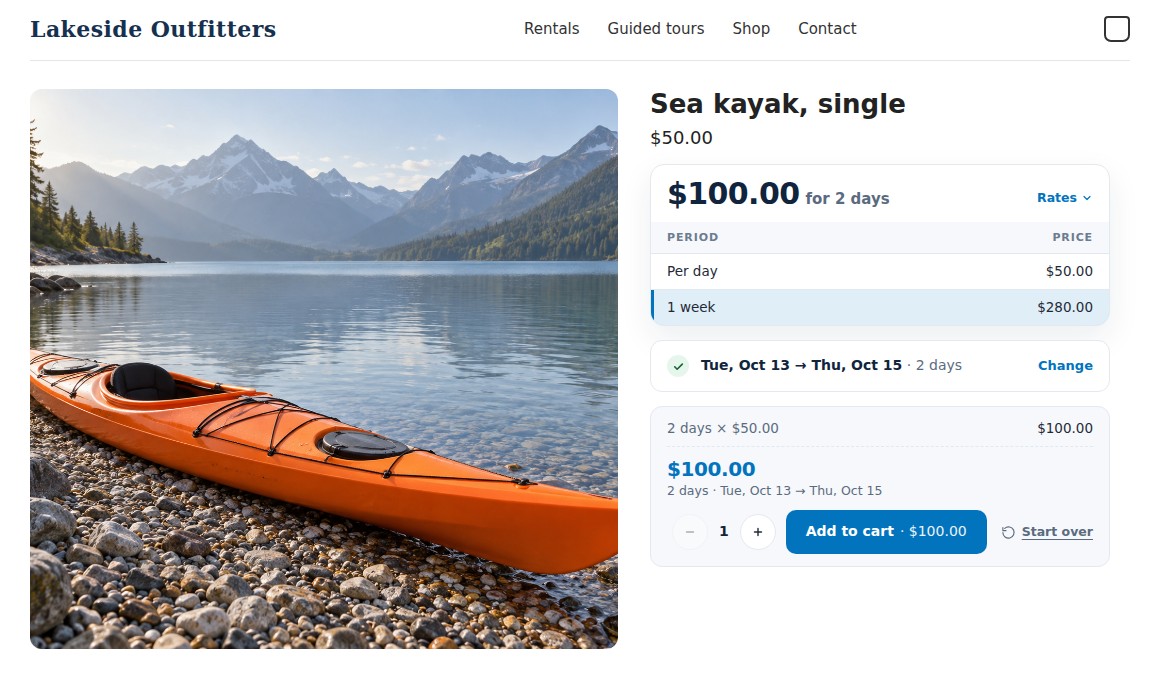
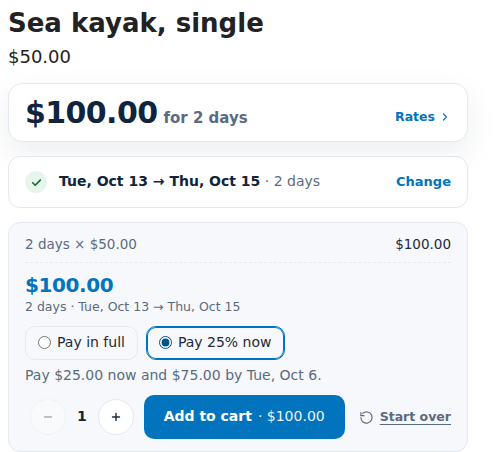
A demo outdoor store: the customer picks dates, sees the price for those days, and adds the rental to the cart.
Everything a rental store needs, inside Shopify
A calendar block on your storefront, Shopify checkout for payment, and your bookings in the Shopify admin next to your orders.
A booking calendar
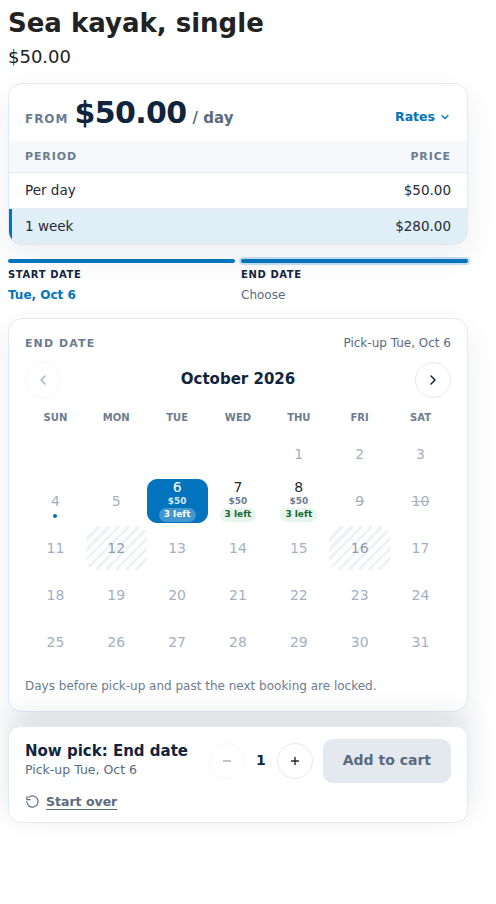
Customers pick dates, or dates and times, on a calendar that shows what is free, with the units left and the price for each day.
StorefrontRent by the day, hour or departure
By the day, by day and time, fixed rental lengths, or set departure dates for tours and classes. Guests and party size too.
StorefrontRental pricing
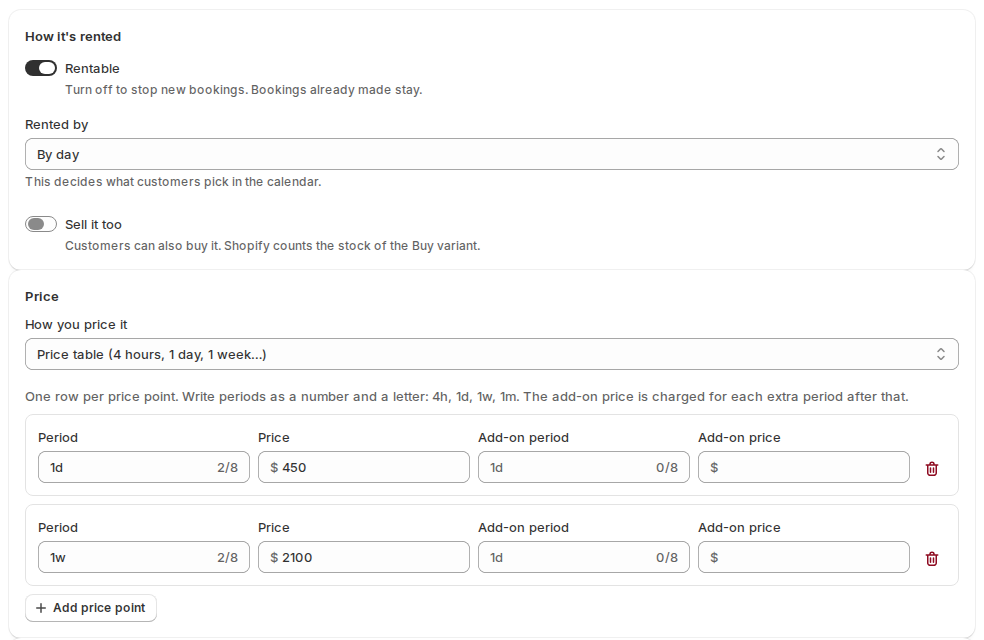
Daily and hourly rates, price tables (4 hours, 1 day, 1 week), and seasonal and length-based rules.
PricingChecked again at checkout
The price and dates are signed when a rental goes in the cart, and Shopify checkout checks them again, so they can’t be changed on the way.
CheckoutStock for every date
Units counted day by day, with turnaround time between rentals, closed days, and minimum and maximum lengths. Orders that beat the stock are flagged.
StockStock per location
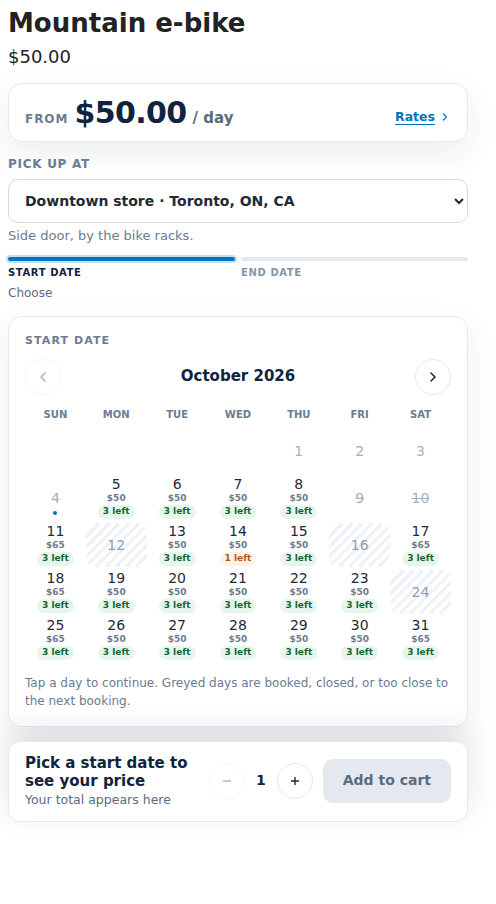
Rent from more than one Shopify location. Customers choose where they pick up, and each location keeps its own stock.
LocationsDelivery and pick-up
Customers choose pick up, delivery or post before they pick dates. Each way has its own time in transit, order cut-off and hand-over days.
DeliveryPay part now
Let customers pay part of the rental at checkout and the rest by a due date before it starts.
PaymentsRental kits
Rent several items as one, like a party kit. The calendar offers only the days when every item in the kit is free.
KitsThe Send & Return desk
See what goes out and comes back today, check rentals out and in with a barcode scanner, print pick lists and export CSV.
Back officeSerial numbers
Track each unit by serial: pick it at check-out, scan it back in, print QR and barcode labels, and see its history.
Back officeReminders and My rentals
Pick-up, return and overdue reminder emails, and a page in the customer account where customers see their rentals and extend them.
CustomersAlso: calendar sync with Airbnb, Booking.com and Google Calendar (iCal), a date search for your catalogue, Shopify Flow triggers, and a REST and GraphQL API. Compare every rental feature on Shopify, WooCommerce and Magento 2.
From product page to returned in four steps
Rentals go through Shopify’s own cart and checkout, so your payment settings, taxes and order emails stay as they are.
Make products rentable
Choose how each product is rented, its price and how many you own, one at a time or in bulk.
Add the calendar
Place the Rental calendar block in the theme editor. A setup guide walks you through it.
Customers book and pay
They pick dates, the rental goes in the cart at a signed price, and they pay at Shopify checkout.
Send it out, check it in
The booking shows in your admin. Check units out and back in at the Send & Return desk.
Works with Online Store 2.0 themes, and with vintage themes through an app embed. You don’t need Shopify Plus.
Five apps: install the ones you need
Rentals & Bookings is the core. Four more apps add signed contracts, security deposits, custom fields and quotes, each installed on its own.
Rentals & Bookings
The core appThe rental engine and everything around it: the storefront calendar and pricing, stock for every date, the admin pages and the checkout checks. The four add-ons plug into it.
Read the Rentals & Bookings docs →- Calendar, pricing and the storefront theme blocks
- Stock per date and per location, with delivery and pick-up
- Part payments, kits and reminders
- Dashboard, bookings, calendar, the Send & Return desk and serial numbers
Rental Contracts
Adds to Rentals & BookingsCustomers read and sign your rental agreement, typed or drawn, before they can check out. You get a signed PDF with a certificate page, and can check it hasn’t been changed.
Read the Rental Contracts docs →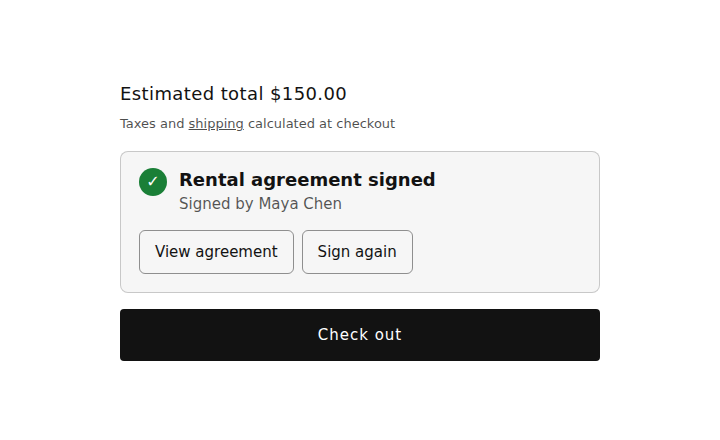
Security Deposits
Adds to Rentals & BookingsA refundable deposit per product or per order, as its own line at checkout. Refund it in full or in part from the order, or automatically after the rental comes back.
Read the Security Deposits docs →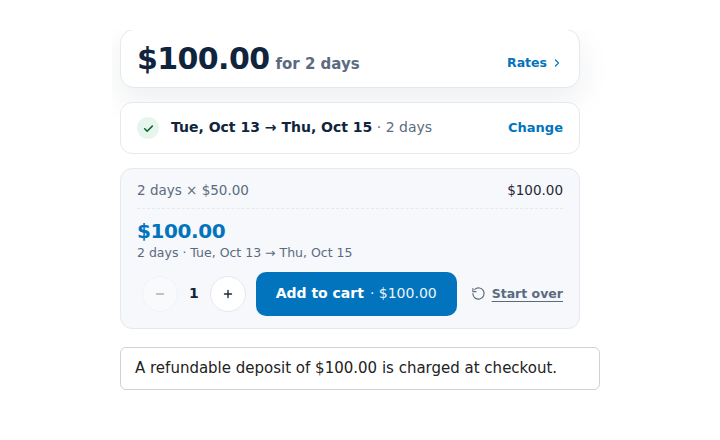
Custom Fields
Works on its own tooAsk questions on the product page or in the cart, charge for options, and add a damage waiver or an ID check before checkout. On rental and regular products.
Read the Custom Fields docs →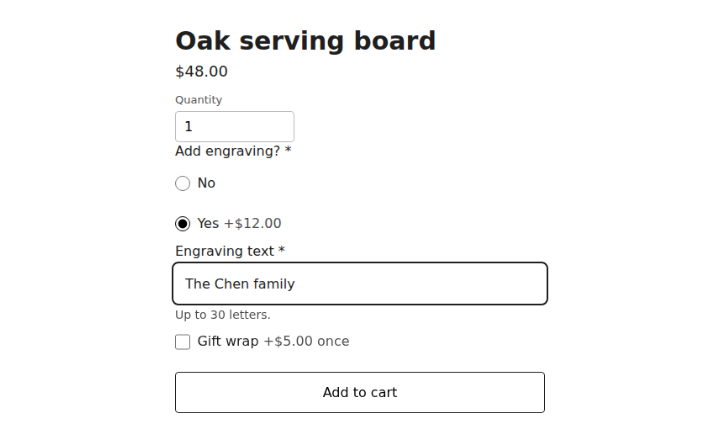
Request a Quote & Hide Price
Works on its own tooLet customers ask for a price, hide prices where you choose, and send offers they accept and pay through Shopify checkout. Quote lines can carry rental dates.
Read the Request a Quote docs →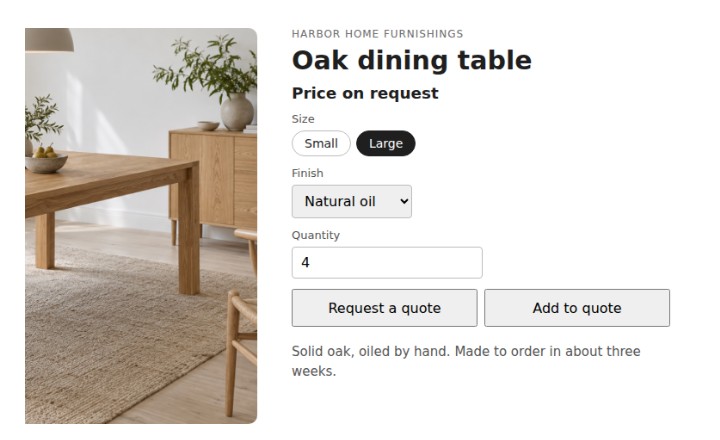
Learn more about all five Shopify apps in our documentation →
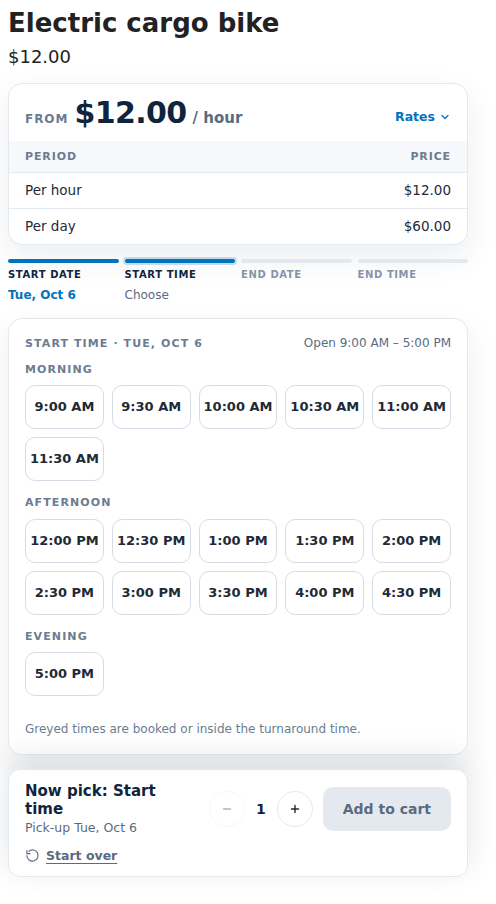
A calendar your customers understand
They see what is free before they choose, and the price for their dates before they add to cart. These screens come from our demo store.
Checked again at checkout
A Shopify Function checks every rental line at checkout and stops one whose price, quantity or dates were changed.
Pay part now, the rest later
Offer a part payment at checkout, with the balance due by a set number of days before the rental starts.
Discount codes and currencies
Shopify discount codes work on rentals, and rental prices convert with Shopify Markets.
No way around the calendar
Buy it now is hidden on rental products, so every rental goes through the dates.
Run the rental counter from Shopify
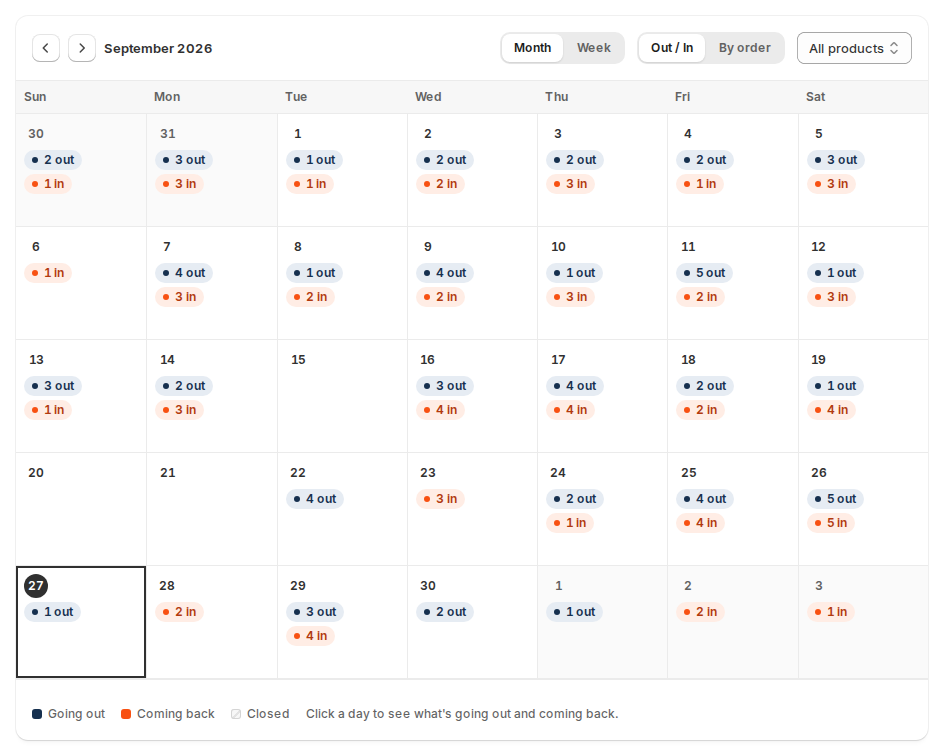
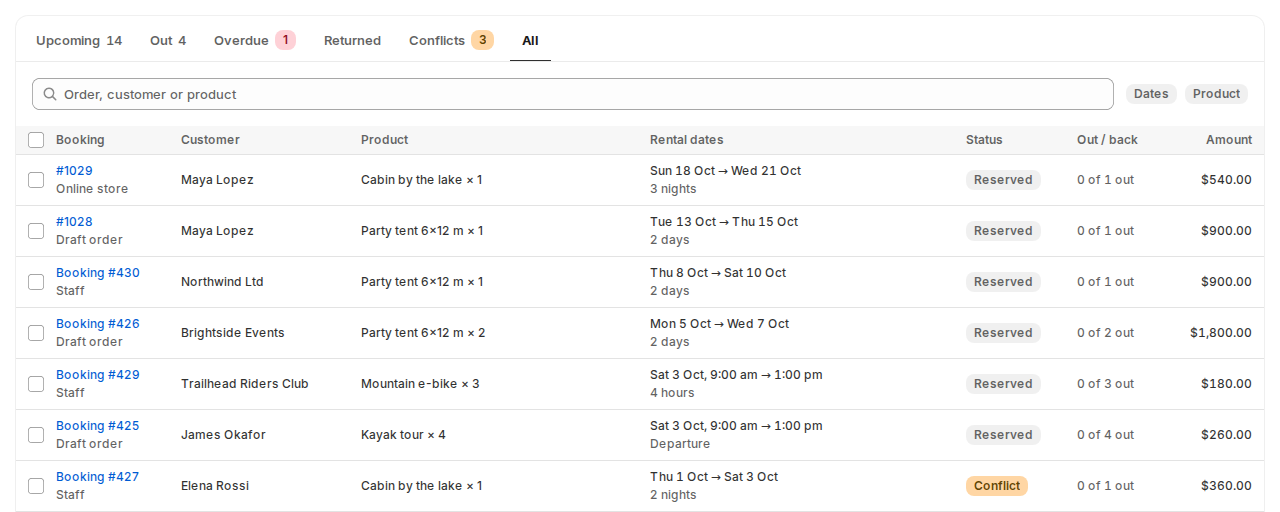
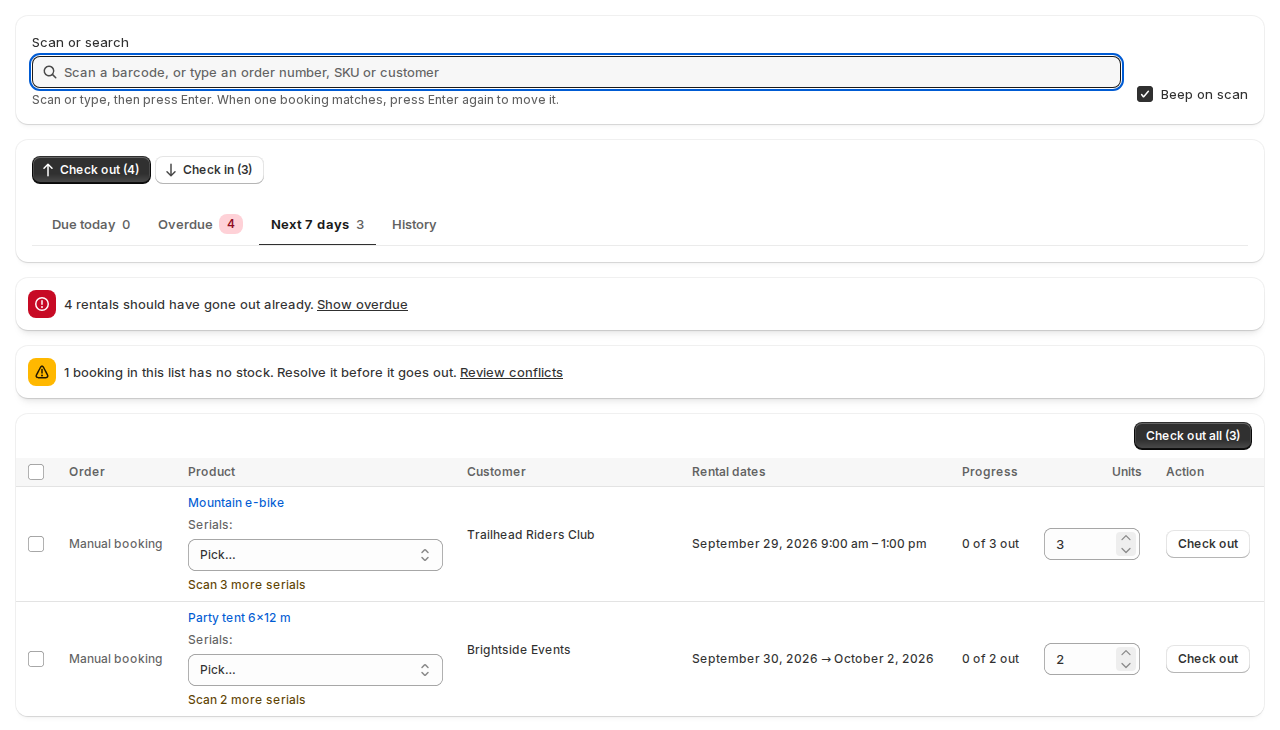
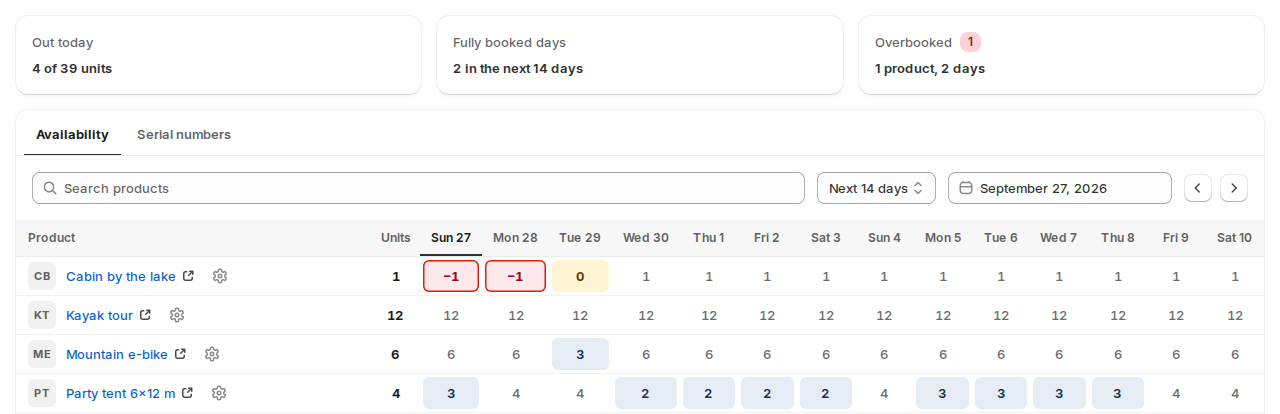
The app’s pages open in your Shopify admin, next to Orders: today’s work, bookings, a calendar, stock by date and the Send & Return desk.
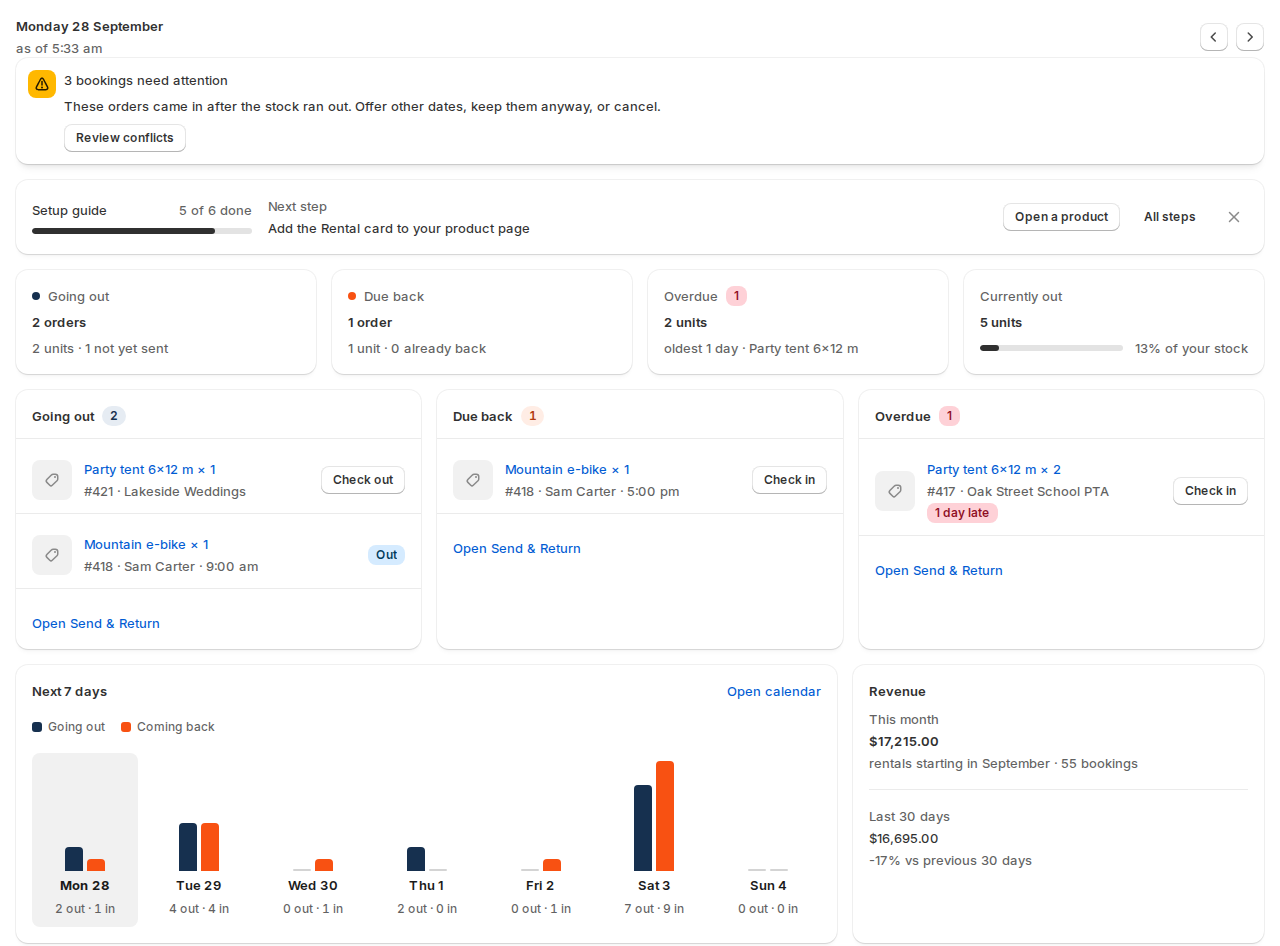
The dashboard: what goes out, comes back and is overdue today, with one click to check it out or in.
Every feature, by category
The Rentals & Bookings app first, then the add-on apps you install separately. Filter by app, or search for a feature.
Rentals & Bookings app
14 categories · 184 featuresBooking calendar
16 features- Booking calendar on the product page, with the units left and the price for each day
- In Line, Popup or separate date pickers
- Calendar Styler: four styles, accent colour, corner radius, labels and a legend, with a live preview
- Pricing card with every rate, and a booking bar with the quantity and the add-to-cart button
- Rental total shown before the customer adds to cart
- Rental dates remembered across pages
- Rent or buy the same product
- Buy it now hidden on rental products, so every rental goes through the dates
Show all 16 featuresShow fewer
- Variable products, each variant with its own stock and rates
- Rental kits: several items rented as one, offered only on days when every item is free
- Guided booking flow: pick-up date and time, then return date and time
- Unavailable days and time slots are greyed with the reason (fully booked, closed with its reason)
- A date-search block that can be placed on the homepage or any page
- Editable date and time labels, ready for translation
- The calendar follows the site language and start of week, right-to-left included
- Calendars show today’s availability, also on fully cached pages
Rental types, stays & guests
8 features- Rent by the day, or by the day and the time of day, with start times grouped into morning, afternoon and evening
- Fixed rental lengths, such as 4 hours or 3 days
- Fixed departures with their own dates, repeats and prices, for tours and classes
- Ongoing and fixed-term rentals, billed each period by invoice
- Rentals billed each period by a subscription app, such as Shopify Subscriptions or Recharge
- Stays by the night: check-in and check-out days and times, nights counted, check-out day left free
- A rental can go out again on the day the last one comes back
- Guests and party size, with guest types and per-guest fees
Tours & activities
25 features- Seats per departure, with “N seats left” on the calendar
- Every departure in one list, with seats left, staff and a link to its manifest
- Guest types with their own prices: adults, children, infants, seniors, students and your own
- Group prices by party size, and “Book it privately” for a private group
- Minimum guests per departure with a decide-by time: run it anyway, cancel and refund, or offer another date
- Manifest for each departure: check guests in, print it, download a CSV or email it to staff
- QR ticket in the order emails and the customer’s account, scanned by staff to check guests in
- Guides, staff and resources such as boats, with skills, set on each product
Show all 25 featuresShow fewer
- Add a one-off departure, change a departure’s time or cancel a whole day, and guests are emailed
- Stop online sales some hours before a departure, and show “Call us to book”
- Cancel a departure and refund every guest, or offer them another date
- Guest names for each booking, with an “Add your group’s names” link in the emails
- Pickup points with a time before departure, and a manifest sorted by pickup time
- Multi-day itinerary as a tab on the product page
- Customers move their booking to another departure themselves, up to a cut-off
- Each tour booking shows its ticket and guest names in the customer’s account
- Review request email after the tour, sent only to guests who turned up
- Sales stop when no qualified guide or resource is free, and seats left follow the free staff
- A resource can also be rented on its own, and is then busy for the jobs that need it
- Staff schedule board with drag and drop, and a “My schedule” page for each staff member
- Staff get an email or a text when they are given a job
- Departures, check-in and walk-up sales in Shopify POS
- Shopify Flow triggers when a departure is guaranteed, below its minimum or cancelled
- Event markup (schema.org) for upcoming departures, for search engines
- Departures in the API
Search & maps
8 features- Date search on any page: dates, times, category, quantity and keyword
- Product listings that mark or hide what is not free on the chosen dates
- Search layouts, fields, labels and colours set in the theme editor
- Search by place with a radius, and results on a map
- Product location shown as an approximate point, with the exact address kept private
- Customers choose a branch or pick-up location
- Search results show the total for the chosen dates
- Date search by party size, or by one day plus a rental length
Stock & availability rules
16 features- Stock counted for every date, per product variant
- Turnaround time before and after each rental, in hours or days
- Opening hours, closed days and holidays, with repeats and reasons
- A rental can run through a closed day, but not start or end on one
- Lead time before the first bookable day
- Minimum and maximum rental length, and how far ahead customers can book
- Allow overbooking, per product
- Block dates by hand, with no order
Show all 16 featuresShow fewer
- Early send and early return move the dates, turnaround included
- No double booking when two customers book at the same moment
- Orders that beat the stock are flagged, with a conflict workflow
- Staff can book sold-out dates on purpose, with a warning, a note on the order and an oversold report
- Turnaround in hours or days, decimals allowed (e.g. 1.5 hours)
- Closed days of the week, such as weekends
- Closed dates for one product only
- Delivery and collection moments worked out from the hand-over method and transit time, separate from the booked dates
Locations, delivery & pick-up
18 features- Stock per Shopify location, with the customer choosing where to pick up
- Moving stock between locations: plan, send and receive
- Location rules and prices, and shortage alerts
- One-way rentals: customers return to another location, with a fee per route
- Delivery, pick up or post, each with its own time in transit, order cut-off and hand-over days
- Delivery areas, time slots and a Schedule for deliveries
- Time slots with a limit on stops and a surcharge, and the delivery fee charged in the cart
- Customers change their delivery or pick-up time slot from their account
Show all 18 featuresShow fewer
- Day sheet email with the day’s deliveries for each location
- Rental bundles on multi-location stores, available per location
- Stock by location for products sold outright too
- Opening hours and staff for each location
- Prices and reports by location
- The customer's postcode or radius area decides which location delivers
- Customers choose and see their delivery or pick-up time slot, and can change it
- Delivery fee by delivery area (postcodes or radius) plus a time-slot surcharge
- Postcode check on the product page
- Calendar feeds per location and REST and GraphQL APIs with location filters; tax follows Shopify's own tax settings
Send & return and serial numbers
23 features- Send desk: what goes out today, what is overdue and what is due in the next 7 days
- Return desk, with a note recorded on each return i
- Send and return history: who did it and when
- Pick lists as CSV or PDF
- Check out and check in a whole batch at once
- Barcode scanning to send and return
- Sent and returned emails to the customer
- Serial numbers per product, with status, cost, date acquired and notes
Show all 23 featuresShow fewer
- Pick the serial at check-out and scan it back in
- QR and barcode label sheets
- Serial history, last movement and a usage report by serial
- Stock tracked hour by hour for time-of-day rentals
- Usage by serial and maintenance photos in the admin
- Courier or warehouse systems can mark a rental sent over the API
- Early return can move the booking end to the actual return date
- Maintenance tickets for repairs and service
- A unit sent for service at check-in stays out of stock until it is fixed
- Parts, labour, vendor work, technician and costs on every ticket
- Service schedules by days, rentals or meter hours, and check-out and check-in checklists
- Damage charges taken from the security deposit, a payment link or draft-order invoice, or at the counter
- Maintenance reports: cost, downtime, utilisation and service compliance
- Maintenance CSV import and API
- Open a maintenance ticket by choosing serial numbers, or flag Needs service at check-in
Pricing
15 features- Fixed, daily and hourly rates
- Price tables for 4 hours, 1 day, 1 week and 1 month, with add-on periods
- Seasonal pricing rules by date, with repeats
- Pricing rules by rental length, with a whole-rental option
- Headline price, price period and custom price text
- Price for each day inside the calendar
- Guest fees, with child, infant and pet pricing
- Charge the return day or leave it free, for the store or per product
Show all 15 featuresShow fewer
- Shopify discount codes work on rentals
- Rental prices convert with Shopify Markets
- One pricing engine shared by all three platforms: hourly, daily and longer rates
- A price per fixed rental date, so periods of different lengths are priced on their own
- Prices for lengths between your price points are worked out by the pricing engine
- Number of price points shown on listing and product pages
- Tax rates and VAT
Part payments, balances & late fees
4 features- Pay part now and the rest before the rental starts
- Balances page and balance reminders for what customers still owe, with a desk warning until it is paid
- Late fees for late returns: a grace period, a cap and staff review, paid by link or at the counter i
- Late-fee policy shown on the product page, in the cart and on the order pages
Checkout & orders
12 features- Price and dates signed when a rental goes in the cart, and checked again at Shopify checkout
- Rental dates on the cart line, the order, the admin and the order emails
- Rentals and ordinary products in the same cart
- Change the rental dates on an order, with an availability check and a new price
- Manual bookings for phone and walk-in customers
- Cancelling or refunding an order releases the dates
- Rentals through headless storefronts and the Storefront API
- Rent at the counter with Shopify POS: book, take payment, check out and check in, with scanning
Show all 12 featuresShow fewer
- Swap a booking to another item for the same dates
- Add rental dates to orders created in the Shopify admin, and book orders that came in without dates
- Staff can change a booking's dates (including a later end) with an availability check
- Choose whether customers may extend, optionally only after the rental has gone out
Dashboard & reports
11 features- Dashboard: going out, due back, overdue, revenue and the next 7 days
- Bookings list with Upcoming, Out, Overdue and Returned
- Bookings calendar with the units going out and coming back each day
- Stock by date: the units free each day, with overbooked days in red
- Usage report by product: utilisation, turns and revenue net of refunds
- Arrivals, departures and in-house guests for stays, with occupancy by room-night
- CSV and ICS export of bookings
- Meter readings (hours) per unit feed maintenance schedules
Show all 11 featuresShow fewer
- Inventory report over 7, 14 or 30 days, with CSV export
- Availability heat map with filters and CSV export
- Serial Number report with one row per unit and CSV export
Emails, reminders & customer account
10 features- Pick-up, return and overdue reminder emails
- Reminders page: every email sent, waiting or held back, with the reason, Preview and Send now
- Editable wording with merge tags, in the customer’s language
- Email to your team for each new rental order
- Arrival details email with the check-in time, address and instructions
- My rentals page in the customer account, with current and past rentals
- Rental details on the Thank-you and order status pages
- Customers extend a rental from their account
Show all 10 featuresShow fewer
- Reminder emails on your own schedule, with as many timing rules as you like
- Reminders by SMS or WhatsApp
Calendar sync, API & languages
10 features- iCal feeds for every product, for Google, Apple and Outlook calendars
- iCal import to block dates from Airbnb, Booking.com and other calendars
- Shopify Flow triggers and actions
- REST and GraphQL API for bookings, availability, pricing and orders, with API keys
- 19 languages and right-to-left layout
- 15 date and time formats
- Create a booking and an order over the API
- Send and return a rental over the API
Show all 10 featuresShow fewer
- API for balances and serials; deposits via the Deposits add-on API
- GraphiQL explorer to try the GraphQL API with your key
Setup & admin
8 features- Make products rentable one at a time or in bulk
- Setup guide with checks that the calendar block and checkout checks are on
- CSV import and export of rental settings, and an importer for moving from our WooCommerce plugin
- Settings for the calendar, stock rules, date formats and emails
- Works with Online Store 2.0 themes, and with vintage themes through an app embed
- No Shopify Plus needed
- Mobile friendly (responsive)
- Custom Fields and Request a Quote also work without the rental app Add-on app
Add-on apps
Each one is installed separatelyRental Contracts
Add-on app 10 features- Customers sign the rental agreement before they pay, typed or drawn
- Your own agreement text, written in the app
- Contract required only when the cart has rentals
- Signing evidence kept: the agreement as signed, the consent text and an audit record
- Signed PDF with a certificate page, stored and checked with Verify
- PDF emailed to the customer and downloadable from the order pages
- Contract box on the order in your Shopify admin
- Contracts in 16 languages (20 locales), including Arabic, Chinese, Japanese and Korean
Show all 10 featuresShow fewer
- Each guest signs the waiver, and the manifest shows who has signed
- Rental contracts signed online, with a signed PDF and audit trail
Installed separately, on top of Rentals & Bookings.
Security Deposits
Add-on app 9 features- Refundable deposit per product: fixed, percent or per unit, as its own line
- One deposit for the whole order
- Deposit shown on the product page and in the cart
- Refund in full or in part from the order, or all at once
- Automatic refund a set number of days after the return
- Refund emails to the customer
- Keep part of the deposit, or invoice, for damage or late fees
- Refundable security deposits
Show all 9 featuresShow fewer
- Security deposits list in the admin with status filters and search; customers see the deposit on the product page, cart and order
Installed separately, on top of Rentals & Bookings.
Custom Fields: questions & options
Add-on app 15 features- Questions on the product page or in the cart, in 18 field types, with conditional logic and file upload
- Questions at checkout: inside the checkout on Shopify Plus, on the Thank-you page on every plan
- Priced options that add a fixed or percentage fee, shown before the customer adds to cart
- Options priced per character, per number, by a formula or per rental day
- Options that add one of your products to the cart as its own line, at its own price
- Options that add another rental, booked for the same dates as the main one
- Colour and image swatches, and questions shown only for chosen variants
- Required answers enforced at checkout
Show all 15 featuresShow fewer
- Fields for rental products and for regular products
- Field groups for everything, rentals only, collections or chosen products
- Questions in your store’s other languages, shown in the language the customer shops in
- Customers change their answers from the cart page
- Extras priced per guest, such as lunch for each guest
- Questions that each guest answers when booking
- Product page answers belong to each cart line
Installed separately. It also works without the Rentals & Bookings app.
Custom Fields: setup, orders & reports
Add-on app 10 features- Live preview of the questions on the product page, cart and order, and on your store before you save
- Start from 12 ready-made templates, such as gift message, engraving, helmet size and driver details
- Import and export of field groups (JSON and CSV), and export of the answers
- Import questions from Easify Product Options or any spreadsheet
- Update only prices and labels from a file, with every change shown before it is made
- Backups and the last 10 versions of each field group, with restore
- Staff change answers on the order after it is placed, with a note on the order
- Customers change chosen answers on their order page until it is fulfilled
Show all 10 featuresShow fewer
- Option revenue report: orders, revenue and how often each option is chosen, with a CSV
- Answers file emailed to you every day or every week
Installed separately. It also works without the Rentals & Bookings app.
Custom Fields: damage waiver & ID checks
Add-on app 5 features- Damage waiver: fixed or percent, per item or per order, required or optional, with per-product overrides
- ID upload with a review queue and secure storage
- Customers upload their ID in their account and see whether it is verified
- Minimum age, retention period and automatic purge for ID documents
- Waiver accept or decline recorded on the order
Installed separately. It also works without the Rentals & Bookings app.
Request a Quote & Hide Price: storefront
Add-on app 14 features- Request a quote button on product pages, and on collection and search cards
- Quote list for several items, and request a quote for the whole cart
- Customers can suggest a price per line and add remarks
- Request form builder with conditional fields, file attachments and spam protection
- Several request forms, each for chosen products, collections, markets or languages
- Hide prices by product, collection, tag, vendor or type, and hide Add to cart and Buy it now
- Rules by audience: guests, signed-in customers, customer tags, companies, markets, countries
- Quote-only products that cannot be bought without an accepted quote
Show all 14 featuresShow fewer
- Price leak check: finds where a hidden price still shows, with one-click fixes
- Customers accept, decline or counter-offer online, with a message thread
- Quotes page in the customer account, with company quotes for B2B contacts
- Rental dates, availability and price on a quote line, with an optional stock hold while the quote is open
- Guests can ask for a quote and open it from a link, without an account
- Rental quotes can hold stock while the offer is open, as an option per quote
Installed separately. It also works without the Rentals & Bookings app.
Request a Quote & Hide Price: in your admin
Add-on app 11 features- Quote list with tabs, filters and search, and quotes you create for a customer
- Start a quote from a customer, company, product, order or draft order in your Shopify admin
- Discounts, custom lines, shipping, taxes and the customer’s currency on a quote
- Status workflow, versions, internal notes, owners, expiry dates and reminders
- Auto-approve requests within your discount and total limits
- Accepted quotes become a Shopify draft order, or go to the cart at the quoted price
- Quote PDF, email templates and alerts to staff, including Slack and Teams
- Quote emails sent from your own mail server
Show all 11 featuresShow fewer
Installed separately. It also works without the Rentals & Bookings app.
Subscriptions & Memberships
Coming soon 18 features- Subscriptions and memberships
- Recurring billing every so many days, weeks, months or years
- Free trials and sign-up fees
- Membership tiers
- Memberships with store credit each period
- Member prices through a customer group
- Memberships with a limit on items out at a time
- A rental queue: the next item goes out when one comes back
Show all 18 featuresShow fewer
- Members see items out against their allowance; admin sees loans and credit ledger
- Shopify discounts and member-tier discounts apply to subscription lines per Shopify's recurring-cycle rules; the app has no coupon engine of its own
- Renewals charged to saved cards through Stripe, Braintree, PayPal and other gateways
- Renewals placed as ordinary orders
- Failed-payment retries, renewal reminders and card-expiring emails
- Customers pause, resume, cancel or change their card from their account
- Offers shown before a customer cancels
- Subscriptions list in the admin with status tabs, search, CSV export and per-subscription pause, resume, cancel and renew now
- Subscription rentals keep their stock reserved across billing cycles; a failed payment does not release a rental whose item is still out
- An API for subscriptions, memberships and the rental queue
Installed separately. It also works without the Rentals & Bookings app.
Live Chat & AI Chatbot
Coming soon 7 features- Live chat with an AI agent that answers from your own pages
- A live chat inbox: assign, private notes, saved replies and a command palette
- Unread replies go out by email, and email replies come back into the same chat
- Live visitors on a map, and proactive messages by page, time, cart value and device
- Routing rules, office hours and chat ratings, with email alerts to staff
- The customer's Shopify orders and rentals next to the chat (no licences)
- Works with or without the rental app, but only on a Shopify store
Installed separately. It also works without the Rentals & Bookings app.
No feature matches “”. Try another word, or ask us: we may already do it.
For rental shops on Shopify, or on their way
Anyone who rents things out by the hour, day, night or trip, and wants bookings, stock and returns in one place.
Rental shops on Shopify
Swap the spreadsheet and the separate booking tool for bookings, stock and returns in the Shopify admin you already use.
Already on ShopifyStores moving to Shopify
Switching platforms? Make products rentable in bulk from the Products page, or bring rental settings in with a CSV file.
Moving to ShopifyParty and event rental
Tents, tables, chairs and linen, with kits, delivery and pick-up, and turnaround time between events.
Kits and deliveryBikes, boats and outdoor
By the hour or the day, guided tours at set departures, and pick-up from more than one location.
Hours and departuresEquipment and tool hire
Price tables by the day and week, a serial number on every unit, and a desk for check-out and returns.
Serials and deskCabins and holiday stays
Booked by the night, with guests, closed days and calendar sync with Airbnb and Booking.com.
Nights and guestsQuestions about the Shopify apps
Straight answers, including the ones that are “not decided yet”.
When will Rentals & Bookings for Shopify launch?
Soon, but we don’t have a date to share yet. The apps are built, and we are testing them on our own Shopify stores before they go to the Shopify App Store for review. Join the waitlist and you will hear as soon as they are live.
How much will it cost?
Not decided yet. Plans and prices will be announced before launch, and people on the waitlist will hear first.
Do I need Shopify Plus?
No. The apps are built for standard Shopify plans. The rental price and the checks at checkout use Shopify Functions, which don’t need Plus.
Will it work with my theme?
Yes. Online Store 2.0 themes get a Rental calendar block that you add in the theme editor, and older (vintage) themes use an app embed instead.
I use your WooCommerce plugin. Can I move to Shopify?
You don’t have to: our WooCommerce rental plugin and Magento 2 extension are still developed and supported.
If you want to move, we are working on a way to bring your rental products’ settings across from WooCommerce. How it will work isn’t settled yet; we will share it before launch.
Can I use Custom Fields or Request a Quote without the rental app?
Yes. Both work on any Shopify store, with or without rental products. Rental Contracts and Security Deposits add to Rentals & Bookings, so they need it installed.
Where can I read how each app works?
In our Shopify app documentation: step-by-step guides with screenshots for Rentals & Bookings and each add-on app, from setting up a rental product to refunding a deposit. The apps aren’t in the Shopify App Store yet, so the docs show how they will work at launch.
What happens after I join the waitlist?
If we don’t have your address yet, we send one email with a confirmation link, and you are on the list once you click it. After that you get an email when the apps launch, and the odd update before then. Every email has an unsubscribe link, and our privacy policy says how we look after your address.
Be the first to know
Join the waitlist and we will email you when Rentals & Bookings for Shopify is in the Shopify App Store.
Want the details first? Read how all five apps work in our documentation.