
“$49 a month until you return it”, or “6 months, billed monthly”. With ongoing and fixed-term rentals, the customer picks a start date only, pays each period, and the item is held from the start. An ongoing rental has no end date. A fixed-term rental ends after a set number of periods.
There are two ways to bill the periods:
- By invoice: each period the app makes a Shopify invoice with a payment link, about a week before the period starts. When it is paid, the period is paid. This works with every payment method, POS, B2B and quotes, with no subscription app. It is what this page covers.
- With a subscription app: another app, such as Shopify Subscriptions, charges the card each period. See Subscription apps and purchase options.
This feature is on the Growth plan and above. It is available now for billing by invoice and for subscription apps’ plans. The app itself charging cards each period is not built.
Turn it on #
- Open Settings › Subscriptions.
- Turn on Offer rentals billed per period. A Subscriptions item appears in the app menu.
- Turn on Offer billing by invoice. Leave Offer subscription apps’ plans on if you use another app too.
- Review the settings below and click Save.
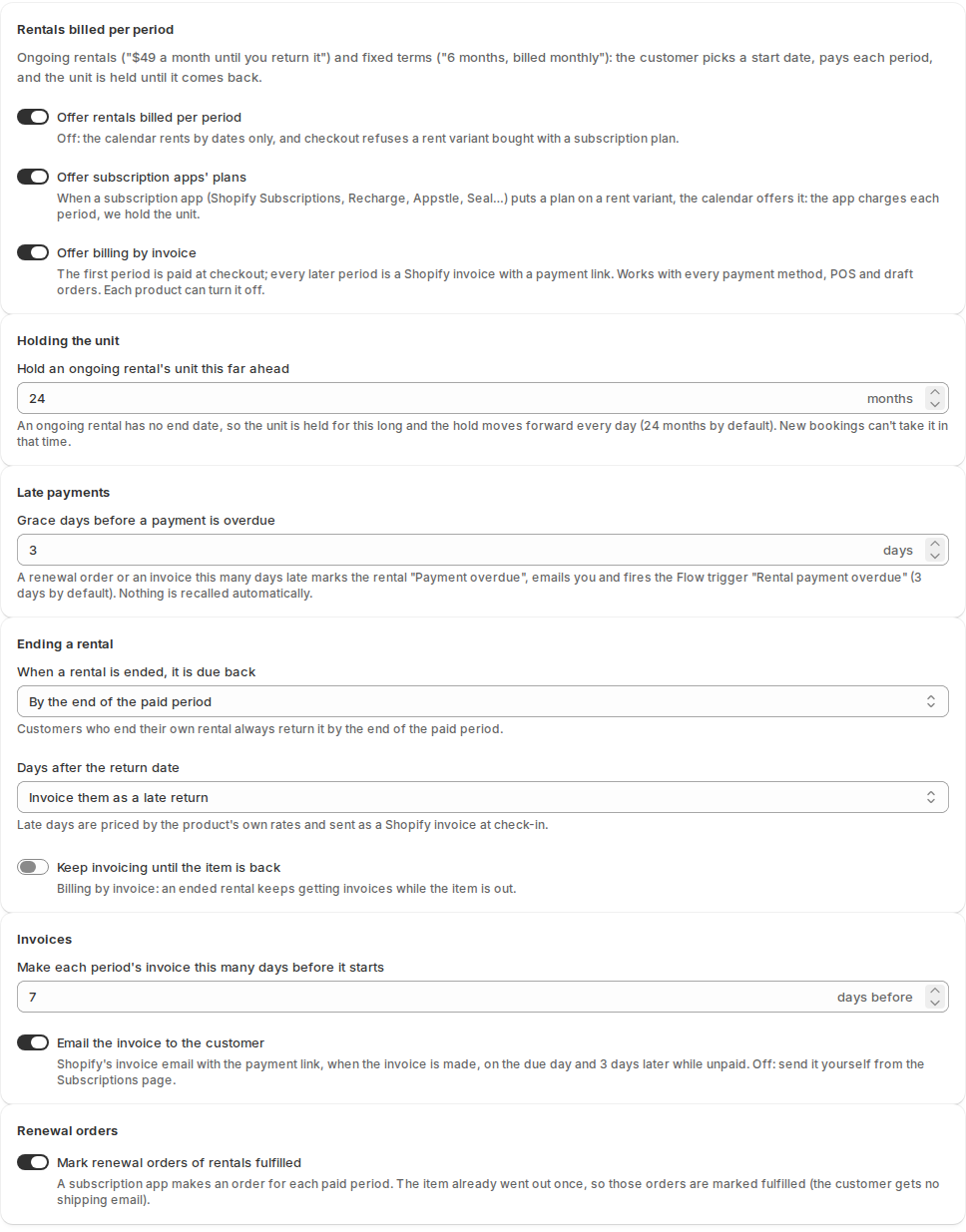
| Setting | What it does |
|---|---|
| Hold an ongoing rental’s unit this far ahead | An ongoing rental has no end date, so its unit is held this long (24 months by default). The hold moves forward every day, and new bookings can’t take the unit in that time. |
| Grace days before a payment is overdue | A renewal or invoice this many days late (3 by default) marks the rental “Payment overdue”, emails you, and fires the Flow trigger Rental payment overdue. Nothing is recalled automatically. |
| When a rental is ended, it is due back | By the end of the paid period, or on a date you choose. Customers who end their own rental always return it by the end of the paid period. |
| Days after the return date | Late days are invoiced as a late return, priced by the product’s own rates and sent at check-in, or not charged. |
| Keep invoicing until the item is back | An ended rental keeps getting invoices while the item is still out. |
| Make each period’s invoice this many days before it starts | 7 by default. |
| Email the invoice to the customer | Shopify emails the invoice with its payment link when it is made, on the due day, and 3 days later while unpaid. Off: you send it yourself from the Subscriptions page. |
| Mark renewal orders of rentals fulfilled | For a subscription app. The item already went out once, so those orders are marked fulfilled and the customer gets no shipping email. |
Set up a product #
Open the product’s Rental page and find the Subscriptions card.
- Turn on Offer this product billed by invoice.
- Choose how often to Invoice: every week, 2 weeks, month and so on.
- Enter the Period price, the price of one period for the whole line. Leave it empty to price one period by the product’s rental rates.
- Enter the Terms offered, separated by commas:
ofor ongoing (until returned), or a number of periods such as6or12. - Click Save subscription settings.
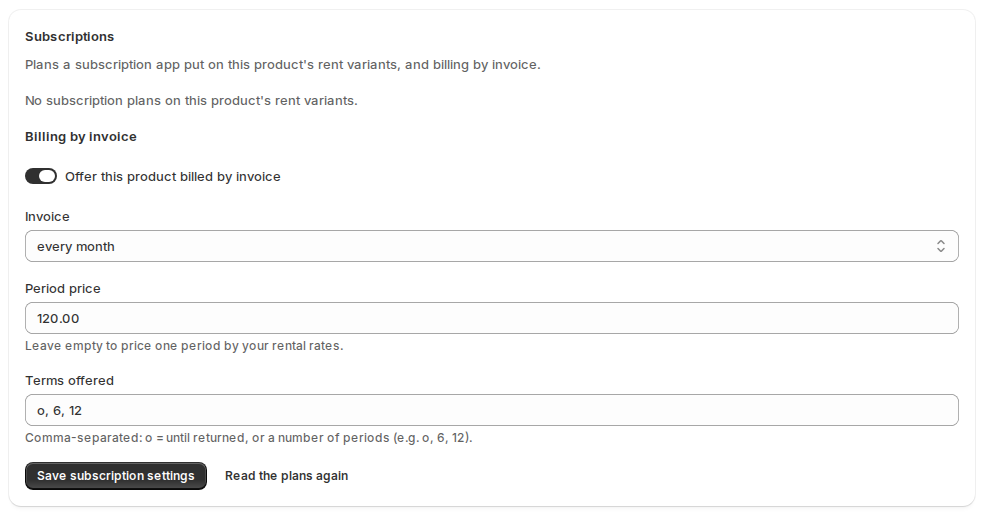
If one product has a variant for each rental length, the card also has One stock for every rent variant, so those variants share the same units.
What the customer sees #
On the product page the calendar asks How do you want to rent? The customer chooses dates (a one-time rental), or an ongoing rental, or a term such as “6 months, invoiced every month”.
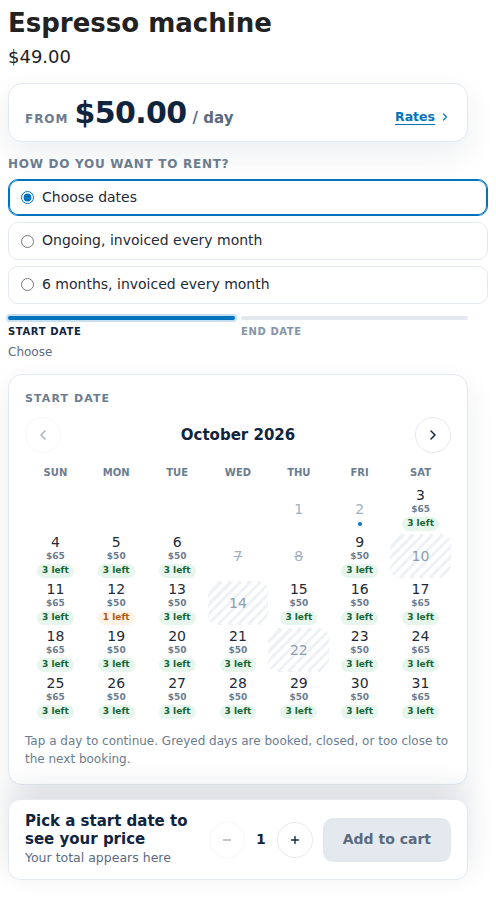
For an ongoing or fixed-term rental the calendar asks for a start day only. A day is free when a unit is free from then on. It shows the price and a consent line under the button.
- The cart line reads “From Oct 1, 2026 · until returned”, or “Oct 1, 2026 – Mar 31, 2027 (6 months)” for a fixed term.
- My rentals shows “Ongoing since Oct 1 · $49 / month · paid through Nov 30”, the periods with Pay now, and End my rental.
- A one-time rental on the same product works as before.
Run it: Subscriptions #
Open Subscriptions in the app menu. The tabs are Running, Payment overdue, Ending, Ended and All. Each row shows the rental, the customer, how it is billed, the price, Paid through, Next due and the status.
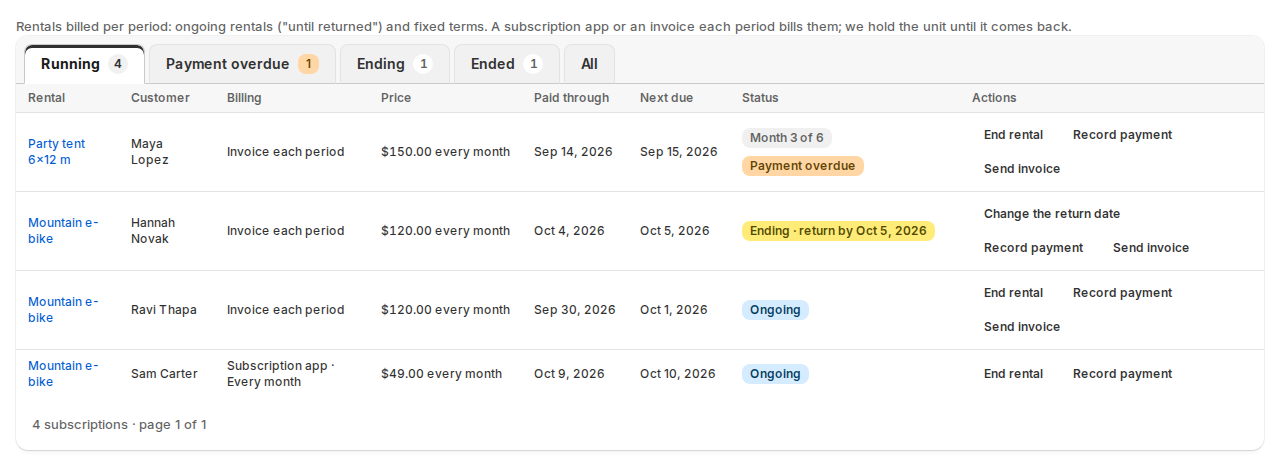
For each rental you can:
- Record payment: a cash payment, a bank transfer, or a renewal the app couldn’t match.
- Send invoice: make or send the invoice for a period (billing by invoice).
- End rental: the rental is due back by the end of the paid period, or on a date you choose. Change the return date moves it.
Bookings and the calendar show Ongoing, Paid through, Payment overdue and “Month 3 of 6”. Opening the booking shows the periods.
Checking the item in ends the rental. The booking ends at check-in (with the turnaround after it) and invoicing stops. A check-in after the return-by date sends a late-return invoice for the late days, if that setting is on.
At the counter and in quotes #
Because invoice billing needs no subscription app, it also works where a subscription app can’t:
- POS: when billing by invoice is on and the product offers it, New rental shows Ongoing rental, billed by invoice. The staff member picks the start date only. The counter charges the first period now, and later periods are invoiced until the item is checked in. Subscription apps’ plans are not offered at the counter.
- Quotes: a draft order can’t carry another app’s plan, so a quote line for an ongoing rental is billed by invoice. See Request a quote for rentals.
Shopify Flow #
- Triggers: Ongoing rental started, Rental period paid, Rental payment overdue, Ongoing rental ending, Ongoing rental ended.
- Actions: End ongoing rental and Record rental payment.
Developers #
REST /api/v1/subscriptions and GraphQL rentalSubscriptions. See the API overview.
Limits #
- A rental billed by a subscription app can’t be part of a kit, can’t be part-paid and can’t be on a draft order. Use billing by invoice for those.
- The app can’t read another app’s subscription contracts, only the renewal orders. See Subscription apps and purchase options.


