
Plan every delivery and collection over your vans in one click
Smart Routing adds route planning to Sales Igniter Rentals & Bookings for WooCommerce. Click Plan the day and it shares the day’s deliveries and collections between your vans, puts each van’s stops in the best order inside the time slots your customers chose, and keeps every van within its load and its shift. Check the plan on a map, move a stop if you like, send it to your drivers and tell each customer a half-hour arrival window.
Stop planning tomorrow’s runs on a whiteboard
Deliveries and collections pile up in the same slots. Working out who goes where, in what order and with what on board takes time every evening, and the customer still has to call to ask when you are coming.
Planning by hand
- Stops copied into a map app one at a time, every evening
- A van leaves full while another drives half empty across town
- A stop misses its slot because nobody added up the driving time
- “What time are you coming?” calls all morning
With Smart Routing
- Plan the day reads the stops straight from your rental orders
- No van planned with more on board than it can carry
- Each stop timed inside the customer’s slot, with the driving in between
- Customers get their half-hour window by email, before you set off
From the day’s orders to planned routes in six steps
Nothing is saved until you accept the plan, and Undo steps back through every change.
Orders come in
Customers book delivery or collection and pick a time slot at checkout, as they do today.
Plan the day
One click shares the day’s stops between your vans and orders each van’s run.
Check the board
Each van’s timeline, load and route on a map. Drag a stop, lock it, plan again.
Accept plan
The routes go into your Schedule, each stop with the window the customer will be told.
Send to drivers
The runs reach the drivers’ phones, and each customer gets their window by email.
See how it went
Reports per day and van: stops, kilometres, driving time and stops per hour.
The planner knows your vans, your slots and your roads
It places every stop it can with the fewest vans, then saves the most driving time or the most kilometres, your choice.
Inside the customer’s slot
Each stop is timed between the slot’s start and end, with the driving and the setup time at the door. Set how late a stop may be, if at all.
Load per van
Set how many units each van carries, counted from the items on each stop. A van is never planned fuller than that. Leave it empty for no limit.
Setup time at the door
Each stop’s setup minutes are part of the plan, so a big tent install doesn’t make the next customer late.
Shifts
Each van leaves the depot no earlier than its shift starts and is back by the end. Vans without their own shift use the default.
Deliveries and collections together
A van drops off a tent at 9 and collects the chairs from yesterday’s wedding on the same run.
Every stop it couldn’t place, with the reason
“No van has room”, “the slot can’t be reached”, “the shift is too short”. Nothing is dropped quietly.
You have the last word on every route
A column per van with its timeline, load bar and stops, next to a map of every route. Change anything and the plan is timed again at once.
Drag and drop, or Move to
Drag a stop to another van or another place in the run, or use Move to. Both work from the keyboard too.
Lock a stop
A locked stop stays on its van and in its place when you plan the day again, so the planner works around it.
The map
Each van’s route from the depot in its own colour, numbered in order, on OpenStreetMap.
Undo
Every change steps back, all the way to the planner’s first answer. Nothing is saved until Accept plan.
Your Schedule stays the source
Accepted routes are the Schedule’s routes: the board, run sheets and CSV of Rentals › Schedule, which comes with Smart Routing, show them too.
Every location
With Multi Location Inventory, each location plans its own vans from its own depot.
Tell every customer when you’ll be there
The window is the planned arrival plus or minus fifteen minutes, always inside the slot the customer chose.
One email per stop
Sent when you send the routes to the drivers, or on the day at an hour you choose. Off until you switch it on.
Only again if it moves
Plan again and only the customers whose window changed get a new email.
An order note
The order records the window the customer was told, for whoever answers the phone.
Your wording
A filter lets a developer change the email or stop it for some orders.
Real road times, and a choice of planner
With Delivery by Distance installed, the planner uses driving times by road. Without it, straight lines times a road factor at your average speed.
| Planner | What it needs | Good for |
|---|---|---|
| Built in | Nothing. It is the default. | Most shops: a few vans and a few dozen stops a day |
| openrouteservice | A free or paid openrouteservice key | Busier days, a second opinion on the order |
| Your own VROOM server | The server’s address | Shops that host their own routing |
Nothing personal leaves your store
An outside planner gets place numbers, travel times, windows and loads. Never names, addresses or coordinates.
Always an answer
No key, an error or an answer that doesn’t add up? The built-in planner plans the day and the board says so.
Your own numbers
Default shift, average speed, road factor, how late a stop may be, and least driving time or fewest kilometres.
A run sheet each driver can follow
Print the day from Rentals › Schedule: one sheet per van, in the planned order.
The planned window per stop
The same half-hour window the customer was told, next to the slot they booked.
Leaves, back, kilometres, driving
Each van’s summary at the top: “Leaves 7:42 AM · Back 12:58 PM · 48.2 km · 2 h 10 min driving”.
A load list, last out first
What goes on the van in loading order, so the first delivery is the last thing loaded.
Signatures and map links
A signature column for each stop and Google Maps directions for the run, as on every run sheet.
Your drivers work the run on their phone
Included with Smart Routing. Drivers open your shop’s own driver page, add it to the home screen, and see the runs you sent them. No app store, and nothing to install from us.
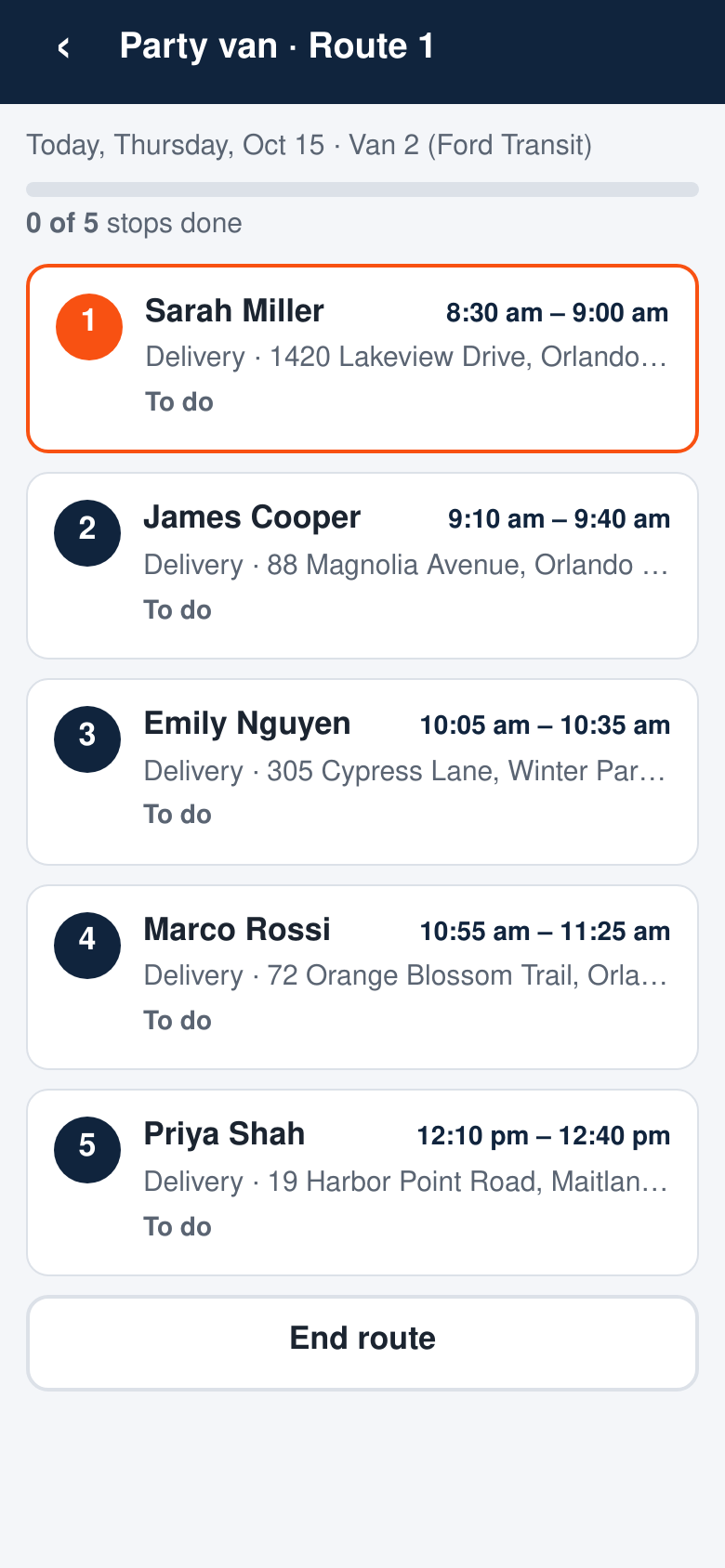
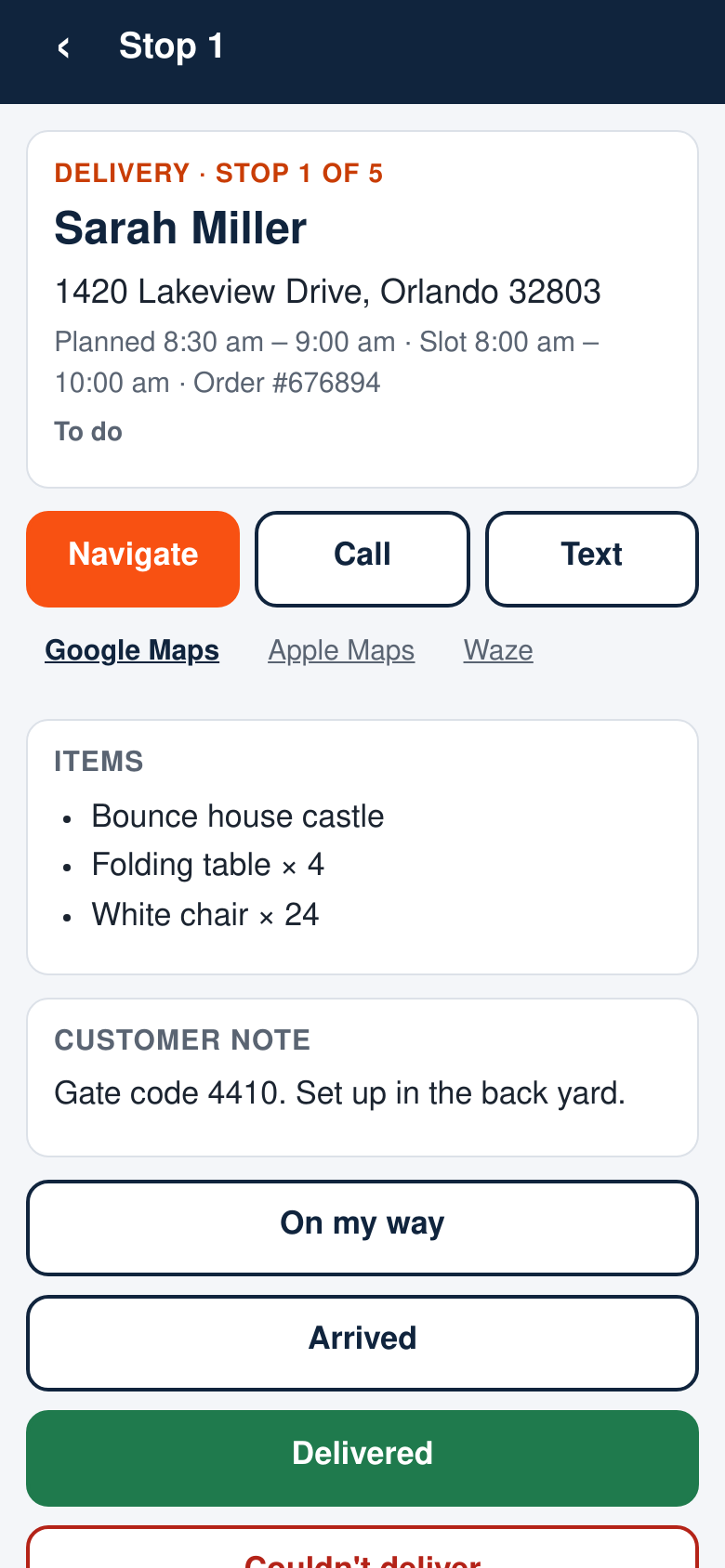
Navigate, call, text
Google Maps, Apple Maps or Waze in one tap, and the customer’s number for that driver’s stops only.
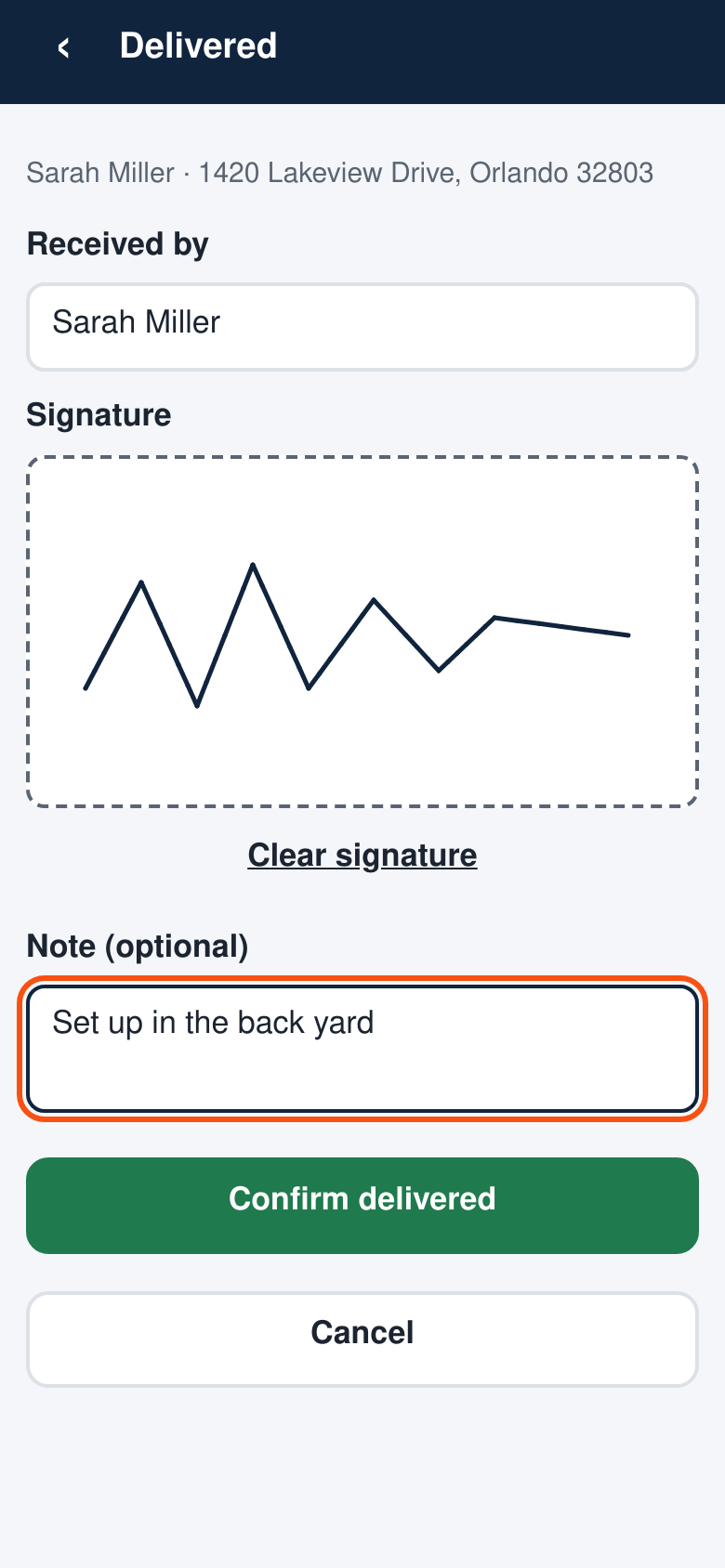
Delivered or Couldn’t deliver
Delivered takes the recipient, a signature and a note. Couldn’t deliver asks why: no one home, no access, wrong address, refused, vehicle or weather.
Works without signal
The run is kept on the phone. Taps made offline wait in a queue and are sent in order when the signal is back.
Back in the office
Each stop on Rentals › Schedule shows the actual time, the reason a stop failed and the signature. The order gets a note: “Delivered to Sarah Miller at 9:24 AM”.
Only their own runs
Give a route a driver on the Schedule. Drivers see only their runs; managers see every route.
From My schedule
Staff who drive see Today’s route at the top of My schedule in their account.
See what every van did, day by day
Rentals › Routes › Reports, for any range of up to 62 days.
Per day and per van
Stops, done, failed, kilometres, driving time, hours on the road and stops per hour, with totals for all vans.
Planned on time
The share of stops the plan has inside their slot. The driver app records the actual time of every stop on the Schedule.
Export CSV
The same table for your spreadsheet, with cells that can’t run as formulas.
Everything the add-on does
| Area | What you get |
|---|---|
| Plan the day | Deliveries and collections shared between vans and ordered inside the customers’ slots, within each van’s load and shift, with the setup time at each door; fewest vans first, then least driving time or fewest kilometres; unplaced stops with the reason |
| The route board | A column per van with timeline, load bar and stops; map; drag and drop, Move to, keyboard; locks; Undo; timed again on every change |
| Accept and send | Accept plan writes one route per van into the Schedule with each stop’s window; Send to drivers marks them sent (a new plan is sent again) |
| The Schedule | Included: Rentals › Schedule with the day’s board, list and week, routes by drag and drop, Change slot, Order routes with Undo, run sheets, the Routific / OptimoRoute CSV and the morning day sheet by email |
| Vans | Staff & resources of type Vehicle; a load and an own shift for each |
| Customer windows | The planned arrival ± 15 minutes inside the slot; email on send or at an hour on the day; once per window; an order note |
| Travel times | By road with Delivery by Distance, else straight lines × road factor at your average speed |
| Planners | Built in, openrouteservice or your own VROOM server, with the built-in planner as the fallback; no personal data sent |
| Run sheets | Planned window per stop; leaves, back, kilometres and driving time per van; a load list, last out first |
| Reports | Per day and van: stops, done, failed, km, driving, on the road, stops per hour, planned on time; totals; CSV |
| Driver app | Included: the run on the driver’s phone, Navigate, call and text, On my way, Delivered with signature and recipient, Couldn’t deliver with the reason, works offline, installable; actual times and proof of delivery on the Schedule |
| Locations | With Multi Location Inventory, a plan per location and depot |
| Developers | REST endpoints for the board, filters for the travel times and the window email, actions when a plan is saved and when routes are sent |
Questions about Smart Routing
What do I need to run it?
Sales Igniter Rentals & Bookings for WooCommerce Regular 1.0.80 or later with delivery & pickup switched on, on WordPress 6.6 and PHP 8.1 or newer. Your vans are added under Rentals › Staff & resources.
Delivery by Distance is optional: with it, the planner uses real driving times by road.
How many vans and stops can it plan?
The built-in planner is made for the way rental shops work: a handful of vans and a few dozen stops a day, planned in seconds. For busier days, connect openrouteservice or your own VROOM server.
Does it change my orders or bookings?
No. It plans the stops your orders already have. Accepting a plan only sets the route, the order of the stops and the window on each stop in your Schedule.
Do my drivers need an app?
They use the driver app that comes with Smart Routing: a page on your own shop they add to their phone’s home screen. No app store and no per-driver fee. Printed run sheets still work for drivers who prefer paper.
Do you send my customers’ addresses to anyone?
The built-in planner works inside your store. An outside planner you choose gets only place numbers, travel times, windows and loads, never names, addresses or coordinates. Road times through Delivery by Distance use the map service you chose there.
Is it included in Ultimate?
Yes. Smart Routing is included in the Ultimate package for WooCommerce, or $99 on its own (renews at $49/year).
Smart Routing for WooCommerce
An add-on to Sales Igniter Rentals & Bookings Regular.
Smart Routing
Everything on this page.
- Plan the day over all your vans, deliveries and collections
- The route board with the map, locks and drag and drop
- Customer arrival windows by email
- Road times, openrouteservice and your own VROOM server
- Rentals › Schedule with the morning day sheet
- Run sheets with planned times and load lists, and reports
Before you buy
What it needs.
- Sales Igniter Rentals & Bookings for WooCommerce Regular 1.0.80 or later
- Delivery & pickup switched on, with your time slots
- WordPress 6.6 and PHP 8.1 or newer, with WooCommerce
- Optional: Delivery by Distance, for driving times by road
- Optional: Multi Location Inventory, to plan each location
Read the guide before you buy
Set-up and every feature, step by step.
Plan tomorrow’s runs in one click
Install it next to Rentals & Bookings Regular, add your vans, and press Plan the day.