
A guest count lets customers say how many people a booking is for. It is kept apart from the quantity, which still means units of stock. A cabin that sleeps 4 is still one cabin, and a tour with 20 places sells one place per guest. The product checks the party against its limits, keeps the quantity right, adds any guest fees to the price, and shows the party in the cart, on the order and in the app.
Turn guests on for a product #
- Open the product’s Rental Settings page (Inventory › the settings button) and click Show advanced settings.
- Under Guests, set Ask for guests:
- No: the quantity is all that is asked (the default).
- Yes, price per unit: each unit (a room, a cabin, a boat) holds up to a number of guests. The price is per unit.
- Yes, price per person: each guest takes one place, and pays for it. The quantity is the number of guests.
- Set Minimum guests and Maximum guests, and optionally a Label (the word next to the count, like Riders or Passengers).
- Save.
With Yes, price per unit, Maximum guests is the most guests one unit holds. A party bigger than that needs more units, and the quantity goes up by itself. With Yes, price per person, it is the most guests one booking can bring.
Guest types #
Guests can be split into adults, children, infants and pets. Adults are always asked for.
Store defaults: Settings › Rules › Show pricing rules, fixed lengths and guests › Guests:
| Setting | What it does |
|---|---|
| Guest types products ask for | Children, Infants and Pets. Products with guests use these unless they set their own. |
| Note for each type | The small line under each type, like “Ages 13 and up”, “Ages 2 to 12”, “Under 2” or “Dogs only”. |
| Infants count toward the maximum | Off: infants don’t take a place in the party. |
Per product, under Guests in the advanced settings:
| Setting | What it does |
|---|---|
| Guest types asked for | This product’s types, instead of the store’s. |
| Maximum infants and Maximum pets | On top of the maximum guests. 0 = not allowed. Blank = no limit. |
Guest fees #
| Setting | Mode | What it does |
|---|---|---|
| Guests included | Price per unit | Guests covered by the price. Each extra guest pays the extra guest fee. |
| Extra guest fee and Charged | Price per unit | The fee for each guest above the number included, Per night or Per stay. On a product booked by the day it reads Per day or Per stay. |
| Pet fee | Price per unit | The fee per pet. |
| Children pay | Price per person | The adult price, A percentage of the adult price or A fixed price. |
| Child price or percentage | Price per person | A percentage (e.g. 50) or an amount, as chosen. |
| Example: a cabin at $150 a night, 2 guests included, $25 per extra guest per night | Amount |
|---|---|
| 3 nights × $150.00 | $450.00 |
| 2 extra guests × $25.00 × 3 nights (4 guests, 2 included) | $150.00 |
| Total | $600.00 |
What customers see #
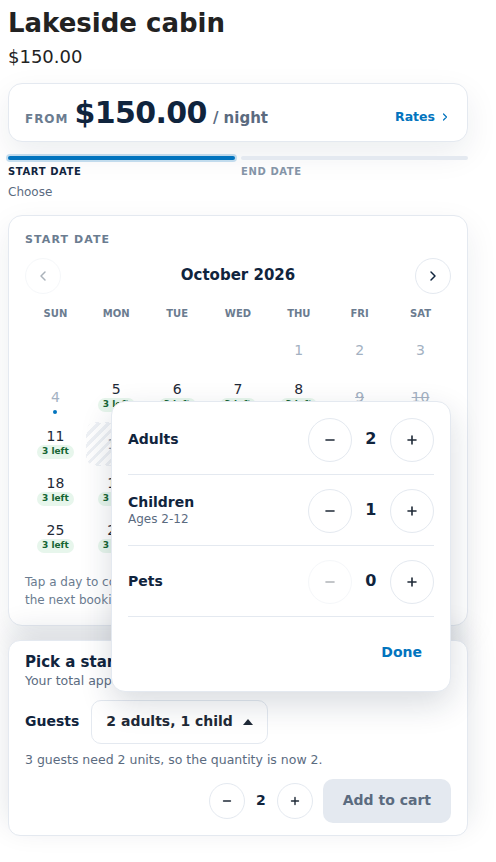
- With one guest type, the product page shows a single count with minus and plus buttons. With more, customers click a button such as “2 adults, 1 child” and a small window opens with a row for each type and its note. On a phone it opens from the bottom of the screen.
- With price per unit, when the party needs more units than the quantity, the quantity goes up and the page says so.
- With price per person, the number of guests is the number of places booked and paid for.
- The booking bar lists the guest fees as their own lines, and the total includes them.
- The cart line shows the party under the dates, for example “Guests: 2 adults, 1 child”. The order keeps it.
In the app #
- A booking’s page shows its Guests.
- A manual booking for a product with guests asks for the party. With price per person the party replaces the quantity: “Priced and held per person: each guest takes one place.” With price per unit: “The quantity goes up if the party needs more units.”
- Reminder emails can use the
{guests}merge tag (“2 adults, 1 child”). - The Rental search block can ask for the party size, so shoppers only see rentals that fit. See Search by date.
Good to know #
- Guests are not a second stock. Price per unit books units; price per person books one unit of stock per guest.
- The party is checked again when the rental is added to the cart, and its price and quantity are checked again at checkout.


