
With pay part now, customers pay part of the rental price at checkout. The rest, the balance, is added to the same Shopify order with a payment link, and is due before the pick-up. The app sends reminders, shows what is owed in the admin and at the desk, and marks the balance paid when the customer pays.
This is part of the rental price. A refundable security deposit is something else: see the Security Deposits app.
Turn it on: Settings › Payments #
| Setting | What it does |
|---|---|
| Let customers pay part now | Turns the feature on. Only for rentals priced by date; fixed-length variants are always paid in full. |
| Who chooses | The customer: pay in full or part now, or Always part now (no full-payment option). |
| Paid at checkout | A percentage of the rental price, A fixed amount per rental or A fixed amount per unit, and the Amount. |
| Pay at least this much now | A minimum for the part paid at checkout. 0 = no minimum. |
| Only rentals of at least | Cheaper rentals are paid in full. 0 = every rental. |
| When the rest is due | Due so many days before pick-up, At a time of day. A rental that starts sooner than this is paid in full. |
| At check-out | What the Send & Return desk does with an unpaid balance: Warn, and let staff check it out anyway, or Block check-out until it is paid or waived. |
| Cancel the booking this many days after the due date | Empty = never. The booking is cancelled and its stock freed; the Shopify order and its payments stay as they are for you to refund or cancel. |
| Give the balance the same discount as the rental | A discount code on the order counts for the balance too. |
| Tax on the balance | Taxable when the rental product is, Always taxable or Never taxable. |
The screen shows an example as you type, like “A 400.00 rental: 100.00 now, 300.00 due 7 days before pick-up.”
Per product, the product’s Rental Settings page has a Part payment section: Store default, On for this product, or Off: always paid in full.
What customers see #
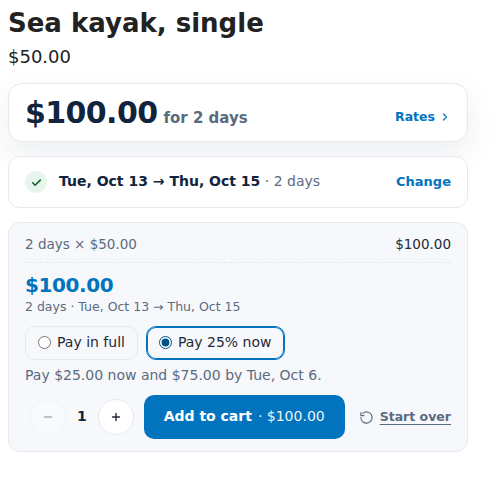
- Under the total: Pay in full or Pay 25% now, and “Pay $25.00 now and $75.00 by Tue, Oct 6.”
- The cart line says how it is paid, for example “Payment: 25% now · 75.00 due Oct 6”.
- Checkout charges the part paid now.
- After the order, the order status page and My rentals show “Balance 75.00 due Oct 6, 2026 · Pay now”.
After the order #
The balance is added to the same order as its own line, like “Balance: Party tent, Oct 13, 2026 – Oct 15, 2026”. The order becomes partially paid and Shopify gives it a payment page. When Shopify can’t edit the order, the balance is sent as a separate invoice instead.
Balance reminders go out by email with the payment link: by default 3 days before, on the day and 1 day after the due date, at 09:00. Change them under Settings › Notifications › Balance reminder. See Reminders and emails.
The Balances page #
Balances in the app’s menu lists rentals paid in part at checkout, with tabs Due, Overdue, Paid, Not added and All.
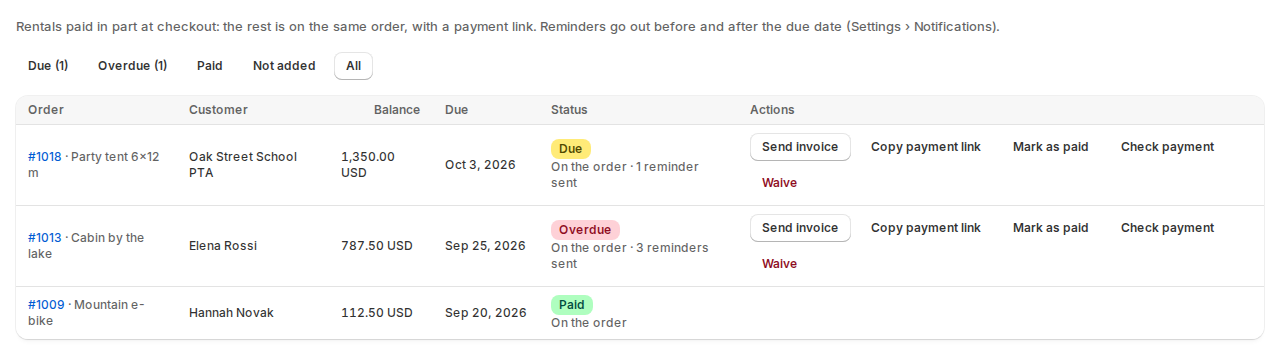
| Action | What it does |
|---|---|
| Send invoice | Sends Shopify’s invoice email with the payment link. |
| Copy payment link | Copies the link to paste into your own message. |
| Mark as paid | For cash or another payment outside Shopify’s checkout. Only when the order owes no more than the balance. |
| Check payment | Looks at the order again to see whether it was paid. |
| Waive | Takes the balance off the order; the customer won’t owe it. |
| Try again | Adds a balance again that Shopify refused the first time. |
The dashboard shows Balances due this week. Bookings and the desk show a balance badge, and the order’s Rental card shows “Paid now 25.00 · balance 75.00 due Oct 6”.
At the desk #
With Warn, Check out asks first: “The balance of 75.00 isn’t paid yet. Collect it first … Check out anyway?” With Block, check-out is refused until the balance is paid or waived.
Good to know #
- A refund that removes rental units before the balance is paid doesn’t reduce the balance by itself. Waive it, or adjust the order in Shopify.
- Manual bookings you create in the app are invoiced in full.
- Balance reminders are emails. Shopify Flow also gets the events Rental balance due, Rental balance overdue and Rental balance paid.


