
Everything customers see in the agreement panel, and everything printed on the signed PDF, comes from the Rental Contracts app’s Settings page. The Preview beside the form shows the panel with your changes as you type.
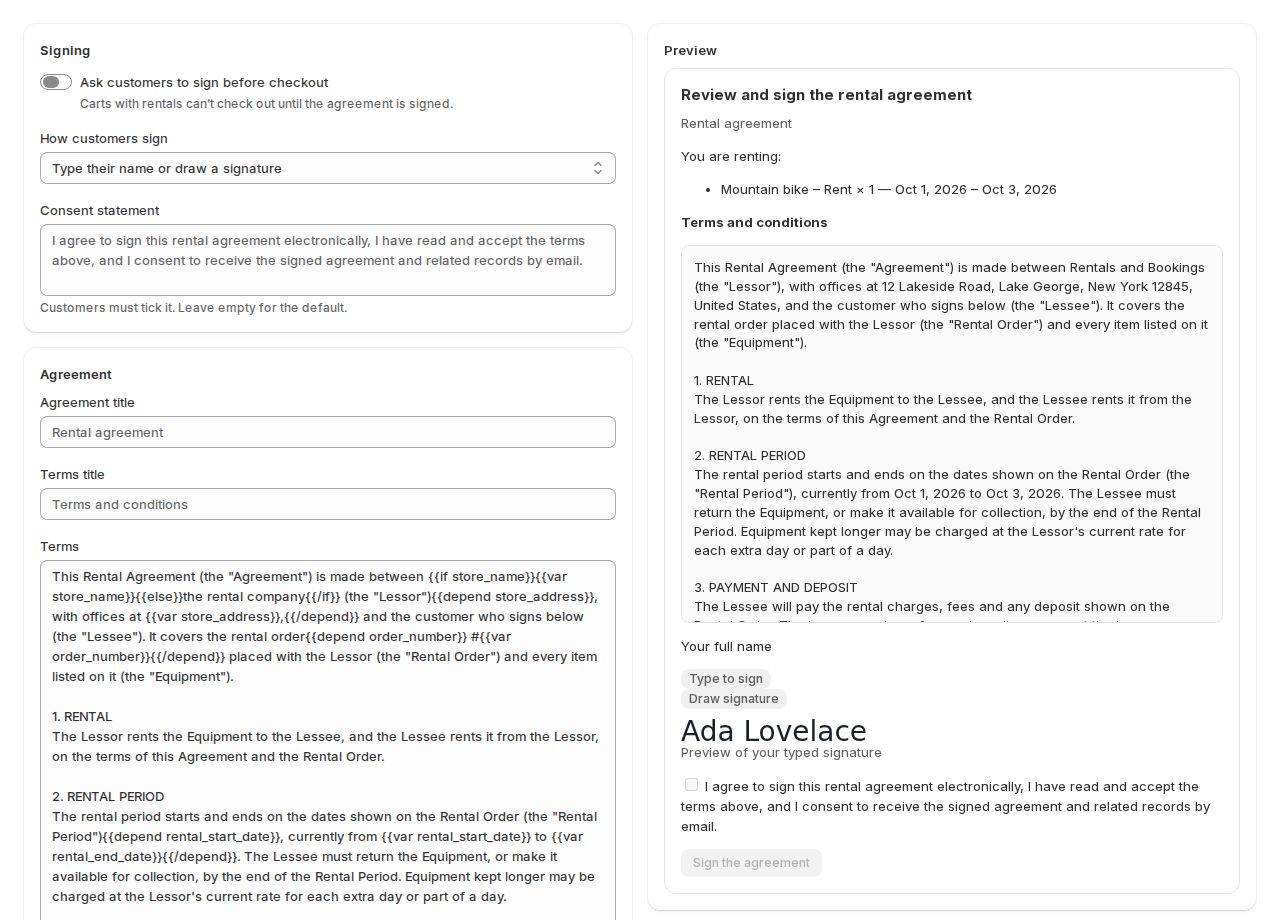
Signing #
| Setting | What it does |
|---|---|
| Ask customers to sign before checkout | Carts with rentals can’t check out until the agreement is signed. Turn it off to stop asking. |
| How customers sign | Type their name or draw a signature, Type their name, Draw a signature, or No signature (tick a consent box only). |
| Consent statement | The sentence customers must tick. Leave it empty for the default: “I agree to sign this rental agreement electronically, I have read and accept the terms above, and I consent to receive the signed agreement and related records by email.” |
Your agreement #
| Setting | What it does |
|---|---|
| Agreement title | The title of the agreement. Empty: “Rental agreement”. |
| Terms title | The heading above the terms. Empty: “Terms and conditions”. |
| Terms | Your terms, as plain text. Line breaks show exactly like this in the cart and the PDF. |
| Use the default terms | Puts the app’s generic terms back. |
| Include the list of rental items | Shows what the customer is renting, with the dates, in the panel and the PDF. |
| Business legal name | Shown as the rental company. Leave it empty for your store name. |
| Governing law | For example: New York, United States. Leave it empty for your store’s region and country. |
The default terms #
The app starts with generic rental terms that name nobody: the rental, the rental period, payment and deposit, delivery and return, use of the equipment, condition on receipt, loss and damage, cancellation, liability, indemnity, default, ownership, governing law and the entire agreement. They fill in your store’s name and address. Read them and change what doesn’t fit your business; have a lawyer look at them if you are unsure.
Placeholders #
Placeholders fill in facts when the terms are shown or printed:
| Placeholder | Becomes |
|---|---|
{{var store_name}}, {{var store_address}}, {{var store_region}}, {{var store_country}} | Your store’s name and address. |
{{var legal_name}}, {{var governing_law}} | The two settings above. |
{{var order_number}}, {{var order_date}} | The order, once there is one (on the PDF). |
{{var customer_name}}, {{var customer_first_name}}, {{var customer_last_name}} | The customer. |
{{var rental_start_date}}, {{var rental_end_date}} | The rental dates. |
{{var site_url}}, {{var today}} | Your store’s address and today’s date. |
A placeholder with no value is left empty, never replaced with a stand-in word. For text that only makes sense with a value, wrap it: {{depend order_number}}Order #{{var order_number}}.{{/depend}} prints nothing while there is no order yet. {{if store_name}}…{{else}}…{{/if}} gives a fallback. The short form {store_name} works too.
The signed PDF #
| Setting | What it does |
|---|---|
| Email the signed PDF to the customer | The customer gets their copy by email after the order. |
| Add a signature certificate page | A last page with the signer, the time, the IP address, the browser, the fingerprints of the document and the audit trail. |
Cart panel wording #
Change any of the panel’s words: Panel heading, “Type” tab, “Draw” tab, Name field, Caption under the typed signature, Caption in the drawing box and Sign button. Leave a box empty to keep the default, which is shown in the customer’s language.
Keeping records #
| Setting | Default | What it does |
|---|---|---|
| Keep signed agreements for (days after the order) | 2557 (7 years) | Signed agreements and their PDFs are erased after this. |
| Keep signed agreements until then when a customer asks to be forgotten | On | A signed agreement is a legal record. Off erases it at once when Shopify passes on an erasure request. |
| Erase signatures that never became an order after (days) | 30 | Signatures from carts that were never checked out. |
| A signature stays valid in the cart for (days) | 3 | After this the customer signs again. |
Click Save in the save bar. The app updates the checkout check straight away; if it can’t, it says so.
Good to know #
- Changing the terms doesn’t change agreements already signed: each keeps the exact text the customer saw.
- If you change the terms while a customer has the panel open, they are asked to read the new version before signing.
- The page also lists this app’s customer data requests, when Shopify passes one on.


