
Every rental product has a price for its dates. It can be a simple rate (per day, per hour or per rental), or a price table with a price for each length. On top of that, date-based and length-based rules change the price for seasons, holidays and longer rentals. Customers see the total before they add the rental to the cart, and checkout charges exactly that total.
Simple rates #
On the full Rental Settings page, set How you price it to Price per day, hour or rental:
| Field | What it does |
|---|---|
| Price per day | Charged for each day (or night) of the rental. Leave it blank if you don’t charge by the day. |
| Price per hour | Used when customers pick times. |
| Price per rental | A flat amount added to every rental. |
The quick Rental Settings form offers the same as Per day, Per hour and One price per booking.
Is the return day charged? #
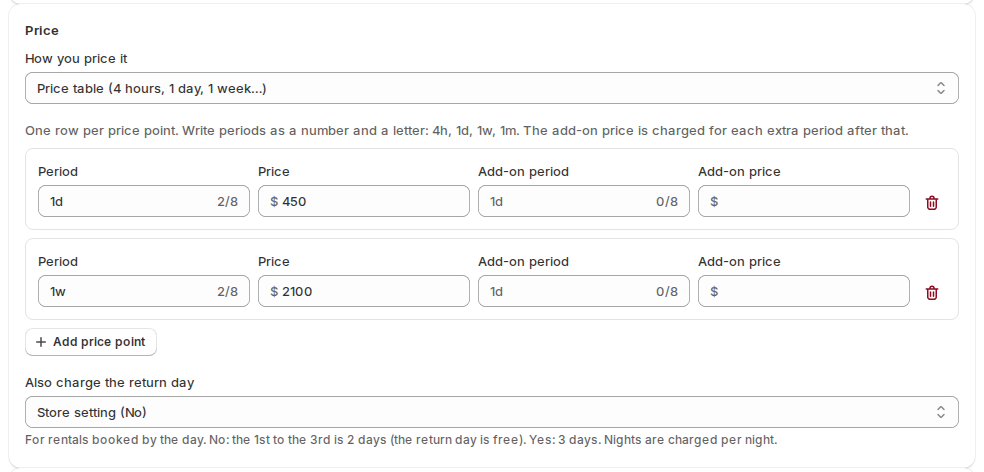
For rentals booked by the day, the day the item comes back can be free or charged. This is the setting Also charge the return day. No (the default): the 1st to the 3rd is 2 days. Yes: it is 3 days. Rentals booked by Nights are always charged per night: the 1st to the 3rd is 2 nights.
Set it for the store in Settings › General › Pricing unit. A product can use its own in the Price section of its Rental Settings: Store setting (it shows what the store uses), No or Yes. This setting only changes the price. Which days are held is set by Booked by, in Settings › Rules.
A price table #
Choose Price table (4 hours, 1 day, 1 week…) to give each length its own price. Add one row per price point with Add price point:
| Column | What it means |
|---|---|
| Period | A number and a letter: 4h, 1d, 1w, 1m. |
| Price | The price for that length. |
| Add-on period and Add-on price | The add-on price is charged for each extra add-on period after that length. For example 1d at 55 with an add-on of 1d at 40. |
A price table suits rentals that get cheaper per day the longer they run, like a camera at 55 a day or 220 a week.
Seasons and holidays: date-based pricing #
Date rules give different prices for certain dates.
| Field | What it does |
|---|---|
| From and To | The dates the rule covers. |
| Repeats | Doesn’t repeat, Every week, Every month or Every year. |
| Price per day, Price per hour, Price per rental | The prices inside those dates. |
| Or adjust by | Instead of prices, a percentage (20%) or an amount (-10) added to the normal price. |
Click Add date rule for each one. A rule needs a price or an adjustment.
Longer rentals: length-based pricing #
Length rules change the price by how long the rental is. Leave To blank for “and longer”, for example 7 days and longer at 10% off.
| Setting | What it does |
|---|---|
| From and To | The rental lengths the rule covers. |
| Prices or Or adjust by | As for date rules. |
| Apply the length rule to the whole rental | On: the rule prices the whole rental. Off: the rule only prices the part of the rental inside its range. |
| When several length rules match | Use the biggest adjustment, Use the smallest adjustment or Apply them all. |
Store rules and product rules #
Rules can be set for the whole store or for one product:
- Store defaults: Settings › Rules › Show pricing rules, fixed lengths and guests. Every product uses these unless it sets its own.
- One product: its Rental Settings › Show advanced settings › Pricing rules. The page reminds you which policy applies when several length rules match, with a link to change it in Settings.
How the price shows on the product page #
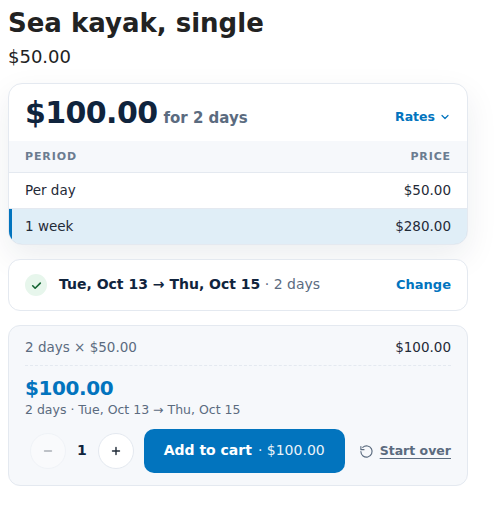
The pricing card above the calendar shows a headline price, like “From $50.00 / day”, and a rate table. Once dates are picked, the card shows the total, like “$100.00 for 2 days”.
| Setting | Where | What it does |
|---|---|---|
| Headline price per | Product › Advanced › Price display | The period next to the “From” price: Automatic, Hour, Week, Month or Event. Automatic says “night” for a product booked by Nights and “day” otherwise. A product saved with Day or Night keeps it, marked “(old setting)”, until you change it. |
| Price shows as | Product › Advanced › Price display | Automatic, The rate table, or The custom text below. |
| Custom price text | Product › Advanced › Price display | Your own wording, like “From {price} per {period}”. {price} and {period} are filled in for you. |
| Show the price in each day | Settings › Calendar & styler | A price under every date. Handy when prices change by season. |
| Show add-on prices | Settings › Calendar & styler › Price table | “+ 40 per extra day” next to each price point. |
| Price points in product lists | Settings › Calendar & styler › Price table | How many rows of the price table show outside the product page. 0 shows all. |
At checkout #
- The price and dates are checked again when the customer pays. Editing the cart can’t change a rental’s price, and a rental added without dates is refused.
- Discount codes work on rentals like on any product.
- Visitors who shop in another currency see the calendar and card prices converted at the same rate checkout uses.
- Guest fees (extra guests, pets, children) are covered in Guests and party size. Paying part now is covered in Pay part now, rest later.
Good to know #
- The price for a product you book by hand from the app (a manual booking) is worked out the same way.
- When you change a booking’s dates from the admin, the app shows the price difference before you apply it. See Managing bookings.


