
This page follows a deposit from the product page to the order: what customers see, how the deposit line gets into the cart, and what checkout checks.
On the product page #
With the Security deposits app embed on, a notice sits right under the rental calendar: “A refundable deposit of $100.00 is charged at checkout.” Customers see it before they add the rental. For a per-unit deposit it follows the quantity, and for a percent deposit it shows the amount once the dates are priced.
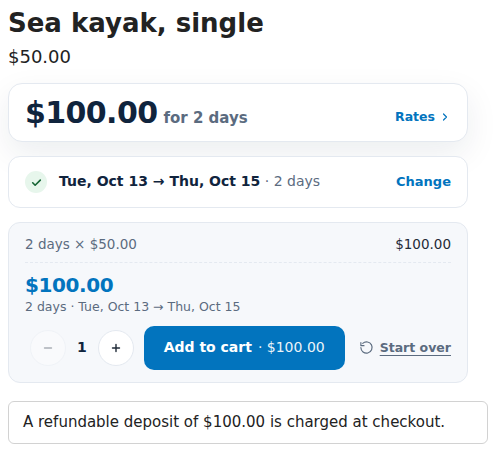
Change the wording under Settings › Product page notice, or turn the notice off in the app embed’s settings (Show the deposit on product pages). The embed’s Notice text overrides the app’s wording for your theme.
In the cart #
When the customer adds the rental, the deposit is added as its own line, named by your Deposit title (“Security deposit”), with a For line naming the rental and its dates, like “Sea kayak · Oct 13 – Oct 15”. One deposit per order shows as a single line for all the rentals that use it.
The cart page keeps deposits in step with rentals: it adds a deposit that is missing, removes one whose rental was removed, and replaces one that no longer matches (after a quantity change, for example). The embed’s settings Keep deposits in step with rentals in the cart and Reload the cart page after a deposit changes control this; leave them on.
At checkout #
The app checks every deposit line again at checkout, whatever the theme or another app did to the cart. If something is wrong, checkout shows one of these messages and waits:
| Message | When |
|---|---|
| “Sea kayak needs a security deposit. Open your cart to add it.” | Block checkout when a rental’s deposit is missing is on and a rental has no deposit. |
| “The security deposit for … is out of date. Open your cart to update it.” | The deposit line was changed or doesn’t belong to this cart. |
| “The security deposit for … doesn’t match the rental quantity. Open your cart to update it.” | The quantity changed. |
| “The security deposit for … expired. Open your cart to update it.” | The deposit is older than the rental’s hold. |
| “A security deposit in your cart has no rental with it (…). Remove it from your cart.” | The rental was removed but the deposit wasn’t. |
| “The security deposit for … is in your cart twice. Remove one.” | Two deposit lines for one rental. |
Opening the cart page fixes all of these by itself.
On the order #
Each deposit line becomes a deposit in the app, paired with its rental and booking. You see it on the Deposits page and on the order’s Security deposit card, marked Held until you refund it. See Refunding deposits.
Good to know #
- The deposit amount always comes from your rules and the rental’s own price, never from the customer’s browser.
- Draft orders you create by hand for rentals don’t get a deposit line by themselves. With Block checkout when a rental’s deposit is missing on, their invoices can’t be paid without one.


