
A damage waiver is a fee that limits what customers pay for accidental damage. The Custom Fields app adds it as its own line in the cart, never to the product’s price. It can be optional (the customer ticks a box) or mandatory, a fixed amount or a percent, per item or once per order.
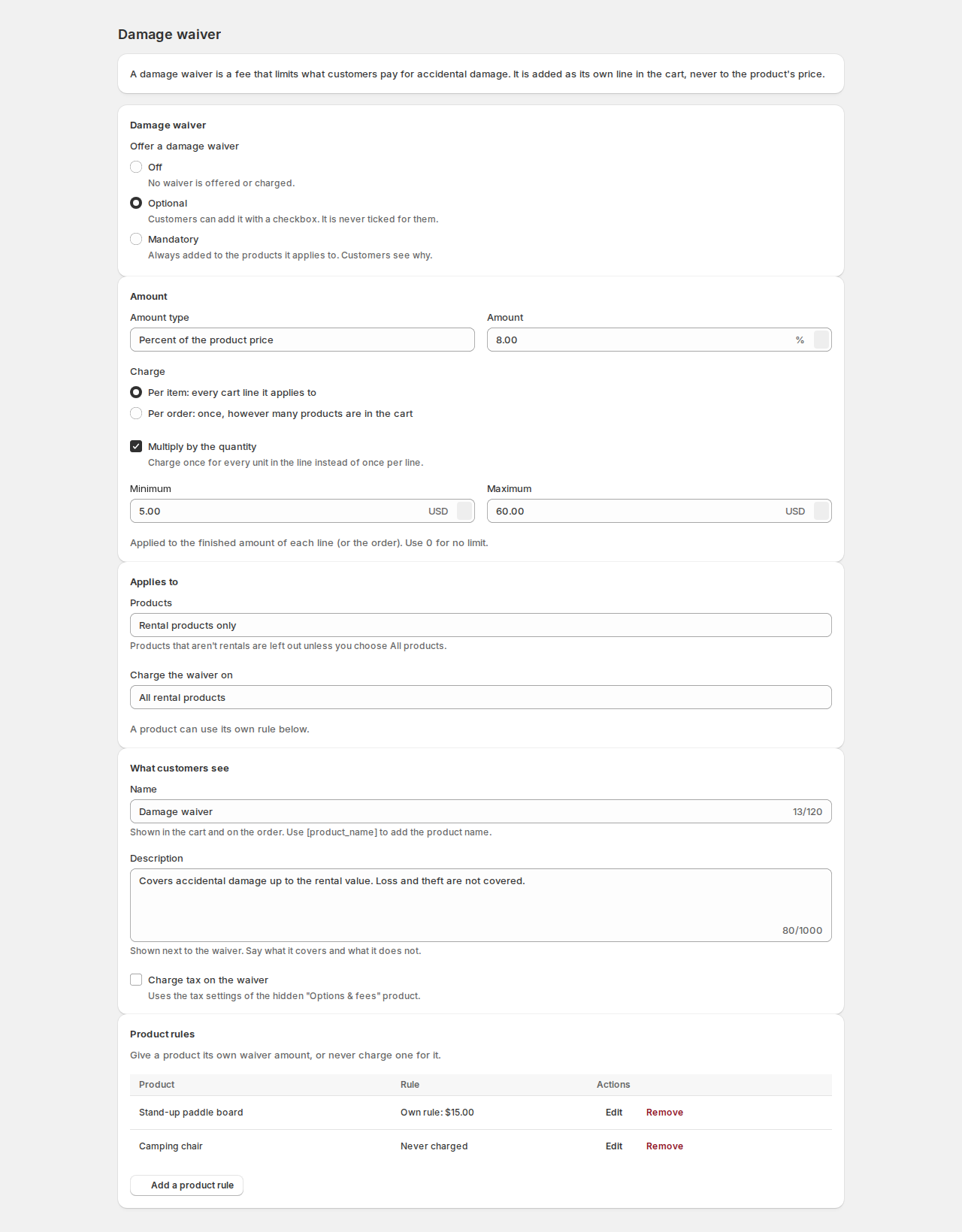
Offer a damage waiver #
Open Damage waiver in the app and choose Offer a damage waiver:
| Choice | What it does |
|---|---|
| Off | No waiver is offered or charged. |
| Optional | Customers can add it with a checkbox. It is never ticked for them. |
| Mandatory | Always added to the products it applies to. Customers see why. |
Amount #
| Setting | What it does |
|---|---|
| Amount type | Fixed amount or Percent of the product price. |
| Amount | The amount or the percent. |
| Charge | Per item: every cart line it applies to, or Per order: once, however many products are in the cart. |
| Multiply by the quantity | Charge once for every unit in the line instead of once per line. |
| Minimum and Maximum | Applied to the finished amount of each line (or the order). Use 0 for no limit. |
For example, 8% of a $300 rental is $24; with a minimum of $5 and a maximum of $60, a $40 rental pays $5 and a $1,000 rental pays $60.
Applies to #
| Setting | What it does |
|---|---|
| Products | Rental products only, or All products, rentals and others. Products that aren’t rentals are left out unless you choose all products. |
| Charge the waiver on | All of them, or only those in chosen collections, chosen products, or with chosen tags or types. |
What customers see #
| Setting | What it does |
|---|---|
| Name | Shown in the cart and on the order. Use [product_name] to add the product name, like “Damage waiver for [product_name]”. |
| Description | Shown next to the waiver. Say what it covers and what it does not. |
| Charge tax on the waiver | Uses the tax settings of the hidden “Options & fees” product. |
- An optional per-item waiver shows on the product page as a checkbox, never ticked in advance, with its amount: “Add Damage waiver ($15.00 per item)”, or “Add Damage waiver (8% of the price)” for a percent.
- A mandatory waiver shows as “Damage waiver ($15.00 per item) is added to your order.”
- A per-order waiver is offered once, in the cart.
If a mandatory waiver is missing, checkout says “… needs the damage waiver. Add it in your cart.”
Product rules #
Under Product rules, click Add a product rule to give one product its own waiver:
- Use the store rule;
- Use its own amount or name (leave a field blank to use the store setting);
- Never charge a waiver.
Remove puts the product back on the store rule.
On the order #
The waiver line shows on the order, and the order note records the decision: “Damage waiver: accepted ($24.00).”, “Damage waiver: charged ($24.00).” or “Damage waiver: declined by the customer.” The rule that applied is kept with the order, so later changes to your settings don’t change it.
Good to know #
- The waiver is an added charge, and customers see its amount before it is added.
- Save the page with the save bar; the checkout check is updated straight away.


