
Late fees charge customers who bring a rental back after it was due. The app works the fee out when the rental is checked in, keeps a running total while it is still out, and lists every fee on the Late fees page. There you accept a fee, edit it or waive it. Accepting takes it from the security deposit, emails the customer a payment link, or records a payment at the counter.
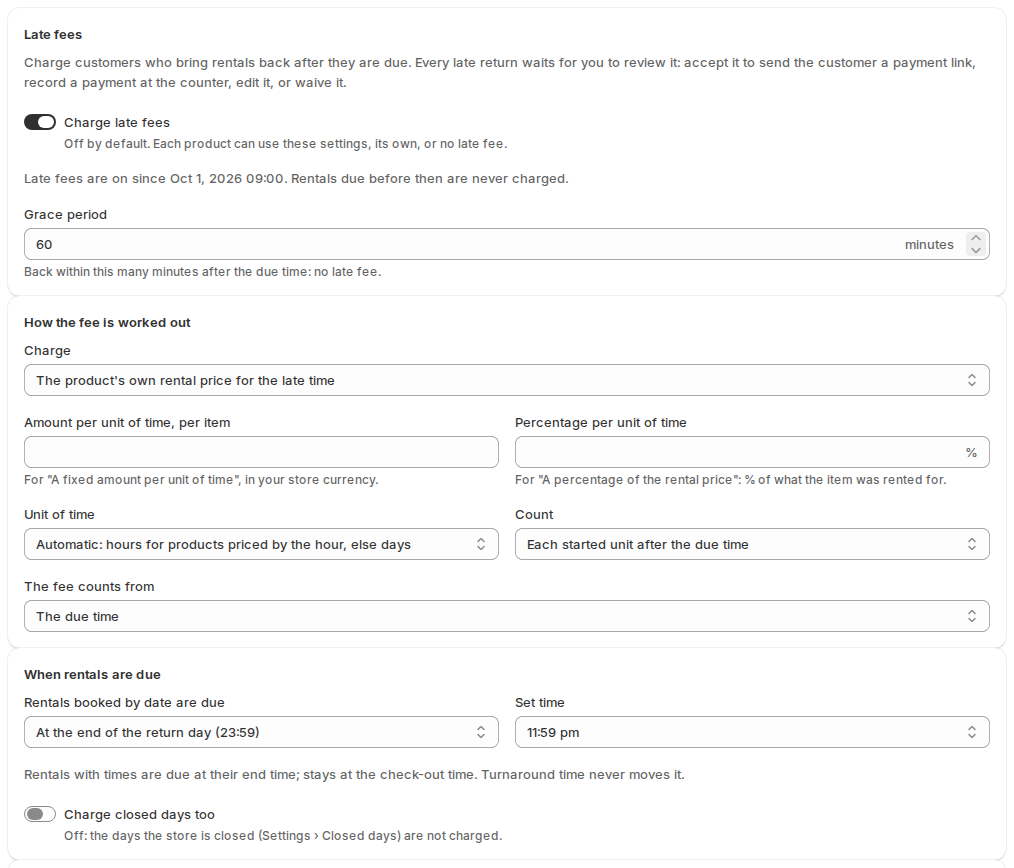
Turn late fees on #
- In the app, open Settings › Late fees.
- Turn on Charge late fees. It is off by default.
- Set the Grace period in minutes (60 by default). A rental back within it has no late fee.
- Choose how the fee is worked out and how it is collected (below), then save.
Rentals that were due before you turned late fees on are never charged. The settings page shows the date and time they were turned on.
How the fee is worked out #
| Setting | Choices |
|---|---|
| Charge | The product’s own rental price for the late time (default): what renting it for the extra time would cost. Or A fixed amount per unit of time, A percentage of the rental price per unit of time, or Only the fixed late return fee. |
| Amount per unit of time, per item | For a fixed amount, in your store currency. |
| Percentage per unit of time | For a percentage: a share of what the item was rented for. |
| Unit of time | Automatic (default): hours for products priced by the hour, else days. Or Hours, Days or Weeks. |
| Count | Each started unit after the due time (default) or Calendar days. |
| The fee counts from | The due time (default) or The end of the grace period. |
An example with the defaults: a party tent is due back on Tuesday at 23:59 and comes back on Thursday at 09:40, 1 day 9 hours late. That is 2 started days. If the tent rents for 110.00 a day, the late fee is 220.00.
When rentals are due #
- Rentals booked by date are due: At the end of the return day (23:59) (default), At closing time on the return day, or At a set time on the return day (Set time).
- Rentals with times are due at their end time, and stays at the check-out time. Turnaround time never moves it.
- Charge closed days too: off by default, so the days your store is closed (Settings › Closed days) are not charged.
Extra fee and limits #
- Fixed late return fee: added once per late fee. 0 means none.
- Most it can be: No limit (default), An amount per item (Most per item) or A percentage of the rental price (Most, % of the rental price).
- Stop counting after: 30 days by default. Then the rental shows as long overdue and you get an email. 0 keeps counting.
Billing and alerts #
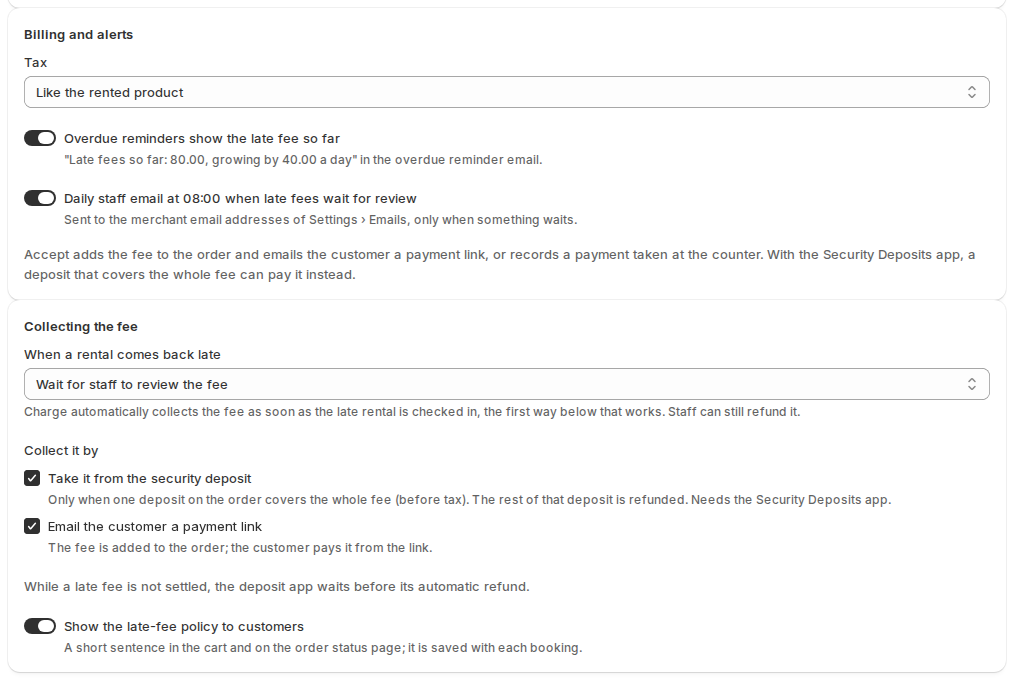
- Tax: Like the rented product (default), Always taxed or Never taxed.
- Overdue reminders show the late fee so far (on): the overdue reminder email adds “Late fees so far: 80.00, growing by 40.00 a day”.
- Daily staff email at 08:00 when late fees wait for review (on): goes to the merchant addresses under Settings › Emails, only when something waits.
How the fee is collected #
When a rental comes back late decides who acts. With Wait for staff to review the fee (default), every late return waits on the Late fees page. With Charge automatically, the fee is collected as soon as the rental is checked in, the first way below that works. Staff can still refund it.
Collect it by (both ticked by default):
- Take it from the security deposit: only when one deposit on the order covers the whole fee before tax. The rest of that deposit is refunded. This needs the Security Deposits app. While a late fee is not settled, the deposit app waits before its automatic refund.
- Email the customer a payment link: the fee is added to the customer’s order as a line, and the customer pays it from the link. If Shopify can’t edit the order, the fee goes on a separate invoice instead.
With neither ticked, staff record each payment taken at the counter. On Shopify the app can’t charge a customer’s saved card for a late fee yet. A fee is paid from the deposit, by the payment link, at the counter or in Shopify POS.
A product’s own late fee #
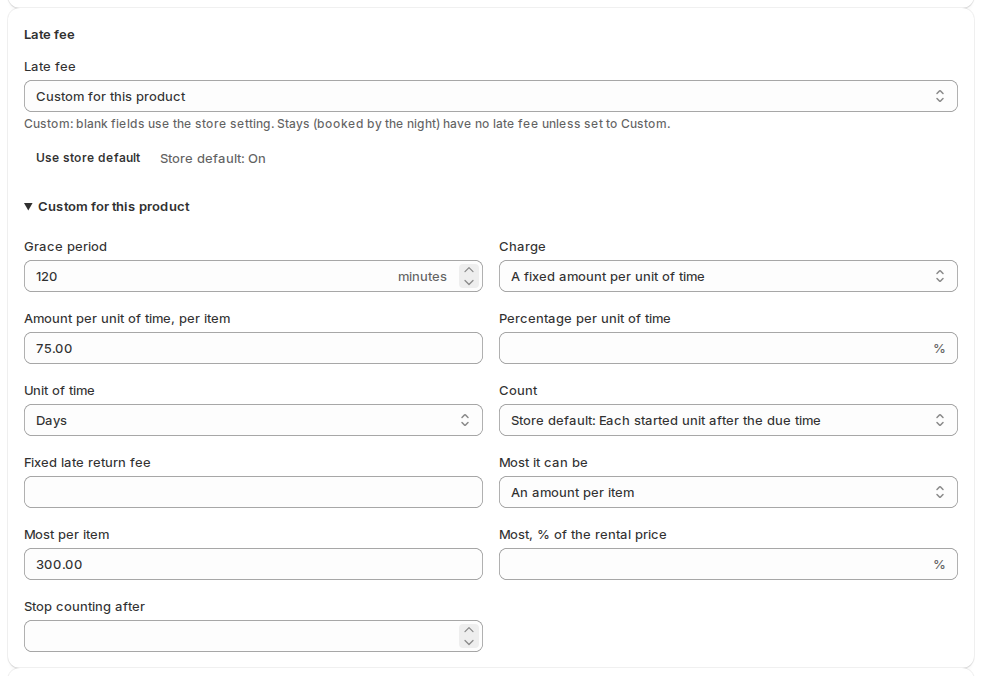
On a product’s page in the app, the Late fee section sets Store default, Custom for this product or No late fee. With Custom, fields you leave blank use the store setting. Stays (booked by the night) have no late fee unless set to Custom. The Rental settings action on a Shopify product page has the same Late fee choice.
When a rental comes back late #
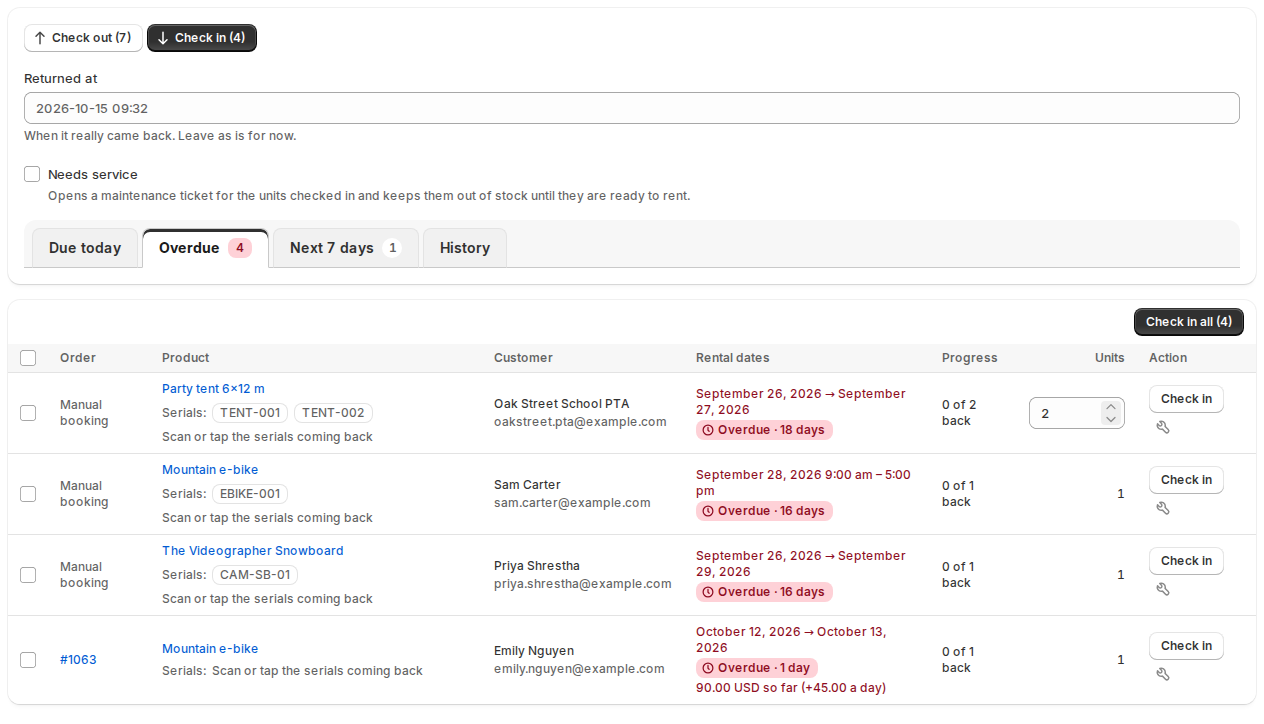
Check rentals in at the Send & Return desk as usual. In Check in mode, Returned at records when it really came back: leave it as is for now, or type the earlier time. After the check-in, the fee’s review card shows under the result. While a late rental is still out, the Overdue list shows its running total.
The Late fees page #
Late fees in the app’s menu (after Balances, shown while late fees are on or any exist) lists every fee. Each order has one fee, numbered like LF-1061-1, which holds all its late items.
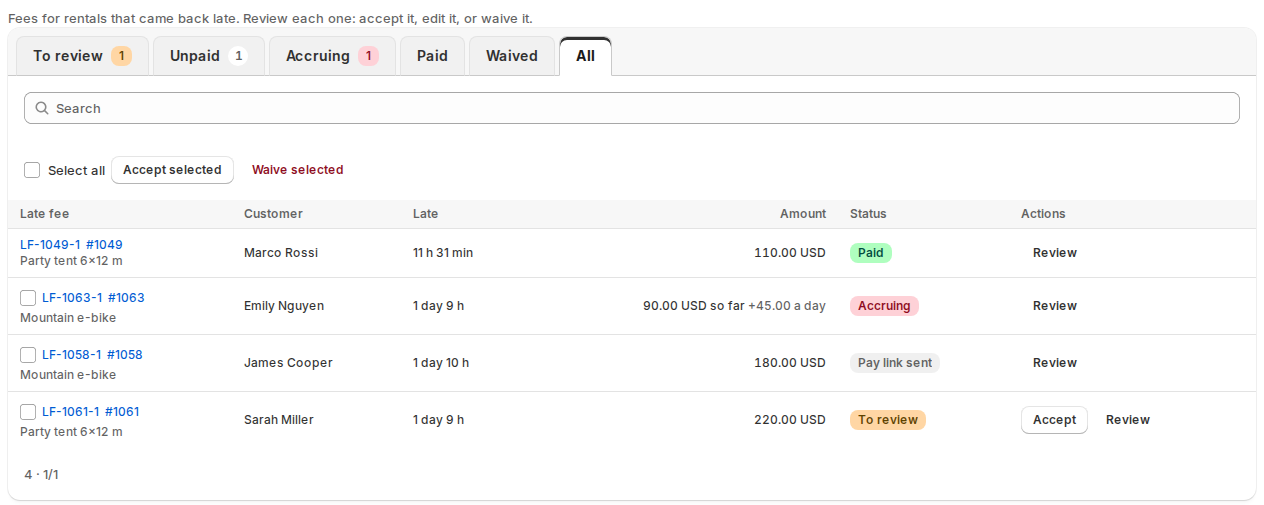
| Status | Means |
|---|---|
| Accruing | Still out: a running total, nothing billed yet. |
| To review | Back late. Accept it, edit it or waive it. |
| Pay link sent | On the order or an invoice; the customer pays from the link. |
| Paid | Paid by the link, from the deposit or at the counter. |
| Failed | It could not be added to the order. Try again or waive it. |
| Waived, Cancelled, Refunded, Part refunded | Finished. Cancelled means a corrected return time left nothing late. |
Accept selected takes each fee from its deposit when one covers it, else emails a payment link. Download CSV exports the list.
Review a late fee #
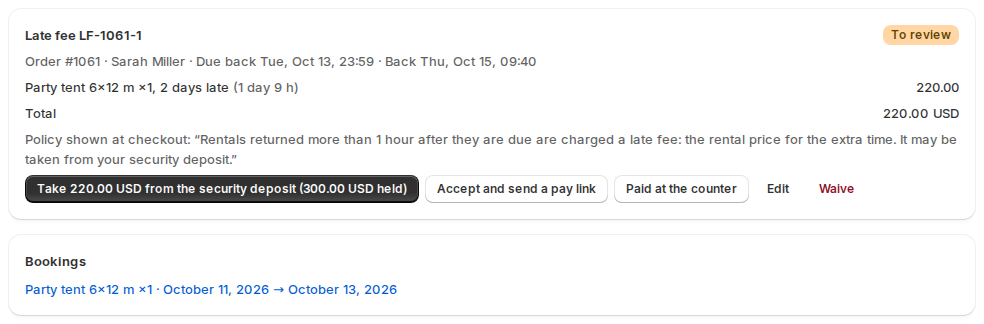
- Take … from the security deposit: shown when a held deposit covers the fee.
- Accept and send a pay link: adds the fee to the order and emails Late fee: please pay.
- Paid at the counter: records cash, card terminal, bank transfer or other.
- Edit: change amounts, Add a line, write a Note to the customer (in the payment email) and a Reason (staff only). Recalculate goes back to the app’s figure.
- Waive: asks why. The customer gets no email.
- Correct the return time: fixes a wrong Returned at and works the fee out again.
Once accepted, the card offers Send the pay link again, Copy payment link, Mark as paid and Check payment. Refund takes all of it or part: back to the original payment method for a link or a deposit, recorded only for the counter. Refunds of the fee’s line made in Shopify are picked up too. The Rental card on the Shopify order page shows each fee (“Late fee 220.00 USD · To review”) with Accept and Review.
What customers see #
- The policy, one sentence such as “Rentals returned more than 1 hour after they are due are charged a late fee: the rental price for the extra time.”: under the rental calendar on the product page (a Custom product shows its own), in the cart, on the thank-you page (with the app’s Rental summary block placed there) and on the order status page. Each online booking keeps the sentence it was sold with. Turn it off with Show the late-fee policy to customers.
- Their account and order status page: “Late fee so far” with what it grows by each day, then the fee with Pay now, then “paid”. Fees to review or waived are not shown.
- Emails, under Settings › Emails: Late fee: please pay, Late fee receipt, and Late fee: reminder to pay (3 and 7 days after the link). Staff get Late fee problem (staff). Tags include
{late_fee_number},{late_fee_total},{late_fee_lines},{late_fee_pay_url},{late_fee_note},{due_back},{returned_at}and{late_fee_policy}, which works in every customer email. See Reminders and emails.
Shopify POS #
In POS a late rental shows “Late fee … to collect”. Collect now adds it to the cart as a sale; the fee is paid once the sale is. When checking a rental in, It came back earlier sets Returned on and Returned at: the fee counts to that moment. Refund a fee paid in POS in POS. See Rentals at the counter with Shopify POS.
Report and dashboard #
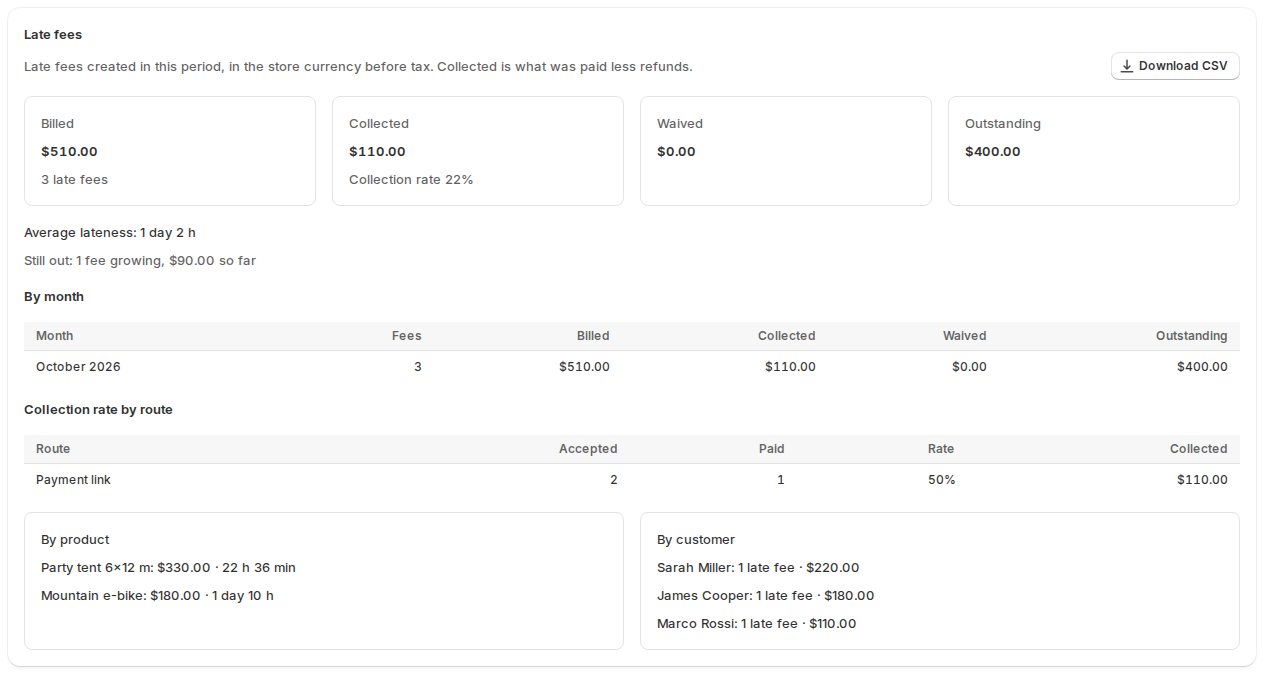
Reports has a Late fees section: billed, collected, waived and outstanding, the collection rate, the average lateness, what is still out, and breakdowns by month, product, customer, location and payment route. Download CSV gives one row per fee. The dashboard has a late fees tile, and a customer’s block in Shopify shows their late returns in the last 12 months.

Rentals that are not charged #
- Products set to No late fee, and stays unless set to Custom.
- Rentals due before late fees were turned on, and rentals back within the grace period.
- Closed days, unless Charge closed days too is on.
- Rentals billed per period follow Settings › Subscriptions › Days after the return date (Charge a late fee). Charge late fees on (Every rental or Only rentals billed per period) limits late fees to those; then customers see no policy sentence.
Rental agreements, Flow and the API #
- Rental Contracts: the
{{ late_fee_policy }}placeholder (Insert a placeholder › Late fee policy) puts the policy in the agreement. The default terms already have it under “2. RENTAL PERIOD”; it is empty while late fees are off. See Writing your rental agreement. - Shopify Flow: the triggers Rental late fee created and Rental late fee paid. See Shopify Flow, API and headless storefronts.
- API: REST
/api/v1/late-feesand GraphQLrentalLateFeeslist, accept, edit and waive fees. See GraphQL API.


