
Store rules decide when customers can pick up and return: your opening hours, your closed days, how much notice you need, the shortest and longest rental, and the turnaround time between rentals. You set them once for the store. A product can set its own where it needs to.
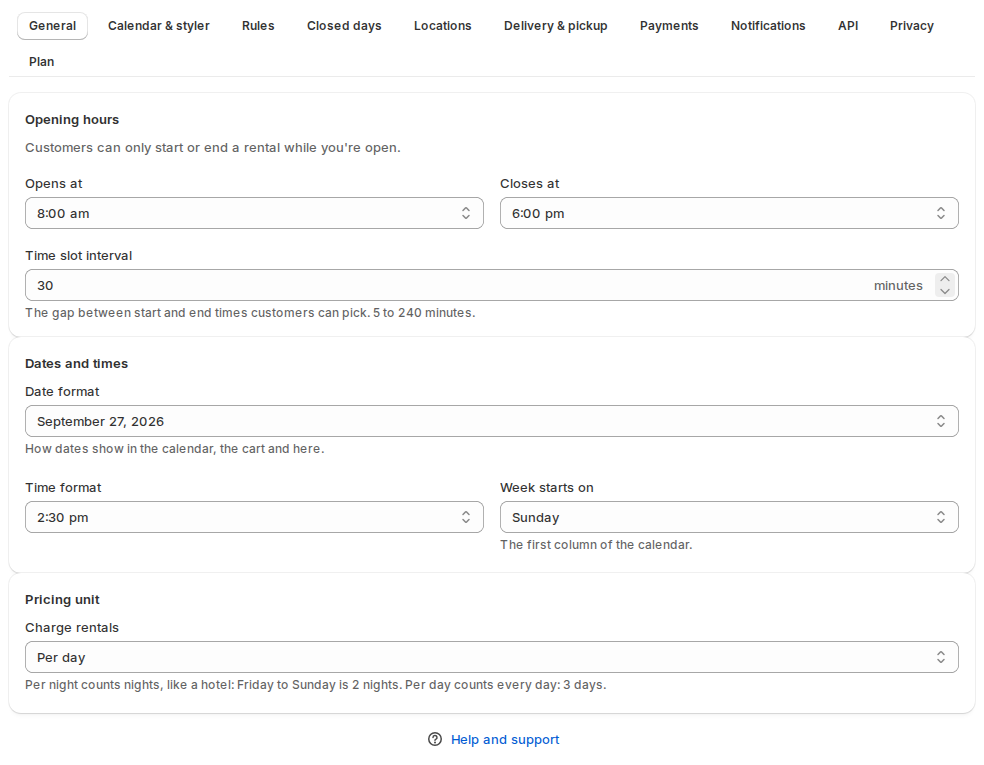
Opening hours and date formats: Settings › General #
| Setting | What it does |
|---|---|
| Opens at and Closes at | Customers can only start or end a rental while you’re open. |
| Time slot interval | The gap between start and end times customers can pick, 5 to 240 minutes. Only for rentals by day and time. |
| Date format and Time format | How dates and times show in the calendar, the cart and the app. |
| Week starts on | The first column of the calendar. |
| Also charge the return day | For rentals booked by the day. No: the 1st to the 3rd is 2 days (the return day is free). Yes: 3 days. Nights are charged per night. |
Closed days and holidays: Settings › Closed days #
Customers can’t start or end a rental on these days. Products use them unless they set their own.
| Field | What it means |
|---|---|
| From and To | The first and last closed day. |
| Repeats | Doesn’t repeat, Every week, Every month or Every year. A public holiday repeats every year; closed on Sundays repeats every week. |
| Closed for | Pick-ups and returns, Pick-ups only or Returns only. |
| Reason | Optional, like “Public holiday”. Customers see it when they hover or tap the day. |
Click Add closed day for each row. Closed every evening? Set your opening hours instead.
A rental may run through a closed day. It just can’t start or end on one (or, with Pick-ups only, can’t start on it).
Booking rules: Settings › Rules #
| Section | Setting | What it does |
|---|---|---|
| Stays | Date-only rentals are booked by | Which days a rental with dates and no times holds: Days: returned on the last day, entire return day is booked, Days: can go out again on the return day or Nights: same-day check-out and check-in. A product can choose its own. See Stays by the night. |
| Check-in time and Check-out time | Only with Nights. Shown to guests. | |
| Turnaround time | After each rental | Blocks the unit after it comes back, to clean, check or charge it (also called turnover). |
| Before each rental | Blocks the unit before it goes out. | |
| Booking window | Lead time | How much notice you need. Customers can’t start a rental sooner than this. |
| Max days ahead | How far ahead customers can book. Blank = no limit. | |
| Rental length | Minimum length | The shortest rental customers can book. |
| Maximum length | The longest rental customers can book. Blank = no limit. | |
| Send, return and extend | Checking out early moves the start date | When you check out a rental before its start date, the booking starts that day. |
| Checking in early moves the end date | When a rental comes back early, the units are free again from that day. | |
| Let customers extend a rental | Customers can ask for more days from their account, if the stock is free. See My rentals and rental extensions. | |
| Only after it has gone out | Customers can extend only once the rental is checked out. |
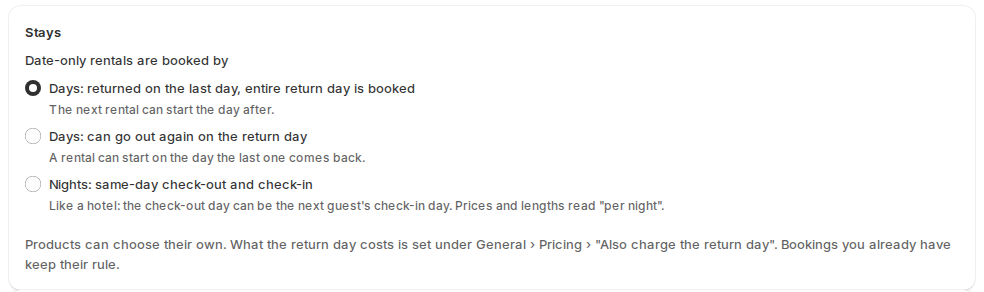
Turnaround time and lead time take hours or days. Every booking holds its units for its dates plus the turnaround time, so the calendar, the inventory grid and checkout all leave that gap free.
Store defaults for products (click Show pricing rules, fixed lengths and guests) holds the fixed lengths, date-based and length-based pricing, and guest types every product uses unless it sets its own. See Rental pricing, Rental types and Guests and party size.
A product’s own rules #
Open the product’s full Rental Settings page (Inventory › the settings button):
- Turnaround and length starts with Booked by: Store setting (it names what the store uses) or one of the three choices. Then come the turnaround time after each rental and the minimum rental length. Each of those fields shows the store default; Use store default puts it back.
- Price has Also charge the return day: Store setting, No or Yes.
- Show advanced settings › Booking rules has the turnaround time before each rental, the lead time, the maximum length and max days ahead.
- Show advanced settings › Closed days and holidays replaces the store’s closed days for this product only.
Time in transit and turnaround time #
With Delivery & pickup on, transported and delivered rentals also block days for the time in transit. Transit and turnaround add up. We recommend using just one of them: transit for transported and delivered rentals, or turnaround time, not both. When both apply, the settings pages show a warning with the combined days, for example “Transport: 3 days transit + 2 days turnaround = 5 days blocked before and after each rental”.
Good to know #
- The same rules run at checkout, when you create a manual booking and when you change a booking’s dates, so a date the calendar wouldn’t offer can’t be booked another way. Staff can still keep a booking that overbooks stock (see Managing bookings).
- The inventory grid hatches closed days, so you can see them next to your bookings.


