
Table of Contents
If your store also uses the Rentals & Bookings app, quotes can include rentals: each rental line carries its dates, the dates are checked against your rental stock, the rental price for those dates becomes the line’s list price, and the dates can be held for the customer while they decide. This needs both apps installed.
Without the Rentals & Bookings app, quotes work as usual and rental dates simply aren’t asked for.
On the storefront #
- On a rental product, customers pick dates on the rental calendar as usual. Add to quote and Request a quote carry those dates into the quote list.
- If they haven’t picked dates, the drawer asks for a Start date and an End date for that line (“Choose the rental dates for …”). The end date can’t be before the start date.
- When the request is sent, the Rentals & Bookings app checks the dates. If the rental isn’t available, the line says why, and the customer can change the dates.
- The rental price for the dates becomes the line’s list price, and the dates show on the quote as “Rental dates”.
In the quote editor #
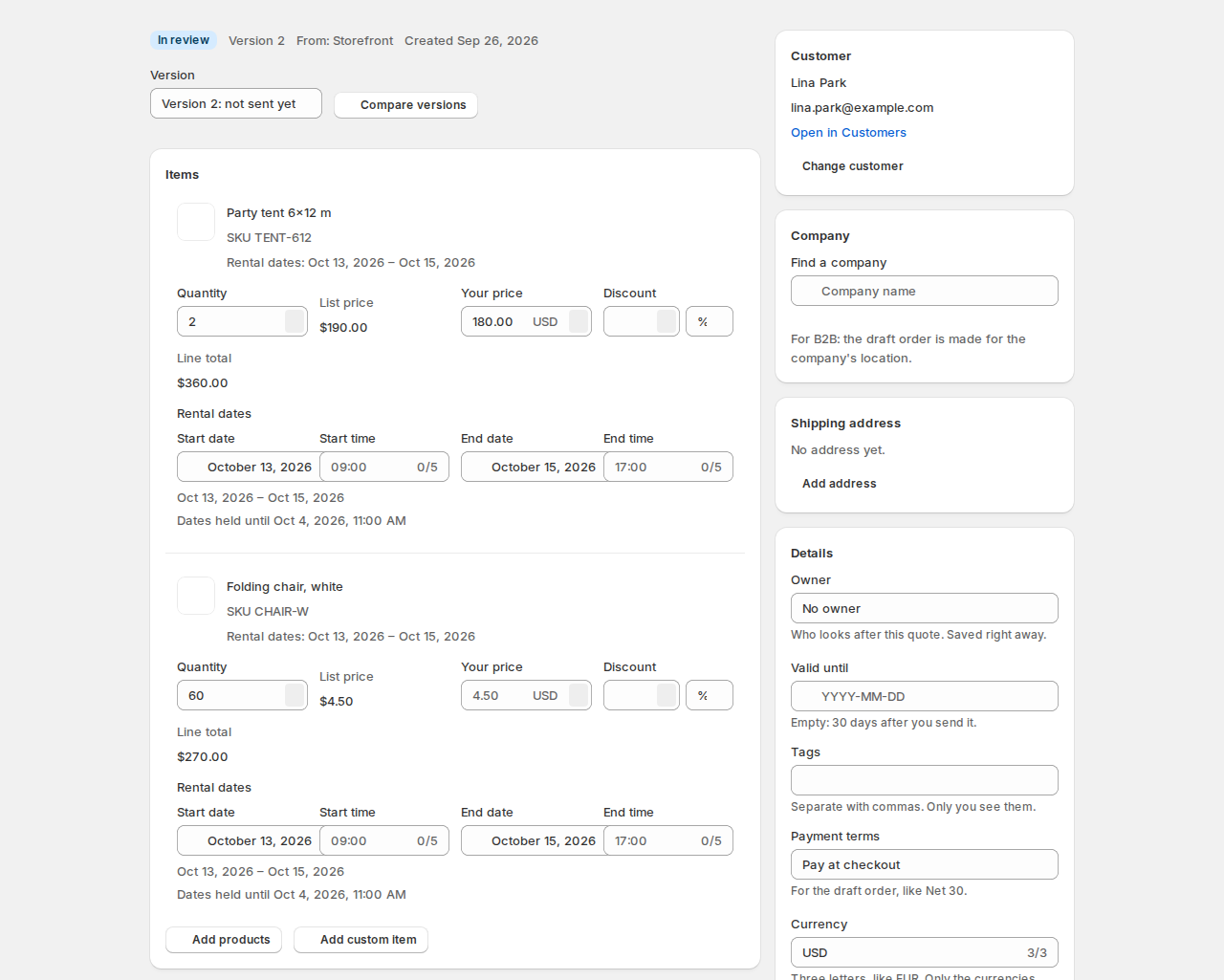
- Rental lines get Start date and End date (and Start time and End time for rentals by the time).
- Each change is checked with the Rentals & Bookings app: “Checking the dates…”, then “Available Oct 13 – Oct 15: $50.00 each”, or “Not available on these dates.”
- Hold the rental dates until the quote expires (in the editor’s Details) keeps the units booked for this customer while they decide. Sending the quote holds the dates, a new version keeps the hold, and cancelling, rejecting, declining or expiry releases them. Holds last up to 7 days; the line says when the dates are held until, and “These dates are no longer held.” once a hold runs out.
- The timeline records “Rental dates held”, “Rental dates released” and “The rental hold ran out”.
When the quote is accepted #
The draft order’s rental line carries the rental dates at the quoted price, so the Rentals & Bookings app accepts it at checkout and turns it into a booking when the order is paid, like any rental order. If the hold ran out and the dates were taken meanwhile, accepting checks the dates again first.
Where you see rental quotes #
- Reports has a Rental quotes section: open quotes with rental dates, their items, dates and units, and whether the stock is Held until a date, Not held, Hold ran out or Booked, with the number of units held for open quotes.
- In the Rentals & Bookings app, held units show on the calendar’s day list as quoted and tentative, and count against stock like a checkout that hasn’t finished.
Good to know #
- Rental quotes use your rental rules: closed days, turnaround time, minimum and maximum lengths.
- Held dates are released by themselves when the quote closes or the hold runs out, so they never block your stock for long.


