
Table of Contents
A deposit can be a fixed amount or a percent of the rental price, charged per unit, once per rental, or once for the whole order. You set a store default that every rental product uses, and give some products their own rule.
The store default: Settings #
| Setting | What it does |
|---|---|
| Collect security deposits | Turn off to stop adding deposits to carts. Deposits already paid stay on their orders. |
| Store default | Applies to every rental product without its own deposit (see Products). |
| Deposit | No deposit, Fixed amount or Percent of the rental price. |
| Amount / Percent | The amount, or the percent of the rental price. |
| Charge | Per unit (times the quantity), Once per rental, or Use the one deposit per order. |
| Example rule | A rental of 3 kayaks at $120 in total | Deposit |
|---|---|---|
| Fixed amount, $200, per unit | 3 units | $600.00 |
| Fixed amount, $200, once per rental | one rental line | $200.00 |
| Percent of the rental price, 10%, per unit | 10% of $40 per kayak, times 3 | $12.00 |
One deposit per order #
For stores that want a single deposit however many rentals are in the cart. Under One deposit per order:
| Setting | What it does |
|---|---|
| Charge one deposit per order | Charged once per order when the cart has a rental set to Use the one deposit per order. |
| Amount type | Fixed amount, or Percent of those rentals’ total. |
| Amount or percent | The deposit. |
| Name | Shown in the cart. Empty: the deposit title. |
Cart and checkout #
| Setting | What it does |
|---|---|
| Deposit title | The name of the deposit line in the cart, checkout and emails. Default: “Security deposit”. |
| Product page notice | Shown next to the rental calendar before the customer adds it. {amount} is the deposit. Default: “A refundable deposit of {amount} is charged at checkout.” |
| Charge tax on deposits | Whether the deposit line is taxed. |
| Block checkout when a rental’s deposit is missing | Checkout refuses a rental without its deposit line. It also blocks draft order invoices for rentals without one. |
A product’s own deposit: Products #
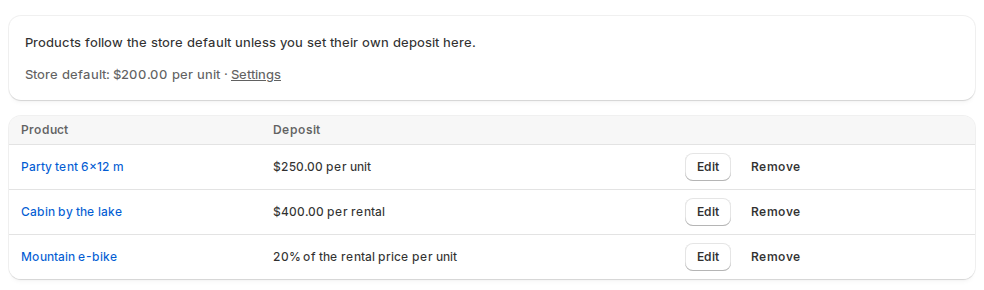
Products lists the products that don’t follow the store default (“Store default: …” is shown at the top).
- Click Add product and pick a rental product.
- In Deposit for the product, choose No deposit, Fixed amount or Percent of the rental price, the amount and how it is charged.
- Click Save.
Use store default removes a product’s own rule. A product’s rule applies to all its rent variants.
Refunds #
The refund settings are covered in Refunding deposits.
Good to know #
- A percent deposit follows the rental price for the dates the customer picks, so the product page notice updates once the dates are chosen. Before that it says “10% of the rental price”.
- Changing a rule doesn’t change deposits already in a customer’s cart until the cart is refreshed, and never changes deposits already paid.


