
A deposit is held until you refund it. Refund it in full, keep part of it for damage or late return, or let the Security Deposits app refund it by itself after the rental is checked in. Refunds go to the customer’s original payment method through Shopify.
From the order page #
The Security deposit card on a Shopify order shows “Deposit: $200.00 held”, each deposit with its total, what was refunded and what is left, and its history.
| Action | What it does |
|---|---|
| Refund | Refunds everything that is left of the deposit. With several deposits on the order, Refund all refunds them together. |
| Keep part | Enter the Amount to keep and a Reason (shown on the refund), then Refund the rest. |
| Refund automatically | Switch automatic refunds on or off for this order only. |
After a refund the card says “Refunded $150.00 to the original payment method.” and adds a line to the history. The refund note on the order says what the refund was for, for example “Security deposit refund for Sea kayak — scratched hull (50.00 kept)”.
From the Deposits page #
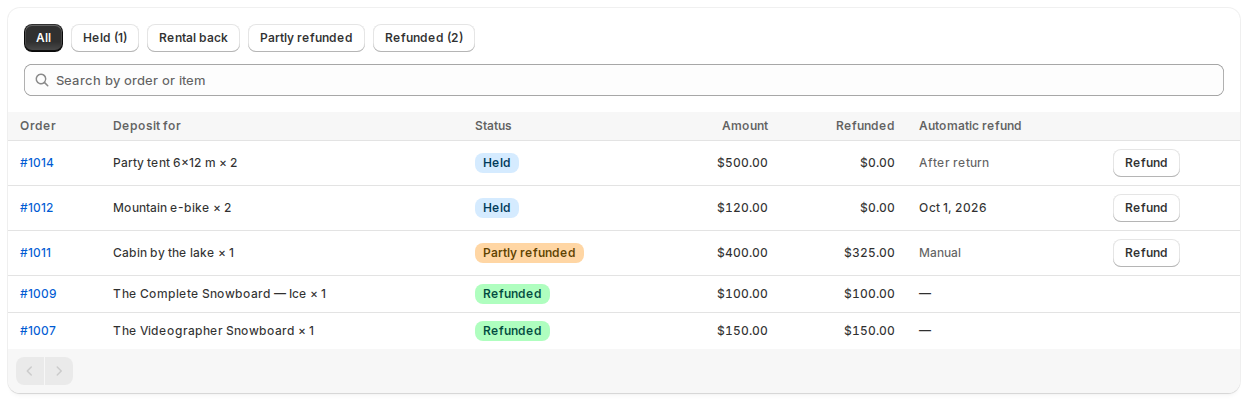
The app’s Deposits page lists every deposit:
| Column | What it shows |
|---|---|
| Order | The order, linked to Shopify. |
| Deposit for | The rental. |
| Amount and Refunded | What was charged and what went back. |
| Status | Held, Partly refunded or Refunded. |
| Automatic refund | The date it will be refunded, After return (waiting for the check-in), or Manual. |
Filter by All, Held, Rental back (checked in and waiting for a refund), Partly refunded or Refunded, and search by order or item. Refund opens a window with the amount and a note.
Automatic refunds #
Under Settings › Refunds:
| Setting | What it does |
|---|---|
| Refund deposits automatically | After the rental is checked in. You can change this on each order. |
| Days to wait after the return | 0 refunds at the next check (hourly). At most 30 days. |
| Send Shopify’s refund notification to the customer | Shopify’s own refund email. |
| Send “deposit refunded” emails | The app’s email to the customer and to your store. |
| Store email for refund copies | Empty: the store’s email. |
A rental counts as back when it is checked in with the Rentals & Bookings app (at the Send & Return desk, or from the order’s Rental card). The deposit is then refunded after the days you set, unless the order’s Refund automatically switch is off. If an automatic refund fails, the Deposits page and the order card say why, and the app tries again a day later.
Emails #
With Send “deposit refunded” emails on, the customer gets “Your security deposit for order … was refunded” with the amount, and your store gets a copy. Shopify’s own refund notification can go out too.
Good to know #
- Refunds you make in Shopify directly, on the deposit line, are counted too: the deposit shows as partly or fully refunded.
- An order that hasn’t been paid yet has nothing to refund to: “This order has no payment to refund to yet. Refund it in Shopify once it is paid.”
- A deposit refunded in full also refunds its line on the order, without restocking anything. Keeping part refunds an amount only.
- Every refund is recorded with who made it and why.


