
SI Refundable Deposits for Shopify
Take a refundable deposit with the order, and give it back from the order
SI Refundable Deposits adds a deposit to the products you choose. It shows on the product page and as its own line in the cart, the customer pays it at checkout, and you refund it to their original payment, in full or in part.
One plan for every deposit
No limit on deposits, and a 90-day free trial. Works with or without our other apps.
Pro
$9.99a month
or $99.99 a year
- Deposits on the products you choose
- Fixed amount or percent, per unit, item or order
- Product page notice and its own cart line
- Checkout protects the deposit
- Refund, keep part or refund automatically
- Shopify Flow trigger and action, and an API
- 90-day free trial
Refunds work on orders up to 60 days old. Stop the plan and carts stop taking deposits, but you can still refund what you hold from the order page. Prices are in US dollars, and Shopify bills them with your Shopify invoice.
The deposit is its own line, not a hidden fee
Customers see what they pay and what comes back. Your product price stays as it is.
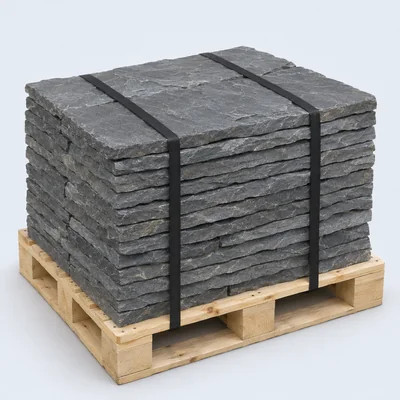
A demo building supply store: the pallet carries a $25 deposit you name yourself.
A spreadsheet is no place to keep deposits
A deposit is money you owe back, so it needs its own record from the cart to the refund.
Deposits by hand
- A separate invoice, or a fee buried in the product price
- A spreadsheet of who paid what
- Each refund worked out by hand
- Deposits you owe back are easy to forget
With SI Refundable Deposits
- The deposit is a separate line in the cart and on the order
- The Deposits list shows what you hold and what is due back
- Refunds go through Shopify to the original payment
- Refunds can run by themselves after fulfillment or on an order tag
From your first rule to the refund
The setup guide in the app walks you through the first three.
Choose what needs a deposit
Every product, or the collections and tags you pick.
Set the amount
A fixed amount or a percent, per unit, once per item or once per order.
Add it to your theme
Turn on the app embed, add the Deposit notice block, turn off Buy it now and add the block to your order page.
Customers pay it
The deposit shows on the product page and joins the cart as its own line.
You hold it
It appears in the Deposits list and on the Shopify order.
You refund it
From the list or the order, or let your release rule do it.
A deposit that fits how you sell
One store default covers most products, and any product can have its own rule.
Store default
One rule for everything it applies to: up to 100 collections, 50 tags, or every product.
Product rules
Give any product its own deposit, or leave it on the store default.
Fixed or percent
A set amount or a percent of the price, per unit or once per item.
Once per order
One shared deposit for the whole order, fixed or a percent of the items that opt in. Turn on Charge a shared deposit per order in Settings first.
Your own name for it
Call it a pallet deposit or anything else in the cart. Emails and the order block always say security deposit.
Tax your way
One store-wide switch decides whether the deposit is taxed. Gift cards never take the default.
The deposit stays in place until they pay
Customers can’t remove it from the cart, and checkout checks it again.
Product page notice
Your text with the amount, up to 500 characters. It follows the variant and quantity.
Its own cart line
The line stays in step with the product, with its quantity locked and no remove button.
Checked at checkout
A Shopify Function stops a cart with a missing, changed or expired deposit, with a clear message.
Draft orders too
Add deposit on a draft order, in your shop currency.
No Shopify Plus needed
It works on every Shopify plan except Starter, on the Online Store channel.
Buy it now stays off
Buy it now skips the cart, so the guide has you turn it off and checkout blocks it.
Refund it, keep part of it, or let it run by itself
Everything about a deposit is in one place, on the Shopify order and in the Deposits list.
The Deposits list
All, Held, Refund due, Partly refunded and Refunded, with search and a Refund button.
Keep part for damage
Keep an amount with a reason, and the order shows Settled.
Automatic refunds
Off until you turn them on. Then a set number of days after fulfillment or delivery, or when an order gets a tag you choose.
It tries again
A failed automatic refund tries again after a day and shows you the error.
Refunds in Shopify count
A refund made in the Shopify admin is picked up too.
Emails on refund
The customer and your store both get a deposit refunded email.
For any store that wants something back
Rental stores use it, and so do stores that sell with something returnable.
Returnable containers
Crates, kegs and gas bottles that come back within 60 days.
Per unitBuilding supplies
A pallet deposit on the products that ship on one.
Fixed amountLoaned tools
Gear lent with a purchase and back within 60 days, refunded on an order tag.
Order tagEvents and party supply
One deposit for the whole order of glassware or linens.
Once per orderFormal wear
A percent of the price, with part kept if something comes back damaged.
PercentRentals
Link Rentals & Bookings and the refund can follow the check-in.
With RentalsOn its own, or with our rental app
The app needs no other app. If SI Rentals & Bookings is on the same store, turn on the link in Settings and deposits follow your bookings.
What the link adds
OptionalOff by default. Without the link, or if you remove Rentals later, the app works the same on its own.
- A rental products choice in Applies to
- A deposit notice next to the rental calendar
- Refund after items are checked in
- Late fees taken from the deposit
What’s included
- Refundable security deposits
- Deposit as a fixed amount or a percentage, per unit, once per item or once per order
- One deposit for the whole order
- Deposits refunded automatically after fulfillment, delivery or an order tag
- Refund the deposit in full or in part, or keep what the damage costs
- A deposits list in the admin, with a Refund button
- Deposit refund emails to the customer
- Deposit shown on the product page and as its own line in the cart
Questions about SI Refundable Deposits
When can I install it?
Soon, but we don’t have a date to share yet. The app is built and goes to the Shopify App Store for review before it is listed.
Do I need Rentals & Bookings?
No. The app works on any Shopify store. If you also use Rentals & Bookings, you can link the two.
Is the deposit a hold on the customer’s card?
No. It is a separate line the customer pays at checkout, and you refund it later.
Can products have different deposits?
Yes. Set a store default, then give any product its own rule.
Can I charge one deposit for the whole order?
Yes. Turn on Charge a shared deposit per order in Settings, then choose Once per order (shared), as a fixed amount or a percent of the items that opt in.
How do refunds work?
Press Refund in the Deposits list or on the order. The money goes through Shopify to the original payment. Refunds work on orders up to 60 days old.
Can I keep part of a deposit?
Yes. Enter the amount and a reason. Kept money stays kept, and the order shows Settled.
Can refunds run by themselves?
Yes, once you turn them on. Set a number of days after fulfillment or delivery, from 0 to 30 with 7 as the default, or refund when an order gets a tag.
Is the deposit taxed?
That is your choice, with one switch for the whole store.
Does it work with Buy it now?
No. Buy it now skips the cart, so the setup guide has you turn it off.
Which Shopify plans does it work on?
Every plan except Starter, on the Online Store channel. You don’t need Shopify Plus.
What happens if I cancel the plan?
Carts stop taking deposits. Your settings stay, and you can still refund them from the order page.
Works alongside our other apps
Each app stands on its own, so a store adds only what it needs.
Get your deposits off the spreadsheet
One rule, and every order keeps its own deposit record.