
Xero Sync for WooCommerce
Your WooCommerce sales in Xero, without typing them in
Sales Igniter Xero Sync posts your orders, payments and refunds to Xero as they happen. If Xero is down or a setting is missing, nothing is lost: the order waits and tells you what to fix.
Sales Igniter Xero Sync
One year of updates and support. Renews at $69 a year.
Your books should match your store without retyping it
Bookkeeping from a WooCommerce store goes wrong in the same few places, and rentals add a few more.
By hand, or with a plain sync
- Every web order typed in again, where a wrong amount or a missed refund goes unnoticed
- A balance paid later goes in as a second sale, so the same income counts twice
- Security deposits land in income, though you’ll give most of them back
- When the connection drops, orders go missing and nobody hears about it
With Xero Sync
- Each paid order posts by itself as an invoice and its payment
- A balance is a second payment on the booking’s invoice
- Deposits post to a liability account you choose
- An order that can’t post waits under Needs attention, with what to fix
Nothing is sent until you press Start
Make your Xero app
Make a free app for your store at developer.xero.com and paste its Client ID and secret. The screen walks you through it, once.
Connect
Sign in to Xero and pick your organisation. We never see your password.
Choose
When an order posts, how customers are kept, and a number prefix if you want one.
Map
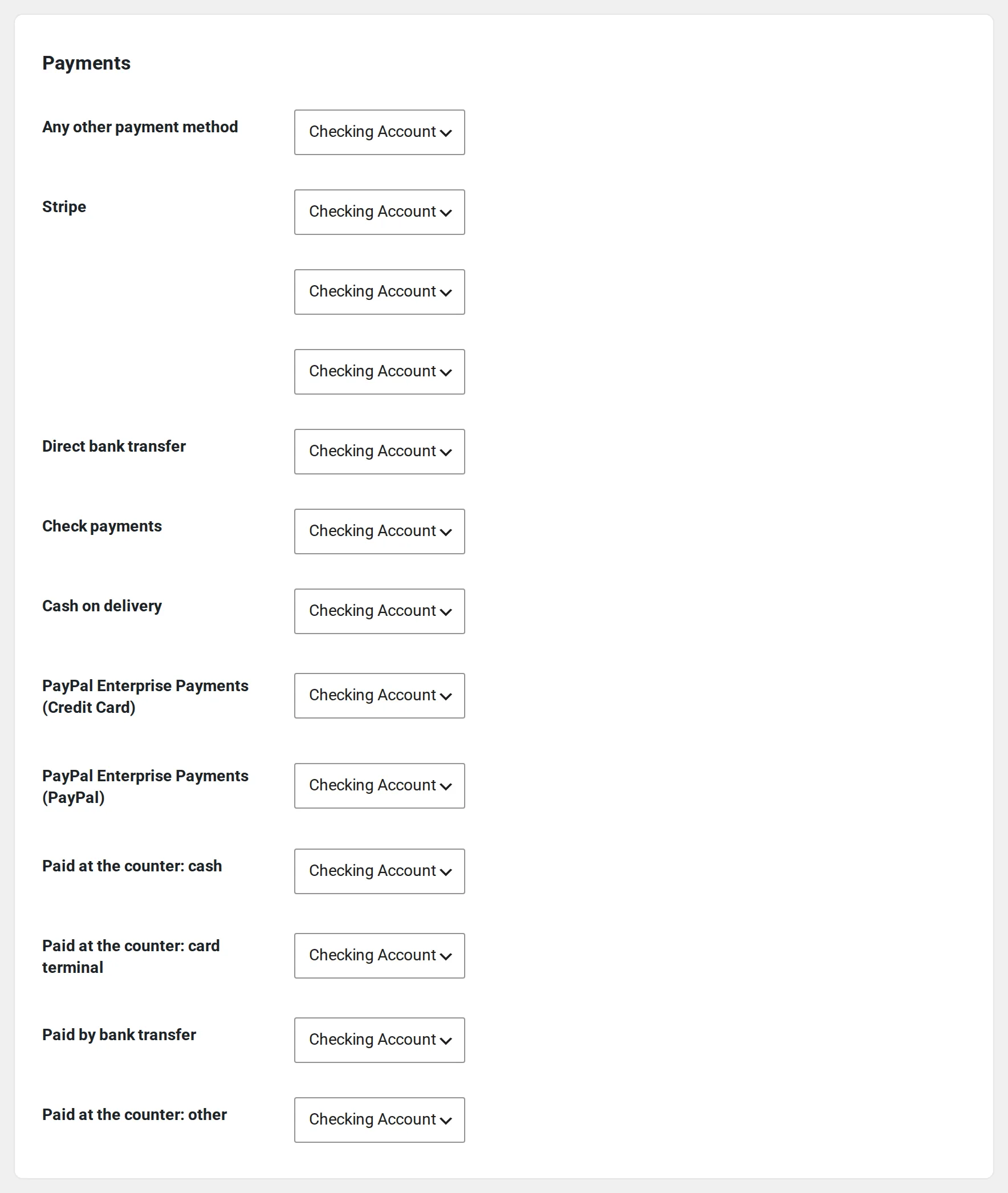
Where products, shipping, fees, taxes and each payment method go in Xero.
Preview
See exactly what your latest order would send. Nothing has been sent yet.
Start
New orders post from that moment. Past orders wait until you import them.
One booking, from checkout to Xero
Brightside Rentals rents party tents and chairs. Sarah Miller books a tent and forty chairs, pays part today with a security deposit, and the rest before the party. This is what Xero Sync does with that booking, on the real screens. The store and its customers are made up, and the books are Xero’s Demo Company.
Your store connects through its own free Xero app
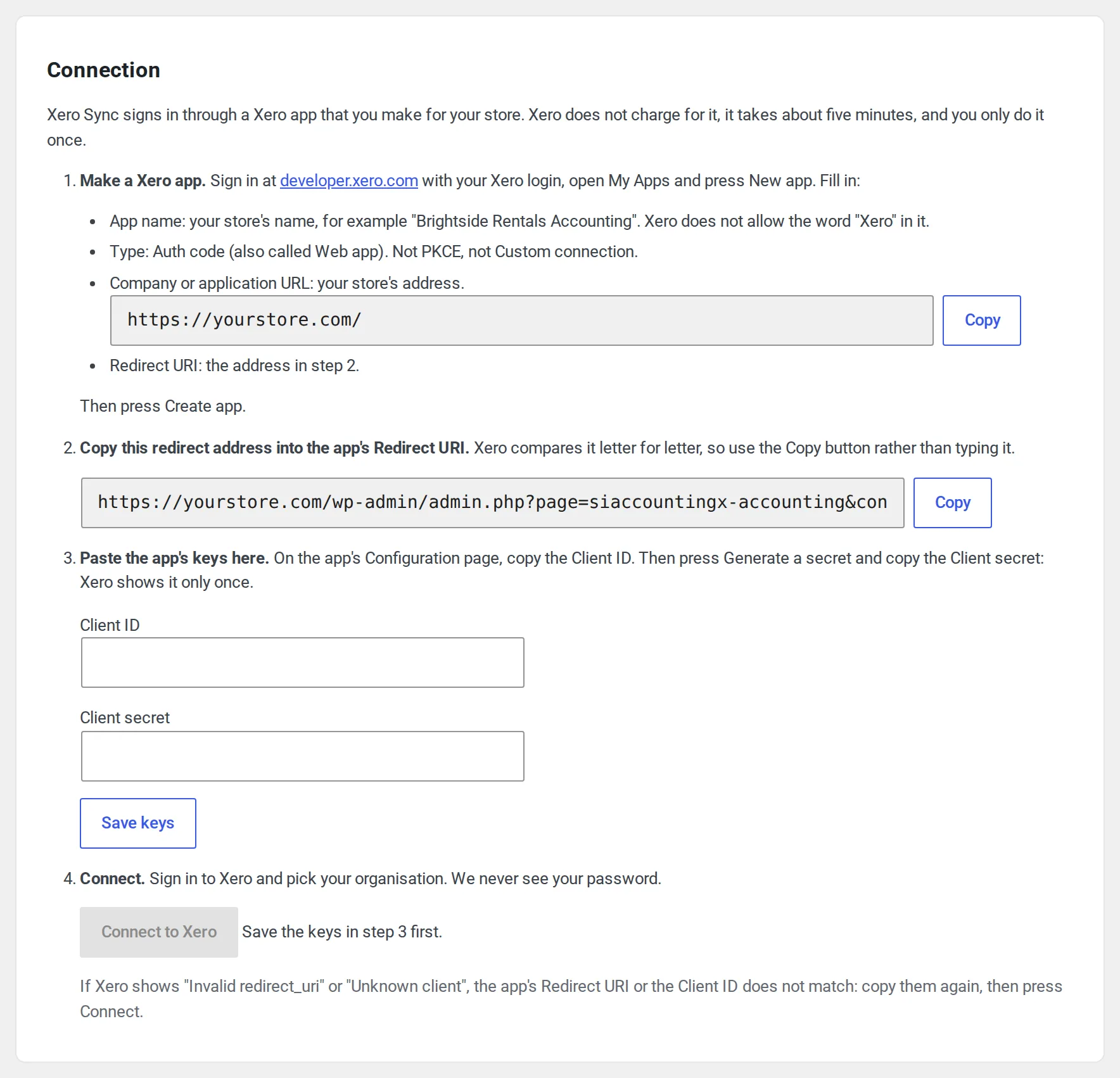
Xero Sync signs in through a Xero app you make for your store at developer.xero.com. It’s free, it takes about five minutes, and you do it once. The Settings tab walks you through four steps, with your store’s addresses filled in and a Copy button beside each, because Xero compares the redirect address letter for letter.
Paste the app’s Client ID and Client secret, save, and press Connect to Xero. Before you leave your site, Xero Sync checks the Client ID and the redirect address with Xero and tells you in plain words if either is wrong. Then you sign in to Xero and pick your organisation.
- The app’s keys stay on your site, encrypted, and nothing passes through our servers
- A staging copy of your site gets its own app, connected to Xero’s Demo Company
Choose how orders post and where each line goes
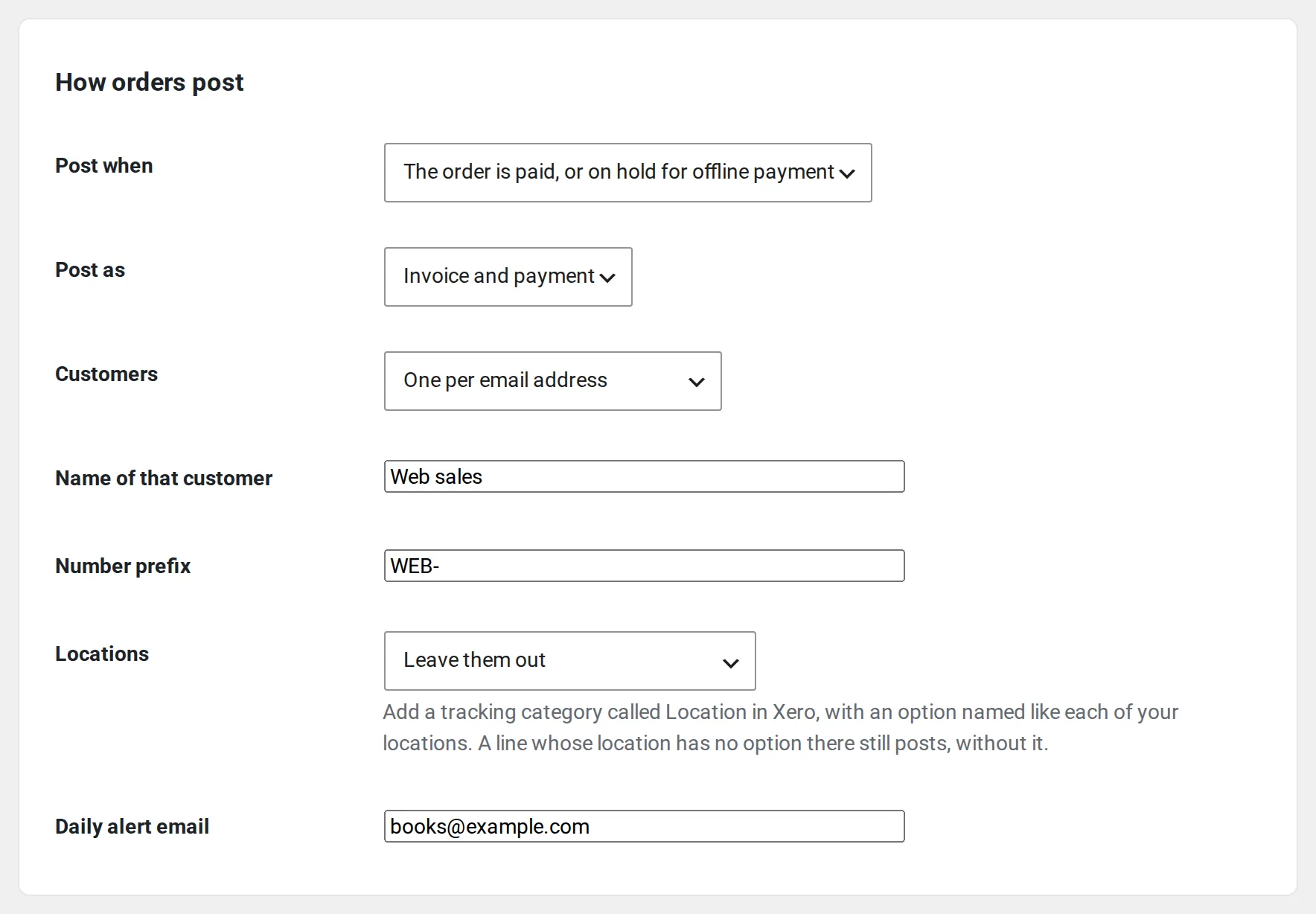
Next, the set-up asks how orders post: when the order is paid or when it’s completed, one Xero contact per email address or one for all web sales, and a number prefix such as WEB- so web orders never clash with invoice numbers you use in Xero.
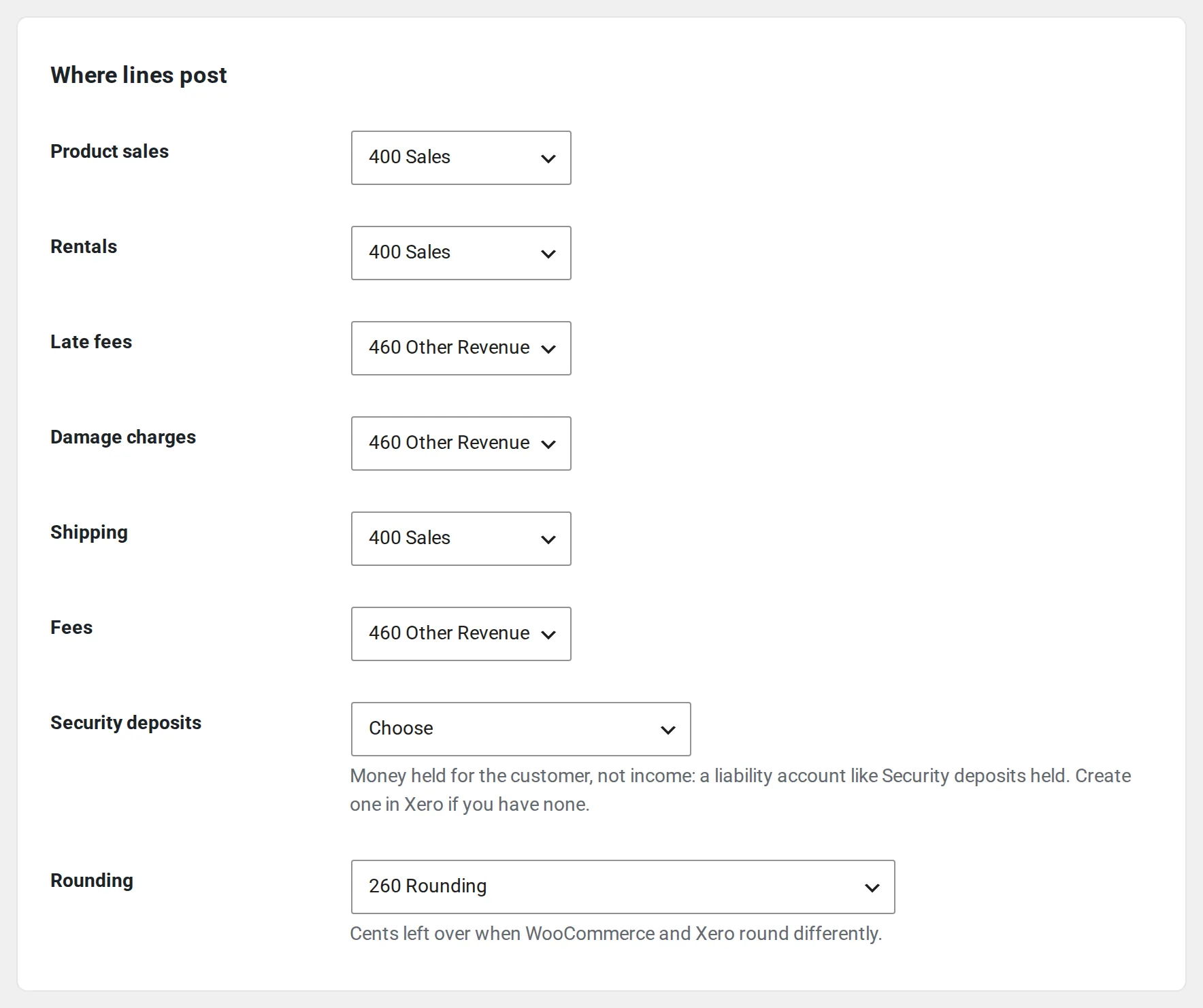
Then Where lines post: products, rentals, shipping, fees and rounding each go to a Xero account you pick, and each row starts with a suggestion read from your chart of accounts. With our rental plugins active you also get rows for late fees, damage charges and security deposits. Xero Sync never creates accounts: it uses the ones you have.
After taxes and payment methods comes a preview of your latest order, exactly as it would be sent. Nothing goes to Xero until you press Start syncing.
Sarah’s booking waits, and says why
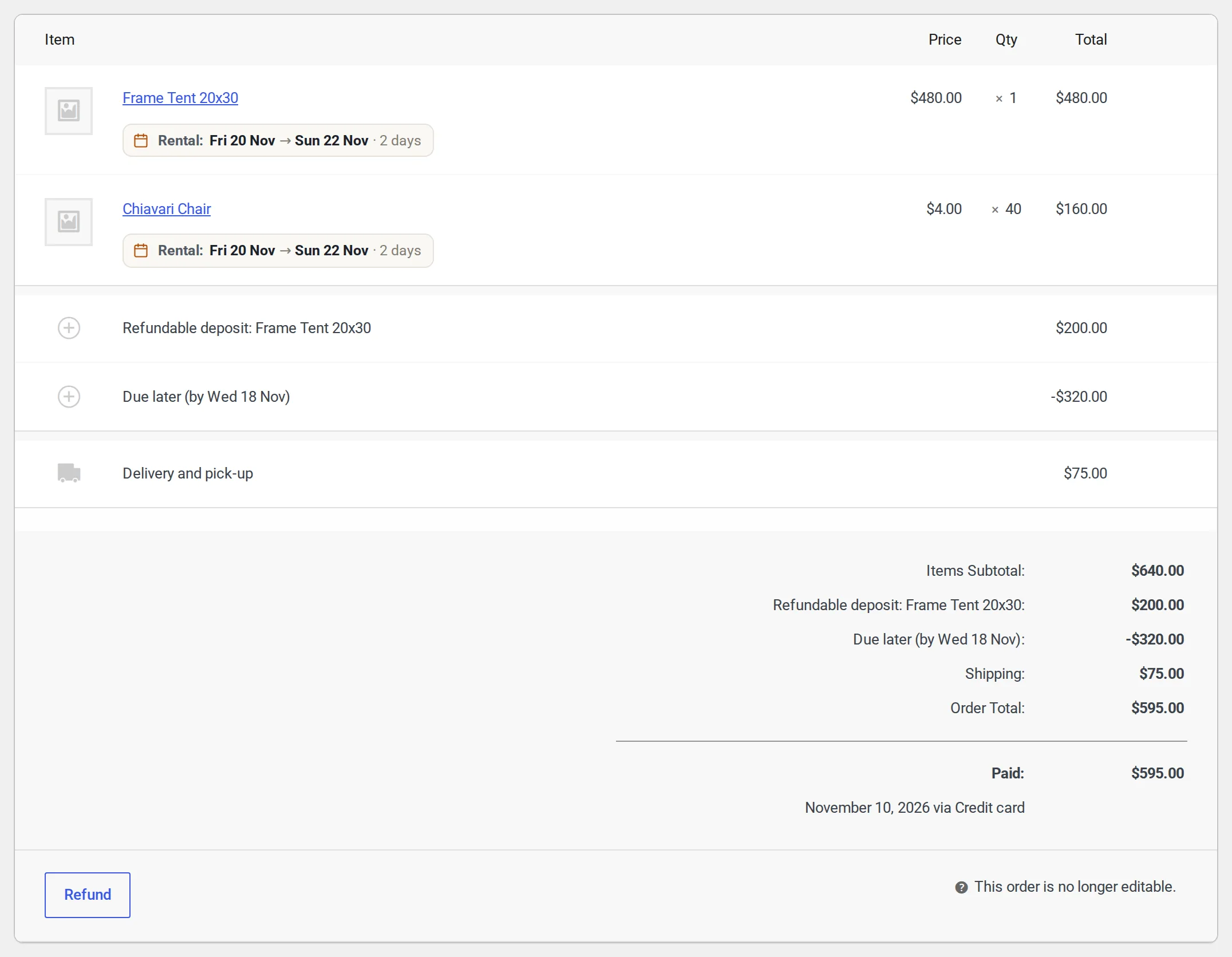
Sarah books online: a 20×30 frame tent and 40 chairs from 20 to 22 November, delivery, and a $200 security deposit. She pays $595 today, and $320 is due before the party.
In this sample store nobody has chosen where security deposits go yet. A deposit is money you’ll give back, so Xero Sync won’t guess and post it as income. The order waits, and its Xero box on the order screen says exactly what’s missing.
- Nothing is lost while an order waits, and your checkout never waits for Xero
- Every gap is named at once, so one visit to Settings fixes them all
- A daily alert email, only on a day something needs you
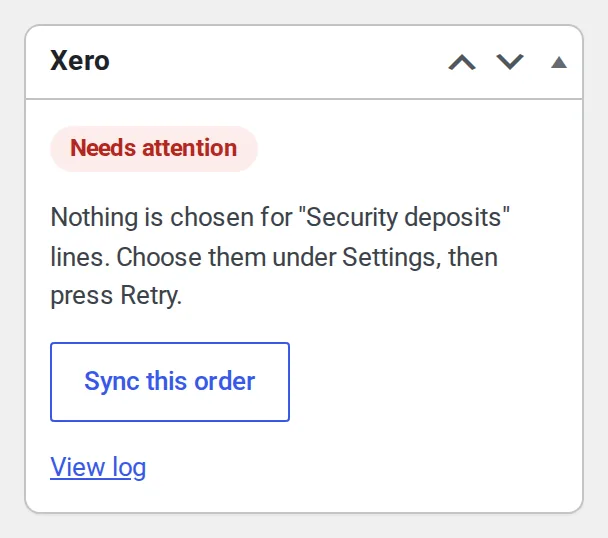
Choose the account, press Retry, and it’s in Xero
The Activity tab lists everything that needs you, with what to do. Pick a liability account such as Security deposits held, press Retry, and the booking posts.
Xero gets one invoice for the whole booking, $915, with the $595 Sarah paid as its first payment. The rental lines carry their dates, and the deposit sits on the liability account, not in sales. The order now shows Posted, the invoice number and Open in Xero.
- Each order has Sync this order; the orders list has a Xero column and Send to Xero

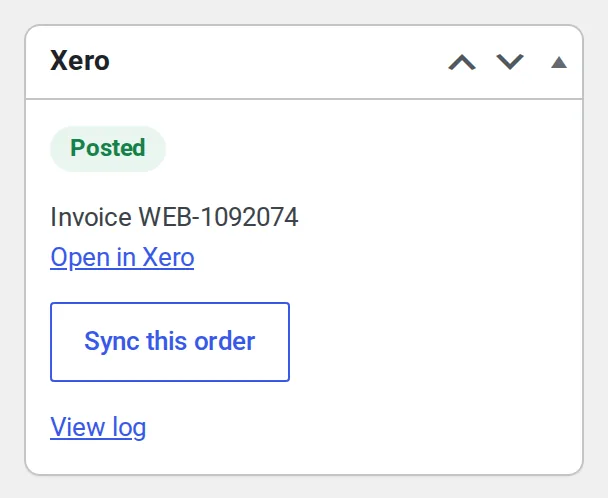
The balance, the deposit and a refund, each in its place
Sarah pays the $320 balance. Xero Sync knows it belongs to her booking, so it’s a second payment on the same invoice, not a new sale.
One chair came back broken, and you keep $45 of the deposit. That posts as one invoice that moves $45 from the deposit account to income. The other $155 goes back to Sarah as a refund in WooCommerce, and Xero gets a credit note for it by itself.
The log says what happened to every order, refund and payment, with the details if you need them.
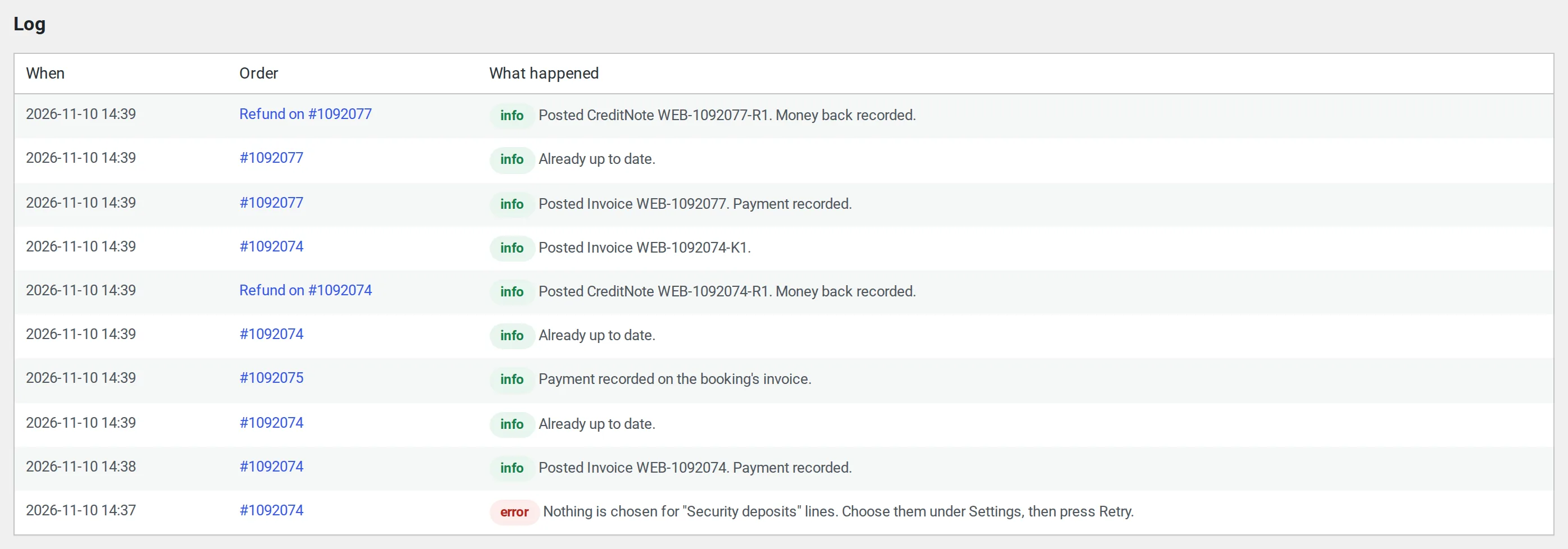
- Late fees, damage charges and extensions post as their own invoices that name the booking
- A refund on a shop order is a credit note too
- An invoice you delete or void in Xero is never posted again by itself
Bring in older orders only when you choose
Orders from before you connected never post on their own. On the Import tab, pick a date range and press Dry run: you see how many orders there are, how many are ready to post, the refunds and the totals, and nothing is sent.
Then press Start posting: they go oldest first, behind new orders. If they’re already in your books, press These are already in my books: link only. Each order is matched to its Xero invoice by number, and nothing is posted.
- The screen’s dry run reads up to 2,000 orders of a range; WP-CLI reads them all
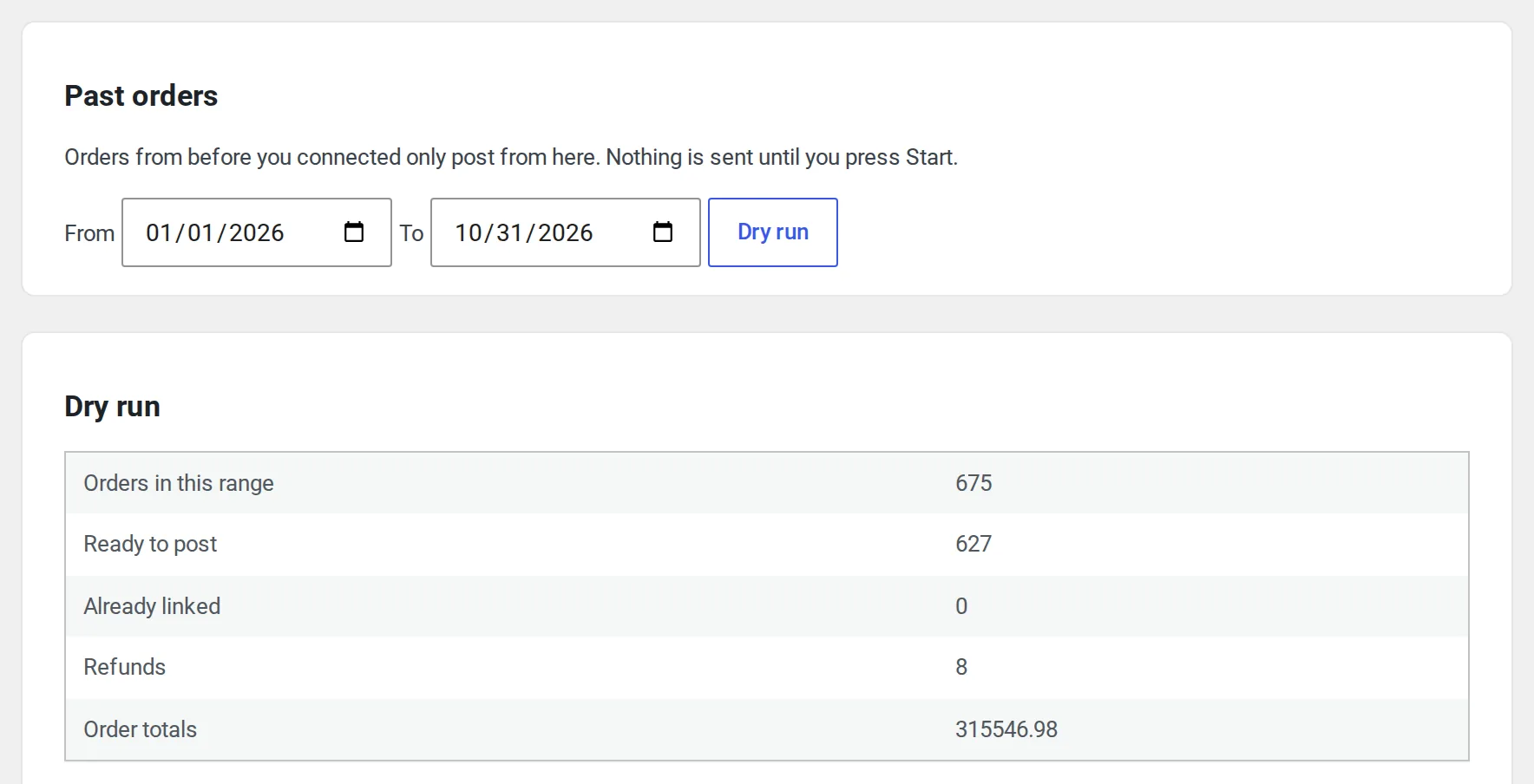
Every order reaches your books, once
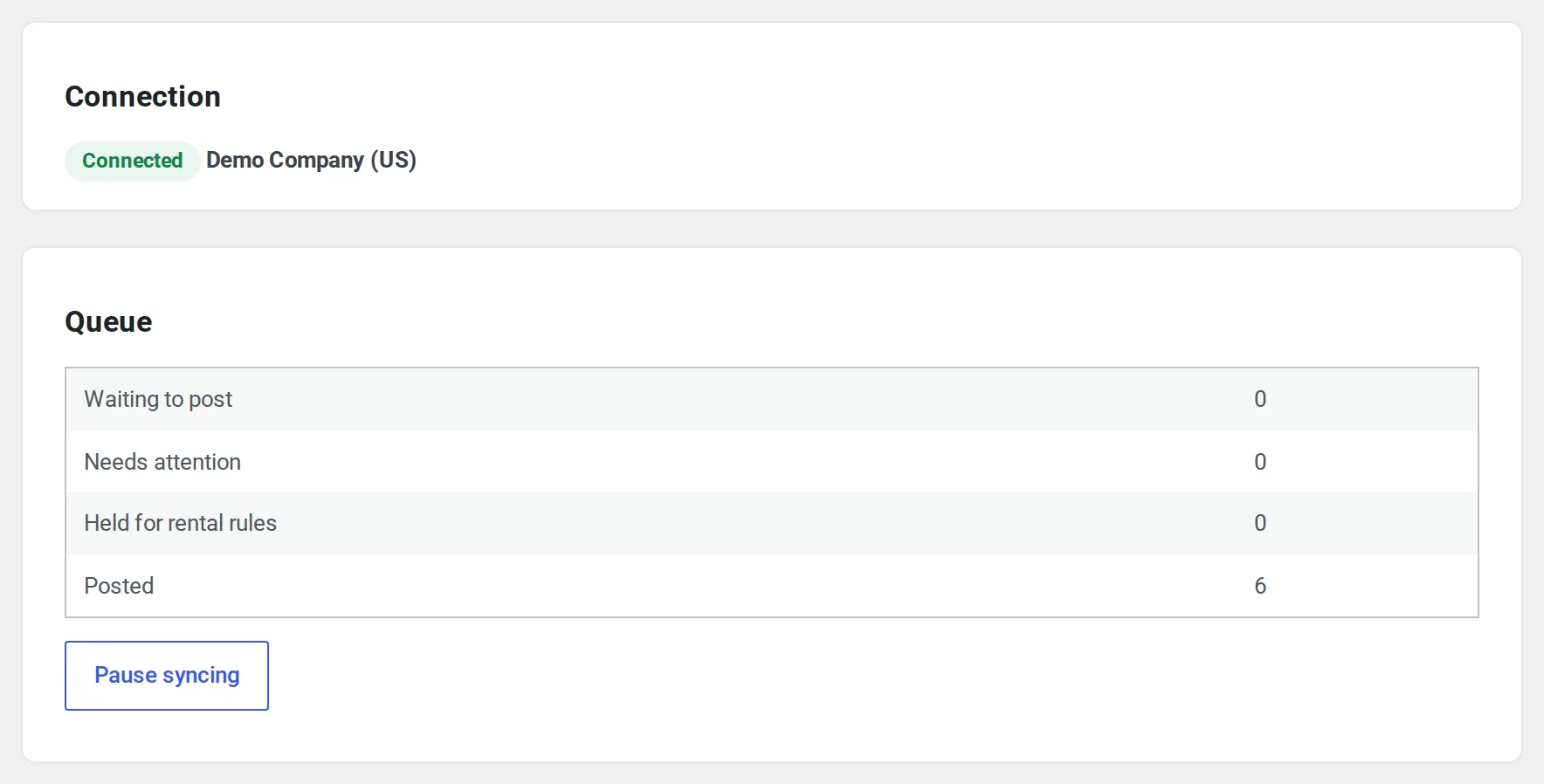
Orders, refunds and cancellations go into a queue and post in the background, so your checkout never waits for Xero. What can’t post waits under Needs attention with what to fix.
- Tries again after 1 minute, 5 minutes, 30 minutes, 2 hours and 12 hours
- A lost answer never posts an order twice: Xero is checked for the order before anything goes again
- A lost connection pauses the queue until you reconnect, and nothing waiting is lost
- A daily alert email, only on a day something needs you
The bookkeeping your store does every day, done in Xero
Orders as they happen
Each paid order becomes an invoice and a payment. Post when the order is paid or when it’s completed.
Refunds and cancellations
A credit note, taken straight off an unpaid invoice or recorded as money going back. A cancelled order voids its document; one with a payment in the books waits for a refund in WooCommerce.
Totals that match
Each line goes to the Xero account you pick, with the Xero tax rate matched to each WooCommerce rate. The tax is the order’s own amount, so totals match the store, and a stray cent goes on a rounding line.
Customers your way
One customer per email address, found if they’re already there, or one customer for all web sales.
Money in the right account
Each payment method posts to the bank or clearing account you pick.
Past orders when you choose
Pick a date range, see a dry run with nothing sent, then post them oldest first, or link the ones already in your books.
On the order screen
Each order shows its state, with Open in Xero, Sync this order and its log. The orders list has a column and a bulk action.
WP-CLI
Status, one order now, a queue run and imports from the command line.
Your own Xero app
Your store connects through a free Xero app you make for it. The keys stay on your site and nothing passes through our servers.
A booking posts as one sale, not five
Our rental plugins make extra orders for one booking: a balance, a late fee, an extension. A plain sync posts each as a new sale and books the same income twice. Sales Igniter Xero Sync knows what each one is.
- Rental dates on the invoice lines
- A balance paid later is a second payment on the booking’s invoice, and a waived balance comes off it
- Late fees, damage charges and extensions post as their own documents naming the booking
- Security deposits held as money owed back, in a liability account, never as income
- Payments taken at the counter go to the account for cash, card terminal or bank transfer
- With Multi Location Inventory, each line goes on its pick-up location’s option in a Xero tracking category called Location, so Xero can report by location.
What goes to Xero, and when
Every change in WooCommerce that touches money, and what Xero Sync does with it.
| In WooCommerce | In Xero |
|---|---|
| An order is paid, or on hold for a bank transfer | An invoice and its payment, a moment later. Or wait until the order is completed, if you choose. |
| An order is edited before anything is paid on it | Its invoice is updated. Ten edits in a minute make one update. |
| An invoice with a payment or credit note on it is edited | It waits under Needs attention, so you change the invoice in Xero yourself. |
| A refund | A credit note, by itself. On an unpaid invoice it comes off what’s owed; on a paid one the money going back is recorded. |
| An order is cancelled | Its invoice is voided. If a payment is already in the books, it waits and asks you to refund the order in WooCommerce first. |
| A booking’s balance is paid, or waived | A second payment on the booking’s invoice, or a credit that takes the waived balance off it. |
| A late fee, a damage charge or an extension | Its own invoice, naming the booking, such as “Late fee on order 1042”. |
| A security deposit is taken, kept or given back | Held as money owed back. Money you keep moves to income on one invoice; money given back is recorded going back. |
| A subscription renewal, or an order made from a quote | A sale that names the subscription or the quote. The quote itself isn’t sent to Xero. |
| Orders from before you connected | Nothing, until you import them from the Import tab after a dry run. |
| You delete or void the invoice in Xero | Nothing is posted again by itself. Press Post again on the order if you want it back. |
For any store that keeps its books in Xero
Shops that sell online
Orders, shipping, fees, discounts and refunds reach Xero without anyone typing them in. No rental plugin needed.
Rental and hire stores
Bookings paid in parts, security deposits, late fees and damage charges post the way your bookkeeper expects.
Stores with more than one location
With Multi Location Inventory, each line goes on its pick-up location in a Xero tracking category, so Xero reports by location.
Your bookkeeper
Open in Xero from any order, a log of every step, and a link-only import for orders already entered by hand.
Any WooCommerce store, and more with ours
A store without our plugins sees none of the rental choices.
| With | What happens |
|---|---|
| Rentals & Bookings | Rental dates on lines, a Rentals row, balances on the booking’s invoice, late fees, extensions and counter payments. |
| Refundable Security Deposits | Deposits held as a liability. Part kept for a charge books the income and lets go of the liability on one document. |
| Maintenance & Inspections | Damage charges get their own row. |
| Multi Location Inventory | Each rental’s pick-up location, so your books can report by location. |
| Bundles & Composites | A bundle posts as one line at its price, “Includes: 2 × Chair, 1 × Table”. Also WooCommerce Product Bundles and Composite Products. |
| Subscriptions and quotes | A renewal or an order made from a quote names the subscription or the quote. The quote itself isn’t sent to Xero. |
Questions about Xero Sync
Does it count against Xero’s limits?
Xero allows each organisation 60 calls a minute, and 1,000 calls a day on a free Starter app (5,000 on Xero’s paid tiers). The queue keeps under the minute limit and sends new orders up to 50 to a call. If a big import uses up the day’s calls, items wait for Xero and then carry on by themselves.
Do I need a Xero developer account?
You make a free app for your store at developer.xero.com with your usual Xero login, then paste its Client ID and Client secret into Xero Sync. The screen walks you through it in four steps, with Copy buttons for the two addresses Xero asks for, and checks the app with Xero before you sign in. A Xero app is free for one organisation: Xero’s Starter tier has no charge.
Will my old orders end up in my books?
Only if you import them. New orders post from the moment you press Start syncing. Past orders post only from the Import tab, after a dry run, or get linked to what’s already there.
What if Xero is down?
The order waits and tries again by itself. Anything that needs you waits under Needs attention, with what to fix.
Does it create contacts or accounts in Xero?
It finds each customer’s contact by email address and adds one only if it isn’t there, so nobody is entered twice. It never creates accounts or tracking options: you pick from the ones you have, and each row starts with a suggestion.
How does it handle tax?
Each line goes with the Xero tax rate you matched to its WooCommerce rate, and the tax amount is the order’s own, so the total in Xero matches the store. When the two round a cent differently, the cent goes on a Rounding line.
What goes to Xero about my customers?
Their name, email address, billing address and phone number, on the contact. Choose one customer for all web sales instead, and only that one name goes.
What about orders in other currencies?
Orders in a currency other than your books’ aren’t posted yet. They wait under Needs attention with a message, so none slips by unseen.
Can I send one order now, or many at once?
Each order has Sync this order. On the orders list, the bulk menu has Send to Xero for the orders you select. WP-CLI has status, sync, drain and import.
What does it leave to me?
An order changed after it was paid, a change to a part-paid booking, and a paid order cancelled with no refund wait under Needs attention, so you decide what goes to Xero. Damage waiver fees post with your other fees. Invoicing when a rental starts and store credit aren’t handled yet.
Do you see my password?
No. You sign in at Xero, and the connection is kept on your own site.
Can I run it with QuickBooks Sync?
Yes. Each plugin posts to its own books, which helps while you move from one system to the other.
What do I need?
WordPress 6.6, WooCommerce 8.0 and PHP 8.1 or newer, a Xero organisation, and an https site address.
The rental features switch on when Rentals & Bookings is active.
Read the guide before you buy
Stop typing orders into Xero
Your WooCommerce sales, payments and refunds in your books as they happen.