
Updated 15 September 2026. Every price below was read from the vendor’s own pricing page on that date and is linked; prices change, so check the source before you buy. This guide is published by Sales Igniter, which makes one of the plugins reviewed — we say so again where it matters, and we make the case for the competitors where they are the better fit.
Searching for a WooCommerce booking plugin turns up two very different kinds of software wearing the same label, and most disappointing purchases come from picking the wrong kind rather than a bad plugin. So before the list, one page on the distinction — then ten plugins, each with what it is best for, what it costs, where it runs out, and a one-line verdict.
If you already know you are renting things out rather than booking appointments, the WooCommerce rental plugin comparison chart is the shorter route: five rental-capable plugins scored row by row on the features a hire business actually uses.
First, are you buying a booking plugin or a rental plugin?
A booking plugin sells time. A haircut, a consultation, a yoga class, a table, a tour departure, a meeting room. The customer picks a slot, the slot fills up, and when the slot is over there is nothing to give back. The hard problems are staff calendars, opening hours, time zones, buffers between appointments and reminders. Amelia, Bookly, WooCommerce Appointments and, to a large degree, WooCommerce Bookings itself are built around this model.
A rental plugin sells a physical object that leaves your premises and has to come back. A camera body, a marquee, a dress, an e-bike, a bouncy castle, a car. That changes the problem completely:
- Inventory is per date, not per slot. If you own five of something, the calendar has to know how many are already out on each day of a requested range — and it has to say so before the customer reaches checkout.
- Turnaround is real time. A tent out for Saturday is unavailable Thursday to Monday. Wetsuits need washing, cars need valeting. Buffer days before and after each hire have to sit inside the availability calendar or you oversell.
- Things have to come back. A booked slot expires on its own; a rented drill does not. You need a check-out and check-in step, ideally by barcode or serial number, and a way to see what is overdue.
- Money is held, not just taken. Refundable security deposits, damage charges against a specific returned item, and signed hire agreements are normal in rental and absent from appointment software.
If your product is somebody’s time or a reservation of a space, a booking plugin is the right buy and several excellent ones cost under $100. If your product goes out of the door and comes back, you need per-date stock and the warehouse side, and only a few plugins in this list have it. The comparison table marks both.
How we compared them
Every plugin here is either a WooCommerce extension or integrates with WooCommerce checkout, so your existing payment gateways, taxes and theme keep working. For each one we read the vendor’s current product and pricing pages rather than a third-party directory, and recorded the price, the billing basis (subscription, one-time, or one-time with optional renewal) and the date. Where a vendor does not publish a figure we say so instead of guessing. Plugins that are no longer maintained or do not really integrate with WooCommerce were moved to the “left off the list” section at the end, which is where three entries from the original 2020 version of this article now live. For rentals, we also ran the same 16 tests on nine paid plugins on one test shop: see our hands-on test of 9 paid WooCommerce rental plugins.
The 10 best WooCommerce booking plugins at a glance
Per-date stock means the plugin can hold a quantity of a product and count it down across a date range. Out / in tracking means it has a check-out and check-in workflow with serial or barcode tracking — the part that separates rental software from a calendar. “From” prices are the cheapest single-site licence on the vendor’s page; the read date applies to the whole table.
| Plugin | Best for | Per-date stock | Out / in tracking | From | Read |
|---|---|---|---|---|---|
| Sales Igniter Bookings & Tours | Equipment, vehicle, event and dress hire — anything that comes back | $199 one-time | 15 Sep 2026 | ||
| WooCommerce Bookings (Woo) | Appointments, classes, tours and reservations on an official extension | $249 / year | 15 Sep 2026 | ||
| Bookings for WooCommerce (Plugin Republic) | Holiday lets and simple daily hire with Airbnb / Booking.com sync | $79 / year or $199 lifetime | 15 Sep 2026 | ||
| Booking & Appointment Plugin (Tyche Softwares) | Stores that mix appointments, multi-day hire and normal products | $199 / year or $349 lifetime | 15 Sep 2026 | ||
| Bookings and Appointments (PluginHive) | Service businesses with staff and shared assets | $149 / year | 15 Sep 2026 | ||
| YITH Booking and Appointment | Accommodation and services with people-based pricing and iCal sync | €249.99 / year | 15 Sep 2026 | ||
| RnB – WooCommerce Booking & Rental (RedQ) | Budget rental sites that can live with marketplace support terms | $29 one-time (6 months support) | 15 Sep 2026 | ||
| Amelia | Appointments and events with staff, locations and a polished front end | $49 / year (Starter) | 15 Sep 2026 | ||
| Bookly | Salons, clinics and consultants who want a free tier and SMS reminders | Free; Pro $39 / year or $99 lifetime | 15 Sep 2026 | ||
| WooCommerce Appointments (BookingWP) | Staff scheduling with two-way Google Calendar sync | €99 / year | 15 Sep 2026 |
1. Sales Igniter Bookings & Tours
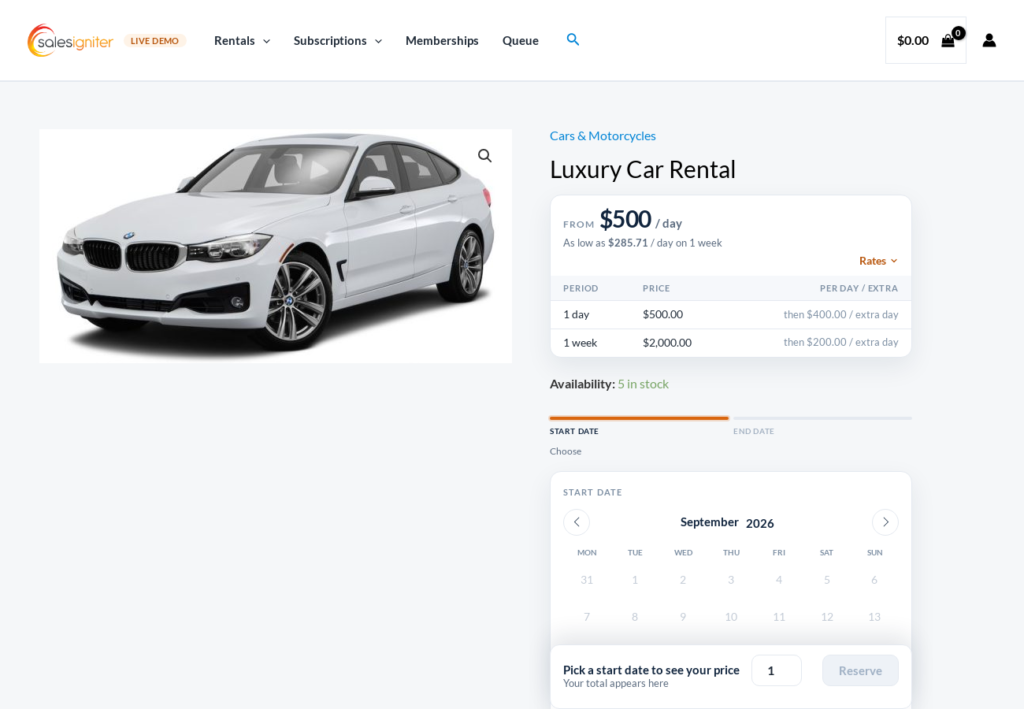
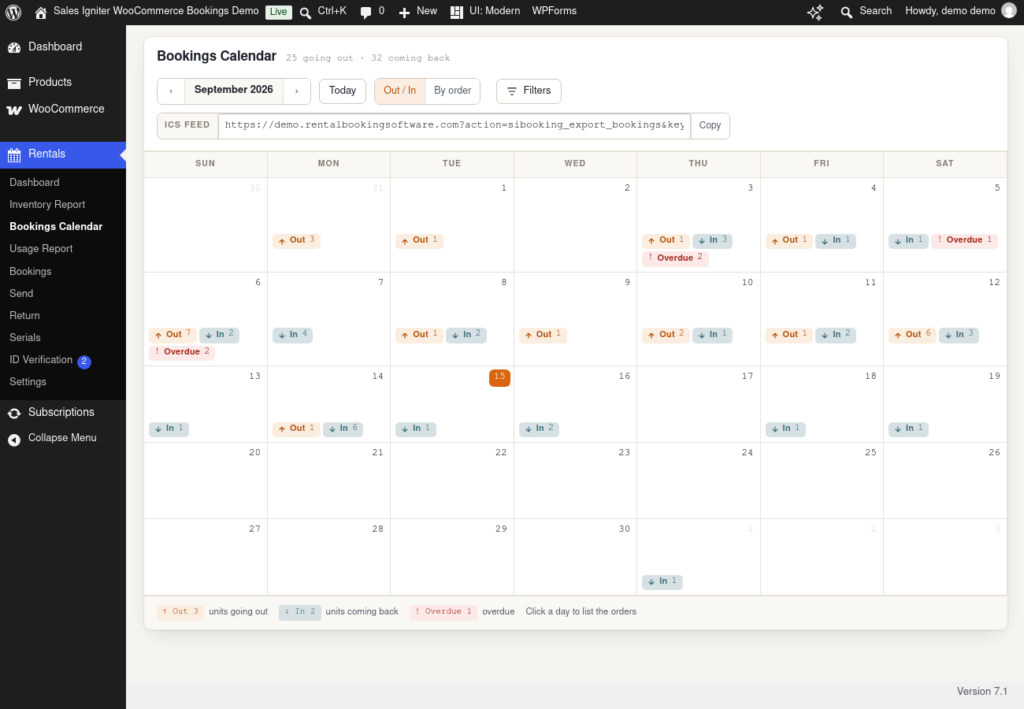
Disclosure first: this is our plugin, so weigh what follows accordingly. Sales Igniter is a WooCommerce rental plugin rather than an appointment scheduler. It installs into an ordinary WooCommerce store and adds the warehouse side that booking plugins leave out: a quantity per product counted down across every date of a hire, turnaround buffers before and after each booking, check-out and check-in screens with barcode and serial-number scanning, and a Bookings Calendar that shows units going out, coming back and overdue for each day. Pricing can be per hour, per day, per week or by fixed periods, with rate tables that fall as the hire gets longer, and the date pickers come in three styles: start and end dates, start date plus a fixed length, or fixed dates and times for tours and classes.
Best for
Equipment hire, vehicle and bike rental, party and event rental, dress and costume hire, camera and AV gear — any business where the same physical stock cycles between customers and you need to know where every unit is. It also handles tours and classes through the fixed date-and-time picker, so a store that rents kayaks and runs guided trips can do both in one catalogue.
Pricing
Two editions, both one-time purchases with the full source code and a year of support and updates. On the pricing page read on 15 September 2026, Regular is $199 (list $349, with the coupon shown on the page) and Pro is $299 (list $499), Pro bundling the add-ons for signed rental contracts, refundable security deposits, subscriptions and memberships, custom fields and ID verification. Renewing support and updates after the first year is optional at $199 a year; the plugin keeps working if you do not.
Limits
It is not a staff scheduler. There is no per-employee calendar, no customer-facing reschedule button for a 30-minute slot, and no SMS reminders out of the box, so a salon or a clinic should look at Amelia or Bookly instead. It is also more software than a simple holiday-let site needs. If you want to see the workflows before deciding, the how-to guides walk through set-up, deposits, contracts and the send and return screens, and the live demo is where the screenshots on this page come from.
Verdict: the WordPress rental plugin to pick when stock goes out and has to come back; the wrong pick when you are selling appointments.
2. WooCommerce Bookings (by Woo)
The official extension from the company that makes WooCommerce, which buys you the deepest integration and first-party support. Bookable products can be sold in fixed time slots or flexible date ranges, with buffers between bookings, resources (rooms, staff, equipment) shared across products, and a capacity per slot so a class can hold ten people. It is mature, thoroughly documented, and for appointments, tours, classes and table reservations it is very hard to argue against.
Pricing
An annual subscription: $249 per year for one site, or $398.40 for two years (list $498), with a 30-day money-back guarantee. Read from woocommerce.com on 15 September 2026. The renewal is what keeps updates and support flowing, so budget it as a recurring cost.
Limits
Rental operators tend to use it for a season and then move on, not because it is badly built but because it models time rather than objects. There is no check-out or check-in step, no serial or barcode tracking, and no security-deposit or hire-agreement workflow, so the return side of a rental business happens in a spreadsheet. Its own product page also notes that it synchronises with a single external calendar. We have written up the trade-offs at length in our WooCommerce Bookings alternative comparison, including the cases where you should stay put.
Verdict: the safe default for time-slot booking on WooCommerce; outgrown quickly by anyone renting physical stock.
3. Bookings for WooCommerce (Plugin Republic)
Best for
Holiday lets, cabins and straightforward daily or weekly hire. Products can be booked by day, night or week, each with a quantity available per period so a site with three kayaks does not sell four, plus buffer days, minimum and maximum booking lengths and a front-end availability search. The standout feature is iCal synchronisation with Airbnb, Booking.com and VRBO, which is exactly what a small accommodation business needs and which most WooCommerce plugins lack.
Pricing
Single site $79 per year, five sites $119, twenty-five sites $349; or lifetime licences at $199, $299 and $899. Prices exclude VAT, with a 14-day money-back guarantee. Read from pluginrepublic.com on 15 September 2026.
Limits
Quantity per period is where the inventory model stops: there is no serial tracking, no check-in or return workflow, and no deposits or contracts. Hourly booking is time-based rather than a true hourly rental with turnaround, so it suits accommodation better than equipment.
Verdict: the best value on this list for a holiday let or a simple daily-hire catalogue, and the one to pick if channel sync matters more than warehouse control.
4. Booking & Appointment Plugin for WooCommerce (Tyche Softwares)
Best for
Stores that need several booking styles under one roof. Tyche’s plugin supports single-day, multi-day and time-slot bookings on the same site, resources with their own availability, special prices by weekday or date, and a customer-timezone display. Its product page specifically advertises “selling and renting together”, so a shop that sells bikes and also hires them out can run both from one catalogue, and the Business and Enterprise tiers add deposits via the vendor’s own Deposits plugin.
Pricing
Annual licences: Starter $199 per year for a single store (a first-year promotion of $159.20 was showing when we read it), Business $299 for five stores, Enterprise $399 for ten; a single-store lifetime licence is $349 and a ten-store lifetime is $549. Read from tychesoftwares.com on 15 September 2026.
Limits
Breadth is the point, and it comes with a large settings surface that takes time to learn. Deposits arrive only through a second plugin, and there is no check-out, check-in or serial tracking, so it stops at the same place as the other schedulers once goods leave the building.
Verdict: the most flexible general-purpose scheduler here, and a fair choice for a mixed sell-and-hire store that does not need return tracking.
5. Bookings and Appointments for WooCommerce (PluginHive)
Best for
Service businesses with staff and a handful of shared assets. It offers single-day, multi-day and time-slot bookings, staff members with their own schedules, preparation buffers, custom booking-form fields, Google, Outlook and iCal sync, reminders, and partial payments through WooCommerce Deposits. Its “assets” feature lets a resource carry a quantity, so two treatment rooms or four projectors can be shared across several bookable services.
Pricing
$149 per year for a single site, cancel any time; multi-site tiers were not shown on the page we read. Read from pluginhive.com on 15 September 2026.
Limits
Assets are a scheduling device rather than an inventory system: there is no return step, no serial numbers, and no damage or deposit release against a particular unit. It also depends on a separate deposits plugin for partial payment.
Verdict: a solid mid-priced scheduler for a studio, clinic or venue; not a rental system.
6. YITH Booking and Appointment for WooCommerce
Best for
Accommodation and services priced per person. Bookable products can be sold by the hour, day, week or month, with price rules per person type (adults, children, over-60s), services and resources attached to a product, Google Calendar integration, and iCal auto-sync with Booking.com, Airbnb and HomeAway to avoid double-booking a room that is listed elsewhere. YITH also has a large catalogue of other WooCommerce plugins that integrate with it, which matters if you already run several.
Pricing
The product page shows the price only at the cart stage; its own product structured data lists €249.99 per year for one site, with a 30-day money-back guarantee. Read from yithemes.com on 15 September 2026 — confirm the figure in your currency at checkout.
Limits
Availability is expressed in people per booking unit rather than a stock count per date, which is right for rooms and tours and awkward for a shelf of identical items; the product page we read does not describe per-date quantity, so check the documentation against your catalogue before buying. It is also the most expensive annual licence on the list after WooCommerce Bookings, and there is no check-in or deposit workflow.
Verdict: a strong choice for guest houses and per-person services inside the YITH ecosystem; look elsewhere for equipment.
7. RnB – WooCommerce Booking & Rental Plugin (RedQ)
Best for
Budget rental sites. RnB is one of the few plugins here that is explicitly a rental product: unlimited rentable items with inventory management, calendar blocking, hourly, daily and monthly pricing, and Google Calendar sync, sold through CodeCanyon where it has more than 12,000 sales and a 4.5-star rating from about 200 reviews.
Pricing
A CodeCanyon regular licence is $29 one-time, including future updates and six months of support from the author, extendable to twelve months for $9; an extended licence for resale is $3,025. Read from codecanyon.net on 15 September 2026.
Limits
The price is the attraction and the marketplace model is the catch: support runs through Envato’s six-month window, updates depend on the author staying active, and the feature set is built for listing rentals rather than running a warehouse — there is no check-out and check-in by serial or barcode and no signed contract flow. We keep a detailed RnB comparison that spells out where the $29 stops being cheap.
Verdict: the cheapest way to put rental dates on a WooCommerce product; fine for a small catalogue, thin for a business that lives on returns and deposits.
8. Amelia
Best for
Appointments and events with a polished, app-like front end. Amelia manages employees, locations, services, packages and recurring events, with a step-by-step booking wizard that looks better out of the box than most WooCommerce product pages. WooCommerce is used as the checkout, so an Amelia appointment becomes a cart item and pays through your existing gateways.
Pricing
Four plans on one domain: Starter $49 per year, Standard $89, Pro $149 (list $199), Elite $259 (list $432) for unlimited domains; lifetime options run from $349 for Pro to $709 for Elite, with a 15-day money-back guarantee. Read from wpamelia.com on 15 September 2026 — the page renders its prices with a script and its structured data tags them as euros while the page shows dollars, so treat the Starter and Standard figures as approximate and confirm on the page.
Limits
It is not a WooCommerce product type. Bookings live in Amelia’s own tables, WooCommerce only takes the money, and there is no concept of a quantity of physical items across a date range. If your inventory is people and rooms, that is fine; if it is objects, it is the wrong tool.
Verdict: the best-looking appointment system that can use WooCommerce checkout; irrelevant to rental.
9. Bookly
Best for
Salons, clinics, tutors and consultants who want to start free. Bookly’s free version allows unlimited appointments with email, SMS and WhatsApp notifications, Stripe and PayPal Standard, and multiple locations; Pro adds staff logins, group bookings, custom fields and the add-on ecosystem. The pricing page lists WooCommerce compatibility across its plans, so an appointment can be pushed into a WooCommerce cart.
Pricing
Bookly Lite is free. Bookly Pro is $39 per year (list $99) or $99 lifetime for one site; the multi-site Business plan is $69 per year for one site or $129 for five, with lifetime equivalents, and individual add-ons are sold separately. Read from booking-wp-plugin.com on 15 September 2026.
Limits
Like Amelia, Bookly keeps its own data model and treats WooCommerce as a payment step, so none of WooCommerce’s product, stock or reporting features apply to a booking. The add-on model means the real cost is easy to underestimate; count what you need before comparing it to a single-price plugin.
Verdict: the cheapest credible way to take appointments on a WordPress site; not a WooCommerce booking plugin in any deep sense, and nothing to do with rental.
10. WooCommerce Appointments (BookingWP)
Best for
Staff-based scheduling with proper calendar sync. WooCommerce Appointments is a true WooCommerce product type with per-staff availability and logins, two-way Google Calendar synchronisation, padding time between appointments, scheduling windows, capacity per slot, and a customer-facing cancel and reschedule flow. It works with every gateway WooCommerce supports.
Pricing
Annual: Standard €99 per year for one site, Developer €199 for five, Ultimate €349 for twenty-five, with renewals at 50% off. Read from bookingwp.com on 15 September 2026.
Limits
The name is accurate: it is for appointments. Capacity is people per slot, not items per date, and the vendor’s own page does not describe multi-day hire, quantities of physical stock or returns.
Verdict: the pick for a multi-staff service business that wants bookings to be real WooCommerce products with Google Calendar kept in sync.
Plugins we looked at but left off the list
Three of these were in the 2020 version of this article. They are dropped for the reasons given, not because they are bad software.
- Pinpoint Booking System — still sold, at $70 per year for one site (read from pinpoint.world, 15 September 2026), with a WooCommerce integration. It is a general reservation calendar first and a WooCommerce plugin second, and the vendor is now steering customers to its hosted platform at $10 a month per calendar.
- WooCommerce Easy Booking — the free version on WordPress.org is still updated (last update August 2026, 4,000+ active installs) and its Pro tier adds stock by date. We could not reach a vendor pricing page to verify the Pro price, so we are not quoting one.
- BookingWizz — listed on CodeCanyon at $19 but last updated in February 2024 and tested only to WordPress 6.4 (read 15 September 2026). Not something we would install on a current WooCommerce store.
- Booking Calendar (wpbookingcalendar.com) and Vik Booking — both capable, both one-time or annual licences (Booking Calendar from $41.87 one-time for a single site at its current discount; Vik Booking Pro €149 for a year of updates), but neither product page mentions WooCommerce, and Vik is a hotel property-management system rather than a shop plugin. Good software, wrong list.
Which WooCommerce booking plugin should you pick?
- Appointments with staff: WooCommerce Appointments if you want real WooCommerce products, Amelia if you want the nicest front end, Bookly if you want to start free.
- Tours, classes, tables and rooms: WooCommerce Bookings for first-party support, YITH for per-person pricing and iCal sync, Tyche for the widest set of booking styles.
- Holiday lets and simple daily hire: Plugin Republic’s Bookings for WooCommerce, mainly for its channel sync and price.
- Physical stock that goes out and comes back: Sales Igniter, or RnB if the budget is $29 and the catalogue is small.
Whichever way you lean, test it on a staging copy of your store with your real theme and gateway before going live, and re-read the vendor’s pricing page on the day you buy — every figure above carries its read date for a reason.