
Hyvä ships no RequireJS, no jQuery and no Knockout. That is the whole point of it — and it is also why an extension written against Magento’s Luma frontend does not simply work on a Hyvä storefront. Version 1.2.197 of the Sales Igniter rental module adds a real Hyvä compatibility layer rather than a set of theme checks bolted onto the Luma code: a separate module a Hyvä merchant installs, four storefront date pickers that render on either frontend, and a Calendar Styler that previews each of them.
What Hyvä theme support means in the Magento 2 rental extension
The Hyvä-only code lives in its own package, Hyva_SalesIgniterRental. A Hyvä merchant installs it alongside the rental module; a Luma merchant does not install it and does not need it. That split is deliberate, and it is enforced by Hyvä’s own machinery rather than by conditionals in our templates:
- Templates come through Hyvä’s compat-module fallback, which puts the compatibility module’s templates ahead of the rental module’s — but only on a request Hyvä has identified as its own. A Luma request never reaches them.
- Layout comes through Hyvä’s layout-handle mirroring: a
hyva_-prefixed handle file is loaded on Hyvä themes and nowhere else. No observer of ours, no plugin of ours.
The practical consequence is that nothing in the Hyvä path can change what a Luma store renders. If you are weighing the two frontends, that isolation is worth more than a compatibility claim: a bug fixed for one cannot regress the other.
Hyvä child themes are detected properly now
This is the fix most existing Hyvä customers will feel. The old theme check searched the theme’s own path for the string “Hyva”. Magento returns a theme’s own path and never its ancestry, so the check recognised Hyva/default and nothing else — while Hyvä’s own documentation tells merchants not to edit Hyva/default and to run a child theme instead. In other words, the check answered “not Hyvä” for the configuration a real Hyvä store runs, and such a store quietly got the Luma code paths unless somebody had found the override flag.
1.2.197 asks Hyvä itself when Hyvä is installed, and walks the theme’s parent chain when it is not. The answer is cached for the request, because it is asked on nearly every block of every page. The Force Hyvä Theme Mode setting is still there and still forces the Hyvä paths on — useful on a headless or heavily customised frontend — but it is no longer the only way a child theme gets the right rendering.
Four storefront date pickers, on either frontend
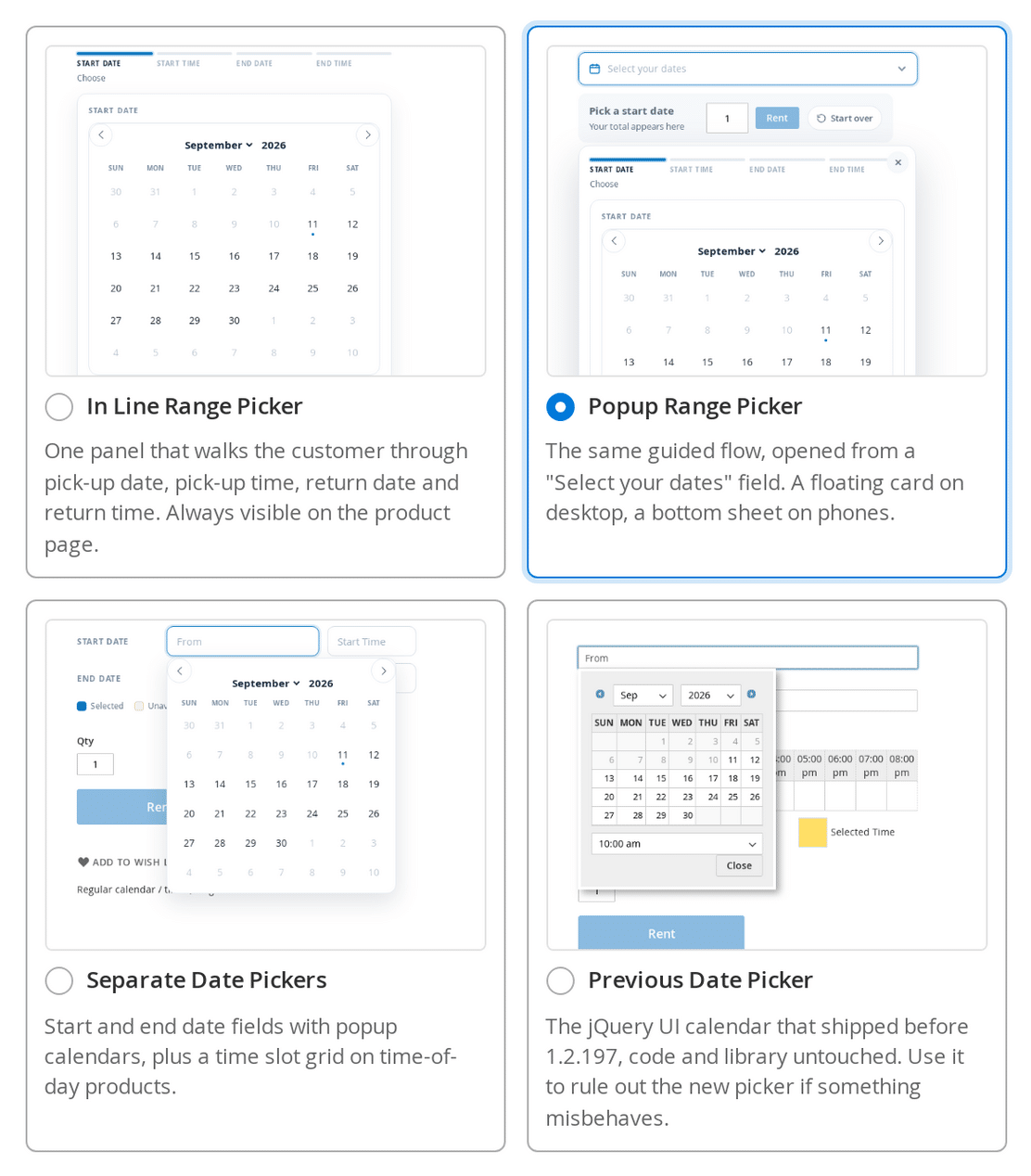
The single most visible change in this release is the date picker. Stores › Configuration › Sales Igniter › Rental › Calendar Styler now offers four, chosen from preview cards rather than a dropdown of jargon:
- In Line Range Picker — the new default. One panel, always visible on the product page.
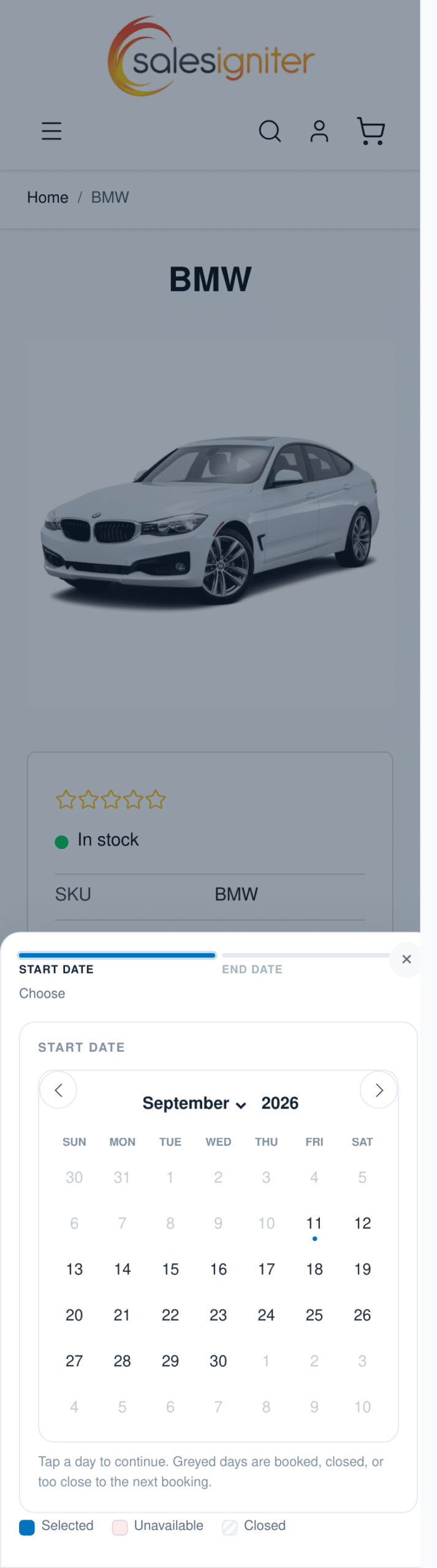
- Popup Range Picker — the same panel behind a “Select your dates” field. A floating card on desktop, a bottom sheet on a phone.
- Separate Date Pickers — familiar start and end fields, each opening its own calendar, with the time grid opening under the field after a date is chosen.
- Previous Date Picker — the jQuery UI calendar that shipped before 1.2.197, unchanged, so you can switch back in one click if something on your theme misbehaves.
The first three are the ones that matter on Hyvä, and all three render there natively. The Previous Date Picker is the exception, and the reason is structural rather than a gap we intend to close: it is a jQuery UI widget, so it needs RequireJS, which a Hyvä page does not have. A Hyvä storefront therefore always gets one of the new calendars whatever the setting says. If you rely on the old picker’s exact behaviour, that is a fact to weigh before moving a rental store to Hyvä.
One decision at a time
The two range pickers walk the customer through the booking in order: pick-up date, pick-up time, return date, return time. Answering a step reveals the next one and hides the one before it, so there is no “which field do I fill in first”. A progress row above the panel names the four steps, shows each answer, and lets the customer click back to change one — which clears everything that depended on it, because a new pick-up date makes the old return date and both times meaningless.
Only the steps a product actually needs are offered. A date-only product asks for two dates. A product with times asks for four. A fixed rental length asks for the start and works out the return itself. A single-day or hotel-style product asks for one day.
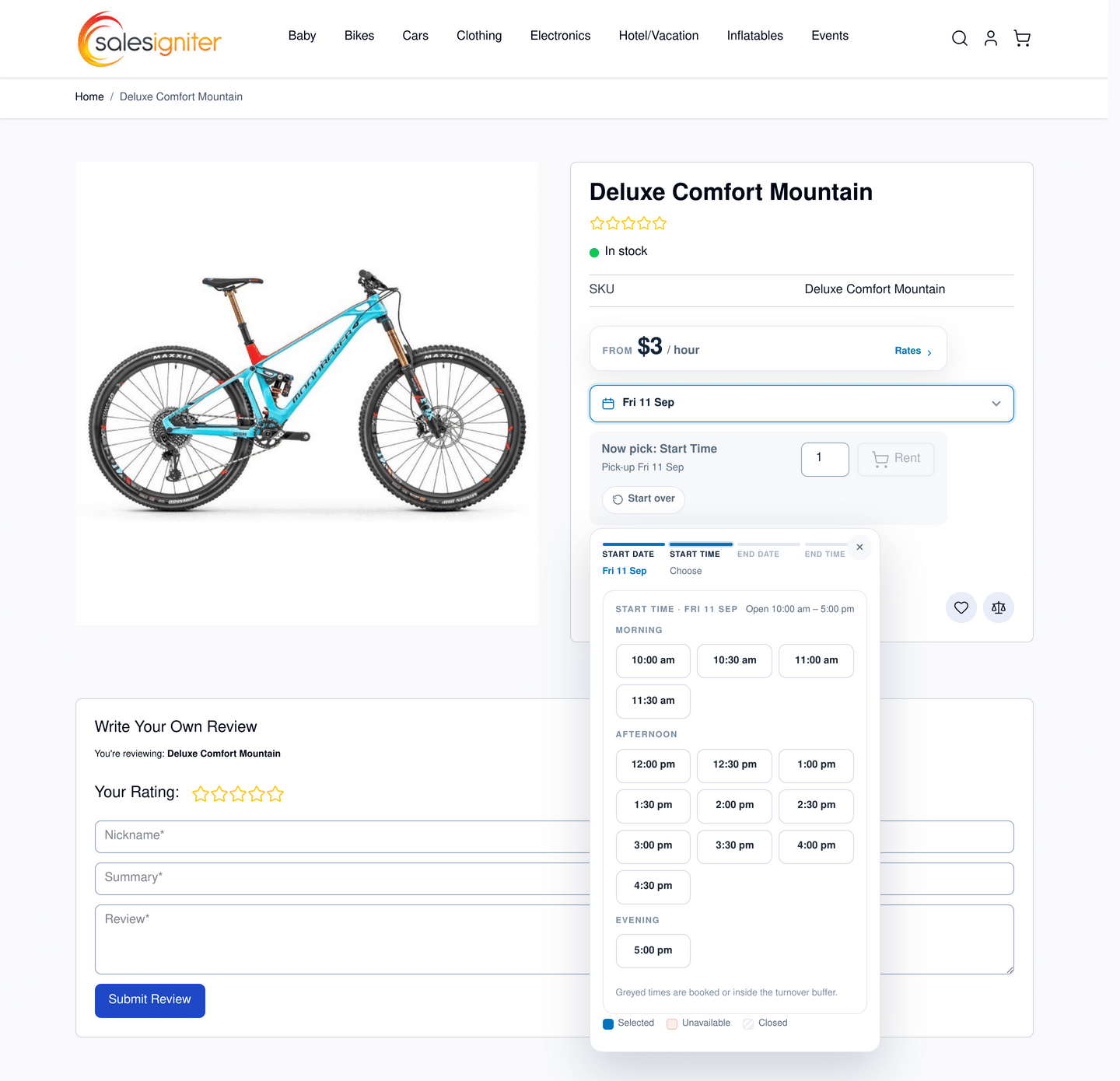
Times are a grid, not a dropdown: the chosen day’s slots at whatever interval you configure, grouped under Morning, Afternoon and Evening, with the store’s opening hours in the heading. A greyed slot now says why it is greyed — the quantity asked for is not free at that time, it is earlier than the pick-up on a same-day return, or it would make the hire shorter than your minimum period. That reason is the difference between a customer trying another time and a customer leaving.
One detail worth knowing if you are laying out a product page: the calendar splits into two panes side by side only when its own box is at least 640px wide, measured on the box rather than the browser window. A Luma product column is around 496px on a 1440px screen, so most stores get one pane at a time, which is the correct behaviour — asking about the window would squeeze the day grid and the slot grid into half the width they need.
The Calendar Styler, with a live preview that actually walks the flow
All of the calendar’s appearance now lives in one settings group with a preview beside it: the picker, a style (Airy, Card, Bold or Classic), a main colour with six presets and Magento’s colour picker, the corner radius, how many months to show, the time slot interval, and whether to show the progress row, the units left in each day and the legend underneath.
The preview is the real storefront markup and the real stylesheet, and it is interactive — pick a date in it and it walks the same guided progression a customer walks, with a Start over button to reset. It is driven by the same shared rules module the storefront pickers use, not by a second implementation, so what you see is what your customers get. A width switch above it flips between a product-column width and full width, because the two-pane layout only appears at the wider one and you need to be able to style both.
Its sample data is shaped like a real rental: three in stock, two sold-out days, a day with one left, a closed day, a turnover gap, a booking that takes 10:00 to 14:00 out of one day and a recurring afternoon block-out, so every state you might want to restyle is on screen.
Right-to-left locales
If you run an Arabic or Hebrew store view, the calendar now renders right to left properly. This needed doing by hand: the underlying calendar library has no right-to-left support at all, and Magento puts a lang attribute on the page but never a dir, so an in-line calendar inherited the correct direction from its wrapper while a popup one — appended to the end of the document — rendered left to right with Sunday on the wrong side, next to a correct inline picker. The stylesheet now keys off the language itself, and the month arrows are mirrored deliberately rather than left to the library, which pins them with physical left and right offsets. Whatever the locale, the form still submits canonical dates, so nothing downstream changes.
The locale work also covers the first day of the week, the date and time patterns and whether the clock is 12-hour, all taken from ICU rather than guessed.
What is genuinely different on a Hyvä storefront
Compatibility claims are worth more when they come with the exceptions. These are the ones we found and checked:
- The Previous Date Picker is unavailable, as above. Hyvä always gets one of the three new calendars.
- Calendar widgets are bound to a theme. This is stock Magento behaviour — widget instances and their layout links are per theme — so a global calendar widget placed under Luma will not appear after you switch to Hyvä. Place it again in the admin against the Hyvä theme and it works, including storing the dates and carrying them through to the product page and the cart.
- Checkout stays on Luma when Hyvä’s own Luma-checkout package is installed, which is the supported arrangement. Nothing in the rental checkout needed changing for it.
- An out-of-stock rental shows no pricing card on Hyvä. Hyvä’s product form wraps everything in a saleability check and the pricing card now lives inside that form. Luma still renders the card on an unbuyable product.
Everything else came out the same on both. The test suites are theme-agnostic, so they were simply run again against Hyvä 1.5.2: the unit tests, the calendar rules tests, the ten picker combinations in the browser suite and the guided-flow regression test all pass identically on Luma and on Hyvä.
Theme compatibility switches, for the stores that need them
Historically this module reached a lot of its behaviour by re-parsing rendered HTML — renaming Add to Cart to “Rent”, hiding a zero price, swapping custom options for the rental calendar, and so on. That work is steadily moving to layout XML, view models and narrowly scoped plugins, which is faster and far less likely to trip over a theme it has never seen. Each replaced piece keeps a compatibility switch, so a merchant on a heavily customised theme can put the old path back for that one responsibility without reverting the release. Four more of those switches landed in 1.2.197.
Upgrading
Update the module as usual, then run setup:upgrade. The old calendar engine and always show settings are mapped onto the new Date Picker choice for you, so an existing store keeps the behaviour it had until you change it. On a Hyvä store, also install the Hyva_SalesIgniterRental compatibility package. Your products, bookings and blocked dates are untouched.
1.2.197 also rebuilds the four admin screens behind the storefront — see the new rental inventory and serial-number reports for Magento 2. You can try the new pickers on the live Magento 2 rental demo, see what is included and what it costs on the Magento 2 and Adobe Commerce rental booking extension page, or read the wider Magento rental booking extension feature overview. There is background on why the frontend choice matters for a rental store in our earlier note on Hyvä-ready rental bookings for Magento and Adobe Commerce.
If you are choosing a platform rather than a theme, the same guided picker shipped for our WooCommerce rental and booking plugin in release 1.0.61 — the two products share the picker’s wording, its steps and its stylesheet on purpose. Our Magento versus WordPress and WooCommerce comparison sets out which one suits which kind of rental business.