
Alternatives / FareHarbor
FareHarbor alternative
FareHarbor or Sales Igniter: hosted tour booking, or tours in a store you own
FareHarbor is hosted booking software for tours, activities, rentals and attractions, paid for by a booking fee your guests pay at checkout. Sales Igniter adds tours and rentals to your own WooCommerce store, with a Shopify app coming soon. Here is what each one does, screen by screen, and what each costs.

The competitor
What FareHarbor is, and who it is for
FareHarbor is booking and business management software for tours, activities, rentals and attractions. It was founded in Hawaii in 2013, has been part of Booking Holdings since 2018, and says 23,000+ companies use it.8
It covers the whole tour day: availabilities with a capacity, guides and drivers assigned to each one, a manifest with QR check-in in its app, waivers, walk-up sales, and distribution to OTAs and affiliates.9 When you join, FareHarbor builds your Dashboard with you and moves your future reservations across.7
There is no monthly fee. FareHarbor calls its model free booking software: your guests pay a booking fee at checkout instead.1 The amount is shown in the booking flow before they pay.6 Businesses below its yearly volume of online direct bookings have a 6% booking fee added to their direct bookings.3 Operators pay a card processing fee and fees for some services, such as private events and FareHarbor Sites.5 OTA bookings that arrive by API carry a 2% fee in most markets.4
What it does
Availabilities and capacity
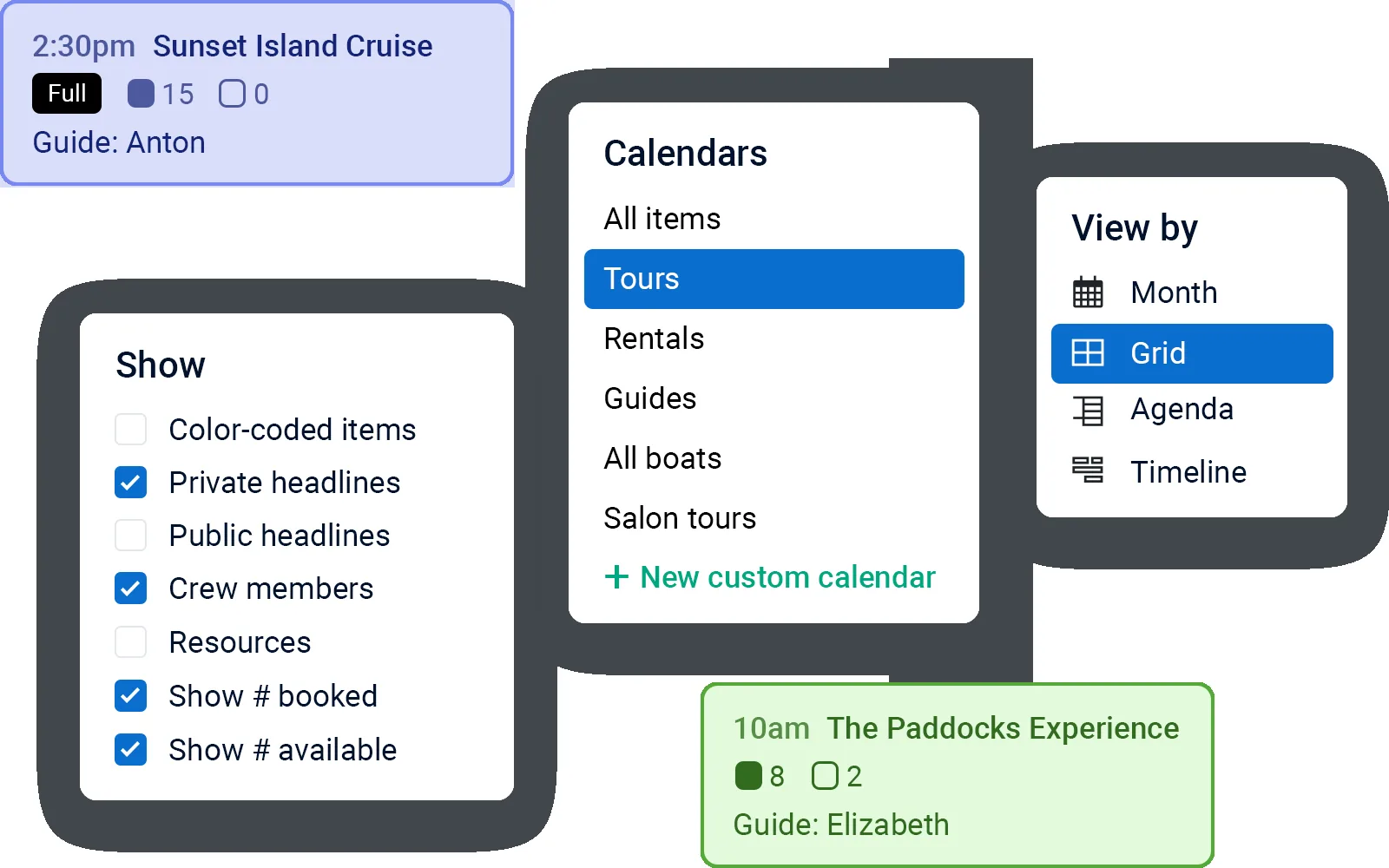
Each tour or activity has availabilities with a start time and a capacity, an online cut-off and a minimum party size, on a calendar you can view by item, guide or resource.26Customer types and prices
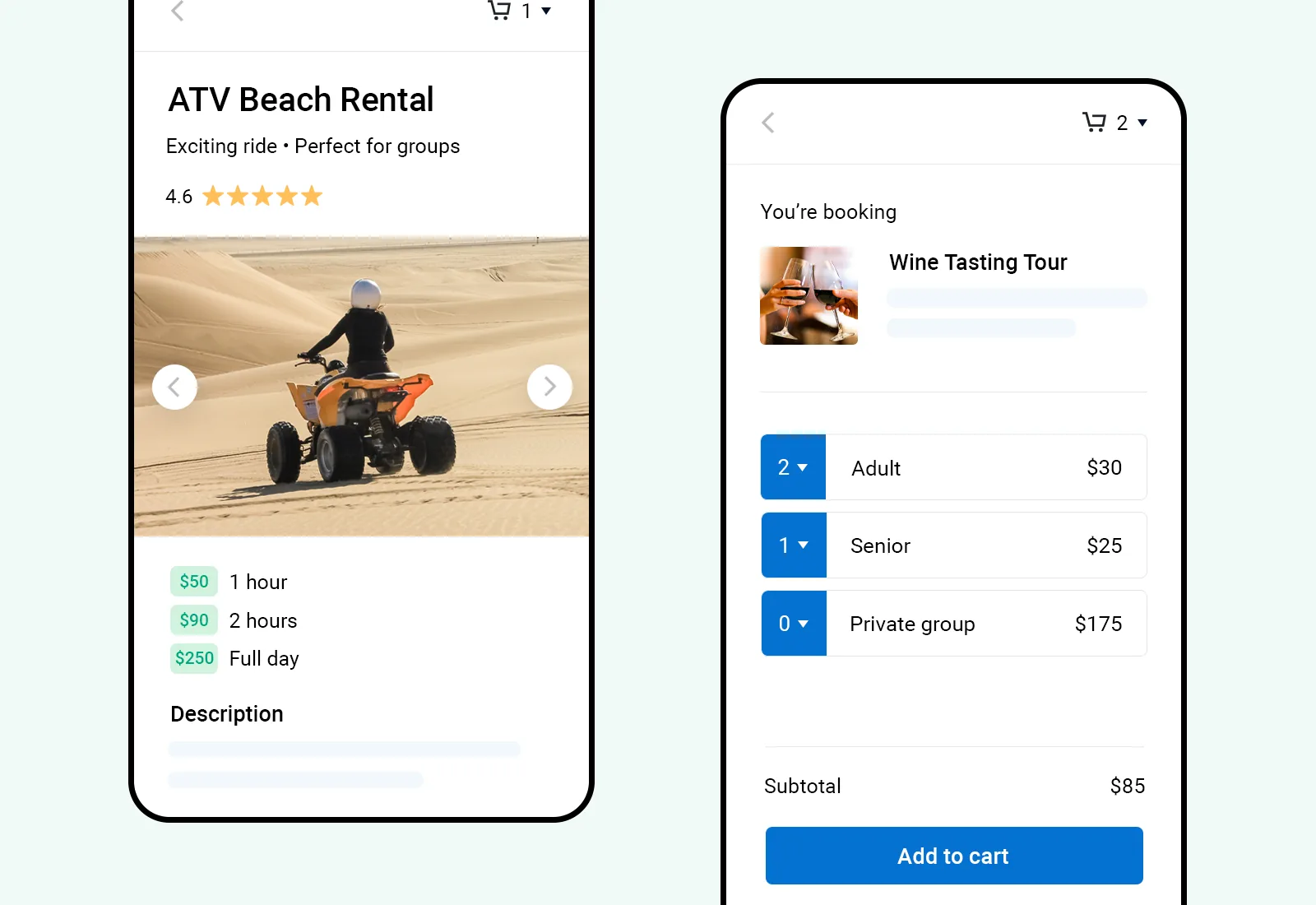
Adults, children, seniors, locals or a private group, each priced, with price schedules that change with the spots left or how far ahead guests book.31Crew and resources
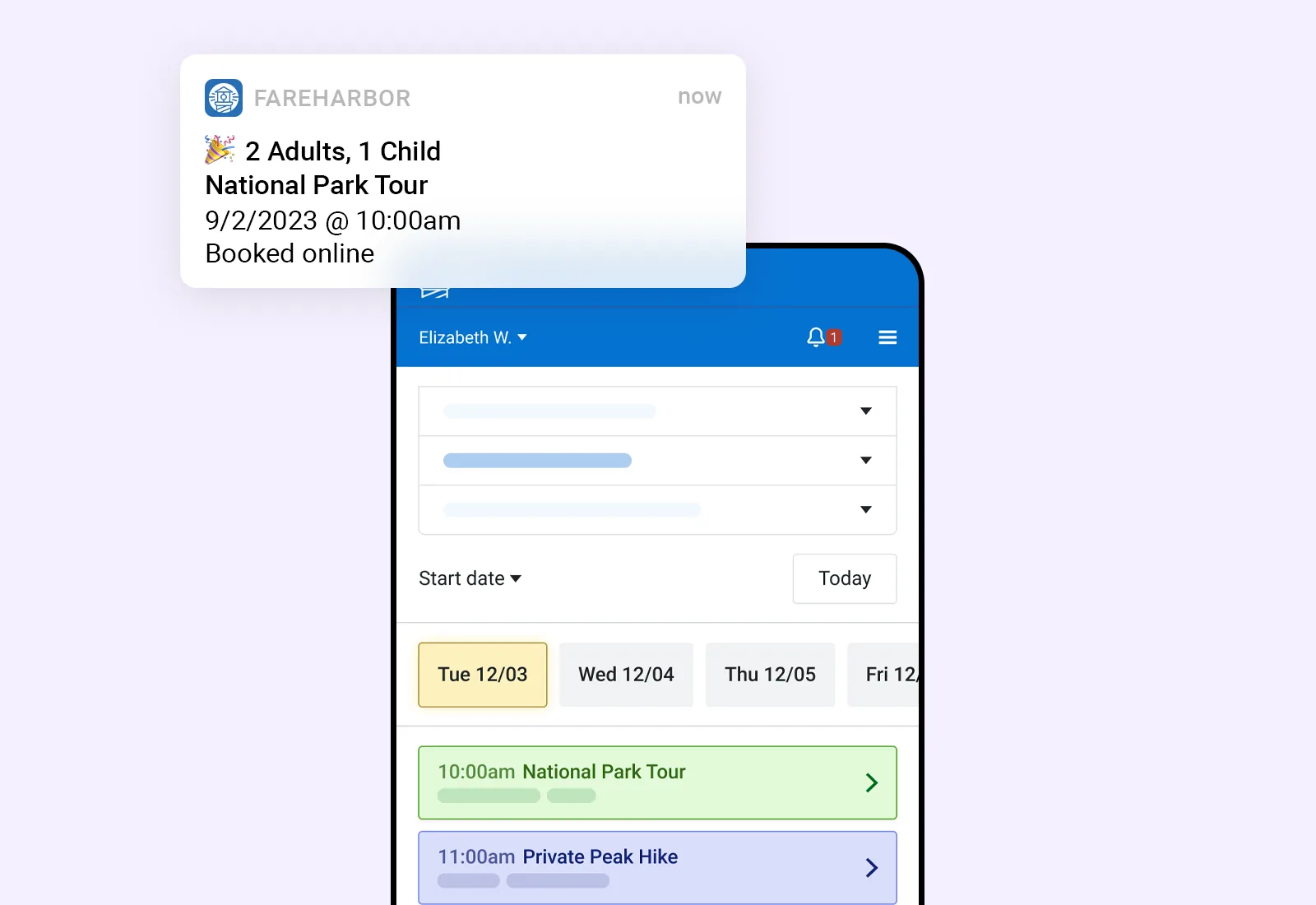
Guides, drivers, boats and vehicles assigned to availabilities; crew get email or app alerts and a manifest link the day before.40Manifest and check-in
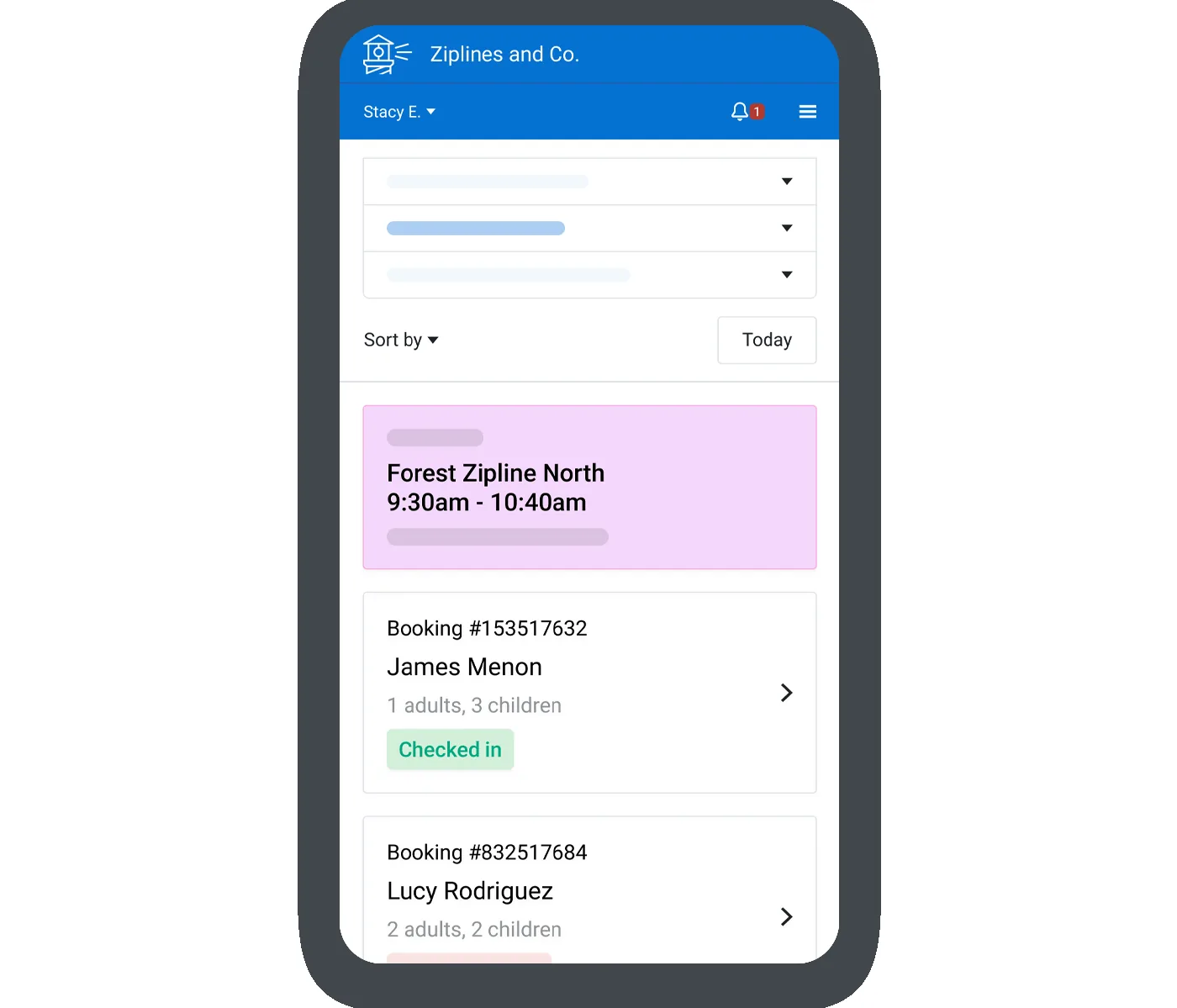
A manifest for the day with pickups and guest notes, and check-in by QR code in its app, also offline, with walk-ups added to the same list.9Waivers
Free waivers signed online by every participant, with guardians signing for minors and the status on the manifest; in select regions.36Selling
A booking flow that fits onto your website, in 23 languages, with combos, packages, upgrades, promo codes, memberships and a waitlist.16Distribution
Over 250 OTAs and travel platforms by API, 500+ affiliates in its own network, and Google Things to do.21Walk-ups and private events
FareHarbor Dock for walk-up sales in kiosk or staff mode, and private events with contracts, proposals and payment schedules.18Reports and payments
Financial, operational and customer reports, payments through FareHarbor with next-day payouts, and QuickBooks Online or Xero.12What it looks like
How it is priced
Standard terms
FreeNo monthly or upfront fee. Guests pay FareHarbor’s booking fee, shown at checkout before they book. A 6% booking fee is added to direct bookings for businesses below its yearly volume of online direct bookings. You pay a card processing fee, a 2% fee on OTA bookings by API, and fees for FHDN affiliate bookings, Dock staff mode, private events and FareHarbor Sites.1FareHarbor has no pricing page: guests pay its booking fee at checkout, and its terms list the fees it may charge operators. On request, FareHarbor can instead charge you a monthly commission on delivered bookings, at a percentage it gives you separately, with no booking fee for guests.5
The alternative
Sales Igniter: tours and rentals inside a store you own
Sales Igniter is not a hosted service. It is a booking engine that installs into an online store, as a WooCommerce plugin for WordPress, a Magento 2 extension, or an app for Shopify.50 Tours and activities are part of the WooCommerce plugin from Regular: departures with seats, guest types, pickups, a manifest with QR check-in, and guides and boats on a schedule board. The Shopify app has them too, coming soon. Tours are not part of the Magento 2 extension.
On WooCommerce and Magento you buy it once, get the complete source code and run it on your own hosting, with unlimited staff logins, products, customers and orders and no per-booking commission.50 On Shopify it is an app billed monthly or yearly through Shopify, coming soon.52 On every platform the booking is part of your own store: your domain, your theme and your own payment gateway.

WooCommerce plugin
Available- RegularThe booking engine, Bundles & Composites, Delivery Cost by Distance$199
$349Promotion · With code 150regular · No end date stated - ProAdds deposits, contracts, subscriptions, custom fields and free install$299
$499Promotion · With code 200pro · No end date stated - UltimateAdds Multi Location Inventory, Quote, Maintenance & Inspections, Smart Routing, Live Chat$499
$799Promotion · With code 300multi · No end date stated
Magento 2 extension
Available- RegularThe booking engine for Magento 2$399
$499Promotion · With code 100hyva · No end date stated - ProAdds contract signing, maintenance, order extensions, damage waiver and deposits$699
$899Promotion · With code 200hyva · No end date stated - UltimateAdds Multi Source Inventory and Request for Quote$1,099
$1,399Promotion · With code 300hyva · No end date stated
Shopify app
Coming soonOur prices and promotions are read live from our store. Promotions show their code and end date, and drop off when they end.
What it does
Departures and seats
Tours as products with their own departures, start times and prices, seats left on the calendar, and online sales that stop before the start. On WooCommerce, and built for the Shopify app, coming soon; not part of the Magento 2 extension.Guests and group prices
Adults, children, infants, seniors, students or your own types, each priced, with group prices by party size and private bookings.Manifest, QR tickets and check-in
A manifest for each departure with pickups and guest names, QR tickets in the order emails, and check-in by guest or by booking.Guides, boats and schedules
Staff and resources with skills on each product, sales that stop when none is free, and a drag-and-drop schedule board.Waivers and extras, from Pro
Each guest signs the waiver and the manifest shows who has signed; extras such as lunch can be priced per guest.Open code with an API
On WooCommerce and Magento 2: the complete source code, an API that includes departures, and your data in your own database.Screen by screen
The same job in each system
Choose a job, and the platform for our side. FareHarbor images are its own marketing images; ours come from stores with sample data.
Departures & seats
Each tour has availabilities with a start time and a capacity. Calendar views by item, guide or resource show the spots booked and left, and the guide on each one.
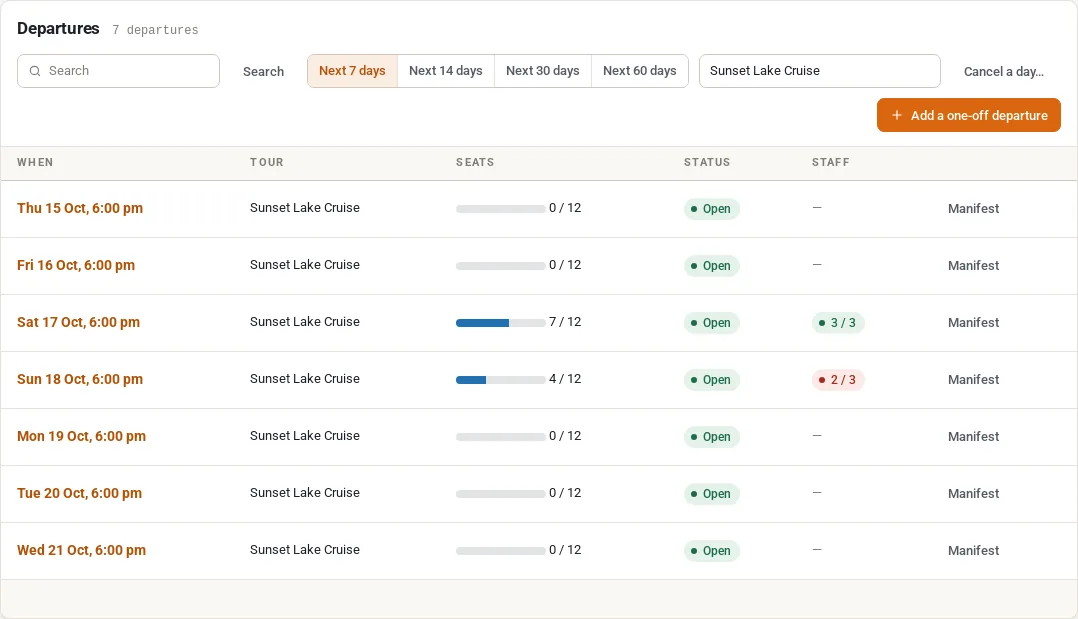
Rentals › Departures lists every departure with its seats booked, status, staff and a link to its manifest, with buttons to add a one-off departure or cancel a day.
Tours are not part of the Magento 2 extension; Magento tracks staff and resources on bookings.
The same departures, seats and manifests are built for the Shopify app, which is coming soon.
The difference: Both sell set start times with a seat limit. FareHarbor runs them in its hosted Dashboard; Sales Igniter runs them in your own WooCommerce store, where the seats left show on the product page.
Online booking
Guests pick a time and customer types such as adult, senior or a private group in a booking flow that opens over your website, then pay through FareHarbor, with its booking fee shown at checkout.
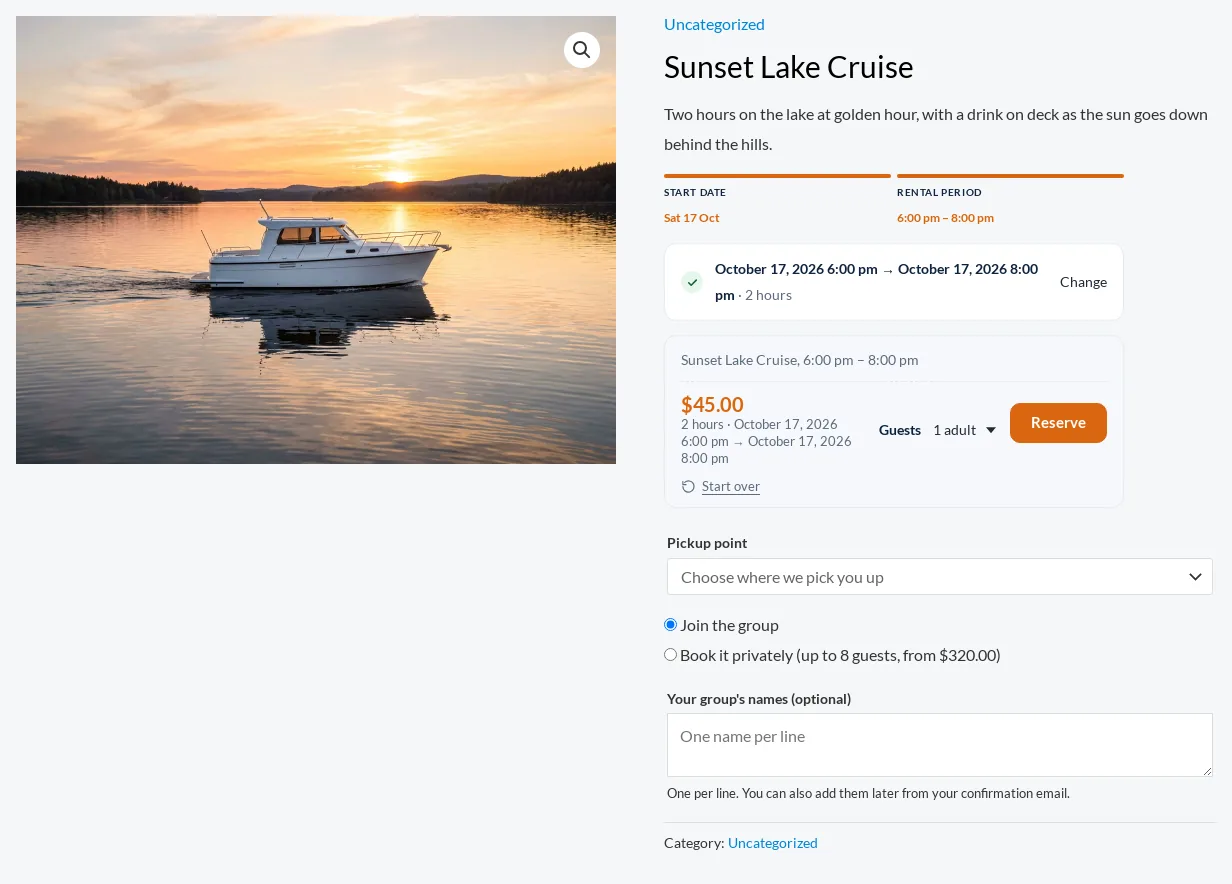
The tour’s product page shows each departure with the seats left; guests choose adults, children or a private booking, a pickup point and their names, and pay at your own WooCommerce checkout.
Tours are not part of the Magento 2 extension.
Departures, guest types and pickups on the product page, paid at the Shopify checkout; the app is coming soon.
The difference: FareHarbor’s checkout adds its booking fee for the guest and takes payment through FareHarbor. Sales Igniter’s booking is part of your store’s own checkout and payment gateways, with no per-booking commission.
Manifest & check-in
A manifest for the day with pickups, waivers and guest notes. Staff check guests in on the web or in the app, by QR code, even without a connection.
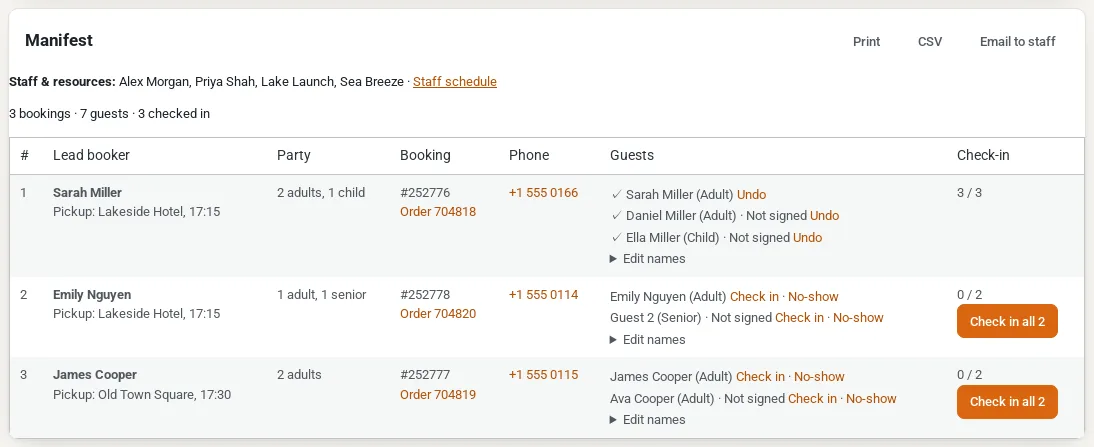
Each departure’s manifest lists the guests with their pickup, waiver and check-in. Staff check in per guest or per booking, scan QR tickets, print it, download a CSV or email it to staff.
Tours are not part of the Magento 2 extension.
The same manifest and QR check-in, with walk-up sales in Shopify POS; the app is coming soon.
The difference: Both check guests in from a manifest with QR codes. FareHarbor adds a native app that also checks in offline; Sales Igniter’s manifest runs in the browser on any phone, inside your own store.
Guides & staff
Users are added as crew on each availability, with a role. They get email or app alerts when they are assigned, for new and cancelled bookings, and a manifest link the day before.
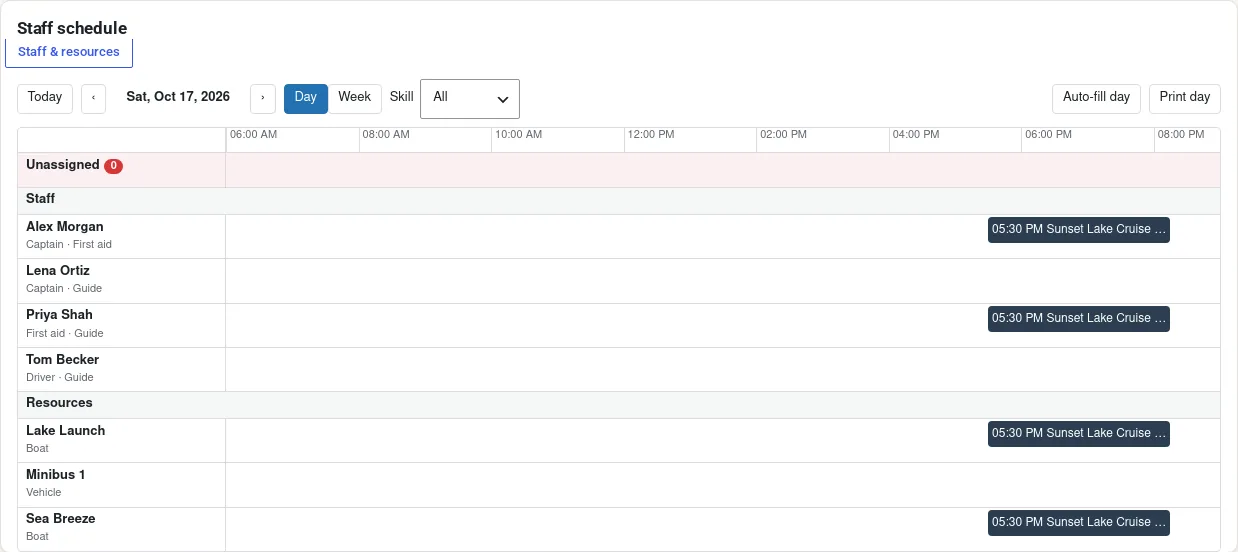
Guides, captains and boats with skills on each product; sales stop when no qualified one is free. A drag-and-drop schedule board, and a “My schedule” page for each staff member.
Staff and resources with skills, assigned to bookings.
Staff and resources with skills, a schedule board, and an email or text for each new job; the app is coming soon.
The difference: FareHarbor alerts crew by email and push notification. Sales Igniter on WooCommerce can stop sales when no qualified guide or boat is free, and staff check their own schedule in the browser; job emails and texts are in the Shopify app.
What it costs
What you will have paid, year by year
FareHarbor charges no monthly fee, so its line has nothing to add up. The booking fee your guests pay, and the fees FareHarbor charges you, depend on your sales and are not in the totals.5 Sales Igniter shows the price with the current promotion and the regular price; renewing updates each year is optional. Prices checked 17 October 2026.
After 5 years, with 6 staff logins
Excludes payment-gateway fees and tax. Sales Igniter on WooCommerce and Magento excludes web hosting, typically $10–$40 a month. Promotions change the first payment only. FareHarbor’s booking fees and commissions depend on your sales, so they are not in the totals. Prices checked 17 October 2026.
Full comparison
48 features in 10 groups
FareHarbor facts come only from its own pages and help centre; where they say nothing we mark “not stated”. Switch the Sales Igniter column between WooCommerce, Magento 2 and Shopify; the tours rows are on WooCommerce today.
Booking & availability
| Feature | FareHarbor | Sales Igniter WooCommerceMagento 2Shopify |
|---|---|---|
| Availability calendar | ✓Bookings calendar with views by item, staff, inventory and capacity | ✓RegularUnits going out and coming back each day✓RegularUnits going out and coming back each day✓Units going out and coming back each day |
| Conflict-free reservations | ✓Capacity rules across all channels, so no overbooking | ✓RegularStock checked for every date of the rental✓RegularStock checked for every date of the rental✓Stock counted for every date of the rental |
| Hourly bookings and time slots | ✓Timed availabilities, plus all-day and day-range ones | ✓RegularSlots grouped into morning, afternoon and evening✓RegularSlots grouped into morning, afternoon and evening✓Start times grouped into morning, afternoon, evening |
| Calendar sync (Google, Apple, Outlook, Airbnb) | An ICS feed out to phone calendars and Google Calendar | ✓RegularICS feed, and iCal import that blocks booked dates✓RegularICS feed, and iCal import that blocks booked dates✓ICS feed, and iCal import that blocks booked dates |
| Staff and resources (guides, rooms, equipment) | ✓Resources for guides, vehicles, boats, equipment and rooms | ✓RegularStaff and resources with skills; sales can stop when none is free✓RegularStaff and resources with skills, assigned to bookings✓Staff and resources with skills; sales can stop when none is free |
Tours & activities
| Feature | FareHarbor | Sales Igniter WooCommerceMagento 2Shopify |
|---|---|---|
| Scheduled departures with start times | ✓Availabilities with a start time, or all-day and day-range ones | ✓RegularDepartures with their own dates, start times and prices–Tours are not part of the Magento 2 extension✓Departures with their own dates, start times and prices |
| Seats per departure, with seats left | ✓Capacity per availability, with the spots left | ✓RegularSeats per departure; “N seats left” on the calendar–Tours are not part of the Magento 2 extension✓Seats per departure; “N seats left” on the calendar |
| Online cut-off before a departure | ✓Online booking closes hours before, set apart for empty and booked ones | ✓RegularOnline sales stop hours before; then “Call us to book”–Tours are not part of the Magento 2 extension✓Online sales stop hours before; then “Call us to book” |
| Minimum guests to run a departure | A minimum party size for the first booking on an empty availability | ✓RegularDecide-by time: run it, cancel and refund, or offer another date–Tours are not part of the Magento 2 extension✓Decide-by time: run it, cancel and refund, or offer another date |
| Cancel or move a departure, with guests told | Cancelling stops sales; its bookings stay until rebooked or cancelled | ✓RegularNew time or cancel; guests emailed, refunded or offered another date–Tours are not part of the Magento 2 extension✓New time or cancel; guests emailed, refunded or offered another date |
| Private bookings and group prices | ✓Exclusive customer types for private bookings, such as a charter | ✓RegularGroup prices by party size and “Book it privately”–Tours are not part of the Magento 2 extension✓Group prices by party size and “Book it privately” |
| Each guest’s name and details | ✓Custom fields for each customer, shown by name on the manifest | RegularEach guest’s name; other questions are asked per booking–Tours are not part of the Magento 2 extension✓Each guest’s name; questions for each guest on Pro |
| Extras priced per guest | ✓Priced custom fields on each customer type | ✓ProExtras priced per guest, such as lunch for each guest–Tours are not part of the Magento 2 extension✓ProExtras priced per guest, such as lunch for each guest |
| Waiver signed by each guest | ✓Free waivers for every participant, guardians for minors; in select regions | ✓ProEach guest signs, a guardian for a minor; the manifest shows who signed–Tours are not part of the Magento 2 extension✓ProEach guest signs; the manifest shows who has signed |
| Pickup points and routes | ✓Pickup routes of stops, with a transportation view of the manifest | ✓RegularPickup points with a time; the manifest sorted by pickup time–Tours are not part of the Magento 2 extension✓Pickup points with a time; the manifest sorted by pickup time |
| Manifest for each departure | ✓Check in, print or download a CSV; a manifest link emailed to crew | ✓RegularCheck guests in, print it, download a CSV or email it to staff–Tours are not part of the Magento 2 extension✓Check guests in, print it, download a CSV or email it to staff |
| QR tickets scanned at check-in | ✓QR codes scanned in its app, also offline | ✓RegularQR ticket in the emails and the account; staff scan it on a phone–Tours are not part of the Magento 2 extension✓QR ticket in the emails and the account; staff scan it on a phone |
| Guests move their own booking | ✓Online rebooking to another date or activity, for card-paid bookings | ✓RegularTo another departure of the same tour, up to a cut-off–Tours are not part of the Magento 2 extension✓To another departure of the same tour, up to a cut-off |
| Staff schedule and job alerts | ✓Crew per availability; email or app alerts and a manifest link | RegularSchedule board and “My schedule”; no email or text per job–Staff on bookings; no schedule board✓Schedule board, “My schedule”, and an email or text per job |
| Walk-up sales at the desk (point of sale) | ✓FareHarbor Dock: kiosk and staff modes, card readers and receipts | RegularStaff book in the admin, also after online sales close; no POS–Tours are not part of the Magento 2 extension✓Departures, check-in and walk-up sales in Shopify POS |
| Assigned seats (seat maps) | ✓Seat layouts; guests pick seats or seats are auto-assigned | –Not built in–Not built in–Not built in |
| OTAs, resellers and affiliates | ✓250+ OTAs by API (2% fee on those bookings) and 500+ FHDN affiliates | –Not built in; departures carry event markup for search engines–Not built in–Not built in; departures carry event markup for search engines |
Inventory, serials & maintenance
| Feature | FareHarbor | Sales Igniter WooCommerceMagento 2Shopify |
|---|---|---|
| Bundles and kits | ✓Combos and packages: several experiences or retail items in one checkout | ✓RegularBundles & Composites included✓RegularMagento bundle and configurable products as rentals✓Rental kits, offered only when every item is free |
Check-out & check-in
| Feature | FareHarbor | Sales Igniter WooCommerceMagento 2Shopify |
|---|---|---|
| Native mobile app | ✓Its app: walk-up bookings, payments, QR scanning, offline check-in | –Runs in the browser; no native app–Runs in the browser; no native appCounter work in the Shopify POS app; no app of ours |
Pricing & payments
| Feature | FareHarbor | Sales Igniter WooCommerceMagento 2Shopify |
|---|---|---|
| Seasonal and rule-based pricing | ✓Price schedules with rules by spots left, guests booked or booking time | ✓RegularPrices for set dates, length-based adjustments✓RegularSeasonal and special-date prices, length-based rules✓Seasonal rules by date, and length-based rules |
| Coupons | ✓Campaigns with promo codes | ✓RegularStore coupons and discount codes✓RegularCoupons and discount codes work on rentals✓Shopify discount codes work on rentals |
| Pay part now, the balance later | ✓Deposits by amount or percentage, switched on by FareHarbor | ✓RegularBooking deposits, balances and payment links✓RegularDeposit to reserve; balance by link, card or at pick-up✓Pay part at checkout, the rest before the rental |
| Per-person and guest-type pricing | ✓Customer types such as adult, child, senior or local, each priced | ✓RegularAdults, children, infants and your own types, each priced–Not built in✓Adults, children, infants and your own types, each priced |
Deposits, contracts & waivers
| Feature | FareHarbor | Sales Igniter WooCommerceMagento 2Shopify |
|---|---|---|
| Contracts and e-signatures | ✓Contracts and proposals for private events; waivers signed online | ✓ProPDF contract signed online, with an audit trail✓ProPDF contract signed online, with an audit trail✓ProRental Contracts app: signed PDF and audit trail |
| Customer ID verification | –No files on bookings, IDs included, per its help centre | ✓ProID upload with an approval queue–Not built in✓ProID upload with a review queue (Custom Fields app) |
| Custom fields | ✓Custom fields per booking or per customer, priced or free | ✓ProProduct, checkout and account fields, priced tooRegularPriced product options; no custom field builder✓ProCustom Fields app: product page, cart and checkout |
Online store
| Feature | FareHarbor | Sales Igniter WooCommerceMagento 2Shopify |
|---|---|---|
| Customer-facing online store | ✓A booking flow and checkout that fit onto any website | ✓RegularYour own WooCommerce store✓RegularYour own Magento store✓Your own Shopify store |
| Add to an existing website | ✓Book buttons, calendars and grids, with a WordPress plugin | ✓RegularIt is part of your WordPress siteRegularPart of a Magento store; other sites link to it✓An app inside your Shopify store |
| Storefront SEO | SEO support with FareHarbor Sites, its hosted websites | ✓RegularMeta tags and sitemaps on your domain✓RegularMagento SEO and sitemaps on your domainShopify's own SEO; event markup for tour departures |
Reports
| Feature | FareHarbor | Sales Igniter WooCommerceMagento 2Shopify |
|---|---|---|
| Operations dashboard | ✓Dashboard with the schedule, the manifest and custom calendars | ✓RegularGoing out, due back, overdue and revenue✓RegularGoing out, due back, overdue and revenue✓Going out, due back, overdue, revenue, next 7 days |
| Utilisation | ✓Reports on capacity and best sellers | ✓RegularUtilisation, turns and revenue per product and serial✓RegularUtilisation per product and per unit, idle units too✓Utilisation, turns and revenue per product and serial |
| Custom reports | ✓Financial, operational and customer reports you can tailor | RegularSet reports with CSV export; no report builderRegularSet reports with CSV export; no report builderSet reports with CSV export; no report builder |
Integrations & API
| Feature | FareHarbor | Sales Igniter WooCommerceMagento 2Shopify |
|---|---|---|
| Accounting sync | ✓QuickBooks Online and Xero | –Not built in–Not built in–Not built in |
| Payment gateways | ✓Payments through FareHarbor’s processors: Stripe, PayPal or Adyen | ✓RegularAny WooCommerce gateway: Stripe, PayPal and more✓RegularAny Magento payment method: Stripe, PayPal and more✓Shopify checkout, with your payment settings |
| API | An API key for Zapier; its booking API serves distribution partners | ✓RegularREST API for the whole rental lifecycle✓RegularGraphQL API on Magento's own endpoint✓REST and GraphQL API, with API keys |
| Import and export | CSV downloads of reports and the manifest | ✓RegularCSV import and export of products✓RegularCSV import and export of products and rental settings✓CSV import and export of rental settings |
Hosting, ownership & cost
| Feature | FareHarbor | Sales Igniter WooCommerceMagento 2Shopify |
|---|---|---|
| Pricing model | No subscription; guests pay a booking fee at checkout | ✓One-time licence; yearly renewal optional✓One-time licence; yearly renewal optionalMonthly or yearly app plans, with a free plan |
| Staff logins | ?Users in permission groups; no limit or price stated | ✓Unlimited admin accounts✓Unlimited admin users; no per-user fee✓Your Shopify staff accounts; no seat fee |
| Hosting | ✓Hosted by FareHarbor | Any web host, or ours; free installation with ProAny web host, or ours; free installation with Pro✓Hosted for you; nothing to run |
| Source code | –No copy; its terms forbid reverse engineering | ✓100% open source✓Full source code with your licence–Hosted app; source code not shared |
| Where your data lives | FareHarbor’s servers; reports and the manifest download as CSV | ✓Your own database✓Your own Magento databaseOrders in Shopify; rental data in our hosted app |
| If you stop paying | No subscription; either side can end the terms on 15 days’ notice | ✓Keeps working; renewal adds support and updates✓Keeps working; renewal adds support and updatesDrops to the Free plan and its order limit |
| Support | ✓Phone or email around the clock, and a help centre | ✓A year of support and updates; renewal optional✓A year of support and updates; renewal optional✓Help and support from inside the app |
In each price
What each includes
From FareHarbor’s own pages and terms, and our pricing page, checked 17 October 2026.
FareHarbor
Hosted by FareHarbor, with no monthly fee; guests pay its booking fee.1- Standard terms, free: no monthly or upfront fee. Guests pay FareHarbor’s booking fee, shown at checkout before they book. A 6% booking fee is added to direct bookings for businesses below its yearly volume of online direct bookings. You pay a card processing fee, a 2% fee on OTA bookings by API, and fees for FHDN affiliate bookings, Dock staff mode, private events and FareHarbor Sites.
- On request, a monthly commission on delivered bookings instead of the booking fee
- Free waivers for every participant, in select regions
- Support: phone or email around the clock
Sales Igniter
Runs in your own WooCommerce, Magento 2 or Shopify store.50- WooCommerce Regular: departures, seats, guest types, pickups, the manifest, QR tickets, guides and resources
- WooCommerce Pro adds a waiver signed by each guest, extras priced per guest, deposits and custom fields
- WooCommerce and Magento 2: unlimited staff logins, products, customers and orders, and no per-booking commission
- Your own checkout and payment gateways, on your own domain
- WooCommerce and Magento 2: the full source code, your own database, a year of updates
- Magento 2: rentals, staff and resources; tours are not part of the extension
- Shopify: billed monthly or yearly through Shopify
Switching
From FareHarbor to tours on your own site
- Book something in the demoA real store with real stock: dates, availability, deposits and contracts, end to end. Open the free live demo
- Choose your platformTours run on WooCommerce today; the Shopify app has them too and is coming soon. Compare the platforms
- Export from FareHarborFareHarbor downloads its reports and the manifest as CSV files; keep a copy of upcoming bookings and customers.47
- Set up your toursCreate each tour as a product with its departures, guest types and pickup points, then book a test departure. Talk to us about your tours

Frequently asked questions
Does Sales Igniter take a fee on each booking?
No. On WooCommerce and Magento 2 you buy a licence once, with no per-booking commission, and renewing support and updates each year is optional.50 FareHarbor has no monthly fee; your guests pay its booking fee at checkout,2 and businesses below its yearly volume of online direct bookings have a 6% booking fee added to direct bookings.3
Can I still sell through OTAs and resellers?
Not through a built-in connection: Sales Igniter has no OTA or channel connections, though each departure carries event markup that search engines can read. FareHarbor connects to over 250 OTAs and travel platforms by API and to 500+ affiliates in its own network,21 with a 2% fee on bookings that arrive by API in most markets.4
Do my guides need an app?
No. On WooCommerce each staff member opens My schedule in a phone browser to see their departures, the manifest and the ticket scanner; there is no native app. FareHarbor has an app for iOS and Android that also checks guests in offline.14
Can every guest sign a waiver?
Yes, from Pro on WooCommerce: each guest signs from a link, a parent or guardian signs for a minor, and the manifest shows who has signed. FareHarbor Waivers are free, shared with every participant on a booking and offered in select regions.36
Can I run rentals and tours in the same store?
Yes. The same plugin rents boats, bikes and gear by the hour or the day, and a boat or other resource can also be rented on its own, so it is busy for the tours that need it. FareHarbor also takes rentals, as items with their own availabilities and resources.41
Is there a Shopify or Magento 2 version?
The Shopify app has the same tours features and is coming soon. Tours are not part of the Magento 2 extension, which covers rentals and tracks staff and resources on bookings.
Sources
- What to Look For in Your Next Booking System (FareHarbor blog) · fareharbor.com/blog/what-to-look-for-in-your-next-booking-system
FareHarbor’s pricing model in its own words: a booking fee passed to the customer at checkout, “a free booking software, omitting any monthly payment plans or upfront costs”. Checked 17 October 2026. - Who pays the FareHarbor booking fee? (FareHarbor blog) · fareharbor.com/blog/who-pays-the-fareharbor-booking-fee
The customer pays the booking fee, shown at checkout before the booking is confirmed; some operators include it in their prices; booking fees are generally non-refundable. Checked 17 October 2026. - October 2024 booking fee adjustment (FareHarbor Help Center) · help.fareharbor.com/hc/en-us/articles/40897900687771-October-2024-booking-fee-adjustment
A 6% booking fee added to all direct bookings (online, Dashboard, Dock staff mode, payment links) for businesses live 12 months or more that processed under 35,000 US dollars of online direct bookings in the previous 12 months; OTA and affiliate bookings excluded; reviewed each 1 October. Checked 17 October 2026. - API Fee & Invoice Process (FareHarbor Help Center) · help.fareharbor.com/hc/en-us/articles/42957604700827-API-Fee-Invoice-Process
A 2% API fee on eligible bookings that arrive from OTAs and other partners by API (not in Guam or French Polynesia); without it, OTA bookings arrive by email and are entered by hand. Checked 17 October 2026. - Terms of Service for Providers (fareharbor.com) · fareharbor.com/legal/tos-providers
Booking fees charged to guests; a processing fee charged to the operator; fees FareHarbor may charge for API bookings, private events, Dock staff mode, FHDN bookings, hosted sites and marketing; the commission model as an alternative; hosted service; no reverse engineering; either side may end the terms on 15 days’ written notice. Checked 17 October 2026. - Terms of Service for Customers (fareharbor.com) · fareharbor.com/legal/tos-customers
Guests pay the booking fee, whose amount is shown in the booking funnel; it is kept on partial refunds. Checked 17 October 2026. - FareHarbor home page · fareharbor.com
Booking software for tours, activities, rentals and attractions; FareHarbor builds your Dashboard and transfers your future reservations; 24/7 support by phone or email. Checked 17 October 2026. - About FareHarbor · fareharbor.com/about
Founded in Hawaii in 2013, 23,000+ companies, part of Booking Holdings since 2018. Checked 17 October 2026. - Tour booking software (FareHarbor) · fareharbor.com/solutions/tour-booking-software
The tour operator’s day: distribution to OTAs, crew assignment, capacity across channels, the manifest, QR check-in with offline mode and walk-ups, reports and follow-up emails. Checked 17 October 2026. - Dashboard (FareHarbor) · fareharbor.com/manage/dashboard
The booking calendar with custom views of staff and activity schedules, inventory and capacity, and the mobile-optimised manifest. Checked 17 October 2026. - Inventory management (FareHarbor) · fareharbor.com/manage/inventory-management
Shared inventory and resources across offerings, seat layouts with customer seat selection, ticket types and capacity rules. Checked 17 October 2026. - Reporting (FareHarbor) · fareharbor.com/manage/reporting
Customisable financial, operational (capacity, best sellers) and customer reports. Checked 17 October 2026. - Staff management (FareHarbor) · fareharbor.com/manage/staff-management
Roles, shift notifications by email and push, and permission levels for users. Checked 17 October 2026. - Mobile app (FareHarbor) · fareharbor.com/manage/mobile-app
The Dashboard on phones and tablets: walk-up bookings, in-person payments, QR code scanning and offline check-in. Checked 17 October 2026. - Online booking (FareHarbor) · fareharbor.com/sell/online-booking
A booking flow that integrates onto any website, Google Pay, Apple Pay and PayPal, upgrades, combos and packages, and marketing tracking. Checked 17 October 2026. - Customer experience (FareHarbor) · fareharbor.com/sell/customer-experience
A booking flow in 23 languages, free FareHarbor Waivers in select regions, automated emails and texts, memberships, self-service rebooking and cancelling, and a waitlist. Checked 17 October 2026. - Payments (FareHarbor) · fareharbor.com/sell/payments
Card, wallet and local payment methods, Afterpay in some regions, payment reports and next-day payouts. Checked 17 October 2026. - FareHarbor Dock · fareharbor.com/sell/fareharbor-dock
Point of sale for walk-ups: Kiosk mode and Staff mode, card readers and printed receipts. Checked 17 October 2026. - Private Events (FareHarbor) · fareharbor.com/sell/private-events
Contracts and proposals, payment schedules and reminders, resource reservation and ledger reporting for private events. Checked 17 October 2026. - FareHarbor Sites · fareharbor.com/sell/fareharbor-sites
Websites built and hosted by FareHarbor on WordPress VIP, with SEO support, quarterly reports and up to 3 languages. Checked 17 October 2026. - Affiliate & API partners (FareHarbor) · fareharbor.com/scale/affiliate-api-partners
Over 250 OTAs and travel platforms by API, 500+ affiliates in the FareHarbor Distribution Network, and affiliate tools. Checked 17 October 2026. - Software partners (FareHarbor) · fareharbor.com/scale/software-partners
Integrations including QuickBooks Online, Xero, Square, waiver and email marketing partners. Checked 17 October 2026. - Support (FareHarbor) · fareharbor.com/support
Phone or email support around the clock, a support form and the Help Center. Checked 17 October 2026. - Can I use FareHarbor on my WordPress site? (FareHarbor blog) · fareharbor.com/blog/can-i-use-fareharbor-on-my-wordpress-site
A WordPress plugin for book buttons, availability calendars and activity grids; the booking window opens over your page. Checked 17 October 2026. - Does FareHarbor offer payment processing? (FareHarbor blog) · fareharbor.com/blog/does-fareharbor-offer-payment-processing
Built-in payment processing through Stripe, PayPal or Adyen, plus cash, cheque and custom payment types. Checked 17 October 2026. - Availability basics (FareHarbor Help Center) · help.fareharbor.com/hc/en-us/articles/40897138198811-Availability-basics
An availability is a date and time an item can be booked, or an all-day or day-range availability. Checked 17 October 2026. - Availabilities and capacity (FareHarbor Help Center) · help.fareharbor.com/hc/en-us/articles/40897166960923-Availabilities-and-capacity
Capacity per availability and how resources count toward the spots left. Checked 17 October 2026. - How do I change online booking cutoff times? (FareHarbor Help Center) · help.fareharbor.com/hc/en-us/articles/40897924991771-How-do-I-change-online-booking-cutoff-times
Auto-close online bookings a set number of hours before the start, with separate settings for availabilities with and without bookings. Checked 17 October 2026. - Changing an availability’s booking restrictions (FareHarbor Help Center) · help.fareharbor.com/hc/en-us/articles/40897202052635-Changing-an-availability-s-booking-restrictions
Booking restrictions per availability, such as the closing time and the minimum party size required when there are no bookings. Checked 17 October 2026. - Canceling availabilities (FareHarbor Help Center) · help.fareharbor.com/hc/en-us/articles/40897123112859-Canceling-availabilities
Cancelling an availability stops new bookings but does not cancel its bookings; the operator contacts the guests to rebook or cancel. Checked 17 October 2026. - Customer types overview (FareHarbor Help Center) · help.fareharbor.com/hc/en-us/articles/40897443464603-Customer-types-overview
Customer types such as adults, children, local, senior or student rates, each with its price on an item. Checked 17 October 2026. - Exclusive customer types (FareHarbor Help Center) · help.fareharbor.com/hc/en-us/articles/40897442777627-Exclusive-customer-types
Exclusive customer types for private bookings such as a private charter: once booked, the availability takes only that type. Checked 17 October 2026. - Manifest overview (FareHarbor Help Center) · help.fareharbor.com/hc/en-us/articles/40897541945115-Manifest-overview
The daily manifest: check-in, pickup summaries, custom-field answers per customer, printing and CSV download. Checked 17 October 2026. - Total price display for online booking (FareHarbor Help Center) · help.fareharbor.com/hc/en-us/articles/55230875441563-Total-price-display-for-online-booking
Priced custom fields placed on individual customer types, and prices shown with fees and taxes included. Checked 17 October 2026. - Setting up custom fields (FareHarbor Help Center) · help.fareharbor.com/hc/en-us/articles/40897451668251-Setting-up-custom-fields
Custom fields on the booking form, priced or free, for the whole booking or each customer. Checked 17 October 2026. - FareHarbor Waivers (FareHarbor Help Center) · help.fareharbor.com/hc/en-us/articles/40897871757339-FareHarbor-Waivers
Waivers signed online, a booking link shared with every participant, guardians signing for minors, status on the manifest, no additional cost. Checked 17 October 2026. - Using the manifest to view pickup routes (FareHarbor Help Center) · help.fareharbor.com/hc/en-us/articles/40897710461851-Using-the-manifest-to-view-pickup-routes
Pickup routes for companies using transportation, shown and checked in from the manifest. Checked 17 October 2026. - Online rebooking (FareHarbor Help Center) · help.fareharbor.com/hc/en-us/articles/40897213805723-Online-rebooking
Customers rebook online to another date, time or activity; card-paid direct bookings only, within the cancellation policy. Checked 17 October 2026. - Adding and removing crew (FareHarbor Help Center) · help.fareharbor.com/hc/en-us/articles/40897187422235-Adding-and-removing-crew
Users assigned as crew to availabilities, with a role or note. Checked 17 October 2026. - Crew notifications (FareHarbor Help Center) · help.fareharbor.com/hc/en-us/articles/40897393741083-Crew-notifications
Email or app notifications to crew: assignment, reminder, new and cancelled bookings, and a manifest link 24 hours before. Checked 17 October 2026. - Introduction to resources (FareHarbor Help Center) · help.fareharbor.com/hc/en-us/articles/40897623777947-Introduction-to-resources
Resources for guides, crew, vehicles, boats, equipment, rooms and seats, assigned through resource requirements. Checked 17 October 2026. - Adding and editing users (FareHarbor Help Center) · help.fareharbor.com/hc/en-us/articles/40897695502363-Adding-and-editing-users
Users who log in to the Dashboard, each in a permission group. Checked 17 October 2026. - How do I add my FareHarbor calendar to my mobile device or computer? (FareHarbor Help Center) · help.fareharbor.com/hc/en-us/articles/40897927395227-How-do-I-add-my-FareHarbor-calendar-to-my-mobile-device-or-computer
An ICS subscription of availabilities and bookings for phone calendars and Google Calendar. Checked 17 October 2026. - Using price schedules with dynamic rules (FareHarbor Help Center) · help.fareharbor.com/hc/en-us/articles/40897564606875-Using-price-schedules-with-dynamic-rules
Price schedules with rules by customers booked, space left or how far ahead the booking is made. Checked 17 October 2026. - Creating campaigns and promo codes (FareHarbor Help Center) · help.fareharbor.com/hc/en-us/articles/40897288495515-Creating-campaigns-and-promo-codes
Campaigns with promo codes for discounts. Checked 17 October 2026. - Deposits (FareHarbor Help Center) · help.fareharbor.com/hc/en-us/articles/40898010428315-Deposits
Deposits as an amount or a percentage, the balance later; enabled by FareHarbor support. Checked 17 October 2026. - How do I download a manifest or report? (FareHarbor Help Center) · help.fareharbor.com/hc/en-us/articles/40897898334619-How-do-I-download-a-manifest-or-report
CSV downloads of most reports and the manifest. Checked 17 October 2026. - Can files be uploaded to customer bookings? (FareHarbor Help Center) · help.fareharbor.com/hc/en-us/articles/40897899237915-Can-files-be-uploaded-to-customer-bookings
No documents or attachments on bookings, IDs included. Checked 17 October 2026. - Introduction to the Zapier integration (FareHarbor Help Center) · help.fareharbor.com/hc/en-us/articles/40898281485339-Introduction-to-the-Zapier-integration
Booking data sent to Zapier with an API key generated in FareHarbor. Checked 17 October 2026. - Sales Igniter for WooCommerce · rentalbookingsoftware.com/woocommerce-bookings
WooCommerce plans, prices and promotion codes, and the full feature list. Prices read live from our store. - Sales Igniter for Magento 2 · rentalbookingsoftware.com/magento-2-rental-booking-module
Magento 2 plans, prices and promotion codes, and the feature list. Prices read live from our store. - Rentals & Bookings for Shopify · rentalbookingsoftware.com/shopify-rental-booking-app
The Shopify app, billed monthly or yearly through Shopify. - Sales Igniter screenshots · rentalbookingsoftware.com/rental-software-screenshots
Screenshots from stores with sample data, for WooCommerce, Magento 2 and Shopify.
Compare other platforms: Peek Pro · Xola · WooCommerce Bookings · YITH Booking · Tyche Booking & Appointment · RnB · Checkfront · All comparisons
See it before you switch from FareHarbor
The free live demo is a real store with real stock: pick your dates and watch the availability calendar, deposits and contracts work end to end.