
Alternatives / Tyche Booking & Appointment
Tyche Booking & Appointment alternative
Tyche Booking & Appointment or Sales Igniter: two booking plugins for WooCommerce
Tyche Softwares’ Booking & Appointment Plugin for WooCommerce books appointments, rentals, stays and tours, and is sold as a yearly licence. Sales Igniter is a rental plugin for WooCommerce, Magento 2 and Shopify, with serial numbers, send and return, deposits and contracts. Here is what each one does, screen by screen, and what each costs.
The competitor
What Tyche Booking & Appointment is, and who it is for
The Booking & Appointment Plugin for WooCommerce is made by Tyche Softwares, who sell several WooCommerce plugins.1 It makes WooCommerce products bookable, including variable, grouped, bundled and subscription products, with six booking types from single days and multiple nights to fixed time slots and hours by duration.1
It is built around a maximum number of bookings per date, weekday or time slot.6 Person types, shared resources such as staff or rooms, special and seasonal prices, deposits and two-way Google Calendar sync are built in,10 and since version 9.1.0 its former add-ons, including the Rental System that blocks days around multiple-night bookings, come with every licence.5
It is a yearly licence: $199 a year for one site on Starter, with Business for five sites and Enterprise for ten, and the same features in each.1 Updates need an active licence and support runs for a year from purchase;2 without an active licence the plugin keeps working, without updates.3
What it does
Six booking types
Single days, multiple nights, fixed time slots, hours by duration, several dates, and several dates at a fixed time, with ready-made templates.1Persons and person types
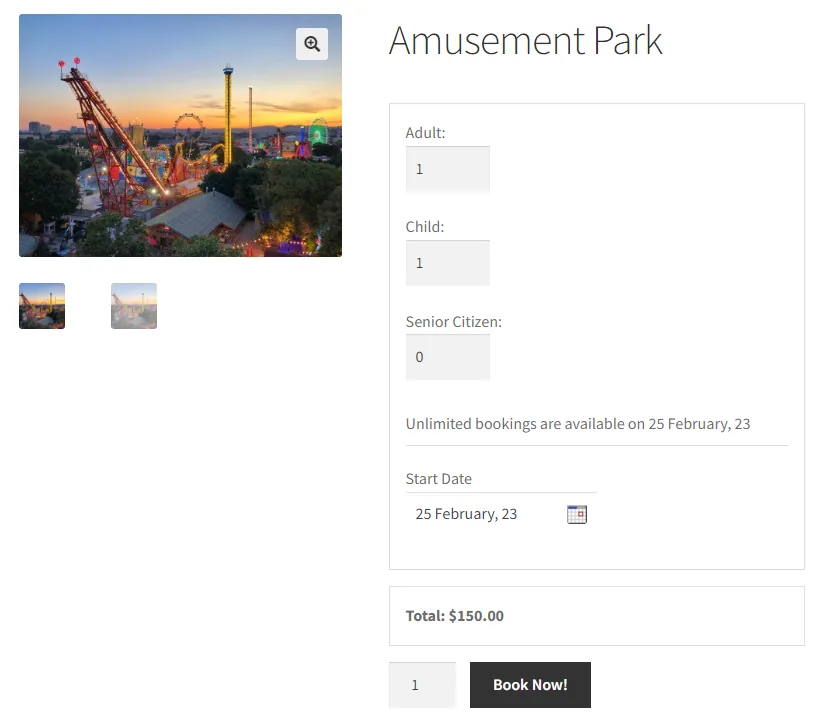
Adults, children or your own types, each with a price, minimum and maximum persons, and each person counted as a booking when places are limited.11Shared resources
Staff, rooms or equipment shared across products, each with a quantity and its own availability, chosen by the customer or assigned.10Special and seasonal prices
Prices for weekdays and dates, prices by range of nights, fixed multi-day blocks and named seasons.14Deposits and approval
A part paid at booking or a security deposit, and bookings you approve before the customer pays.15Rent, sell or both
The built-in Rental System lets a product be rented, sold or both, with days blocked around multiple-night bookings.8Calendars and time zones
Two-way Google Calendar sync, store-wide or per product, and time slots shown in the customer’s own time zone.1Reminders, tickets and changes
Email and SMS reminders, printable tickets, and customers who reschedule or cancel from their account.20API, webhooks and AI
A REST API, webhooks, Zapier and an optional MCP connection for AI assistants, plus a tool to move bookings from WooCommerce Bookings.26What it looks like
How it is priced
Starter
$199/year1 site licence; 1 year of updates and support; 30-day money-back guarantee1Business
$299/year5 site licences; 1 year of updates and support; priority support; the same features as Starter1Enterprise
$399/year10 site licences; 1 year of updates and support; priority support; the same features as Starter1Billed yearly.1 All three plans have the same features since version 9.1.0; they differ in the number of sites and priority support.5
The alternative
Sales Igniter: a rental plugin for WooCommerce, Magento 2 and Shopify
Sales Igniter is also a plugin that runs inside your own WooCommerce store, so with either one the booking form sits on your product pages and the orders go through your own checkout. The difference is what each is built around: Sales Igniter tracks rental stock by quantity or by serial number, checks items out and back in, and adds deposits, contracts, maintenance and stock by location.34
On WooCommerce and Magento 2 you buy it once, get the complete source code and run it on your own hosting, with unlimited staff logins, products, customers and orders; renewing updates each year is optional.34 The same engine runs as a Magento 2 extension and as an app for Shopify, billed monthly or yearly through Shopify, coming soon.36

WooCommerce plugin
Available- RegularThe booking engine, Bundles & Composites, Delivery Cost by Distance$199
$349Promotion · With code 150regular · No end date stated - ProAdds deposits, contracts, subscriptions, custom fields and free install$299
$499Promotion · With code 200pro · No end date stated - UltimateAdds Multi Location Inventory, Quote, Maintenance & Inspections, Smart Routing, Live Chat$499
$799Promotion · With code 300multi · No end date stated
Magento 2 extension
Available- RegularThe booking engine for Magento 2$399
$499Promotion · With code 100hyva · No end date stated - ProAdds contract signing, maintenance, order extensions, damage waiver and deposits$699
$899Promotion · With code 200hyva · No end date stated - UltimateAdds Multi Source Inventory and Request for Quote$1,099
$1,399Promotion · With code 300hyva · No end date stated
Shopify app
Coming soonOur prices and promotions are read live from our store. Promotions show their code and end date, and drop off when they end.
What it does
Booking calendar and rules
Dates, times or fixed departures on your product pages, with turnover time, holidays and minimum periods.Serials and the Send & Return desk
Quantity or serial tracking, barcode returns, pick lists, and readings and photos at send and return.Pricing, deposits and balances
Hour to year rates, seasonal prices, pay part now and the balance later, with payment links.Contracts, deposits and waivers
Signed PDF contracts, refundable security deposits and damage waivers, from Pro up.Guests, staff and departures
On WooCommerce: guest types with their own prices, staff and resources that can stop sales when none is free, and tour departures with manifests.Locations, quotes and maintenance
Stock by location, request a quote and maintenance tickets with service schedules. The comparison below shows which licence or plan has each.Open code with an API
On WooCommerce and Magento 2: the complete source code, an API for the rental lifecycle, and your data in your own database.Screen by screen
The same job in each plugin
Choose a job, and the platform for our side. Tyche images are from its page on tychesoftwares.com and its documentation; ours come from stores with sample data.
Availability & calendar
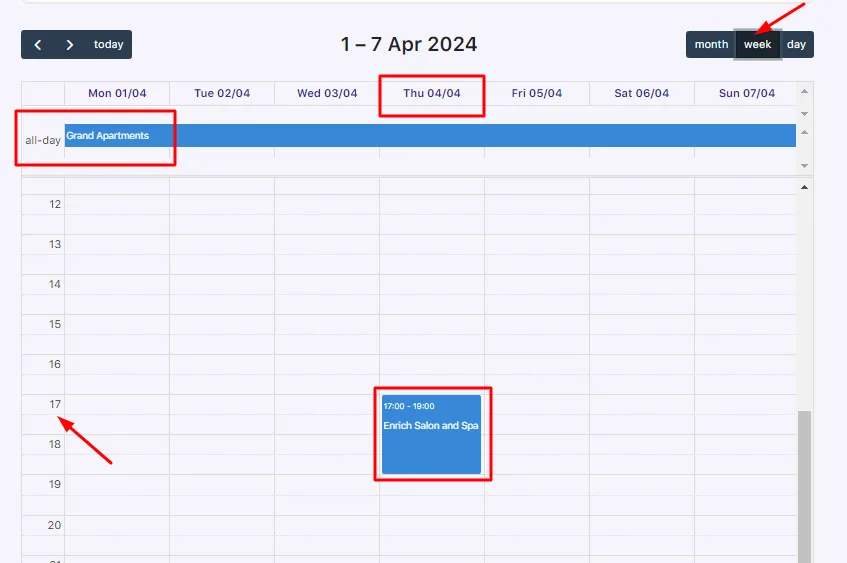
An admin calendar of bookings by month, week or day, filtered by product. A maximum number of bookings per date, weekday, time slot, variation or attribute value closes dates once they are full.
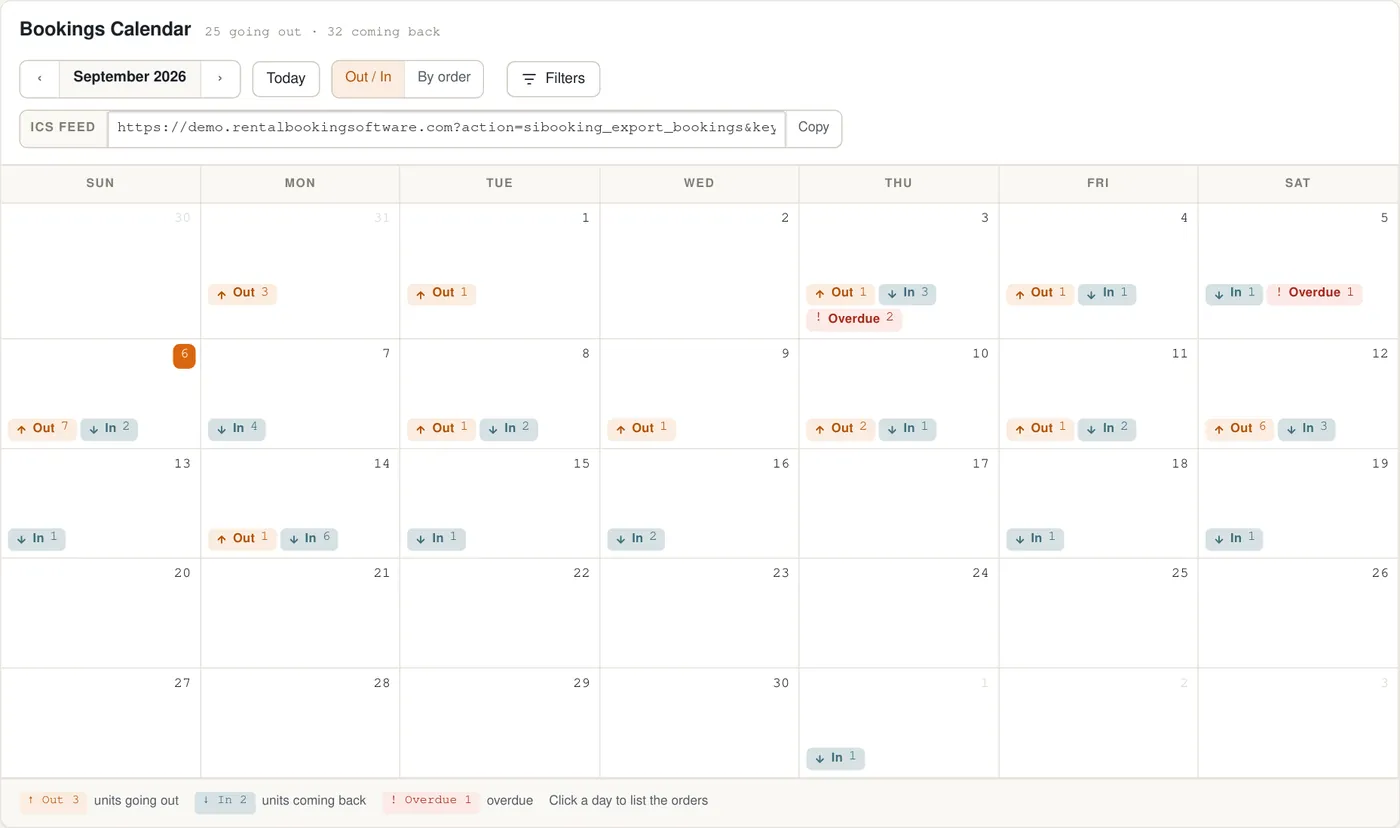
A month view of units going out and coming back, a dashboard for today, and an ICS feed for your own calendar.
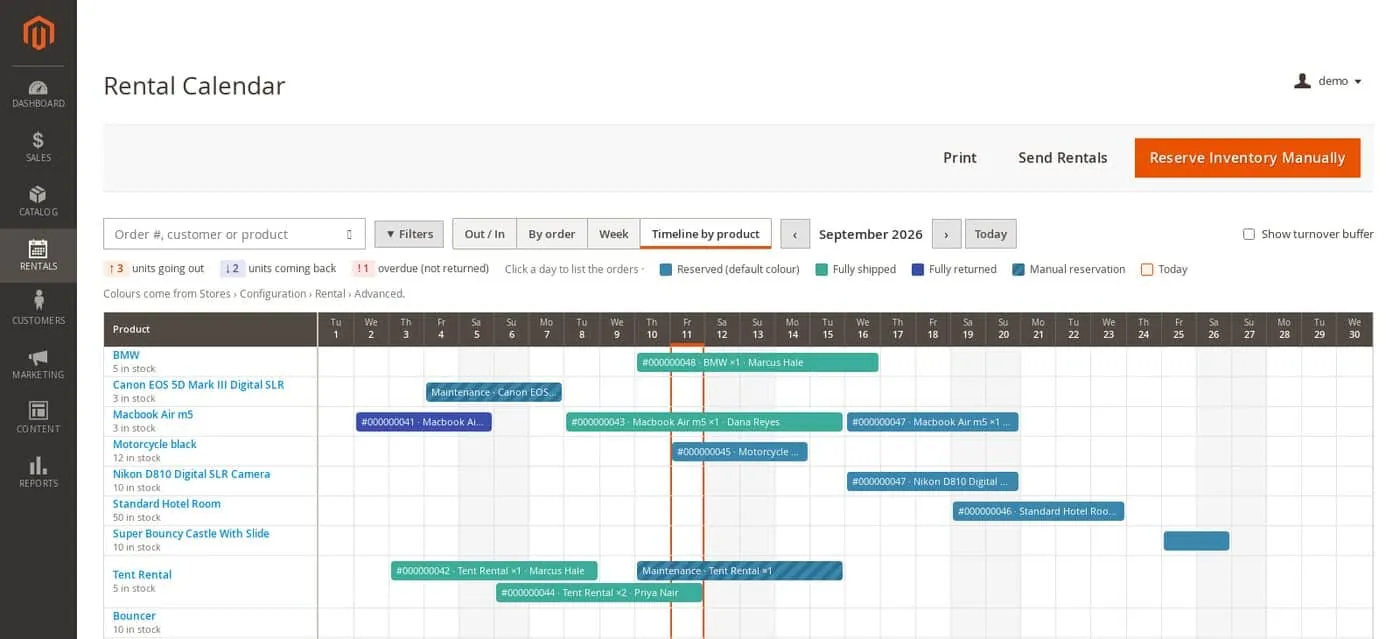
A rental calendar by product or by order, with units going out and coming back and maintenance blocks.
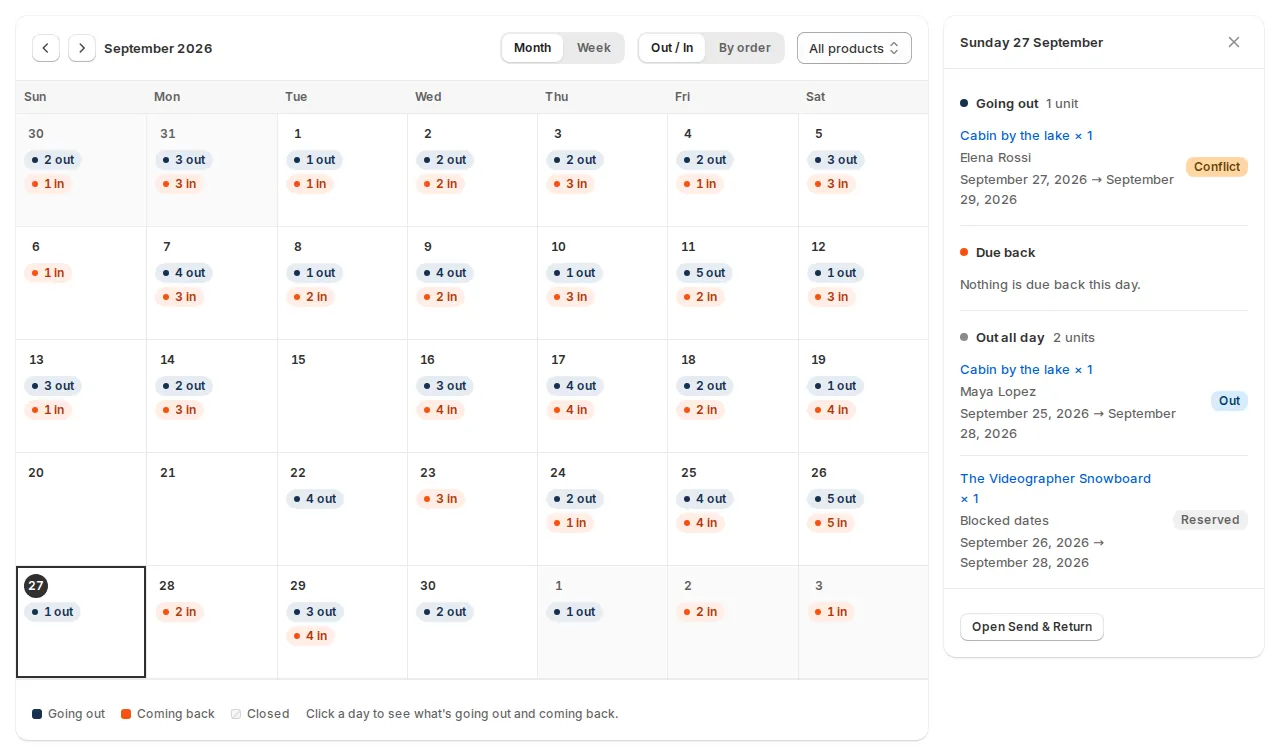
A month calendar of units going out and coming back, with each day’s bookings and conflicts in a side panel.
The difference: Both close dates once they are full. Tyche counts bookings against a limit per date or slot; Sales Igniter checks stock for every date of the rental, by quantity or by serial number.
Online booking
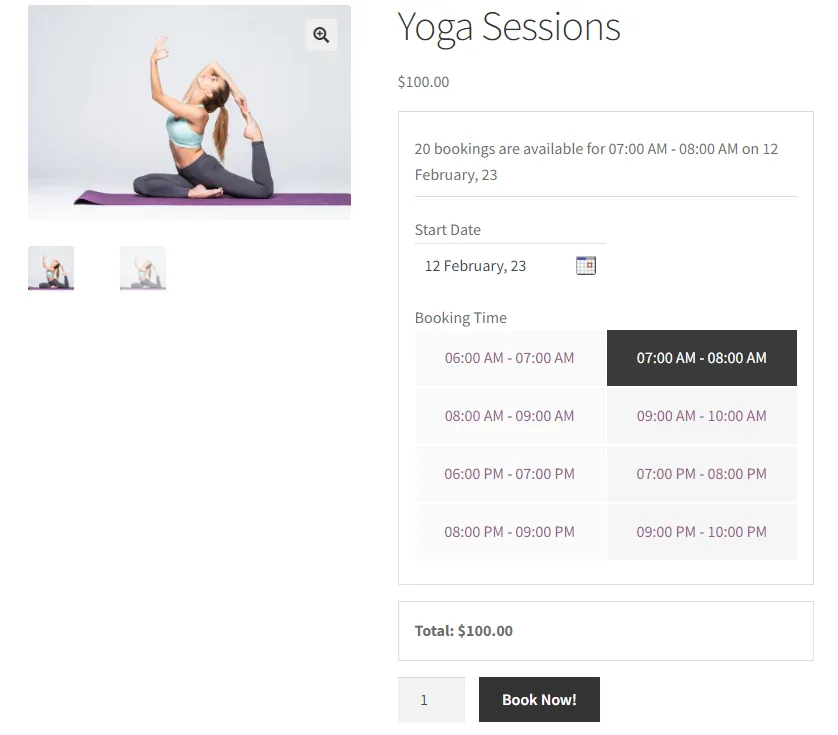
A booking form on your product pages with dates, time slots, persons and resources, the places left and the total, plus an availability search by date and category.
The booking form is part of your own product pages, on your domain and in your theme, in every licence.
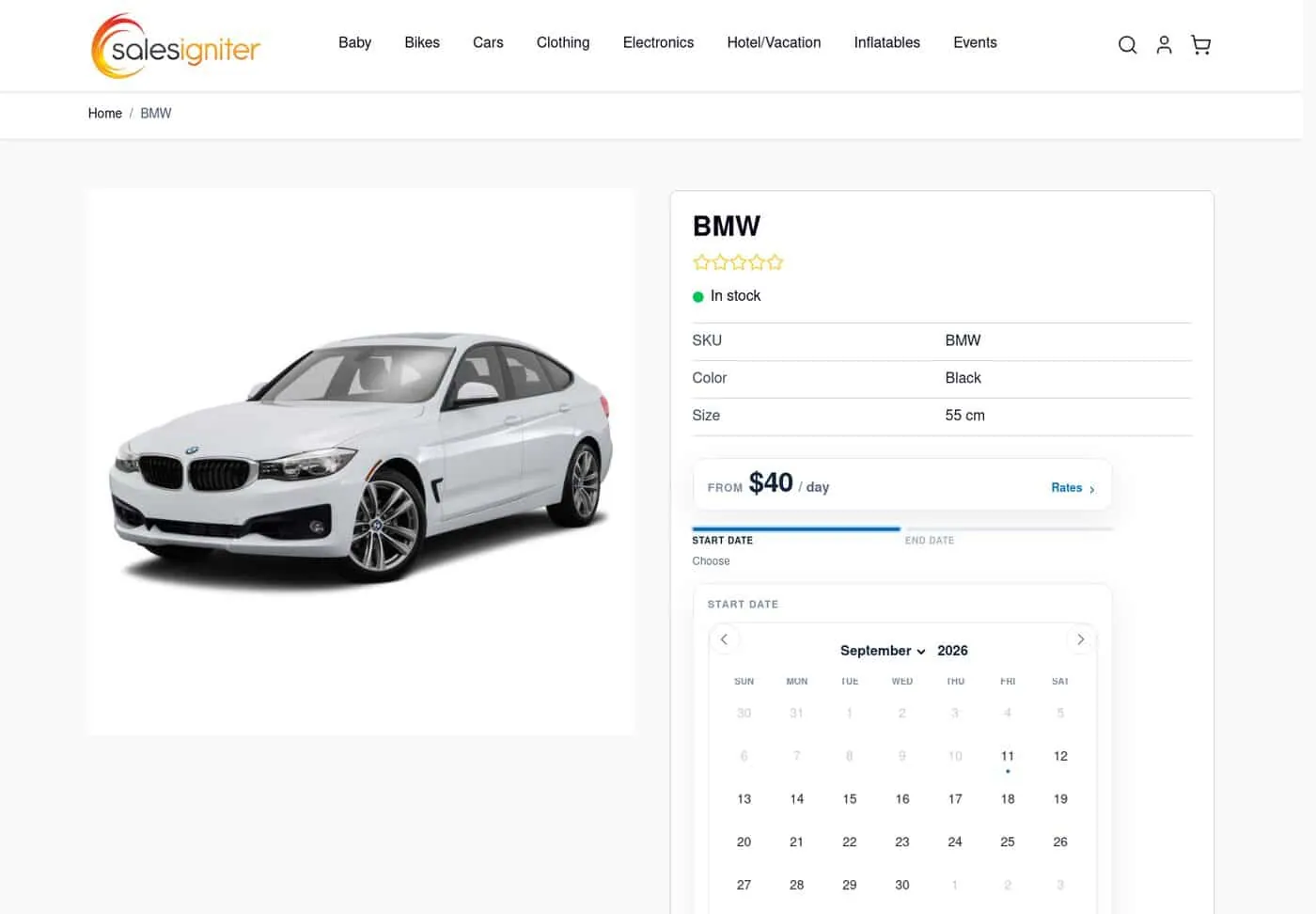
The rental calendar on your own Magento product pages, with rates, start and end dates.
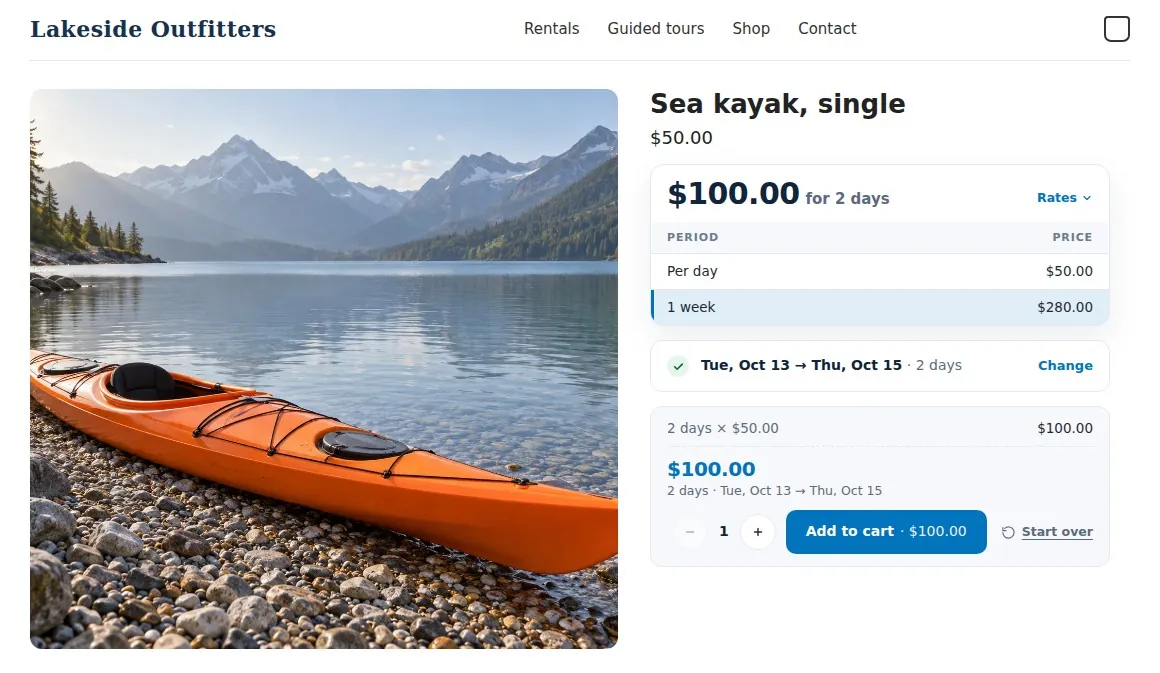
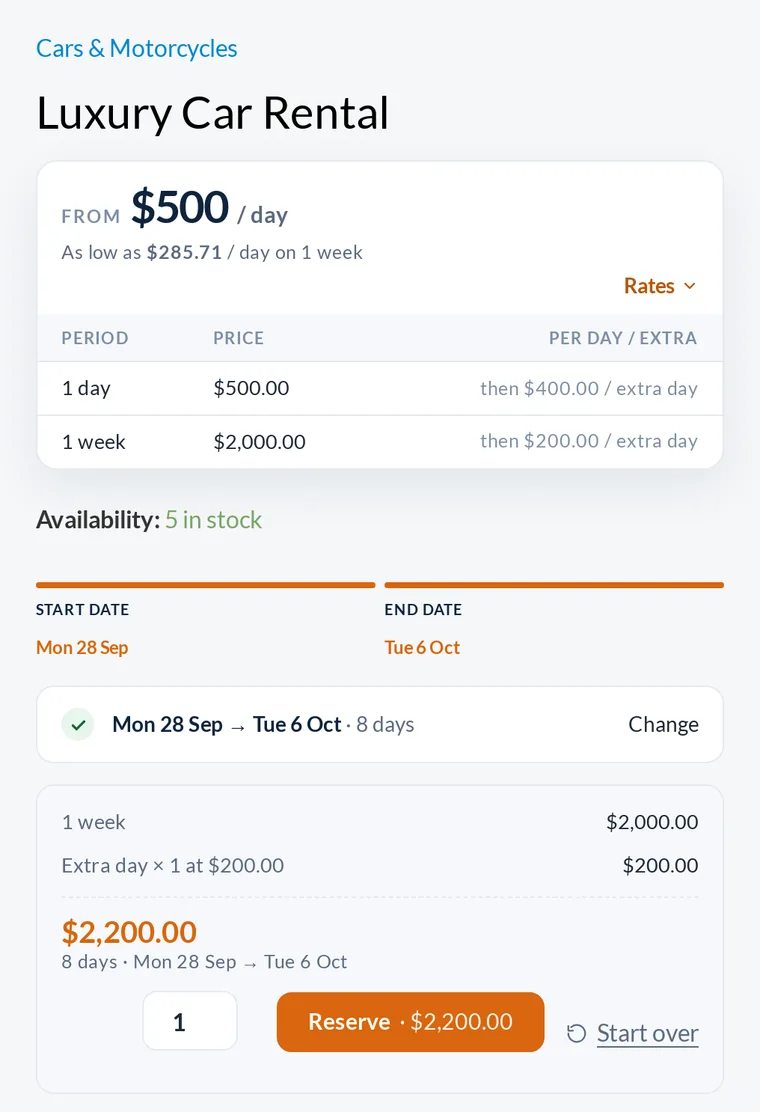
A rental card on your Shopify product pages, with rates by period, the chosen dates and the total.
The difference: Both put the booking form on your own WooCommerce product pages. Tyche adds six booking types and time slots in the customer’s time zone, built for appointments; Sales Igniter’s rental types cover dates, times and fixed departures, and the same engine runs on Magento 2 and Shopify.
Check-out & check-in
The bookings list has Today’s Check-ins and Today’s Check-outs filters. Recording what was handed over or returned is not described in its documentation.
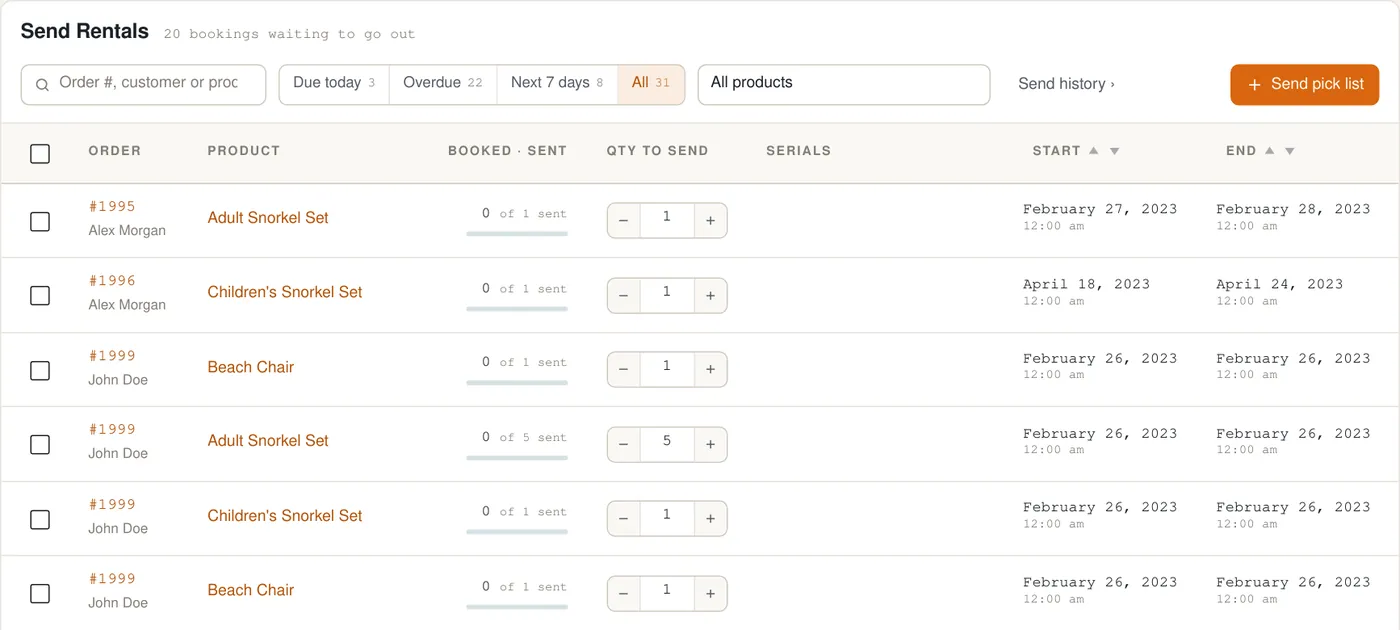
A Send & Return desk with Due today, Overdue and Next 7 days, serial pickers, barcode returns and pick lists.
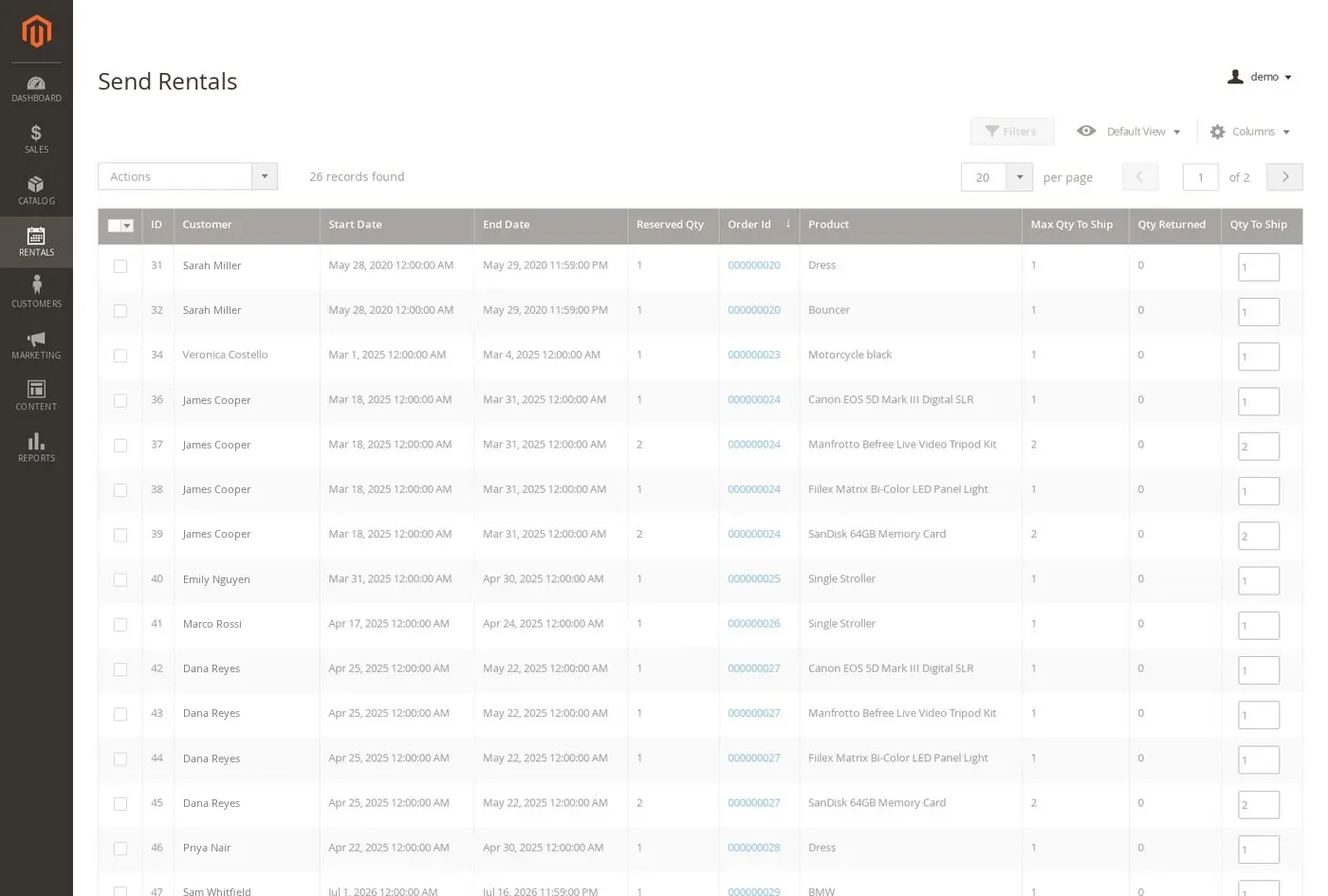
A Send Rentals grid with the dates, reserved quantity and quantity to ship for each order line.
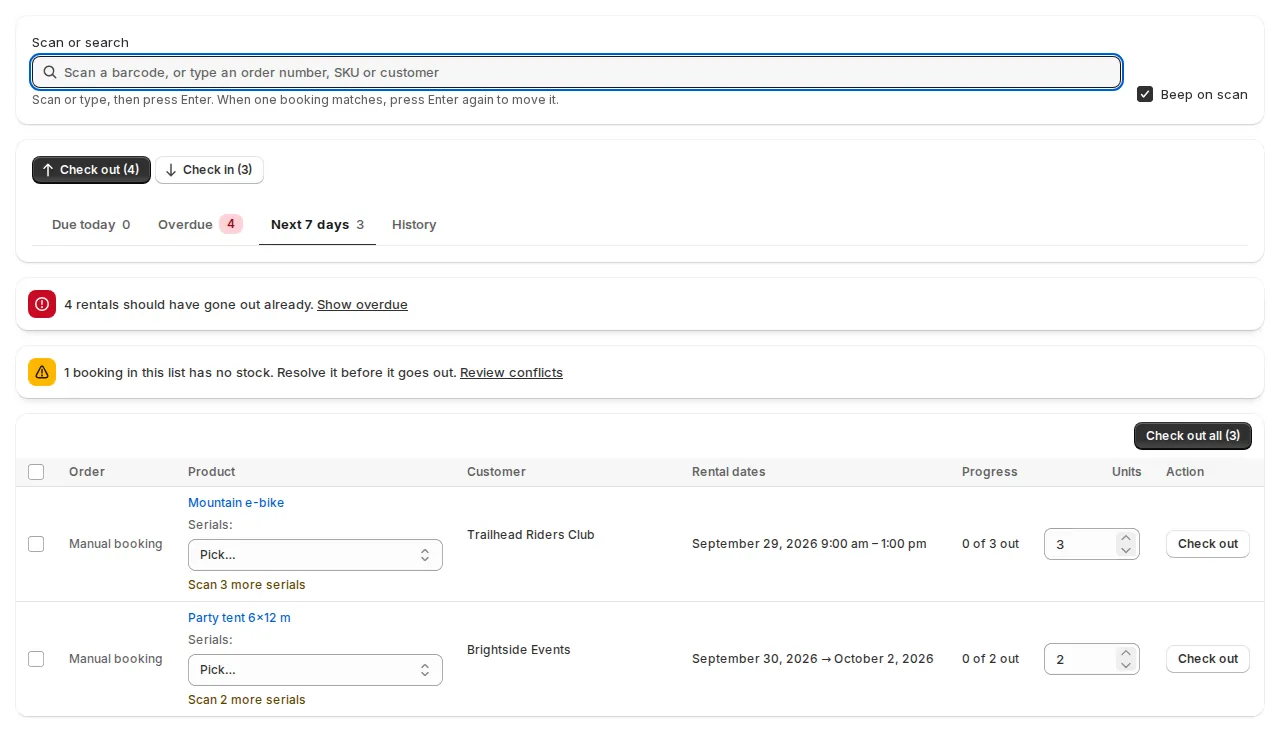
A Send & Return desk with a scan box, Due today, Overdue and Next 7 days, and serial pickers.
The difference: Tyche shows which bookings start or end today. Sales Igniter records what went out and when it came back, unit by unit, with serial numbers.
Maintenance
Its documentation does not describe maintenance or repairs. Dates can be blocked on a product or resource by hand.
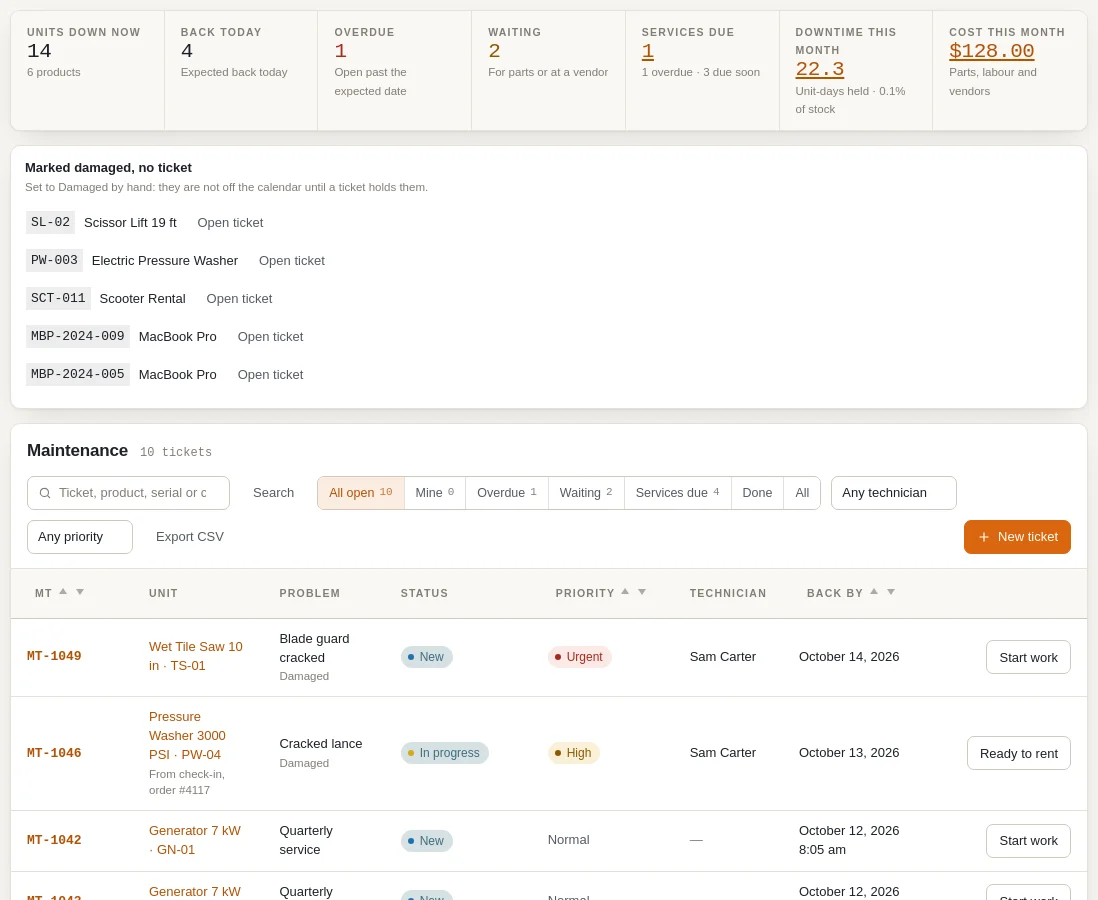
Maintenance & Inspections, in Ultimate: tickets with technicians and photos, service schedules by days, rentals or meter hours, and check-in that sends a unit to repair.
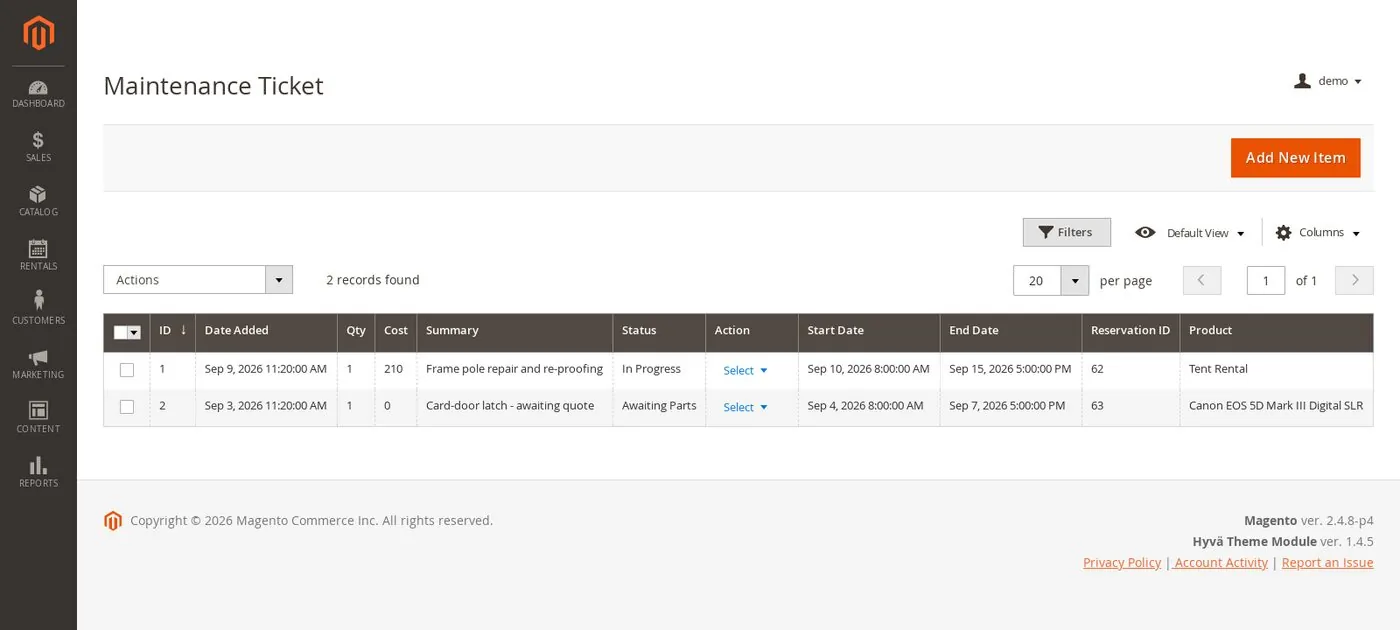
Maintenance tickets with the technician, repair cost and photos, service schedules, and check-in that sends a unit for service, in Pro.
Tickets with parts, labour, vendor work and costs, service schedules by days, rentals or meter hours, and check-in that sends a unit for service.
The difference: Sales Igniter has maintenance tickets, service schedules and repair at check-in on every platform. Tyche has no maintenance tools in its documentation.
Reports
A bookings list with filters by date, product, customer and status, CSV download and printing, and a calendar view.
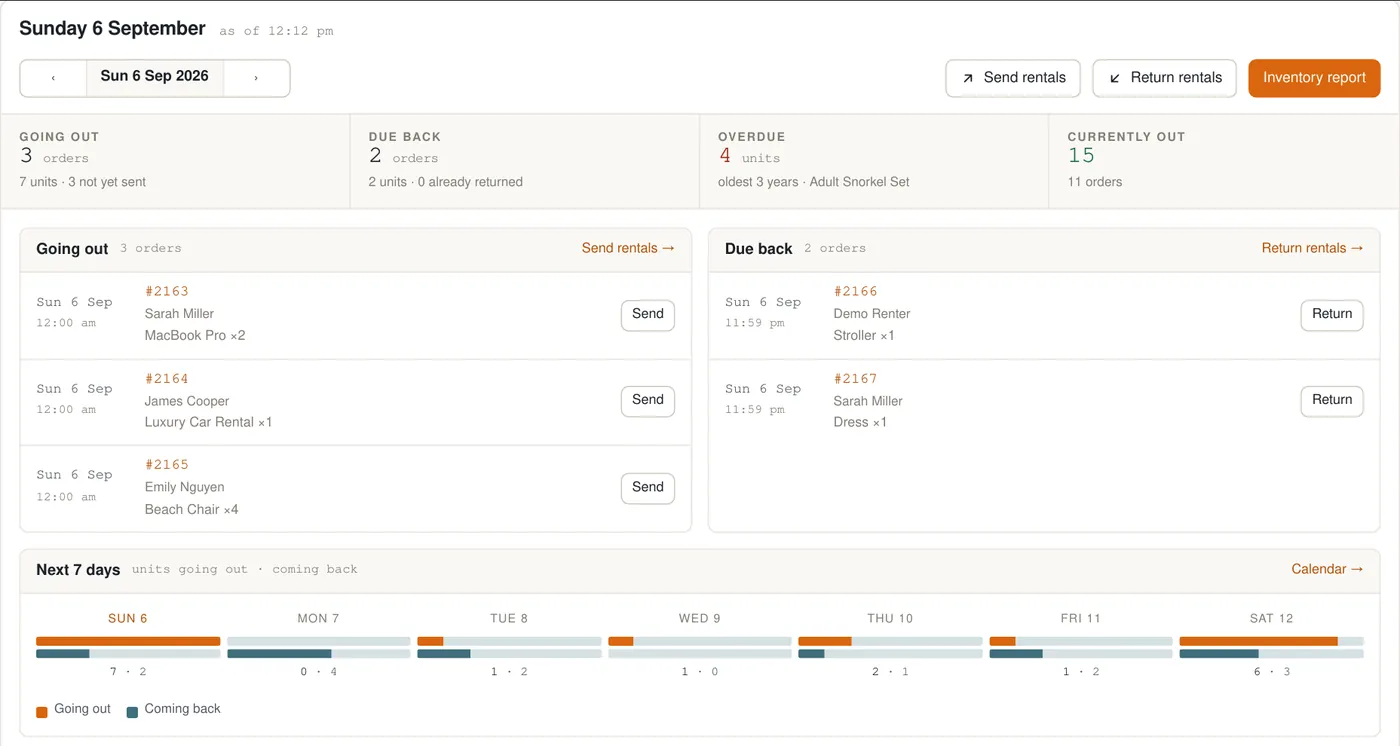
A rentals dashboard, a usage report with utilisation and revenue per unit, and inventory reports with CSV export.
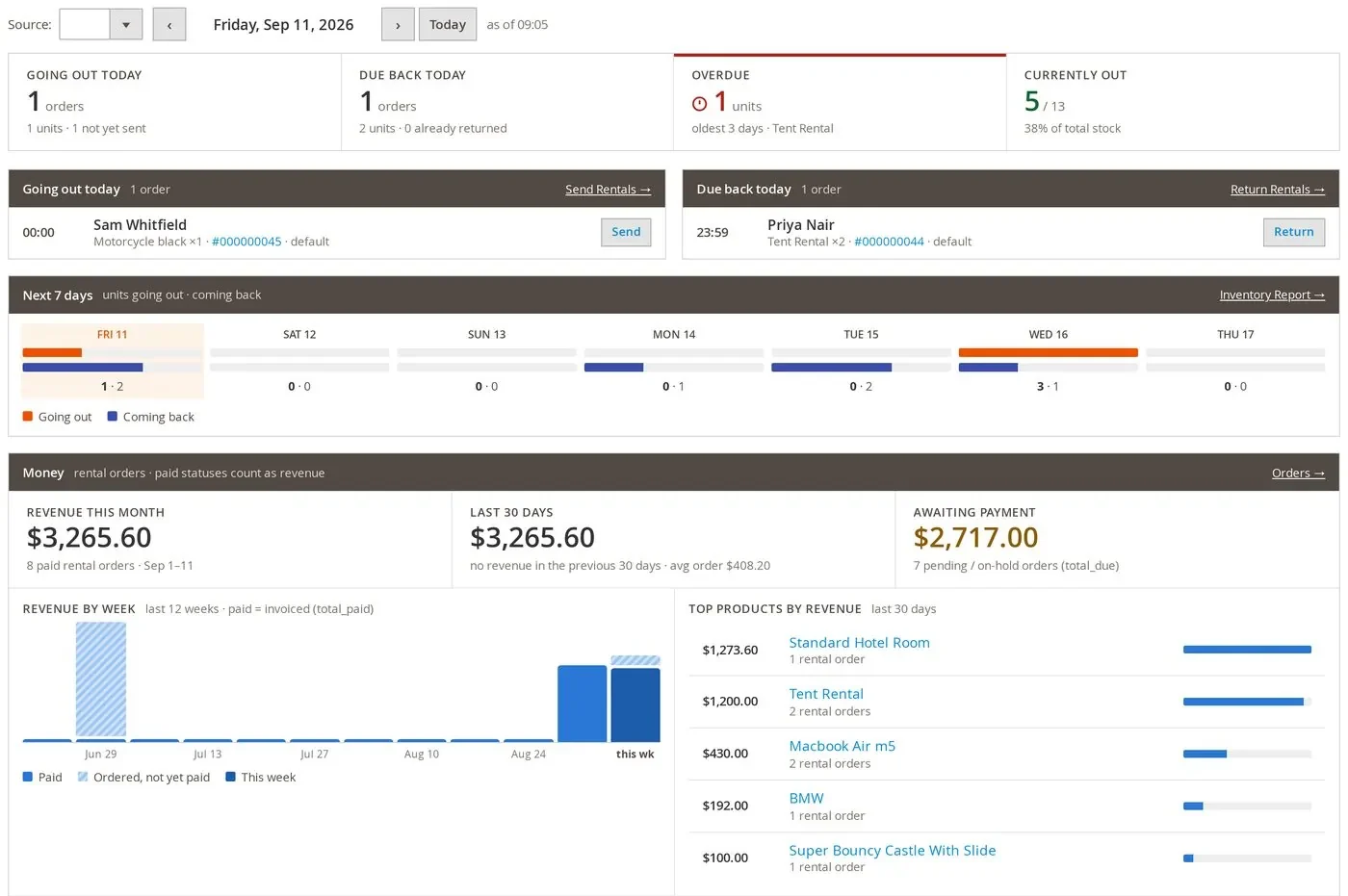
A rentals dashboard with today’s sends and returns, the next 7 days, revenue by week and payments due.
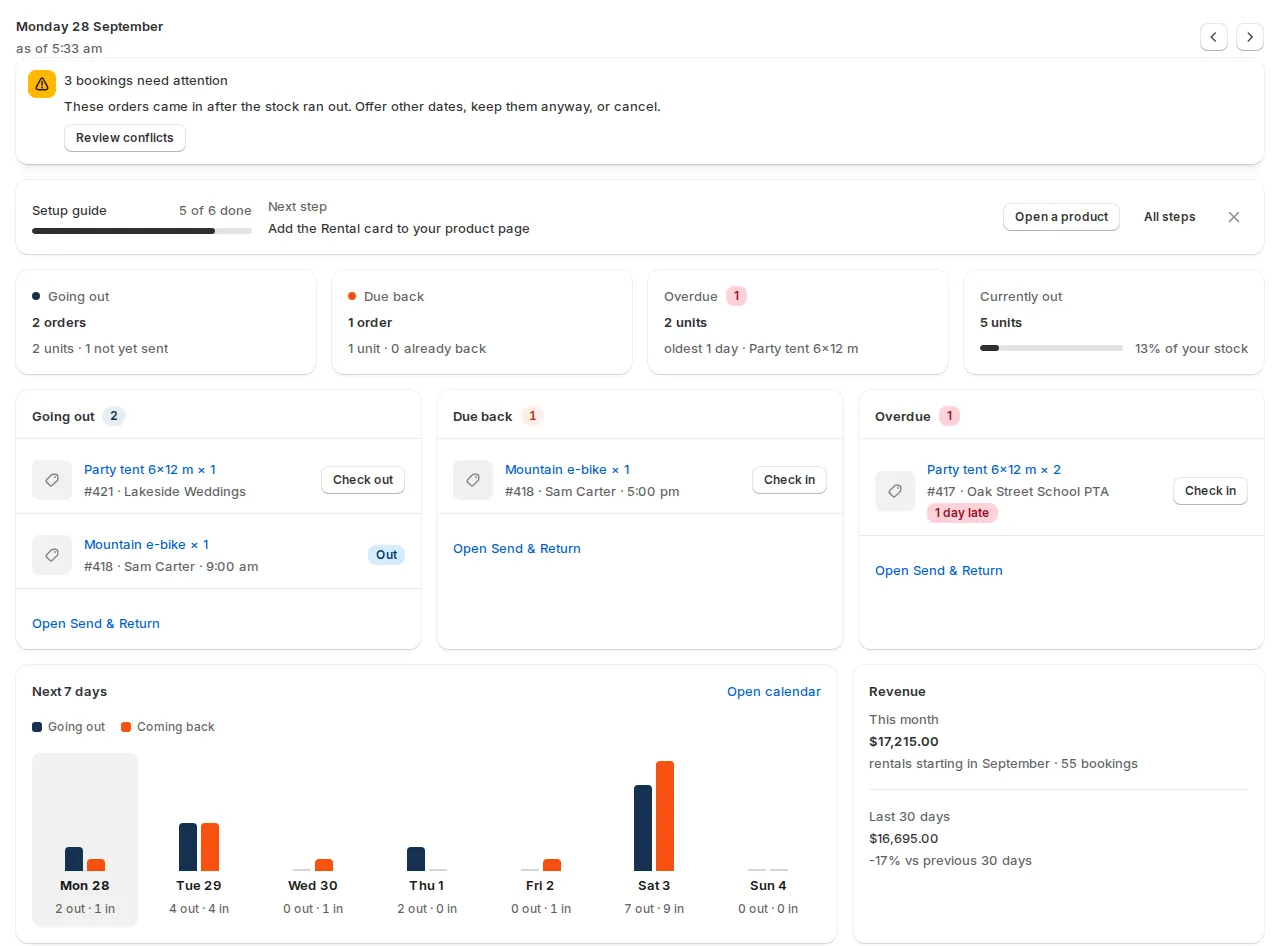
A dashboard with going out, due back, overdue, the next 7 days and revenue, plus usage by product.
The difference: Tyche lists, prints and exports bookings. Sales Igniter adds a rentals dashboard and usage reports with utilisation per product and unit.
What it costs
What you will have paid, year by year
Tyche at the yearly price of its Starter plan for one site, renewed each year; Business and Enterprise add more sites, not features.1 Sales Igniter shows the price with the current promotion and the regular price; renewing updates each year is optional. Prices checked 19 October 2026.
After 5 years, with 6 staff logins
Excludes payment-gateway fees and tax. Sales Igniter on WooCommerce and Magento excludes web hosting, typically $10–$40 a month. Promotions change the first payment only. Prices checked 19 October 2026.
Full comparison
63 features in 10 groups
Tyche facts come only from Tyche Softwares’ own pages and documentation; where they say nothing we mark “not stated”. Where a feature needs another plugin, its name is shown next to the mark. Switch the Sales Igniter column between WooCommerce, Magento 2 and Shopify.
Booking & availability
| Feature | Tyche Booking & Appointment | Sales Igniter WooCommerceMagento 2Shopify |
|---|---|---|
| Availability calendar | ✓Admin calendar by month, week or day, filtered by product | ✓RegularUnits going out and coming back each day✓RegularUnits going out and coming back each day✓Units going out and coming back each day |
| Conflict-free reservations | ✓Maximum bookings per date, weekday or time slot; dates show Booked once full | ✓RegularStock checked for every date of the rental✓RegularStock checked for every date of the rental✓Stock counted for every date of the rental |
| Turnover time between rentals | Days blocked before and after multiple-night bookings, once a date is fully booked | ✓RegularBefore or after, in minutes or hours✓RegularBefore and after, in minutes or hours, per product✓Before and after, in hours or days, per product |
| Hourly bookings and time slots | ✓Fixed time slots and duration-based hours | ✓RegularSlots grouped into morning, afternoon and evening✓RegularSlots grouped into morning, afternoon and evening✓Start times grouped into morning, afternoon, evening |
| Calendar sync (Google, Apple, Outlook, Airbnb) | ✓Google Calendar sync both ways, per product or store-wide | ✓RegularICS feed, and iCal import that blocks booked dates✓RegularICS feed, and iCal import that blocks booked dates✓ICS feed, and iCal import that blocks booked dates |
| Staff and resources (guides, rooms, equipment) | ✓Staff, rooms or equipment shared across products, each with a quantity | ✓RegularStaff and resources with skills; sales can stop when none is free✓RegularStaff and resources with skills, assigned to bookings✓Staff and resources with skills; sales can stop when none is free |
Inventory, serials & maintenance
| Feature | Tyche Booking & Appointment | Sales Igniter WooCommerceMagento 2Shopify |
|---|---|---|
| Track by unit or by quantity | Booking limits per date, slot, variation or attribute value; serial numbers not described | ✓RegularQuantity or serial-number tracking✓RegularQuantity or serial-number tracking✓Quantity or serial-number tracking |
| Barcode and QR labels | ?Not stated on their pages | ✓RegularLabel sheets for your serial numbers✓RegularQR and barcode label sheets for your serials✓QR and barcode label sheets for your serials |
| History per unit | ?Not stated on their pages | ✓RegularSend and return history, readings and photos✓RegularSend and return history, readings and photos✓Serial history, last movement and usage |
| Meter readings (hours, miles) | ?Not stated on their pages | ✓RegularOdometer, hour meter, fuel and condition✓RegularOdometer, hour meter, fuel and checksHour meter readings in checklists, for servicing |
| Bundles and kits | Product BundlesBookable kits with WooCommerce Product Bundles, sold separately by Woo | ✓RegularBundles & Composites included✓RegularMagento bundle and configurable products as rentals✓Rental kits, offered only when every item is free |
| Sub-renting from partners | ?Not stated on their pages | –Not built in–Not built in–Not built in |
| Purchase orders and vendors | ?Not stated on their pages | –Not built in–Not built in–Not built in |
| Depreciation | ?Not stated on their pages | –Not built in–Not built in–Not built in |
| Maintenance tickets / work orders | ?Not stated on their pages | ✓UltimateTechnicians, photos, a timeline and write-off✓ProTechnician, repair cost, timeline and photos✓Parts, labour, vendor work, technician and costs |
| Service schedules | ?Not stated on their pages | ✓UltimateBy days, number of rentals or meter hours✓ProBy days, rentals or meter hours, with checklists✓By days, rentals or meter hours, with checklists |
| Units in repair can’t be booked | Only by blocking dates on the product or resource by hand | ✓Ultimate“Needs service” at check-in takes it out of stock✓ProSent for service at check-in, out of stock until fixed✓Sent for service at check-in, out of stock until fixed |
| Maintenance as a paid service | ?Not stated on their pages | –Not built in–Not built in–Not built in |
Check-out & check-in
| Feature | Tyche Booking & Appointment | Sales Igniter WooCommerceMagento 2Shopify |
|---|---|---|
| Check-out and check-in screens | Today’s check-ins and check-outs as filters on the bookings list | ✓RegularSend & Return desk: due today, overdue, next 7 days✓RegularSend and return pages, with history by order or product✓Send & Return desk: due today, overdue, next 7 days |
| Barcode scanning | ?Not stated on their pages | ✓RegularReturn by barcode with a keyboard-wedge scanner✓RegularSerials scanned at check-out and check-in✓Scan labels at the desk or the POS counter |
| Native mobile app | ?Not stated on their pages | –Runs in the browser; no native app–Runs in the browser; no native appCounter work in the Shopify POS app; no app of ours |
| Photos at send and return | ?Not stated on their pages | ✓RegularPrivate photos per serial, on your server or S3✓RegularPrivate photos per serial, on your server or S3Photos in checklists and on maintenance tickets |
| Extensions and early returns | Customers reschedule from their account | ✓RegularExtensions, early returns and swaps✓ProEarly returns in Regular; extensions with Pro✓Extensions, early returns, part returns and swaps |
| Pickup, return and overdue reminders | Email and Twilio SMS reminders before or after the booking date | ✓RegularEmail, SMS (Twilio) or WhatsApp✓RegularEmail reminders on your own schedule; no SMS✓Email, SMS or WhatsApp |
Pricing & payments
| Feature | Tyche Booking & Appointment | Sales Igniter WooCommerceMagento 2Shopify |
|---|---|---|
| Seasonal and rule-based pricing | ✓Weekday and date prices, prices by range of nights, and seasons | ✓RegularPrices for set dates, length-based adjustments✓RegularSeasonal and special-date prices, length-based rules✓Seasonal rules by date, and length-based rules |
| Customer-specific pricing | ?Not stated on their pages | ProMember discounts through Memberships✓RegularRental prices per customer group–Not built in |
| Coupons | ?Not stated on their pages | ✓RegularStore coupons and discount codes✓RegularCoupons and discount codes work on rentals✓Shopify discount codes work on rentals |
| Late fees | ?Not stated on their pages | ✓RegularGrace period, cap, staff review; deposit, card or link✓RegularGrace period, cap, staff review; deposit, card or link✓Grace period, cap, staff review; link or deposit |
| Long-term rentals with recurring billing | WooCommerce SubscriptionsRecurring bookings with WooCommerce Subscriptions, sold separately by Woo | ✓ProSubscriptions and recurring billing✓Subscriptions add-on, sold separately✓Ongoing rentals billed each period by invoice or app |
| Pay part now, the balance later | ✓A percentage or flat part at booking, the rest later | ✓RegularBooking deposits, balances and payment links✓RegularDeposit to reserve; balance by link, card or at pick-up✓Pay part at checkout, the rest before the rental |
| Per-person and guest-type pricing | ✓Person types such as adults and children, each priced | ✓RegularAdults, children, infants and your own types, each priced–Not built in✓Adults, children, infants and your own types, each priced |
Deposits, contracts & waivers
| Feature | Tyche Booking & Appointment | Sales Igniter WooCommerceMagento 2Shopify |
|---|---|---|
| Security deposits | ✓A security deposit added once to the booking payment | ✓ProOwn cart line; refunded automatically or after inspection✓ProOwn cart line; can be held on the card✓ProSecurity Deposits app; own line at checkout |
| Damage charges | ?Not stated on their pages | ✓ProKeep only what the damage costs✓ProFrom the deposit, a saved card, a pay link or the counter✓Pay link, invoice or counter; from the deposit on Pro |
| Damage waiver | ?Not stated on their pages | ✓ProPer item or per order, with product overrides✓ProMandatory or optional, percent or flat, per product✓ProCustom Fields app; per item or order, with overrides |
| Contracts and e-signatures | ?Not stated on their pages | ✓ProPDF contract signed online, with an audit trail✓ProPDF contract signed online, with an audit trail✓ProRental Contracts app: signed PDF and audit trail |
| Customer ID verification | ?Not stated on their pages | ✓ProID upload with an approval queue–Not built in✓ProID upload with a review queue (Custom Fields app) |
| Custom fields | Product Add-OnsExtra booking fields with Gravity Forms or Woo’s Product Add-Ons, sold separately | ✓ProProduct, checkout and account fields, priced tooRegularPriced product options; no custom field builder✓ProCustom Fields app: product page, cart and checkout |
Online store
| Feature | Tyche Booking & Appointment | Sales Igniter WooCommerceMagento 2Shopify |
|---|---|---|
| Customer-facing online store | ✓Bookable products in your own WooCommerce store | ✓RegularYour own WooCommerce store✓RegularYour own Magento store✓Your own Shopify store |
| Store address | ✓Your own store’s domain and theme | ✓RegularYour own domain and theme✓RegularYour own domain and theme✓Your Shopify store's domain and theme |
| Add to an existing website | ✓Added to your WordPress and WooCommerce site | ✓RegularIt is part of your WordPress siteRegularPart of a Magento store; other sites link to it✓An app inside your Shopify store |
| Search the catalogue by dates | ✓Availability search by date range and category | ✓RegularDate search that hides or marks what is not free✓RegularDate search that hides or marks what is not free✓Date search that hides or marks what is not free |
| Storefront SEO | ?Not stated on their pages | ✓RegularMeta tags and sitemaps on your domain✓RegularMagento SEO and sitemaps on your domainShopify's own SEO; event markup for tour departures |
| Request a quote | ?Not stated on their pages | ✓UltimateQuote basket, offers and conversion to a paid order✓UltimateQuote requests from your store✓Quote requests in the Quotes app |
Locations & delivery
| Feature | Tyche Booking & Appointment | Sales Igniter WooCommerceMagento 2Shopify |
|---|---|---|
| Multiple locations | ?Not stated on their pages | ✓UltimateStock by location, transfers and shortage alerts✓UltimateMulti Source Inventory: availability per source✓Stock by location; how many depends on the plan |
| Multi-store | Vendors sell bookable products through Dokan, WC Vendors or WCFM | ✓UltimateMulti-stores and franchises✓RegularMagento multi-website and store-view scopes–Not built in |
| GPS and telematics | ?Not stated on their pages | –Not built in–Not built in–Not built in |
| Delivery and routes | ?Not stated on their pages | ✓UltimateSmart Routing; delivery cost by distance in RegularRegularDrop-off and pick-up dates; no delivery routesDelivery areas, slots and day sheets; no route planning |
Reports
| Feature | Tyche Booking & Appointment | Sales Igniter WooCommerceMagento 2Shopify |
|---|---|---|
| Operations dashboard | Bookings list with Today onwards, check-in and check-out views | ✓RegularGoing out, due back, overdue and revenue✓RegularGoing out, due back, overdue and revenue✓Going out, due back, overdue, revenue, next 7 days |
| Utilisation | ?Not stated on their pages | ✓RegularUtilisation, turns and revenue per product and serial✓RegularUtilisation per product and per unit, idle units too✓Utilisation, turns and revenue per product and serial |
| Custom reports | Bookings list with filters, CSV download and printing | RegularSet reports with CSV export; no report builderRegularSet reports with CSV export; no report builderSet reports with CSV export; no report builder |
| Maintenance reports | ?Not stated on their pages | ✓UltimateCost, downtime and service compliance✓ProCost, downtime and service compliance✓Cost, downtime and service compliance |
Integrations & API
| Feature | Tyche Booking & Appointment | Sales Igniter WooCommerceMagento 2Shopify |
|---|---|---|
| Accounting sync | ?Not stated on their pages | –Not built in–Not built in–Not built in |
| Payment gateways | ✓Paid through your WooCommerce checkout | ✓RegularAny WooCommerce gateway: Stripe, PayPal and more✓RegularAny Magento payment method: Stripe, PayPal and more✓Shopify checkout, with your payment settings |
| API | ✓REST API, webhooks and an MCP connection for AI assistants | ✓RegularREST API for the whole rental lifecycle✓RegularGraphQL API on Magento's own endpoint✓REST and GraphQL API, with API keys |
| Single sign-on | ?Not stated on their pages | –Not built in–Not built in–Not built in |
| Import and export | ✓Bookable products and their settings in and out; bookings to CSV | ✓RegularCSV import and export of products✓RegularCSV import and export of products and rental settings✓CSV import and export of rental settings |
Hosting, ownership & cost
| Feature | Tyche Booking & Appointment | Sales Igniter WooCommerceMagento 2Shopify |
|---|---|---|
| Pricing model | Yearly licence for 1, 5 or 10 sites | ✓One-time licence; yearly renewal optional✓One-time licence; yearly renewal optionalMonthly or yearly app plans, with a free plan |
| Staff logins | ✓Licensed per site, not per user | ✓Unlimited admin accounts✓Unlimited admin users; no per-user fee✓Your Shopify staff accounts; no seat fee |
| Hosting | Runs on your own WordPress hosting | Any web host, or ours; free installation with ProAny web host, or ours; free installation with Pro✓Hosted for you; nothing to run |
| Source code | Template overrides, hooks and filters; its terms don’t state the licence of the code | ✓100% open source✓Full source code with your licence–Hosted app; source code not shared |
| Where your data lives | ✓Bookings stay in your own WooCommerce store | ✓Your own database✓Your own Magento databaseOrders in Shopify; rental data in our hosted app |
| If you stop paying | ✓Keeps working without an active licence; updates stop | ✓Keeps working; renewal adds support and updates✓Keeps working; renewal adds support and updatesDrops to the Free plan and its order limit |
| Support | ✓Support for a year from purchase, renewed with the licence | ✓A year of support and updates; renewal optional✓A year of support and updates; renewal optional✓Help and support from inside the app |
In each price
What each includes
From each side’s own pricing pages, checked 19 October 2026.
Tyche Booking & Appointment
A yearly licence for 1, 5 or 10 sites, with every feature in each plan.1- Starter, $199 a year: 1 site licence; 1 year of updates and support; 30-day money-back guarantee; 1 site
- Business, $299 a year: 5 site licences; 1 year of updates and support; priority support; the same features as Starter; 5 sites
- Enterprise, $399 a year: 10 site licences; 1 year of updates and support; priority support; the same features as Starter; 10 sites
- Without an active licence the plugin keeps working, without updates
- Recurring bookings need WooCommerce Subscriptions, and bookable kits need WooCommerce Product Bundles, both sold by Woo
Sales Igniter
Runs in your own WooCommerce, Magento 2 or Shopify store.34- WooCommerce and Magento 2: unlimited staff logins, products, customers and orders in every licence
- The booking calendar on your own product pages, on your domain
- Send & Return desk with serial numbers and barcode scanning
- WooCommerce Regular: guest types, staff and resources, and tour departures with manifests
- WooCommerce Pro: deposits, contracts, subscriptions and custom fields; Ultimate adds Multi Location Inventory, Quote, Maintenance & Inspections, Smart Routing and Live Chat
- Magento 2 Pro: contracts, maintenance, order extensions, damage waiver and deposits; Ultimate adds Multi Source Inventory and Request for Quote
- WooCommerce and Magento 2: the full source code, your own database, a year of updates
- Shopify: billed monthly or yearly through Shopify
Switching
From Tyche Booking & Appointment to Sales Igniter
- Book something in the demoA real store with real stock: dates, availability, deposits and contracts, end to end. Open the free live demo
- Stay on WooCommerce, or choose Magento 2 or ShopifyThe platform comparison covers cost, scale and catalogue size. The Shopify app is coming soon. Compare the platforms
- Export your bookingsTyche downloads bookings as a CSV file from its View Bookings page; keep a copy of upcoming bookings and their orders.21
- Set up your rental productsBring rental products in from a CSV file, then set rates and serial numbers. Talk to us about your stock

Frequently asked questions
Does Tyche track stock or serial numbers?
It limits the number of bookings per date, weekday or time slot, and per variation or attribute value of a variable product.7 Serial numbers are not described in its documentation. Sales Igniter tracks stock by quantity or by serial number for every date of a rental, and checks items out and back in at the Send & Return desk.
Does Tyche have check-in and check-out?
Its bookings list can show today’s check-ins and today’s check-outs.21 Sales Igniter’s Send & Return desk records what went out and what came back, with barcode returns if you have a scanner.
Does Sales Igniter take deposits like Tyche?
Yes. Tyche has partial payments and a security deposit added to the booking payment built in.15 In Sales Igniter for WooCommerce, paying part now and the balance later is in Regular, and refundable security deposits, damage waivers and signed contracts are in Pro.
Does Sales Igniter have person types, staff and resources?
Yes, on WooCommerce: guest types with their own prices, and staff and resources that can stop sales when none is free, are in Regular. Tyche has person types and shared resources built in.11
What happens if I stop renewing?
Tyche’s plugin keeps working without an active licence, but updates stop, and support runs for a year from purchase.3 A Sales Igniter licence is a one-time purchase with a year of updates and support; renewing is optional, and the plugin keeps working without it.
Can I sell rental packages and kits?
Yes. Sales Igniter for WooCommerce includes Bundles & Composites, so a package is one product while each item in it draws on its own stock. Tyche works with WooCommerce Product Bundles, which Woo sells separately.29
Is there a Magento or Shopify version?
Yes. Sales Igniter is also a Magento 2 extension, and Rentals & Bookings for Shopify is billed monthly or yearly through Shopify. The Shopify app is coming soon, and its prices appear on this page at launch. Tyche’s plugin is for WooCommerce only.1
Sources
- Booking & Appointment Plugin for WooCommerce (tychesoftwares.com) · tychesoftwares.com/products/woocommerce-booking-and-appointment-plugin
The three yearly plans (Starter, Business, Enterprise) by number of stores, the feature list, the product types it works with, Google Calendar sync, time zones, rescheduling, cancellation and the FAQ. Checked 19 October 2026. - Terms & Conditions (tychesoftwares.com) · tychesoftwares.com/terms-conditions
Updates for the duration of the licence, support for a year from purchase, renewal to keep support, no refunds on renewals, 30-day money-back guarantee. Checked 19 October 2026. - License (Booking & Appointment documentation) · tychesoftwares.com/docs/docs/booking-appointment-plugin-for-woocommerce-new/home/license
The plugin works even when the licence key is not active, without update notifications. Checked 19 October 2026. - Booking & Appointment Plugin for WooCommerce documentation · tychesoftwares.com/docs/docs/booking-appointment-plugin-for-woocommerce-new
The documentation index, searched for the features marked not stated. Checked 19 October 2026. - Changelog (Booking & Appointment documentation) · tychesoftwares.com/docs/docs/booking-appointment-plugin-for-woocommerce-new/changelog
Version 9.1.0, 6 October 2026: Seasonal Pricing, Recurring Bookings, Partial Deposits, Rental System, Printable Tickets and marketplace integration built in and included with every licence; Zoom, FluentCRM, Zapier, Twilio SMS and vendor integrations on all plans. Checked 19 October 2026. - Maximum Bookings per day, date and time slot (Booking & Appointment documentation) · tychesoftwares.com/docs/docs/booking-appointment-plugin-for-woocommerce-new/maximum-bookings/maximum-bookings-per-day-date-time-slot
A maximum number of bookings per date, weekday or time slot; dates show Booked once full. Checked 19 October 2026. - Attribute values as quantity (Booking & Appointment documentation) · tychesoftwares.com/docs/docs/booking-appointment-plugin-for-woocommerce-new/maximum-bookings/allow-the-ability-to-consider-attribute-values-as-quantity-setup-lockout-for-the-same
Booking limits per variation and per attribute value of a variable product. Checked 19 October 2026. - Rental System (Booking & Appointment documentation) · tychesoftwares.com/docs/docs/booking-appointment-plugin-for-woocommerce-new/addons/rental-system
Built in for multiple-night bookings: days blocked before the start and after the end once a date’s limit is reached, flat charge per day, same-day booking, and sale, rent or both. Checked 19 October 2026. - Time slots (Booking & Appointment documentation) · tychesoftwares.com/docs/docs/booking-appointment-plugin-for-woocommerce-new/time-slots
Fixed and duration-based time slots. Checked 19 October 2026. - Adding and Viewing Resources (Booking & Appointment documentation) · tychesoftwares.com/docs/docs/booking-appointment-plugin-for-woocommerce-new/resources/adding-a-resource
Resources such as staff, rooms or equipment shared across products, each with an available quantity and its own availability. Checked 19 October 2026. - Persons Feature (Booking & Appointment documentation) · tychesoftwares.com/docs/docs/booking-appointment-plugin-for-woocommerce-new/persons-feature
Minimum and maximum persons, person types such as adults and children with their own prices, and each person counted as a booking. Checked 19 October 2026. - Setting up Special Prices for weekdays and dates (Booking & Appointment documentation) · tychesoftwares.com/docs/docs/booking-appointment-plugin-for-woocommerce-new/setup-special-prices-for-weekdays-dates
Prices for chosen weekdays and dates. Checked 19 October 2026. - Setup Price Ranges for multiple-day bookings (Booking & Appointment documentation) · tychesoftwares.com/docs/docs/booking-appointment-plugin-for-woocommerce-new/setup-price-ranges-for-multiple-day-bookings
Prices by range of nights, per day or fixed. Checked 19 October 2026. - Seasonal Pricing (Booking & Appointment documentation) · tychesoftwares.com/docs/docs/booking-appointment-plugin-for-woocommerce-new/addons/seasonal-pricing
Built in: prices raised or lowered for named seasons, per product or store-wide. Checked 19 October 2026. - Partial Deposits (Booking & Appointment documentation) · tychesoftwares.com/docs/docs/booking-appointment-plugin-for-woocommerce-new/addons/partial-deposits
Built in: a percentage or flat part paid at booking, or a security deposit added once to the payment. Checked 19 October 2026. - Recurring Bookings (Booking & Appointment documentation) · tychesoftwares.com/docs/docs/booking-appointment-plugin-for-woocommerce-new/addons/recurring-bookings
Built in, but needs WooCommerce Subscriptions: bookings that repeat with a subscription. Checked 19 October 2026. - Printable Tickets (Booking & Appointment documentation) · tychesoftwares.com/docs/docs/booking-appointment-plugin-for-woocommerce-new/addons/printable-tickets
Built in: tickets with a number and a security code emailed when an order is completed. Checked 19 October 2026. - Set Bookable Products That Require Confirmation (Booking & Appointment documentation) · tychesoftwares.com/docs/docs/booking-appointment-plugin-for-woocommerce-new/set-bookable-products-that-require-confirmation
Bookings approved or rejected by the admin before the customer pays. Checked 19 October 2026. - Google Calendar (Booking & Appointment documentation) · tychesoftwares.com/docs/docs/booking-appointment-plugin-for-woocommerce-new/integrations/google-calendar
Google Calendar connected by OAuth, store-wide or per product. Checked 19 October 2026. - Create and Send Multiple Email and SMS Reminders (Booking & Appointment documentation) · tychesoftwares.com/docs/docs/booking-appointment-plugin-for-woocommerce-new/reminders/create-send-multiple-email-sms-reminders
Email and SMS reminders a set time before or after the booking date. Checked 19 October 2026. - View Bookings (Booking & Appointment documentation) · tychesoftwares.com/docs/docs/booking-appointment-plugin-for-woocommerce-new/booking/view-bookings
The bookings list with Today’s Check-ins and Today’s Check-outs filters, CSV download and printing. Checked 19 October 2026. - Calendar (Booking & Appointment documentation) · tychesoftwares.com/docs/docs/booking-appointment-plugin-for-woocommerce-new/booking/calendar
The admin calendar of bookings by month, week or day, filtered by product. Checked 19 October 2026. - Create Booking (Booking & Appointment documentation) · tychesoftwares.com/docs/docs/booking-appointment-plugin-for-woocommerce-new/booking/create-booking
Bookings created by staff with a new order, an existing order or no order. Checked 19 October 2026. - Search Product Availability (Booking & Appointment documentation) · tychesoftwares.com/docs/docs/booking-appointment-plugin-for-woocommerce-new/booking-widget-and-block/search-product-availability
A search widget for available products by date range and category. Checked 19 October 2026. - Import and Export of Booking Settings (Booking & Appointment documentation) · tychesoftwares.com/docs/docs/booking-appointment-plugin-for-woocommerce-new/import-and-export-of-booking-settings
Bookable products with their booking settings exported and imported from the products list. Checked 19 October 2026. - Booking & Appointment REST API (Booking & Appointment documentation) · tychesoftwares.com/docs/docs/booking-appointment-plugin-for-woocommerce-new/booking-appointment-rest-api-updated
REST API endpoints for bookings, resources and products. Checked 19 October 2026. - Webhooks (Booking & Appointment documentation) · tychesoftwares.com/docs/docs/booking-appointment-plugin-for-woocommerce-new/webhooks
Webhooks for bookings, bookable products and resources. Checked 19 October 2026. - Connect to AI assistants using MCP (Booking & Appointment documentation) · tychesoftwares.com/docs/docs/booking-appointment-plugin-for-woocommerce-new/connect-booking-appointment-plugin-to-ai-assistants-using-mcp
An optional MCP connection that lets AI assistants search, move and cancel bookings. Checked 19 October 2026. - WooCommerce Product Bundles (Booking & Appointment documentation) · tychesoftwares.com/docs/docs/booking-appointment-plugin-for-woocommerce-new/compatibility-with-other-plugins/woocommerce-product-bundles
Bookable bundles built with WooCommerce Product Bundles, each item with the same booking type. Checked 19 October 2026. - Gravity Forms Product Add-ons (Booking & Appointment documentation) · tychesoftwares.com/docs/docs/booking-appointment-plugin-for-woocommerce-new/compatibility-with-other-plugins/gravity-forms-gravity-forms-product-addons
Extra booking fields with Gravity Forms Product Add-ons or WooCommerce Product Add-ons. Checked 19 October 2026. - Dokan Pro plugin (Booking & Appointment documentation) · tychesoftwares.com/docs/docs/booking-appointment-plugin-for-woocommerce-new/compatibility-with-other-plugins/dokan-pro-plugin
Vendors create and sell bookable products in a Dokan marketplace; WC Vendors and WCFM are documented alongside it. Checked 19 October 2026. - Migrate WooCommerce Bookings (Booking & Appointment documentation) · tychesoftwares.com/docs/docs/booking-appointment-plugin-for-woocommerce-new/migrate-woocommerce-bookings-to-booking-appointment-plugin
A built-in tool that moves bookings from WooCommerce Bookings, keeping orders and customer details. Checked 19 October 2026. - Hooks and Filters Documentation (Booking & Appointment documentation) · tychesoftwares.com/docs/docs/booking-appointment-plugin-for-woocommerce-new/hooks-and-filters-documentation
PHP hooks and filters for developers. Checked 19 October 2026. - Sales Igniter for WooCommerce · rentalbookingsoftware.com/woocommerce-bookings
WooCommerce plans, prices and promotion codes, and the full feature list. Prices read live from our store. - Sales Igniter for Magento 2 · rentalbookingsoftware.com/magento-2-rental-booking-module
Magento 2 plans, prices and promotion codes, and the feature list. Prices read live from our store. - Rentals & Bookings for Shopify · rentalbookingsoftware.com/shopify-rental-booking-app
The Shopify app, billed monthly or yearly through Shopify. - Sales Igniter screenshots · rentalbookingsoftware.com/rental-software-screenshots
Screenshots from stores with sample data, for WooCommerce, Magento 2 and Shopify.
Compare other plugins and platforms: RnB · WooCommerce Bookings · YITH Booking · Booqable · Checkfront · EZRentOut · FareHarbor · All comparisons
See it before you switch from Tyche
The free live demo is a real store with real stock: pick your dates and watch the availability calendar, deposits and contracts work end to end.