
An equipment rental website builder has to handle things a general site builder doesn’t: rates from four hours to four weeks, a serial and an hour meter for every machine, deposits, delivery, and service schedules. This seven-minute video builds that site on WordPress and WooCommerce with Rentals & Bookings, our plugin, so the store, the orders and the customer list stay on a site you own.
The shop in the video is Ironclad Equipment Rental, a made-up company. The same steps work for a tool rental website, or for camera and AV gear, medical equipment, outdoor and sports gear and event staging. The whole video is written out below, chapter by chapter, with its screens, so you can read it instead of watching.
The short version. Import the free Equipment Rental theme, add each machine as a WooCommerce product with its stock, and customers can book it. Regular adds longer rates, serials, hour meters, Send & Return and delivery. Pro adds ID checks, refundable deposits and signed agreements. Ultimate adds three yards in one store, service by the hour meter and driver routes.
- What you’ll build
- What you need
- Chapter guide
- The shop
- Start from a theme
- Machines and rates
- Serials and hour meters
- ID, deposits, agreement
- Pick-up or delivery
- Three yards, one store
- Send & Return
- Service by the hour meter
- Late returns and damage
- Delivery routes
- Five tips
- Recap
- Which edition you need
- Where to go next
- FAQ
What this equipment rental website does
The video sets up a complete equipment and tool rental business website: a great-looking template, plus the back-office features you need to increase your profit and make operations run smoothly. It uses the Sales Igniter Rentals & Bookings plugin for WordPress and WooCommerce.
Rentals & Bookings lets contractors and homeowners book by the hour, day or week, pick up at the yard or have it delivered, and pay online. By the end, you’ll have an equipment rental website that takes bookings, tracks every machine by serial and hour meter, and keeps each one serviced. The video goes step by step in 11 parts, with five tips at the end. For the software side, see our equipment rental software page.
- Hourly, daily, weekly and four-week rates, so a long job books online at a fair price.
- A serial number, a barcode label and an hour meter for every machine.
- ID checks, a refundable deposit and a rental agreement signed online.
- Pick-up at the yard or delivery to the site, with the choice of returning it or having you collect it.
- Stock kept at each yard, in one store.
- Service schedules by the hour meter or the calendar, with machines kept out of stock until they’re fixed.
- Extensions from the customer’s account, and late fees worked out for you.
What you need before you start
- WordPress and WooCommerce, with a place to host them.
- Rentals & Bookings. The theme, stock and hourly or daily prices work in Lite, the free plugin. The table below shows which edition adds the rest.
- A list of your machines: how many of each you own, your rates, and the readings you want at the counter.
- A barcode scanner, if you want to scan returns. The labels print from the Serials list.
Chapter guide: all 14 chapters, with times
Click a time to play the video from there. “Comes with” shows the edition you need to follow along. The sections after the table follow the same order.
| Time | Chapter | What it covers | Comes with |
|---|---|---|---|
| 0:00 | Intro | What you get, and the other kinds of rental the same setup suits. | Any edition |
| 0:50 | The shop: Ironclad Equipment Rental | A made-up company with three yards around Phoenix. | Any edition |
| 1:07 | Start from a rental theme | Import the Equipment Rental theme: sample machines, page sections and a homepage. | Lite (free) |
| 1:31 | Machines and tools | Stock, hourly and daily prices, price points, and the homepage date search. | Lite; price points and date search in Regular |
| 2:10 | Serials, hour meters and photos | A serial per machine, barcode labels and the Engine hours field set. | Regular |
| 2:41 | ID checks, deposits and the agreement | ID uploads, a refundable deposit and a signed rental agreement. | Pro |
| 3:02 | Pick up at the yard, or delivery | How the machine gets there and back, delivery fees, a cap on stops, pricing by distance. | Regular |
| 3:39 | Three yards, one store | Stock at each yard, and customers choose where to pick up. | Ultimate |
| 3:55 | At the counter: Send & Return | Today’s pick-ups, readings at the counter, and scanning the barcode at the return. | Regular |
| 4:16 | Service by the hour meter | A schedule every 250 hours or six months, and tickets from the return. | Ultimate |
| 4:43 | Late returns, extensions and damage | Customer extensions, late fees staff review, and damage charges. | Regular; damage charges in Ultimate |
| 5:09 | Delivery routes | Each day’s routes, sent to your drivers’ phones. | Ultimate |
| 5:24 | Tips for your equipment rental store | Five tips, listed below. | Any edition |
| 6:25 | Recap, Magento 2 and Shopify | A summary, and the other platforms. | Any edition |
The shop: Ironclad Equipment Rental
Here’s the shop the video builds: Ironclad Equipment Rental, a made-up rental company with three yards around Phoenix. It rents mini excavators, skid steers and scissor lifts to contractors, and compactors, mixers and pressure washers to homeowners.
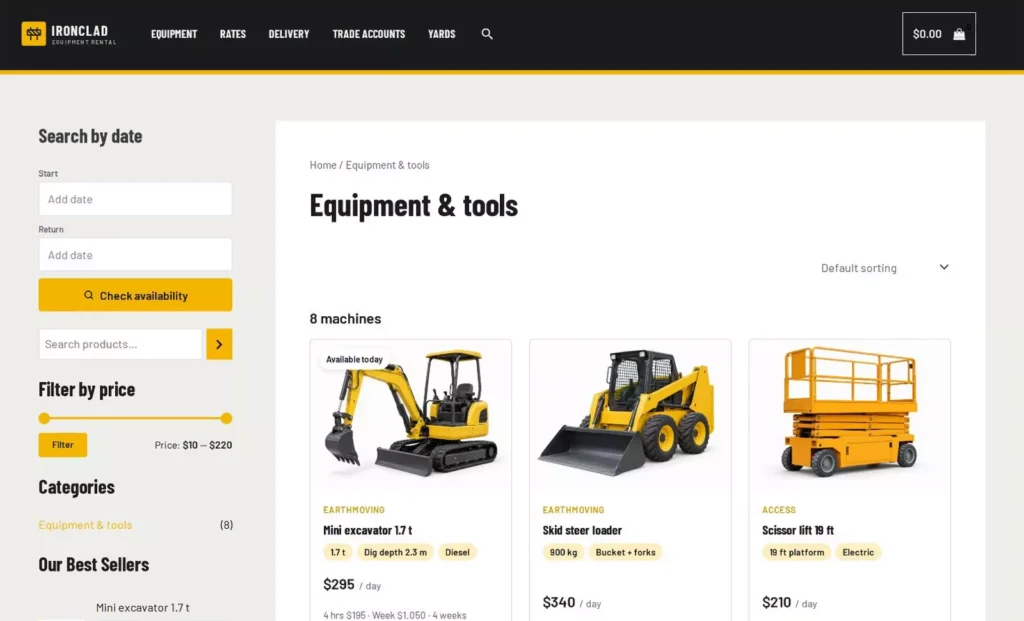
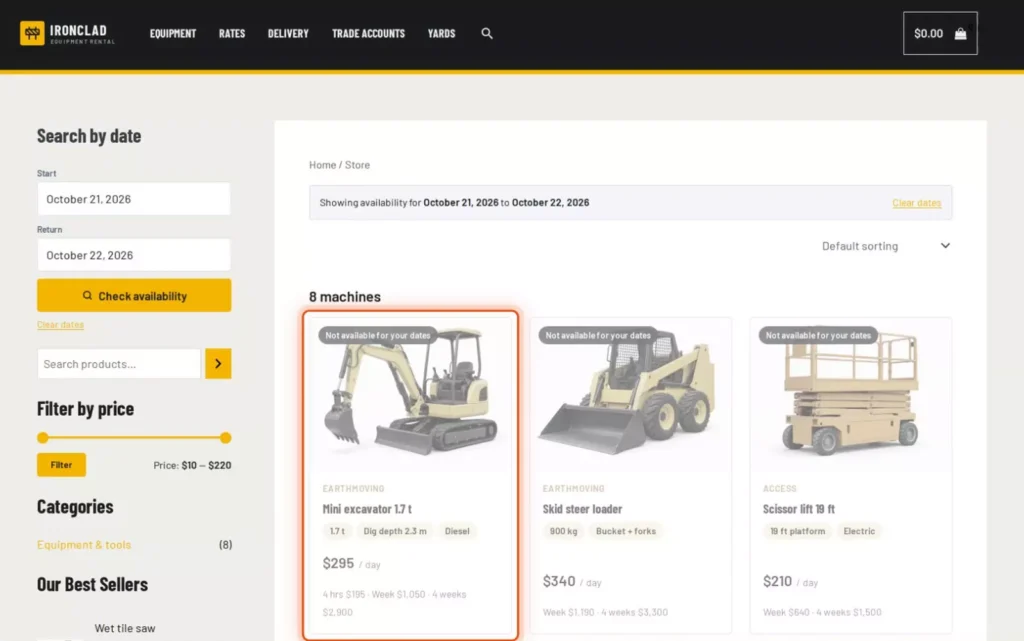
Each machine card shows its specs, its daily price and its longer rates. The mini excavator is $295 a day, $195 for four hours, $1,050 for a week and $2,900 for four weeks.
Start from a rental theme
Start with the look. Rentals & Bookings has free rental themes, each one a .zip file for one kind of rental business. Download the Equipment Rental theme from that page.
In Rentals, open Setup, then Tools, to reach Theme Import / Export. Under “Add a theme (.zip)”, choose the file and click Upload theme. The theme then shows as a card with a short description and what’s in it: 7 sample products and 6 page sections.
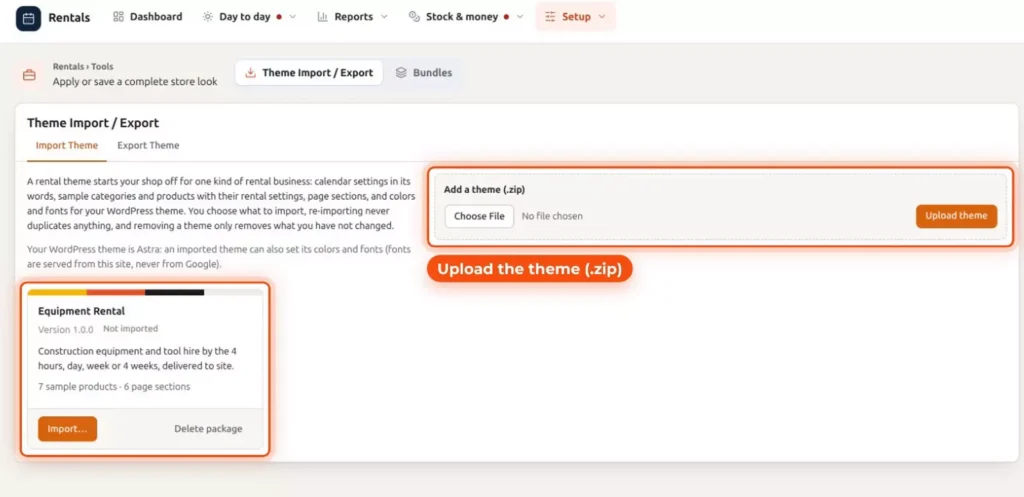
Click Import, and choose what comes in: sample machines with their rental prices, page sections and a homepage, all ready to edit. “What to import” has a tick box for each part:
- Calendar presets: the colors and labels of the date picker, in this industry’s words.
- Categories and sample products: 1 category and 7 sample products, with their prices, rental settings and photos.
- Block patterns: homepage and section patterns in the block inserter, under “Rental theme sections”. They work with any WordPress theme.
- Homepage: a page built from the homepage pattern. Tick “Also make it my homepage” to use it as your front page.
- Astra colors and fonts: Astra’s nine colors, heading and body fonts and button shape, using free Astra settings only. The Ironclad store runs on the Astra theme, so this box shows.
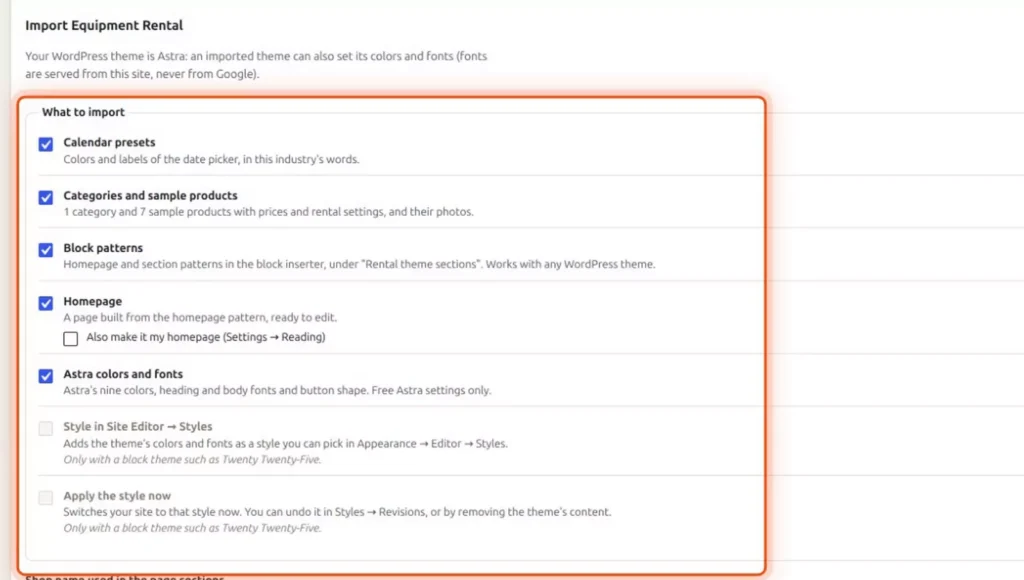
Two more boxes, a style in the Site Editor and “Apply the style now”, only work with a block theme such as Twenty Twenty-Five. Enter the shop name to use in the page sections, then click Import theme. Importing again never duplicates anything, and removing a theme only removes what you haven’t changed. With the free plugin, the homepage hero comes without the date search. Regular adds it.
Machines and tools: rates by the hour, day and week
Turn on booking and set the stock
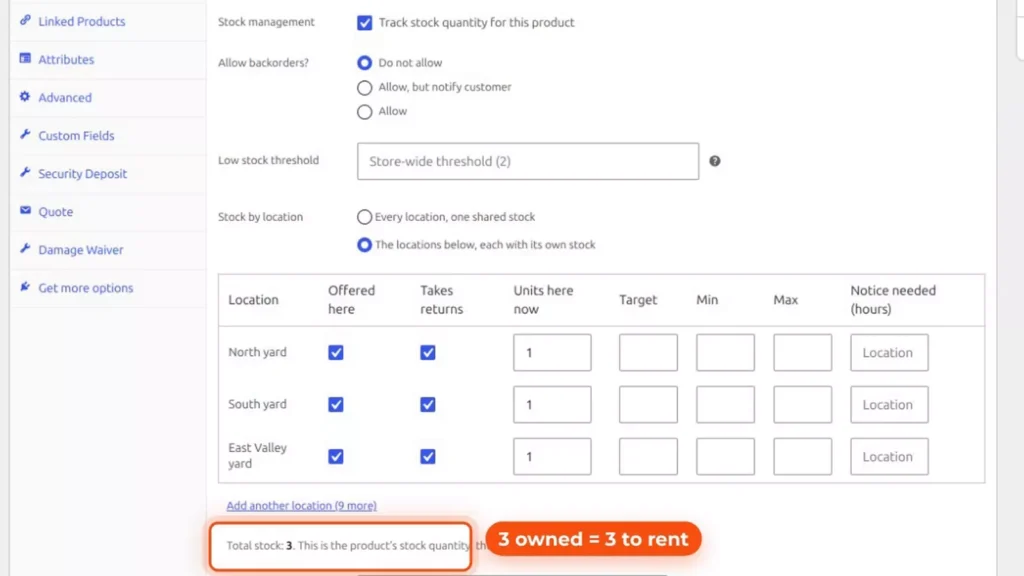
Each machine is a WooCommerce product with Enable Booking ticked. It’s on the General tab of the Rentals & Bookings box, on the product’s edit screen. The Rental Type below it is Date for the mini excavator.
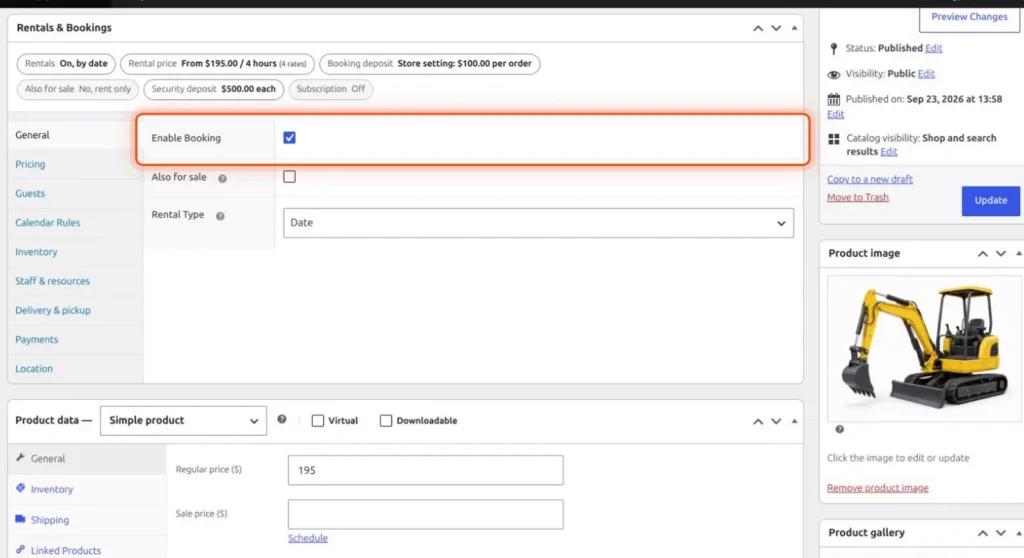
The stock is how many you own: three mini excavators, so a fourth can’t be booked for the same days. You set it on the Inventory tab. Ironclad keeps one at each yard, which Three yards, one store comes back to.
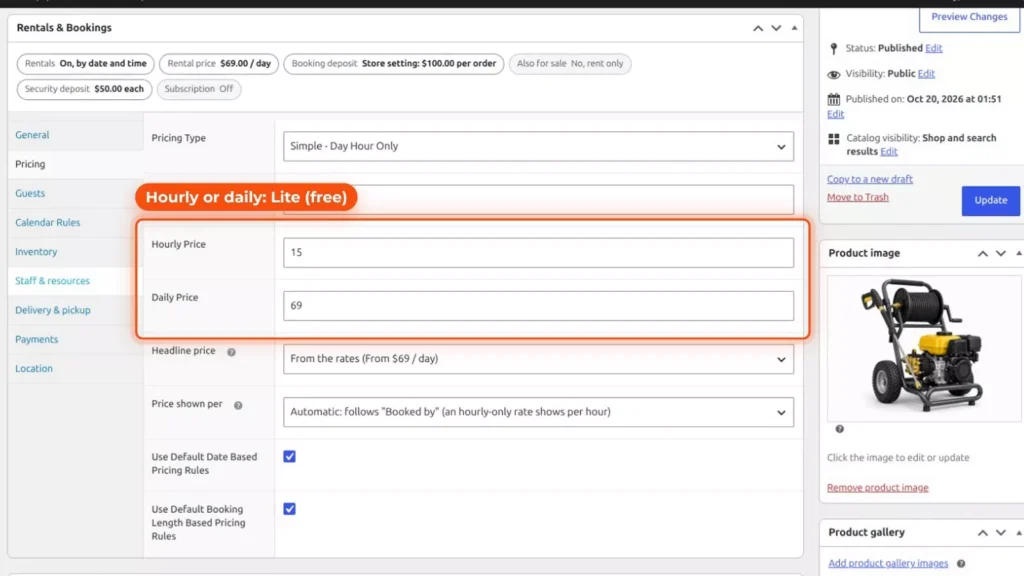
Hourly or daily prices in the free plugin
The free plugin sets an hourly or a daily price, so a pressure washer can rent by the hour. On the Pricing tab, the pressure washer uses the Simple – Day Hour Only pricing type, with an Hourly Price of $15 and a Daily Price of $69.
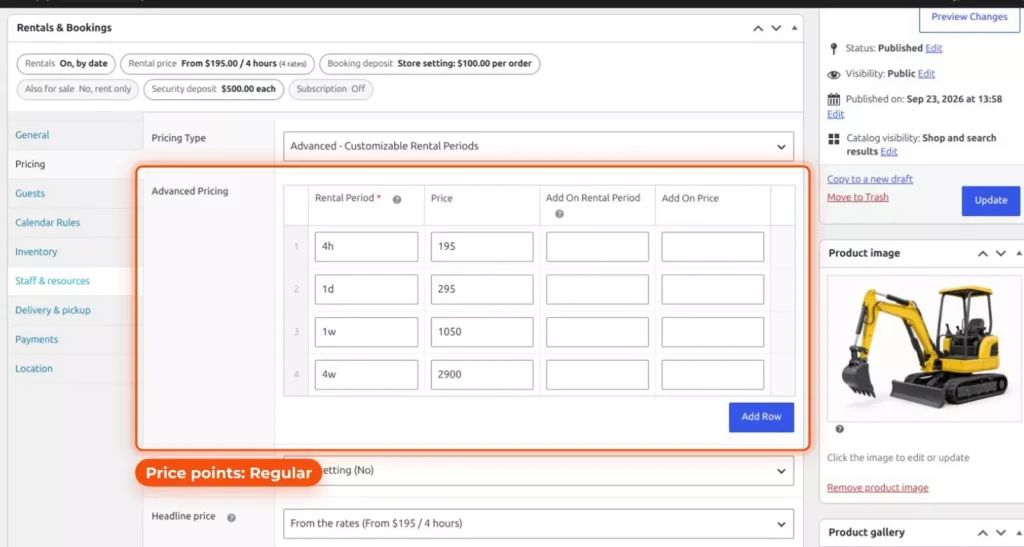
Price points in Regular
Regular adds price points. Set the Pricing Type to Advanced – Customizable Rental Periods, and add a row for each rental period. The mini excavator has four: 4h at $195, 1d at $295, 1w at $1,050 and 4w at $2,900. So it rents for four hours, one day, one week or four weeks, and the longer the job, the better the rate.
On the product page, those rows show as a rate table with the cost per hour or per day. The week works out at $150 a day, and the four weeks at $103.57 a day.
A date search on the homepage
Regular also adds a date search on the homepage. Ironclad’s search bar asks for the pick-up yard, the start and return dates, a category and a model or tool. Anything already booked on the customer’s day is marked: on the results page, those machines are faded and labeled “Not available for your dates”.
Serials, hour meters and photos
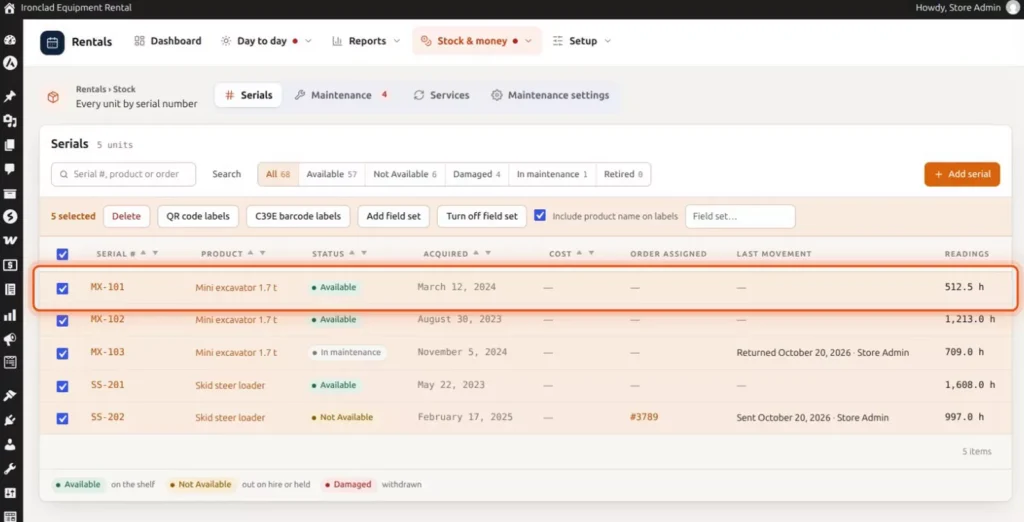
Each machine gets its own serial number, with a barcode label you can print. The Serials list is under Rentals, Stock & money. MX-101, MX-102 and MX-103 are the three mini excavators, and SS-201 and SS-202 are skid steers, each with its status, last movement and latest reading. Tick the rows you want and click C39E barcode labels, or QR code labels.
In Rentals, Settings, Serials, add serial custom fields, or click Start from a template and pick Engine hours: an hour meter, the fuel level and photos, with fields for greasing and attachments too. For each field, you choose whether it’s recorded at send and at return, and whether it’s required.
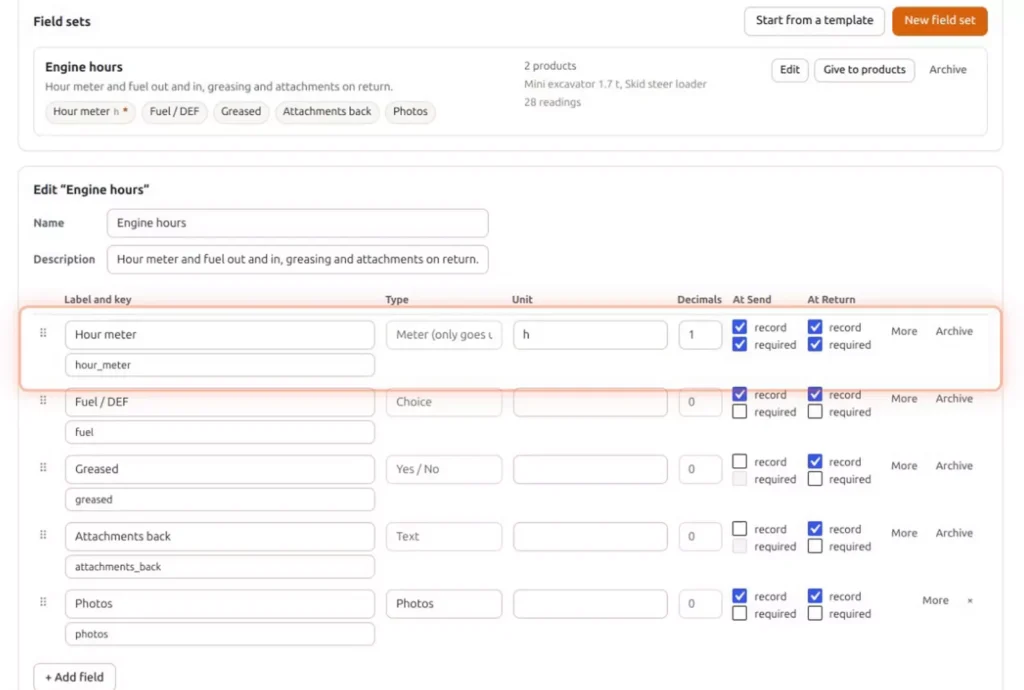
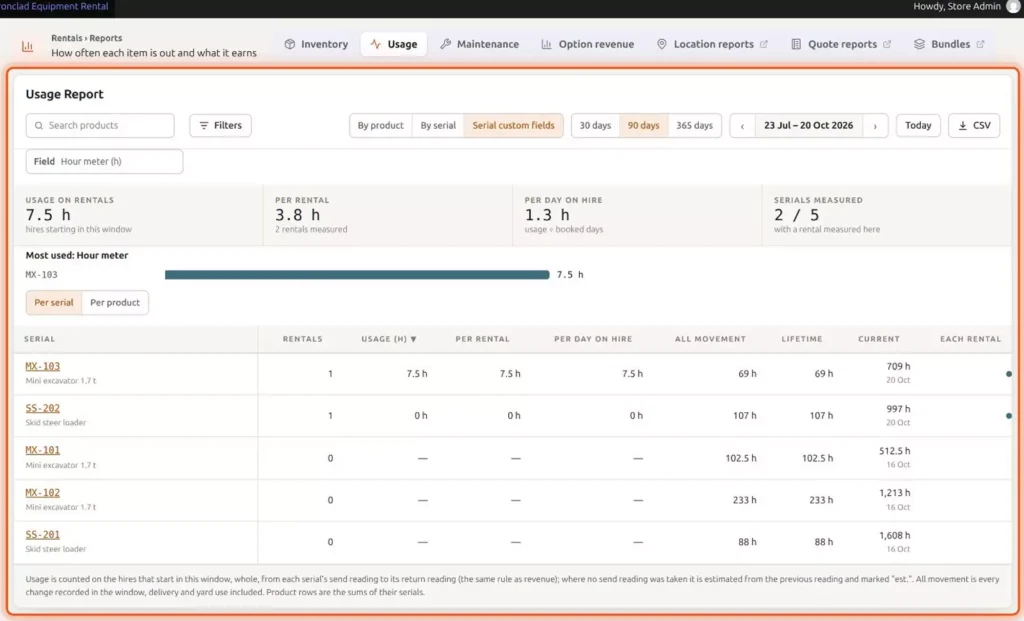
Give the field set to your machines with Give to products, and staff fill it in when a machine goes out and when it comes back. Everything recorded shows on the serial’s page and in the Usage Report. The report is under Rentals, Reports. Open Serial custom fields, pick the Hour meter field, and it adds up the hours for each serial, per rental and per day on hire.
ID checks, deposits and the rental agreement
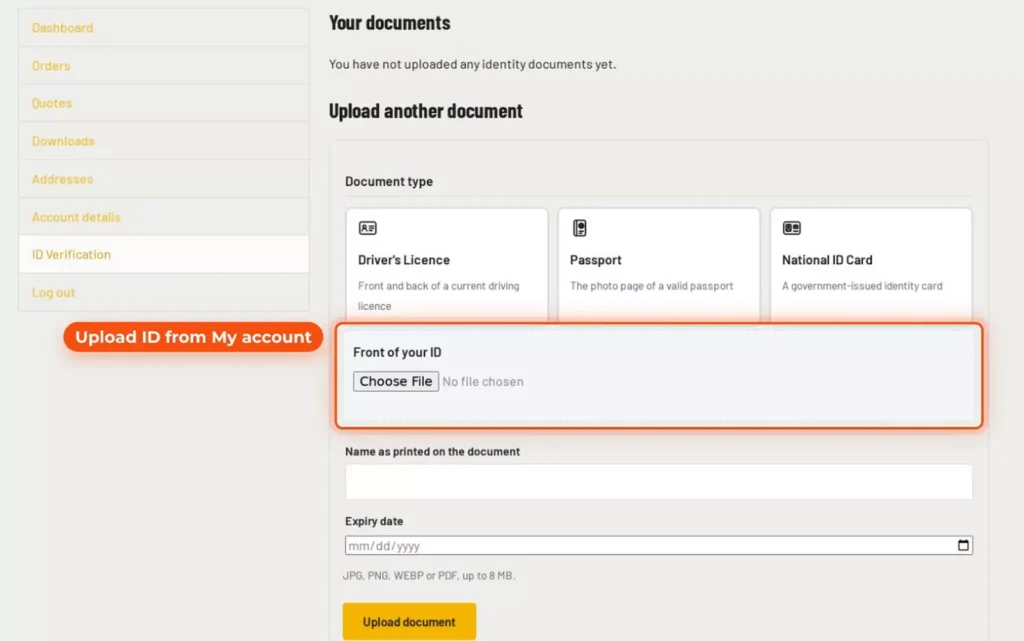
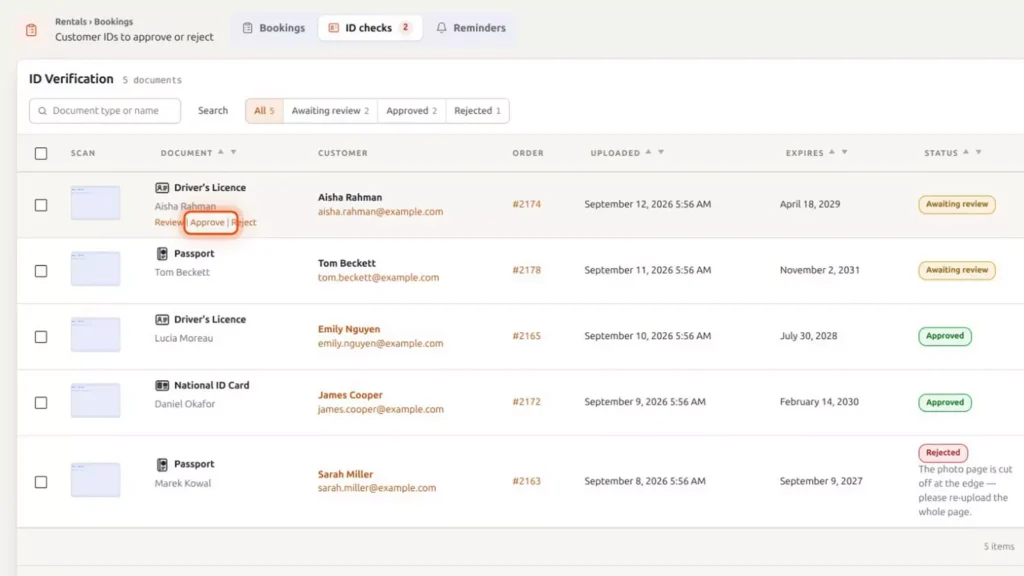
Pro checks who’s renting. Customers upload their ID from their account. On the ID Verification page in My Account, they pick Driver’s Licence, Passport or National ID Card, upload the front, and add the name and the expiry date.
You approve it under ID checks, in Rentals, Day to day. The list shows each document with its customer, order, upload date and expiry date, and each row has Review, Approve and Reject links.
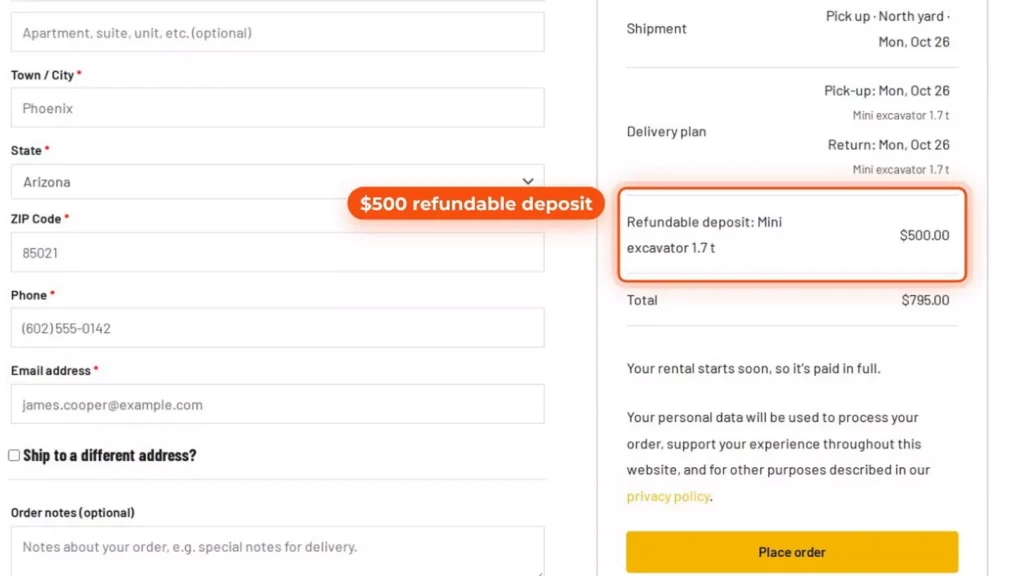
A refundable deposit is added at checkout. Here it’s a $500 line for the mini excavator on top of the $295 rental, for a total of $795.
Customers sign your rental agreement online at checkout: they review your terms, type their name or draw a signature, and tick the box to agree. Their signature, the time and the document they signed are recorded, and a signed copy is emailed to them.
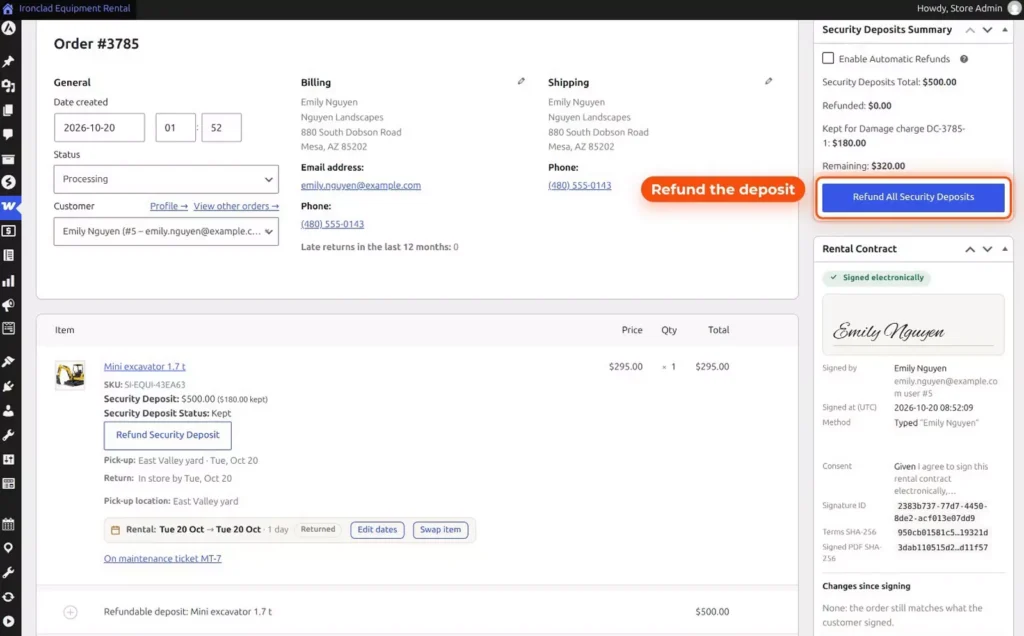
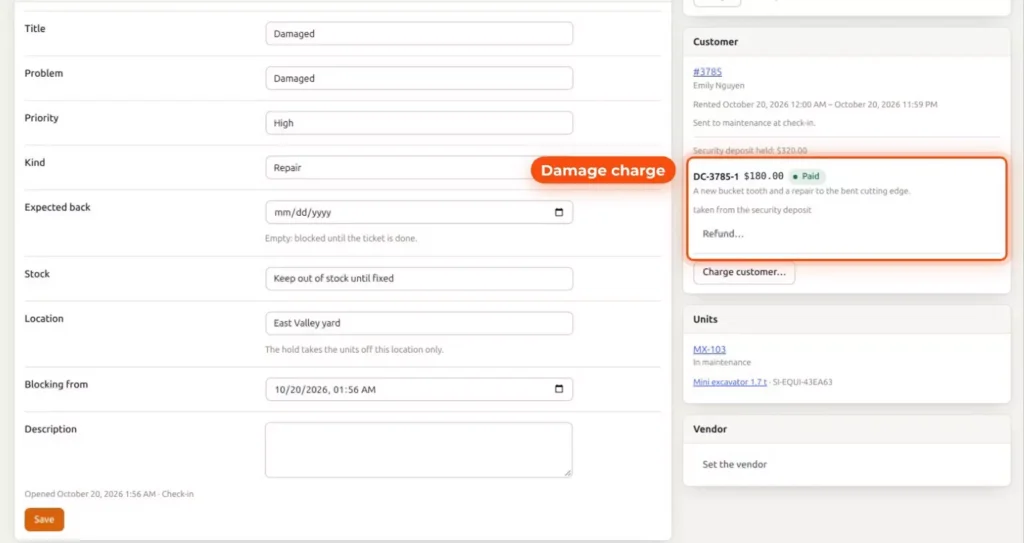
When the machine is back, refund the deposit from the order. The Security Deposits Summary shows the total, what’s been refunded and anything kept, above the Refund All Security Deposits button. On this order, $180 of the $500 was kept for a damage charge, which leaves $320.
Pick up at the yard, or delivery
Now pick-up and delivery. In Rentals, Settings, Delivery & pickup, tick “Customers choose how they get their rental”, then offer Pick up and Delivery under “Ways offered”. Delivery then has its own time slots, stop limit, fee and returns.
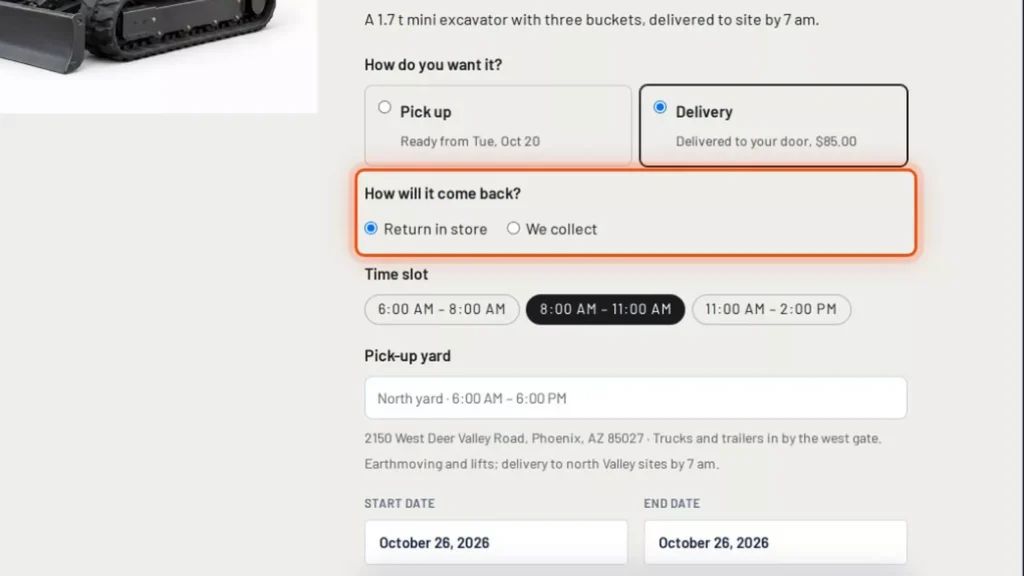
On the product page, customers answer “How do you want it?” and “How will it come back?”: return it to the yard, or we collect. The second question only shows when the way they chose offers more than one way back, so tick both Return in store and We collect under Delivery.
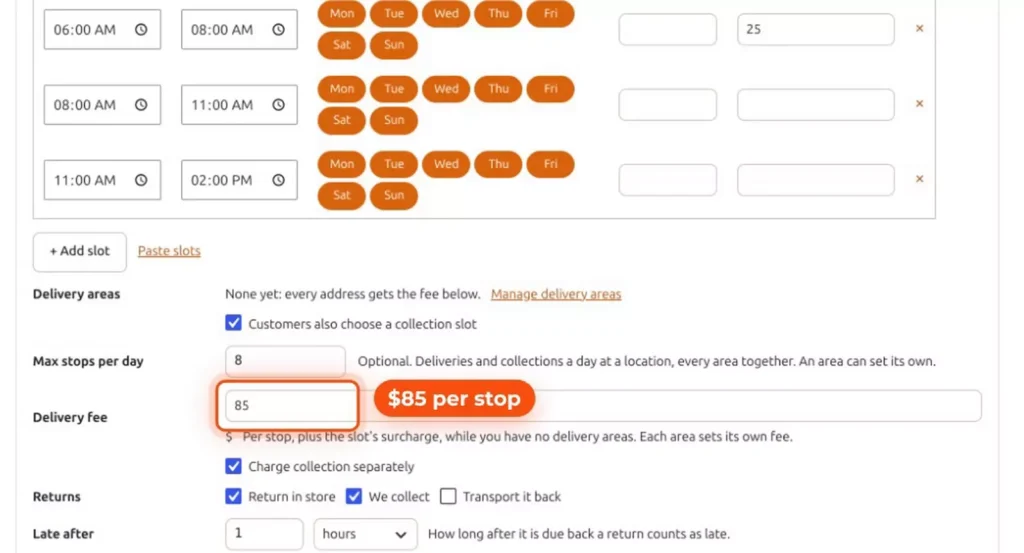
Set a delivery fee per stop, charge collection separately if you like, and cap the stops per day at what your trucks can do. Ironclad charges $85 per stop, with “Charge collection separately” ticked and “Max stops per day” at 8. A time slot can add its own surcharge, and once you add delivery areas, each area sets its own fee.
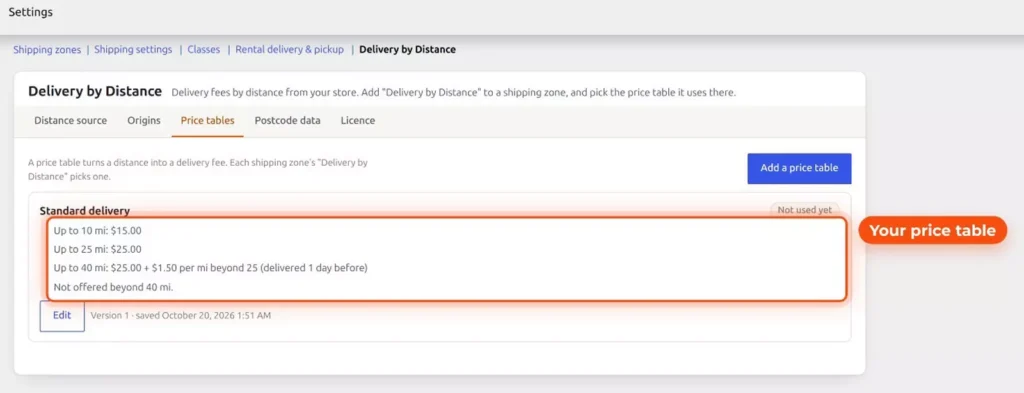
Rather price by how far you drive? Delivery by Distance, included from Regular up, prices each trip from a price table you set. The tables are under WooCommerce, Settings, Shipping, and you add Delivery by Distance to a shipping zone and pick the table it uses there. Ironclad’s Standard delivery table is $15 up to 10 miles and $25 up to 25 miles. Up to 40 miles it’s $25 plus $1.50 for each mile beyond 25, delivered a day before, and it isn’t offered beyond 40 miles.
Three yards, one store
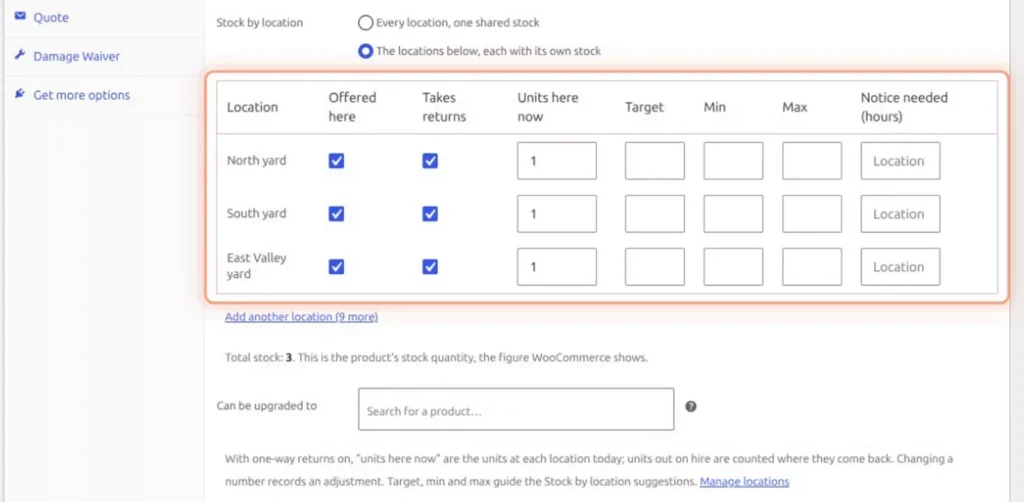
Ironclad has three yards. Multi Location Inventory, included in Ultimate, keeps the stock at each one. The Locations screen lists North yard, South yard and East Valley yard with their addresses. On a product’s Inventory tab, choose “The locations below, each with its own stock”, then set what each yard offers, whether it takes returns and how many units are there now.
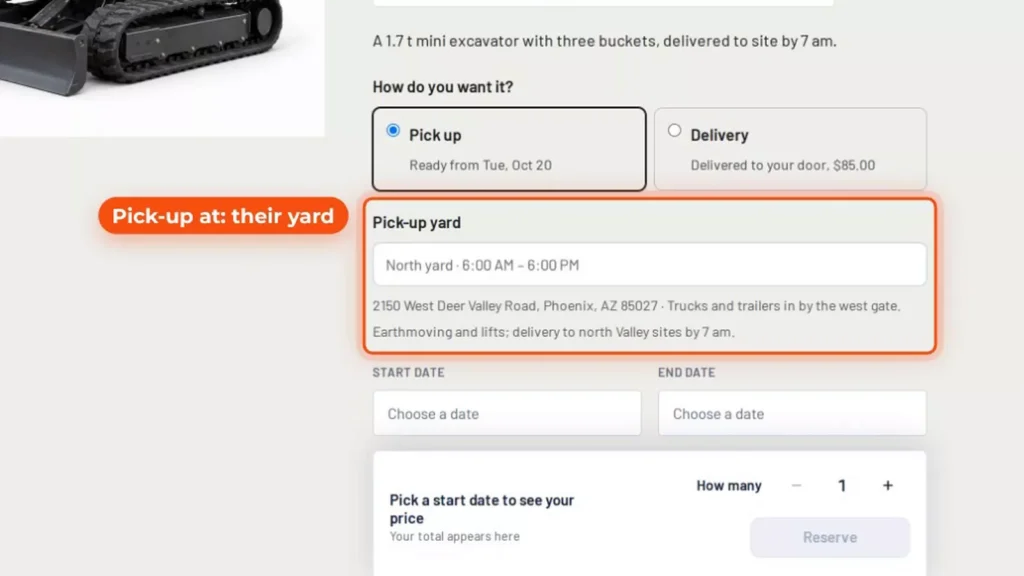
Customers choose where to pick up. With Pick up selected, the product page asks for a pick-up yard and shows its hours and address. The machine goes back to the yard it came from.
At the counter: Send & Return
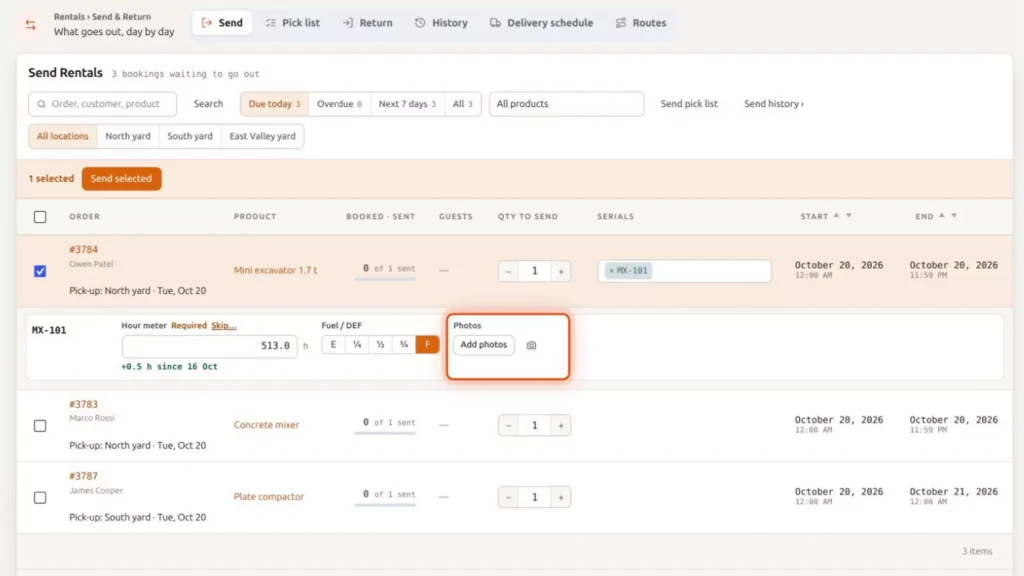
At the counter, Rentals, Send & Return lists today’s pick-ups, and you can filter the list by yard. Tick the order and choose the machine’s serial. A row opens for that serial: fill in the hour meter, the fuel and the photos, and click Send selected to send it. The row shows how far the meter has moved since the last reading, here +0.5 h since 16 Oct.
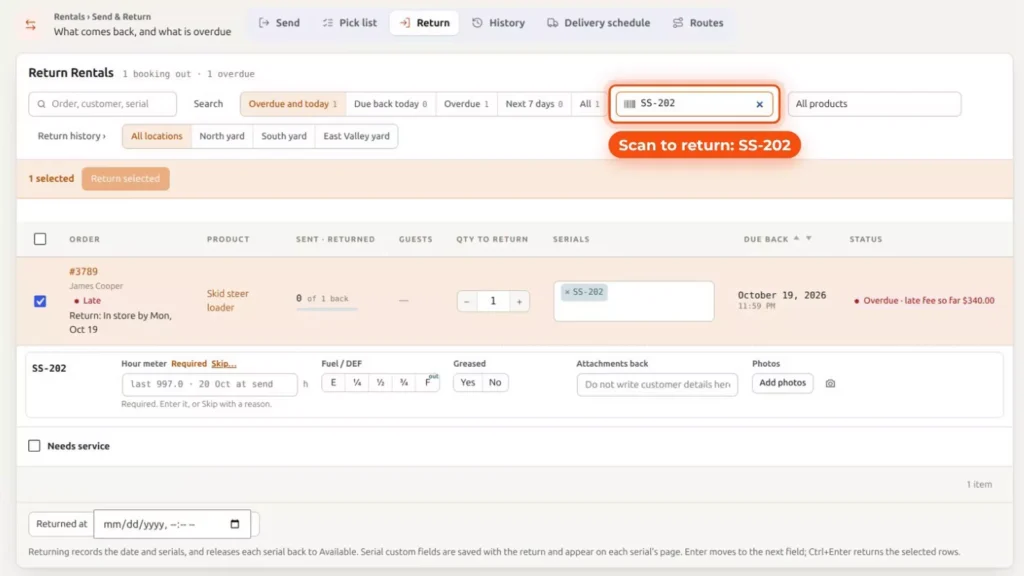
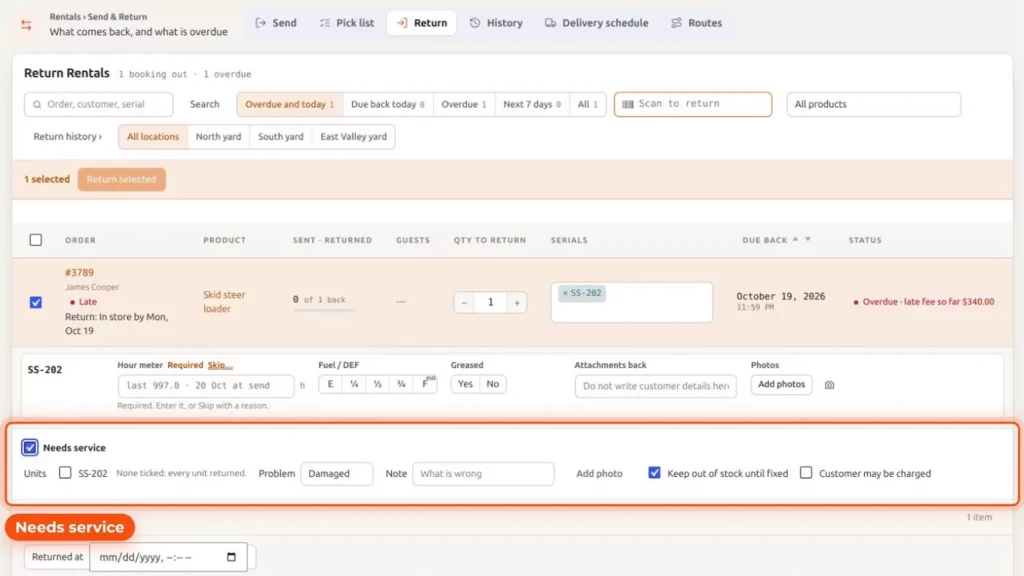
When it comes back, scan its barcode on the Return tab, in the “Scan to return” box, and record the readings again. Then click Return selected. If the machine is overdue, the row says so and shows the late fee so far.
Service by the hour meter
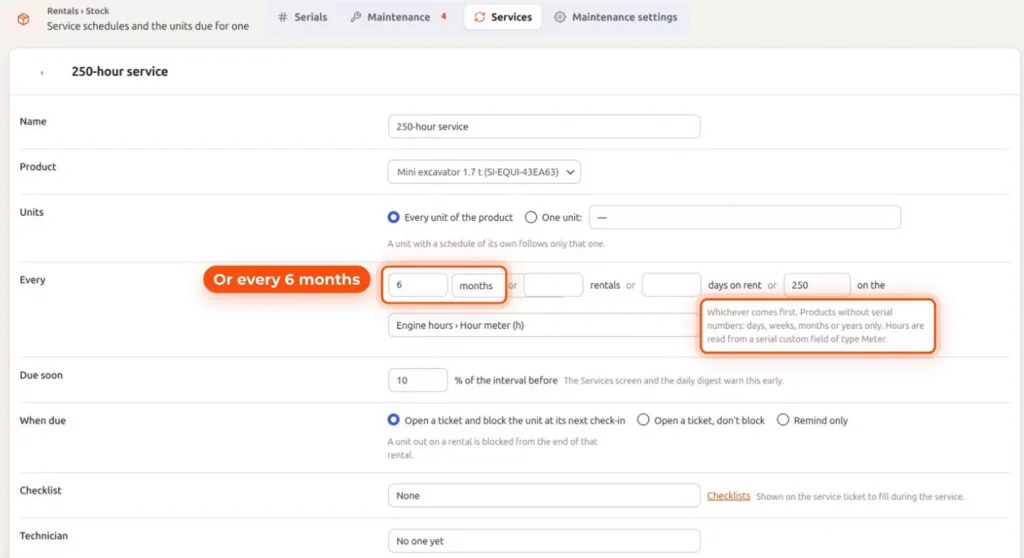
Ultimate adds Maintenance & Inspections. A service schedule can run every 250 hours on the hour meter, or every six months, whichever comes first. Schedules are on the Services tab, under Rentals, Stock & money. This one covers every unit of the mini excavator and reads its hours from the Engine hours field set. It warns you when 10% of the interval is left, and when it’s due, it opens a ticket and blocks the unit at its next check-in.
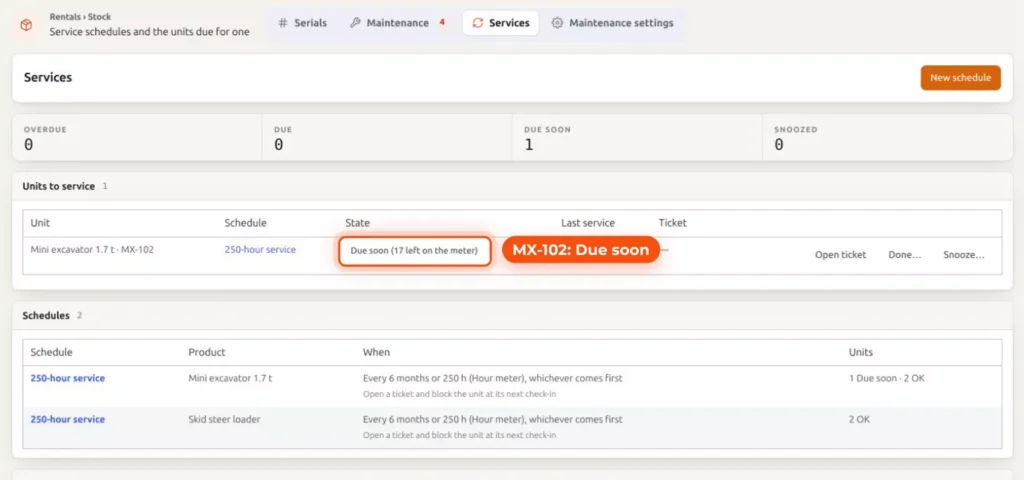
The machine shows as Due soon before it’s late. On the Services screen, MX-102 reads “Due soon (17 left on the meter)”, and you can open a ticket, mark it done or snooze it from that row.
If a machine comes back with a problem, tick Needs service at the return. Choose the problem, add a note, and leave “Keep out of stock until fixed” ticked. It stays out of stock until the ticket is done and it’s Ready to rent. The repair ticket, on the Maintenance tab, has a Ready to rent button for that moment.
Late returns, extensions and damage
Rental extensions
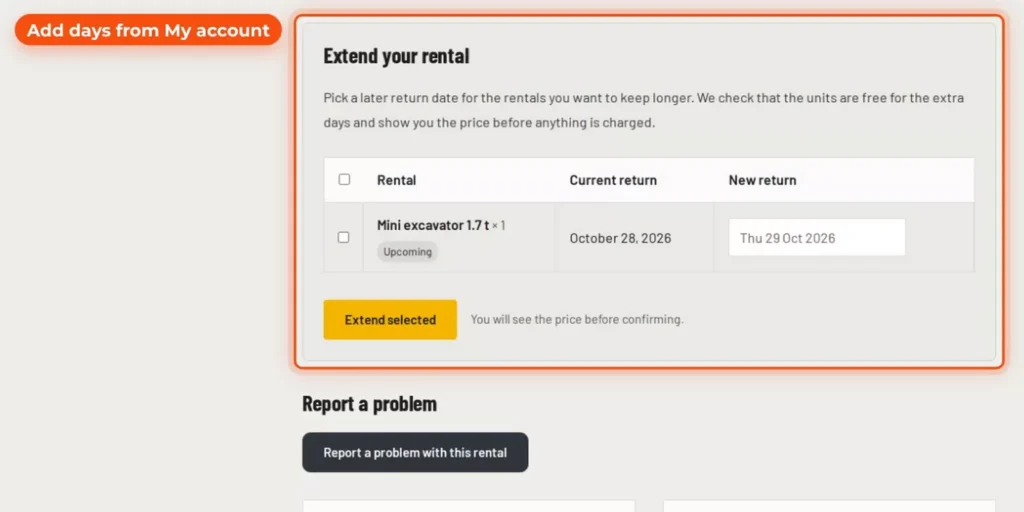
Jobs run long. Turn on “Enable rental extensions” in Rentals, Settings, Extend, and customers add days from their account, when the machine is still free. On their order, “Extend your rental” asks for a new return date, checks that the units are free for the extra days, and shows the price before anything is charged.
Late fees
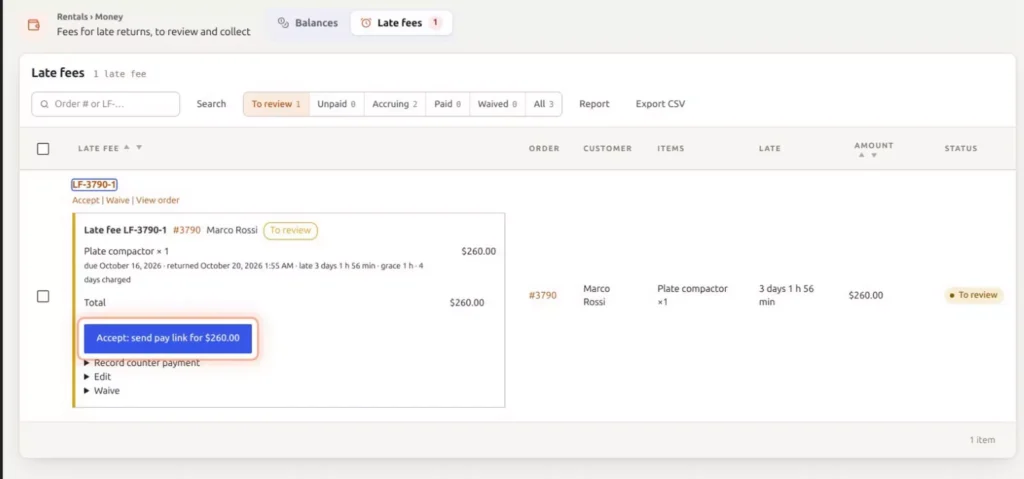
A late return gets its late fee worked out for you: staff review it, and the customer pays from a link. Under Rentals, Stock & money, Late fees, a plate compactor that came back 3 days 1 h 56 min late has a $260 fee waiting in To review. Open it to see how the fee was worked out: the due date, the return time, a one-hour grace period and 4 days charged. Then click “Accept: send pay link”. You can also record a counter payment, edit the fee or waive it.
Damage charges in Ultimate
With Ultimate, damage found at the return becomes a damage charge, taken from the deposit or paid from a link. On this repair ticket, charge DC-3785-1 is $180 for a new bucket tooth and a repair to the bent cutting edge, taken from the security deposit.
Delivery routes
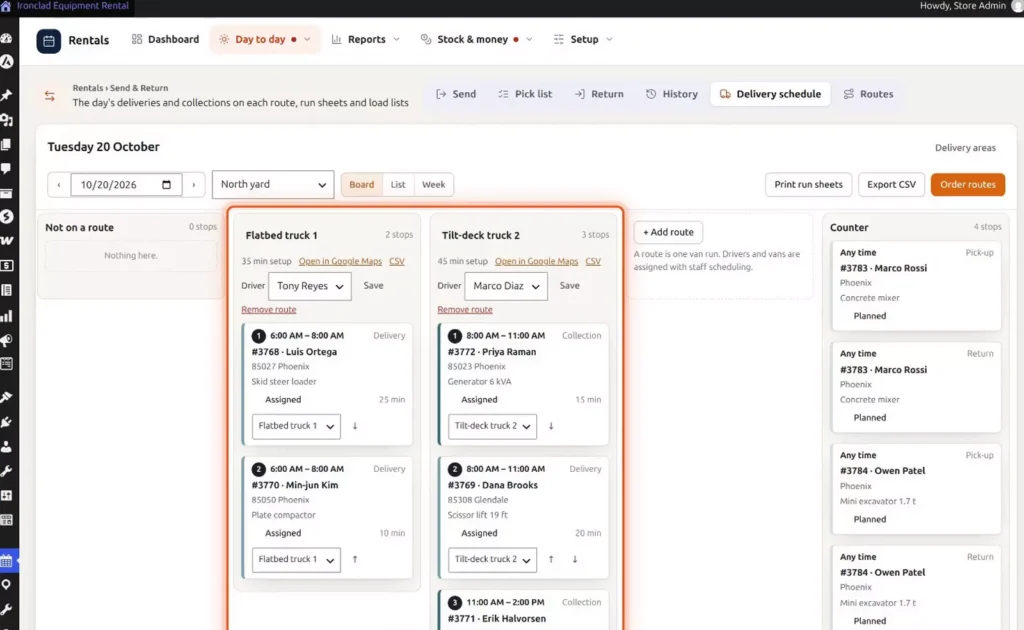
Delivering with more than one truck? Smart Routing, in Ultimate, plans each day’s routes and sends them to your drivers’ phones. In Rentals, Send & Return, the Delivery schedule tab shows the day as a board, with a column for each truck, its driver and its stops in order.
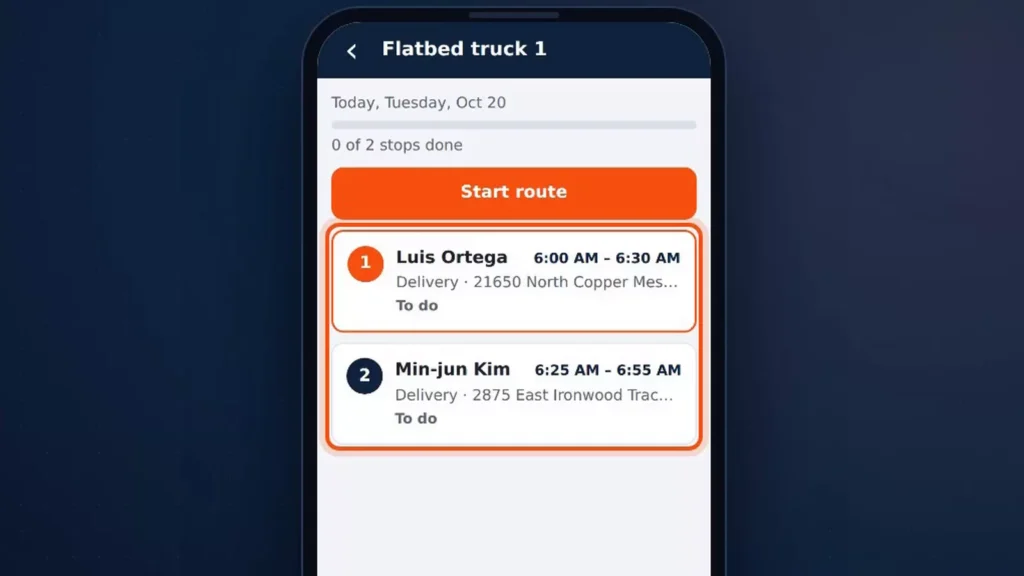
Each driver gets the route on their phone, with the day’s stops in order and a Start route button.
We have two videos on it: delivery routes in 2 minutes and the full Smart Routing tutorial.
Five tips for your equipment rental store
- Price for the job. Add four-hour, day, week and four-week rates, so a long job books online at a fair price. Price points come with Regular.
- Record every out and back. Record the hour meter, the fuel and photos every time a machine goes out and comes back. A dispute then starts from facts. Serial custom fields come with Regular.
- Leave time between rentals. Leave time after each rental for cleaning, refueling and checks, with a Buffer After Booking in the free plugin. And service by the hour meter, not by memory, which takes the service schedules in Ultimate.
- Charge for delivery both ways. Set a delivery fee, charge collection separately, and never promise more stops than your trucks can make. This comes with Regular.
- Turn on extensions and late fees from day one, so a job that runs long is extended online, and a late return is charged fairly. Both come with Regular.
Recap, Magento 2 and Shopify
So that’s an equipment rental website: hourly, daily, weekly and four-week rates, a serial and an hour meter for every machine, ID checks, deposits and signed agreements, pick-up or delivery, three yards in one store, and with Ultimate, service by the hour meter and routes for every truck.
Rentals & Bookings is also available for Magento 2 and Shopify. Features differ by platform. This video shows the WooCommerce version.
Want us to do all the product data entry, search engine optimization, setup and design? We offer complete packages for that as well. Contact us and tell us what you need.
Which edition do you need?
Each edition includes the one above it. Regular, Pro and Ultimate are one-time purchases with a year of support and updates, and the plugin keeps working whether or not you renew.
| Edition | What it adds | Price |
|---|---|---|
| Lite | The Equipment Rental theme, machines as products with stock, hourly or daily prices, a buffer after each booking. | FreeNo time limit |
| Regular | Price points, the date search, serials and hour meters, Send & Return, pick-up and delivery, Delivery by Distance, extensions and late fees. | $199Code 150regular, list $349 |
| Pro | ID checks, refundable security deposits, signed rental agreements, free installation. | $299Code 200pro, list $499 |
| Ultimate | Multi Location Inventory, Request a Quote, Maintenance & Inspections with damage charges, Smart Routing, Live Chat, AI Chatbot & Help Desk, free installation. | $499Code 300multi, list $799 |
Try the Ironclad demo
Book the mini excavator yourself, then see which package fits your yard.
Where to go next
- How to start an equipment rental business, for the business side before the website.
- How to add equipment rentals to a WooCommerce store, if you already sell online.
- Serial numbers and serial custom fields docs, for the hour meter setup.
- Getting started with maintenance and service schedules.
- Delivery routes in 2 minutes, or the full Smart Routing tutorial.
FAQ
No. It’s a plugin you install on your own WordPress and WooCommerce site, so you choose the hosting and keep the store, the orders and the customer list. You do the setup yourself, or choose Pro or Ultimate, which include free installation.
Yes. WordPress and WooCommerce run the store, and Rentals & Bookings adds booking by date, stock per day and the rental desk. The free Equipment Rental theme gives you sample machines, page sections and a homepage to start from.
Yes. The free plugin sets an hourly or a daily price. Regular adds price points, such as four hours, a day, a week and four weeks on the same machine.
Yes, with Regular. Add the Engine hours field set to your machines and staff record the hour meter when each one goes out and comes back. Service schedules that run from the hour meter need Ultimate.
Yes, with Multi Location Inventory, which is included in Ultimate. It keeps the stock at each yard, and customers choose where to pick up.