
Equipment rental software
Equipment rental software you buy once and run on your own site
Rentals & Bookings tracks each machine and tool by serial number, prices jobs by the hour, day, week or month, and takes bookings on your own website. It’s a WooCommerce plugin or a Magento 2 extension with no monthly fee, on hosting you control.
Try the equipment demo (opens in a new tab)See prices
Equipment rental management software keeps track of what you own and when each unit is free, then handles the booking, the contract and the return. Most of it is a subscription the vendor hosts. Sales Igniter Rentals & Bookings is a licence you buy once. It runs on your own website, so bookings and customer records stay in your database.
The short version. On WooCommerce, Regular costs $199 once and covers serial tracking, barcode check-out and check-in, rates by the hour to the year, delivery fees and reports. Pro ($299) adds deposits, signed contracts and ID checks. Ultimate ($499) adds several yards, service tickets, driver routes and quotes. You supply the hosting and a WordPress or Magento site. If you’d rather not run a website at all, a hosted tool is the better buy.
What it does
What equipment rental management software has to do
Appointment booking tools fall apart on equipment: a machine has a serial, a service history and a return date that slips. The label on each card is the WooCommerce edition that includes it.
Availability by date
Stock is counted for every date, with turnover time held before and after each rental. Two customers checking out at the same moment can’t both take the last unit.
RegularEvery unit on record
Track by quantity or by serial. Each serial has a status, cost, date acquired and rental history, plus hour-meter, odometer or fuel readings and photos at send and return.
RegularRates that fit the job
Charge by the hour, day, week, month or year. Add seasonal prices, rules by rental length and late fees, or take part of the payment now and the balance later.
RegularCheck-out and check-in
A Send and Return desk with barcode scanning, pick lists and condition notes, and a record of who handled each item. Print QR or barcode labels from your serials.
RegularDeposits, waivers, contracts
Refundable deposits, required or optional damage waivers, and rental agreements signed online with a PDF and audit trail. ID uploads go through an approval queue.
ProDelivery and pick-up
Delivery areas, time slots and fees, including fees by road distance. Ultimate plans the routes and puts them on your drivers’ phones, with proof of delivery.
Regular, routes in UltimateSeveral yards or branches
Stock held at each location, transfers with shortage alerts, pick-up at one yard and return to another, and prices and reports by location.
UltimateService and repairs
Tickets with parts, labour and costs. Schedule service by days, rentals or meter hours. A unit sent for service stays out of stock until it’s fixed.
UltimateReports and an API
A dashboard of what’s going out, due back and overdue. Utilisation per product and per serial, an availability heat map, CSV exports and an API for bookings.
RegularThat’s the short list for equipment. The full feature list shows every feature by platform and edition, and Magento 2 and Shopify differ from WooCommerce in places.
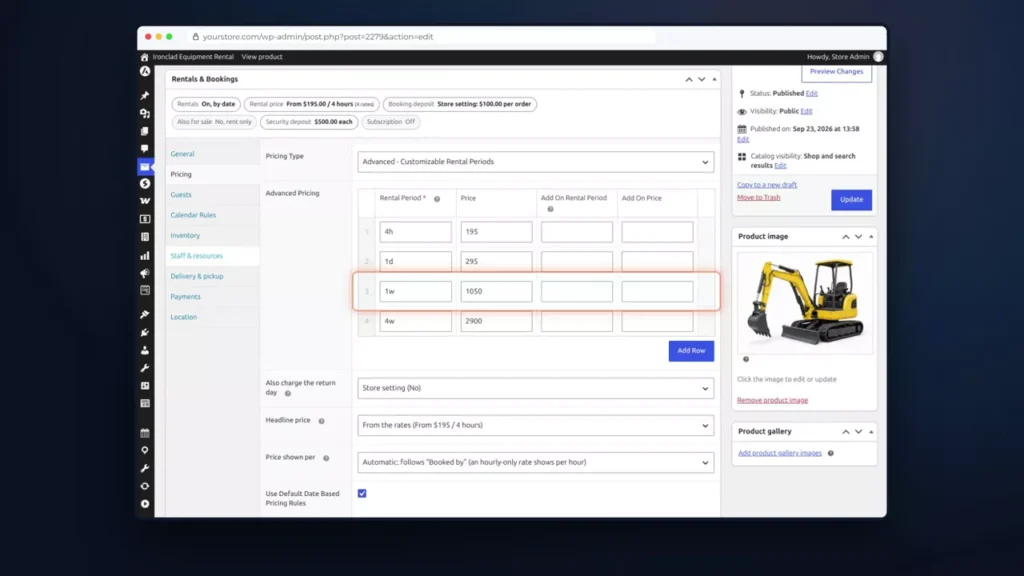
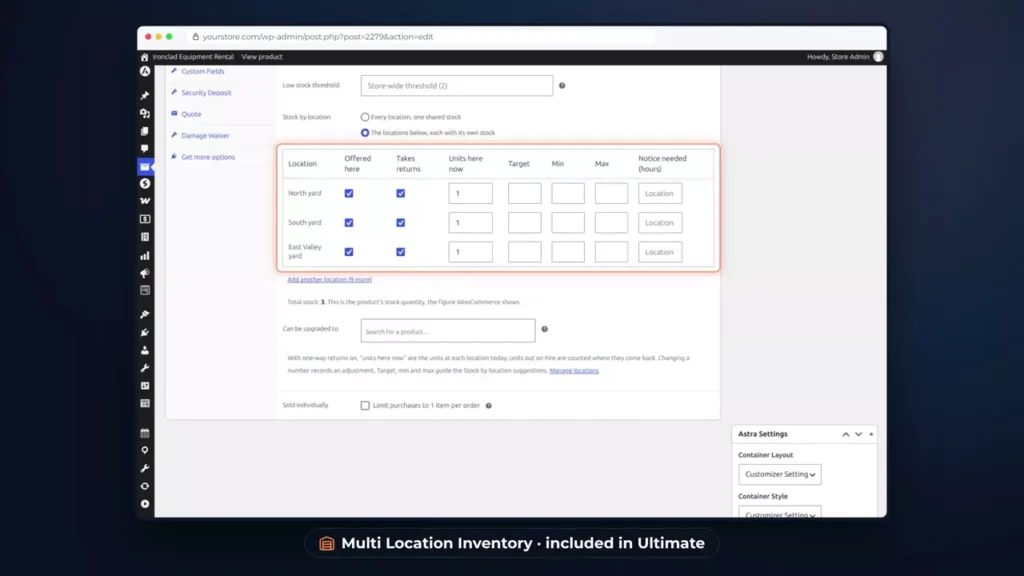
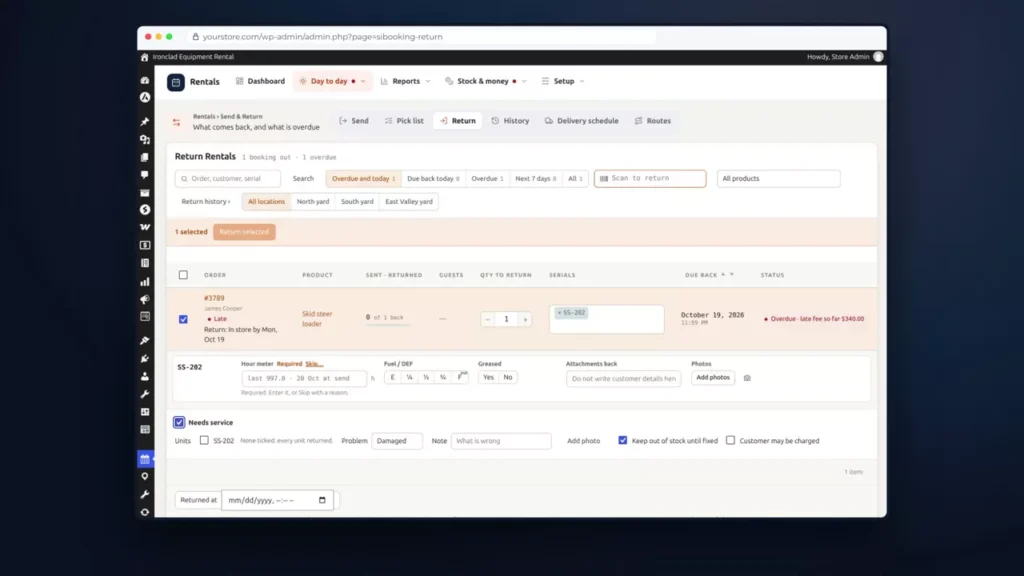
Live demo
See it on a working equipment rental store
Ironclad Equipment Rental is a made-up company with three yards, running on a real WooCommerce store. Book a mini excavator, then open the admin with one click and find your order. Change anything you like: the demo resets every night at 03:33 UTC. No sign-up and no card.
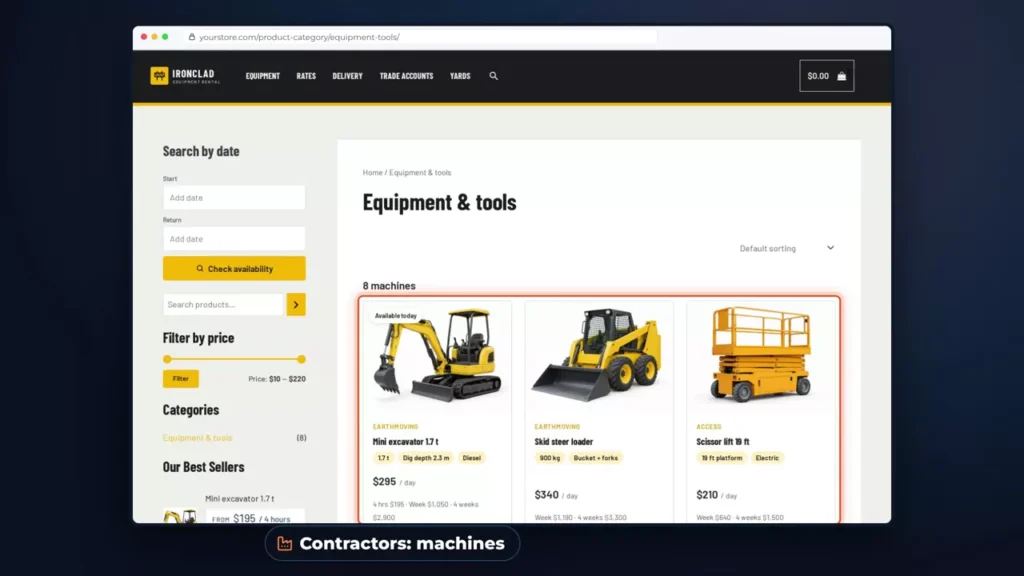
Open the Ironclad store (opens in a new tab)See all the demos
Self-hosted or hosted
Buy it once or pay every month
Self-hosting costs less and asks more of you. Hosted tools are the reverse.
Self-hosted: what you get
- One payment, then an optional yearly renewal for support and updates.
- No monthly fee, no charge per user or location, and no commission. Your payment gateway charges its usual fee.
- The source code, so you or any developer can change how it works.
- Bookings and customers in your own database, on your own domain.
- It keeps running if you stop renewing.
Self-hosted: what you take on
- Hosting. A standard WordPress host is typically $10 to $40 a month. Magento 2 needs more.
- Updates and backups. Most managed hosts handle both, but checking them is your job.
- A website: WordPress with WooCommerce, or Magento 2.
- A developer for anything the settings don’t cover.
Hosted: what you get
- The vendor runs the servers, updates and backups.
- Many include an online storefront, so you can start without a site of your own.
- Some include QuickBooks sync, GPS tracking or licence scanning.
- One company to call when something breaks.
Hosted: what you take on
- The bill runs for as long as you trade, and the vendor sets the price.
- Pricing often climbs with each location or user you add.
- Your data sits on the vendor’s servers, and leaving means exporting it.
- If you stop paying, you lose access.
Pro and Ultimate include free installation on your server, and on WooCommerce the free Equipment Rental theme gives you a store to start from. Our open source page goes through what self-hosting asks of you.
Cost
What equipment rental software costs over five years
These totals assume you renew every year. Renewing is optional, so they’re the most you’d pay us at today’s prices. Hosting is extra.
| Option | How it’s charged | Five-year total |
|---|---|---|
| Sales Igniter Regular, WooCommerce | $199 once, then $199 a year if you renew | $995 |
| Sales Igniter Pro, WooCommerce | $299 once, then $199 a year if you renew | $1,095 |
| Sales Igniter Ultimate, WooCommerce | $499 once, then $299 a year if you renew | $1,695 |
| Sales Igniter Regular, Magento 2 | $399 once, then $299 a year if you renew | $1,595 |
| Sales Igniter Ultimate, Magento 2 | $1,099 once, then $299 a year if you renew | $2,295 |
| Booqable Grow | $69 a month on yearly billing, before add-ons | $4,140 |
| EZRentOut Growth | $399 a month billed annually, with 4 users and 1 location | $23,940 |
| Quipli Core | $6,000 a year per location | $30,000 per location |
Five years of hosting at $10 to $40 a month adds $600 to $2,400, and more on Magento 2.
Compare like with like. Regular has no deposits, signed contracts, multi-location stock or maintenance, so for a business with several yards, Ultimate is the closer match to the hosted plans.
Three vendors that publish their prices, read on 6 November 2026: EZRentOut, Booqable and Quipli. On Booqable Grow, barcode scanning, the website builder and deliveries are paid add-ons, and extra locations need the Scale plan. Quipli says it offers special rates for multiple locations. Sales Igniter prices use the current discount codes shown in the next section. Vendor-by-vendor comparisons: EZRentOut, Booqable, Point of Rental and Rentman.
Editions
Editions and prices
Each edition is a one-time purchase with a year of support and updates, and each includes the one before.
| Edition | What it adds for equipment rental | Price | Yearly renewal, optional |
|---|---|---|---|
| Lite | Booking calendar, quantity inventory, daily and hourly rates and turnover buffers | Free, no time limit | None |
| Regular | Serial numbers with QR and barcode labels, the Send and Return desk, weekly to yearly rates, delivery fees, reports, and SMS and WhatsApp reminders | $199 with code 150regular (list $349) | $199 |
| Pro | Refundable deposits, signed contracts, damage waivers, ID checks, subscriptions and free installation | $299 with code 200pro (list $499) | $199 |
| Ultimate | Multi Location Inventory, Maintenance & Inspections, Smart Routing, Request a Quote & Hide Price, and Live Chat, AI Chatbot & Help Desk | $499 with code 300multi (list $799) | $299 |
| Edition | What it adds for equipment rental | Price | Yearly renewal, optional |
|---|---|---|---|
| Regular | Serial numbers, barcode send and return, rental rates and inventory reports | $399 with code 100hyva (list $499) | $299 |
| Pro | Contract signing, maintenance, order extensions, damage waiver and refundable deposits, and free installation | $699 with code 200hyva (list $899) | $299 |
| Ultimate | Multi Source Inventory and Request for Quote | $1,099 with code 300hyva (list $1,399) | $299 |
On WooCommerce, a small business with one yard usually needs Regular, or Pro for deposits and signed contracts. Several yards, service tickets or driver routes mean Ultimate.
Delivery by Distance is included from Regular on WooCommerce, or $49 if bought separately. You can also buy Maintenance & Inspections on its own for $99 instead of moving to Ultimate. Licences are per site.
Platforms
WooCommerce, Magento 2 or Shopify
Pick the platform first, because the feature set isn’t identical across the three.
WooCommerce
The lowest prices and the widest set for equipment. It installs into a WordPress site and works with your existing theme.
Delivery fees, driver routes, ID uploads, SMS and WhatsApp reminders and 16 rental themes are all on this platform.
See the WooCommerce pluginMagento 2
For several depots or countries, per-warehouse stock, B2B account pricing, or a catalogue in the tens of thousands of SKUs. Hyvä ready.
Maintenance comes in at Pro here. Delivery fees, driver routes, ID uploads and SMS reminders aren’t on the Magento 2 list, so check it first.
See the Magento 2 extensionShopify
An app billed monthly or yearly through your Shopify invoice, so the buy-once pricing here doesn’t apply.
A free plan covers 10 rental orders a month, and paid plans start at $19.99 a month with a 90-day free trial. Serial readings and photos at send and return aren’t in the Shopify app.
See the appCompare all three platforms feature by feature, or read Magento 2 against WooCommerce.
Is it for you
Who it suits, and who should look elsewhere
A good fit if
- You want customers to book and pay on your own website.
- You already have a WordPress or Magento site, or someone who can build one.
- You rent a mix: serialised machines alongside hand tools kept on simple quantities.
- You sell as well as rent, and want both in one cart.
Look elsewhere if
- Nobody on your team wants to look after a website, hosting or updates.
- You need QuickBooks sync or GPS tracking built in from day one.
- You want an ERP with accounting and purchasing in the same system.
What you rent
Equipment rental software by trade
Starting from scratch? Read how to start an equipment rental business, then use the free equipment rental contract template and rental pricing calculator.
Reviews
What rental owners say
Rated 5.0 from 24 reviews on our reviews page. Over 15 years of rental software development, and hundreds of stores rely on it.
“Our company does sound production and rentals. Before this software became available, we tried pretty much every SAAS option and other online rental solution out there hoping it would work for us… Once we found this one, all of our needs were filled.”
“Although it sounds simple the rental process is very complex. In our case we used it for audio video and lighting rentals and it worked great. The equipment we rent is expensive and we have to make sure we are protected.”
Getting started
From spreadsheet to first online booking
Start with the demo. You don’t buy anything until step 3.
- 1
Try the demo
Book something in the Ironclad store, then open the admin.
- 2
Pick platform and edition
Use the tables above, or tell us what you rent, your locations and how you price.
- 3
Install it
Pro and Ultimate include free installation. On Regular you install it yourself, or ask your web developer.
- 4
Load your stock
Import products and rental settings by CSV, or start from the Equipment Rental theme.
- 5
Take a test booking
Set rates, turnover time and serials, book a test order, then open it to customers.
FAQ
Equipment rental software questions
What is equipment rental management software?
It replaces the spreadsheet and the wall calendar with one system for stock, availability, bookings, deposits, contracts, check-out, returns and service. Rentals & Bookings does this inside a WooCommerce or Magento 2 store, so customers book and pay online and your staff work from the same records.
Is there free equipment rental software?
Yes. On WooCommerce, Rentals & Bookings Lite is free with no time limit and has the booking calendar, quantity inventory, and daily and hourly rates. Serial numbers and scanning at send and return start at Regular. The Shopify app also has a free plan for 10 rental orders a month.
Is there really no monthly fee?
On WooCommerce and Magento 2, yes. You pay once, and that includes a year of support and updates. Renewing after that is optional: $199 a year for Regular and Pro on WooCommerce, $299 for Ultimate and for Magento 2. You still pay your web host, your payment gateway and any SMS or AI provider you connect. The Shopify app is a monthly or yearly subscription.
What happens if I stop renewing?
The software keeps running on your site. You lose access to new versions and to our support.
Does it sync with QuickBooks or track machines by GPS?
Neither is built in. EZRentOut lists QuickBooks sync on its Premium plan and GPS and telematics integrations on its Enterprise plan, so a hosted tool may suit you better if you need them on day one. Serial readings and photos can be recorded over the API, so a developer can connect a telematics feed.
Can I run several yards or branches?
Yes, with Ultimate. On WooCommerce, Multi Location Inventory holds stock at each yard, with transfers, one-way rentals, and prices and reports by location. On Magento 2, Ultimate adds Multi Source Inventory. Neither charges per location.
Will it stop double bookings?
Yes. Stock is counted for each date, and hour by hour for time-of-day rentals, with turnover time held around each rental. If two customers check out at the same moment, only one gets the last unit. Staff can still book sold-out dates on purpose, with a warning and an oversold report.
Can staff scan barcodes?
Yes. Print QR or barcode labels from your serials, then scan at the Send and Return desk. A USB or Bluetooth scanner works, because it types the code like a keyboard.
Can I move over from spreadsheets or another system?
Products and rental settings import from a CSV file. Open bookings can be entered as manual bookings, or created over the API if a developer is moving a lot of them. If you’re coming from another system, ask us first and we’ll tell you whether it fits.
Do I need a developer?
Not to get started: rates and rental rules are all in the settings, and Pro and Ultimate include free installation. You’d want one for behaviour the settings don’t cover. The code is open, so any PHP developer can do that work, or we can.
Try it on a real store before you decide
Book a machine in the Ironclad demo and open the admin. No sign-up, no card and no sales call.
Try the equipment demo (opens in a new tab)Ask us if it fits
Ready to buy? See WooCommerce pricing or Magento 2 pricing.