
Skip to content
Sales Igniter
Sales Igniter
  • Features
    • Features
    • Reviews ⭐⭐⭐⭐⭐
    • Demo
      • Live Stores
      • Live Demo
    • Screenshots
      • Magento 2 / Adobe Commerce
      • WooCommerce / WordPress
  • Pricing
    • Magento 2 / Adobe Commerce
    • WooCommerce / WordPress
    • Magento 1.9.x / OpenMage
    • Web Hosting
  • Help
    • Documentation
      • Magento 2
      • WooCommerce / WordPress
    • Screencast
    • FAQ
    • Blog
  • Account
    • My Account
    • My Account (Alternate)
  • Contact
    • Contact Sales Igniter
    • Custom Project Quote Request
Search
Sales Igniter
Sales Igniter
Search
  • Features
    • Features
    • Reviews ⭐⭐⭐⭐⭐
    • Demo
      • Live Stores
      • Live Demo
    • Screenshots
      • Magento 2 / Adobe Commerce
      • WooCommerce / WordPress
  • Pricing
    • Magento 2 / Adobe Commerce
    • WooCommerce / WordPress
    • Magento 1.9.x / OpenMage
    • Web Hosting
  • Help
    • Documentation
      • Magento 2
      • WooCommerce / WordPress
    • Screencast
    • FAQ
    • Blog
  • Account
    • My Account
    • My Account (Alternate)
  • Contact
    • Contact Sales Igniter
    • Custom Project Quote Request

General

12
  • Quickstart Guide
  • Calendar Widget
  • Protected: Install and Updates Magento 2.2
  • Protected: Install and Updates Magento 2.3.x – 2.4.x Regular Version
  • Protected: Install and Updates Magento 2.3.x – 2.4.x Pro Version
  • Protected: Install and Updates Multi Source Inventory Pro
  • Protected: Install and Updates Rental Multi-Vendor Marketplace
  • Protected: Install and Updates Amasty RFQ Integration
  • Calendar Settings
  • Rental Settings
  • Installing A Specific Version
  • Uninstall or Disable

Content Management

6
  • Spreadsheet Mass Import / Export (CSV)
  • Rental Product Pricing
  • Adding Rental Products
  • Editing Text & Emails
  • Multi-Vendor Marketplace Setup
  • Multi Inventory Setup

Order Management

4
  • Rental Contracts
  • Order Editing
  • Processing Orders
  • Rental Order Extensions

Internationalization

1
  • Languages and Currencies

Installing Extensions

1
  • Installing Third Party Extensions

Troubleshooting

3
  • Theme Integration
  • Module Conflicts
  • Troubleshooting Guide

Programming Guide

1
  • Programming Notes

Version Release Notes

1
  • Release Notes

Reports

1
  • Utilization Report
View Categories
  • Home
  • Doc
  • Magento 2 Rental
  • Order Management
  • Rental Order Extensions

Rental Order Extensions

2 min read

Please note that this feature is only available in the Pro version 

General Settings #

The general settings are found in Rentals > Settings > Rental Order Extensions

You can configure if you want to allow or not rental extensions, and how long before the rental end date to allow an extension. 

Customer Side #

The customer will be able to go into their account area and see the Extend Order link if their rental order qualifies for extension. In order for the link to show up the following criteria needs to be met: 

    a) Today’s date needs to be after the start date
    b) Today’s date needs to be before the end date – config days before end of rental setting
    c) Order can have no products returned
 
Here is how it looks on the customer side order page for where they can extend the rental: 

 
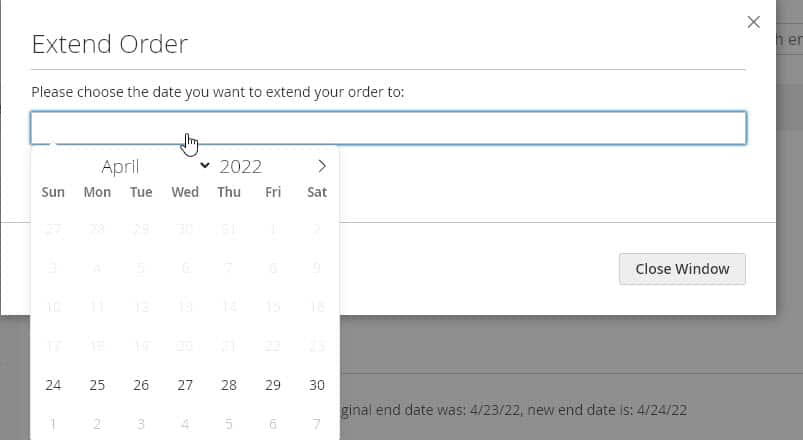
Here is a screenshot of the extend order choose date popup: 
Notes #

1) No shipping fee will be charged on rental extension orders, the order type will be set to virtual in order for this to happen.
 
2) Inventory is checked before the customer can choose the rental order extension date, if there is not enough inventory then the rental extension order date won’t be allowed.
3) Order notes will be added to the order on the original order showing what the new rental extension end date is, and an order note is also added to the rental extension order so that it’s easier to track which orders are for rental extensions. 
 
4) The original rental order inventory end date will be extended so in the reservationorders table there will not be a second entry for the rental extension order. Also the Rental extension order will not show start and end dates in the Sales > Orders grid since only the original order gets the inventory reserved. 

Extending Orders As Admin #

There is no button for extending rentals on the admin side, however you can instead “login as customer” in order to extend their order for them if needed. For more information about how to login as a customer please see the official documentation. 

What are your Feelings

  • Happy
  • Normal
  • Sad

Share This Article :

  • Facebook
  • X
  • LinkedIn
  • Pinterest
Processing OrdersRental Contracts
Table of Contents
  • General Settings
  • Customer Side
  • Notes
  • Extending Orders As Admin

Rental Newsletter

Learn about the latest rental industry news, features added to our rental system, and receive special offers. Subscribe now.

loader

OVERVIEW
Home
Features
Pricing
Live Stores
FAQs
Blog
Contact Us
INDUSTRIES SERVED
Audio Video, Computer, Electronics
Baby Equipment Rental System
Car Reservation Software
Clothing, Dress, Purse Rental
Heavy Equipment, Construction
Hotel, Property & Vacation Rentals
Inflatable Bounce House
Movies, Video Games, Board Games
Party & Event Rental Software
Sporting Equipment
Watches and Jewelry Rental
LATEST UPDATES
How to Start An Equipment Rental Business
Rental Pricing: How Much Should I Charge To Make The Most Profit?
How to add Bookings and a Rental Calendar to a Magento 2 website?
10 Brilliant Rental Software Apps You’ll Love
ADDITIONAL LINKS
Terms & Conditions
Free Rental Contract Agreements
Free Rental Pricing Calculator
Awesome Rental Business Resources List
Affiliate Program
Social Media

Copyright © 2026 Sales Igniter. All Rights Reserved

Loading...

Insert/edit link

Enter the destination URL

Or link to existing content

    No search term specified. Showing recent items. Search or use up and down arrow keys to select an item.