
Table of Contents
- Version 1.2.214 Released October 5, 2026
- Version 1.2.211 Released September 30, 2026
- Version 1.2.210 Released September 29, 2026
- Version 1.2.209 Released September 28, 2026
- Version 1.2.208 Released September 25, 2026
- Version 1.2.206 Released September 24, 2026
- Version 1.2.205 Released September 23, 2026
- Version 1.2.204 Released September 22, 2026
- Version 1.2.202 Released September 21, 2026
- Version 1.2.200 Released September 17, 2026
- Version 1.2.198 Released September 13, 2026
- Version 1.2.197 Released September 11, 2026
- Hyvä Compatibility Extension 1.0.0 Released September 11, 2026
- Version 1.2.192 Released May 4, 2026
- Version 1.2.178 Released August 15, 2025
- Version 1.2.166 Released February 21, 2025
- Version 1.2.156 Released September 27, 2024
- Version 1.2.151 Released July 15, 2024
- Version 1.2.148 Released July 1, 2024
- Version 1.2.148 Released May 10, 2024
- Version 1.2.138 Released October 16, 2023
- Version 1.2.135 Released August 18, 2023
- Version 1.2.131 Released July 6, 2023
- Version 1.2.120 released April 18, 2023
- Version 1.2.118 released March 28, 2023
- Version 1.2.117 released March 27, 2023
- Version 1.2.110 released November 21, 2022
- Version 1.2.107 released October 17, 2022
- Version 1.2.96 released August 16, 2022
- Version 1.2.76 released June 10, 2022
- Version 1.2.64 released May 6, 2022
- Version 1.2.59 released April 27, 2022
- Version 1.2.51 released March 28, 2022
- Version 1.2.50 released March 25, 2022
- Version 1.2.36 released February 16, 2022
- Version 1.1.20211104 released November 4, 2021
- Version 1.1.20210201 released February 1, 2021
- Version 1.1.20201026 released October 26, 2020
- Version 1.1.20200820 released August 20, 2020
- Version 1.1.20200612 released June 12, 2020
- Version 1.1.20200518 released May 17, 2020
- Version 1.1.20200201 released February 1, 2020
- Version 1.1.20200105 released January 5, 2020
- Version 1.1.20191222 released December 22, 2019
- Version 1.1.20191213 released December 12, 2019
- Version 1.1.20181022 released October 22, 2018
- Version 1.1.20180918 released September 18, 2018
- Version 1.0.20180821 released August 21, 2018
- Version 1.0.20180724 released July 24, 2018
- Version 1.0.20180611 released June 11, 2018
- Version 1.0.20180514 released May 14, 2018
- Version 1.1
- Version 1.0 Stable
- Magento 2.x Beta
Each entry is tagged:New featureImprovementFixOptimizationChangeCompatibilityUpgrade noteKnown limitation
Release notes for the core Rental Booking extension (salesigniter/releaserental2), and for the smaller add-ons that do not have a page of their own. These extensions have their own release notes:
- Rental Booking (core) – this page
- Deposits & Damage Waiver Release Notes
- Maintenance Release Notes
- Multi Source Inventory Release Notes
- Rental Contracts Release Notes
- Rental Order Extensions Release Notes
- Request for Quote & Hide Price Release Notes
- Subscriptions & Memberships Release Notes
Version 1.2.214 Released October 5, 2026 #
- Upgrade noteThis is a big update: read these notes before updating a live store, and try it on a copy first. Version 1.2.212 was not released on its own; its security fixes are part of this version. Update the extensions from the same release together:
composer update salesigniter/*, thenrm -rf generated/code/SalesIgniter generated/metadata,bin/magento setup:upgrade,bin/magento setup:di:compile(production mode), a full static content deploy withpub/staticcleared first,bin/magento indexer:reindex catalogsearch_fulltextandbin/magento cache:flush - New featureBooked by: days or nights. Hotel / Property Rental Mode is now Date-only rentals are booked by, the first field of Stores › Configuration › Sales Igniter › Rental › Turnover Time and Rental Start Padding, with three choices: Days: returned on the last day, entire return day is booked (the old No), Days: can go out again on the return day (new) and Nights: same-day check-out and check-in (the old Yes). With the new middle choice a rental of two days or more holds the item only until the start of its return day, so the next rental can start that day. Your setting is kept, and orders placed before this update keep their whole return day. See Rental Settings
- New featureEach product can choose how it is booked. The product’s Enable Hotel Mode is now Booked by, the first field of Calendar Rules on the Rental tab: Store setting, which names what the store uses, or one of the three choices. No product changes how it books: one that followed the store shows Store setting, Yes shows Nights and No shows Days: returned on the last day. See Adding Rental Products
- New feature"Also charge the return day" per product. The store setting stays under Pricing; a product can now follow it or choose No or Yes in the Rental tab’s Pricing section. Existing products follow the store. Nights are charged per night either way
- ImprovementNights say nights. A product booked by nights shows "/ night", "Per night" and "7 Nights" on its price card and price list, and "2 nights" in the calendar’s summary; GraphQL’s price breakdown says "1 night" / "2 nights". Products booked by days are unchanged
- Upgrade noteA product CSV import of
sirent_hotel_modenow takes the choice names, as the product form shows them (comma included), or Store setting, instead of Yes / No; an exported file imports back - New featureSearch Styler. Stores › Configuration › Sales Igniter › Rental › Search Styler, right under the Calendar Styler, sets how every Rental search widget of a store view looks, with a live preview on desktop and phone: the layout, which fields show and in what order, the heading, the button text, each field’s label, the calendar skin, the corner radius, the shadow and seven colours (with a contrast warning for the button text), and whether the results page shows the search form. The widget defaults that were under Search & Results moved here with their saved values: there is nothing to migrate, and a widget’s own settings still win
- ImprovementThe search’s calendar is the guided one: it shows the Start Date and End Date steps, says what to pick next, and has Start over and Done buttons, in the Calendar Styler’s skin
- ImprovementPhone pop-ups stay by their field. On a phone the date pop-up of the Rental search widget and of the Rental Calendar widget opens right under its field when the screen has room, and only otherwise as a sheet at the bottom of the screen. Product pages do not change
- ChangeThe Rental Calendar widget opens as a pop-up. It shows a "Select your dates" field that opens the calendar on a click, like the Rental search widget. To keep the calendar open in the page, edit the widget and set its new Date picker setting to In line (in a directive, add
picker="inline"). A store on Separate Date Pickers keeps its two date fields - ChangeOne pricing engine everywhere. Rental prices are now worked out by the same pricing engine the WooCommerce and Shopify editions use. The product page, the cart, checkout, the admin create-order screen, configurable and bundle lines, the rental search and GraphQL all price the same way, so the price a customer is shown is the price the cart charges. The engine ships inside the rental extension: there is nothing extra to install
- ChangeSome rental prices change, on purpose. The end date picked on the calendar is the day the item comes back, and it is no longer charged: 1 → 3 March is 2 days (it was 3), and a same-day rental is 1 day; the day count in the calendar’s summary and on the rental search’s cards says the same. To keep charging the return day, set Also charge the return day to Yes (Stores › Configuration › Sales Igniter › Rental › Pricing, or per product). Add to price calculation number is retired: a store that used
1dthere sets Also charge the return day instead. Rentals with times are charged for the time booked - ChangeA month is 30 days, and long rentals use the cheapest mix of your price points. Special pricing periods apply to the part of the rental inside the period (a discount only when it makes the price lower; a fixed amount is per charged day). Catalog price rules apply once, on the rental’s total, and quantity price bands use the line’s quantity on every path, configurable rentals included
- Upgrade noteSee what changes before going live.
bin/magento salesigniter:pricing:diff --changedprices sample rentals of your products the old way and the new way and lists every difference with its reason; it saves nothing. Orders already placed keep their price, and an extension of a rental is charged with the rules it was booked under. Use legacy pricing (deprecated), in the same Pricing settings, switches back to the old calculation while you compare - New featureRental search. A results page lists only the rentals that are free for the dates searched (and the quantity, a place or a branch), with the total for those dates on each card, sorted by Recommended, Price or Name. It is on by default at
/rental-searchand stays in the full page cache. Settings: Stores › Configuration › Sales Igniter › Rental › Search & Results - New featureRental search widget, a date bar for any CMS page, block or Page Builder area (Content › Widgets), on Luma and Hyvä. Searched dates carry through to the product page. The older Rental Calendar widget keeps working
- New featureSearch near a place or at a branch. Products get location fields on the Rental tab, Multi Source Inventory sources act as branches, and a branch chosen in the search is the one the rental is booked at. Addresses are turned into coordinates offline first; Google is used only when you add a Google key
- New featureA map on the results page, off by default (Stores › Configuration › Sales Igniter › Rental › Maps & Locations), with a map and list side by side. OpenStreetMap is built in; a keyed tile provider or Google Maps can be set instead. Nothing is loaded from outside until the map is switched on, and a product’s exact pick-up point is shown only on the order
- New featureCategory and search pages can honour the searched dates (off by default): mark or hide the rentals that are not free for those dates, with a "Showing availability for …" bar and a Clear dates link. While it is on, the older session-based listing settings step aside, and category pages can stay in the full page cache
- Upgrade note
setup:upgradeadds the product attributes the search uses (the "From" price and four location fields). Reindex the search afterwards:bin/magento indexer:reindex catalogsearch_fulltext - New featureDeposit (Partial Payment): pay part now, the balance later. Checkout can offer "Pay in full" or "Pay part now" (a percentage, a fixed amount per unit or per order, or the first days of the rental). The balance is collected with a payment link, charged to the saved card, or paid at pick-up, and every balance is listed under Rentals › Balances. Customers see their payment schedule in My Account, in emails and on invoices. Off until you turn it on under Stores › Configuration › Sales Igniter › Rental › Booking deposit. See pay part now, the balance later, collecting and tracking balances and changes, refunds and cancellations
- New featureGraphQL for deposits and balances: the deposit choice in the cart, balances and payment schedules, for headless storefronts and back-office tools. See Booking Deposits & Balances
- Upgrade noteThis version needs Common 1.2.59, which composer installs with this update. On Hyvä the deposit parts need the Hyvä Compatibility extension 1.0.1. Holding back extensions and the security deposit while a balance is unpaid needs Rental Order Extensions 1.2.68 and Deposits & Damage Waiver 1.1.1
- FixProduct calendars show today’s availability, also on pages served from the full page cache. A cached page could offer days booked since, today after the Hour For Next Day cut-off had passed, or an old Next available date. The calendar now checks availability on every visit while the page stays cached
- FixCategory and search pages show today’s "Next Available" and "Available Today", with one request per page, while the page stays cached. They could be out of date for as long as the page was cached, and for up to an hour with the full page cache off
- FixA product’s own store hours apply everywhere: in the rental search, the cart’s date check, GraphQL and admin order create, not only on its product page. A product weekday left at 00:00:00 uses the store’s hours for that day
- FixStore-hours times left blank follow the store’s setting. A product saved at a store view with Hour For Next Day or its opening times blank overrode the store’s setting (a blank cut-off acted as midnight, so today was never offered). The upgrade removes the blank values already saved
- FixA store setting saved empty no longer hangs the page. A rental setting whose store value was empty or -200 (from
bin/magento config:set, an SQL import or an old upgrade) made the page that read it ask for it again and again until PHP ran out of memory. Such a value now reads as the setting’s default (no turnover, no limit, off); products set to Use Config Settings still follow the store - FixThe last unit can no longer be sold twice. Two checkouts at the same moment could both book the last available unit. Checkout now waits its turn per product (up to 15 seconds) and is refused with a clear message if the unit has gone
- FixDated prices on category pages are cached per date range: the first visitor’s "Price for Selected Dates" was served to everyone, so the category cache used to have to be switched off
- FixConfigurable rentals price consistently: in a cart with a configurable rental and other rentals each line uses its own dates, and catalog price rules are no longer applied twice on the product page
- FixAn order line whose quantity was cancelled in the order editor no longer stops the rest of the order from reserving stock
- FixGraphQL
cart.itemsworks for carts holding rental lines (it failed with "Product "sirent" type is not supported"); rental lines come back asRentalCartItemwith their dates. See Reading a Cart with Rental Lines - FixFresh installs get the Single Day Mode product attribute, and default to the Popup Range Picker as documented
- FixHyvä: Add to Compare and Add to Wish List work again on rental products in category, search and widget lists
- FixA product list placed in a CMS page or block no longer fails with "Call to a member function setIsBottom() on false" on a page whose Rental Calendar widget shows the time grid; the list shows without a bottom toolbar
- FixBooking deposits: balance reminder emails (the day before, on the day, and card expiring) are queued again; the reminder step failed with a database error in 1.2.213
- FixSecurity. Prices, buyouts and availability are decided on the server: cart options only the extension may set are removed from storefront add-to-cart, reorder and GraphQL requests; a buyout is honoured only when buyout is switched on with a price; another order’s reservation is moved only for an extension of the customer’s own order. Stored data is read safely, eight admin pages check their own permission, price calculations on public pages are bounded, and the rental orders report handles its filter values safely
- Upgrade noteFor theme developers: the storefront date endpoints
salesigniter_rental/calendar/changeglobaldatesandsalesigniter_rental/ajax/changedatesonproductsaccept only a POST with a form key. The extension’s own calendars already send it; custom theme code that calls them by GET or withoutform_keymust be updated - ImprovementWorks with a strict Content Security Policy: the extension’s inline scripts carry a nonce, so they keep running with inline scripts switched off
- ImprovementThe reservations table gets proper column types and indexes for faster availability reads. The upgrade rebuilds that table, which takes a while on a large store: plan
setup:upgradeoutside busy hours. Rental price rows of deleted products are removed - ChangeThe extension logs on its own channel: lines read
salesigniter_rental.WARNING(wasmain.WARNING), in the same log files - ChangeThe Reduce overhead on inventory tables setting is removed. Nothing read it any more, so nothing changes
- Upgrade noteCart Dates is discontinued. If
salesigniter/cartdatesis installed, remove it (composer remove salesigniter/cartdates, thenbin/magento setup:upgrade). Composer refuses to install this version next to Cart Dates 1.0.7 or older - Upgrade noteNew text is in English; the other languages show it in English until it is translated
- Upgrade noteAlso released: Common 1.2.59 (
salesigniter/releasecommon2), required by this version. It adds the shared payment layer that booking deposits use to charge a saved card; accepts Request for Quote and Subscriptions & Memberships licence keys on their licence screens; gives Booked by its choices back, and clears Also charge the return day, whensalesigniter:Restore:Attributes/salesigniter:Remove:Attributesswitch the rental fields on or off; and compiles on stores without Stripe, ParadoxLabs TokenBase, Mollie or Magento_InstantPurchase - Upgrade noteAlso released: Hyvä Compatibility 1.0.1 (
salesigniter/hyvarental): the booking deposit parts on Hyvä (the product page line, the Pay in full / Pay part now choice in the cart, the payment schedule in My Account; Hyvä Checkout support is beta) and translations in 19 languages. Requires Rental 1.2.213 or later - Upgrade noteAlso released: Purchase Rentals 1.2.53 (
salesigniter/releasepurchaserentals2): checkout failed with "error on server" on PHP 8.2 or later; a purchase is tied to the customer’s own order and the right product (security); its three product fields get their own "Purchase Rentals" section on the product form. Requires Rental 1.2.213 or later - Upgrade noteAlso released, with translations in 19 languages: Bookings Grid 1.0.3, Pickup and Dropoff Dates 1.2.6, Mageplaza integration 1.0.1, PDF Serial 1.2.121, Order Editor integration 1.2.65 (Pro) and Custom Vendor PDF 1.2.66 (marketplace)
- Upgrade notePickup and Dropoff Dates 1.2.7 now requires Rental 1.2.213 or newer. Stores on an older Rental keep 1.2.6 until they update Rental.
Version 1.2.211 Released September 30, 2026 #
- ImprovementConfigurable rental products ask for their options first. Until the customer chooses the options (a colour, a size), the calendar says First select product options to choose your dates instead of saying no dates are available, and it shows the chosen product’s availability as soon as the options are set. A bundle whose options still need choosing says the same. On every date picker, on Luma and Hyvä
- FixOn Luma, choosing a colour or size swatch on a configurable rental product now updates the calendar to that product’s availability
- FixProducts whose own calendar setting was left at No from older versions now follow the store’s date picker setting.
- ImprovementThe one-time conversion of stored rental dates is safer on large stores. It runs in small batches, carries on where it stopped if it is interrupted, and says what it is doing in the admin’s System Messages: its progress while it runs, a warning if it stops making progress (usually because cron is not running), and a confirmation when it is done
- Upgrade noteIf your store was upgraded to a version between 1.2.196 and 1.2.210 without cron running, the date conversion is still waiting and the admin now tells you so. Start cron, or run
bin/magento salesigniter:rental:migrate-dates
Version 1.2.210 Released September 29, 2026 #
- ImprovementThe first available date and time are worked out the way the cart checks a booking. Where the calendar opens, the Next available line and the earliest start the cart accepts now all come from one answer that respects turnover, existing bookings, closed days and closures, store opening hours, padding and the minimum rental period. The date and the time used to be worked out separately, so the calendar could offer a time the cart then refused, or a time that had already passed. It is also about twice as fast
- New featureNext available is back on the product page. The pricing card shows the first date a product can be rented from, with the time for products rented by the hour, when Show next available date is on. The date is written in the format chosen under Rental Date Output Format, the way the cart shows it
- FixTurnover set for a store view is used for that store view’s bookings, including orders created or edited in the admin and reservations made later, on invoice or by the scheduled task
- FixThe Minimum and Maximum Rental Period are counted the way the calendar counts them: whole days count both the first and the last day, hourly rentals count the minutes, and hotel mode counts nights. The cart used to refuse the shortest rental the calendar offered (two days with a two-day minimum), accept a day more than the maximum, and refuse some hourly rentals as too long
- FixClosures that repeat every week are greyed out on every calendar (In-line, Popup, Separate and Previous Date Picker, on Luma and Hyvä), in the GraphQL calendar, in listing availability and in the iCal feed. A closure only blocks rentals that start or end on it: the day before is bookable, a rental may run through the closed day, and a closure with hours blocks only those hours. A closure used only for pricing no longer closes the calendar
- FixTurnover shorter than a day is counted in exact minutes. A 90-minute turnover with a 60-minute time increment used to count as 120 minutes, so after a rental ending at 10:30 the calendar offered 12:00 and the cart refused it. The time slots also leave room for the new rental’s own turnover, so the calendar no longer offers a time the cart refuses
- ChangeThe In-line and Popup Range Pickers no longer repeat the step name in a heading line at the top of the calendar; the steps above it already show where the customer is
- Upgrade noteBookings made before this update keep the turnover times they were saved with
Version 1.2.209 Released September 28, 2026 #
- New featureReady for Request for Quote. The rental extension works with the new Sales Igniter Request for Quote extension, sold separately: rental products can be quoted with their dates, prices can be hidden for chosen customers, a sent quote can hold the stock it offers, and reports link to the quote. The old Amasty integration code is no longer part of the rental extension
- ChangeNew installs start with the Popup Range Picker. Stores that are already installed keep the calendar they use today
- FixWith the Previous Date Picker on a Luma store, the price for the chosen dates now shows on the product page. It was worked out but stayed hidden, so only the price grid was visible. Until both dates are chosen, the page now says Select both dates to see the price.
- FixThe Previous Date Picker’s calendar icon sits inside the From and To fields on Luma, on the product page and in the Pick your rental dates sidebar. It used to drop below the field
- FixTurnover time before and after a booking is shown correctly on the calendar. The before and after times were swapped, and could be added twice
- FixSingle day mode on the Previous Date Picker quotes a price again, and the Rent button becomes available once a day is chosen
- FixOn a Hyvä store using the Previous Date Picker with separate date and time fields, choosing a date no longer shows No Times Available in a loop
- FixEvery rental line of an order reserves its stock with the right quantity, including the parts of a bundle, and an order line without dates no longer stops the reservation with an error
- FixProduct pages that can show the out-of-stock pop-up are served from Magento’s full page cache again
- FixA global calendar widget set to a fixed rental length no longer breaks the page it is on
- FixThe price and availability requests a product page makes answer with a clear message, instead of a server error, when the product does not exist or is not a rental
- ImprovementOption prices on category and search listings are formatted like every other price in the store, and follow hidden prices
- ImprovementEvery text in the extension can be translated, and all 34 bundled languages are complete. Brand names are no longer translated: the German translation had turned “Sales Igniter” into “Verkaufszünder”
- CompatibilityNeeds Sales Igniter Common 1.2.57, which moves the licence check, the uninstall tool and the shared GraphQL helpers into Common. Composer installs it with this update
Version 1.2.208 Released September 25, 2026 #
- New featureMark rentals as sent automatically. For shops whose own system sends the rentals, such as a warehouse app or a courier integration: set Auto mark rentals as sent instead of manually sending them to Yes under Rentals > Settings > Send and Return, and each rental is marked as sent when its start date and time arrive, exactly as if staff had pressed Send. The quantities, Send History, the Magento shipment and, when Sales Emails > Shipment is enabled, the customer’s shipment email all follow as they do for a manual send. Only rentals that start after you switch it on are marked sent, so older rentals that were never sent stay as they are. It only marks orders whose status is in the section’s Order Statuses allowed list and not in the new Order statuses that are not auto marked as sent list, which holds Canceled by default; rentals on those orders wait for a manual send. It is off by default and can be set per website
- ImprovementSend History has a Sent By column (Automatic or Staff), the Send Rentals screen shows when automatic sending is on, and the GraphQL API’s
RentalReservationhas asent_byfield - ChangeThe Send Rentals settings section is now called Send and Return. Your settings in it are unchanged
- ImprovementThe License panel under Rentals > Settings > License now tells you where to find your license keys: My Account > Licenses on rentalbookingsoftware.com. It used to point to your order email
- FixA rental’s ship date is now recorded when it is sent. It was only written to Send History, so the ship date in the GraphQL API was always empty, the Serial Number report had no start for a unit’s rental, and Reserve inventory until the item is returned never counted units that were overdue. Updating fills it in on rentals already sent, from their Send History
- FixA product’s Disable Shipping setting is now respected when rentals are sent. Sending checked the quantity instead of the product, so a Magento shipment could be created for a product with shipping disabled, or left out for one that ships
- Known limitationAutomatic sending does not assign serial numbers, because it cannot know which units your other system sent. Units of serial-tracked products can still be returned by quantity, or by picking their serials on Return Rentals
- Upgrade noteRun setup:upgrade. It adds one column to the send history table and fills in the ship date of rentals already sent. If you use Reserve inventory until the item is returned, units that were sent, are past their return date and have not come back now count against availability, as that setting describes; before this version they were never counted. Automatic sending runs from Magento’s cron every five minutes, so the cron must be running; a rental is marked sent at the first run after it starts
Version 1.2.206 Released September 24, 2026 #
- New featureSerial custom fields: record what each unit reads when it goes out and when it comes back. Group the things your staff check into field sets – an odometer or hour meter, the fuel level, a yes / no check such as "cleaned", a note, photos – and give them to the products they suit, or start from one of 14 ready-made sets for vans, e-bikes, plant, boats, generators, cameras, drones, party equipment and more. Send Rentals, Return Rentals and Scan Returns then ask for them unit by unit. A meter can never go backwards unless staff say it rolled over or was replaced, the last value is shown as a hint but never filled in, and a required field can always be skipped with a reason when a gauge is broken. See Serial Custom Fields and Field Sets and Recording Readings and Photos at Send and Return
- New featureSerial photos. Take them from a phone or tablet at send and return, or add them on the unit’s own page. They are private evidence and are never shown to customers: stored in a private folder or in Amazon S3 or any S3-compatible service, with a test button that also checks the web server keeps the folder private, an optional retention period and a "keep as evidence" flag that the retention period never touches
- New featureEvery serial has a page of its own, with its details, its photos, the current value of each field, what its meters have counted in their lifetime, and a history of every send, return, inspection and service with what was recorded at each. Readings are never overwritten: a mistake is corrected or voided with a reason, and the original stays visible with who changed it. See Serial History, Corrections and Voids
- New featureThe Serials grid, under Rentals > General > Serials. Every serial of every product in one list: search by serial, product, SKU or order number (a barcode scanner works in the search box), status tabs with counts, filters, the order each unit is out on and its last movement. Select units to print QR code or C39E barcode labels as a PDF, with or without the product name, to add or turn off a field set, or to delete them. Deleting asks first, names the readings and photos that go with the units, and never removes one that is out on a rental or held by a maintenance ticket. See The Serials Grid, and the Serials Quickstart Guide for when to track a product by serial number rather than by quantity
- New featureAdd and edit a serial without opening its product. The top of each serial’s page holds its code, status, date acquired, cost, the order it is assigned to, its source on a Multi Source Inventory store, and notes, and Add serial adds a unit to any rental product that uses serial numbers. See Adding and Editing a Serial
- New featureUsage report: how far each unit went. Group the Usage report by Serial custom fields to see the miles or hours each unit, and each product, did per rental and in total, which units work hardest, and the lifetime and current reading of every meter. Choice and yes / no fields show how often each answer was recorded. A new Usage link on every serial opens the report on that one unit. See Usage Report: Serial Custom Fields
- New feature"Rental usage and photos" on the order screen shows what each unit did on that hire: the miles or hours, the fuel out and back, the checks at return and the photos. It is for staff only and never reaches the customer. See Rental Usage and Photos on the Order
- New featureGraphQL for serial custom fields, readings and photos, so a handheld app, a telematics feed or a warehouse system can record readings and photos, send and return with them, return by scan and read usage back. See Serial Custom Fields, Readings & Photos
- New featureA License panel under Stores > Configuration > Sales Igniter Rental > License. Enter your license key (find it in My Account > Licenses) and save: it is activated for this store with rentalbookingsoftware.com, and the panel shows the product, the expiry date, the days left and the sites using the key, with a renewal link when it has expired or is within 30 days of doing so. The license switches nothing on or off in the store; it is the same key your updates are downloaded with
- New featureUninstall with Magento’s own command.
bin/magento module:uninstall --remove-datanow removes the extension together with its data: every rental table, the rental columns on Magento’s quote and order tables, the rental product attributes, and the extension’s settings, permissions and scheduled jobs. Rental products are turned into simple or virtual products and switched off rather than deleted, and orders are not touched.bin/magento salesigniter:Uninstallprints the exact command for your store. See Uninstall or Disable - ImprovementThe admin order calendar shows booked and closed days again. When creating or editing an order, a day that cannot supply the quantity is shown in red with "N of M available", and a closed weekday or excluded date is striped. Staff can still choose them, so an overbooking remains a deliberate decision rather than an accident
- FixThe admin order calendar’s requests now require an admin login. The four requests behind the date pickers on the admin order screens – availability, price, and the two "Change All Dates" calls – were answered for anyone who knew the address, without an admin session, and one of them changed the admin’s order quote. They now need a signed-in admin with permission to create or edit orders
- Fix"Change All Dates" now changes rental bundles too. On the admin order screens, a bundle line kept its old dates while every other line moved. Bundles with rental dates are now reconfigured with the rest, and their selections follow them
- FixSending or returning a serial changed the same code on every other product. Sending unit "UNIT-1" of one product marked every other product’s "UNIT-1" as out on that rental, and returning it marked them all available, including one genuinely out with another customer. Only the product’s own serial changes now
- FixSaving a product no longer deletes and re-creates its serials. Every save gave each serial a new internal id and cleared the rental and maintenance ticket it was attached to. Serials are now updated in place, and only the rows you removed are deleted
- ChangeA serial’s code can no longer be changed once the unit has been sent, returned or put on a maintenance ticket, because those records name the unit by its code. The product’s Serial Numbers grid, the serial’s page and the API all refuse it and explain why. To relabel a unit, add the new code as a new serial and set the old one to Retired
- ChangeThe Serial Number Report’s Edit serial button is now Complete History and opens the unit’s own page, and the admin says "stock" or "inventory" where it used to say "fleet"
- Upgrade noteRun setup:upgrade. It adds six tables for serial custom fields and photos, and gives every existing admin role that already uses the rental extension the new permissions – Serials, Serial custom fields, Serial page and Serial photos, including deleting photos – so nobody loses a screen. Review the roles of staff who should not have all of them, and see Serials Settings and Permissions. Photos are kept in
pub/media/salesigniter/serial-photosby default, with random file names and deny files for Apache and IIS, and are only ever shown in the admin. On nginx, which ignores those deny files, addlocation ^~ /media/salesigniter/serial-photos/ { deny all; }to the server block before staff start taking photos; Test the saved settings under Stores > Configuration > Sales Igniter Rental > Serials checks that the web server refuses the folder. A daily cron job at 03:20 clears unused uploads and the photo trash. In developer mode, deletegenerated/code/SalesIgniterandgenerated/metadataafter updating, or the admin order calendar answers with an error until they are rebuilt;setup:di:compiledoes this for you in production mode - Upgrade noteAlso released: Common 1.2.56 (
salesigniter/releasecommon2). Update it with this version.bin/magento salesigniter:Uninstallno longer deletes anything: it prints themodule:uninstallcommand for the Sales Igniter modules on your store and stops, so a script that still calls it halts instead of removing data.salesigniter:Remove:Attributesandsalesigniter:Restore:Attributes, which you run when disabling and re-enabling the extension, now also coversirent_minmaxhidecalendar; without it, product pages kept failing while the extension was disabled - Upgrade noteReleased the same day, and requiring this version: Deposits & Damage Waiver 1.0.2, Maintenance 1.2.52, Rental Contracts 1.2.64 and Multi Source Inventory 1.2.50, each with its own uninstall routine. Their changes are on their own release notes pages, linked at the top of this page
- FixAlso released: Purchase Rentals 1.2.52 (
salesigniter/releasepurchaserentals2). With Purchase Rentals installed, product edit pages could stop with an error on PHP 8.2 or later in developer mode. It also removes its three product attributes and its settings onmodule:uninstall --remove-data, ships translations in 19 languages, and requires this version of the rental extension
Version 1.2.205 Released September 23, 2026 #
- FixThe calendar greyed out one turnover too many on first load. The dates printed with the page had the turnover buffer applied twice, so until the calendar refreshed itself a moment later it blocked an extra turnover’s width around every booking
- FixLead time and turnover no longer add up. When a product had both a lead time and a turnover before each rental, the calendar added them together and refused start dates that checkout would have accepted. The first bookable moment is now the larger of the two, as it always was at checkout
Version 1.2.204 Released September 22, 2026 #
- New featureCalendar sync: block dates that are booked somewhere else. Paste the calendar (.ics) address from Airbnb, Booking.com, Vrbo or another depot into a product’s calendar sync panel, and the dates it says are taken stop being sellable here. Calendars are checked every ten minutes and can be synced by hand. A failed or empty download never frees dates, and an imported calendar can never remove one of your customers’ reservations. It has its own permission, Calendar Sync (external calendars), given on upgrade to admin roles that already use the rental extension
- ImprovementA bundle priced per product shows its total for the chosen dates. The product page showed $0.00 – the catalog price of a rental – instead of the total that the cart would charge
- OptimizationThe Previous Date Picker redraws a fraction as often. Opening the page used to rebuild the calendar grid 34 times and now does it 12 to 18 times, and changing a bundle option went from 24 rebuilds to 8. The days it offers are exactly the same
- FixAdmin order creation: picking dates works again, and bundles can be added. Choosing a date in a rental’s configure panel stopped with a "moment is not defined" error, adding a rental bundle failed with a server error, and "Start Date::" carried a double colon on the admin item lists. The calendar icon now sits inside the date field
- FixA console error on the admin order screen, "sales_order_create_search_gridJsObject is not defined", on stores where the product search grid is not on the page when the rental script loads
- ChangeReminders moved to Rentals > Reports > Reminders, and existing admin roles that use the rental extension are given its permission on upgrade. Until now a custom role could not see the Reminders screen at all
Version 1.2.202 Released September 21, 2026 #
- New featureReminders on your own schedule. Each reminder email can now have as many timing rules as you like – "2 hours before pickup", "1 day after it was due back, at 09:00" – set under Stores > Configuration > Sales Igniter Rental > Emails, where each rule reads back as a sentence as you type it. A new Reminders screen lists every reminder that was due, whether it was sent, and, when it was not, why: no email address, a cancelled order, a rental already back, and so on. Each reminder is sent once, even when two cron runs overlap
- New featureA calendar feed that a calendar can subscribe to. Each product gets a private feed address for Google Calendar, Outlook, Apple Calendar or a channel manager, in two versions: availability, which shows dates only and can be shared with a partner, and bookings, which carries order numbers and customer names. An edited booking updates the event already in the calendar instead of adding a second one, and the address can be replaced from the product page if it leaks
- Upgrade noteThe old calendar address, /ical/view/product/id/<product id>, is closed. It needed nothing but a product number, so anyone could read who had booked what. Move each subscription to the product’s new feed address. If a calendar needs a few days to move, Re-open the old unauthenticated feed under Stores > Configuration > Sales Igniter Rental > Calendar Feeds (iCal) brings it back, with a warning on the admin dashboard for as long as it is on
- New featureReturn a rental by scanning its barcode. Rentals > Send and Return > Scan Returns is one box that a barcode scanner types into: each scan returns one unit, and a code that matches nothing, a unit scanned twice, a unit that is not out, or one that belongs to another order is refused with the reason
- ImprovementOne "Sales Igniter Version" row lists every Sales Igniter extension installed, instead of a separate version row inside each add-on’s settings, and Multi Source Inventory, which showed its version nowhere, is included
- ImprovementTranslations. Eight translation files had names Magento does not read, so Finnish, Norwegian, Polish, Turkish, Albanian and Chinese (Traditional) translations never appeared; they are renamed and now load. More than 300 lines whose quotes broke the file are repaired, Portuguese (Portugal), Hindi and the Swiss German, French and Italian variants are new, and two Polish mistranslations that could now be seen are fixed
- FixA rental bundle’s calendar offered dates that add-to-cart then refused, because the bundle’s items were not read until the cart. The calendar now knows the chosen items as soon as the page opens and recalculates in the browser when an option changes. On the Previous Date Picker the same bundles showed a calendar button that did nothing and a message asking for options that were already chosen; the button is now hidden and the real reason is shown
- FixThe calendar refuses a quantity that no day can supply. Asking for 10 of a product you have 4 of blocked only the days that already had a booking and left every other day selectable. The calendar now says the quantity is not available, and lowering it brings the dates back
- FixCategory and search pages with rental products could fail with a server error on OpenSearch. A price filter range starting at exactly zero – normal for rental products, whose catalog price is zero – made the search engine reject the whole page. This is a Magento bug still present in 2.4.9; the extension now works around it
- FixRental dates on the admin order screen ignored the Rental Date Output setting, so the same order showed "Pickup Date: May 9, 2027" above "Start Date: 5/10/27". The contract PDF, the extend dialog, the quote grid and the product page’s first available date use the setting too
- FixMass Send and Mass Return stopped at the first row with a quantity of 0 and silently skipped every row after it while reporting success. Every selected row is now processed, and the rows left out are listed
- FixReminder emails. A store view’s own admin email and copy-to addresses were ignored, the admin copy of the return reminder could be sent every fifteen minutes, and the overdue reminder used the satisfaction email’s template by default
- FixA new installation stored rental prices rounded to whole units. The extension’s tables are now created from their declared schema alone. Existing stores were never affected and nothing changes for them
Version 1.2.200 Released September 17, 2026 #
- New featureRefundable security deposits and damage waivers, included with Rental Booking Pro. A deposit is charged with the order so that it can be given back, held as its own line and released in full or in part from the order page – or automatically, once every unit has come back. A damage waiver is offered on the product page as mandatory, optional or not at all, priced as a percentage of the hire or a flat amount, with the customer’s decision recorded on the order. They come from a separate extension with its own release notes; see Refundable Security Deposits and Damage Waiver for setting them up and working with them
- FixTwo public Ajax endpoints returned a 500 to any request without a payload. A bare GET – which crawlers make constantly – was enough: the pricing endpoint built its "product does not exist" reply and then ran on into a block that needs both the product and the dates, and the out-of-stock endpoint read its product parameter without checking it was there at all. Both now answer with the module’s normal error envelope and a 200
- ImprovementProduct edit > Rental was about fifty fields in one flat list, ordered by nothing more than when each attribute happened to be created. It is now sorted into collapsed sections – Pricing, Deposit, Calendar, Calendar Rules, Excluded Dates, Damage Waiver and Store Hours – so a setting can be found by what it does. Nothing is renamed or removed, and a field the extension does not recognise, including anything you have added yourself, is left exactly where it was
- ImprovementReservation pricing grid. Price and Period now read as pairs with their add-on counterparts and are sized to match; amounts show two decimals rather than the raw four, except where a value genuinely carries more precision; and an unused add-on price reads as a plain 0. The five advanced columns – website, customer group, applies to, and the quantity range – are behind a show/hide control, and the grid opens expanded on any row that actually uses one of them
- Change"Price Additional" and "Period Additional" are now Addon Price and Addon Period. All 32 translation files are re-keyed with them, so every existing translation still applies
- FixSerial Numbers grid: on a Multi Source Inventory store every heading from Source Code rightwards sat one column out, because that column had no sort order and the cells and the header row disagreed about where it belonged. The control column is also wider, so Notes is readable instead of 60 pixels wide
- OptimizationIndexes on the columns every report, scan and join actually filters on. Availability lookups, the serial-number lookup behind a barcode scan (which was reading the whole fleet on every scan), the report joins and the per-source columns all had none. Four of them had to be converted from text to varchar first, which is lossless here – the longest value measured across two live installs was twelve characters
- ChangeThe legacy inventory grid table left behind by an inventory cache that no longer exists is dropped on upgrade. It was empty on every install checked, and nothing had read or written it for several releases
Version 1.2.198 Released September 13, 2026 #
- New featureA GraphQL API, on Magento’s own
/graphqlendpoint – there is no second endpoint and nothing to switch on. Storefront fields cover availability, rental pricing and the calendar; back-office fields cover serial numbers, bookings, reservations and orders - New featureThe back-office fields are gated by the permissions you already have. An admin or integration bearer token that reaches
/rest/V1reaches these fields, checked against the same ACL resources; storefront fields stay open - FixRental products now resolve in Magento’s standard
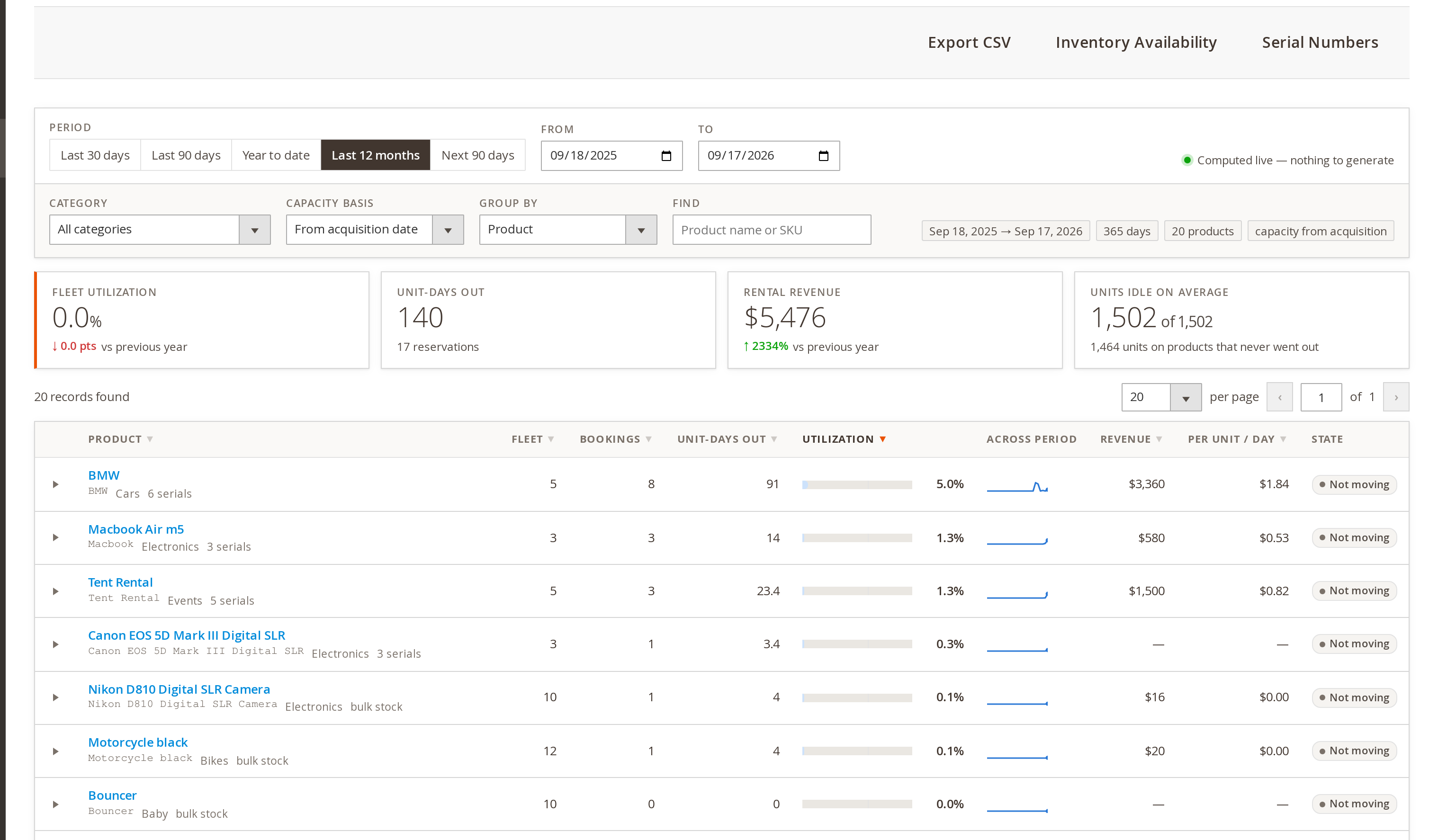
productsquery. Without a concrete GraphQL type for the rental product type a mixed catalogue returnednullfor every rental row, which is exactly the products the extension sells - FixUtilization report: serial numbers were measured against the wrong capacity. Once one unit had an acquisition date inside the reporting period, every unit listed after it was divided by that unit’s shortened capacity and read far too high. Each unit is now measured on its own
- FixA unit’s capacity ran to the end of its last booking rather than the end of the report, so a unit that sat idle for the rest of the period still read as fully used, and the answer changed with the order the bookings happened to be read in
- FixUsage and capacity are now measured over the same window. With the calculation method set to Product, capacity started at the acquisition date while the hires were still counted over the whole period, so anything bought recently could report well over 100% utilized
- ImprovementUnits that never went out now appear on the report, at 0%. The serial rows were built from what had been shipped, so the one unit worth knowing about – the one earning nothing – was the one you could not see. In the report below, Bouncer is a ten-unit line that has not gone out once in twelve months, sitting at 0% with nothing to show for itself
- FixThe report no longer stops dead on a product with no rental stock, or on a report whose start and end are the same day. Both raised a division by zero that ended the run and left the report stuck on "running" for good. A product that cannot be measured is now logged and skipped, and the report always finishes
- OptimizationThe serial list for a product is read once instead of once per unit per booking – thousands of queries for a busy product, and most of the reason the report takes as long as it does to build
Version 1.2.197 Released September 11, 2026 #
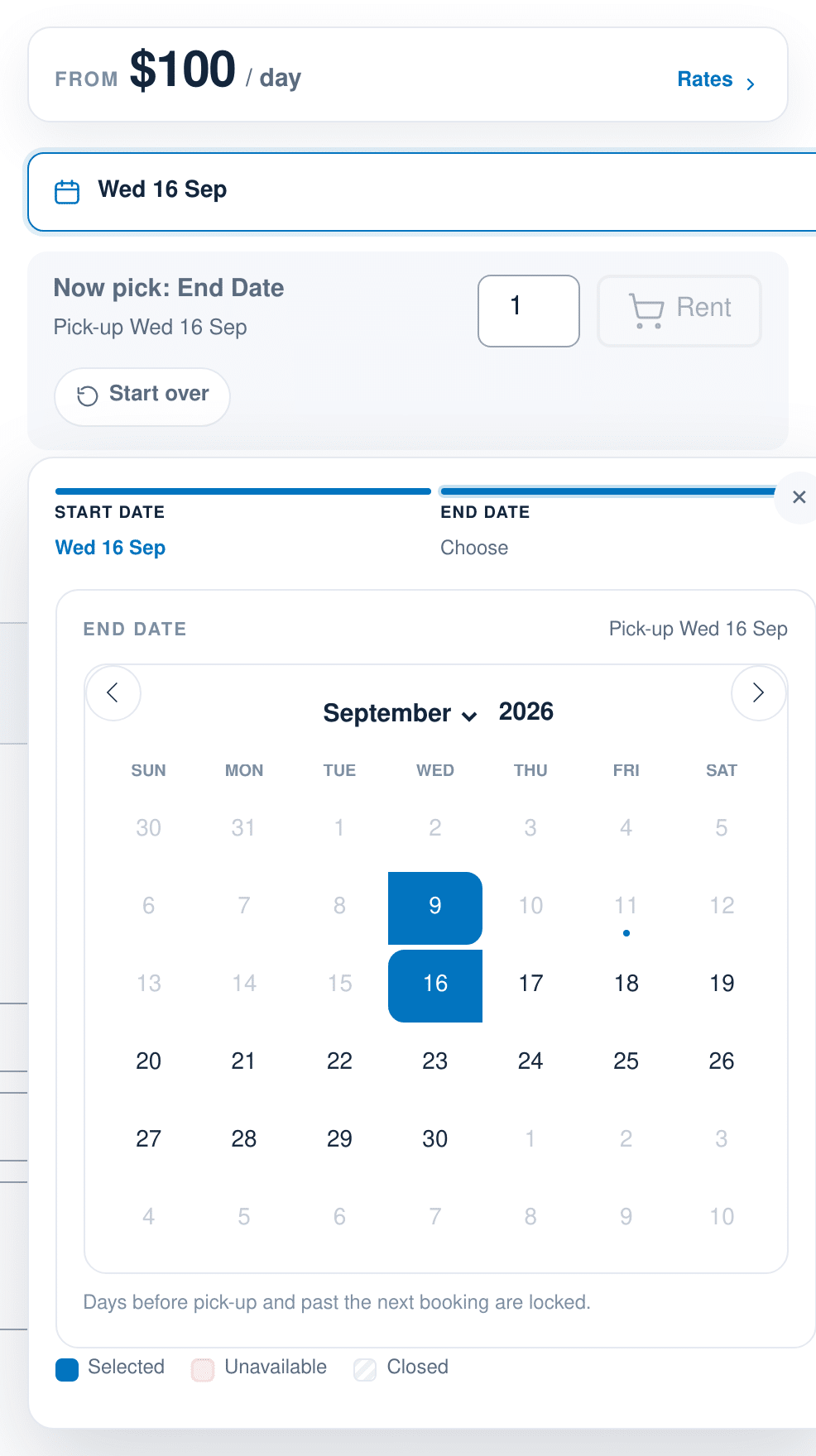
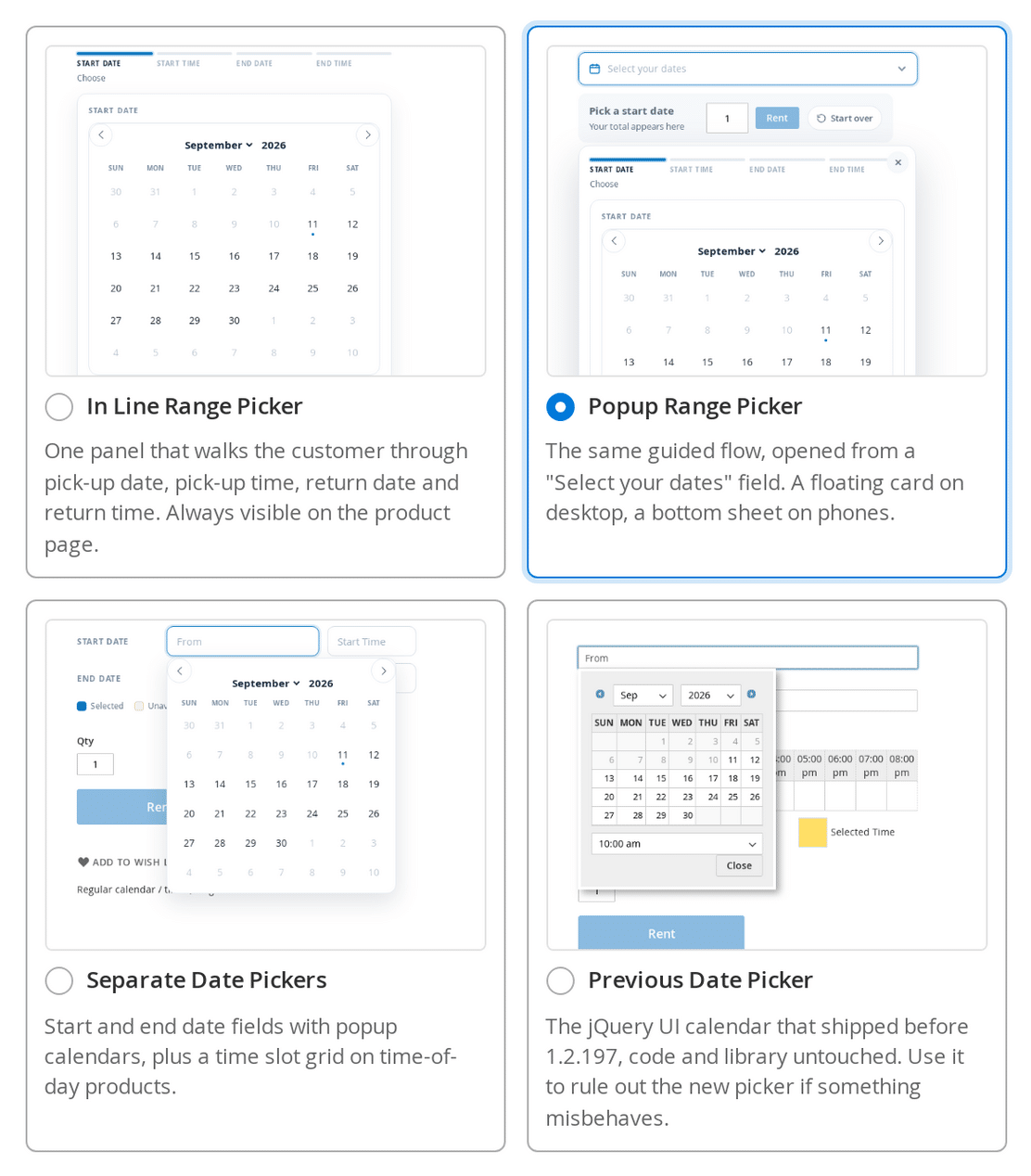
- New featureFour storefront date pickers, chosen with one new Date Picker setting under Stores > Configuration > Sales Igniter > Rental > Calendar Styler: In Line Range Picker (the new default), Popup Range Picker, Separate Date Pickers, and Previous Date Picker – the jQuery UI calendar that shipped before this release, kept unchanged so you can rule the new one out if anything misbehaves
- ChangeThe new Date Picker setting replaces the old Calendar Engine and Always Show Calendar settings. Every store that had either of those is migrated to the equivalent picker on upgrade, so no store changes calendar by itself. The per product "Show the calendar in line" attribute is unchanged and still overrides the store setting
- New featureA guided booking flow on the two range pickers: pick-up date, then pick-up time, then return date, then return time, one step at a time, with each answered step revealing the next. A progress row names the steps, shows what has been chosen, and lets the customer click back to change one, which clears anything that depended on it. Steps are only offered for decisions the customer actually makes, so a date-only product asks for two and a fixed length product asks only for the start
- OptimizationMoving between days in the calendar no longer makes an availability round trip to the server – everything the calendar needs is sent with the page
- New featureNew Calendar Styler settings group with a live, interactive preview of the real calendar beside the fields: style (airy, card, bold or classic), main colour with presets, corner radius, months shown, time slot interval, whether to show the progress row, the units left in each day, and the legend. The Date Picker and Style are chosen from picture cards that show what each option looks like, and the preview can be switched between a product column width and full width
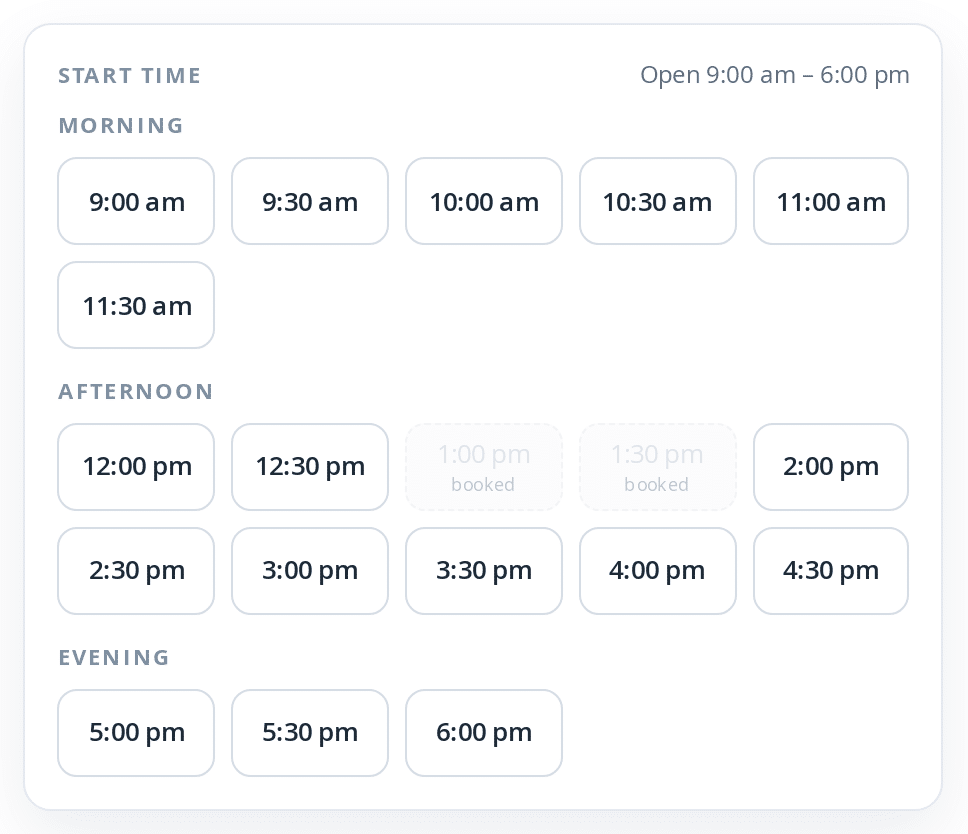
- ImprovementTime of day is now a slot grid rather than a dropdown: the chosen day’s times at your configured interval, grouped under Morning, Afternoon and Evening, with the store hours in the heading
- New featureA greyed time slot now says why it is greyed – Booked for someone else’s reservation, Disabled for an admin closure, before pick-up on a same day return, or too short for the minimum rental period
- FixThe old jQuery timepicker dropdown is removed from the new pickers. It was also the cause of a Maximum call stack size exceeded crash that stopped the calendar initialising after repeated date or quantity changes, leaving a page that looked normal but had no working calendar
- ChangeNumber of months shown is now a single setting of 1, 2 or 3. Stores that stored the old rows and columns pair are migrated automatically, and two or three months scroll sideways rather than being clipped when the product column is narrow
- New featureRight to left locale support. The calendar now renders right to left in RTL locales, including popup calendars, which previously rendered left to right with Sunday on the left while the inline calendar beside them was correct
- FixThe day grid is now fluid instead of a fixed pixel width, fixing the Saturday column being cut off on custom skins, corner radii and month counts
- OptimizationRewritten availability engine. Availability is now derived on read from the reservations table with a date windowed query and a sweep line builder, instead of a serialized inventory array cached per product. The rental cache type, its cron job and its console command are gone. This also fixes a calendar that could show a booked day as free for up to 24 hours, because the old cache was only invalidated when a product was saved and never when a reservation was written
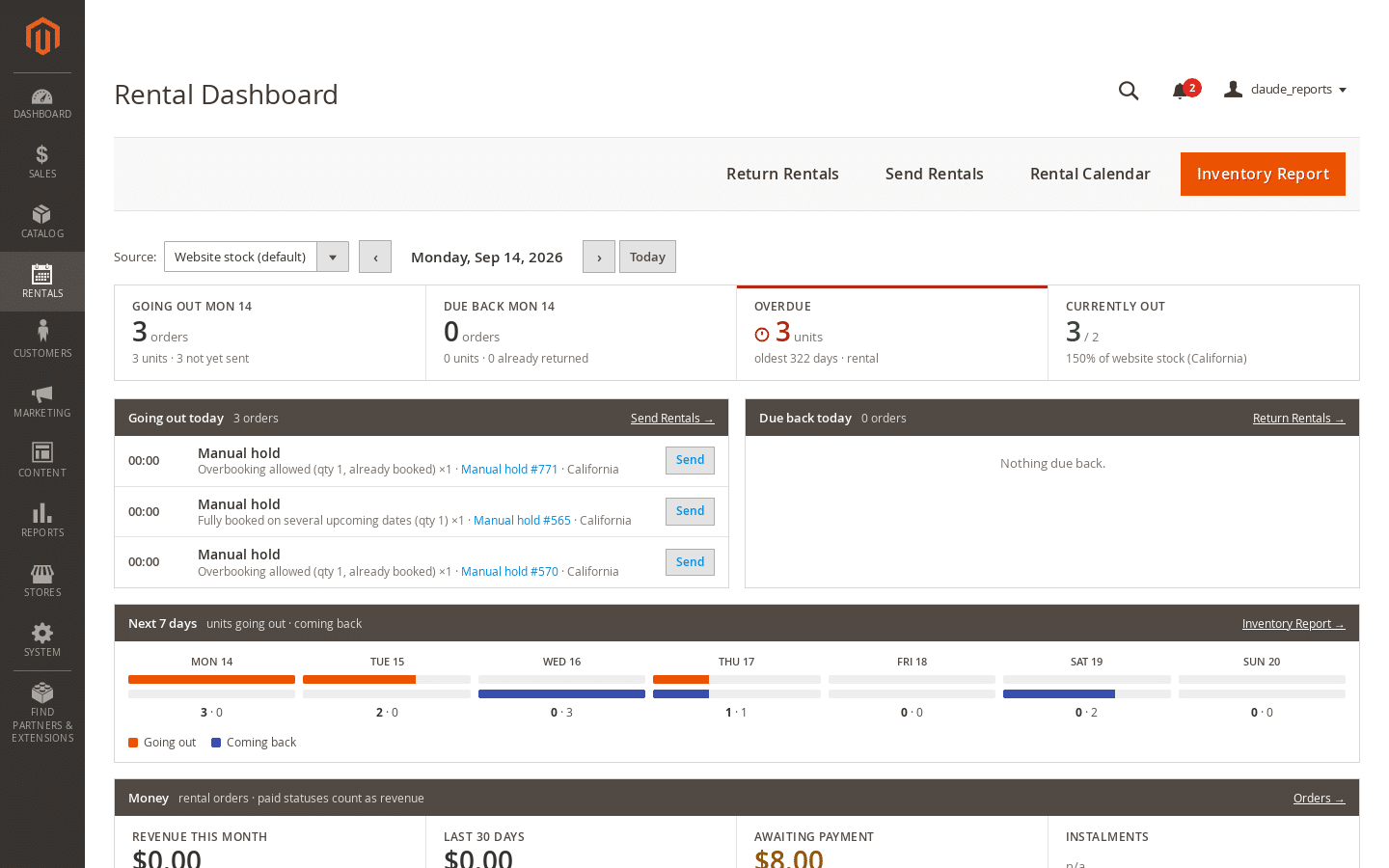
- New featureNew Rentals > Dashboard: units going out, due back, overdue and currently out for any chosen day, the next 7 days, an overdue list oldest first, and a money card with revenue this month, the last 30 days against the previous 30, the average rental order, orders awaiting payment, a 12 week paid against ordered chart, and the top five products by revenue. The whole page arrives in one request, so stepping a day or changing source is a single round trip
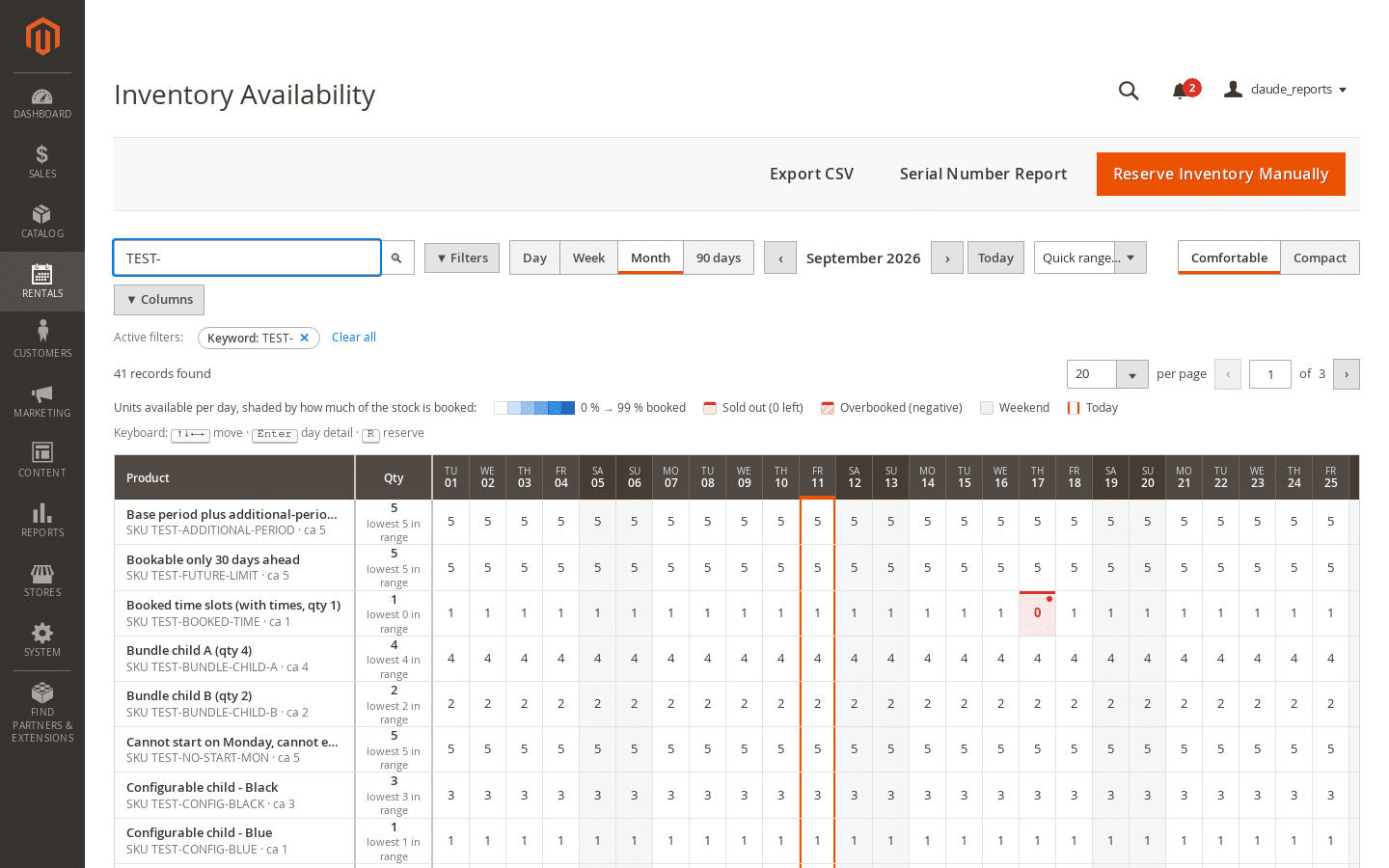
- ImprovementRebuilt Inventory Availability report on the standard Magento data grid toolbar: keyword search, a filters popover, removable filter chips, a columns popover, paging, and CSV export. Day, week, month and 90 day views, a heat map over the booked share with distinct sold out and overbooked states, sticky product and day headers, a hover card with the reserved breakdown by order, manual, maintenance and RFQ, and full keyboard navigation
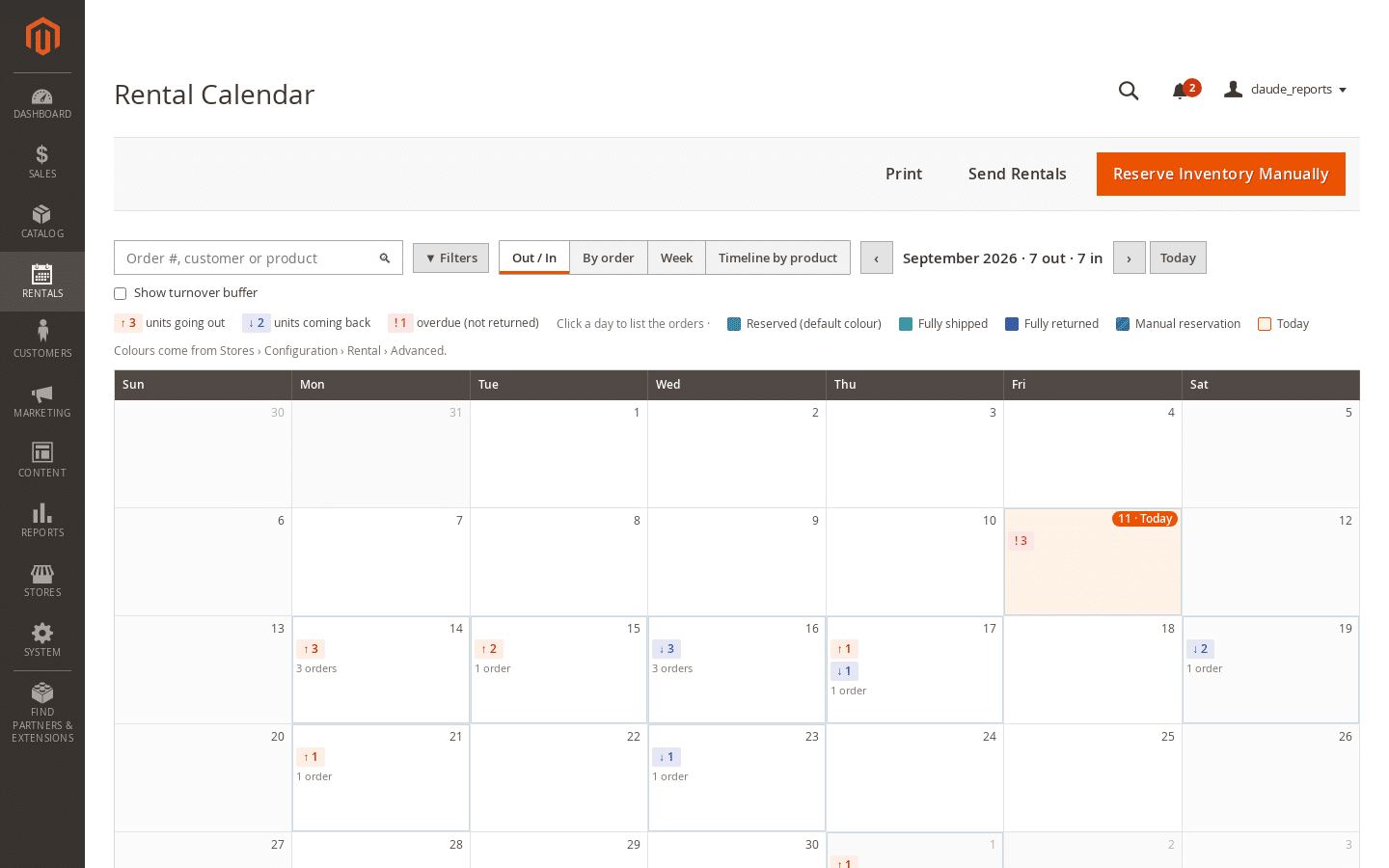
- ImprovementRebuilt Rental Calendar report. The new default view is Out / In, showing per day how many units go out and come back, the orders behind them and any overdue units, with a day popover listing every pick-up and return with Send and Return actions. By order, week and timeline by product views are also there, and the FullCalendar library it used to load is removed entirely
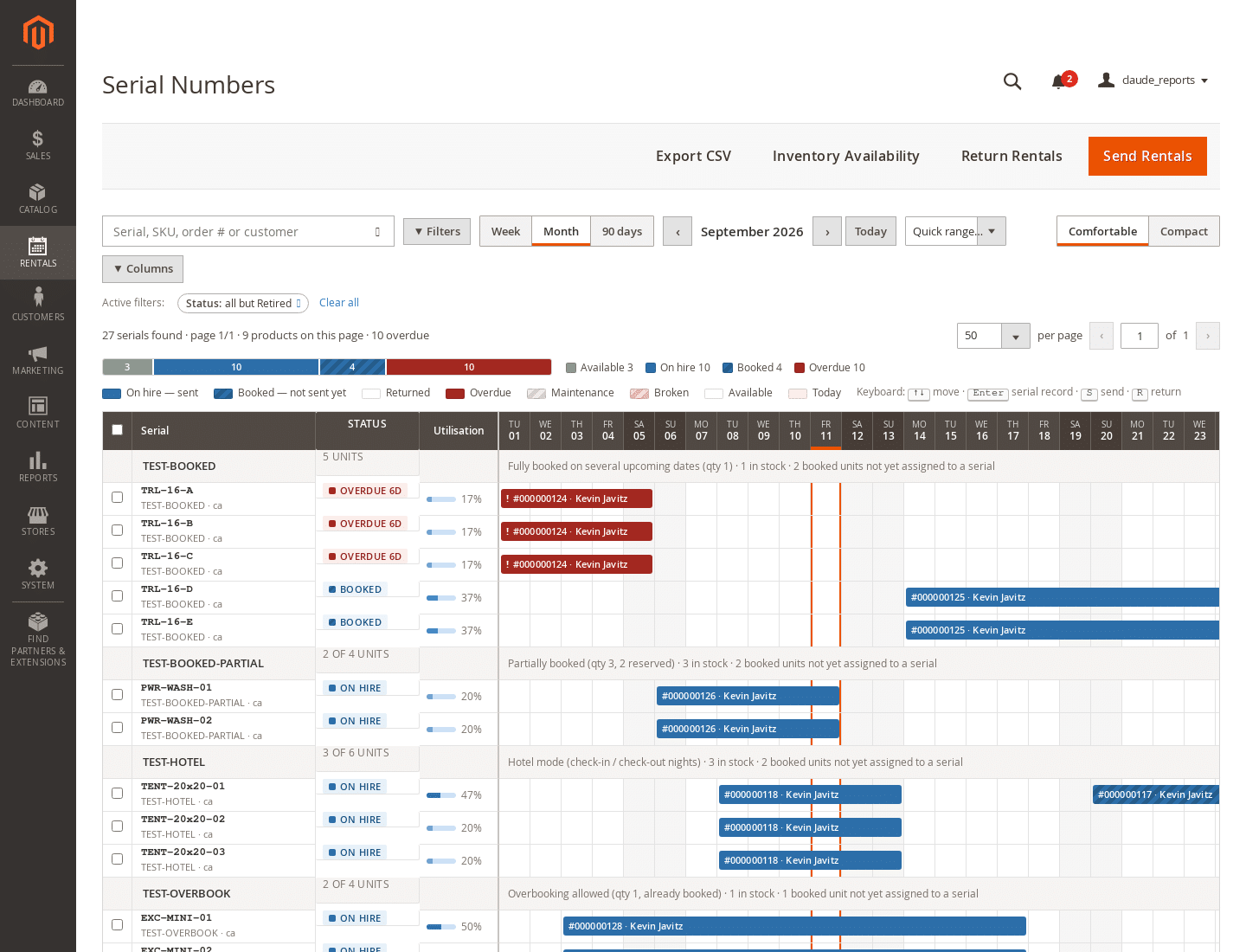
- ImprovementRebuilt Serial Number report as Serial Numbers: one row per physical unit, with a bar for each booking labelled with the order and customer, so a row reads without a click. Adds a retired status, bulk send, return, new maintenance ticket and change status actions, a serial record drawer with cost, acquisition, utilisation and booking history, and a CSV export
- FixFixes found while rebuilding that report: it rendered blank on arrival because the first request carried no source or stock scope, the source and stock filters were swapped so a source filter silently became a stock filter, and the stored serial status and maintenance ticket were ignored so a workshop hold looked identical to a customer booking
- OptimizationFirst phases of removing the HTML round trip plugin, which re-parsed rendered HTML on every block of every page. Each behaviour that has been replaced keeps its own compatibility switch under Stores > Configuration > Sales Igniter Rental > Theme Compatibility, all off by default, so a heavily customised theme can put any one of them back. Measured on the admin order view, 0.421s down to 0.208s; the product page is 37ms faster and the category page 57ms faster
- ChangeRental date storage moves to the MySQL date format. The conversion is scheduled by the upgrade and runs on the next cron passes in bounded chunks, so nothing long runs inside setup:upgrade. To convert immediately instead, run bin/magento salesigniter:rental:migrate-dates –dry-run and then without the flag. It is idempotent and one way, and any row it cannot parse is reported and left untouched
- New featureRental dates can now be displayed the way your store writes dates. A new Rental Date Output Format group under Stores > Configuration > Sales Igniter > Rental sets the format separately for emails, for orders (the admin and customer order views, invoices, shipments, credit memos and PDFs) and for the cart, checkout and mini cart. Fourteen presets from
2026-06-23toTue, Jun 23, 2026 10:00 AM, or your own PHPdate()or ICU pattern - ImprovementA preset with no time in it still shows the time on products hired by time of day, so choosing a date only format does not quietly drop the pick-up hour. Presets that include a time always show it
- ChangeThe default is Store locale, which is what every store did before this release. Nothing changes on any store until the setting is changed, and each of the three can be set per store view
- CompatibilitySupport for Magento 2.4.9 on PHP 8.3 and 8.4
- FixHyvä theme detection now recognises Hyvä child themes. It previously matched only the theme path Hyva/default, so a store running a child theme – which is what Hyvä’s own documentation tells merchants to do – silently got the Luma code paths unless the Force Hyva Theme Mode setting had been found and turned on
- ChangeHyvä theme support now lives in a separate optional extension, salesigniter/hyvarental – see the entry below, and the install and updates page for the one extra command. Nothing changes for stores on Luma or a Luma derived theme
- FixFixes: the admin order view fataled for orders whose product had since been deleted; the rental calendar fataled every admin page that renders it; the Status column scrolled away from the rest of the header; Start Date and End Date showed a double colon on the admin order view, in the cart and in the mini cart; Send and Return quantities now pre-fill with the outstanding amount; the rental options rebuild no longer wipes other custom options; each rental shipment row now links to the sales shipment it belongs to; the shipment grid Serial column renders again; the pricing card rate table starts collapsed; and no Instalments panel is shown when Partial Payment Pro is not installed
- Upgrade noteUpgrade note: after deploying, run bin/magento setup:upgrade and then clear pub/static/frontend, pub/static/adminhtml and var/view_preprocessed before flushing the cache. Several JavaScript and CSS files moved between directories in this release and Magento leaves the previously generated symlinks in place; if they are not cleared those files return 404 and Luma’s top navigation collapses to zero height, which looks like a menu problem and is not one
Hyvä Compatibility Extension 1.0.0 Released September 11, 2026 #
- New featureFirst release of salesigniter/hyvarental, an optional companion extension for stores running the Hyvä theme. It is not needed on Luma or any Luma derived theme, and the rental extension works without it
- New featureIt comes from the same composer repository as the rental extension, so installing it is one extra command, composer require salesigniter/hyvarental, followed by bin/magento setup:upgrade. The full instructions are on the install and updates page
- CompatibilityRequires version 1.2.197 or later of the rental extension, and hyva-themes/magento2-compat-module-fallback, which is supplied by the Hyvä composer repository your store already uses to install Hyvä
- New featureHyvä ships no RequireJS, no jQuery and no Luma JavaScript, and its product page markup is not Luma’s. This extension supplies the Hyvä versions of the few templates that depend on that: the rental add to cart button with the Rent and Buyout labels, the pricing card, and the out of stock modal, which is rewritten with Alpine and Hyvä’s own modal helper instead of emitting a RequireJS call on every page of the site
- FixIt also moves the pricing card next to the calendar on Hyvä, where the layout instruction that places it before the price on Luma silently matches nothing, leaving the card rendered below the review form near the footer
- CompatibilityEverything in it is wired through the Hyvä compatibility module fallback and Hyvä’s own layout handles, both of which only apply on a Hyvä theme. Nothing here can reach a Luma page, so Luma output is unchanged by installing it
- Known limitationKnown limitation: the Previous Date Picker is not available on a Hyvä storefront, because it needs the jQuery UI widget and therefore RequireJS, which Hyvä does not ship. A Hyvä store always gets the new calendar whatever that setting says
- Known limitationWorth knowing when you switch a store to Hyvä: Magento binds widget instances to a theme, so calendar widgets configured under Luma will not appear until they are placed again against the Hyvä theme. This is standard Magento behaviour, not a rental extension limitation
Version 1.2.192 Released May 4, 2026 #
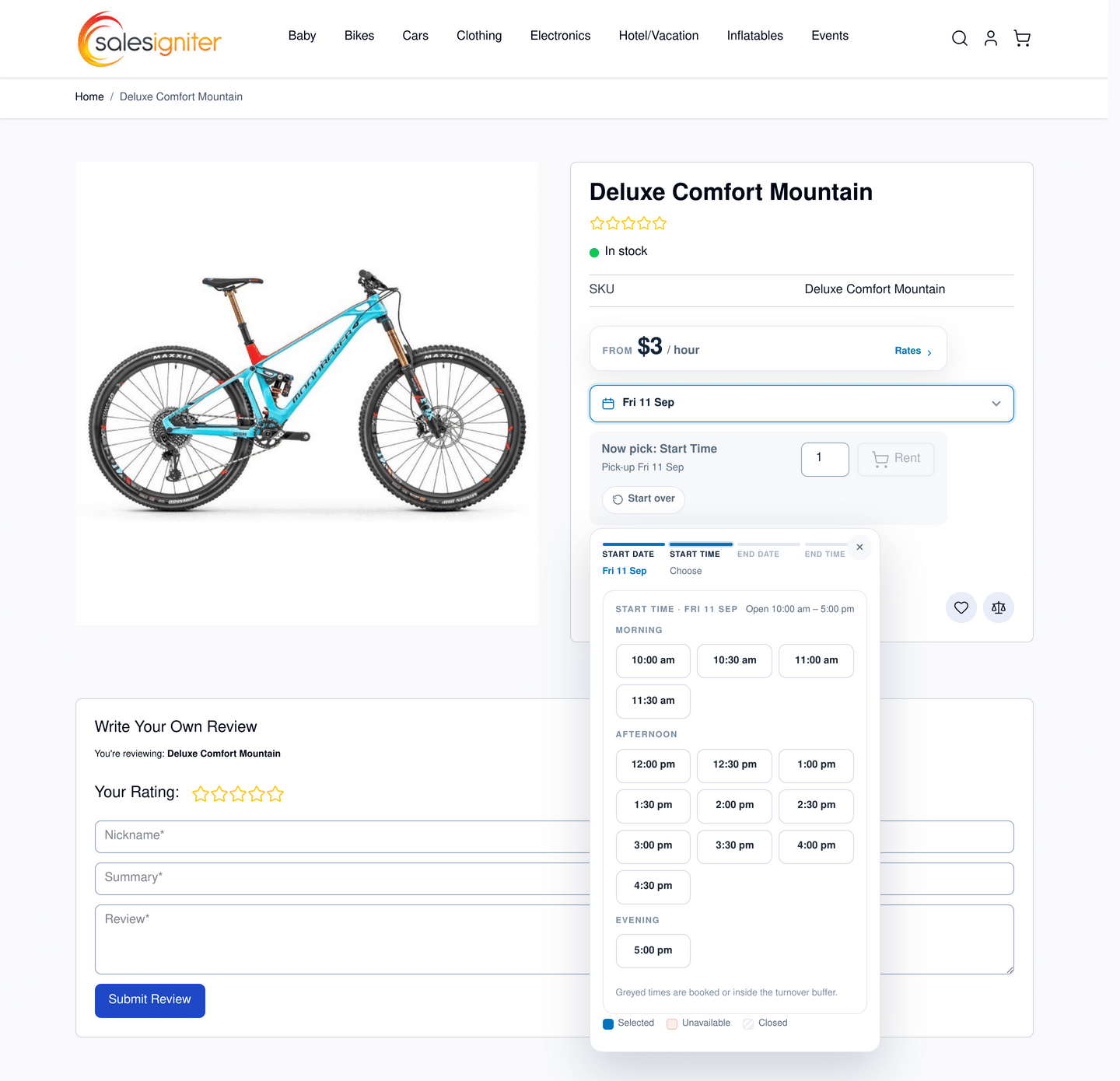
- OptimizationHyva Ready with a completely new calendar rewrite – more details in our blog post. Performance is hugely improved
- CompatibilityFix for calendar placement on bundles in Magento 2.4.8 and calendars repeating
- FixFix for SendReturnApiProcessorInterface di.xml di define
- New featureNew setting allowing disabling combining rental & regular products in one purchase
- ChangeQuerypath usage reduced and changed from 3.0.7 to 4.2.0 using gravitypdf/querypath
Version 1.2.178 Released August 15, 2025 #
- FixFix for time of day not being properly recorded to orders in some cases
- OptimizationDatabase data upgrade speed increased for updating from older versions
- FixFix for serial number report and same day reservations
- FixFix logic for disabled from price
- FixFix foreign keys for fixednames_id when saving and deleting
- FixFix for date based pricing ids repeating in the grid
- New featureStop checkout even in cases where the customer already added the product to the cart when the inventory was available, recheck that the inventory is available on the checkout page
- New featureAbility to disable the rental calendar by product when there is no inventory (global setting was already there)
- ChangeQuerypath version update
Version 1.2.166 Released February 21, 2025 #
- Fixupdate Period::after( to use date intervals was causing an error in edge cases
- FixFix for single day end date checking
- FixFix for stockout modal
- New featureAdded error check to the admin disabled dates from / to date entry that the from date is before to date
Version 1.2.156 Released September 27, 2024 #
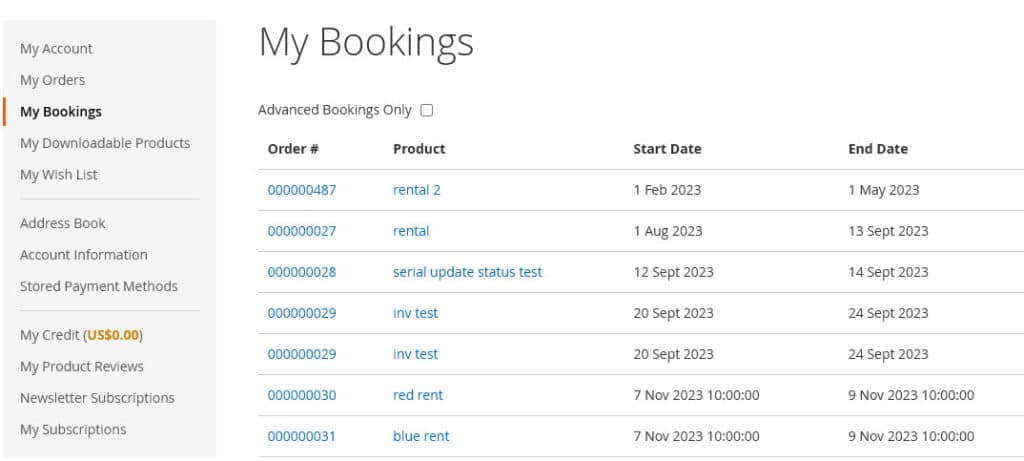
- New featureNew feature: Upcoming reservations page on the customer side, or view all previous reservations
- New featureNew feature: Customer reservations tab on the view customer page of the admin
Version 1.2.151 Released July 15, 2024 #
- FixFix for time of day rentals first date available
- FixFix for buyouts not adding to cart
- FixFix for quantity not available message not resetting dates
Version 1.2.148 Released July 1, 2024 #
- CompatibilityUpdates for PHP 8.2 and Magento 2.4.7
Version 1.2.148 Released May 10, 2024 #
- New featureConfigurable product reservations can now show out of stock popups
- FixFix for custom options price showing on the product page
- FixFix for converting product types
- FixFix for return reminder to take into account early returns
- FixFix for converted product types from simple to reservation
Version 1.2.138 Released October 16, 2023 #
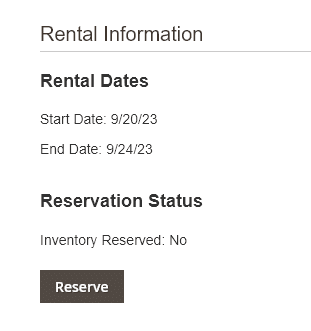
- New featureNew Feature: Manually reserve or cancel reservation inventory on the order view page with one click
- FixFix for utilization reports when rental overlaps the report start and end date
- FixFix for serial status not updating properly when sending from the order page in some cases
- FixFix for price shown on product page for rental products when price rules applied
- ImprovementSeparate css file for extension css rather than using jquery-ui-theme.css file
- ImprovementPlugin for ui widget prices to properly show rental pricing for things like recently viewed products
Version 1.2.135 Released August 18, 2023 #
- New featureNew Feature: Product Utilization Reports please check the docs page for more info
- FixFixed an issue where same day rentals that don’t use time of day were not returning the daily rental price
- FixAutomated email reminders now properly check if the order was cancelled before sending
- FixA few dynamically declared class properties were fixed so there should be no more deprecated notices when running in developer mode
Version 1.2.131 Released July 6, 2023 #
- ChangeAdjustments to data normalization for rental dates (backend)
- New featureNew Feature in rentals > settings > advanced to only show rentals in the rentals > send rentals page that have certain order statuses
- New featureAdded extra data validation for special pricing and “passing null” issue for a few array keys in the Calendar.php file which can throw errors in developer mode
- FixFix for Automated rental emails now check that the order was not canceled before sending
- CompatibilityFix for “Insert value list does not match column list” on the catalog_product_index_price. Please note the best fix is actually from the Magento core team by adding one extra line to this file as shown here: https://github.com/magento/magento2/pull/36370/commits/b615f477c6ad906fe5d518d8c5e9c13ca0c12c1b we recommend you manually patch this file, it is probably coming by default in Magento 2.4.7 the file is at vendor/magento/module-catalog/Model/Indexer/Product/Price/AbstractAction.php
Version 1.2.120 released April 18, 2023 #
- CompatibilityLeague Period changed to version 4.12.0 so that if you are still using PHP 7.4 you can upgrade (5.1 supports > PHP 8.1 only)
- OptimizationOptimized compactInventory method
- CompatibilitySeparated out the PDF files to a new package salesigniter/releasepdfserial please use composer require salesigniter/releasepdfserial but only if you are on Magento >= 2.4.3 this was seperated out so that if you are still using Magento 2.3.x you can upgrade. This package only adds sent and returned rental serial numbers to the PDFs so even if you don’t use it it’s not that important
- FixFixed an issue where if you add 2 configurable products that are the same to the cart but for different dates, it was not giving the correct price
- FixFixed an issue where the first date available was not taking into account disabled days of the week or disable dates
Version 1.2.118 released March 28, 2023 #
- CompatibilityCompatibility with Magento 2.4.6
Version 1.2.117 released March 27, 2023 #
- New featureNew Feature: The backend rentals > rental calendar > by order now has color coded background colors based on if the order has been placed, shipped, or returned. Colors are settable in rentals > settings > advanced
- FixFix: for compactInventory function in Model/Product/Stock.php related to league period
- FixFix: in some cases on short months using fixed length rentals the price would show for 2 months instead of one
- FixFix: serials and price points were not allowing to completely remove the last price point or serial, now these can be completely removed
- FixFix: return overdue logic fix
- FixFix: email preview error for certain email templates in the backend
Version 1.2.110 released November 21, 2022 #
- CompatibilityPackage Updates: querypath has been updated to this version: https://github.com/jakejackson1/querypath/tree/php8.1-compatibility so when running in developer mode there will no longer be deprecated errors with PHP 8.1. Also this package has been updated: https://github.com/thephpleague/period from 3.2 to 5.1.0 for the same reasons
- OptimizationImprovement: quantity validator observer frequency is reduced which will speed up adding to cart on the customer and admin side
- ChangeImprovement: special pricing css moved from in-line styling to using the old-price css class
- FixFix: for early ship and return not correctly updating the dates of the reservation
- FixFix: for disabled days of the week not correctly being disabled in some cases
Version 1.2.107 released October 17, 2022 #
- ChangeImprovement: addtocart.phtml template is no longer overridden, the validate product js is changed to a mixin
- ImprovementImprovement: serials assigned on Invoice PDFs also works for bundles
- FixFix for reserving inventory by order status not working when an order was invoiced and status changed to “processing”
- FixFix for Saudi Arabia locale and calendar dates, now it uses ar_MA locale for the date part
- FixFix for the admin rental calendar report by start/end date not showing manually reserved inventory, and filtering of dates
- FixFix for editing serials on existing orders status
- FixFix for custom options and non-english text for the start and end date not properly hiding time of day when time of day is not enabled for a product
Version 1.2.96 released August 16, 2022 #
- FixFix for filtering by serial number on the serial number report
- FixFix for filtering by product id on the rental inventory report
- FixFix for showing the turnover and rental length on the calendar
- FixFix for updating rental dates on the order edit / ship / return pages
Version 1.2.76 released June 10, 2022 #
- New featureMageworx order editor integration (Pro version) See Order Editing page for more information
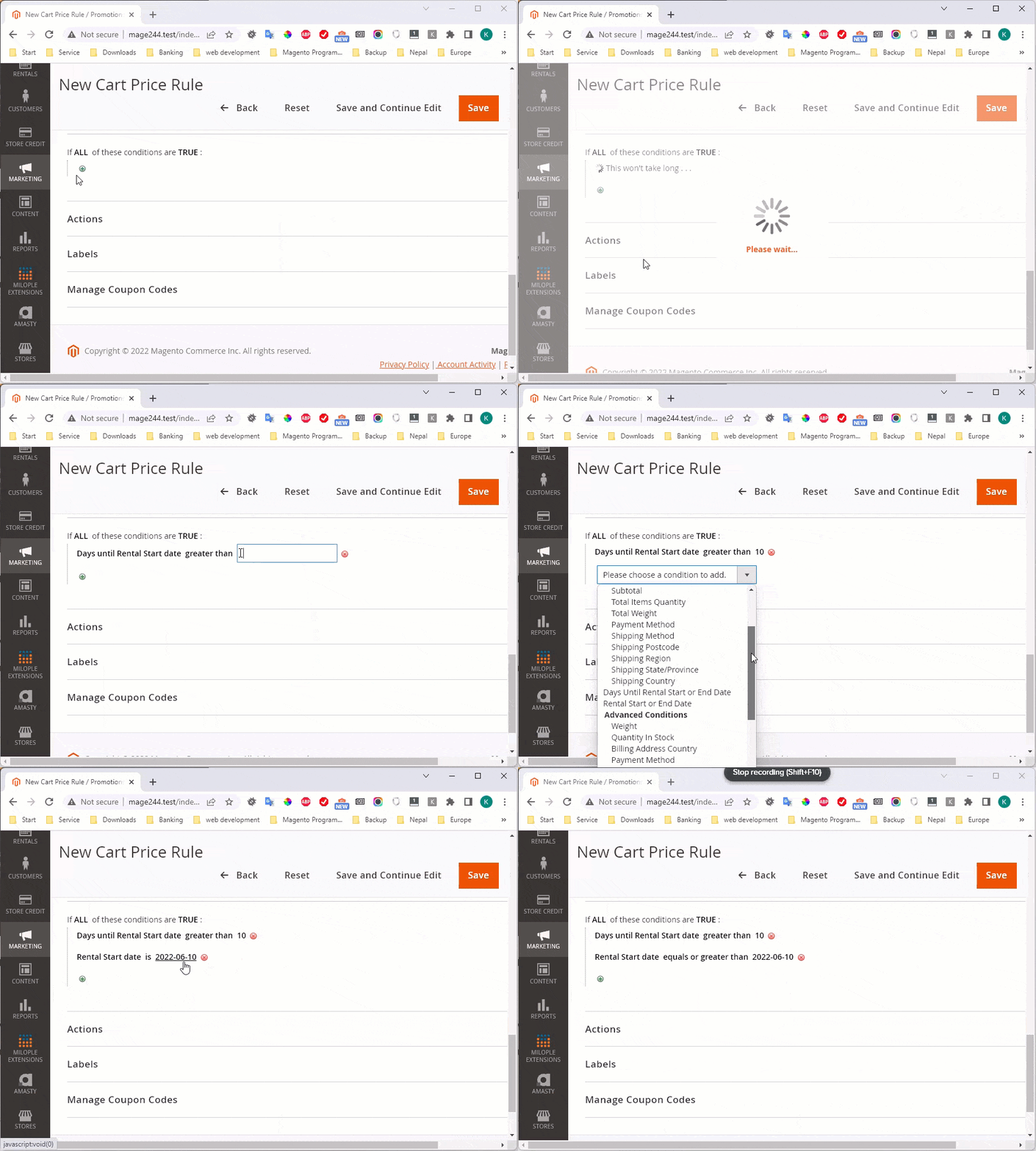
- New featureNew rules are added for marketing > cart price rules, you can create promotions and coupons based on the rental dates the customers have in their shopping cart
Version 1.2.64 released May 6, 2022 #
- New featureNew email templates for upcoming rentals, during the rental, and after the rental
- CompatibilityExisting email templates were updated to the format used in Magento 2.4.4 (they will still work with 2.3.x – 2.4.3).
Version 1.2.59 released April 27, 2022 #
- CompatibilityInitial updates for Magento 2.4.4 if you are upgrading to 2.4.4 please test it first on a staging server as there are a lot of changes in this release as far as the Magento source code. We have tested it and it’s working for the rental system reports, editing products, calendar and ordering, but it’s best to check it on your store before pushing to your live one since it’s a brand new release
- New featureNew Feature: You can now add the list of serials to your packing list PDF if the product uses serial numbers
- New featureNew Feature: Serials can now be adjusted after a shipment has been made on the order > shipment grid click the edit button next to the serial numbers
- FixFix for certain cases where the global calendar is loaded on the product page (so there are 2 sets of calendars) which is not common
- FixFix for the admin order creator – out of stock type messages were not clearing properly when editing rental dates
Version 1.2.51 released March 28, 2022 #
- FixFix for disabled days of the week causing an issue in getFirstAvailableDate
Version 1.2.50 released March 25, 2022 #
- CompatibilityCompatibility for Magento Cloud Edition / Commerce Edition
- ChangeNormalization of the reservationorders table so there are now separate tables for shipment and returns, which makes it much easier to read the table data when debugging or checking for inventory
- ChangeEditing rental dates now carries through properly on bundles rental option dates and the order dates updating has been moved to its own class and the StockManagment.php file is now a bit lighter
Version 1.2.36 released February 16, 2022 #
- OptimizationBig speed optimizations for the product page calendar (3 – 5x faster)
- OptimizationCaching added to further improve loading speed when there are lots of reservations for a product
Version 1.1.20211104 released November 4, 2021 #
- FixFix for late returns and early returns not reporting the proper inventory levels in specific cases
- New featureHide calendar feature
- FixFix for the product page hide price points
- New featureNew feature to reserve inventory starting with the order start date which can be adjusted in the rentals settings area
- FixFix for sending shipments with empty serial numbers
- New featureReservation history link added to the product grid in the admin
- New featureAdded a new feature to allow tying prices to certain dates of the year for example $3/day for November 1 – 30.
- FixFixed issue with editing orders and bundles
- New featureAdded a setting to add a calendar icon for non-default themes in case their icon font doesn’t have the icon
- New featureAdded store open and close times to bundles
- FixFix for certain cases where the time period was not being translated on the product page
- New featureAdded serial numbers to emails and grids
- FixFix for iOS calendar 12:01pm issue
Version 1.1.20210201 released February 1, 2021 #
- FixFix for Manual Reservations grid filtering and pagination
- ImprovementImprovement to Custom Options start and end date for i18n internationalization / translations (Please check this documentation page for more info)
- New featureNew Feature: Date based rental discounts can now be applied to the entire rental period if there is an overlap of the special period dates
- ImprovementLanguage translation files updated
- FixFix for product name on grids
- New featureNew Feature to disable adding turnover optionally when adding manual reservations
- ImprovementImproved error checking on shipment for serials allowed to ship
- FixCSS fix for hours of start and end time of day on Rentals > Settings page
- FixFix for max qty should not be filterable on send/return grids
Version 1.1.20201026 released October 26, 2020 #
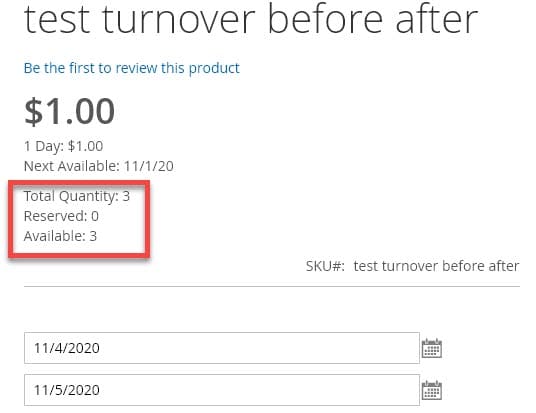
- New featureNew feature: Ability to show total quantity, reserved quantity, and available quantity after selecting dates on the product page the default is off it can be enabled in rentals > settings > product details page > show extra quantity data on product page? It looks like:

- ImprovementImprovement: Rental calendar now will disable turnover dates before the customer chooses their rental dates, making it easier for customers to choose dates. (this is configurable under rentals > settings > turnover > disable turnover days on calendar). Before this check was done after choosing rental dates and an error message was shown.
- FixFix: If customer adds a rental product to shopping cart but checks out a few days later, a check was added to make sure the start date is still ok
- FixFix: Customer name link on inventory report was no linking correctly
- FixFix: In certain situations with multiple date overlaps inventory was not calculating correctly
- FixFix: sirent_fixed_type no longer gives error on product imports using csv
- FixRental product type is now by default disabled since this was causing issues with configurable type products defaulting to being a rental product
- New featureAdded command line uninstall option using salesigniter:Uninstall this will remove all rental tables and product attributes so only use if completely wanting to remove the rental system. Also a uninstall script module was added when using the Magento method: module:uninstall.
Version 1.1.20200820 released August 20, 2020 #
- CompatibilityUpdates for Magento 2.4, if you are going to use Magento 2.4 please review our install guide on the subject.
- CompatibilityImproved compatibility with Itoris Dynamic Product Options
- FixFix: Manually reserve inventory keeps the turnovers correctly for when using different turnovers for different stores
- FixFix: Bundles now correctly show padding on calendar
Version 1.1.20200612 released June 12, 2020 #
- FixAdmin inventory reports are now properly localized to the locale’s date format
- ImprovementAdmin inventory report now has sticky headers to make scrolling long lists of product inventory easier to read
- FixFix for bundle quantity returning wrong price
- New featureComparability added for the Porto theme and the rent button enabling / disabling
- New featureCustomer name added to rental send / return grid and manually reserve inventory grid
- New featureNew feature added: Disable guest checkout if order contains rental products
- ImprovementImprovement to admin order editing – it now checks inventory by excluding the previous order from inventory checks so that it doesn’t give overbooking error messages
Version 1.1.20200518 released May 17, 2020 #
- New featureNow using updated db_schema.xml format for database tables / columns that are added
- New featureNew Feature: You can now rename the rental and buyout buttons from rentals > settings area for the product page or category listings pages
- ImprovementImprovement: Rental inventory report coloring now has better mouse over highlighting
- CompatibilityCompatibility added for Unirgy Dropship extension
- FixFix for rent button being enabled by default on page load before the rental dates were set
- FixFix for rental return allowing entering serial numbers that were not used when sending
- ImprovementImprovement: store > config > catalog > date and time > use javascript set to Yes and it will still be ok so you can use the javascript calendar on non rental products for custom options
Version 1.1.20200201 released February 1, 2020 #
- FixFix for seasonal pricing: now it should give more reliable results for when pricing periods don’t fit within a special pricing period
- CompatibilityUpdate for Magento 2.3.4
- FixFix for excluded periods not being able to be deleted from products
- FixFix for return grid not showing on admin order page when multi source shipping is not enabled
Version 1.1.20200105 released January 5, 2020 #
- New featureSmall update added ability to hide price points from product page, or replace price points with custom pricing text
Version 1.1.20191222 released December 22, 2019 #
- Known limitationDate based pricing feature released, currently experimental. For more information see: Date Based Pricing
- FixAbility to hide the start date and auto-select the start date based on the first available rental date. Useful for when you want your customers to just click rent and not choose dates. Works well with fixed rental dates.
Version 1.1.20191213 released December 12, 2019 #
- CompatibilityUpdated for Magento 2.3.x!
- New featureNew Feature: order grid now has extra ship and return actions added to make it quicker to get to the ship and return when needed:

- ImprovementImproved color coding of inventory report showing green for in stock and red for out of stock products:

- ImprovementImproved rental inventory column on the product grid, now you can see all information in one grid column, as well as link to the inventory report for the full report:

- ImprovementImproved global calendar widget now you can name the button like “Set Dates” or “View Products”
- ImprovementImproved inventory handling now it doesn’t rely on the cron being setup it will reserve inventory on checkout success page using ajax in case the Magento installation does not have crons setup
- FixProduct bundles changing product options now updates the price correctly
- FixFix for order view page showing return button when there were no items to return
- FixFix for rental excluded dates not excluding the last day when doing all day (checkbox) exclude dates
- FixFixed dates was not updating the price when using drop down option, now it does
- FixFixed return and send grid saying “object object” instead of “No items selected” when not checkboxing items to ship or return


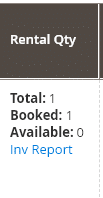
Version 1.1.20181022 released October 22, 2018 #
- FixFix for Magento 2.2.6 and the product edit page not displaying on the admin side
Version 1.1.20180918 released September 18, 2018 #
- New featureNew feature: Products now support store hours on product level instead of just global level
Version 1.0.20180821 released August 21, 2018 #
- FixFixed issue with returns grid not allowing some orders to be returned if returning multiple orders at the same time
- FixFixed issue with pickup / dropoff dates and Magento 2.2.4+
- OptimizationImproved loading speed when product uses time of day
Version 1.0.20180724 released July 24, 2018 #
- New featureNew feature: $0 reservations. There is a setting to allow it as some stores don’t want to charge for rentals. Check rentals > settings > pricing > allow zero price
Version 1.0.20180611 released June 11, 2018 #
- FixFixed date format issue on manual reserve
- ChangeRental reservations are now done when the cron runs instead of when the order is placed to prevent timeout errors on large stores
Version 1.0.20180514 released May 14, 2018 #
- New featureImproved related products with rentals. Related products can now be added from the main reservation product’s page.
Version 1.1 #
- New featureReturn reminders
- New featureDamage Waiver Fees
- OptimizationSpeed improvements on large bundles
Version 1.0 Stable #
- New featureSetting that allows Forcing all rental items in order to use the same start and end dates
- New featureManually edit rental dates (does not change order price)
- New featureFixed period rentals (admin can set the time period of the rental like 1 day or 1 week) the customer only selects the start date
- New featureDisable shipping
- New featureHotel mode – daily rentals allow a new rental on the end date (check-out and check-in on same day)
Magento 2.x Beta #
- New featureRental calendar on product page
- New featureGlobal rental calendar on side column
- New featureRental calendar widget that can be placed anywhere
- New featureComplex pricing algorithm enabling price by any rental period ($X per X hours, $X per X Days, $X per X Weeks, etc.) with in between periods calculated automatically
- New featureAdmin order creator (similar to POS) allowing admin to create orders, select shipping and payment methods, charge payment method, and accept signatures for the rental contract
- New featureMultiple calendar styles
- New featureQuantity based inventory and serial number based inventory
- New featureConvert for sale products to rental products and rental products to for sale products
- New featureDaily, Weekly, and Monthly Inventory report with details of order numbers and quantity ordered per day per product
- New featureTime of day rentals allowing hourly rentals of products
- New featureTurnover (buffer) time setting allowing you to set a certain time period before or after a rental for the rental product to be available again
- New featureSend and return rentals with email confirmation to customers (optional)
- New featureSent and returned rentals report
- New featureDropoff and pickup dates (separate from rental start and end date)
- New featureMulti-language compatible
- New featureVAT and international tax rates compatible
- New featureMulti-currency compatible
- New feature20+ language packs available (translated using Google Translate)
- New featureCompatible with Magento payment modules (Authorize.net, Paypal, Braintree, Check/Money Order, Purchase Order, Bank Transfer Payment, Cash on Delivery)
- New featureDisabled dates (can repeat) for store closed times, holidays
- New featureMinimum and maximum rental periods
- New featureRentals work with configurable products (sizes, colors) and bundles (packages of multiple products, some can be for sale products too)
- New featureCalendar report of rental orders by start/end date and rental orders by order (order extends length of rental on the calendar)


