
This page covers what the chat collects, how visitors agree, what the AI provider receives, and how long data is kept. You change most of it under Settings › Privacy.
What the chat collects #
- Messages, and the name and email address a visitor gives.
- For a signed-in customer, their Shopify customer number and, when your store allows it, their name, email and orders, to show your team their orders and to help the AI answer.
- The pages a visitor looks at and when, for visitors who accepted your cookie banner.
- The country your store detects for the visitor. No IP address is stored.
Consent #
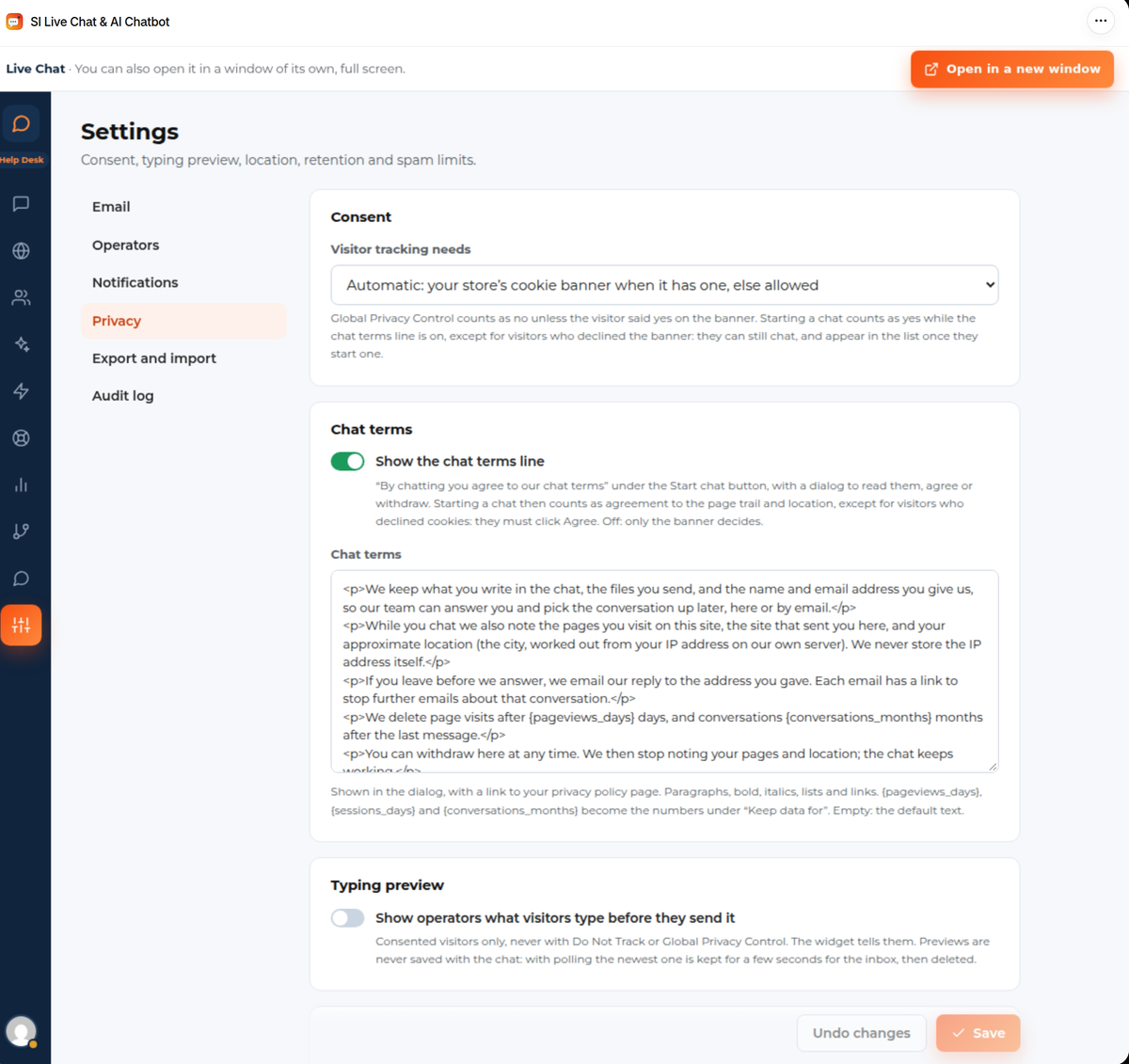
Visitor tracking needs decides when the chat may follow a visitor’s pages:
- Automatic: your store’s cookie banner when it has one, otherwise allowed.
- Your store’s cookie banner: Shopify’s customer privacy choice.
- Always allowed: for a store with no banner.
- Never track visitors.
A visitor who sends Global Privacy Control counts as no, unless they said yes on the banner. A visitor who declined cookies can still chat; they appear in Live visitors only once they start a chat.
Chat terms shows the line “By chatting you agree to our chat terms” under the Start chat button, with a dialog to read the terms, agree or withdraw. Write your own text there and link your privacy policy. Starting a chat counts as agreeing to the page trail and country, except for visitors who declined cookies: they have to click Agree.
Typing preview lets operators see what a visitor types before they send it. It is for visitors who agreed only, never with Do Not Track or Global Privacy Control, and the chat tells them. Previews are never saved with the chat.
Analytics can send two events to Google Analytics when your store already loads it: `chat_started` when a visitor sends their first message and `chat_lead` when they give their email in the chat. They carry no message text, email or name, and nothing is sent for staff.
What the AI provider receives #
For each answer, the visitor’s question and the matching parts of your store go to the AI provider. By default requests go through OpenRouter to hosts that keep no data, and each request asks the provider not to collect it. Email addresses, phone numbers and card-like numbers typed into the chat are replaced before they leave. For a signed-in customer, and while Use what we know about logged-in people is on, the AI also gets their name and last 5 orders; those aren’t masked. You can switch that off on the AI Chatbot screen. If you use your own provider key, requests go to that provider instead.
How long data is kept #
Under Keep data for you set how many days or months to keep page views, sessions, anonymous visitors with no conversation, conversations after their last message, raw emails, email logs, the audit log, closed tickets and the AI usage record. A daily job removes what is older.
Customers’ requests and uninstalling #
When a customer asks Shopify for their data or to be erased, Shopify tells the app and it exports or erases that customer’s chats, tickets and Secure details. A shop-wide erase removes the store’s data.
Shopify asks apps to delete a store’s data 48 hours after it uninstalls the app, and the app always does. Delete all chat data soon after the app is uninstalled deletes it at once instead.
Secure details #
On the Ultimate + Help Desk plan, customers can leave logins your team needs (a supplier portal, a Wi-Fi password) on their account instead of in a ticket. Each value is encrypted, your team sees only that an entry exists, people you allow can reveal it for 30 seconds, and every reveal is recorded. Nothing from it goes into emails, the AI, reports or exports. See Help Desk.


