
Custom Fields,Damage Waiver,andID Verification
Custom fields on the checkout and the product page, a damage waiver that actually gets collected, and customer ID you can verify before the keys leave the counter. One plugin, one price.
Three jobs, one plugin
Every rental shop ends up needing all three. Buying them separately means three plugins, three renewals and three things to keep compatible.
Custom fields
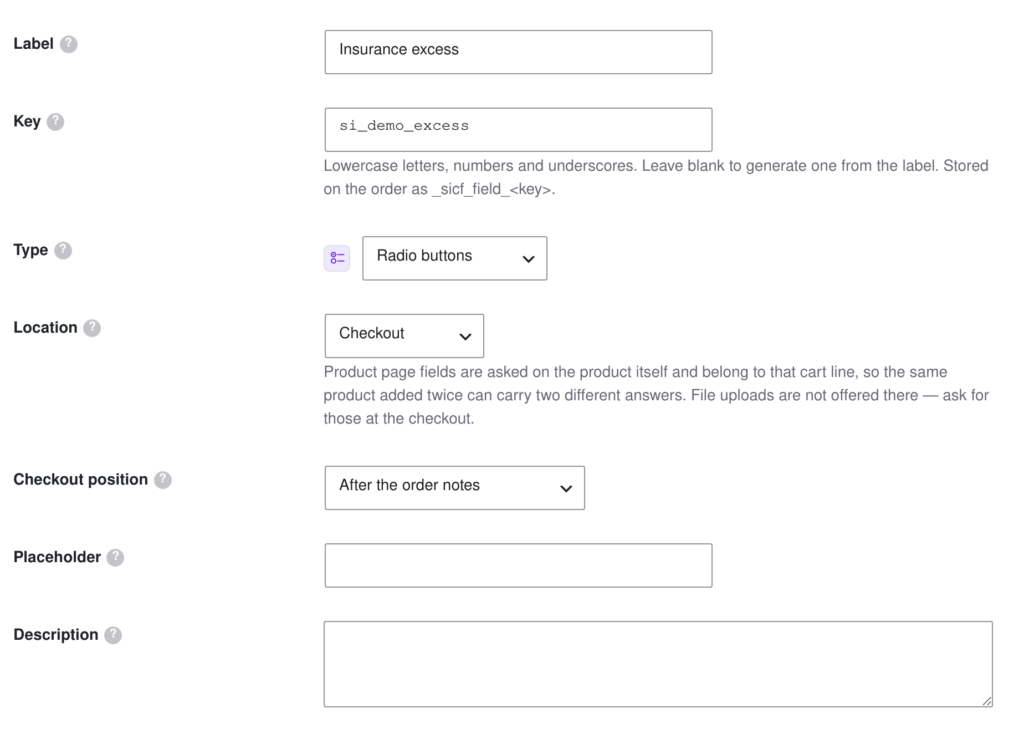
Nineteen field types you can put on the checkout, the product page, the registration form or the My Account area — with conditional logic, per-role visibility and optional pricing.
Damage waiver
A fixed or percentage fee, per item or per order, required or offered as an opt-in the customer can decline — with the decision recorded on the order so it is provable later.
ID upload & verification
Collect a passport or driving licence at checkout, approve or reject it from a review queue, and store it outside the media library where it cannot be guessed or indexed.
Nineteen field types, and somewhere sensible to put each one
Every type carries its own icon in the admin, tinted by family, so a long list of fields can be read at a glance instead of one label at a time.
Text & numbers
Text, text area, email, phone, URL, number, password, VAT number
Choices
Dropdown, multi-select, radio buttons, checkbox, checkbox group
Date & time
Date pickers and time pickers, localised to your store
Uploads & pickers
File upload and colour picker
Layout
Headings and message blocks that explain rather than ask
Checkout
Fifteen positions on the page. Delivery notes, a PO number, how they heard about you.
Product page
Above the add to cart button. Collection time, driver, size, per-item extras.
Registration
Asked once when the customer signs up, and kept on the account.
My Account
Editable later by the customer, when you allow it.
The order record
- Admin order screen
- Customer’s order
- Order emails
- Priced fields as cart fees
- Per-item data on the line
- Readable after a field changes
Ask it only where it belongs
A question that matters at the counter does not belong on a registration form. Each field chooses one of four places, and can be narrowed further from there.
- Checkout — fifteen positions on the page, from above the billing form to under the place-order button.
- Product page — asked per item, above the add to cart button.
- Registration form and My Account — for anything you want on file rather than on one order.
- Conditional logic — show a field only when an earlier field calls for it. A hidden field is never required and never charges.
One saved rule, not forty product edits
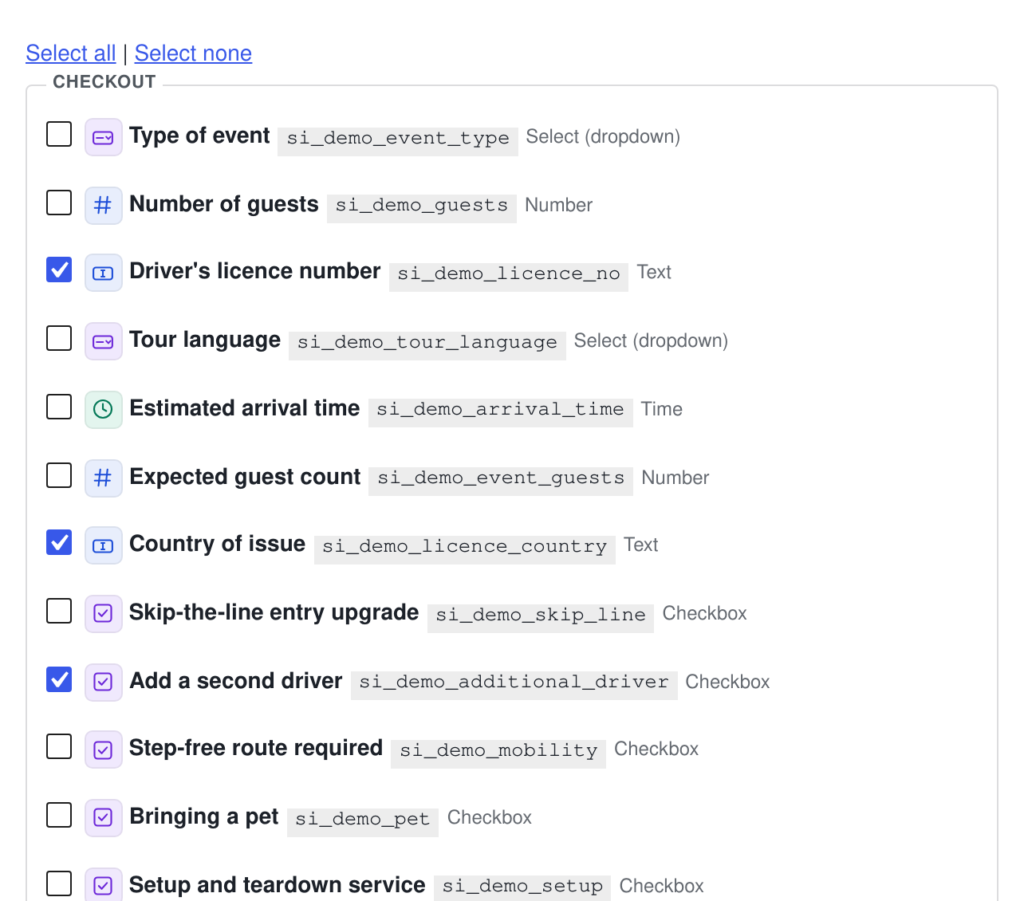
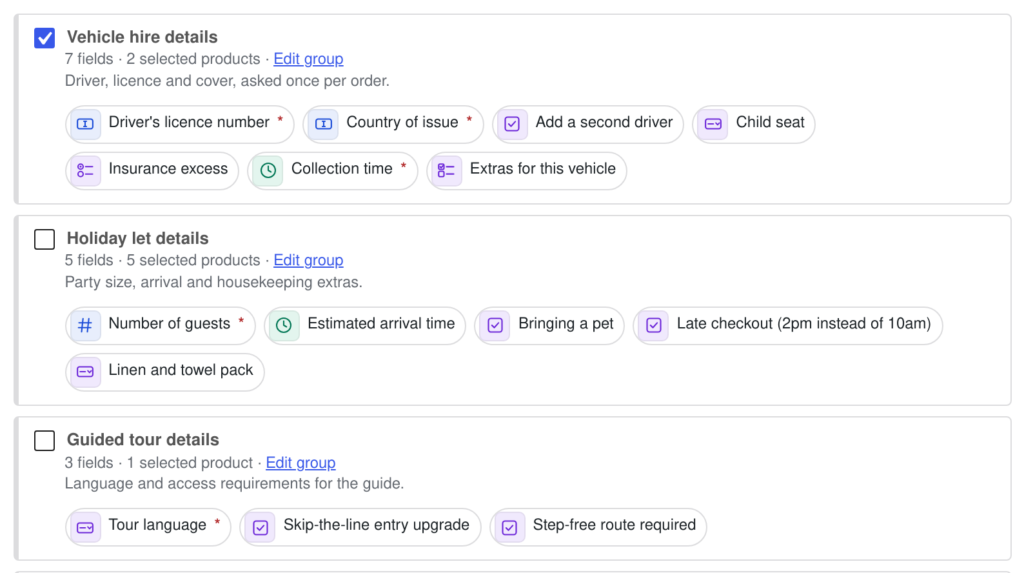
A field group is a named set of fields plus one rule for the products it applies to. Point six questions at forty products once, and change them in one place forever after.
Build the group
Tick the fields it holds — driver, licence, cover, extras.
Point it at products
All products, rentals only, categories, or a hand-picked list.
Reuse it
Duplicate the group, or copy its product list into another.
Change it once
Edit the group and every product it covers follows.
Targeting that matches how rentals are actually organised
- Rental products only — leaves your merchandise and consumables alone.
- By category — choosing a parent covers everything beneath it, so new products inherit automatically.
- A hand-picked list — searchable by name or SKU, for the awkward exceptions every catalogue has.
- Duplicate a group to reuse the field selection, or copy a product list to point a different set of questions at the same products.
Apply a group without leaving the product
Every product gets its own Custom Fields tab. Tick the groups it should ask for — or create a brand new field for it right there, without a trip to the settings screen.
The product tab does both halves of the job
- Tick a group and the product joins it. Untick it and the product comes back out.
- A group that already reaches the product by a rule is shown ticked and locked, with the rule named — so you always know why a question is being asked.
- Add a field creates a new one on the spot, and you choose whether it joins an existing group, starts a new group for this product, or belongs to this product alone.
- Every field is a chip you can click straight through to its editor.
Two cars, two drivers, two collection times
Questions asked on the product page belong to that cart line. Add the same product twice with different custom fields data and you get two lines — not one line of quantity two with one set of data between them.
The questions that decide the handover
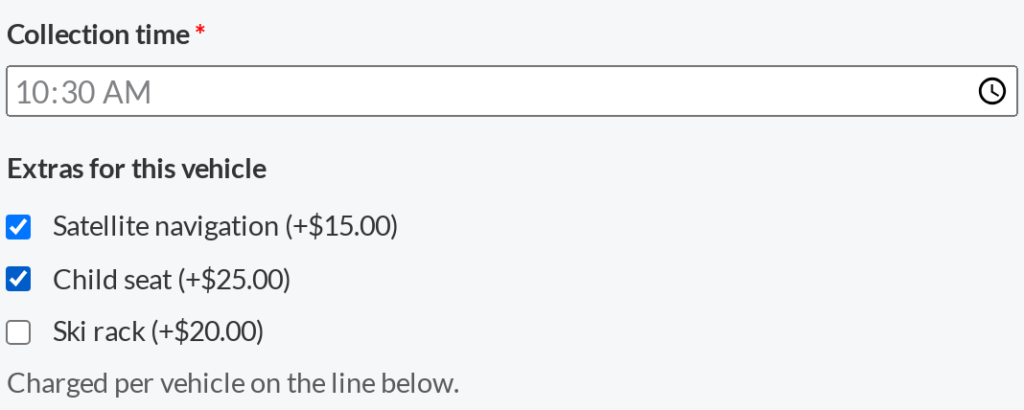
Collection time, driver, size, per-item extras — anything that differs between two of the same product belongs here rather than at the checkout.
- A missing required field stops the add to cart, so nothing reaches the basket half-specified.
- Custom fields data shows under the item in the cart and lands on the order line, so the picker sees them next to the thing they are picking.
- Priced fields are charged per unit — two hire cars with a child seat are two child seats.
Fields that pay for themselves
A question with a price on it is an upsell that never gets forgotten at the counter. The charge is added to the cart as a fee, so your product prices and reports stay clean.
| The question | Type | What it adds |
|---|---|---|
| Add a second driver | Checkbox | A flat fee while the box is ticked. |
| Insurance excess | Radio buttons | A price per option — standard free, reduced excess charged, zero excess charged more. |
| Extras for this vehicle | Checkbox group | Sums every box ticked, charged per vehicle on that cart line. |
| Late checkout | Checkbox | A percentage of the line price rather than a flat fee, if you prefer. |
| Setup and teardown | Checkbox | A one-off service fee, added once per order. |
Prices can be fixed or a percentage, set on the field or on an individual choice. A field hidden by conditional logic never charges — a customer is never billed for something they could not see.
The fee that actually gets collected
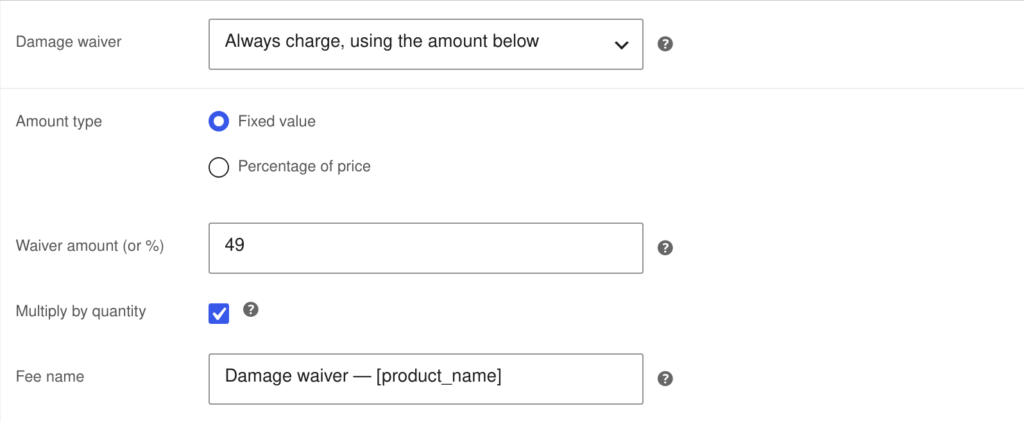
Fixed or a percentage. Per item or per order. Required, or an opt-in the customer can decline — with the decision written onto the order so it is provable months later.
- One global rule covering all products, rentals only, selected categories or a hand-picked list — with minimum and maximum clamps on a percentage.
- Per-product and per-variation overrides. One product can always charge its own amount even when the global waiver is off; another can never charge at all.
- Declining is recorded on the order, with an order note, so a dispute later has a record.
- The rule is snapshotted onto each order, so editing it later never rewrites history.
- A notice on the product page tells the customer before the cart, so the fee is never a surprise.
See who you are handing the keys to
The customer uploads a passport or driving licence at checkout. You approve or reject it from a queue, and the reason for a rejection is emailed back so they know what to send instead.
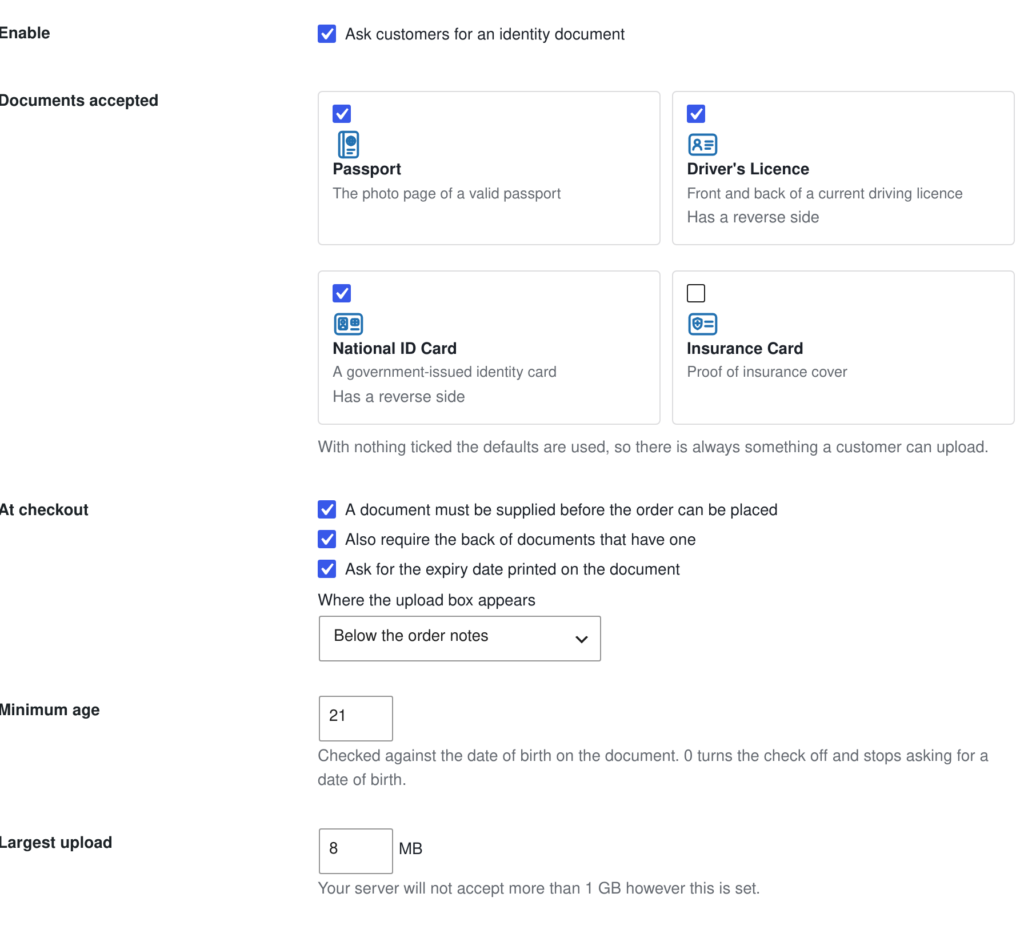
Identity documents are treated as evidence, not as media
An uploaded licence is not a product photo. Putting one in the Media Library gives it a predictable URL, lists it in search and exposes it through the REST API. This plugin refuses to do that.
Unguessable storage
A directory named with 32 random characters, and every file renamed — the customer’s own filename never touches your disk.
Contents checked, not claims
The file type is verified by inspecting the file, never by trusting its extension or what the browser said it was.
Checked on every view
A document can only be opened through a link that checks a one-time token and that you are allowed to see it.
Automatic retention
Documents can be purged a set number of days after the order completes, so you are not holding identity data forever.
Everything the plugin does
| Feature | What it means in practice |
|---|---|
| 19 field types | Text, text area, email, phone, URL, number, password, VAT number, dropdown, multi-select, radio, checkbox, checkbox group, date, time, colour, file upload, heading, message. |
| 4 places to ask | Checkout (15 positions), product page, registration form, My Account. |
| Field groups | Reusable sets of fields with one targeting rule: all products, rentals only, categories, or a hand-picked list. |
| Product data tab | Apply groups to a product, or create a field for it, without leaving the product screen. |
| Per-item questions | Product page data belongs to the cart line, so the same product twice can carry different custom fields data. |
| Conditional logic | Show a field only when earlier fields call for it. Hidden fields are never required and never charge. |
| Pricing | Fixed or percentage, on the field or on an individual choice, added to the cart as a fee. |
| Damage waiver | Global rule plus per-product and per-variation overrides, required or opt-in, with the rule snapshotted onto each order. |
| ID upload & verification | Four document types, a review queue, approval and rejection emails, secure storage and optional retention purging. |
| Order integration | Custom fields data on the admin order, the customer’s order and the order emails — each controlled per field, and readable even after a field is renamed or deleted. |
| Export & import | Move a whole field setup between sites as JSON. |
| HPOS compatible | Works with WooCommerce High-Performance Order Storage, declared and tested. |
Custom Fields, Damage Waiver & ID Verification
Sold on its own, or included with the Pro edition alongside the other add-ons. Works as a standalone WooCommerce plugin — Sales Igniter Bookings & Tours is optional, and adds the “rental products only” targeting rule when it is present.
Requirements, activation and where the settings live.
Types, conditional logic, visibility and pricing.
One rule instead of forty product edits.
The product data tab, and adding a field from it.
Per-item questions and how they reach the order.
Turning a question into an upsell.
Rules, overrides and proving a decline.
Documents, the queue and how files are stored.
Custom fields data on orders, emails and My Account.