
Custom fields data is only useful if the right people see it. Every field controls this for itself, on the Show the value setting of the field editor.
| Setting | Where the data shows |
|---|---|
| Admin order screen | In a panel on the order, for whoever is fulfilling it. |
| Customer order details | On the customer’s own order page in My Account. |
| Order emails | In the order confirmation and other WooCommerce emails. |
| Editable in My Account | The field shows on My account › Account details, where the customer fills it in and changes it. A checkout field marked so starts the next checkout from the saved answer. |
Product page data #
Custom fields data given on the product page is attached to the order line item rather than the order as a whole, under the field’s label. They appear on the admin order, the customer’s order and the emails automatically, beneath the item they belong to.
Custom fields data survives the field being changed #
When custom fields data is stored, the plugin also records the label, the type and the option labels it was captured under. Rename a field, change its choices or delete it entirely and old orders still read correctly — they show what was actually asked at the time, not what the field says today.
Changing answers after the order #
Since version 1.0.10 answers can be corrected after the order is placed: a typo in a name to print, a size, a time.
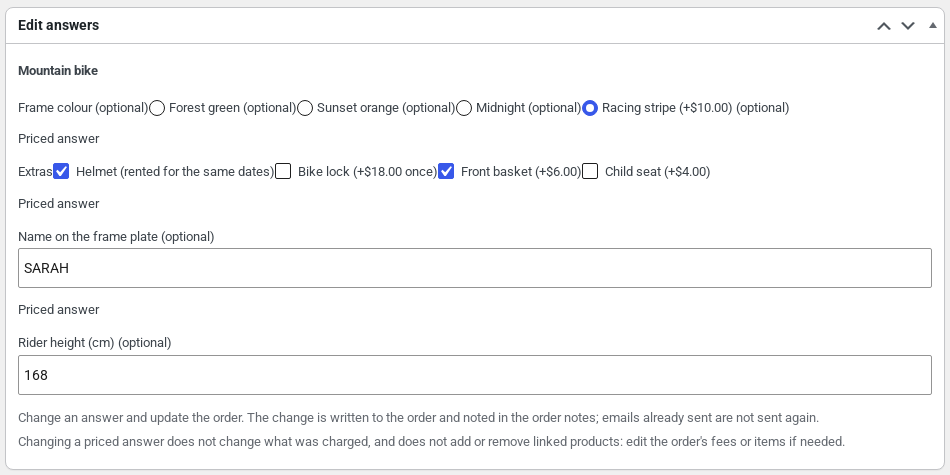
- Staff change any answer in the Edit answers box on the order screen.
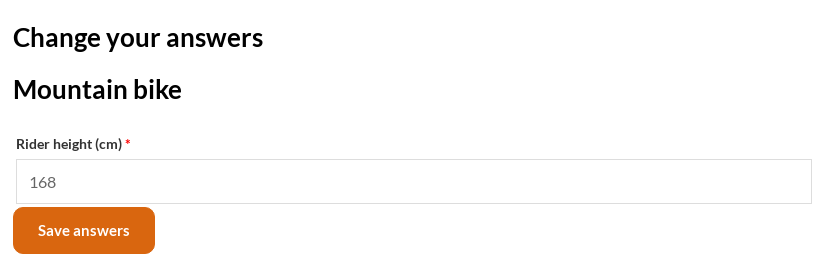
- Customers change the answers to questions marked Customer can edit the answer on the order, from My account › Orders › View, with Change your answers, until the order is completed. A priced answer is never offered there.
- Every change is noted on the order, for example “Answers changed by Sam: Name to print ‘Ann’ → ‘Anne'”.
- A priced answer changed by staff doesn’t change what was charged, and files can’t be changed this way.
Getting the data out #
- Export answers on the Import / export tab writes what customers answered on the orders between two dates to a CSV, one row per order line or one row per answer. See Import, export, templates and backups.
- Answers are also stored as order meta, so any plugin that exports WooCommerce orders can include them.
- WooCommerce › Option revenue shows what each priced question and option earned. See The option revenue report.


