
For check-in, a waiver or a boarding list you often need each guest’s name, not just the person who booked. A tour can ask for them on the product page, and customers can add them later.
Ask for names #
On the product, below the date rows, set Ask for each guest’s name:
| Choice | What happens |
|---|---|
| Optional (the default) | The product page has a box Your group’s names (optional), one name per line. Names can be added later from the confirmation email. |
| Required | One name per guest before the tour can be added to the cart. |
| Not asked | No names. The manifest shows “Guest 1”, “Guest 2” and so on. |
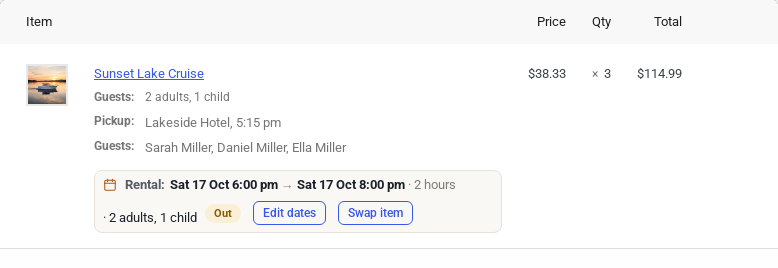
The names show on the order line as Guests, and on the manifest.
Add the names later #
While a name is missing, the confirmation email and the order in My Account show Add your group’s names. The link opens a page with a first and last name for each guest; the customer types them and clicks Save the names. No sign-in is needed: the link is private to that order.
Staff change names #
On the departure’s manifest, click Edit names next to a booking, type the first and last names and click Save names. A name typed on the manifest is kept even if the order changes later.


