
Any field can carry a price, which turns a question into an upsell. A tick box becomes “Add a second driver — £45”; a dropdown becomes an insurance tier. The charge is added to the cart as a fee, never as a change to the product price, so your product prices and reports stay clean.
Where to set a price #
| Where | Effect |
|---|---|
| The field’s own price | Charged once while the field holds any value. Right for a tick box or a text field. |
| An option’s price | Charged when that particular choice is selected, and it overrides the field price. Right for tiers — Basic free, Full £40. |
Both can be a fixed amount or a percentage. For a checkout field the percentage is read against the cart subtotal; for a product page field it is read against that item’s own price.
Ways to charge #
The Pricing setting in the field editor decides how the amount is worked out:
| Pricing | Charge |
|---|---|
| The price as it is | The field or option price, a fixed amount or a percentage, as above. A negative price is a discount. |
| Fixed, once per line | Chosen in the price type: the same amount whatever the quantity, for a set-up or cleaning fee. Works on the field price and on any option’s price. |
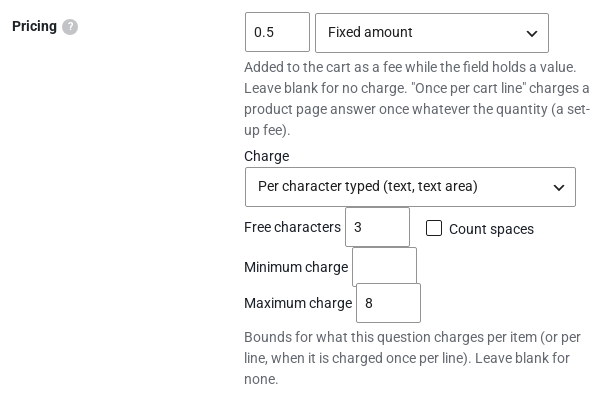
| Per character typed | Text and text area fields: the price times the characters typed, after a number of Free characters. Spaces count only if you say so. |
| Per number entered | Number fields: the price times the number the customer types. |
| Per rental period | Each fixed price times the rental’s days, or nights for stays, from the Rentals & Bookings plugin. Without it, one period. |
| Formula | Worked out from the answers, for example {width} * {height} * 0.05. |
Any of them can have a Minimum charge and a Maximum charge for one item (or for the line, when it is charged once per line).
Formulas #
A formula can use numbers, + - * /, brackets, min(), max(), round(), ceil() and floor(), and:
{question_key}: another answer as a number (a ticked checkbox is 1, a list counts the options picked);qty: the quantity (a formula that uses it is charged once per line);price: the product price;days: the rental’s days or nights.
A formula that doesn’t work is saved with a warning saying why, and charges nothing until it is fixed. The same formulas work in our Shopify app.
How it behaves in the cart #
- Checkout fields recalculate the order review as the customer changes them, so the total moves the moment they tick an extra.
- Multi-value fields sum every selected option, so a checkbox group can add three extras at once.
- A field hidden by conditional logic never charges. If the customer changes an earlier field and it disappears, its fee goes with it.
- Product page fields are charged per unit on their own cart line, unless their price is charged once per line.
- On the product page, each priced answer shows what it adds, and an Options total sums them as the customer answers.
Tax #
Charge tax on option prices (Rentals › Settings › Custom Fields, or Custom Fields › Settings without the Rentals plugin) decides whether option prices are taxed:
- Prices on checkout fields are taxed at the standard rate.
- Prices on product page options take their product’s tax class, and stay untaxed on a product that isn’t taxable.
- New stores start with it on. Stores updating from an earlier version keep option prices untaxed, as before, and see a one-time notice pointing to the setting.


