
This page is for staff who handle rental quotes. It needs Sales Igniter Rentals & Bookings 1.0.13 or later. Dates, availability and the hold settings are in Rental quotes: dates, availability and stock holds.
Rental items in the editor #
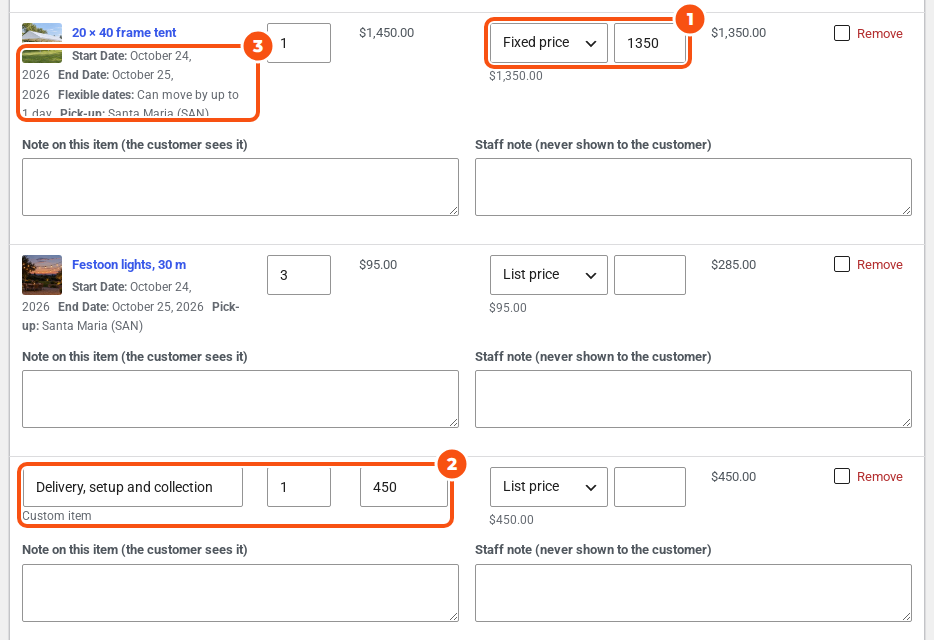
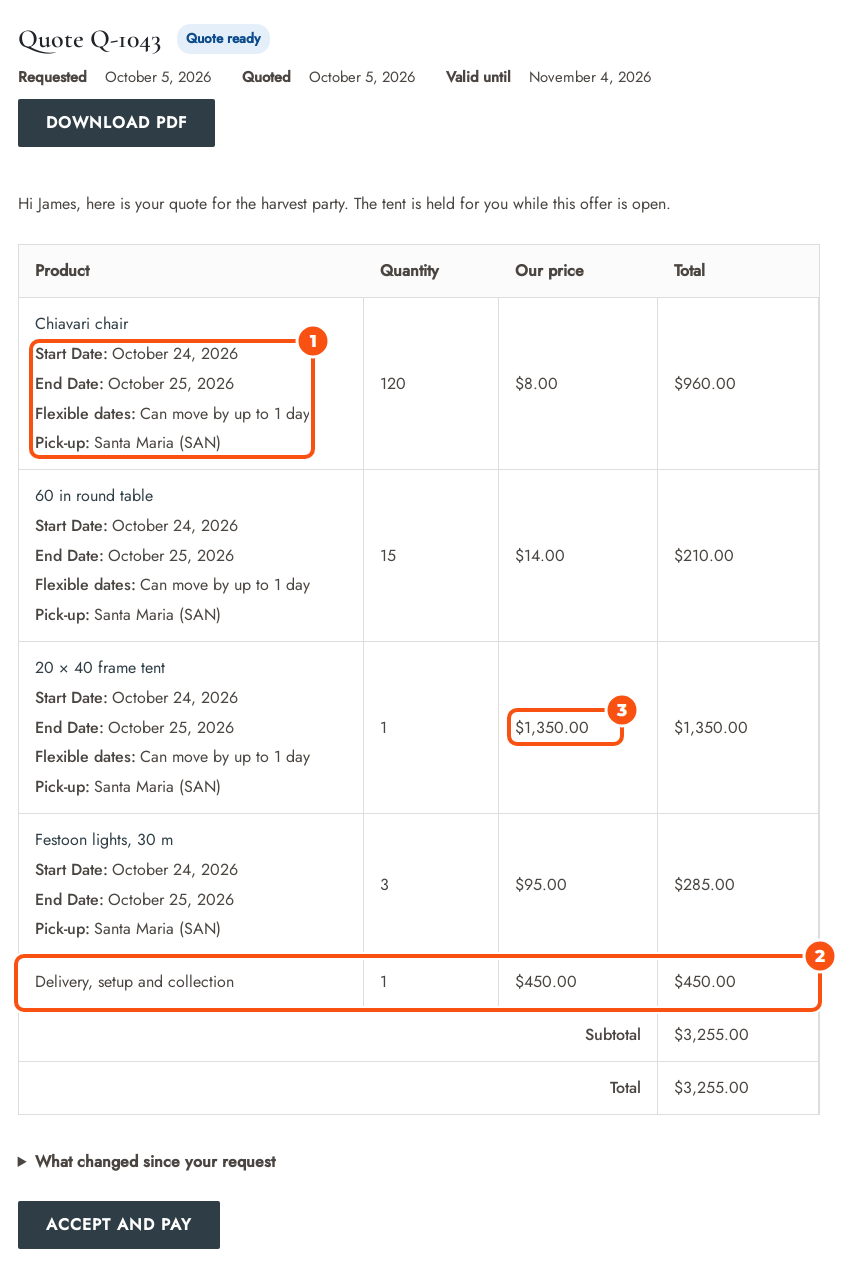
Rental items show their dates, flexible dates and pickup location under the product name. You price them like any other item: List price is the rental price for those dates. Add delivery or setup as a custom item.
The Rental panel #
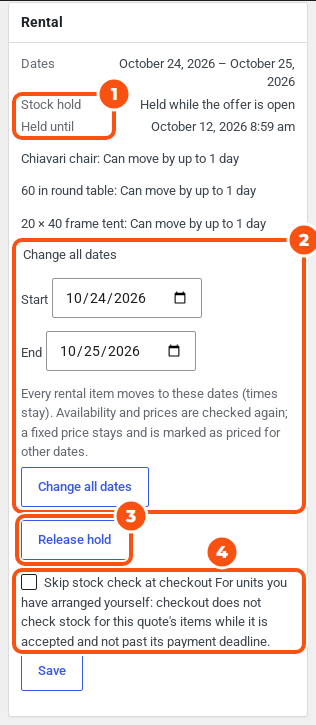
Open a quote with rental items. The Rental panel in the side column shows the Dates, the Stock hold state, Held until and any flexible dates.
| Stock hold | Meaning |
|---|---|
| Not held | Nothing is reserved for this quote. |
| Held while the offer is open | Reserved since you sent the offer (Hold while the offer is open, or Hold stock). |
| Held until payment | Reserved since the customer accepted, until the payment deadline. |
| Partly held | Some items are reserved, others are not. |
| Released | The hold was released. |
| Moved to the order | The order’s own bookings took over. |
Change all dates #
On drafts, new requests, sent quotes and quotes with changes requested:
- Enter a Start and End date in the panel.
- Click Change all dates.
Every rental item moves to those dates; the times stay. Availability and prices are checked again. An item with a Fixed price keeps it and the customer sees “Priced for the dates in this quote.”; list and percent prices follow the new rental price. On a sent quote the change goes into your working copy, which the customer sees when you send it again.
If any item can’t move (stock, or your rental date rules), nothing changes and you see “The dates were not changed: …” with the reason. The same happens if held stock can’t move to the new dates: the dates and the hold stay as they were.
Hold stock and Release hold #
- Hold stock works on sent and accepted quotes and needs the
sirfq_hold_stockcapability (Administrators and Shop managers have it). It is all or nothing: if one item can’t be held, nothing is held. On a sent quote it holds for up to the Longest offer hold from now, never past the offer’s expiry. On an accepted quote it holds until the payment deadline. - Release hold frees the stock. On a sent quote, sending again won’t hold again. On an accepted quote, a failed order won’t hold it again.
Skip stock check at checkout #
For units you have arranged yourself, tick Skip stock check at checkout and click Save. Checkout then doesn’t check stock for this quote’s items while it is accepted and before its payment deadline. A start date that has passed is still refused. On the payment-link path the order is created without a stock check anyway, so this matters only for checkout.
Each of these actions is written to the quote’s timeline, for example “Stock held by staff.” or “Rental dates changed to …”.
Deposits and damage waiver #
- A refundable security deposit never counts in the quote total. It shows as a separate row after the total: “Refundable deposit, added to your order” when the customer pays through a payment link, or “Refundable deposit, collected at checkout” otherwise. It shows only where prices are shown.
- Deposits and the damage waiver are not discounted by your quote prices, but a percentage deposit is worked out from the quoted price.
- The damage waiver’s notice is hidden on products whose price is hidden from the visitor. The waiver is still charged in the cart.
- Deposits and product fields can go on a payment-link order. A damage waiver, ID verification, contract signing, part payment and checkout fields that must be filled in always go through checkout: the editor greys out Payment link (order created for the customer) and shows the reason.
These need the latest versions of the deposits and custom fields add-ons.
Where staff see held stock #
- Quote holds card. On the Rentals dashboard a Quote holds card shows how many units are held for quotes, and up to ten holds with the quote number, customer, product, quantity, dates and held-until time, soonest first. It shows to users who can view quotes, and lists only quotes they may open. When nothing is held it says “No stock is held for quotes.”
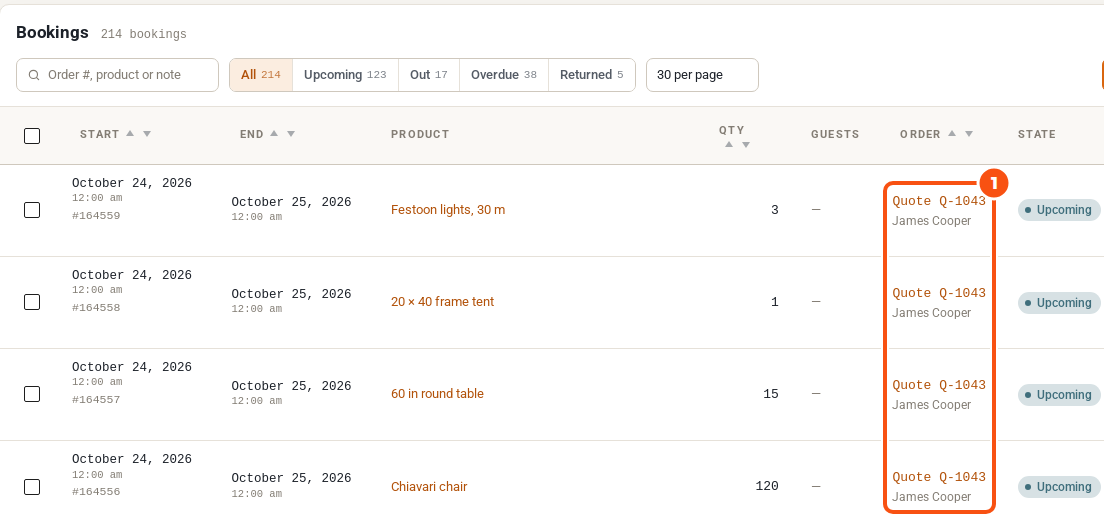
- Bookings lists. A hold shows as “Quote Q-1043”, linking to the quote, instead of “—” in the Bookings list’s Order column or “Manual booking” in the reports and send lists. Users who can view quotes but may not open that one see the quote number only. The Notes column of the Bookings list reads “Quote Q-1043” too.

Multi Location Inventory #
With the Multi Location Inventory plugin, the pickup and return locations are captured, shown on the quote and written to the order, and holds count against the chosen pickup location. With an older version of that plugin, the Rental panel says that quote holds count against the shared stock instead; checkout still checks the pickup location.


