
A guest count lets customers say how many people a booking is for. It is kept apart from the quantity, which still means units of stock. A cabin that sleeps 4 is still one cabin, and a tour with 20 places sells one place per person. The product checks the party against its limits, keeps the quantity right, and shows the party in the cart, on the order and in your admin.
Guest counts are part of every edition, including the free Lite plugin. Guest types (adults, children, infants and pets), guest fees and the guest search need Rentals & Bookings Regular (and Pro). They are covered in Guest types and guest fees and Searching by number of guests.
When to use guests #
| Your rental | Guests setting | Example |
|---|---|---|
| A place that sleeps a set number of people | Each unit holds up to a number of guests | A cabin that sleeps 4, a holiday home, a venue |
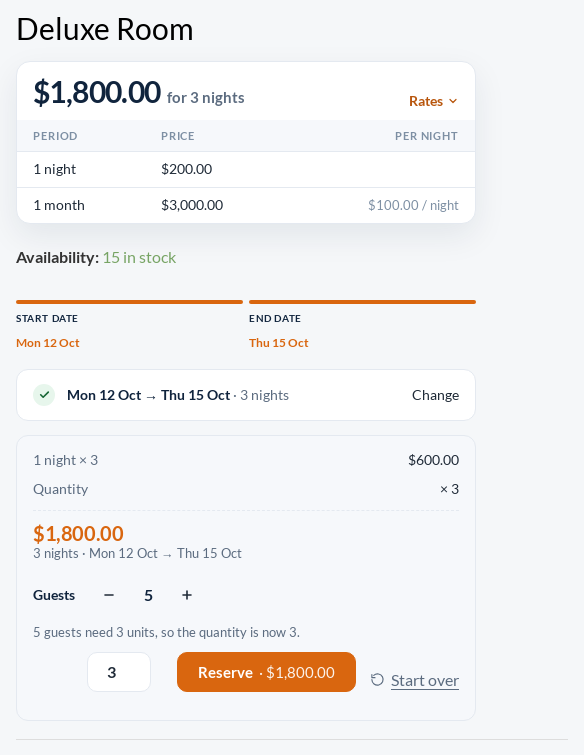
| Identical rooms or boats of one size | Each unit holds up to a number of guests | 15 rooms for 2 guests each: 5 guests need 3 rooms |
| Places sold per person | Each guest takes one place (seats) | A guided tour with 20 places, a sunset cruise |
| Things hired by the item | Off | Bikes, kayaks, tools: the quantity is all you need |
A product with guests Off works exactly as before. It shows no guest field, runs no guest checks and its price does not change. Off is the default, so nothing changes until you turn guests on.
Turning guests on for a product #
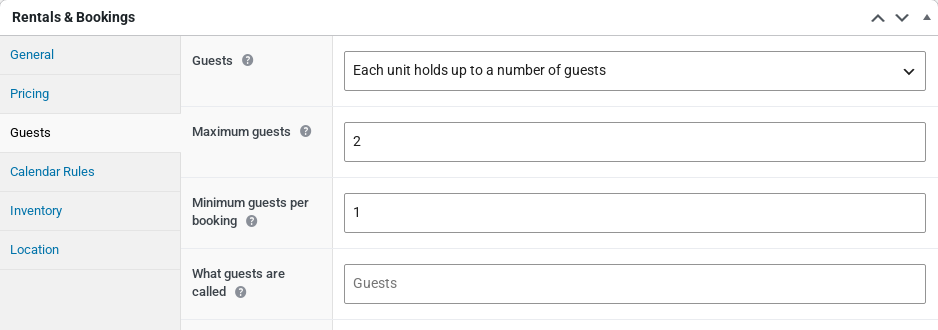
- Edit the product and open the Guests tab in the Rentals & Bookings box.
- In Guests, choose how guests work for this product.
- Set Maximum guests and, if you need one, Minimum guests per booking.
- Optionally, fill in What guests are called.
- Click Update.
| Setting | What it does |
|---|---|
| Guests | Off: the quantity is all that is asked. Each unit holds up to a number of guests: the party is checked against a maximum per unit (a room, a cabin, a boat). Each guest takes one place (seats): the quantity is the number of guests. |
| Maximum guests | Units: the most guests one unit holds (a cabin that sleeps 4: 4). A booking can bring up to this number times the units in stock. Seats: the most guests one booking can bring. Leave it empty to allow up to the stock. |
| Minimum guests per booking | The fewest guests a booking may have, for example a private tour for at least 2. It is 1 unless you change it. The guest count starts at this number. |
| What guests are called | The word shown beside the count, for example Riders or Passengers. Leave it empty for Guests. It is not made plural, so the cart reads “Riders: 3”. |
In units mode you can leave Maximum guests empty. The party is then recorded on the order but never limited. A variable product’s variations use the Guests tab of the parent product.
What customers see #
The product page gets a Guests count with minus and plus buttons. In the modern layout it sits in the booking bar next to Reserve. In the original layout it is a row under the dates, and the previous date picker shows a plain number box. The count is not a step of the date picker: customers can change it before or after they pick dates, and the price updates straight away. Changing the guests or the quantity keeps the dates they picked.
When the plus button reaches a limit it stops, and a short line under the count says why.
Each unit holds up to a number of guests #
- The quantity box still means units: rooms, cabins or boats.
- When the party needs more units than the quantity, the quantity goes up by itself and the page says so: “5 guests need 3 units, so the quantity is now 3.”
- Customers can book more units than the party needs, but never fewer.
- The count stops at the maximum times the units in stock: “This rental takes up to 30 guests.”
Each guest takes one place (seats) #
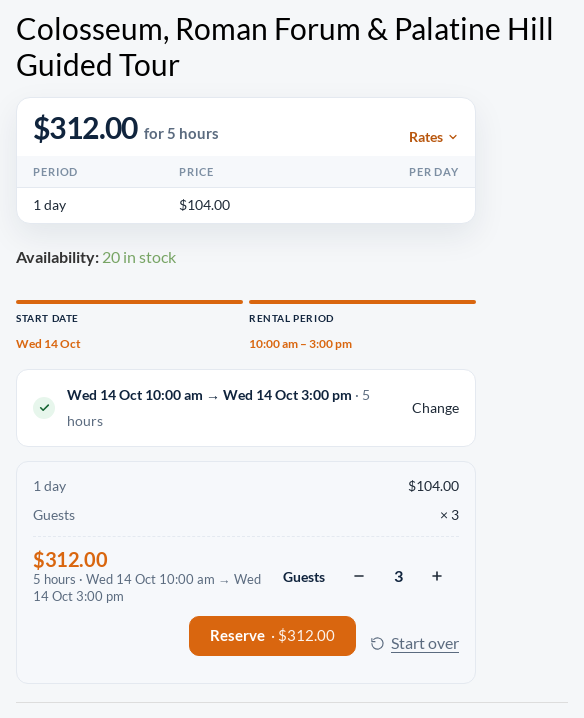
- There is no quantity box. The number of guests is the number of places booked and paid for.
- The price is per person, so 3 guests pay 3 times the price for the dates.
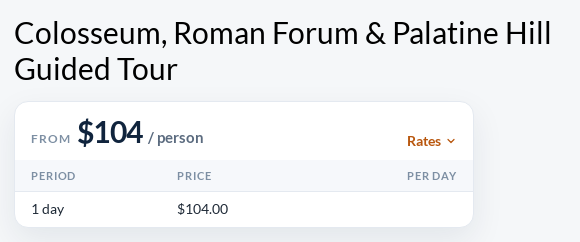
- The headline price reads “/ person”, for example “From $104 / person”. This happens when the product’s Price shown per (Pricing tab) is Automatic and the product has no price text of its own.
- The count stops at Maximum guests: “Up to 10 guests can book at once.”
Checks before a booking reaches the cart #
The page checks the party as customers change it, and the same checks run again when the item is added to the cart. A changed page or an app cannot book around them.
| Message | When it appears |
|---|---|
| Please add at least 2 guests. | The party is below Minimum guests per booking. |
| This rental takes up to 16 guests. | Units: the party is more than the maximum times the units in stock. |
| 5 guests need at least 3 units. | Units: the quantity is too low for the party. |
| Up to 10 guests can book at once. | Seats: the party is more than Maximum guests. |
| Only 6 places are left on these dates. | Seats: fewer places are free than the party needs. |
| There are no places left on these dates. | Seats: every place is taken on those dates. |
Availability counts units, as it always has. With units, a product is available when enough units are free for the units the party needs (5 guests in rooms for 2 need 3 rooms). With seats, it needs one free place per guest.
In the cart and on the order #
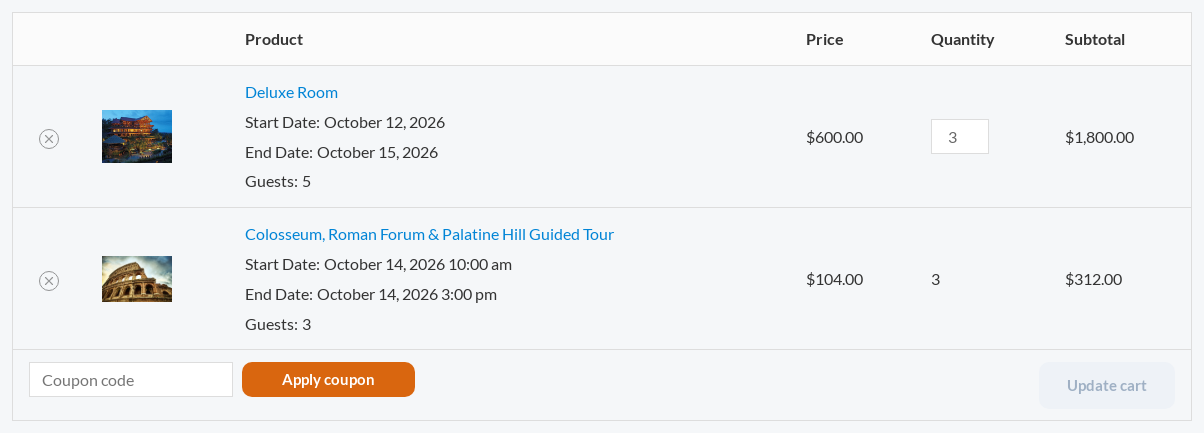
- Each cart line shows the party under the dates, for example “Guests: 5”.
- On a seats line the quantity is shown as a number, not a box. To change it, the customer removes the line and books again with the new party.
- On a units line the quantity can go up in the cart, but not below the units the party needs.
- The same product, dates and party added twice become two cart lines, not one line with double the places.
- The checkout, the order confirmation, the order emails and My Account show the same Guests row.
- The party of the last item added to the cart is remembered while the visitor browses. The next product page they open starts with the same party, reduced to that product’s limits if it has to be.
In your admin #
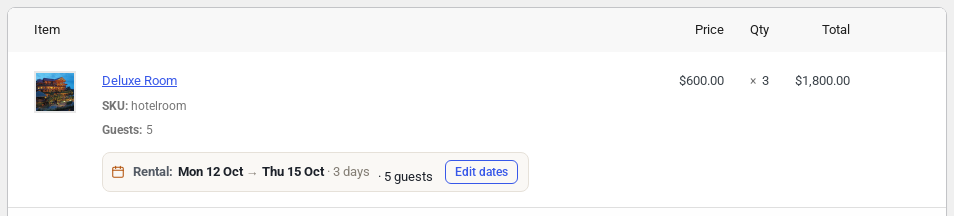
The order screen. Each line shows the party under the product name, and the rental summary adds it after the dates (“· 5 guests”).
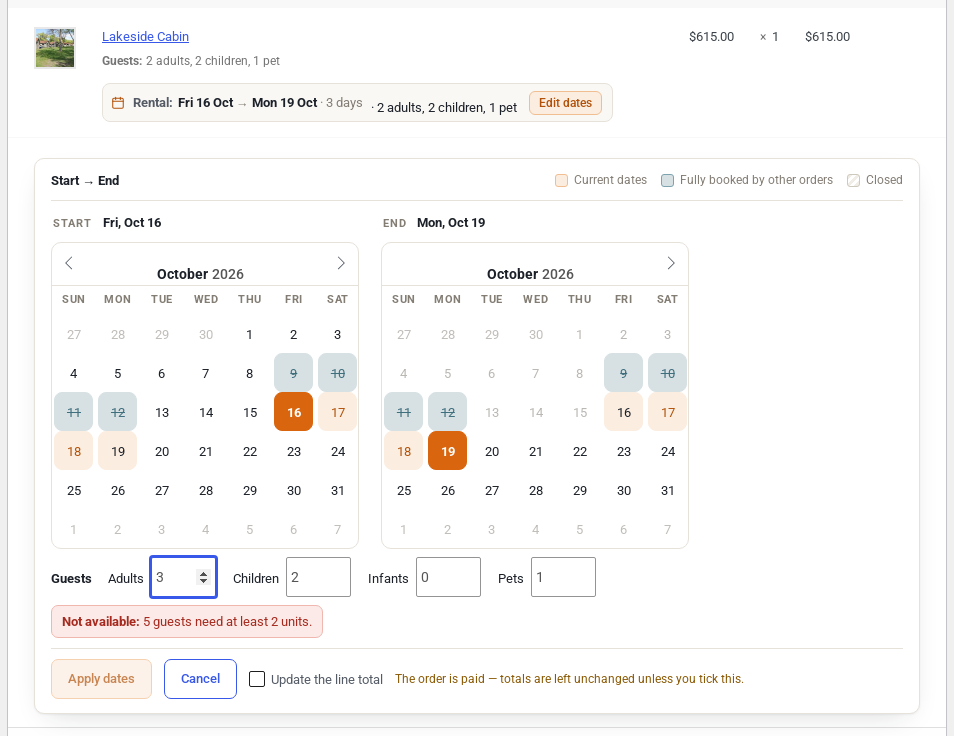
Changing the party. Click Edit dates on the line. The editor has a box for the guests next to the dates. It checks the new party the way the product page does and shows the new price. On a paid order the totals stay as they are unless you tick Update the line total. On a seats product the line’s quantity and its booking follow the new party. An order note records the change, for example “Guests for Deluxe Room changed from 5 guests to 6 guests by Demo Admin.”
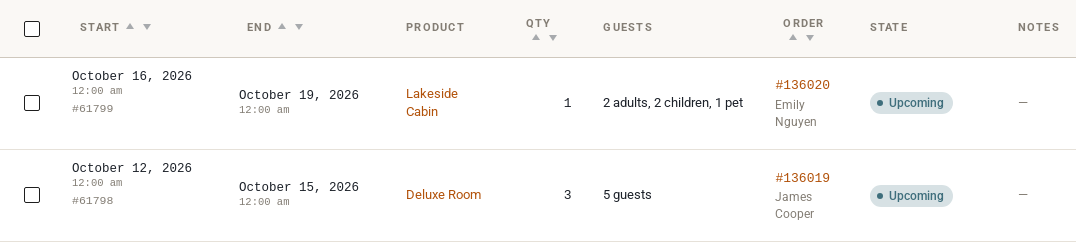
Rentals > Bookings. The bookings list and the Edit Booking screen get a Guests column. It only appears once at least one product counts guests, so a shop that never uses guests sees these screens as before.
Reminder emails. Reminder emails can use the {guests} merge tag, and each item in {items} gets a Guests line. See Email Reminders.
Good to know #
- Guests are not a second stock. Units mode books units; seats mode books one unit of stock per guest.
- In the free Lite plugin guests do not change the price, apart from seats, where each guest pays for a place. Extra-guest fees, pet fees and child prices need Regular.
- A seats product set to Sold individually in WooCommerce takes one place per order, so a party of more than one is refused: “Only one place can be booked at a time for this rental.”
- To change how the Guests count looks, copy
single-product/add-to-cart/guests.phpintoyourtheme/woocommerce/single-product/add-to-cart/. - For developers: the party is stored on the order line as
sibooking-guests(adults and children together), plussibooking-adults,sibooking-children,sibooking-infantsandsibooking-petswith Regular’s guest types. Only values above zero are stored. The Store API’s add-to-cart takes the same names.


