
This page covers SMS via Twilio and WhatsApp via Twilio — one Twilio account carries both. It assumes you have read SMS and WhatsApp rental reminders, which explains what rental reminders are, when they fire, how the three routes compare and what they cost. For the other WhatsApp route, see WhatsApp via Meta.
Twilio is the shorter setup of the two WhatsApp routes: once the account exists, connecting it is two strings pasted into our settings. That is a statement of effort, not a recommendation — the trade-offs are in the comparison table on SMS and WhatsApp rental reminders.
Quick setup #
Quick setup: SMS via Twilio #
About 15 minutes outside the US. In the US it is the same 15 minutes of work plus a wait of days to weeks for your A2P 10DLC campaign to be approved, and nothing delivers reliably until it is. That wait is the carriers’ and nobody can shorten it.
- Create a Twilio account and put a payment method on it.
- Buy a phone number from Twilio — or, outside the US and Canada, request a free alphanumeric sender ID instead.
- In the US only: register your 10DLC Brand and Campaign, and wait for approval.
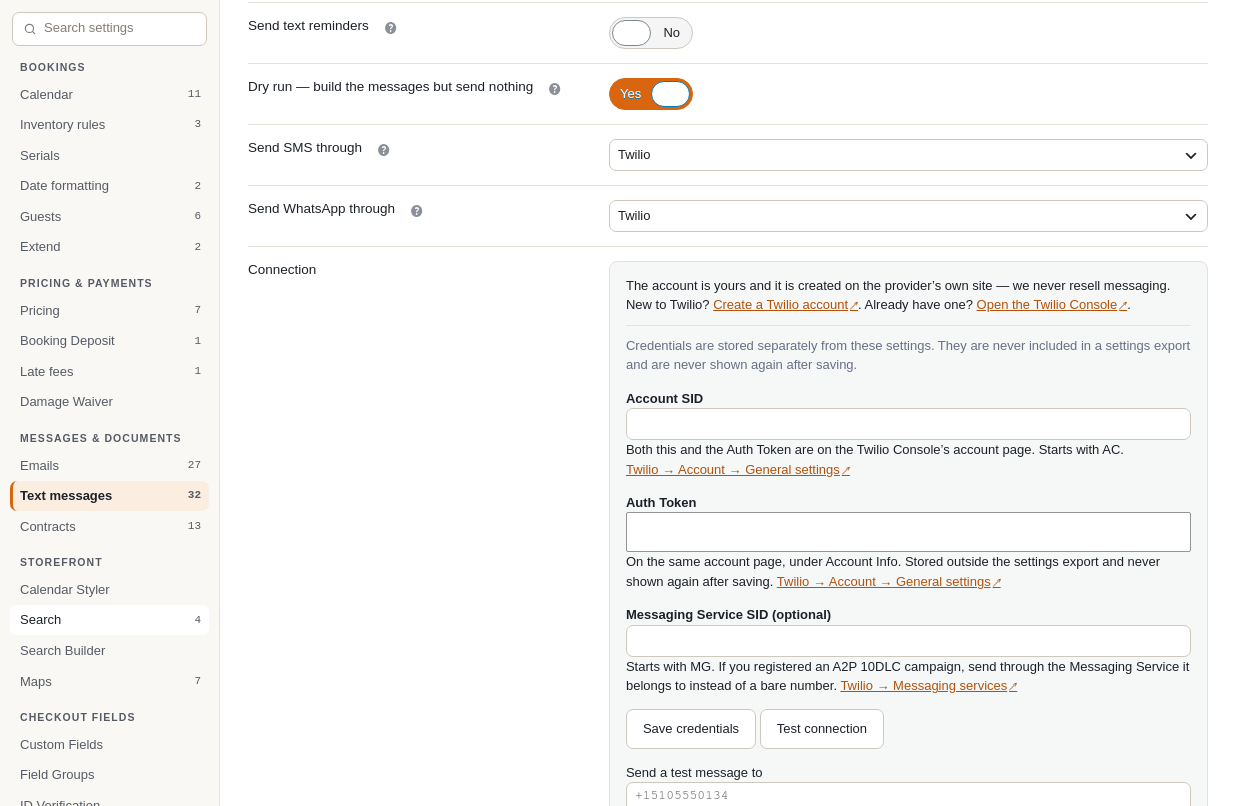
- In Rentals › Settings › Text messages, set Send SMS through to Twilio.
- Paste your Account SID and Auth Token, save, and press Test connection.
- Put your number or sender ID in Send SMS from.
- Set each reminder’s Channel to SMS, leave Dry run on, and send yourself a test.
Stuck on a step? A Twilio account and In the US: A2P 10DLC registration, below, cover the whole of it.
Quick setup: WhatsApp via Twilio #
About 20 to 30 minutes, plus template approval — usually minutes, occasionally a business day. If you already send SMS through Twilio, skip step 1.
- Create a Twilio account and put a payment method on it.
- In the Twilio Console, run WhatsApp Self Sign-up: pick the number, sign in with Facebook, and confirm you own the number by SMS or voice code. Twilio creates the WhatsApp Business Account for you, inside its own portfolio.
- In Meta’s WhatsApp Manager, reached from Twilio’s console, submit a utility template for each reminder and each language.
- In Rentals › Settings › Text messages, set Send WhatsApp through to Twilio.
- Paste your Account SID and Auth Token, save, and press Test connection.
- Choose your WhatsApp sender in Send WhatsApp from.
- Pick your approved template for each reminder, and say which merge tag fills each numbered variable.
- Set each reminder’s Channel to WhatsApp, leave Dry run on, and send yourself a test.

Stuck on a step? Setting up WhatsApp through Twilio below covers the Twilio half, and What WhatsApp requires and WhatsApp Setup Tips, below, cover what Meta asks of every sender.
A Twilio account #
SMS always goes through Twilio. One Twilio account covers both SMS and WhatsApp, which is why it is the shortest route to having both channels — and WhatsApp on its own can instead be sent directly from Meta, without a Twilio account at all, as described in WhatsApp via Meta. For SMS you will need a Twilio account with a payment method on it, an API key, and a sender:
- A phone number bought from Twilio — about $1.15 a month for a US local number, $2.15 for a toll-free one, $2.50 for a UK mobile number, $30 a month for a German one.
- Or, outside the US and Canada, an alphanumeric sender ID — your shop name, up to 11 characters, free on Twilio. An alphanumeric sender cannot receive replies, so nobody can text STOP back to it. When you use one, the plugin automatically adds a line to every message saying that replies are not possible and pointing at a link that stops the texts. That is a legal requirement in the US and it cannot be switched off, and it costs you characters.
In the US: A2P 10DLC registration #
If you are sending to US mobile numbers from an ordinary phone number, US carriers require you to register a Brand (who your business is) and a Campaign (what you send, with sample messages and a description of how you collect consent). Unregistered US traffic is filtered or blocked outright, usually silently.
- Most rental shops qualify as a low-volume standard brand: roughly $19 one-off ($4 brand registration plus $15 campaign vetting) and $1.50–$10 a month for the campaign. A standard brand is $44 instead of $4; a sole proprietor route exists if you have no business tax ID.
- It takes days to weeks, not minutes. Twilio estimates under a week for campaign approval; its own quickstart has carried a banner saying reviews are taking 10–15 days.
- You must file your exact legal business name as registered with your EIN, the EIN itself, your legal structure, industry, a working business website, an authorised representative with job title, phone and email, and the full business address.
- The most common reason a campaign is rejected is an opt-in description that does not match what your checkout actually says. The plugin shows you the exact wording of your checkout consent checkbox — copy and paste that into the application.
- US carriers also charge a pass-through fee on every message on top of Twilio’s price (AT&T $0.0035, T-Mobile and Verizon $0.0045, others around $0.004).

Outside the US and Canada there is no 10DLC equivalent. An alphanumeric sender ID is the normal route and there is nothing to register.
Setting up WhatsApp through Twilio #
What Meta asks of every WhatsApp sender is in What WhatsApp requires below. What follows is the part Twilio changes.
If you are going through Twilio, do the whole sign-up inside Twilio rather than on Meta’s site. Meta provides a flow called Embedded Signup, which “gathers business-related information from your business customers” and “automatically generates all WhatsApp assets that the platform needs” — the WhatsApp Business Account and the registered number — without you filling in forms on a separate site. Twilio exposes it as WhatsApp Self Sign-up in the Twilio Console: you pick the number, sign in with Facebook, create or choose a Meta Business Portfolio, fill in the WhatsApp business profile and confirm you own the number by SMS or voice code. Twilio’s own documentation says registration “might take a few minutes”. It is much the shortest path on the Twilio route — bearing in mind that the WhatsApp Business Account it creates for you sits in Twilio’s business portfolio rather than in yours.
Your approved templates are then reached through the Twilio Console, and the identifier we store for one is Twilio’s own Content SID (it begins HX) rather than a Meta template name. That matters in one situation only: it is part of why moving to the direct Meta route is a fresh setup rather than a migration. See WhatsApp via Meta.
What WhatsApp requires #
WhatsApp is not “SMS but cheaper”. It is a different channel with its own gatekeeper, and a reminder is by definition a message you start — the customer has not messaged you first — so Meta’s rules for business-initiated messages apply in full. Meta is the gatekeeper whichever route you use. On this route you need:
- A WhatsApp Business Account connected to a Meta Business Portfolio, with business verification (legal name, address, a verifiable web presence). Twilio’s Self Sign-up creates this for you, inside Twilio’s business portfolio rather than yours.
- A dedicated phone number for it. Once a number is attached to a WhatsApp Business Account it stops working in the normal WhatsApp app.
- A message template approved by Meta for each reminder and each language, written and submitted in Meta’s WhatsApp Manager. Twilio’s console sends you to that same screen; the form and the review are Meta’s either way. Review is usually within a day. Register them as utility templates, not marketing ones.
WhatsApp wording cannot be edited in our settings, and that is not a limitation we can remove. The words are registered with Meta and Meta does the substitution; all we send is the template’s name, the language and the values that fill its variables. If you want to change a word, you change it in your WhatsApp Business Account and wait for another review. The settings screen gives you suggested wording and the variable order to paste into Meta’s form, and lets you say which merge tag fills each variable — and nothing else, because nothing else is ours to give.
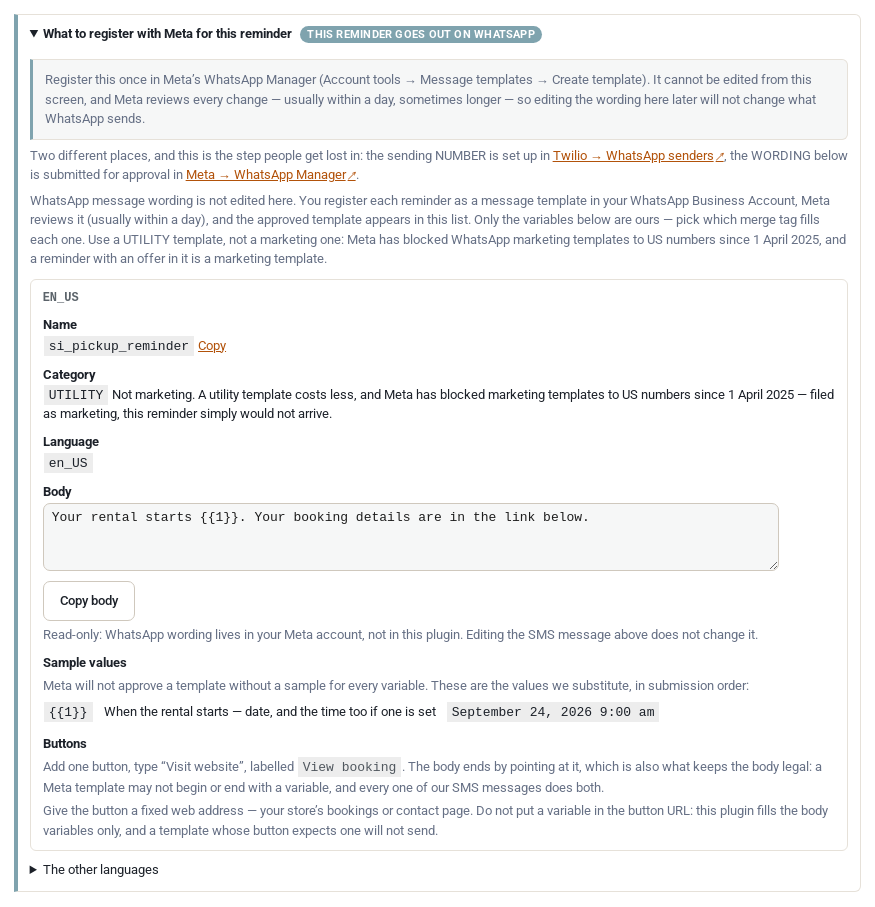
One hard limit worth knowing before you plan around WhatsApp: Meta has blocked WhatsApp marketing templates to US numbers since 1 April 2025. Utility templates — which is what a pickup or return reminder is — still work to US numbers and are unaffected. But it does mean WhatsApp can never carry anything promotional to a US customer, and a reminder with an offer in it counts as promotional.
WhatsApp Setup Tips #
You do not have to wait for business verification before you can try it. Meta’s documentation says a newly created business portfolio starts with a messaging limit of 250 unique recipients per 24 hours outside a customer service window, and lists business verification as one of three ways to raise that to 2,000 — not as a condition of sending at all. Twilio’s guide says business verification is not required to register a sender, but that you must complete it before you move into production, before you can raise your limits and before you can add more than two senders. So the practical order is: sign up, register the sender, send yourself a test, and start verification on day one as a background task rather than treating it as a gate.
Check Meta’s template library before you write a template from scratch. The library is a catalogue of pre-written utility templates whose wording Meta has already settled. Meta’s own page says “Library templates contain fixed content that cannot be edited and parameters you can adapt”, and that “If you choose Customize template, your template will have to go through review before you are able to send messages” — so a library template used as written is the fast path, and editing one puts you back in the queue.
How that maps onto the three reminders this plugin sends, honestly:
- Before pickup — the library entry to look at is
ORDER_PICK_UP, which is the closest thing in it to “your rental is ready to collect”. Meta does not publish the library’s wording in its documentation, so open the library in WhatsApp Manager, or in Twilio’s template builder, and read whatORDER_PICK_UPactually says. If it works for your shop, use it as it stands and you skip the review; if it does not, register our pickup wording as a custom utility template instead. - Before return and overdue — there is no library entry for these. The library’s documented ground is e-commerce and financial services: order management, delivery, payments, account updates. Returning a hired item is not in it, and
PAYMENT_DUE_REMINDERis about money owed, not about bringing a kayak back. Register these two as custom utility templates using the suggested wording the settings screen gives you. One aside while you are here: overdue is the one reminder the free edition does not have. Nothing there records that a rental came back, so nothing there can know a rental is late, and its overdue timings are locked rather than left to chase customers who returned on time. It needs Send & Return, which is part of Regular alongside text reminders — so on this route you do have it, and there is an overdue template to register. See Email Reminders. - Languages — a template is approved per language, so each language you send in is its own template. Meta’s library requires a language code and says it supports a list of them, but that list is not published on the library page, so we cannot tell you which of the nineteen languages this plugin ships wording for the library covers. Assume you may have to register custom templates for some languages even if the English one comes from the library.
Either way, a custom utility template is not the multi-week wait that 10DLC registration is. Meta reviews most templates within minutes; Twilio’s guidance is that approvals typically come back within the hour and sometimes take up to a business day. The one thing that reliably causes a rejection is a variable with no explanation of what it contains, which is why the settings screen hands you the wording and the variable order to paste in.
Finally, and plainly: do not send business messages through the ordinary WhatsApp or WhatsApp Business app, or through an unofficial API. It breaches Meta’s terms and numbers used that way get permanently banned — along with the number your customers already have for your shop. The route described on this page is an official one; nothing outside it is worth using.
Meta’s Embedded Signup, messaging-limit and template-library documentation and Twilio’s WhatsApp self sign-up guide were read on 21 September 2026. Meta does not state anywhere we could find that library templates are approved instantly; what its documentation does say is that customising one sends it to review, which is the basis for the advice above. Both companies change these rules regularly.
What it costs #
Twilio charges $0.005 per message, inbound or outbound, on top of Meta’s own fee, which it passes through at cost. With Meta’s US utility rate at $0.0034, a US reminder on this route costs about $0.0084. (Both figures read from Twilio’s published WhatsApp pricing on 21 September 2026.) Sending direct from Meta avoids Twilio’s $0.005 per message — at 500 reminders a month that is a difference of about $2.50, so the percentage is larger than the money. That route is described on WhatsApp via Meta.
From 1 October 2026 Meta begins charging for utility messages sent inside an open 24-hour customer service window, and for service messages. Both are free today, and Twilio passes Meta’s fees through, so this reaches you on this route too. A reminder to a customer who has not messaged you recently is billed at the utility rate either way; what changes is a reminder landing within 24 hours of a customer message. (Read 21 September 2026.)
You pay Twilio directly. Sales Igniter never resells messaging, never holds a balance and never appears in the chain — your account, your card, your API key, your 10DLC registration. That has a practical upside: when a message fails you can open your own Twilio console and see exactly what we saw. It also means the phone numbers never touch our servers, so if a customer asks who processes their data the answer is you and Twilio — and you will want a data processing agreement with Twilio if you are in the EU or UK.
STOP on the Twilio route #
Consent, the checkout checkbox and what STOP does to your reminders are described on SMS and WhatsApp rental reminders, and none of that changes here. One thing does:
- Twilio and most US carriers also honour STOP at the network level regardless of what we do. That backstop belongs to the Twilio route — it covers SMS and WhatsApp via Twilio, and it does not exist on WhatsApp via Meta. Our own record exists so that you can produce it, and neither a carrier’s record nor Meta’s is one you can show a regulator.
An alphanumeric sender ID cannot receive anything at all, so nobody can text STOP back to it. When you use one, the plugin adds a line to every message saying replies are not possible and pointing at a link that stops them. That is a legal requirement in the US, it cannot be switched off, and it costs you characters.
When Twilio returns an error #
Start at Rentals › Reminders and find the row. The reasons that are nothing to do with Twilio — no phone number on the order, quiet hours, the daily cap, dry run — are on SMS and WhatsApp rental reminders. This is the Twilio half:
- A Twilio error (on SMS, or on WhatsApp via Twilio). The row shows the provider’s own message in plain words — “The carrier says that is not a valid phone number” (21211), “This person replied STOP” (21610), “Meta blocks WhatsApp marketing templates to US numbers; a reminder must use a UTILITY template” (63049). If the error is about your account, your sender or your registration, your Twilio console has the full story, and that is the fastest place to fix it. Genuinely temporary failures are retried automatically after 1, 5 and 30 minutes and then stop; a hard rejection is never retried, because retrying it just costs money.
Related pages #
- SMS and WhatsApp rental reminders — what reminders are, when they fire, the comparison of all three routes, costs, consent and STOP, quiet hours and the Reminders screen.
- WhatsApp via Meta — the other WhatsApp route, sent from your own Meta app.


