
The plugin keeps a product’s configuration from the moment the shopper adds it to the quote basket all the way to the order. This page says how each product type behaves.
| Product type | Basket and quote page | Quote editor |
|---|---|---|
| Simple, virtual, downloadable | One item | One item |
| Variable | The variation, with its attributes under the name | One item per variation |
| Grouped | One item per child product | One item per child product |
| Bundle (WooCommerce Product Bundles) | One item, with an “Includes” row per bundled product | One item with its configuration |
| Composite (WooCommerce Composite Products) | One item, with a row per component | One item with its configuration |
| Product options from other plugins | Rows under the product | The same rows |
Simple, virtual and downloadable products #
These work as you would expect: product, quantity, the shopper’s suggested price (when Suggested prices is on) and note. Staff price them in the editor like any item.
Variable products #
A variation is quoted as its own item, with the attributes the shopper chose under the product name, for example “Length: 6 ft” and “Finish: Smoked oak”. On the product page the shopper picks the variation, then clicks Add to quote. In shop lists the button opens the product page so they can choose.
In the quote editor, search for the variation itself in Search for a product or variation… and click Add item. Choosing the parent product is refused with “Choose a specific variation from the list.”
To change the variation later the shopper uses Change options in the basket (see The quote basket and the request form).
Grouped products #
A grouped product is not quoted as one item: each child with a quantity becomes its own item.
- The shopper enters quantities for the children on the grouped product page.
- They click Add to quote. The button shows when at least one child can be quoted.
- Each child with a quantity is added as a separate item. Children that can’t be quoted, or that were refused (for example a rental without dates), are left out and named in the message.
The grouped product itself stays on the Product types that cannot be quoted list in General, which is the default. You can’t add a grouped product in the editor; add its children.
Bundles #
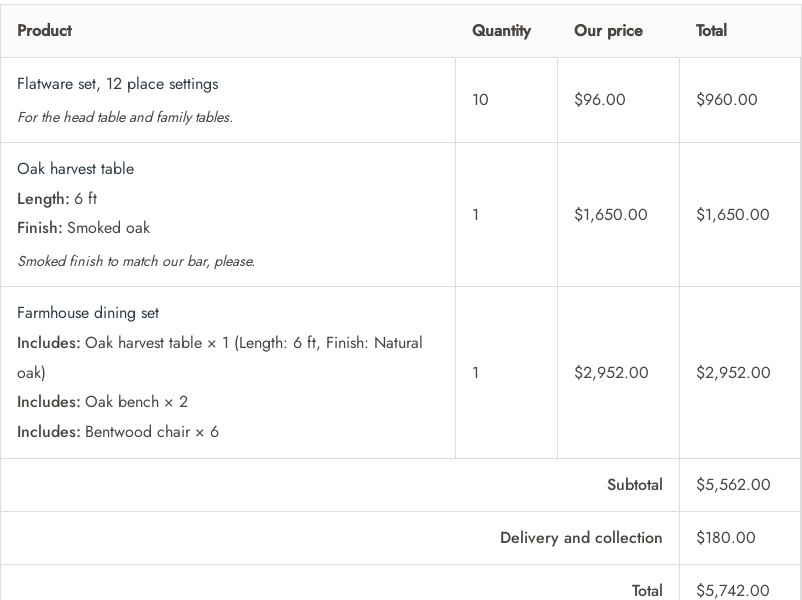
A bundle from WooCommerce Product Bundles is one quote item: the bundle, with the configuration the shopper chose. An “Includes” row lists each chosen product and quantity, for example “Includes: Oak bench × 2”. Optional items the shopper left unticked are not part of it.
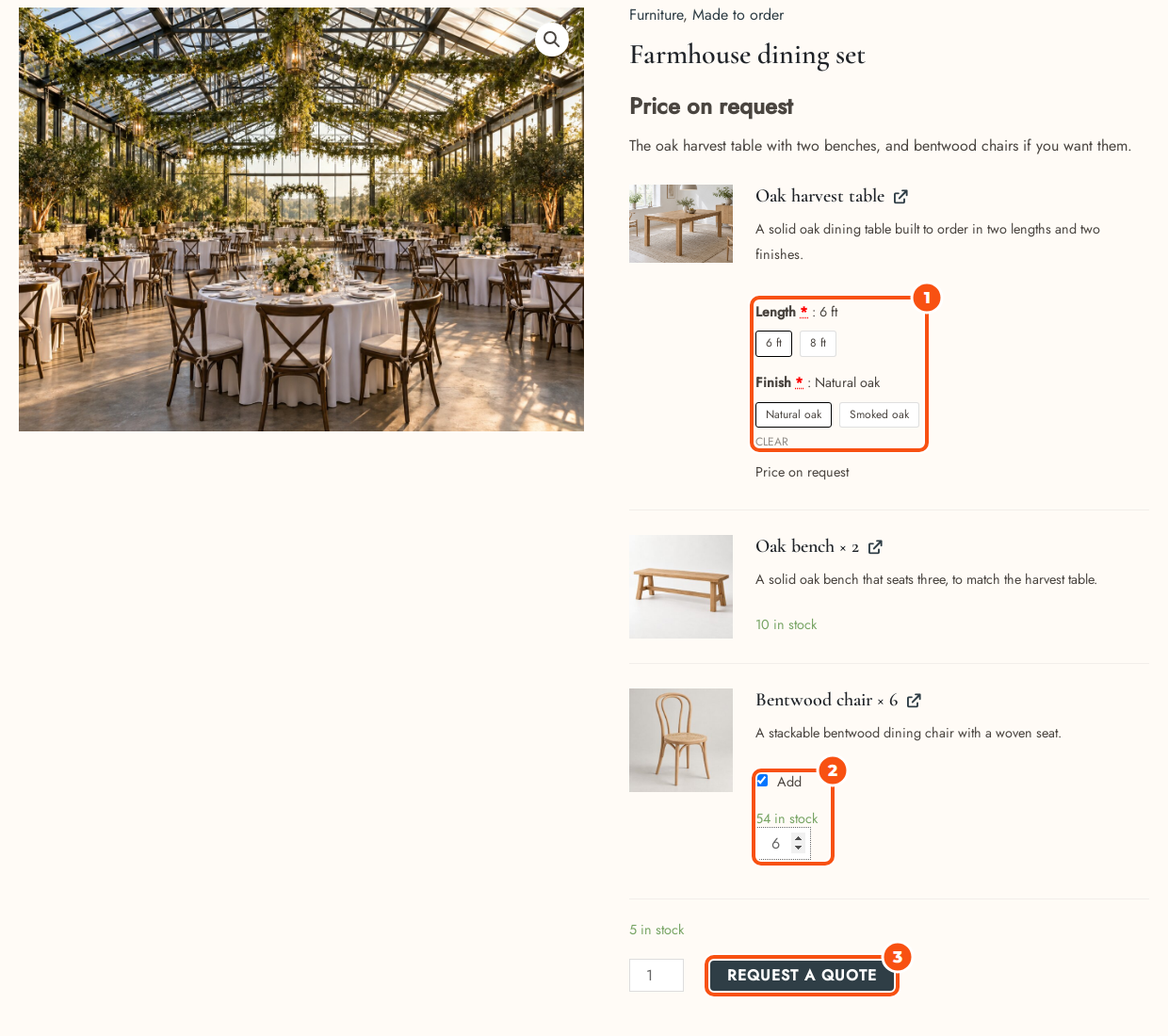
- The price you quote is the price for one configured bundle. At checkout and on the order the price is split across the bundle’s items in proportion to their catalog prices, so tax classes and stock stay correct while the customer sees one price.
- At checkout the bundled items follow the bundle’s quantity and are locked with it. Removing one takes the whole quote out of the cart.
- Change options in the basket opens the bundle with the shopper’s choices already set.
- When a bundle’s price is hidden, the prices of its items and its running total are hidden on its page too.
Composites #
A composite from WooCommerce Composite Products works like a bundle: one item, with a row per component showing the component title, the chosen product, its quantity and its attributes, for example “Frame: Oak frame × 1 (Size: Large)”. The same price split, locks and Change options apply.
Known limits:
- A composite option that is itself a bundle counts as one product; it is not broken into its own items.
- Tax for each child is rounded once per line, while the cart rounds per item, so a very small rounding difference is possible.
If you deactivate Product Bundles or Composite Products later, existing quotes still show the items they stored.
Adding a bundle or composite in the editor #
Staff who add a bundle or composite in the editor get its default configuration. If that default is not valid for an order, it is refused with a message: ask the customer to add it from the product page, or set default options on the product. A customer’s own configuration from the storefront is kept exactly as chosen.
Product options from other plugins #
Plugins that add extra options to the product page, and keep them as WooCommerce cart item data, are supported. The plugin:
- keeps the customer’s choices as readable rows under the item, with Change options in the basket;
- adds the options’ price adjustments to the item’s list price;
- carries the choices into the cart and the order, so the quoted price covers them.
On an item whose price is hidden from the shopper, amounts are removed from those rows. The option prices that the options plugin prints on the product page are not hidden by a hide-price rule: check that plugin’s own settings.
Rentals #
Rental products are quoted with their dates and availability. A rental bundle or composite is one item too, and each rentable product inside it is checked and held on its own. See Rental quotes: dates, availability and stock holds.


