
Sales Igniter Custom Fields adds three things to a WooCommerce store: custom fields you can ask on the checkout, the product page, the registration form or the My Account area; a damage waiver fee engine; and customer ID upload with a review queue. This page covers what you need, how to install it, and where everything appears afterwards.
Requirements #
- WordPress 6.0+ and PHP 7.4+.
- WooCommerce 8.0 or newer. The plugin declares compatibility with High-Performance Order Storage, so either order storage mode works.
- Sales Igniter Rentals & Bookings is optional. Custom Fields runs as a standalone WooCommerce plugin. With Rentals & Bookings active it mounts its settings into Rentals › Settings and gains the “rental products only” targeting option.
- ACF is not required. Nothing here depends on Advanced Custom Fields.
Install the plugin #
- Download
sicustomfields.zipfrom your account on rentalbookingsoftware.com. - In your WordPress admin go to Plugins › Add New › Upload Plugin, choose the zip and click Install Now.
- Click Activate.
Where the settings live #
With Sales Igniter Rentals & Bookings active, everything is under Rentals › Settings as three extra tabs. Without it, the same screens appear under a top-level Custom Fields menu.
| Tab | What it configures |
|---|---|
| Custom Fields | The field definitions themselves — type, where they are asked, conditional logic and pricing. |
| Field Groups | Reusable sets of fields, and which products each set applies to. |
| Damage Waiver | The global waiver rule and the products it covers. |
| ID Verification | Which documents are accepted, whether they are required, and how long they are kept. |
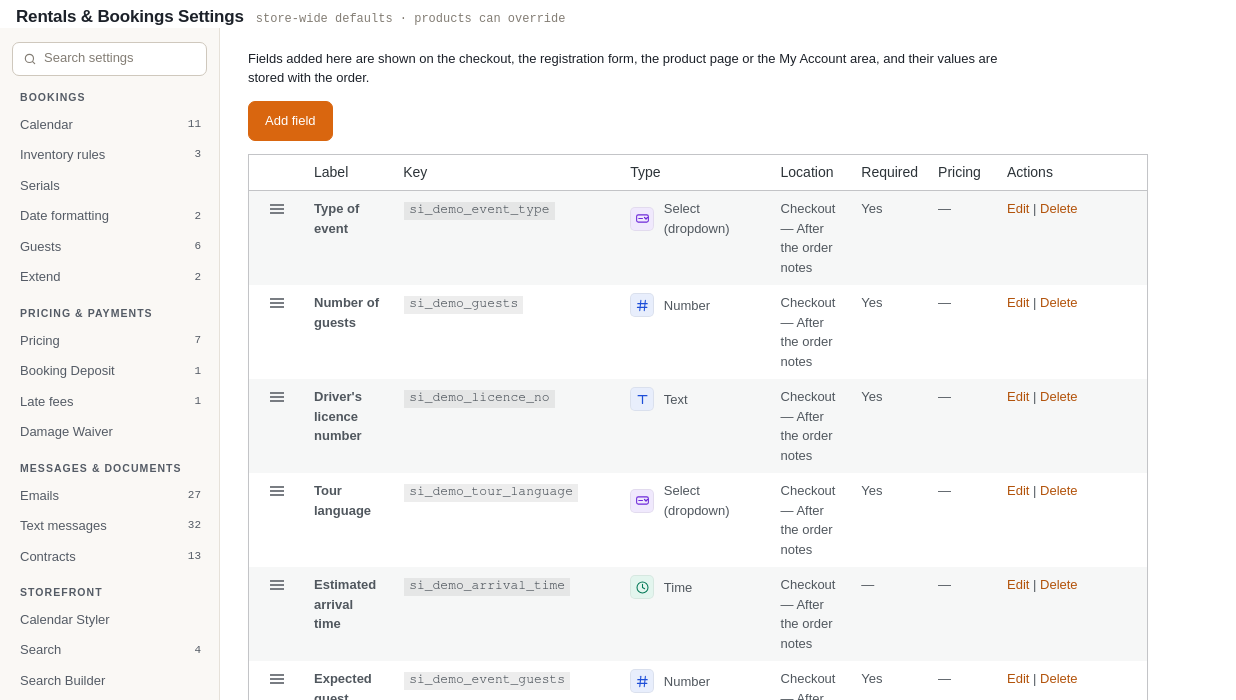
The ID review queue is a page of its own: Rentals › ID Verification.
What changes on your site #
- Nothing is asked of customers until you create a field — installing the plugin on its own changes no page.
- Each product gains a Custom Fields tab and a Damage Waiver tab in its Product data box.
- Orders gain a panel showing the custom fields data customers submitted, and that data can be included in order emails.
Note: The plugin supports the classic (shortcode) checkout. On the block checkout, required fields and waiver acceptance are still enforced on the server so they cannot be bypassed, but the fields themselves are not rendered as checkout blocks.


