
A subscription lets a customer rent a product on a recurring basis: they choose a start date, pay for the first billing period at checkout, and are then billed automatically every billing period until they (or you) cancel. This page explains the global settings, the per-product settings and what the customer sees.
How a subscription rental works #
- The customer only picks a start date on the product page. The rental period is the billing length (for example one month), and the price charged each period is the product’s rental price for that length, calculated by Rentals & Bookings in the usual way.
- Because the rental has no fixed end, the plugin reserves the product’s inventory well into the future (the reserved how long into the future setting below) so it cannot be double-booked, and pushes that reservation forward again after every successful renewal.
- At checkout a subscription is created and linked to the order (the parent order). Each renewal creates a new WooCommerce order, copied from the parent order, and charges the payment method saved on it.
- Renewals run daily through the WordPress cron (see Installation).
Length notation #
Every length field in the plugin uses the same short notation: a number followed by a period letter.
| Letter | Period | Examples |
|---|---|---|
h | hour | 12h = 12 hours |
d | day | 1d = 1 day, 14d = 2 weeks |
w | week | 1w = 1 week |
m | month | 1m = monthly, 3m = quarterly |
y | year | 1y = yearly |
Global settings #
Go to Subscriptions > Settings. These are the defaults every subscription product uses unless you override them on the product itself.
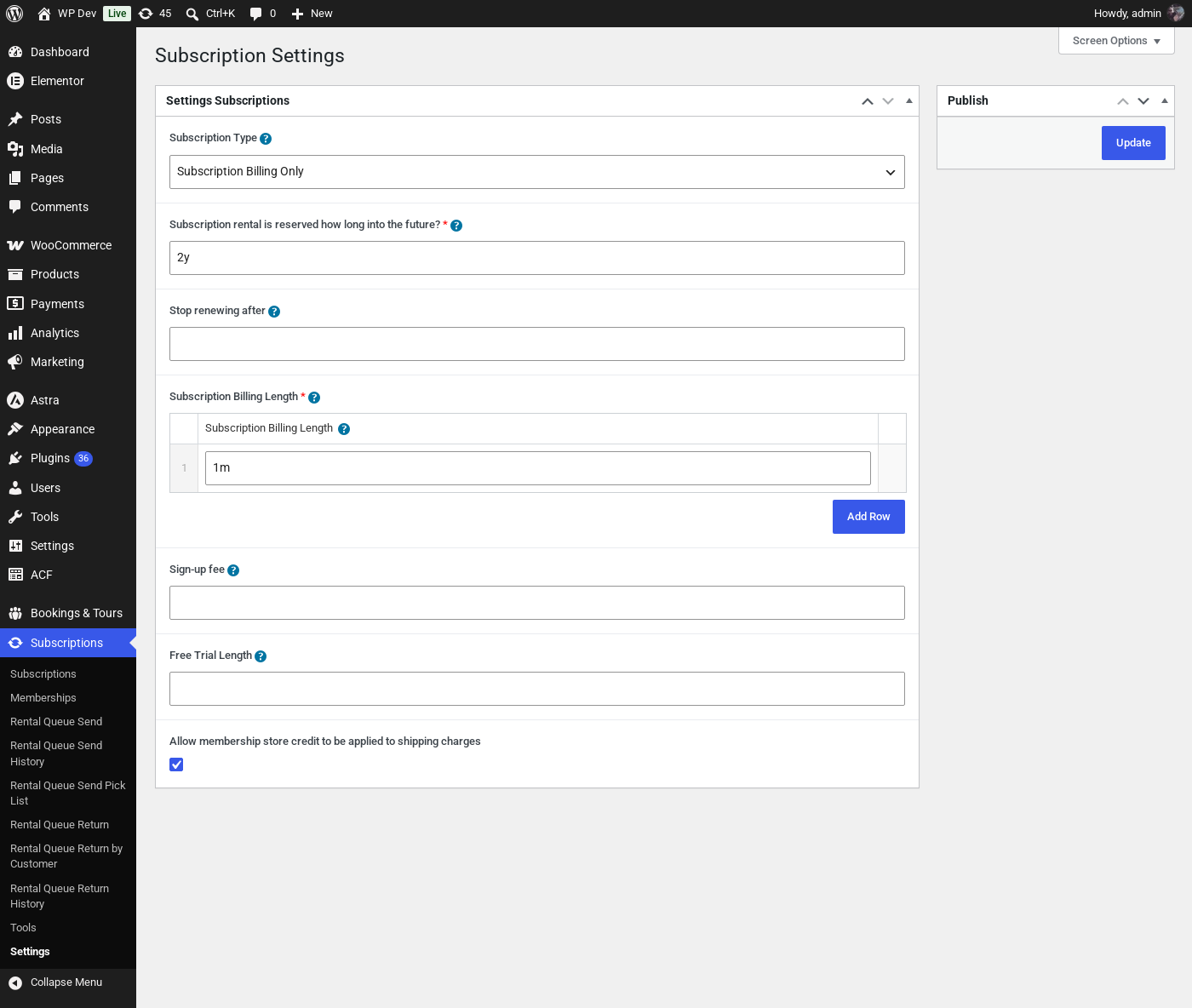
| Setting | What it does |
|---|---|
| Subscription Type | Subscription Billing Only: a product with subscriptions enabled can only be rented as a subscription. Subscription & Non-Subscription Billing (Customer Chooses): the product page shows a “Pay Once” / “Subscription Billing” choice so the customer can also rent it as a normal one-off booking. |
| Subscription rental is reserved how long into the future? | How far ahead a subscription reserves the product’s inventory, since the customer never picks an end date. The default 2y reserves two years from the start date and is extended after each renewal. Use a shorter value if you rent items on subscription for a limited time and want them to show as available again sooner. |
| Stop renewing after | Leave empty or 0 to renew forever. Otherwise a length such as 6m or 1y after which the subscription expires and is no longer billed. |
| Subscription Billing Length | How often the customer is billed, and therefore how long each rental period is. Add one row for a fixed billing length (for example 1m). Add several rows (for example 1m, 3m, 1y) to give the customer a “Billing every” drop-down on the product page. |
| Sign-up fee | A one-time amount added to the first order only, on top of the first period’s rental price. It is shown on the product page and added to the cart as a “Sign-up Fee” line. Leave empty for no fee. |
| Free Trial Length | Empty or 0 for no trial. Otherwise a length such as 7d: the first order is placed at $0 for the rental (a sign-up fee, if any, is still charged), the first rental period runs for the length of the trial, and the first real payment is taken when the trial ends. |
| Allow membership store credit to be applied to shipping charges | Only relevant to store credit memberships – see Setting up Memberships. When ticked, a customer’s membership credit can also cover shipping at checkout. |
Enabling subscriptions on a product #
Edit the product and scroll down to the Subscriptions & Memberships box, Subscription tab. The product must already be set up as a rental / booking product in Rentals & Bookings, because the subscription price is the product’s rental price for one billing period.
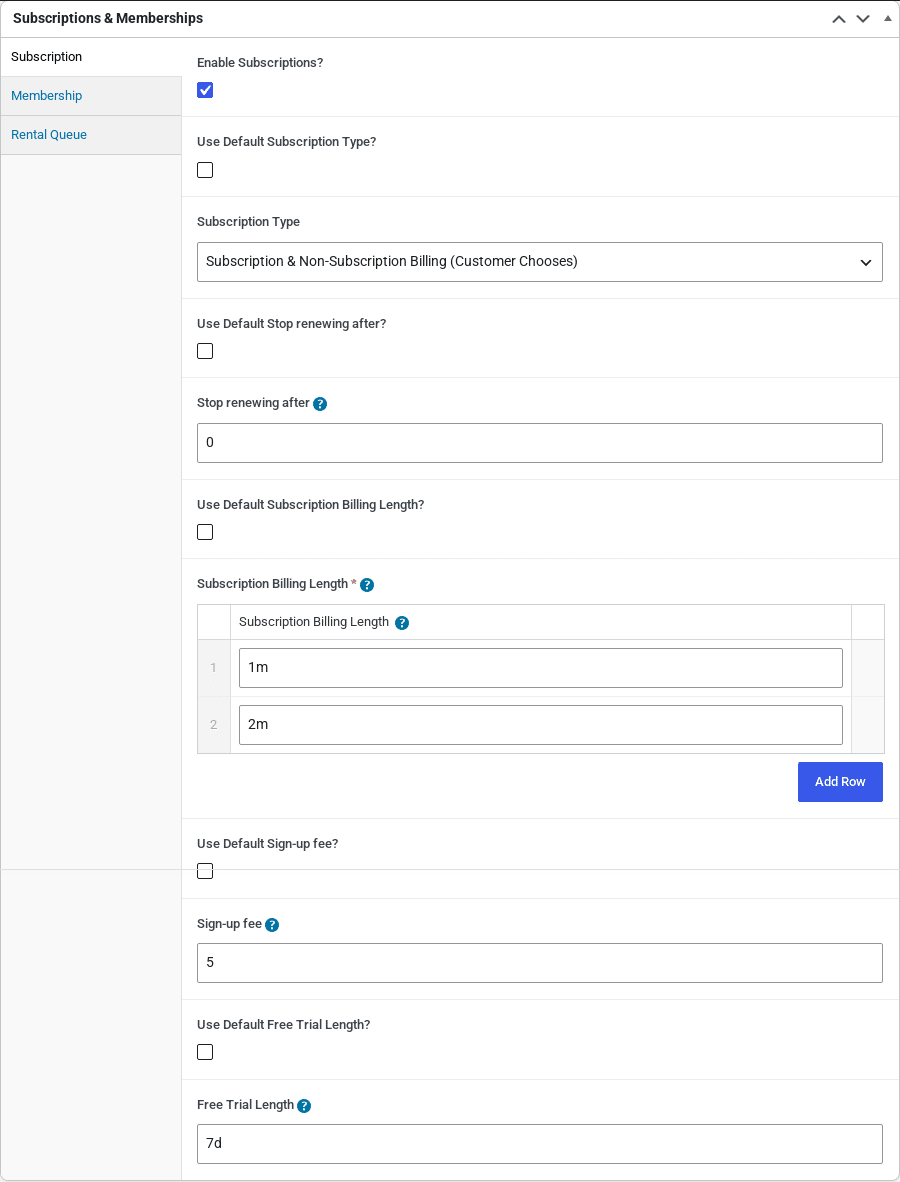
- Enable Subscriptions? – tick to make this product available on a recurring basis.
- Every global setting then appears with a Use Default … ? checkbox above it. Leave the checkbox ticked to use the value from Subscriptions > Settings; untick it and the product’s own field is shown so you can set a different Subscription Type, Stop renewing after, Subscription Billing Length, Sign-up fee or Free Trial Length for this product only.
In the screenshot above the product overrides every default: customers can choose between paying once and subscribing, can be billed every 1 or 2 months, pay a $5 sign-up fee, and get a 7-day free trial.
What the customer sees #
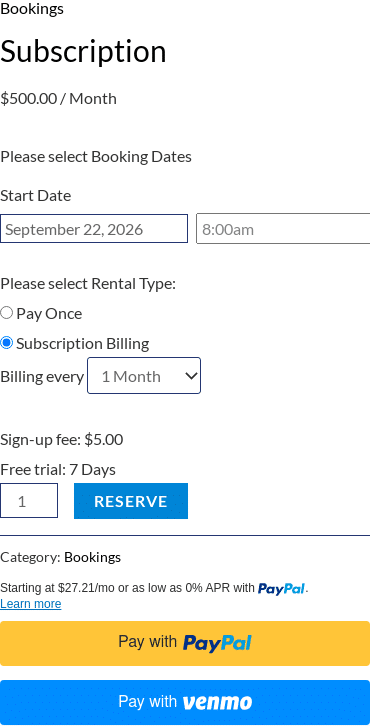
- The usual Rentals & Bookings Start Date picker – but no end date.
- Please select Rental Type with Pay Once / Subscription Billing – only when the subscription type is Customer Chooses. With Subscription Billing Only this choice is hidden and the product is always a subscription.
- Billing every drop-down – only when more than one billing length is configured.
- Sign-up fee and Free trial lines – only when set.
In the cart and on the order, the end date of a subscription item reads Recurring Subscription instead of a date, and the sign-up fee appears as a separate fee line so it is never charged again on renewals.
Payment methods and renewals #
When the customer pays the first order with a supported gateway (Stripe, PayPal, Braintree or Authorize.net) their payment method is saved and each renewal is charged automatically, without the customer having to do anything. If a renewal charge fails, the renewal order is marked Failed, the Subscription Renewal Payment Failed email is sent, and the customer can add a new card from My Account > Subscriptions.
With a manual payment method (Check, Bank Transfer, Cash on Delivery) renewal orders are still created on schedule but are left On hold; collect payment and complete the order yourself. The Subscriptions list shows these in a Manual Renewals column – see Managing Subscriptions.
Example setups #
| Goal | Settings |
|---|---|
| Monthly equipment rental, cancel any time | Enable Subscriptions; Billing Length 1m; Stop renewing after empty |
| 12-month lease billed monthly | Billing Length 1m; Stop renewing after 1y |
| Let customers pick monthly or yearly | Billing Length rows 1m and 1y; give the yearly length a discount in the product’s Rentals & Bookings pricing |
| Rent once or subscribe | Subscription Type Customer Chooses |
| Try before you buy | Free Trial Length 7d, optionally with a Sign-up fee to cover delivery |


