
This page says what the importer moves over from PluginHive’s Bookings and Appointments For WooCommerce and what you set up by hand. How to run a dry run, an import and a rollback is in Import from another plugin.
The importer reads PluginHive’s bookable products, the bookings on your orders and its store-wide availability straight from the database, so PluginHive may be active or deactivated. It was tested with the Premium version 6.0.3; products made with the old free version are read too.
What moves over #
Products of the type “Bookable product” become simple products with the rental switched on. They keep their name, photos, description, categories, reviews and orders.

| In PluginHive | In Rentals & Bookings |
|---|---|
| Booking period in days | Rental by date; the last day picked is charged (every day counts) |
| Booking period in hours or minutes | Rental by date and time, priced by the hour |
| Booking period in nights | Rental by date, a stay of nights |
| Booking period in months | Rental by date, a month counted as 30 days (listed) |
| A fixed block (for example 90 minutes) | A fixed price for one rental, with the length rounded up to whole hours |
| Base cost and cost per block | Fixed fee and price per day, night or hour |
| Minimum and maximum blocks | Shortest and longest rental |
| Bookings allowed per block | Stock |
| Buffer before and after | Buffer before and after |
| Book until (how close to the start) and open for (how far ahead) | Earliest start from now and booking window |
| Days a booking may start on | Closed for starts on the other weekdays |
| Availability rules: dates, weekdays or months set to not available | Closed days on the product (month rules repeat every year) |
| Price rules by number of blocks | Length price rules |
| Price rules by date, month or weekday | Date price rules |
| Participants, with a minimum and maximum | Guests (when each participant took a place, each guest takes a seat and the stock is the number of places) |
| Store-wide availability: dates, weekdays or months set to not available | Closed days under Rentals › Settings (when “Also import its store-wide closed days” is ticked) |
Bookings #
PluginHive keeps each booking on its order line, with the dates in “From” and “To”. Those become bookings, with the number of participants when each one took a place.
- Bookings still to come on paid, processing and completed orders are imported onto their order lines.
- Unpaid bookings (for example a bank transfer not yet received) are imported, and their dates held.
- Bookings that require confirmation are imported as booked and listed under “Check these”.
- Cancelled and refunded bookings are skipped. Past bookings stay plain orders.
What you set up by hand #
These show on the Can’t import tab of the report, each with what to do. The rest of the product is still imported.
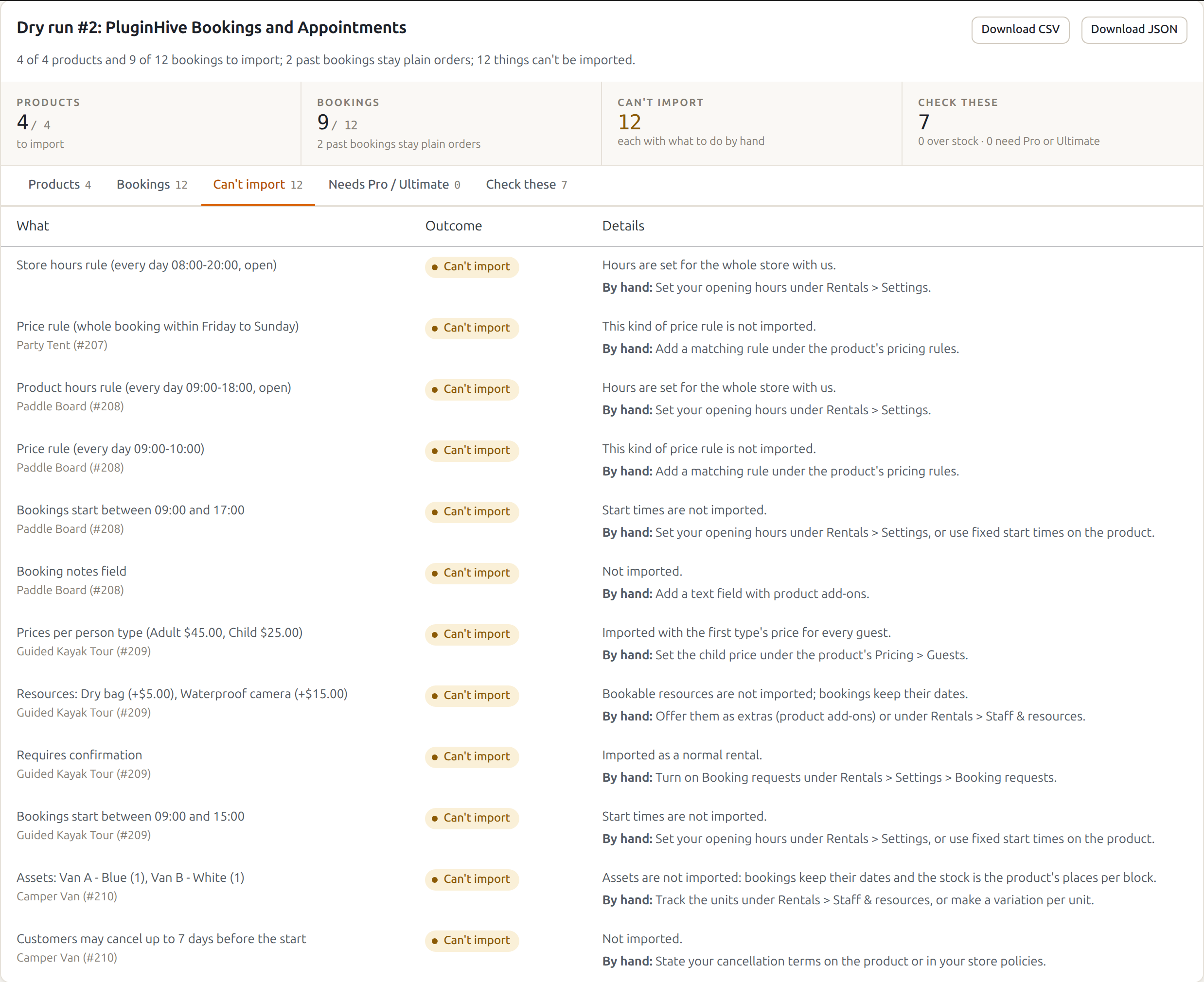
- Working hours and availability or price rules by time of day: opening hours are set for the whole store under Rentals › Settings, or use fixed start times on the product.
- Dates closed unless a rule opens them: our products are open unless a closed day says otherwise, so add closed days and opening hours.
- A fixed last booking date: add a closed day range from the day after, or set a booking window.
- Prices per person type (for example Adult $45, Child $25): imported with the first type’s price for every guest. Set the child price under the product’s Pricing › Guests.
- Price multiplied by the number of people and price rules by number of participants: set a fee per extra guest under the product’s Pricing › Guests.
- Price rules over a whole booking by weekday, and base cost changes inside a price rule: add matching rules under the product’s pricing rules.
- Resources: offer them as extras (product add-ons) or under Rentals › Staff & resources.
- Assets (for example Van A and Van B): the bookings keep their dates and the stock is the product’s places per block. Track the units under Rentals › Staff & resources, or make a variation per unit.
- Requires confirmation: turn on Booking requests under Rentals › Settings › Booking requests.
- Cancellation window and booking notes field: state your cancellation terms in your store policies, and add a text field with product add-ons.
- Recurring bookings: the dates already booked are imported from their orders.
While PluginHive stays active #
The imported products are simple products now, so PluginHive no longer shows its booking calendar on them: customers see only the Rentals & Bookings calendar. When you are happy with the import, deactivate PluginHive.
Rolling back makes them “Bookable product” again, with PluginHive’s own settings, which were never changed.


