
The Import / export tab (next to Fields and Field Groups) copies your questions between stores, keeps backups, starts you off from ready-made groups and downloads what customers answered. It replaces the export and import boxes at the bottom of the Custom Fields tab. Requires Custom Fields 1.0.10 or later.
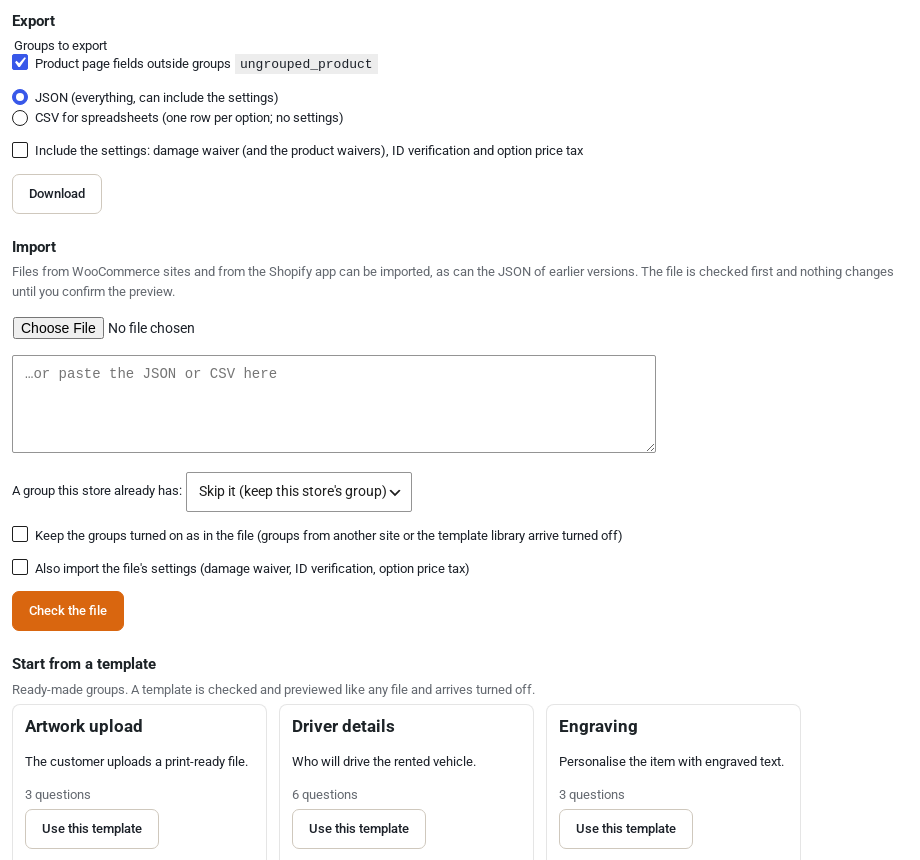
Export your questions #
- JSON keeps everything: groups with their questions, options, prices, products and categories. It can also carry the damage waiver, ID verification and option price tax settings, with each product’s own waiver.
- CSV opens in a spreadsheet, one row per option.
- The same file format is read by our Shopify app, so groups move between a WooCommerce store and a Shopify store.
- A questions file holds no customer data, but it shows your prices. Share it only with people you trust.
Import questions #
- Choose a .json or .csv file. Files exported by earlier versions still import.
- Choose what happens to a group your store already has: skip it, replace it or import a copy beside it, for all groups at once or one by one.
- Check the preview. It shows what each group becomes, how many questions and options it has, which products and categories were found on this store, and every problem with its row and column in the CSV, or its place in the JSON.
- Nothing changes until you press Import.
Products and categories are matched by ID on the same site, otherwise by slug or SKU. Groups from another site or from the template library arrive turned off, so nothing shows on your store before you have checked it.
Templates #
Twelve ready-made groups to start from: engraving, monogram, gift message, gift wrap, artwork upload, event details, purchase order, driver details, rider height and weight, helmet size, experience level and event set-up. Each one arrives turned off: adjust it, choose its products, then switch it on.
Backups and history #
- A backup of your fields, groups and settings is taken before every import and every restore. Backups are kept for 30 days and restored from the same tab.
- An import that fails part way puts everything back by itself.
- Each field group keeps its last 10 versions. Open History on the Field Groups tab to restore one.
Export answers #
Export answers writes what customers answered on the orders placed between two dates to a CSV:
- one row per order line, or one row per answer;
- optionally with their registration and My Account answers;
- uploaded files are listed by name only.
Large date ranges run in the background. The file is kept in a private folder and deleted after 24 hours, and every export is logged.
From the command line #
Developers can do the same with WP-CLI: wp sicf export, wp sicf import (with --dry-run), wp sicf answers and wp sicf backups.


