
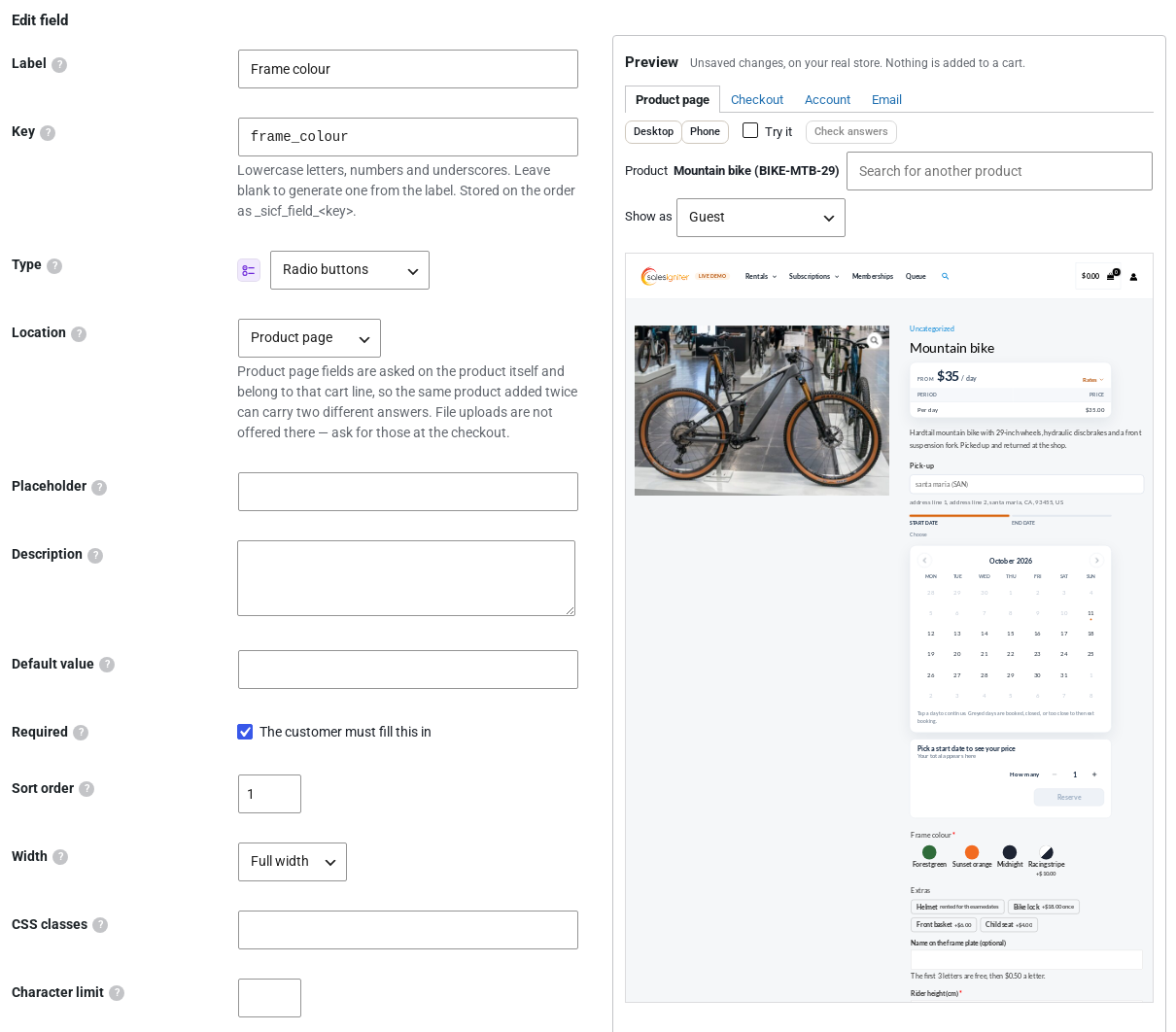
The field editor and the field group editor show a live preview of your store beside the form. Every change you type appears in it before you save, so you can see a new question on a real product page, at the checkout and in the order email without placing a test order. Requires Custom Fields 1.0.10 or later.
Where to find it #
Open Rentals › Settings › Custom Fields (or Custom Fields › Settings without the Rentals plugin) and edit a field, or open a group under Field Groups. The Preview column sits to the right of the form. On a narrow screen it opens as a drawer from the Preview button.
What it shows #
| Tab | What you see |
|---|---|
| Product page | A real product page of your store with your unsaved questions on it. Pick the product shown. |
| Checkout | The real checkout when your own cart holds something. Otherwise a map of the checkout with every place a field can go, and the field drawn where you put it. On a store that uses the Checkout block, the map shows the block’s sections. |
| Account | The registration form and the Account details form, for fields asked there. |
| The order email with sample answers, using WooCommerce’s own email preview. |
- Switch between desktop and phone width.
- Show as shows the page to a guest or to a given role, for fields limited to some roles.
- The preview says when the field’s rules don’t reach the product shown, and shows it anyway so you can work on it.
Try it and Check answers #
Switch on Try it to type answers into the preview. Conditions show and hide questions as they would for a customer, and the Options total adds up what the answers cost. Check answers shows the messages a customer would get for a missing or wrong answer.
Nothing leaves the preview #
- Only you see the preview, and only while you are signed in as a shop manager or administrator.
- Nothing is saved until you press Save. Closing the editor throws the draft away.
- Nothing can be added to the cart or ordered from the preview: add to cart says “Preview: nothing is added to the cart” and Place order reads Preview only, with no payment methods.
- Page caches leave the preview alone, so customers never see a draft.


