
This page covers the quote emails, the privacy tools, how long data is kept, and notes for developers: template overrides, hooks, capabilities and the REST API.
The emails #
All quote emails are WooCommerce emails. Edit them in WooCommerce › Settings › Emails, with the usual options (enable, subject, heading, additional content, email type) and your store’s email styling.
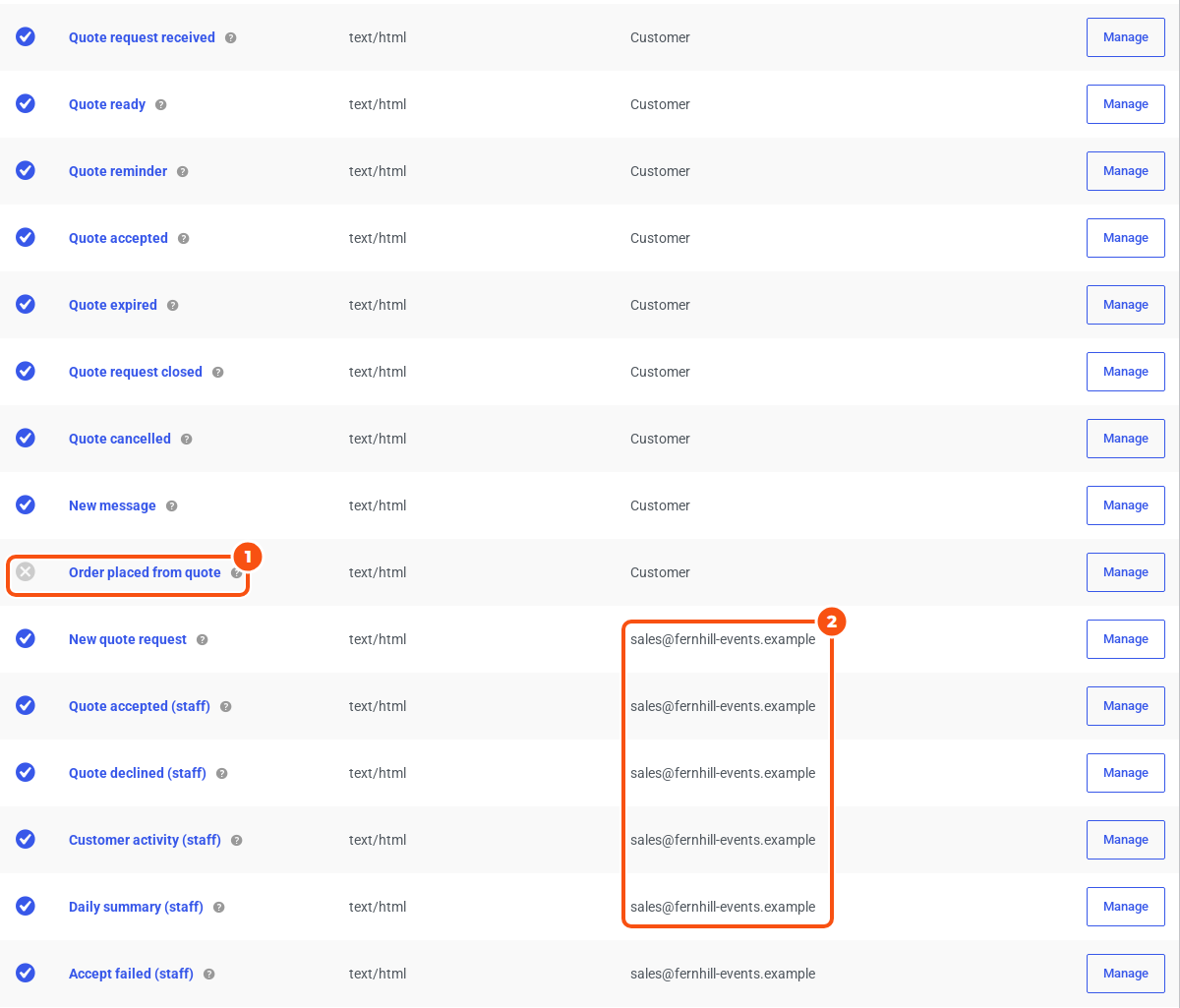
Sent to the customer
| When it goes out | |
|---|---|
| Quote request received | The request is submitted. |
| Quote ready | You send an offer: the first one, a new version or a resend. The PDF is attached when that is on. |
| Quote reminder | Once per offer, shortly before it expires. The PDF is attached when that is on. |
| Quote accepted | The customer accepts. It has the payment link and the deadline. |
| Quote expired | An offer or its payment deadline passes. |
| Quote request closed | You reject a request with Email the customer ticked. |
| Quote cancelled | The customer withdraws, or you cancel with Email the customer ticked. |
| New message | Staff post a message to the customer on the quote. |
| Order placed from quote | An order is placed. Off by default, because WooCommerce already sends its own order emails. |
Sent to staff
| When it goes out | |
|---|---|
| New quote request | A request is submitted. |
| Quote accepted (staff) | A customer accepts. |
| Quote declined (staff) | A customer declines. |
| Customer activity (staff) | A customer sends a message, asks for changes, edits or withdraws a request. |
| Daily summary (staff) | Once a day, when the daily summary is switched on (see below). |
| Accept failed (staff) | A customer accepts but some rental items are no longer available. |
Staff emails have a Recipient(s) field (comma separated), which defaults to the store’s admin email. The quote’s owner, if there is one, gets a copy of every staff email except the daily summary.
Placeholders #
Use these in subjects, headings and additional content: {quote_number}, {customer_name}, {expires_on}, {total}, {quote_link}, {pay_link}, {reason}, {event} (Customer activity only) and WooCommerce’s {site_title}. An unknown placeholder prints as nothing.
Email links never accept or pay on their own: {quote_link} opens the quote page, and on the payment-link path {pay_link} opens WooCommerce’s order payment page. Mail scanners that follow links can’t accept a quote.
The daily summary #
Tick Daily summary in WooCommerce › Settings › Quotes › Offers and expiry and choose the Summary time (08:00 site time by default). Staff get a list of the quote requests that came in during the last 24 hours, with quote, customer, status and when it was submitted. Nothing is sent on a day without new requests. It runs on WooCommerce’s scheduled actions, so make sure those are running.
Did the customer get it? #
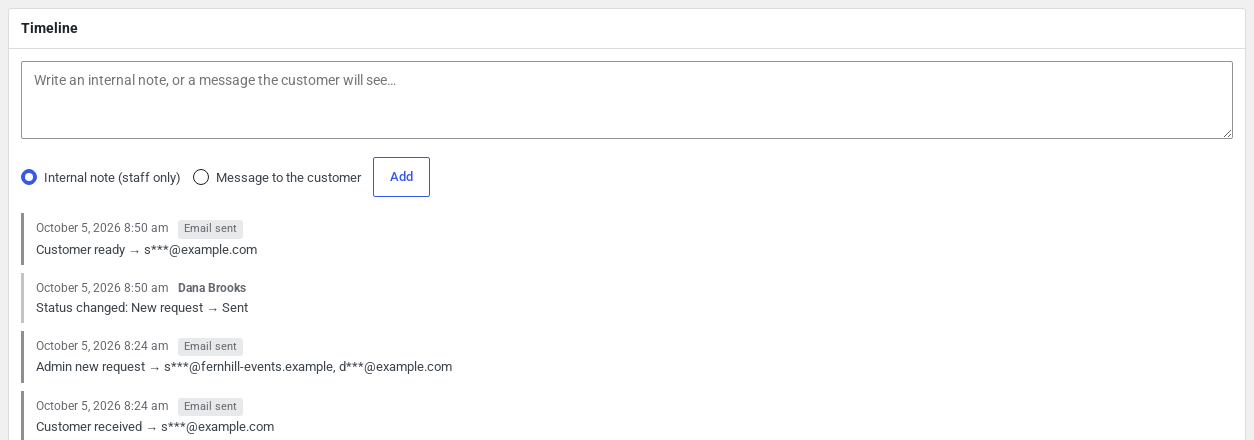
Every send is logged on the quote’s Timeline as “Email sent” or “Email failed”. Each entry shows which email it was, by its name in WooCommerce › Settings › Emails, and the address it went to, partly masked; a failed send also shows the error. Things the plugin did by itself, such as assigning an owner, show as System.
Privacy #
- Consent. Turn on Privacy consent in the Request form section. The answer and its time are stored with the request.
- Export and erase. Use Tools › Export Personal Data and Erase Personal Data. A person’s quotes are those with their email address, or linked to the account with that email. Export includes contact details, addresses, custom-field answers, the person’s own messages, file names and consent. Erase anonymises closed quotes and unsent baskets: contact details, addresses, answers, the customer’s messages and item notes, files and the email log’s recipients. Open quotes are kept and reported as retained, the way WooCommerce keeps orders it still needs. Quote numbers and totals stay.
- Policy text. Suggested wording is added to Settings › Privacy › Policy Guide under “Request a Quote”.
Keeping and removing data #
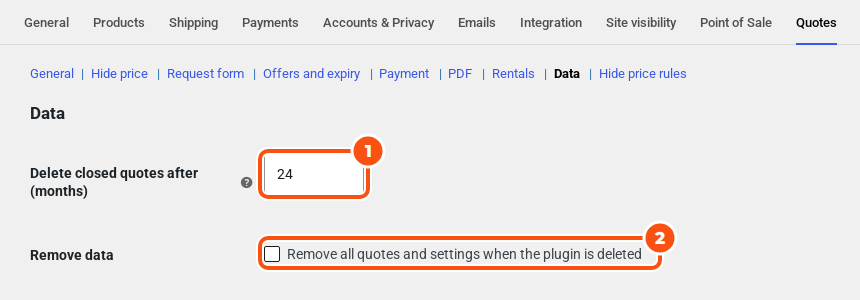
- Delete closed quotes after (months) deletes ordered, declined, rejected, expired and cancelled quotes that long after they closed (in 30-day months). The default is 24; 0 keeps them forever. Orders are never touched. Baskets that were never sent are deleted 30 days after they were last changed.
- Remove data (“Remove all quotes and settings when the plugin is deleted”) is off by default. When on, deleting the plugin first releases any rental stock held for quotes, then deletes the quotes, the uploaded files, the Request a quote and Your quote pages, the products’ Quote tab settings, the plugin’s settings and email settings, its scheduled jobs and its capabilities.
Languages #
The plugin’s text is in English and uses the sirfq text domain, so it can be translated. For WPML, the plugin ships a wpml-config.xml that registers the text settings (button labels, hidden-price text, consent text, quoted shipping label, PDF footer) and your custom fields’ labels, help text and choices for String Translation.
For developers #
Template overrides. Copy a file from the plugin’s templates/ folder to yourtheme/sirfq/ with the same path, and edit it. This covers the basket (basket/), the buttons (buttons/), the quick quote form (popup/form.php), the quote page (quote/), My Account (myaccount/quotes.php), the PDF (pdf/quote.php) and every email (emails/ and emails/plain/).
Hooks. Hooks start with sirfq_. Some you are likely to want:
| Hook | Use |
|---|---|
sirfq_decision (filter) | Change whether a price is hidden or Add to Cart is replaced for a product and visitor |
sirfq_validate_submit (filter) | Add your own check before a request is accepted |
sirfq_request_submitted | A request was submitted |
sirfq_quote_transition, sirfq_quote_status_{status} | A quote changed status |
sirfq_order_created, sirfq_checkout_order_linked | A quote became an order |
sirfq_assign_owner, sirfq_auto_approve (filters) | Override owner assignment or automatic approval |
sirfq_conversion_path (filter) | Choose checkout or payment link per quote |
sirfq_csv_columns, sirfq_csv_row | Change the CSV export |
sirfq_pdf_html, sirfq_pdf_available, sirfq_pdf_filename | Change the PDF |
sirfq_rest_quote, sirfq_report | Change the REST output or the report |
sirfq_privacy_erase_open_quotes | Also anonymise open quotes on erase |
sirfq_captcha_verify, sirfq_captcha_fail_open | Change the CAPTCHA check |
sirfq_rental_requires_checkout, sirfq_accept_failed | Rental quotes: force checkout, or react to a failed accept |
Capabilities. sirfq_view_quotes, sirfq_edit_quotes, sirfq_send_quotes, sirfq_convert_quotes, sirfq_view_all_quotes, sirfq_manage_quote_settings and sirfq_hold_stock. Administrators and Shop managers have them all. Staff without sirfq_view_all_quotes see only the quotes they own and unassigned ones.
REST API. Namespace wc-sirfq/v1, for staff only. Authenticate with a WooCommerce REST API key, or a logged-in session with a nonce. Every route checks a quote capability, and the routes for one quote respect owner scoping.
| Route | Methods |
|---|---|
/quotes | List (filter by status, owner, search, email, number, date_from, date_to, with page and per_page), create |
/quotes/{id} | Read, update |
/quotes/{id}/send, /reject, /cancel, /reopen, /extend | POST |
/quotes/{id}/order | POST: create the order |
/quotes/{id}/mark-ordered | POST: mark an accepted quote-only quote as ordered |
/quotes/{id}/messages | List, post |
/quotes/{id}/versions | List |
/rules, /rules/{id} | List, create, read, update, delete |
An update must carry the quote’s lock_version: without it you get a 400, with an old one a 409. A partial update keeps whatever it doesn’t name. Unknown amounts come back as null, never 0.


