
A late fee is what a customer pays when a rental comes back after it was due. Rentals & Bookings works it out for you when you check the rental back in, from rules you set once: how long a grace period to allow, what each late hour or day costs, and the most it can be. Nothing is charged until a member of staff accepts it, unless you choose to charge automatically.
Once accepted, the fee is collected the first way that works: taken from the security deposit, charged to the card the customer saved at checkout, or paid by the customer from a link in an email. You can also record a payment at the counter, change the amount, or waive the fee.
Late fees are part of Rentals & Bookings Regular and Pro. They are not in the free Lite edition. They are off until you switch them on.
Switch late fees on #
Go to Rentals → Settings → Late fees and tick Charge late fees. The rest of the settings appear when it is on. Their defaults charge the product’s own rental price for each started hour or day late, after a 60-minute grace period.
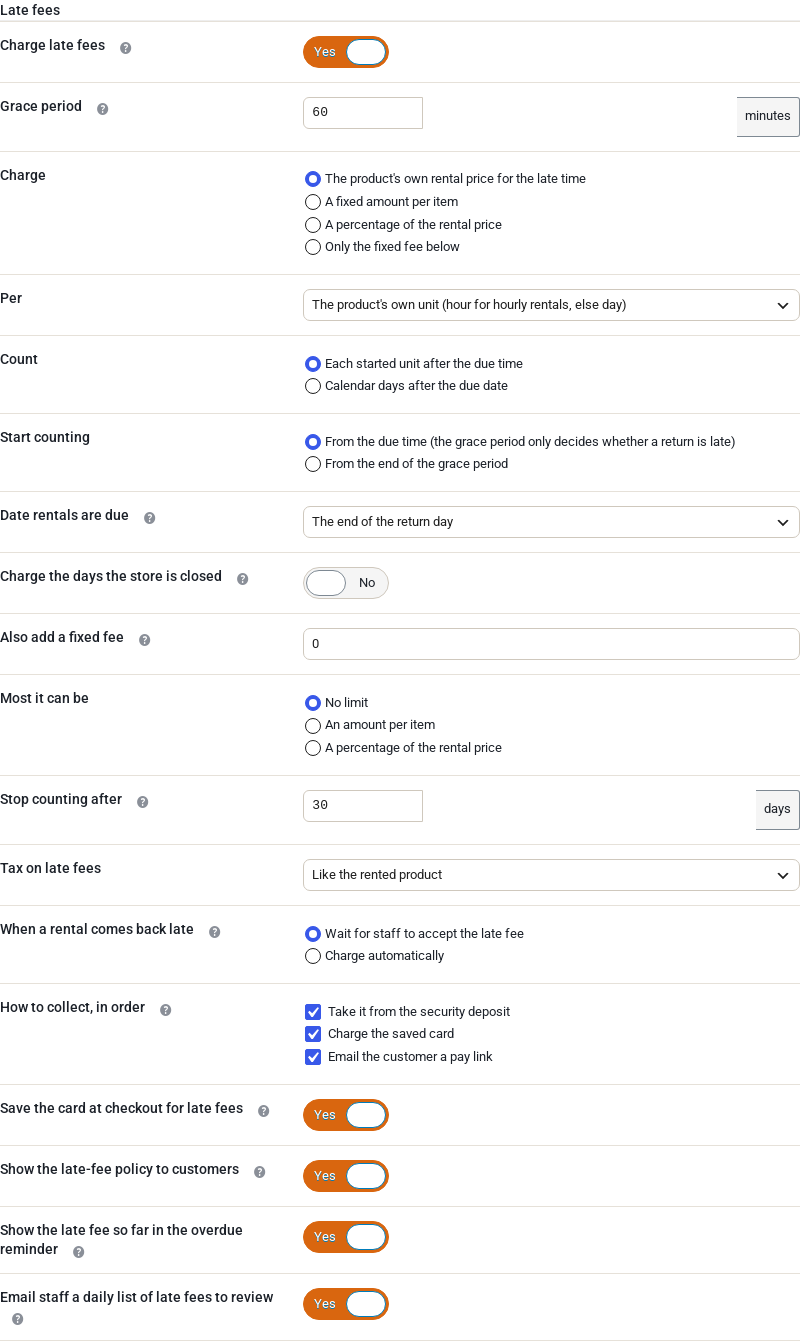
Only rentals due back after you switch late fees on are charged. Rentals that were already late when you switched them on stay as they are.
| Setting | Default | What it does |
|---|---|---|
| Charge late fees | Off | Turns late fees on for the store. |
| Grace period | 60 minutes | A return this late or less is not charged. |
| Charge | The product’s own rental price for the late time | What the late time costs: the product’s own rental price for the late time, a fixed amount per item, a percentage of the rental price, or only the fixed fee below. |
| Fixed amount / Percentage | empty | Shown for a fixed amount or a percentage: the amount (or the percentage of the item’s rental price) for each unit late, per item. |
| Per | The product’s own unit | The unit late time is counted in: hour, day or week. The product’s own unit is the hour for hourly rentals and the day for everything else. |
| Count | Each started unit after the due time | Each started unit counts in full (1 day and 2 hours late is 2 days). Calendar days counts the dates after the due date instead. |
| Start counting | From the due time | From the due time, the grace period only decides whether a return is late. From the end of the grace period takes the grace time off the time charged. |
| Date rentals are due | The end of the return day | When a rental booked by date (no time) is due back on its last day: the end of the day (23:59), the store’s closing time, or a set time. |
| Due time | 17:00 | Shown for a set time. Use the 24-hour clock. |
| Charge the days the store is closed | Off | Off, the closed weekdays and closure dates under Rentals → Settings are not counted. |
| Also add a fixed fee | 0 | A late-return fee added once per late return, on top of the above. 0 for none. |
| Most it can be | No limit | A limit per item: an amount, or a percentage of the item’s rental price. |
| Stop counting after | 30 days | The fee stops growing after this many days late, and staff get a “long overdue” email. 0 never stops. |
| Tax on late fees | Like the rented product | Like the rented product, always taxed, or never taxed. |
| When a rental comes back late | Wait for staff to accept the late fee | Or Charge automatically: the fee is collected at check-in, the first way below that works. |
| How to collect, in order | All three ticked | Take it from the security deposit, charge the saved card, email the customer a pay link. See How the money is collected. |
| Save the card at checkout for late fees | On | Saves the customer’s card at checkout and shows the consent sentence above Place order. |
| Show the late-fee policy to customers | On | One sentence under Add to cart and in the cart. |
| Show the late fee so far in the overdue reminder | On | Adds the fee so far to the Overdue reminder email. |
| Email staff a daily list of late fees to review | On | At 08:00 store time, only on days when something waits. |
Amounts are in your store currency and are entered like product prices.
How a late fee is worked out #
A rental booked with times is due at its booked end. A rental booked by date is due on its last day at the time in Date rentals are due. A stay booked by the night is due at its check-out time.
When it comes back, the late time is the real time between the due moment and when it was returned. If that is within the grace period, nothing is charged and the order gets a note saying so. Otherwise the late time is counted in the unit you chose, the days the store was closed come off unless you charge them, and the result is priced:
- The product’s own rental price for the late time: what the late time would cost if the customer had booked it, priced like a booking of that product.
- A fixed amount per item: the amount times the units late times the number of items.
- A percentage of the rental price: that percentage of the item’s booked rental price for each unit late.
- Only the fixed fee: just the late-return fee, however late.
Then the fixed fee is added, the limit in Most it can be is applied, and tax follows Tax on late fees.
For example, with the defaults in a store that is open every day, a camping tent rented at $40.00 a day that was due back at 23:59 on Friday and checked in at 10:00 on Sunday is 1 day and 10 hours late. That is 2 started days, so the late fee is $80.00.
Each item that comes back late is its own line, and so is each check-in: if two of three chairs come back on time and one comes back a day later, only that one is charged. One order has one open late fee, numbered after the order (LF-1042-1). A late return after that fee was accepted starts a new one (LF-1042-2).
A product’s own late fee #
Each rental product can follow the store’s settings, have its own, or have none. Open the product, go to the Payments tab of its rental settings and find Late fee:
- Store setting (the default) uses Rentals → Settings → Late fees.
- Custom for this product shows the product’s own Grace period (minutes), Charge, Per, Count, Fixed fee per late return, Most it can be and Stop counting after (days). A field left blank keeps the store’s value.
- No late fee: this product is never charged one.
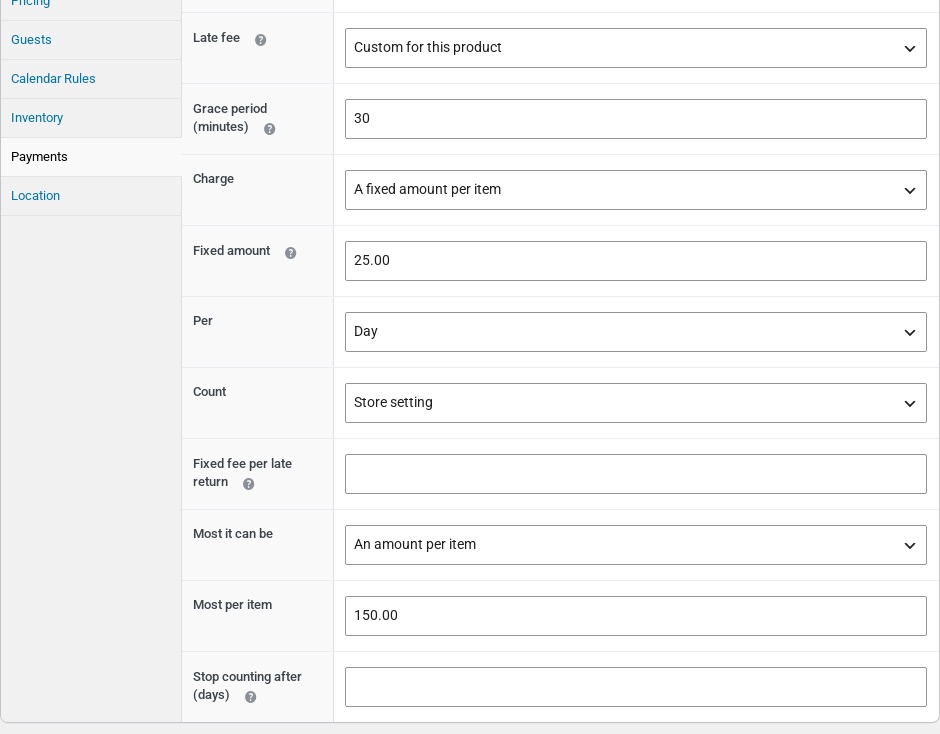
Variations follow their parent product. Stays booked by the night have no late fee unless you set the product to Custom for this product.
When a rental comes back late #
Late fees start on Rentals → Return, described in Send and Return.
- While late fees are on, the Return screen has a Returned at field beside the Return button. Leave it empty to record the return as now. If the items really came back earlier, such as a drop-box return found the next morning, set the time they came back. It can’t be in the future.
- A rental that is still out shows the fee so far in its status, for example Overdue · 2 days · late fee so far $160.00. The fee grows every hour until the rental is back, and the Overdue reminder email shows it too.
- When you return a late rental, its late fee card appears under the confirmation, ready to review.
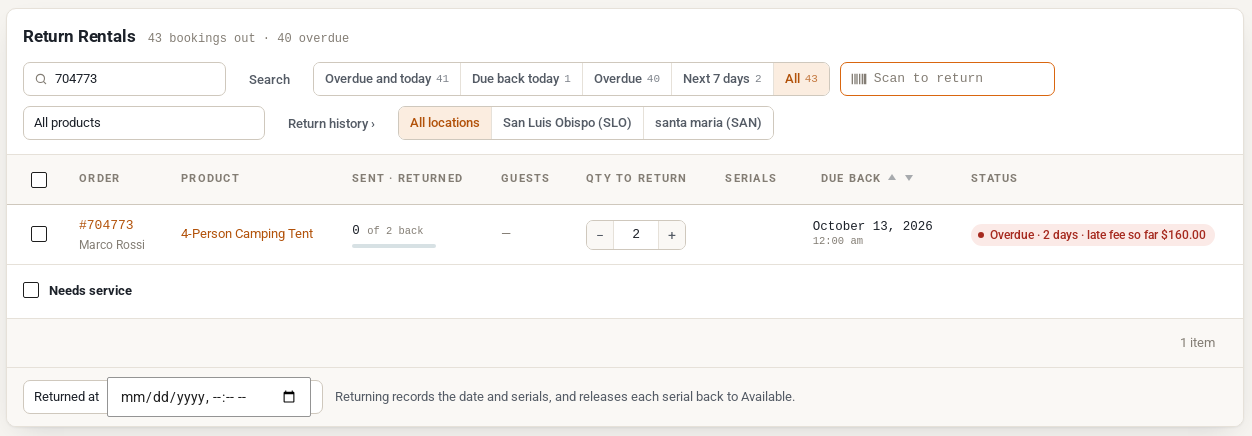
A late fee whose rental is still out is Accruing. When everything late is back, it becomes To review and waits for staff. Nothing is billed while the total can still grow.
Review and accept a late fee #
Every late fee has a card with its lines and its actions. It is in the Late fees box on the booking’s order screen, on the Return screen after a late check-in, and on Rentals → Late fees when you click the fee’s number.
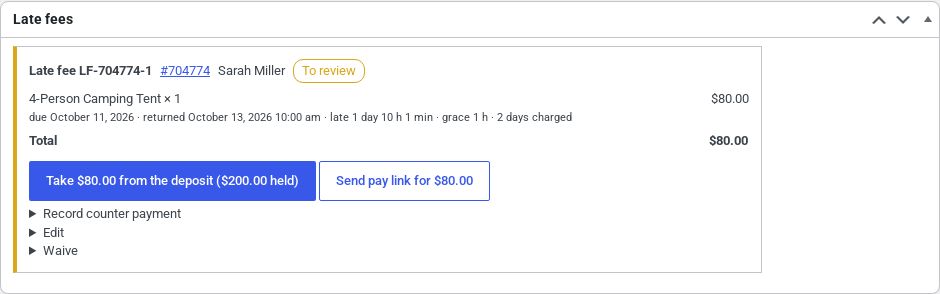
Each line shows when the item was due, when it came back, how late it was and what was charged. On a fee To review:
- The main button collects it the first way that works, for example Take $80.00 from the deposit ($200.00 held), Charge Visa •4242 $80.00 or Accept: send pay link for $80.00. The other ways are offered beside it.
- Edit changes a line’s amount, adds a line such as cleaning, and adds a Note to customer that goes in their emails. Reason (staff only) stays on the record. Save and accept saves and collects in one go. Recalculate goes back to the amounts worked out for you and drops your changes. The card keeps the calculated amount next to an edited one.
- Record counter payment marks the fee paid by cash, card terminal, bank transfer or other, with an optional reference.
- Waive cancels the fee with a reason. The customer isn’t asked to pay and gets no email.
Once a fee is paid, only a Refund changes it: all of it or part, with a reason. A fee kept from the security deposit goes back from the deposit. A fee paid with the card or the pay link is refunded on its late-fee order, through the payment gateway when it can refund. For a fee paid at the counter the refund is recorded, and you give the money back yourself.
How the money is collected #
How to collect, in order lists three ways. Accept uses the first one that works for that order:
| Way | When it works |
|---|---|
| Take it from the security deposit | The order holds a security deposit from Refundable Security Deposits (1.0.3 or later), the deposit is not taxed, and what is left of it covers the whole fee. The fee is kept from the deposit, with no new order. |
| Charge the saved card | The customer has an account, paid with a payment method that can charge a saved card (Stripe, WooPayments with saved cards on, Braintree, Authorize.net, PayPal with vaulting), and agreed to it at checkout. |
| Email the customer a pay link | Always. The fee becomes its own late-fee order, and the customer gets an email with a link to pay it. |
The pay link is the last resort even when you untick it, so a fee is never left without a way to pay. Recording a counter payment is always possible too.
With Charge automatically, the fee is collected the moment a late rental is checked in, without a review. Check-in times can be wrong, so waiting for staff is the safer choice.
When a saved card is declined:
- A soft decline, such as insufficient funds, is tried again 1 day and 3 days later. The customer gets the pay link after the first decline, and staff get the Late fee problem email after the last.
- A lost, stolen or expired card, or one the gateway can no longer charge, sends the pay link at once.
- If the bank asks the customer to confirm the payment (3-D Secure), they get an email with the link; paying there confirms it.
A card is never charged twice for the same fee, whatever is clicked. While a late fee of an order is open and the deposit is one of the ways to collect, Security Deposits waits before it refunds that order’s deposit automatically.
The Late fees list #
Rentals → Late fees lists every late fee. The menu shows how many wait for review. The buttons at the top choose which you see: To review, Unpaid, Accruing, Paid, Waived and All, each with its count. The list opens on To review.
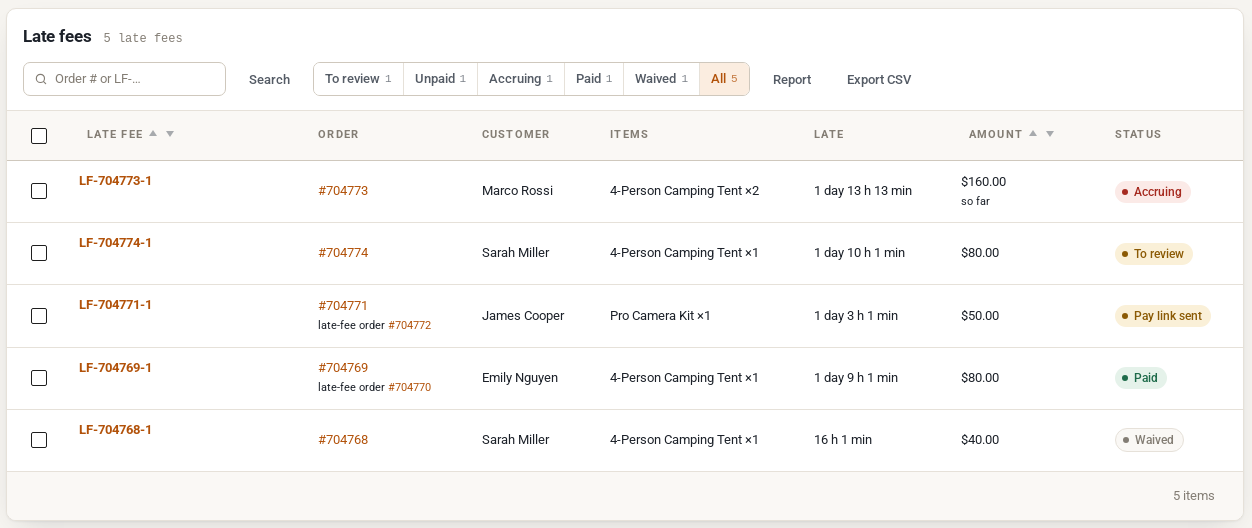
Each row shows the late fee and its order (with the late-fee order once there is one), the customer, the items, how late it was, the amount and the status. Click a fee’s number to open its card in the list. The row links offer Accept, Send pay link, Waive and View order. Tick several fees to Accept or Waive them together. Export CSV downloads the fees of the button you are on, and Report opens the report. Search by order number or late fee number.
| Status | Meaning |
|---|---|
| Accruing | Still out: the total grows until everything is back. |
| To review | Back, waiting for staff. |
| Charging… | The saved card is being charged. |
| Pay link sent | The customer was emailed the pay link. |
| Payment failed | The saved card was declined; the card shows when it is tried again. |
| Waiting for the customer | The bank asked the customer to confirm the payment. |
| Paid, Partly refunded, Refunded | Paid, then perhaps refunded. |
| Waived | Waived by staff, with the reason. |
| Cancelled | The booking order was cancelled or refunded before the fee was accepted. |
What the customer sees #
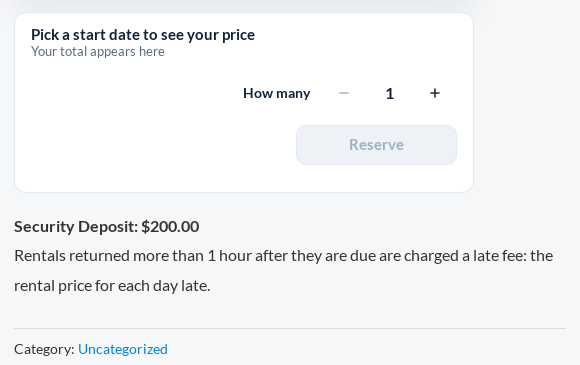
Before booking. With Show the late-fee policy to customers on, a rental product with a late fee shows one sentence under Add to cart, and the cart (classic and block) shows it for the rentals in it: “Rentals returned more than 1 hour after they are due are charged a late fee: the rental price for each day late.”
At checkout. When the card may be charged for a late fee, a customer with an account sees one sentence above Place order: “If a rental comes back late, the late fee (…) may be charged to this card. We email you the details first.” The card is saved, and the order records what the customer saw. Without that record a fee is never charged to the card; the customer gets the pay link. Guests always get the pay link.
Emails. These WooCommerce emails are under WooCommerce → Settings → Emails, where you can switch them off and change their subject, heading and wording:
| To | When | |
|---|---|---|
| Late fee: please pay | Customer | The pay link goes out: accepted by link, a declined card, or Send pay link. |
| Late fee: confirm the payment | Customer | The bank asks the customer to confirm a card payment (3-D Secure). |
| Late fee: still unpaid | Customer | 3 and 7 days after the pay link, while the fee is unpaid. |
| Late fee: receipt | Customer | The fee is paid, whichever way. It replaces WooCommerce’s own order emails for the late-fee order. |
| Late fee problem | Store | A card charge failed after its retries, or ended with an unknown result. |
| Late fees to review | Store | Once a day when fees wait, if the daily list is on. |
| Long overdue rental | Store | Once, when a rental still out reaches Stop counting after. |
A waived late fee sends no email. Every late-fee email can use {late_fee_number}, {late_fee_total}, {late_fee_lines}, {late_fee_pay_url}, {late_fee_so_far}, {late_fee_per_day}, {late_fee_policy}, {due_back} and {returned_at}. The rental reminder emails can use {late_fee_so_far}, {late_fee_per_day} and {late_fee_policy}.
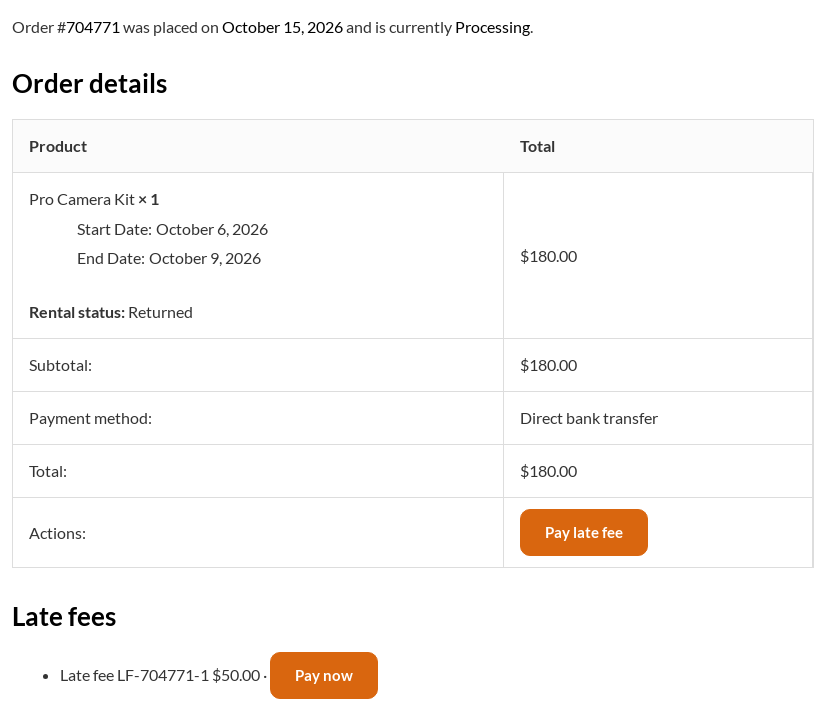
My Account. The booking’s order page lists its late fees, with Pay now while one is unpaid, then Paid, Waived or Refunded. The orders list has a Pay late fee button on that order. Paying opens WooCommerce’s usual payment page for the late-fee order. Fees staff have not reviewed yet are not shown.
The report #
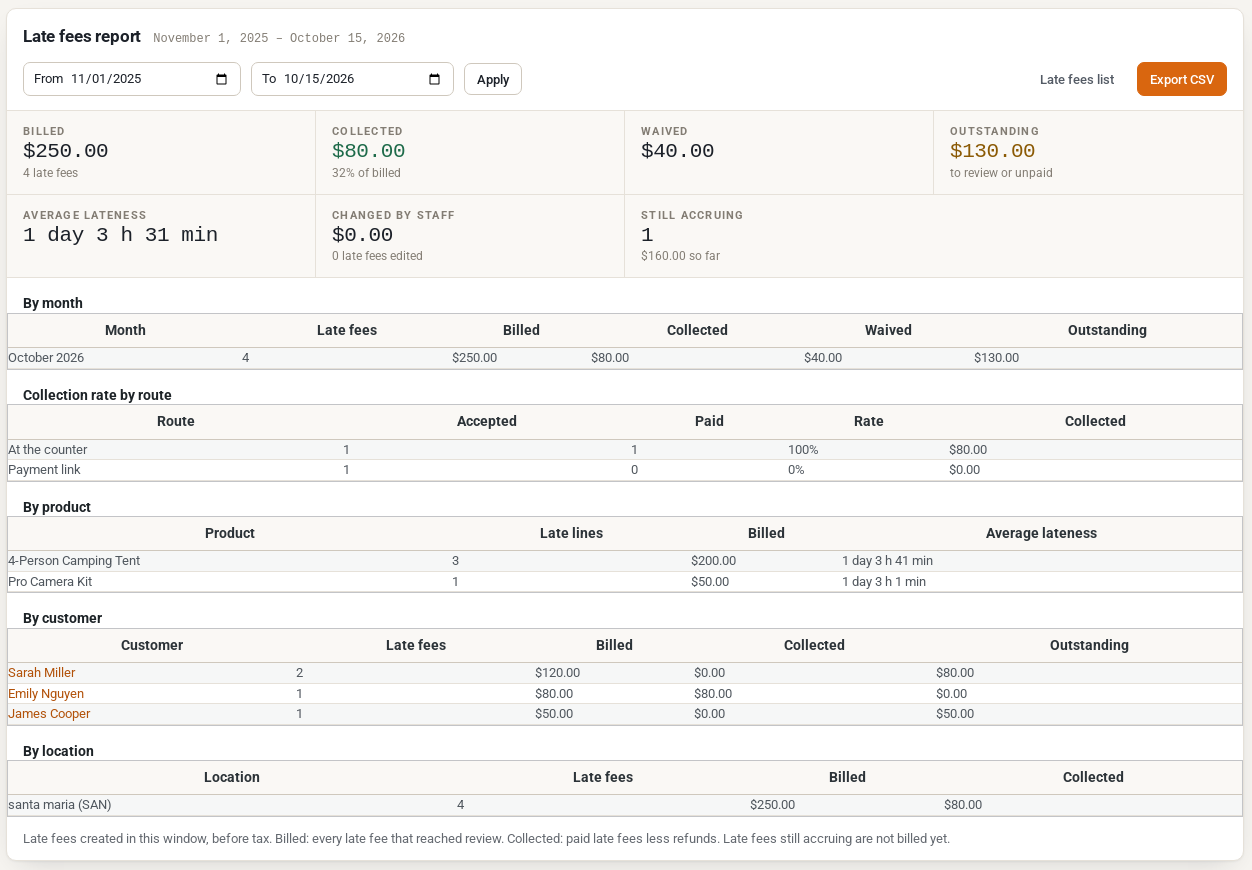
Click Report on Rentals → Late fees. It covers the late fees created between two dates, the last 12 months to start with, before tax:
- Billed: every late fee that reached review. Collected: paid fees less refunds. Waived. Outstanding: to review or unpaid. Average lateness, the total Changed by staff, and what is Still accruing.
- By month, Collection rate by route (how many of the fees accepted with each way were paid), By product, By customer and, with Multi Location Inventory, By location.
Export CSV downloads one row per late fee.
The dashboard’s money card shows the late fees to review, what is unpaid and what was collected this month. An order screen shows Late returns in the last 12 months under the billing address, and so does the customer’s user profile.
When no late fee is charged #
- The return is within the grace period.
- The product is set to No late fee, or it is a stay booked by the night and not set to Custom.
- The rental was due before late fees were switched on.
- The booking order is cancelled or refunded before the fee is accepted: its fee is cancelled.
- The closed days are not charged, unless you tick Charge the days the store is closed.
Late fees in rental contracts #
With Rental Contracts PDF Signing 1.1.4 or later, put {late_fee_policy} in the contract terms (the terms setting lists it). It prints the same policy sentence the customer saw before booking, so the signed contract states your late-fee rules.
REST API #
Late fees are in the REST API under wc-sibooking/v1/late-fees, for users who can edit orders. See the REST API overview and authentication.
| Route | What it does |
|---|---|
GET /late-fees | Lists late fees. Filter by status, order_id, customer, search, created_after and created_before. |
GET /late-fees/{id} | One late fee with its lines. |
PUT /late-fees/{id} | Changes line amounts, extra lines, the note to the customer and the staff reason. |
POST /late-fees/{id}/accept | Accepts and collects it, the first way that works or the route you give (deposit, card, link). |
POST /late-fees/{id}/waive | Waives it. A reason is required. |
POST /late-fees/{id}/send-link | Emails the pay link again. |
POST /late-fees/{id}/counter-payment | Records a payment at the counter: method (cash, card, bank, other) and reference. |
POST /late-fees/{id}/refund | Refunds it, all of what is left or an amount, with a reason. |
POST /late-fees/{id}/recalculate, /retry | Works it out again; charges a declined card again. |
A return made through the API takes returned_at, the store time the items came back, and its answer lists the late fees it made or changed.


