
Customers can see their rentals in their Shopify customer account, and ask for more days when they need them. The Rentals & Bookings app adds a My rentals page, a rental block on each order, an Extend rental action, and a rental summary on the Thank-you page.
These work with Shopify’s new customer accounts (Settings › Customer accounts). Stores still on classic customer accounts get a My rentals page on the storefront instead (see below).
Add the customer pieces #
Open Shopify › Settings › Checkout › Customize (the checkout and accounts editor):
- Thank you page: add the app block Rental summary. Its settings are Heading (default “Your rental”) and Next steps.
- Customer accounts › Order status: add the app block Rental on order.
- Customer accounts: add the My rentals page to the account menu when the editor offers it.
- Save.
The Extend rental action appears by itself on orders that can be extended.
My rentals #
The page groups a customer’s rentals into Current rentals, Upcoming rentals and Past rentals. Each shows the product, the dates, the order and a status: Reserved, Out, Overdue, Returned, Cancelled or Being confirmed (a booking you still need to resolve). Rentals that can be extended have an Extend button.
On the order and after checkout #
- The order status page shows each rental line with its dates and status.
- The Thank-you page lists each rental with its dates, then your Next steps text.
- With pay part now, both show what is still owed: “Balance 75.00 due Oct 6, 2026 · Pay now”. See Pay part now, rest later.
Let customers extend a rental #
Turn on Let customers extend a rental under Settings › Rules › Send, return and extend. Turn on Only after it has gone out as well if customers may only extend once the rental is checked out.
How it works for the customer:
- They open the order (or My rentals) and choose Extend rental.
- They pick a new return date. Later dates that are already booked can’t be picked, and neither can a return day you’re closed.
- The price for the extra days shows: “New return date Oct 18, 2026: $75.00 for the extra days.”
- They click Continue to payment and pay through a secure Shopify invoice. The extra days are held for a short time while they pay.
- Once it is paid, the rental ends on the new date. A free extension (Extend at no charge) is applied at once.
The price is the rental price from the start to the new end, less what was already paid for the old end. Guest fees for the extra nights are included.
A rental can be extended when it has an order, is reserved or out (overdue rentals too), and its product is still rentable. Rentals with set departures, one-variant-per-length products, returned or cancelled rentals, and bookings in conflict can’t be extended. Customers see “This rental can’t be extended online. Contact the store.” in that case.
You see the extension on the booking’s history and on both orders’ notes. The booking’s dates and the order’s rental block update by themselves.
Classic customer accounts #
On classic accounts, customers see their rentals on your store at /apps/rentals/my. Add that address to your store’s menu as a “My rentals” link. Signed-in customers can extend rentals there too.
For you: the customer page in Shopify #
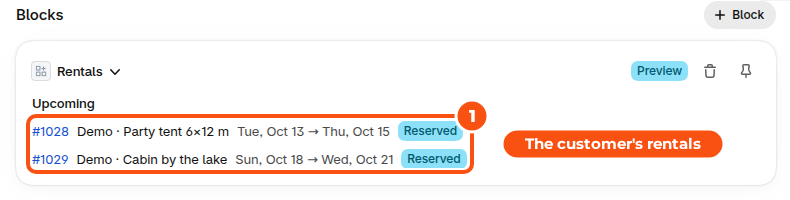
The Rentals card on a customer page in Shopify lists that customer’s current, upcoming and past rentals with links to the orders. Add it once with + Block in the page’s Blocks section, then pin it (see Getting started).
Good to know #
- The customer pieces show the customer’s own rentals only, and only when they are signed in. A customer who isn’t signed in sees the dates on the order and a Sign in button.
- The pages are in the customer’s language, where the app has a translation.


