
This WordPress tour booking plugin sells tours through your own WooCommerce checkout and payment gateway, with no booking fee from us on any ticket. Tours & Activities is part of Rentals & Bookings, our plugin, and it comes with Regular, Pro and Ultimate.
The video follows Paddle & Pine Adventures, a made-up kayak and bike shop on the coast. It sets up a sunset kayak tour, a private food tour by bike and a three-day coastal trip, then takes the bookings and runs the day from a guide’s phone. This page is the written version of that video: every chapter, in order, with screenshots from it, so you can follow along without watching. It also covers what you need before you start and which edition you need.
The short version. A tour is a WooCommerce product whose rows are departures, each with seats. Guests pick a departure, choose their guest types, and pay in your normal checkout. Guides and kayaks can stop sales when none are free, a minimum can decide whether a departure runs, and staff check guests in by QR on a phone. A waiver signed by every guest needs Pro.
- What you can sell
- What you need
- Chapter guide
- Tours on your own website
- The problems with running tours
- Meet Paddle & Pine
- Set up a tour
- A guest books
- Guides and kayaks
- Minimums and weather days
- Group prices and private tours
- Pickups and itineraries
- On the day
- After the tour
- Why sell tours on WordPress
- Recap
- Which edition you need
- Where to go next
- FAQ
What you can sell with this tour booking plugin
- Departures with seats, and seats left shown on the booking calendar.
- Guest types with their own prices: adults, children, infants, seniors, students and up to three of your own.
- Group prices by party size, with a “Book it privately” option.
- Tours that need people and gear, with guides and kayaks that stop sales when none are free.
- Minimum guests with a decide-by time: run it anyway, cancel and refund, or offer another date.
- Pickup points and multi-day itineraries.
- QR tickets and a manifest on your guide’s phone, plus a waiver for every guest with Pro.
- Review requests that go only to guests who were checked in, and event markup so search engines can read your dates and prices.
Tours sit beside your rentals in the same store. Paddle & Pine also rents kayaks by the hour, and a kayak out on a rental counts as busy for the tour.
What you need before you start
- WordPress and WooCommerce, with the payment gateway you want to use.
- Rentals & Bookings Regular, Pro or Ultimate. Regular includes Tours & Activities. Pro adds a waiver for every guest.
- A list of your tours: when they run, how many seats each has, and what they cost by guest type.
- Your guides and equipment, if you want them to limit sales.
The tours getting started guide has the written steps.
Chapter guide: all 14 chapters, with times
Click a time to play the video from there. “Comes with” shows the edition you need to follow along. The sections below follow the same order.
| Time | Chapter | What it covers | Comes with |
|---|---|---|---|
| 0:00 | Tours on your own website | Selling tours in your own WooCommerce store, with no booking fee. | Regular |
| 0:30 | The problems with running tours | Oversold seats, double-booked guides, runs below the minimum, printouts at the dock. | Regular |
| 0:57 | Meet Paddle & Pine Adventures | A made-up kayak and bike shop with three tours. | Regular |
| 1:18 | Set up a tour | Departures, seats per departure, guest types and the Departures list. | Regular |
| 2:20 | A guest books | Seats left on the calendar, guest names, a QR ticket, and moving to another departure. | Regular |
| 3:07 | Guides and kayaks that limit sales | Staff & resources, skills, Limit sales, the staff schedule and My schedule. | Regular |
| 4:03 | Minimum guests, weather days and changes | A minimum with a deadline, cancelling a day, changing a time, stopping online sales. | Regular |
| 5:12 | Group prices and private tours | Prices by party size, and Book it privately. | Regular |
| 5:36 | Pickup points and multi-day itineraries | Hotel pickups on the ticket, an Itinerary tab, the pickup list on the first morning. | Regular |
| 6:19 | On the day | The manifest on a phone, QR check-in, and a waiver for every guest. | Regular; waivers in Pro |
| 7:08 | After the tour | Review requests to guests who checked in, and event markup for search engines. | Regular |
| 7:29 | Why sell tours on WordPress | Your checkout, your data and a one-time purchase. | Regular |
| 8:02 | Recap | Everything Paddle & Pine set up. | Regular |
| 8:20 | Get Tours and Activities | Which editions include it. | Regular |
Tours on your own website
Twelve seats on the sunset kayak tour. Two guides. At least four guests to run. And a waiver for every paddler. Selling that online shouldn’t mean handing your checkout to someone else.
If your website runs on WordPress, you can sell tours and activities right in your own WooCommerce store: departures, seats, guides, check-in, pickups and waivers, with no booking fee.
The problems with running tours
Anyone who runs tours knows the mess:
- The tour that sells more seats than you have kayaks.
- The guide booked on two trips at once.
- The departure that runs with two people because nobody checked the minimum.
- Guests waiting at the dock while you hunt for their names on a printout.
- On a lot of booking platforms, a fee on every ticket you sell.
Rentals & Bookings for WooCommerce handles all of that, on your own website.
Meet Paddle & Pine Adventures
Paddle & Pine Adventures is a kayak and bike shop on the coast. They rent kayaks and bikes by the hour, and they run three tours: a sunset kayak tour, a private food tour by bike and a three-day coastal trip. On the home page, the tours sit under “Pick your adventure”: $59 per adult for the sunset tour, $200 for a group of four on the bike tour, and $485 per adult for the coastal trip.
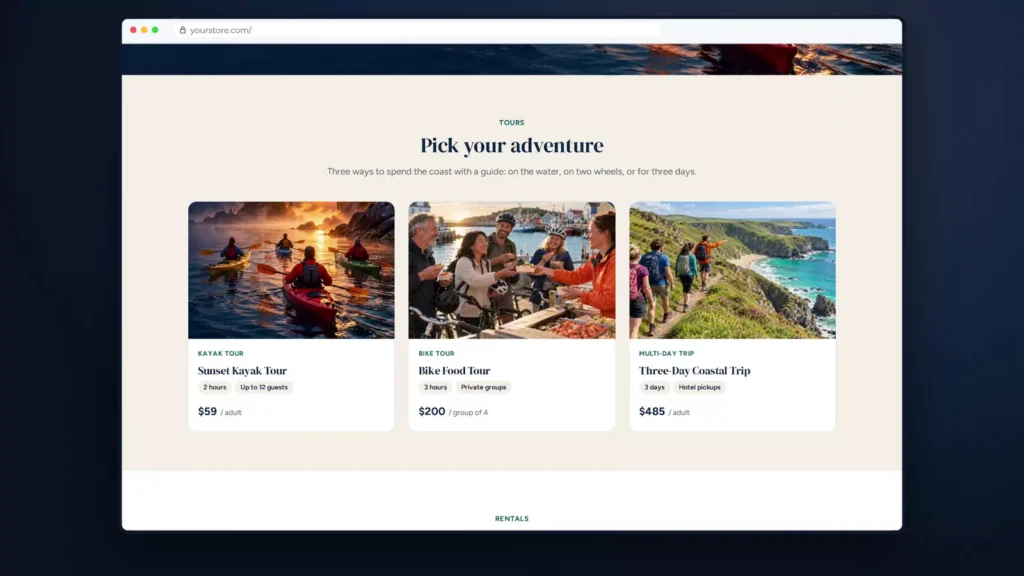
The video does three things with these tours: it sets them up, books them and runs the day.
Set up a tour: departures, seats and guest types
Choose the rental type
A tour is a WooCommerce product. Open it, here the Sunset Kayak Tour, and go to the Rentals & Bookings box. Its rental type is Fixed Rental Date and Rental Length. That’s the difference from a rental: guests don’t pick any time they like, they pick one of your departures.
Add the departures
Each row under the rental type is a departure, with a date and start time, a length, a price and how often it repeats. This one starts at six in the evening, lasts two hours and repeats every day, at $59.
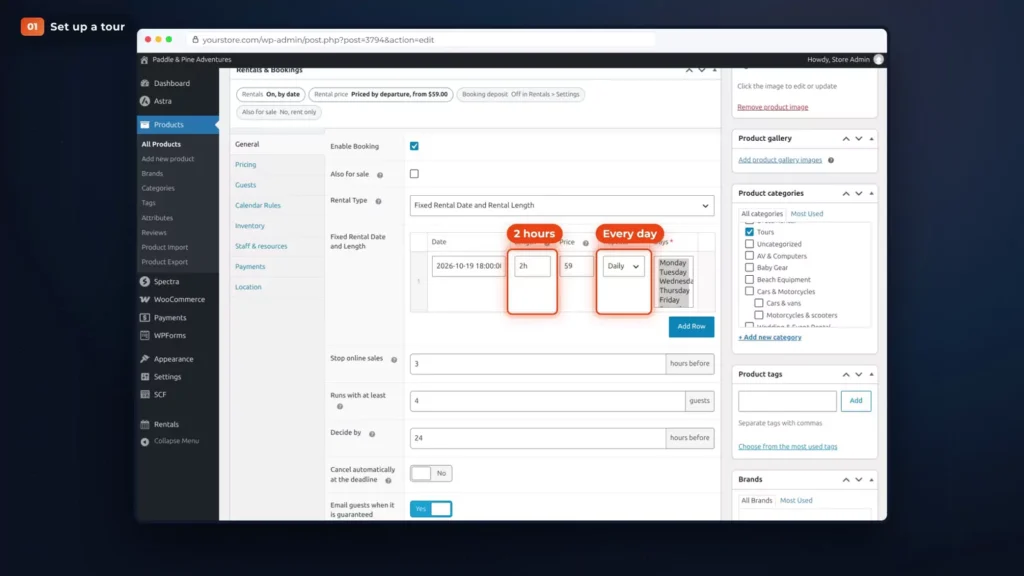
Each departure has twelve seats. That’s the Quantity on the product’s Inventory tab.
Turn on guest types
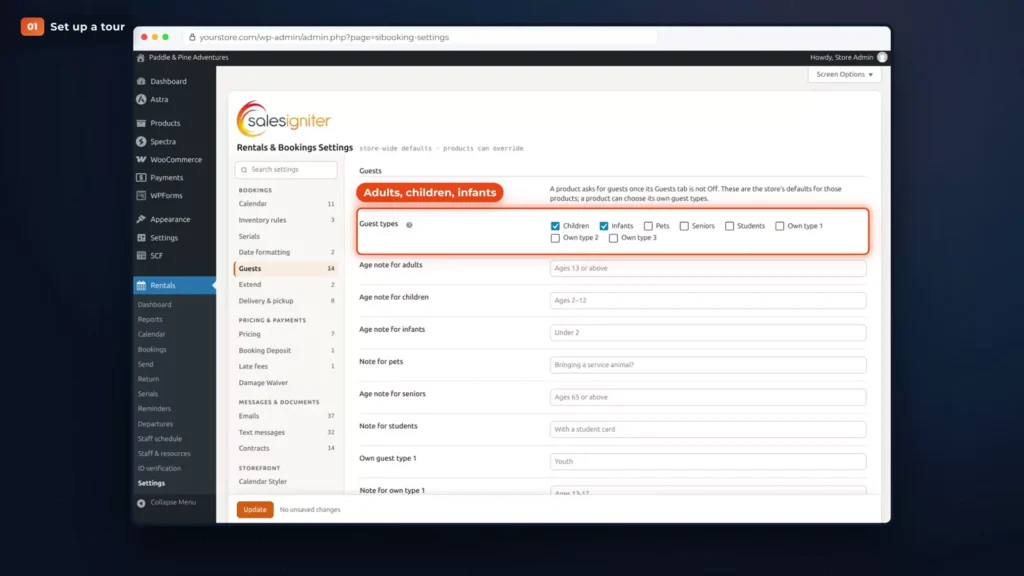
Next, the guests. Under Rentals, Settings, Guests, Paddle & Pine turns on adults, children and infants.
Set the guest prices
On the tour, the Guests tab sets what each type pays. Adults pay the full price, children pay half and infants go free. The child price here is a percentage off, set to 50.
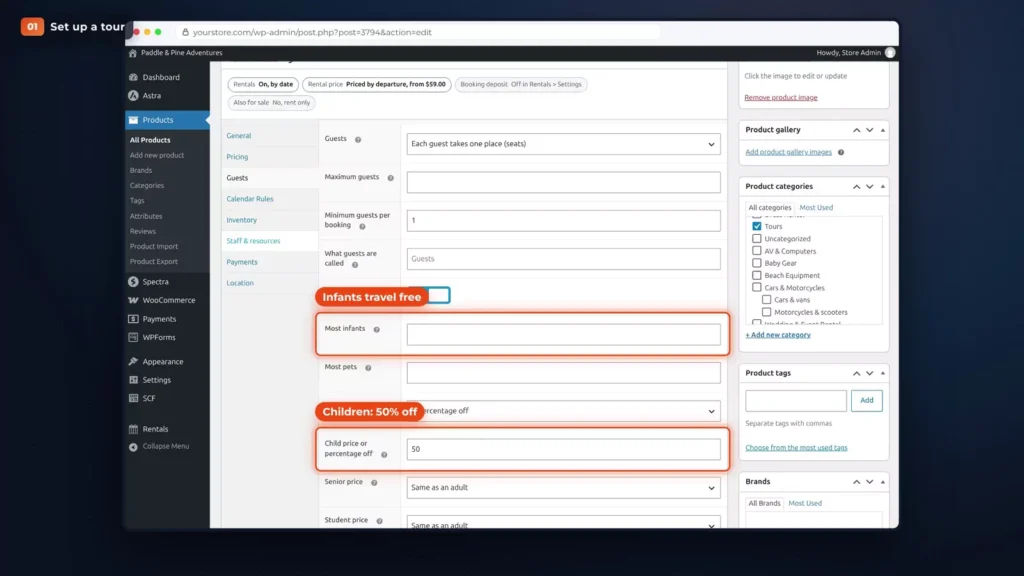
Seniors, students and up to three guest types of your own are there too. More on guest types and group prices.
See every departure in one list
Every departure lands in one list: Rentals, Departures. Each one shows a seats bar, its state, its staff and its manifest.
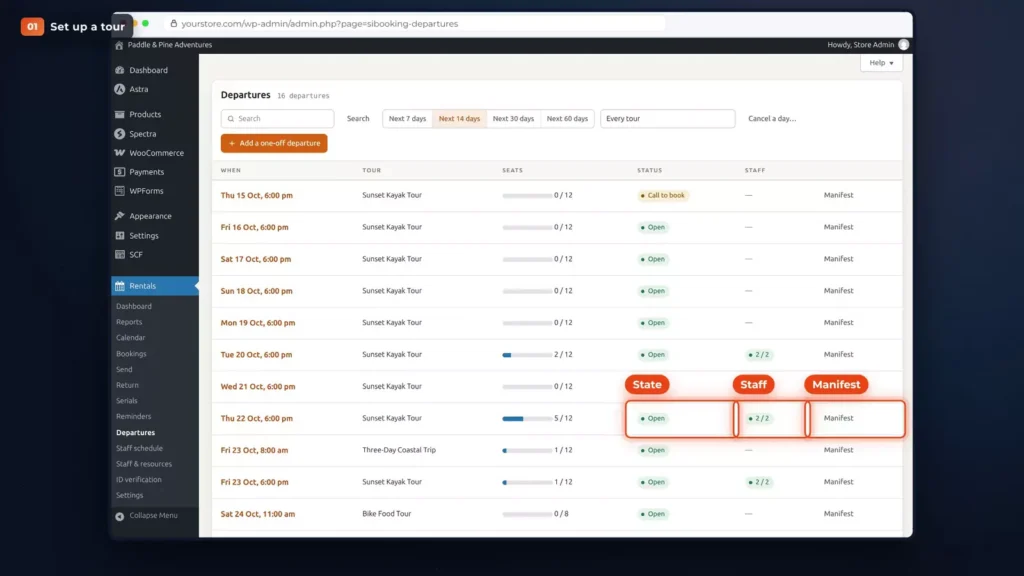
From here you can add a one-off departure, change a time or cancel a day. More on the Departures page.
A guest books, and moves her own booking
Pick a departure and the guests
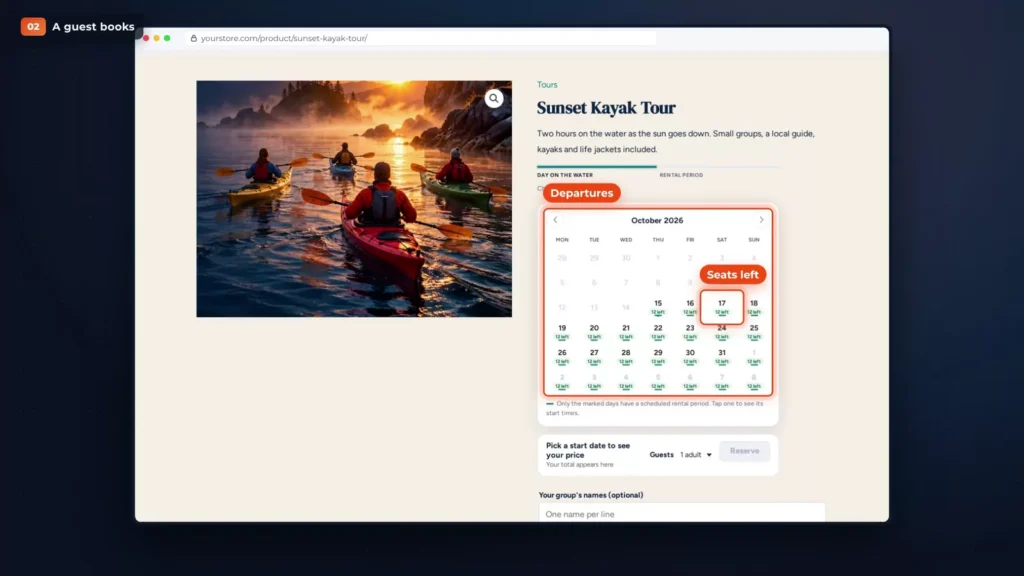
Now the part your guests see. Sarah wants the sunset tour on Saturday for her family. The tour page has a calendar of the departures, with the seats left on each.
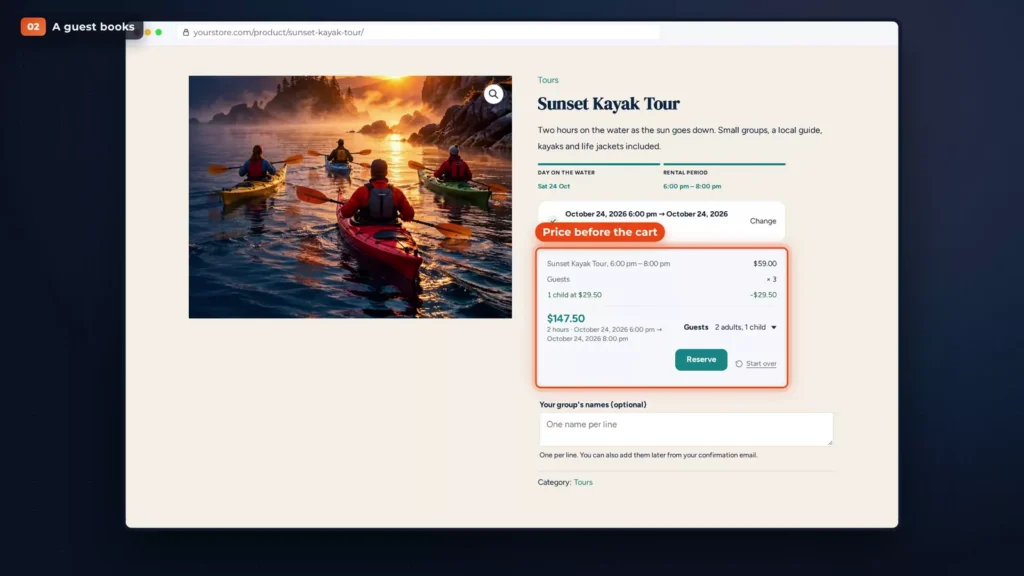
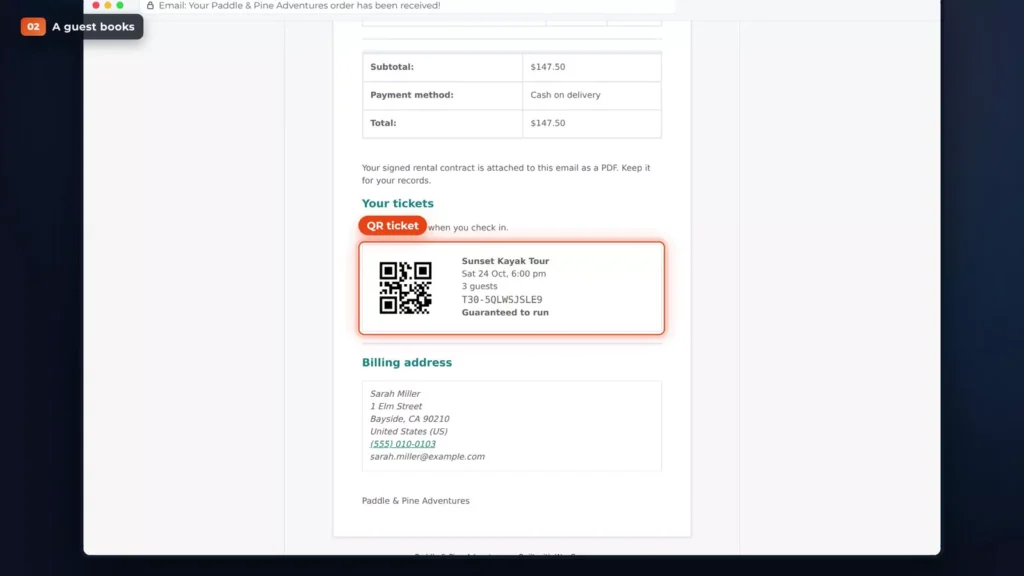
She picks two adults and one child, and the price is there before the cart: $147.50, with the child at half price.
Give each guest’s name
The tour asks for each guest’s name, at booking or later from a link in her email, so the crew knows who’s coming. On the tour page it’s a box under the price, “Your group’s names”, with one name per line. More on guest names.
Pay in your own checkout
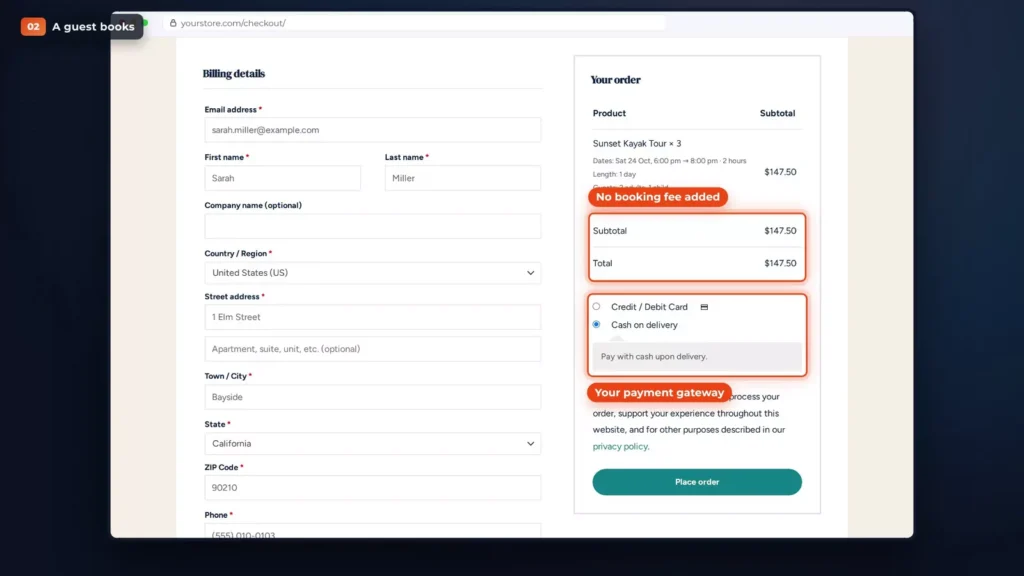
Checkout is your normal WooCommerce checkout, with your own payment gateway. No booking fee is added: the subtotal and the total are both $147.50.
Get the QR ticket
Her confirmation email carries a QR ticket, with the tour, the date and time, the number of guests and the ticket code. It’s in her account too.
Move to another departure
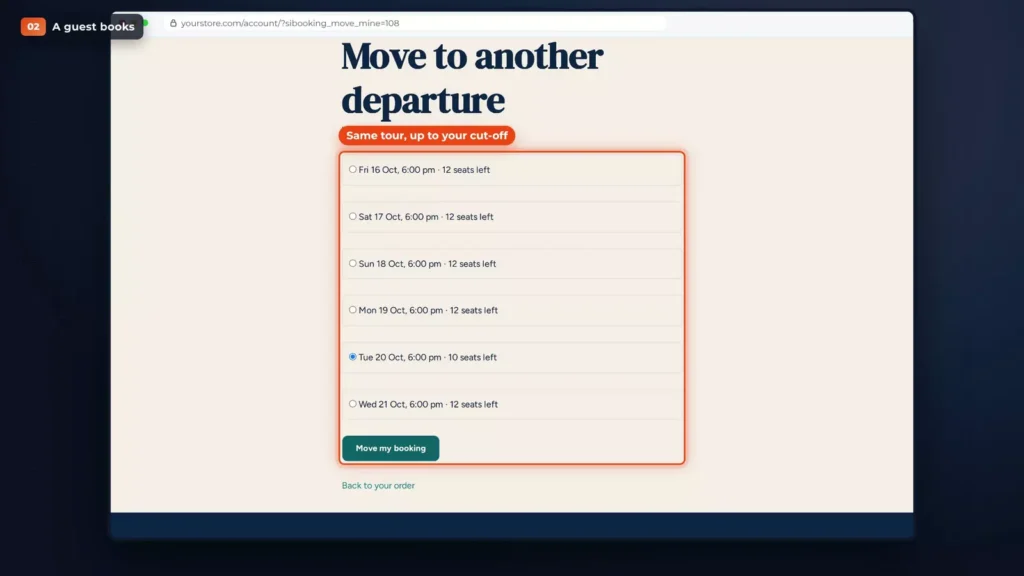
If her plans change, she can move the booking to another departure of the same tour herself, right from her account, up to your cut-off. The ticket has a “Move to another departure” link. It lists the other departures with their seats left, and she clicks “Move my booking”.
Guides and kayaks that limit sales
Add your guides and kayaks
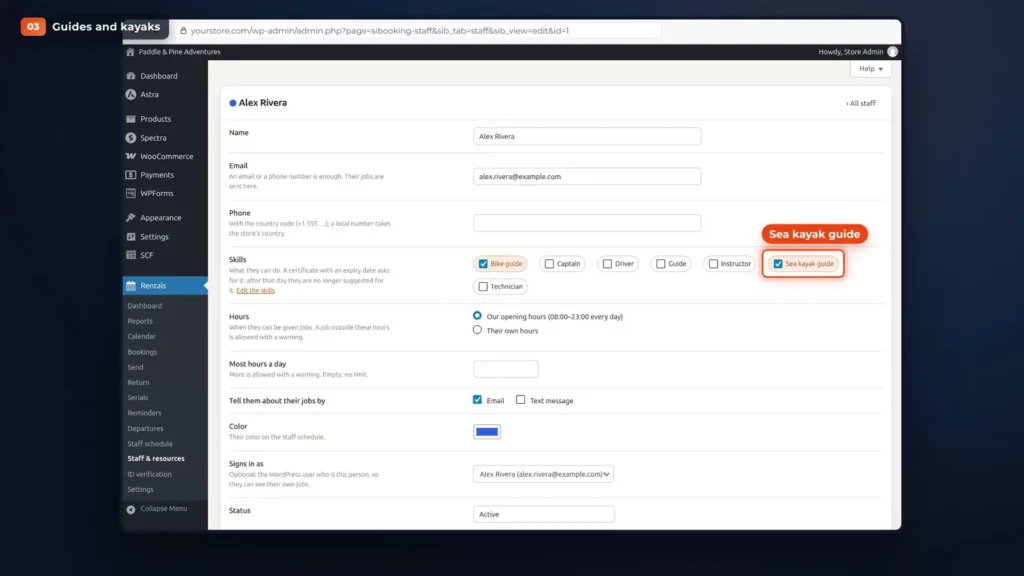
A tour needs people and equipment. Under Rentals, Staff & resources, Paddle & Pine adds its guides, Alex and Jordan, and its kayaks. Each guide has skills, and Alex is a qualified sea kayak guide. More on staff and resources.
Say what the tour needs
On the tour, the Staff & resources tab says what it needs: a qualified guide and the kayaks. Here each booking needs one sea kayak guide and one kayak with a seat for every guest. Then turn on Limit sales, which is a choice on each row.
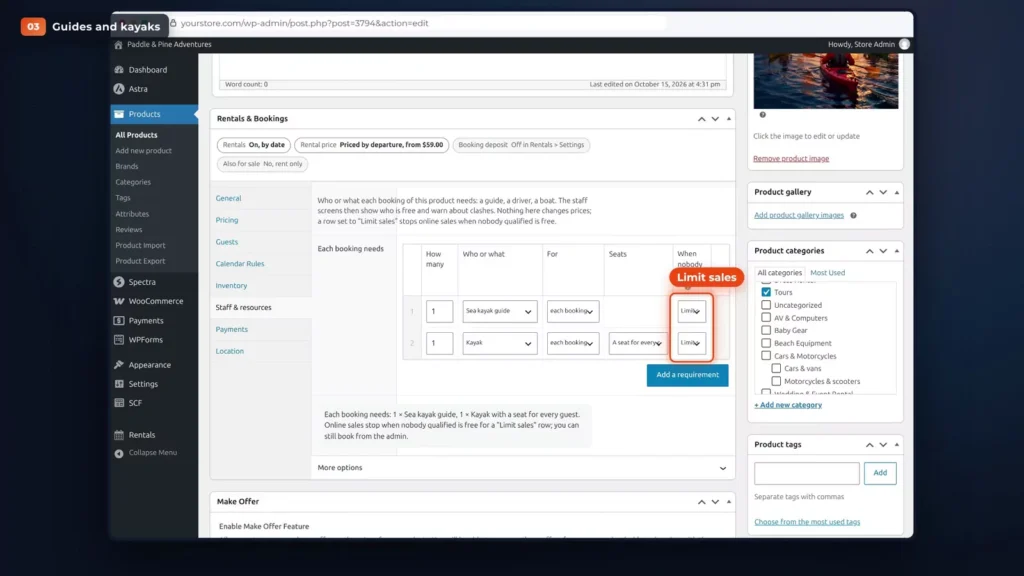
Now, when no qualified guide is free, the departure stops selling, and the seats left follow the staff who are free. That only stops online sales. You can still book from the admin. More on Limit sales.
Link kayaks that are also rented
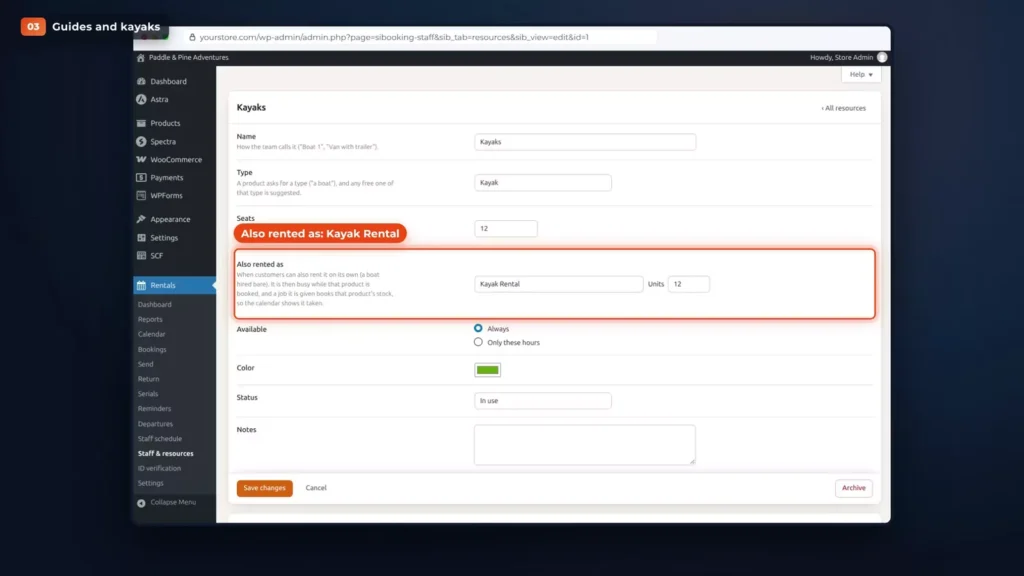
Paddle & Pine also rents kayaks by the hour, so the kayaks are linked to the kayak rental product, with the “Also rented as” field on the resource. While the kayak rental is booked, the linked kayaks count as busy for the tour. On the Departures list, a departure held back this way says “Limited by kayak”.
Assign guides on the staff schedule
The staff schedule shows the week, with an Unassigned row at the top and a row for each guide and each resource. Drag a departure onto a guide to assign it. In the video, Saturday’s sunset tour has no guide, so it’s dragged onto Alex.
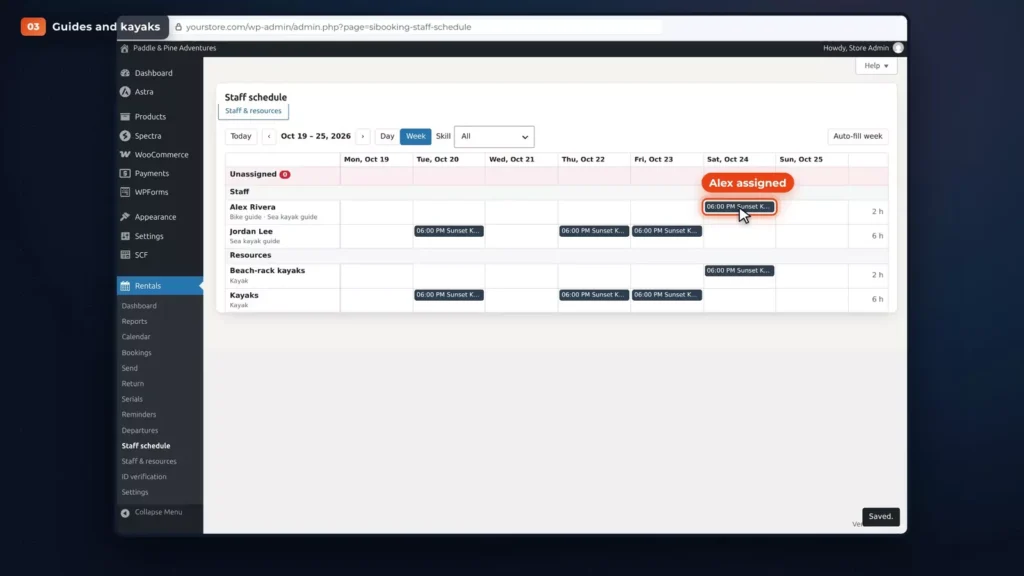
Each guide sees their own departures under My schedule, on their phone. More on the staff schedule.
Minimum guests, weather days and changes
Set a minimum with a deadline
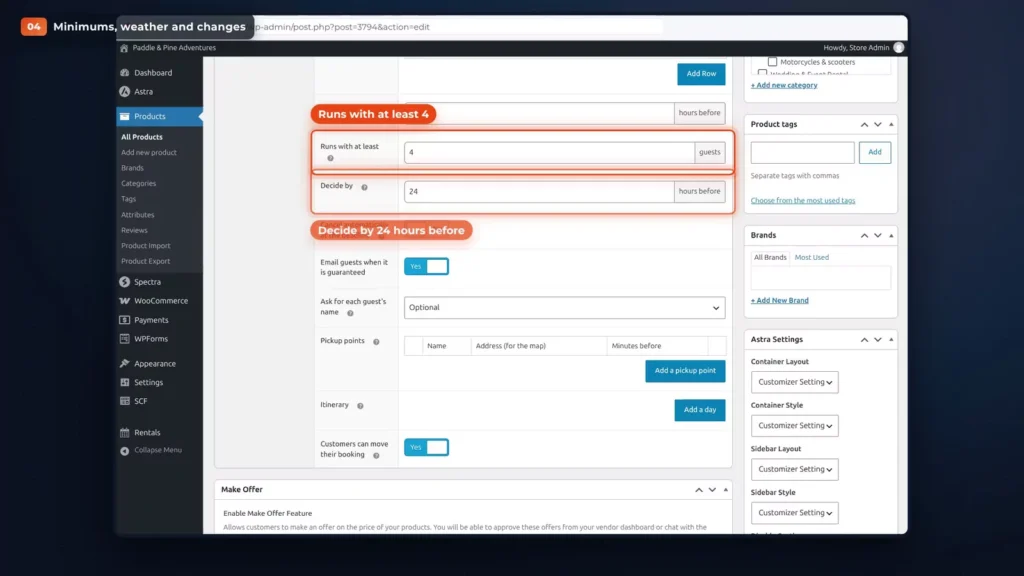
Not every departure fills up. On the tour, set “Runs with at least” to four guests and “Decide by” to 24 hours before.
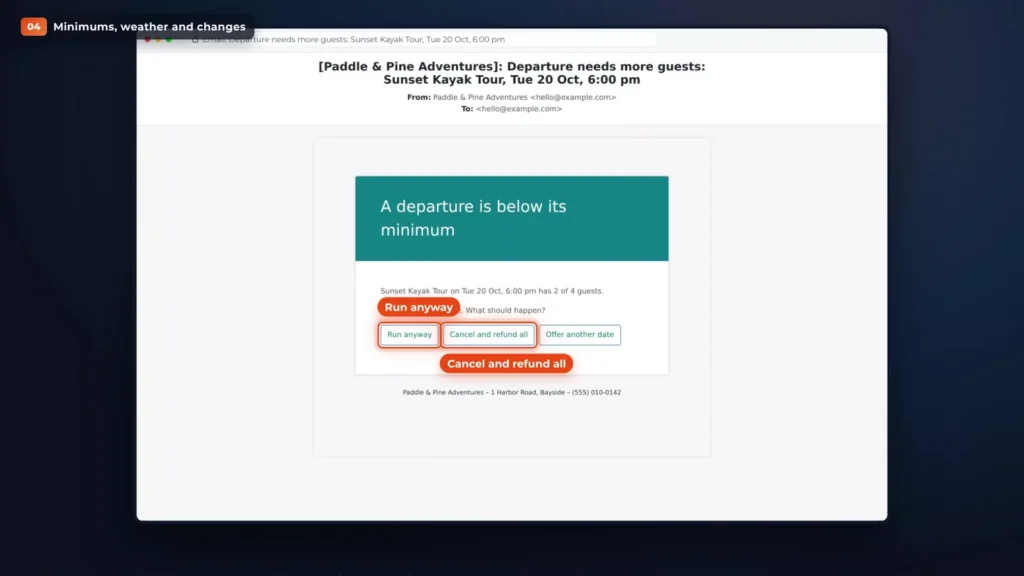
If a departure is short, you get a warning before the deadline, and then an email with three choices: run anyway, cancel and refund everyone, or offer the guests another date.
Or tick “Cancel automatically at the deadline”, and a departure that’s still short is cancelled and refunded without asking. And when a departure is guaranteed, guests can get an email to say so. More on minimum guests.
Cancel a departure for bad weather
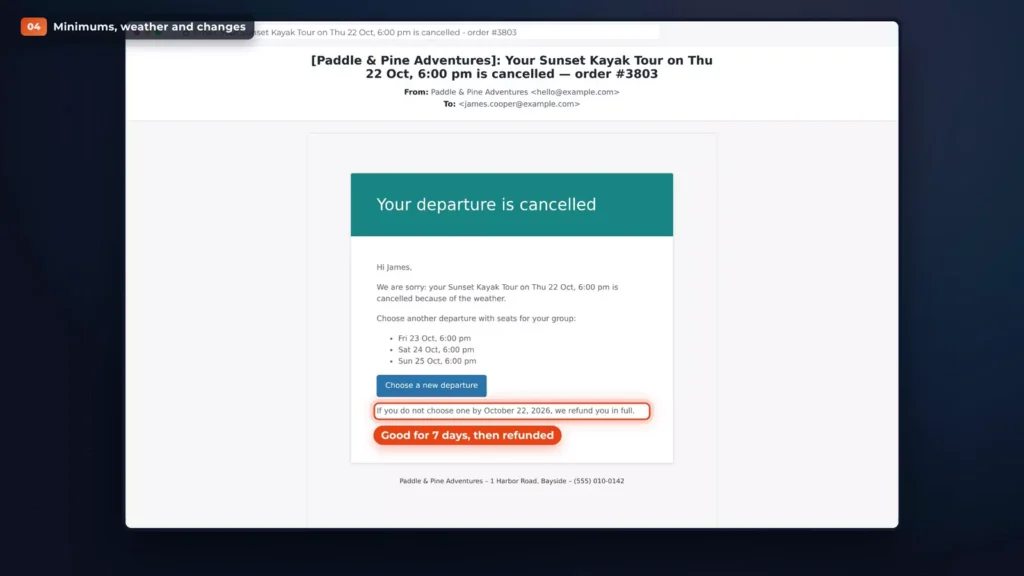
Weather happens too. A storm is coming on Thursday, so Paddle & Pine cancels Thursday’s departure, with “Cancel departure” on the departure’s own page. Guests are refunded through their payment method, or offered another date. You choose which on the cancel screen, under “Guests get”.
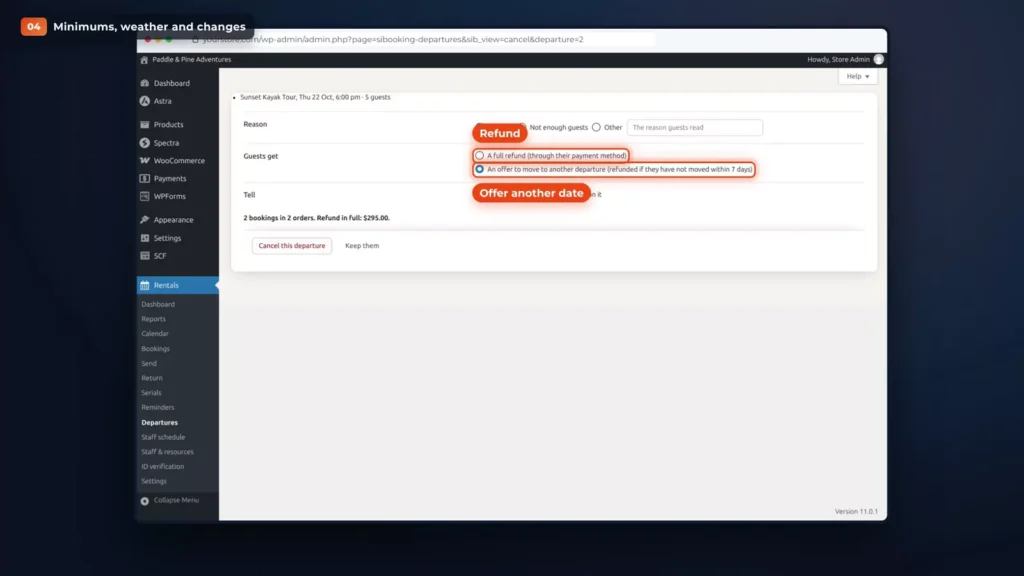
The offer comes with a link that’s good for seven days. Anyone who doesn’t pick one is refunded.
Change the start time
Need to start an hour later? “Change time” on the departure’s page moves every booking and emails the guests. In the video, the start goes from 6:00 PM to 7:00 PM. More on cancelling and changing departures.
Stop online sales before the start
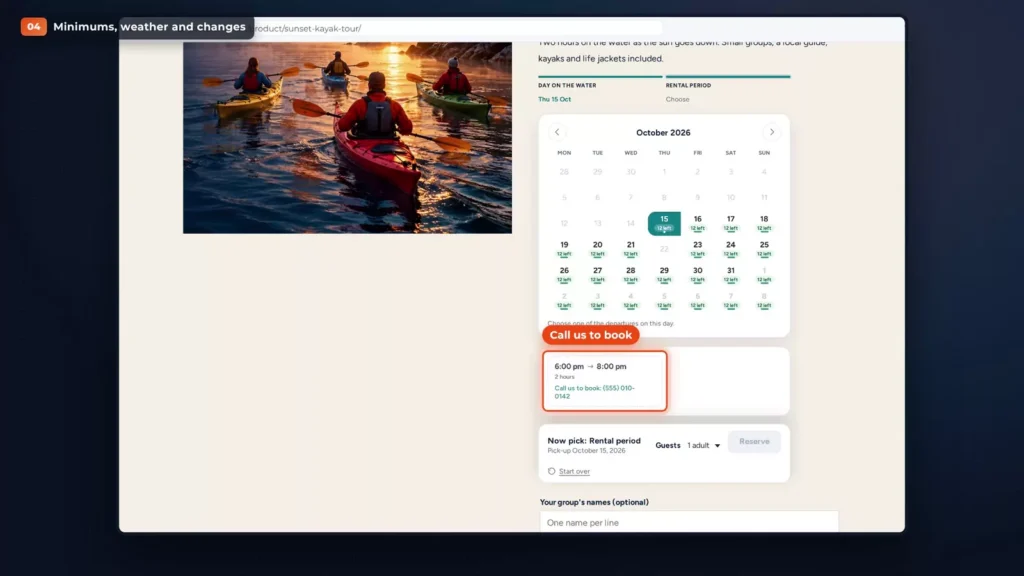
Online sales can stop a few hours before the start, with “Stop online sales” on the tour, set here to three hours. After that, the calendar says “Call us to book”, with your phone number, and staff can still book from the admin.
Group prices and private tours
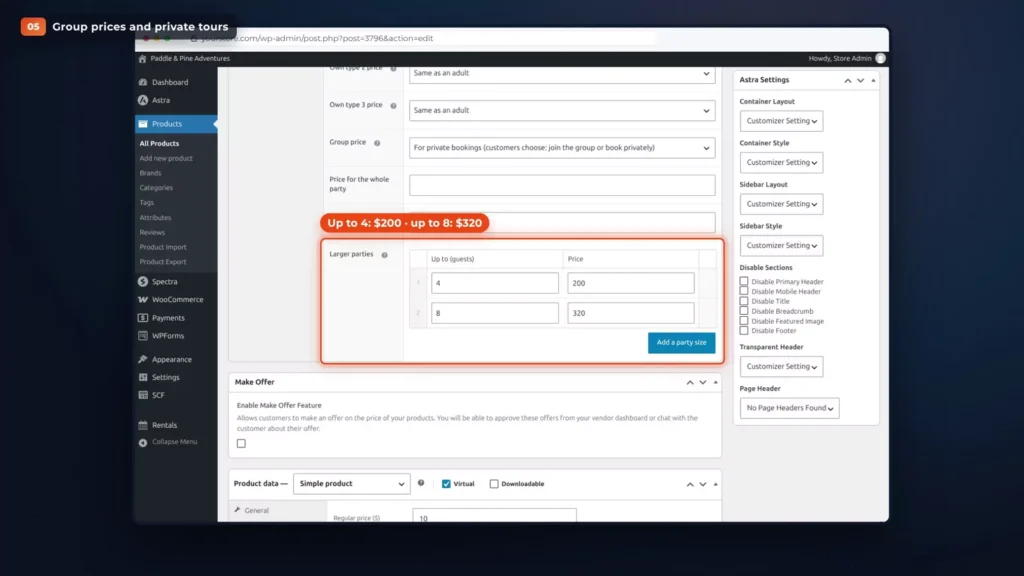
The Bike Food Tour sells differently. It’s priced by the group: up to four guests for $200, up to eight for $320. Those are rows under “Larger parties” on the tour, each with a number of guests and a price.
James books it for his team and ticks “Book it privately”. With six adults, that’s $320 for the group.
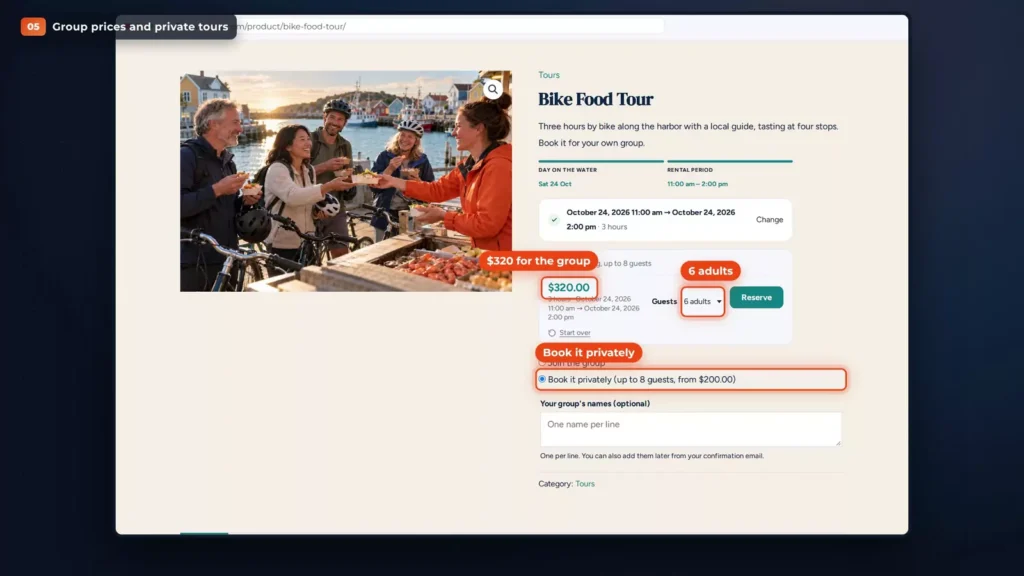
A private departure takes nobody else, so his group has the guide to themselves. On the calendar, nobody else can book that departure. More on group prices and private bookings.
Pickup points and multi-day itineraries
The Three-Day Coastal Trip needs two more things.
Pickup points
First, pickup points: three hotels in town, each with an address and how many minutes before the start the pickup is. Harbor View Hotel is 45 minutes before, Dune Street Inn 30 and Lighthouse Lodge 15.
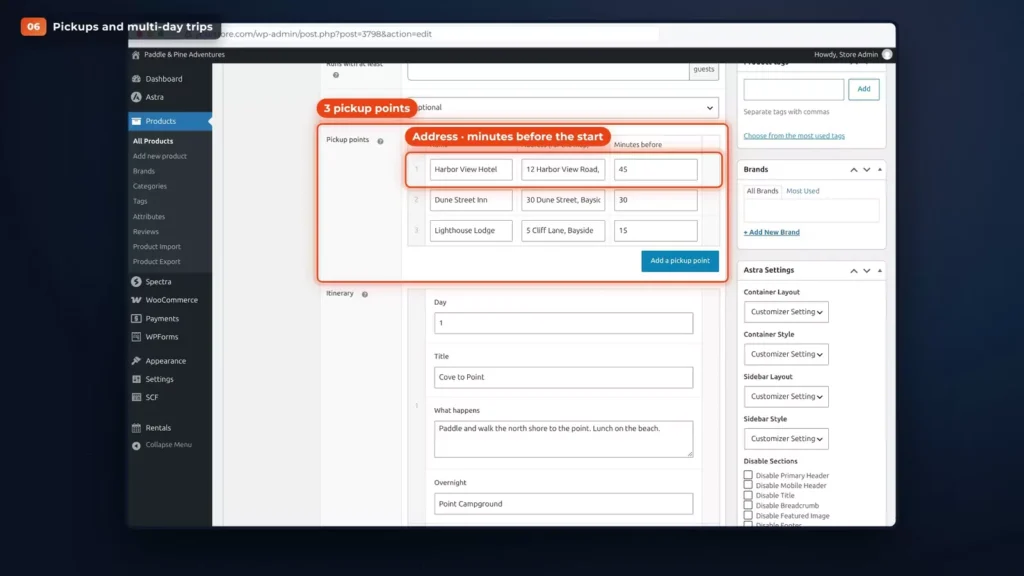
Emily picks hers when she books, Dune Street Inn, and it’s printed on her ticket and in her emails. More on pickup points.
An itinerary
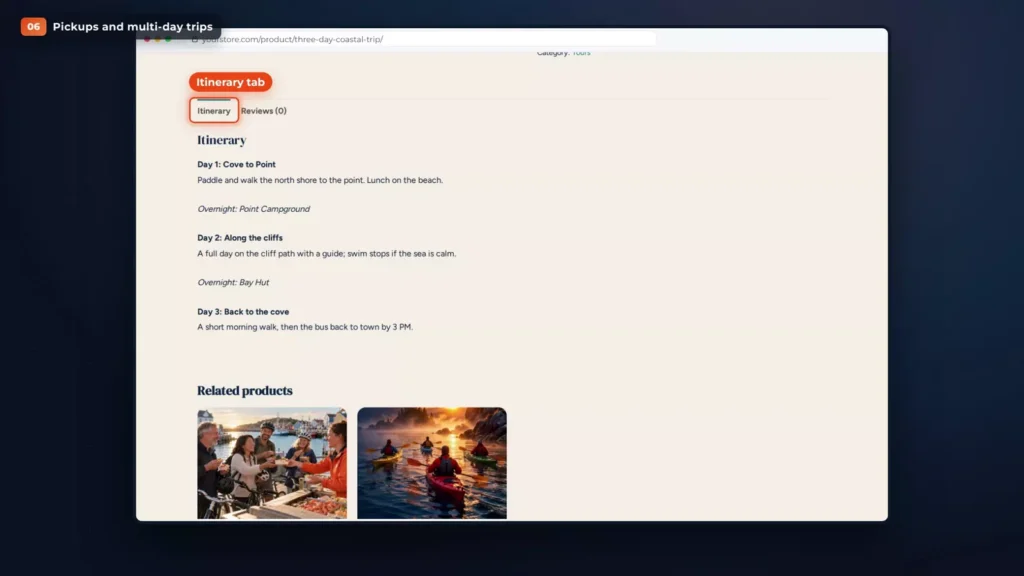
Second, an itinerary. Each day has a title, a description and the overnight stop. Day 1 is Cove to Point, with the night at Point Campground. Day 2 is Along the cliffs, with the night at Bay Hut. Day 3 is Back to the cove.
Guests see it in an Itinerary tab on the tour page, and the crew sees it under the manifest. More on itineraries.
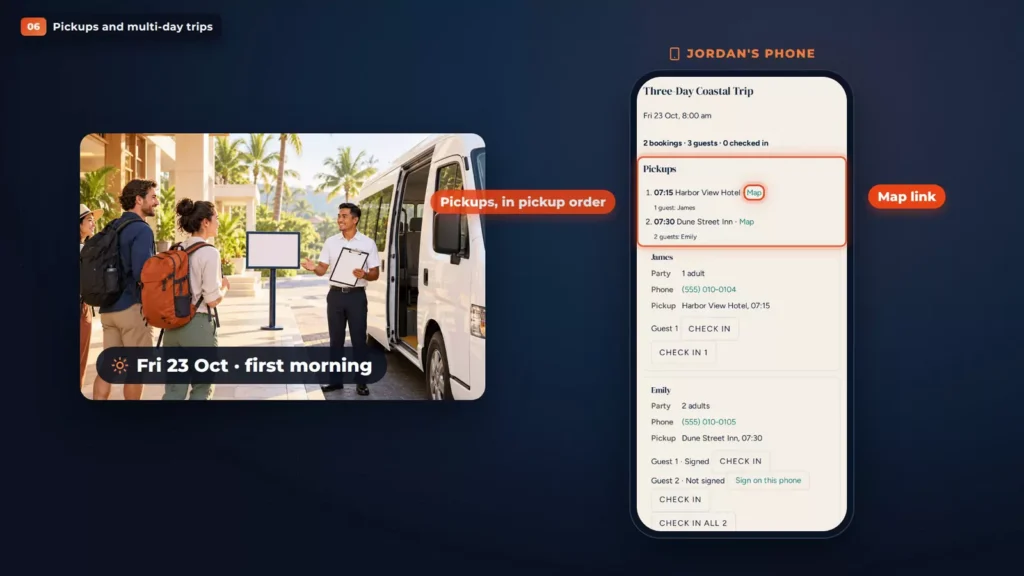
The first morning
On the first morning, the manifest starts with the pickup list, in pickup order, with a map link for every stop.
On the day: manifest, QR check-in and waivers
Open the manifest
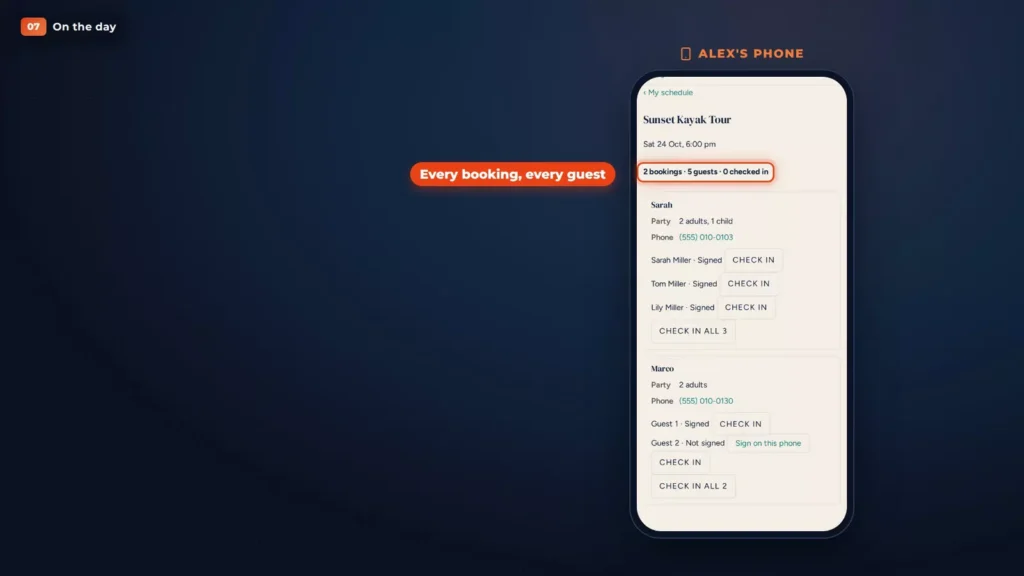
Saturday, half past five, at the dock. Alex opens My schedule on the phone and taps the sunset tour. The manifest lists every booking and every guest.
Check guests in
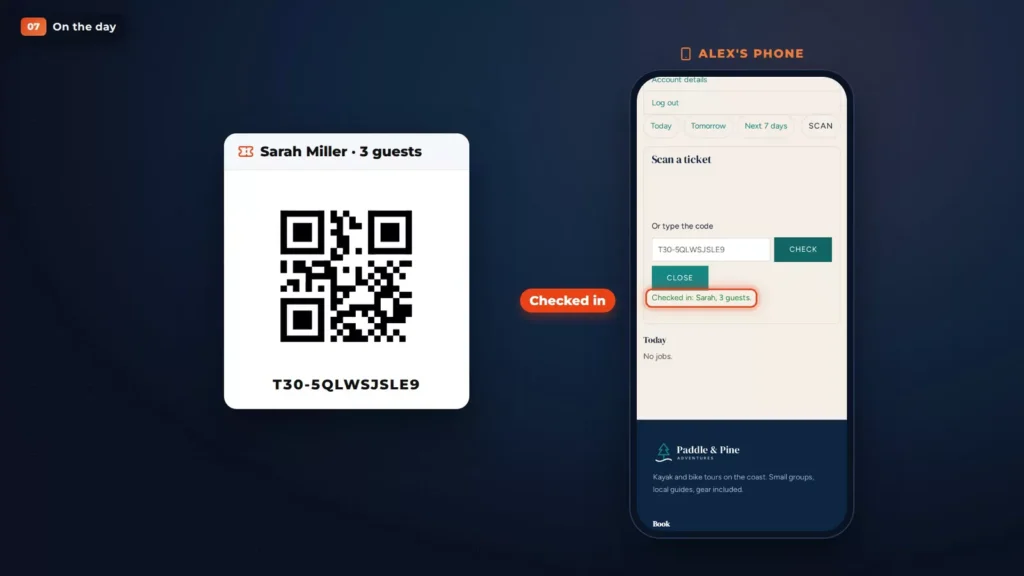
Sarah shows her QR code. Alex scans it, or types the code, and her family is checked in. Guests can be checked in together, or one by one. More on the manifest and check-in.
Waivers, with Pro
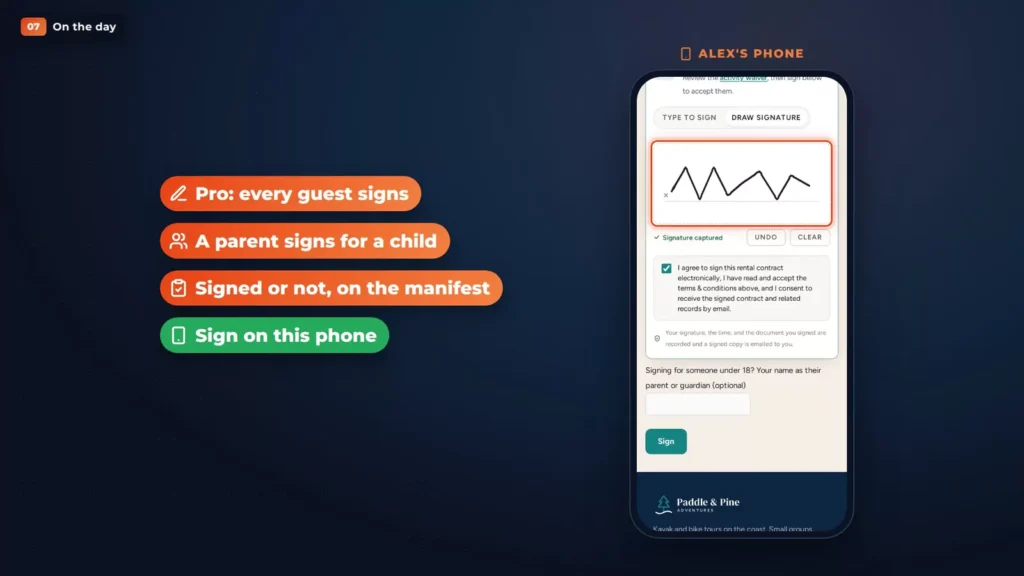
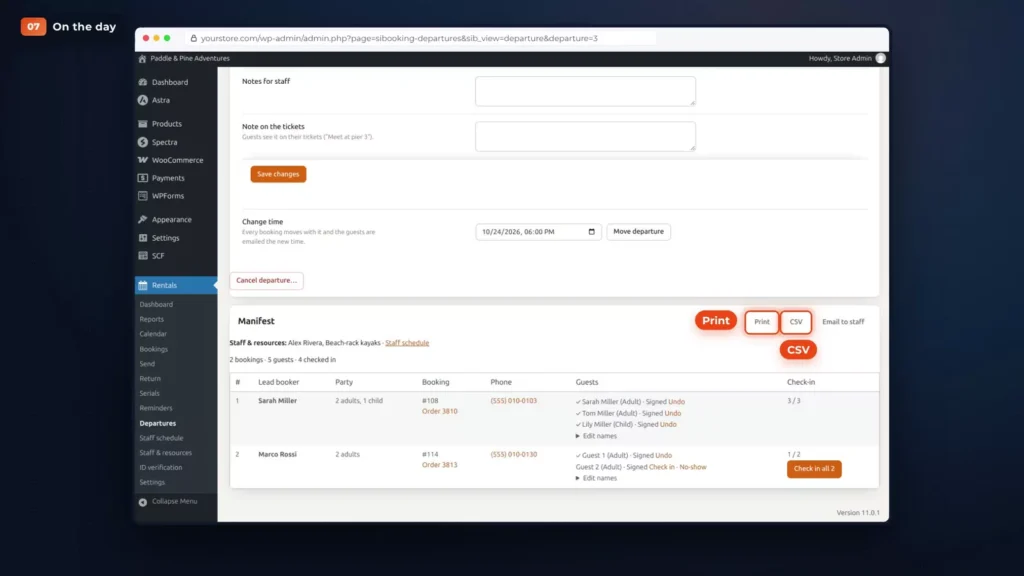
With Pro, every guest signs the waiver, and a parent or guardian signs for a child. The manifest shows who has signed.
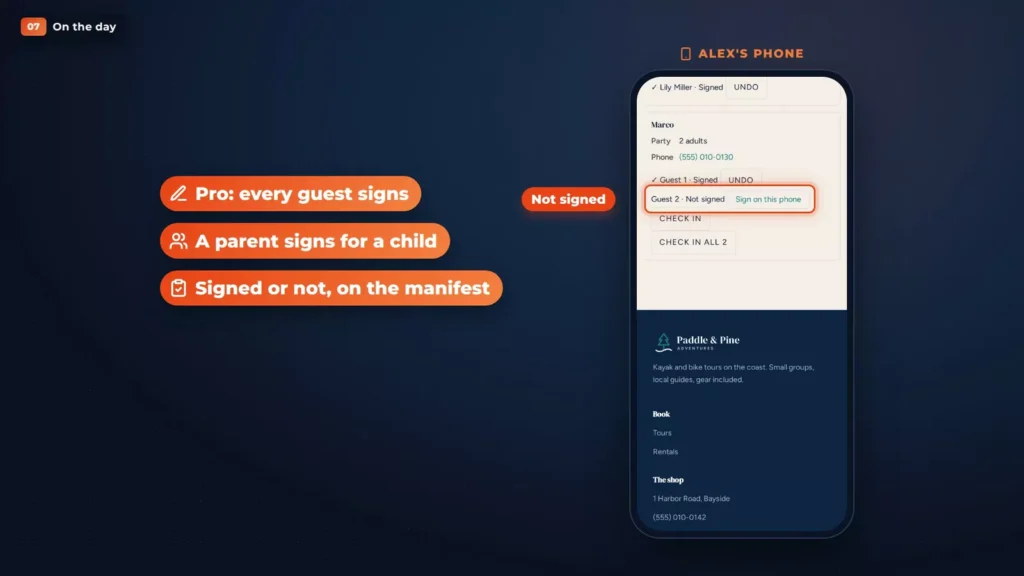
One of Marco’s guests hasn’t yet, so Alex taps “Sign on this phone” and they sign right there. More on how each guest signs.
Back at the office
Back at the office, the manifest prints, downloads as a CSV file or goes to the crew by email.
After the tour: review requests and event markup
After the tour, a review request goes out, but only to guests who were checked in. No-shows are never asked. More on tour emails and the review request.
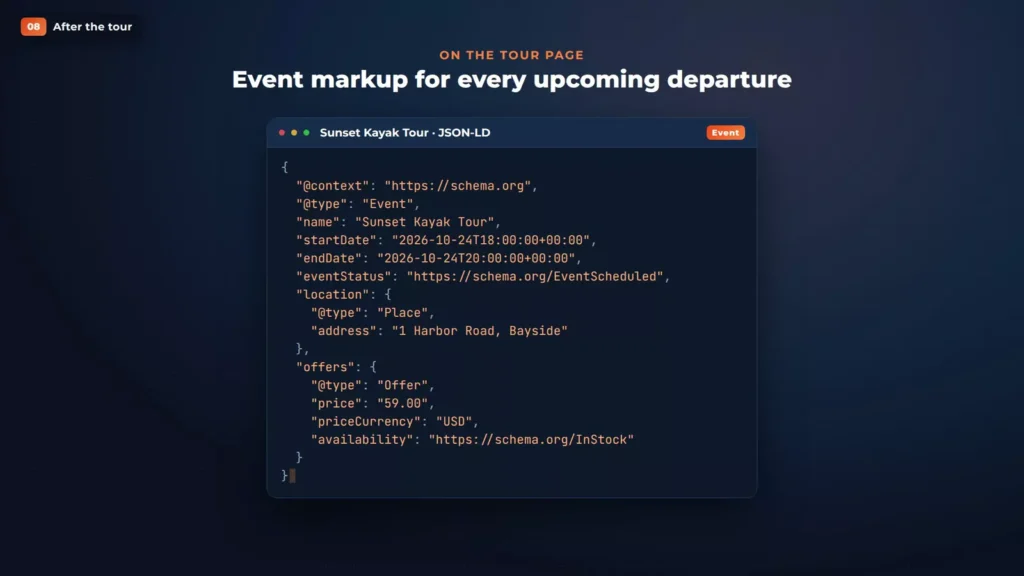
And every upcoming departure carries event markup on the tour page, so search engines can read its date and price.
Why sell tours on WordPress
So why sell tours on WordPress instead of a booking platform?
- Your guests book on your website, in your checkout, with the payment gateway you already use.
- Your guest list and bookings stay in your own database.
- There’s no booking fee from us on any ticket. Your payment gateway’s own fees still apply.
- Your rentals and your tours live in the same store.
- Rentals & Bookings is a one-time purchase that keeps working whether or not you renew support.
Running Shopify? Tours and activities are in our Shopify app too.
The trade-off is that this doesn’t connect to Viator, GetYourGuide or other resellers. If most of your bookings come from those, compare it with the platforms first: we’ve written up the FareHarbor, Peek Pro and Xola differences.
Recap
That’s Paddle & Pine, all on their own WooCommerce store:
- Departures with seats.
- Guest types and group prices.
- Guides and kayaks that limit sales.
- Minimums with a deadline.
- Pickups and itineraries.
- QR check-in and a waiver for every guest.
Which edition do you need?
Tours & Activities comes with Rentals & Bookings Regular, and Pro adds a waiver for every guest. Ultimate has both. Each edition is a one-time purchase with a year of support and updates, and it keeps working whether or not you renew.
| Edition | What it adds | Price |
|---|---|---|
| Regular | Tours & Activities: departures, seats, guest types, group prices, staff and resources, minimums, pickups, itineraries, QR check-in and review requests. | $199Code 150regular, list $349 |
| Pro | A waiver signed by every guest, plus free installation. | $299Code 200pro, list $499 |
| Ultimate | Multi Location Inventory, Maintenance & Inspections, Request a Quote and Smart Routing for shops that also rent, plus Live Chat, AI Chatbot & Help Desk and free installation. | $499Code 300multi, list $799 |
See tours on the live demo
Click through a tour booking on the demo store, then pick the edition that fits.
Open the tours demoCompare the editions
Tour booking software overview or contact us. This page shows the WooCommerce version. Rentals & Bookings is also available for Magento 2 and Shopify. Features differ by platform.
Where to go next
- Tours & Activities docs, with a guide for each chapter.
- Departures page, manifest and check-in and cancelling or moving a departure.
- Limit sales and the staff schedule, for guides and equipment.
- Each guest signs, for the waiver setup in Pro.
- How to Build a Rental Business Website, the full A to Z video, if you rent as well.
FAQ
None from us. Guests pay in your normal WooCommerce checkout, through your own payment gateway, and nothing is added to their tickets. Your gateway’s own fees still apply.
No. Tours & Activities sells on your own website and doesn’t connect to resellers or online travel agencies.
Yes, with Pro. Every guest signs, and a parent or guardian signs for a child. Turn on Each guest signs under Rentals, Settings, Contracts. It needs guest names switched on for the tour.
No. It’s a one-time purchase with a year of support and updates. You can renew those if you want them, and the plugin keeps working whether or not you do.
Not yet. There are 16 free rental themes, and the boat rental theme is the closest match for water tours.